A Lexicon 224 emulation VST developed in JUCE, modeling the original 12-bit/20kHz fixed-point DSP architecture, Schroeder-Moorer filter topologies, and time-varying modulation.
C++
5
12 commits
updated Jul 9, 2026
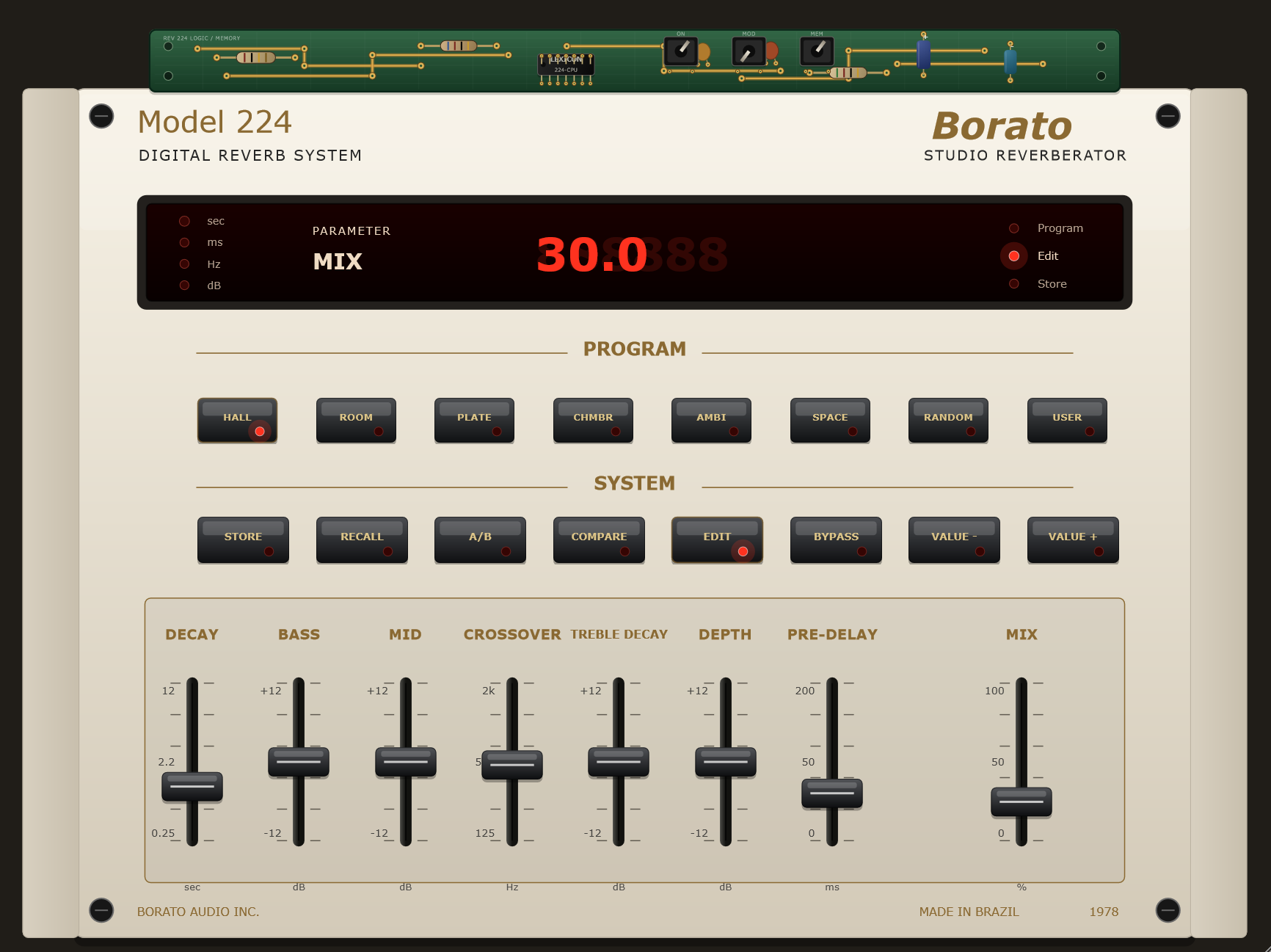
Borato 224 is a vintage digital reverb plugin inspired by the workflow and hardware look of classic units such as the Lexicon 224. The project is built with JUCE, uses CMake as the main build path, and also keeps a functional .jucer file for Projucer-based workflows.
C:\JUCE.libs/clap-juce-extensions submodule.Recommended toolchains:
This project is generator-agnostic: use any CMake generator supported by your local compiler, JUCE checkout, and plugin SDK setup.
List the generators available on your machine:
cmake --help
Common choices:
Visual Studio 18 2026    Windows + MSVC 2026
Visual Studio 17 2022    Windows + MSVC 2022
Ninja                    Windows/macOS/Linux with Ninja installed
Unix Makefiles           macOS/Linux, or Windows environments that provide make
Xcode                    macOS + Xcode
If CMake reports could not find any instance of Visual Studio, that Visual Studio version is not installed or not visible to CMake. Pick another generator from cmake --help, install the missing toolchain, or use a fresh build directory.
Configure with the installed Visual Studio generator. Example for Visual Studio 2026:
cmake -S . -B build -G "Visual Studio 18 2026" -A x64 -DBORATO224_JUCE_SOURCE_DIR=C:\JUCE
If you have Visual Studio 2022 installed instead, use:
cmake -S . -B build-vs2022 -G "Visual Studio 17 2022" -A x64 -DBORATO224_JUCE_SOURCE_DIR=C:\JUCE
Example with Ninja, if Ninja and a C++20 compiler are installed and available in the current shell:
cmake -S . -B build-ninja -G Ninja -DCMAKE_BUILD_TYPE=Debug -DBORATO224_JUCE_SOURCE_DIR=C:\JUCE
cmake --build build-ninja
Release with Ninja:
cmake -S . -B build-ninja-release -G Ninja -DCMAKE_BUILD_TYPE=Release -DBORATO224_JUCE_SOURCE_DIR=C:\JUCE
cmake --build build-ninja-release
Build Debug:
cmake --build build --config Debug
Build Release:
cmake --build build --config Release
The VST3 output is generated under:
build/Borato224_artefacts/Debug/VST3/Borato 224.vst3
build/Borato224_artefacts/Release/VST3/Borato 224.vst3
By default the CMake build does not install the plugin into C:\Program Files\Common Files\VST3, because that usually requires administrator permissions. To enable post-build copying to the system VST3 folder, configure with:
cmake -S . -B build -G "Visual Studio 18 2026" -A x64 -DBORATO224_JUCE_SOURCE_DIR=C:\JUCE -DBORATO224_COPY_PLUGIN_AFTER_BUILD=ON
If CMake reconfiguration fails because it points to a missing MSVC toolset, the build directory has stale compiler cache. Reconfigure the existing build directory with the installed generator:
cmake -S . -B build -G "Visual Studio 18 2026" -A x64 -DBORATO224_JUCE_SOURCE_DIR=C:\JUCE
cmake --build build --config Debug
Or create a fresh build directory:
cmake -S . -B build-vs2026 -G "Visual Studio 18 2026" -A x64 -DBORATO224_JUCE_SOURCE_DIR=C:\JUCE
cmake --build build-vs2026 --config Debug
Install Xcode command line tools:
xcode-select --install
Configure with a local JUCE checkout:
cmake -S . -B build -DBORATO224_JUCE_SOURCE_DIR=/path/to/JUCE
Optional Xcode generator:
cmake -S . -B build-xcode -G Xcode -DBORATO224_JUCE_SOURCE_DIR=/path/to/JUCE
cmake --build build-xcode --config Debug
Release with Xcode:
cmake --build build-xcode --config Release
Optional Ninja generator:
cmake -S . -B build-ninja -G Ninja -DCMAKE_BUILD_TYPE=Debug -DBORATO224_JUCE_SOURCE_DIR=/path/to/JUCE
cmake --build build-ninja
Release with Ninja:
cmake -S . -B build-ninja-release -G Ninja -DCMAKE_BUILD_TYPE=Release -DBORATO224_JUCE_SOURCE_DIR=/path/to/JUCE
cmake --build build-ninja-release
Build Debug:
cmake --build build --config Debug
Build Release:
cmake --build build --config Release
The build can produce VST3, AU, and Standalone targets on macOS, depending on the local JUCE and SDK setup.
Install common JUCE build dependencies. Package names vary by distribution; on Debian/Ubuntu this is a typical starting point:
sudo apt update
sudo apt install build-essential cmake pkg-config libasound2-dev libjack-jackd2-dev \
  libfreetype6-dev libfontconfig1-dev libx11-dev libxcomposite-dev libxcursor-dev \
  libxext-dev libxinerama-dev libxrandr-dev libxrender-dev libwebkit2gtk-4.1-dev
Configure:
cmake -S . -B build -DCMAKE_BUILD_TYPE=Debug -DBORATO224_JUCE_SOURCE_DIR=/path/to/JUCE
Equivalent explicit generator examples:
cmake -S . -B build-ninja -G Ninja -DCMAKE_BUILD_TYPE=Debug -DBORATO224_JUCE_SOURCE_DIR=/path/to/JUCE
cmake -S . -B build-make -G "Unix Makefiles" -DCMAKE_BUILD_TYPE=Debug -DBORATO224_JUCE_SOURCE_DIR=/path/to/JUCE
Release with explicit generators:
cmake -S . -B build-ninja-release -G Ninja -DCMAKE_BUILD_TYPE=Release -DBORATO224_JUCE_SOURCE_DIR=/path/to/JUCE
cmake --build build-ninja-release

cmake -S . -B build-make-release -G "Unix Makefiles" -DCMAKE_BUILD_TYPE=Release -DBORATO224_JUCE_SOURCE_DIR=/path/to/JUCE
cmake --build build-make-release
Build:
cmake --build build
For Release:
cmake -S . -B build-release -DCMAKE_BUILD_TYPE=Release -DBORATO224_JUCE_SOURCE_DIR=/path/to/JUCE
cmake --build build-release
Linux builds normally produce VST3 and Standalone. AU is a macOS-only format.
After building (or downloading CI artifacts), copy the plugin(s) into a folder your DAW scans, then rescan plugins.
Common scan/install locations:
VST3 (per-user)   %LOCALAPPDATA%\Programs\Common\VST3\
VST3 (system)     C:\Program Files\Common Files\VST3\
CLAP (per-user)   %LOCALAPPDATA%\Programs\Common\CLAP\
CLAP (system)     C:\Program Files\Common Files\CLAP\
Common scan/install locations:
VST3              ~/Library/Audio/Plug-Ins/VST3/
CLAP              ~/Library/Audio/Plug-Ins/CLAP/
AU (.component)   ~/Library/Audio/Plug-Ins/Components/
Standalone (.app) /Applications or any local folder
CI builds are currently unsigned and not notarized. If macOS blocks them after download, remove quarantine:
xattr -dr com.apple.quarantine "Borato 224.vst3"
xattr -dr com.apple.quarantine "Borato 224.clap"
xattr -dr com.apple.quarantine "Borato 224.component"
xattr -dr com.apple.quarantine "Borato 224.app"
Common scan/install locations:
VST3              ~/.vst3/                  (or /usr/local/lib/vst3/, /usr/lib/vst3/)
CLAP              ~/.clap/                  (or /usr/local/lib/clap/, /usr/lib/clap/)
LV2               ~/.lv2/                   (or /usr/local/lib/lv2/, /usr/lib/lv2/)
The repository includes a release artifact workflow:
.github/workflows/build-macos-release.yml
It builds Release artifacts on windows-2025 (x64), macos-15 (Apple Silicon), macos-15-intel, and ubuntu-latest, downloading JUCE through CMake with BORATO224_FETCH_JUCE=ON.
Windows artifacts:
Borato224-v0.0.5-Windows-x64-VST3.zip
Borato224-v0.0.5-Windows-x64-CLAP.zip
Borato224-v0.0.5-Windows-x64-Standalone.zip
Borato224-v0.0.5-Windows-x64-install-notes
macOS artifacts:
Borato224-v0.0.5-macOS-arm64-VST3.zip
Borato224-v0.0.5-macOS-arm64-CLAP.zip
Borato224-v0.0.5-macOS-arm64-AU.zip
Borato224-v0.0.5-macOS-arm64-Standalone.zip
Borato224-v0.0.5-macOS-arm64-install-notes
Borato224-v0.0.5-macOS-intel-VST3.zip
Borato224-v0.0.5-macOS-intel-CLAP.zip
Borato224-v0.0.5-macOS-intel-AU.zip
Borato224-v0.0.5-macOS-intel-Standalone.zip
Borato224-v0.0.5-macOS-intel-install-notes
Ubuntu artifacts:
Borato224-v0.0.5-Ubuntu-VST3.tar.gz
Borato224-v0.0.5-Ubuntu-CLAP.tar.gz
Borato224-v0.0.5-Ubuntu-Standalone.tar.gz
Borato224-v0.0.5-Ubuntu-install-notes
The workflow runs on pushes to master, release/**, ci/**, version tags such as v0.0.5, pull requests to master, and manual workflow_dispatch.
To download the files:
Actions.Build Release Artifacts run.Borato224-v0.0.5-Windows-x64-release-assets, Borato224-v0.0.5-macOS-arm64-release-assets, Borato224-v0.0.5-macOS-intel-release-assets, and/or Borato224-v0.0.5-Ubuntu-release-assets from the run summary.To create release assets automatically, push a version tag:
git tag v0.0.5
git push origin v0.0.5
The workflow will build Release artifacts and create/update a draft GitHub Release for that tag with:
Borato224-v0.0.5-Windows-x64-VST3.zip
Borato224-v0.0.5-Windows-x64-CLAP.zip
Borato224-v0.0.5-Windows-x64-Standalone.zip
INSTALL-Windows-x64.md
Borato224-v0.0.5-macOS-arm64-VST3.zip
Borato224-v0.0.5-macOS-arm64-CLAP.zip
Borato224-v0.0.5-macOS-arm64-AU.zip
Borato224-v0.0.5-macOS-arm64-Standalone.zip
INSTALL-macOS-arm64.md
Borato224-v0.0.5-macOS-intel-VST3.zip
Borato224-v0.0.5-macOS-intel-CLAP.zip
Borato224-v0.0.5-macOS-intel-AU.zip
Borato224-v0.0.5-macOS-intel-Standalone.zip
INSTALL-macOS-intel.md
Borato224-v0.0.5-Ubuntu-VST3.tar.gz
Borato224-v0.0.5-Ubuntu-CLAP.tar.gz
Borato224-v0.0.5-Ubuntu-Standalone.tar.gz
INSTALL-Ubuntu.md
To install the CI artifacts, copy the extracted plugin(s) into the appropriate folders listed in Installing the Plugin, then rescan plugins in your DAW.
You can also open:
Borato224.jucer
Confirm that the JUCE module paths point to your local JUCE checkout, save the project, then build through the generated IDE project under:
Builds/VisualStudio2022/
Builds/VisualStudio2026/
On macOS or Linux, add the matching exporter in Projucer before saving.
Projucer builds the regular JUCE formats listed in the project, such as VST3, LV2 on Linux, AU on macOS, and Standalone. CLAP is not a native Projucer exporter, but this repository includes a CMake wrapper that can link against the Projucer-generated Shared Code library and produce a .clap from that build.
For Ubuntu/LV2 testing, open Borato224.jucer on Linux, confirm the JUCE module paths for that machine, save the project, then build the generated Linux Makefile project under:
Builds/LinuxMakefile/
Windows example using the Visual Studio 2026 Projucer exporter:
git submodule update --init --recursive

# 1. Open Borato224.jucer in Projucer, confirm the module paths, save it, then
#    build the "Borato224 - Shared Code" target in Visual Studio.

# 2. Build only the CLAP wrapper from that Projucer Shared Code library.
cmake -S . -B build-projucer-clap -G "Visual Studio 18 2026" -A x64 `
  -DBORATO224_JUCE_SOURCE_DIR=C:\JUCE `
  -DBORATO224_CLAP_FROM_JUCER=ON `
  -DBORATO224_JUCER_CONFIGURATION=Debug

cmake --build build-projucer-clap --config Debug --target Borato224Projucer_CLAP
The expected Windows CLAP output is:
build-projucer-clap/Borato224Projucer_artefacts/Debug/Borato 224.clap
For Release, build the Projucer Shared Code target as Release first, then use:
cmake -S . -B build-projucer-clap-release -G "Visual Studio 18 2026" -A x64 `
  -DBORATO224_JUCE_SOURCE_DIR=C:\JUCE `
  -DBORATO224_CLAP_FROM_JUCER=ON `
  -DBORATO224_JUCER_CONFIGURATION=Release

cmake --build build-projucer-clap-release --config Release --target Borato224Projucer_CLAP
If your Projucer exporter or configuration writes the Shared Code library somewhere else, pass it explicitly:
cmake -S . -B build-projucer-clap -G "Visual Studio 18 2026" -A x64 `
  -DBORATO224_JUCE_SOURCE_DIR=C:\JUCE `
  -DBORATO224_CLAP_FROM_JUCER=ON `
  -DBORATO224_JUCER_SHARED_CODE_LIB="C:\full\path\to\Borato224.lib"
The primary CMake build can also produce CLAP directly from the CMake JUCE target:
git submodule update --init --recursive
cmake -S . -B build -DBORATO224_BUILD_CLAP=ON -DBORATO224_JUCE_SOURCE_DIR=/path/to/JUCE
cmake --build build --config Release --target Borato224_CLAP
Use Borato224_CLAP for the regular CMake build and Borato224Projucer_CLAP when you want to test against the .jucer/Projucer-generated Shared Code build.
Source/
  PluginProcessor.*    JUCE processor, APVTS, presets, A/B, compare and bypass
  PluginEditor.*       Canvas-drawn JUCE interface
  PluginParameters.*   Parameter IDs, ranges and program presets
  SimpleReverb.*       Main reverb DSP

assets/
  224-Borato-vst.png   Current plugin screenshot for documentation
  lexicon_224.svg      Main visual reference
  push_224.svg         Push button reference
  faders_224.svg       Fader reference
  leds_224.svg         LED reference
AudioProcessorValueTreeState for automatable parameters.See MANUAL.md.
MIT. See LICENSE.
1,184 followers · starred Oct 2026
A Lexicon 224 emulation VST developed in JUCE, modeling the original 12-bit/20kHz fixed-point DSP architecture, Schroeder-Moorer filter topologies, and time-varying modulation.
C++
5
12 commits
updated Jul 9, 2026
Borato 224 is a vintage digital reverb plugin inspired by the workflow and hardware look of classic units such as the Lexicon 224. The project is built with JUCE, uses CMake as the main build path, and also keeps a functional .jucer file for Projucer-based workflows.
C:\JUCE.libs/clap-juce-extensions submodule.Recommended toolchains:
This project is generator-agnostic: use any CMake generator supported by your local compiler, JUCE checkout, and plugin SDK setup.
List the generators available on your machine:
cmake --help
Common choices:
Visual Studio 18 2026    Windows + MSVC 2026
Visual Studio 17 2022    Windows + MSVC 2022
Ninja                    Windows/macOS/Linux with Ninja installed
Unix Makefiles           macOS/Linux, or Windows environments that provide make
Xcode                    macOS + Xcode
If CMake reports could not find any instance of Visual Studio, that Visual Studio version is not installed or not visible to CMake. Pick another generator from cmake --help, install the missing toolchain, or use a fresh build directory.
Configure with the installed Visual Studio generator. Example for Visual Studio 2026:
cmake -S . -B build -G "Visual Studio 18 2026" -A x64 -DBORATO224_JUCE_SOURCE_DIR=C:\JUCE
If you have Visual Studio 2022 installed instead, use:
cmake -S . -B build-vs2022 -G "Visual Studio 17 2022" -A x64 -DBORATO224_JUCE_SOURCE_DIR=C:\JUCE
Example with Ninja, if Ninja and a C++20 compiler are installed and available in the current shell:
cmake -S . -B build-ninja -G Ninja -DCMAKE_BUILD_TYPE=Debug -DBORATO224_JUCE_SOURCE_DIR=C:\JUCE
cmake --build build-ninja
Release with Ninja:
cmake -S . -B build-ninja-release -G Ninja -DCMAKE_BUILD_TYPE=Release -DBORATO224_JUCE_SOURCE_DIR=C:\JUCE
cmake --build build-ninja-release
Build Debug:
cmake --build build --config Debug
Build Release:
cmake --build build --config Release
The VST3 output is generated under:
build/Borato224_artefacts/Debug/VST3/Borato 224.vst3
build/Borato224_artefacts/Release/VST3/Borato 224.vst3
By default the CMake build does not install the plugin into C:\Program Files\Common Files\VST3, because that usually requires administrator permissions. To enable post-build copying to the system VST3 folder, configure with:
cmake -S . -B build -G "Visual Studio 18 2026" -A x64 -DBORATO224_JUCE_SOURCE_DIR=C:\JUCE -DBORATO224_COPY_PLUGIN_AFTER_BUILD=ON
If CMake reconfiguration fails because it points to a missing MSVC toolset, the build directory has stale compiler cache. Reconfigure the existing build directory with the installed generator:
cmake -S . -B build -G "Visual Studio 18 2026" -A x64 -DBORATO224_JUCE_SOURCE_DIR=C:\JUCE
cmake --build build --config Debug
Or create a fresh build directory:
cmake -S . -B build-vs2026 -G "Visual Studio 18 2026" -A x64 -DBORATO224_JUCE_SOURCE_DIR=C:\JUCE
cmake --build build-vs2026 --config Debug
Install Xcode command line tools:
xcode-select --install
Configure with a local JUCE checkout:
cmake -S . -B build -DBORATO224_JUCE_SOURCE_DIR=/path/to/JUCE
Optional Xcode generator:
cmake -S . -B build-xcode -G Xcode -DBORATO224_JUCE_SOURCE_DIR=/path/to/JUCE
cmake --build build-xcode --config Debug
Release with Xcode:
cmake --build build-xcode --config Release
Optional Ninja generator:
cmake -S . -B build-ninja -G Ninja -DCMAKE_BUILD_TYPE=Debug -DBORATO224_JUCE_SOURCE_DIR=/path/to/JUCE
cmake --build build-ninja
Release with Ninja:
cmake -S . -B build-ninja-release -G Ninja -DCMAKE_BUILD_TYPE=Release -DBORATO224_JUCE_SOURCE_DIR=/path/to/JUCE
cmake --build build-ninja-release
Build Debug:
cmake --build build --config Debug
Build Release:
cmake --build build --config Release
The build can produce VST3, AU, and Standalone targets on macOS, depending on the local JUCE and SDK setup.
Install common JUCE build dependencies. Package names vary by distribution; on Debian/Ubuntu this is a typical starting point:
sudo apt update
sudo apt install build-essential cmake pkg-config libasound2-dev libjack-jackd2-dev \
  libfreetype6-dev libfontconfig1-dev libx11-dev libxcomposite-dev libxcursor-dev \
  libxext-dev libxinerama-dev libxrandr-dev libxrender-dev libwebkit2gtk-4.1-dev
Configure:
cmake -S . -B build -DCMAKE_BUILD_TYPE=Debug -DBORATO224_JUCE_SOURCE_DIR=/path/to/JUCE
Equivalent explicit generator examples:
cmake -S . -B build-ninja -G Ninja -DCMAKE_BUILD_TYPE=Debug -DBORATO224_JUCE_SOURCE_DIR=/path/to/JUCE
cmake -S . -B build-make -G "Unix Makefiles" -DCMAKE_BUILD_TYPE=Debug -DBORATO224_JUCE_SOURCE_DIR=/path/to/JUCE
Release with explicit generators:
cmake -S . -B build-ninja-release -G Ninja -DCMAKE_BUILD_TYPE=Release -DBORATO224_JUCE_SOURCE_DIR=/path/to/JUCE
cmake --build build-ninja-release

cmake -S . -B build-make-release -G "Unix Makefiles" -DCMAKE_BUILD_TYPE=Release -DBORATO224_JUCE_SOURCE_DIR=/path/to/JUCE
cmake --build build-make-release
Build:
cmake --build build
For Release:
cmake -S . -B build-release -DCMAKE_BUILD_TYPE=Release -DBORATO224_JUCE_SOURCE_DIR=/path/to/JUCE
cmake --build build-release
Linux builds normally produce VST3 and Standalone. AU is a macOS-only format.
After building (or downloading CI artifacts), copy the plugin(s) into a folder your DAW scans, then rescan plugins.
Common scan/install locations:
VST3 (per-user)   %LOCALAPPDATA%\Programs\Common\VST3\
VST3 (system)     C:\Program Files\Common Files\VST3\
CLAP (per-user)   %LOCALAPPDATA%\Programs\Common\CLAP\
CLAP (system)     C:\Program Files\Common Files\CLAP\
Common scan/install locations:
VST3              ~/Library/Audio/Plug-Ins/VST3/
CLAP              ~/Library/Audio/Plug-Ins/CLAP/
AU (.component)   ~/Library/Audio/Plug-Ins/Components/
Standalone (.app) /Applications or any local folder
CI builds are currently unsigned and not notarized. If macOS blocks them after download, remove quarantine:
xattr -dr com.apple.quarantine "Borato 224.vst3"
xattr -dr com.apple.quarantine "Borato 224.clap"
xattr -dr com.apple.quarantine "Borato 224.component"
xattr -dr com.apple.quarantine "Borato 224.app"
Common scan/install locations:
VST3              ~/.vst3/                  (or /usr/local/lib/vst3/, /usr/lib/vst3/)
CLAP              ~/.clap/                  (or /usr/local/lib/clap/, /usr/lib/clap/)
LV2               ~/.lv2/                   (or /usr/local/lib/lv2/, /usr/lib/lv2/)
The repository includes a release artifact workflow:
.github/workflows/build-macos-release.yml
It builds Release artifacts on windows-2025 (x64), macos-15 (Apple Silicon), macos-15-intel, and ubuntu-latest, downloading JUCE through CMake with BORATO224_FETCH_JUCE=ON.
Windows artifacts:
Borato224-v0.0.5-Windows-x64-VST3.zip
Borato224-v0.0.5-Windows-x64-CLAP.zip
Borato224-v0.0.5-Windows-x64-Standalone.zip
Borato224-v0.0.5-Windows-x64-install-notes
macOS artifacts:
Borato224-v0.0.5-macOS-arm64-VST3.zip
Borato224-v0.0.5-macOS-arm64-CLAP.zip
Borato224-v0.0.5-macOS-arm64-AU.zip
Borato224-v0.0.5-macOS-arm64-Standalone.zip
Borato224-v0.0.5-macOS-arm64-install-notes
Borato224-v0.0.5-macOS-intel-VST3.zip
Borato224-v0.0.5-macOS-intel-CLAP.zip
Borato224-v0.0.5-macOS-intel-AU.zip
Borato224-v0.0.5-macOS-intel-Standalone.zip
Borato224-v0.0.5-macOS-intel-install-notes
Ubuntu artifacts:
Borato224-v0.0.5-Ubuntu-VST3.tar.gz
Borato224-v0.0.5-Ubuntu-CLAP.tar.gz
Borato224-v0.0.5-Ubuntu-Standalone.tar.gz
Borato224-v0.0.5-Ubuntu-install-notes
The workflow runs on pushes to master, release/**, ci/**, version tags such as v0.0.5, pull requests to master, and manual workflow_dispatch.
To download the files:
Actions.Build Release Artifacts run.Borato224-v0.0.5-Windows-x64-release-assets, Borato224-v0.0.5-macOS-arm64-release-assets, Borato224-v0.0.5-macOS-intel-release-assets, and/or Borato224-v0.0.5-Ubuntu-release-assets from the run summary.To create release assets automatically, push a version tag:
git tag v0.0.5
git push origin v0.0.5
The workflow will build Release artifacts and create/update a draft GitHub Release for that tag with:
Borato224-v0.0.5-Windows-x64-VST3.zip
Borato224-v0.0.5-Windows-x64-CLAP.zip
Borato224-v0.0.5-Windows-x64-Standalone.zip
INSTALL-Windows-x64.md
Borato224-v0.0.5-macOS-arm64-VST3.zip
Borato224-v0.0.5-macOS-arm64-CLAP.zip
Borato224-v0.0.5-macOS-arm64-AU.zip
Borato224-v0.0.5-macOS-arm64-Standalone.zip
INSTALL-macOS-arm64.md
Borato224-v0.0.5-macOS-intel-VST3.zip
Borato224-v0.0.5-macOS-intel-CLAP.zip
Borato224-v0.0.5-macOS-intel-AU.zip
Borato224-v0.0.5-macOS-intel-Standalone.zip
INSTALL-macOS-intel.md
Borato224-v0.0.5-Ubuntu-VST3.tar.gz
Borato224-v0.0.5-Ubuntu-CLAP.tar.gz
Borato224-v0.0.5-Ubuntu-Standalone.tar.gz
INSTALL-Ubuntu.md
To install the CI artifacts, copy the extracted plugin(s) into the appropriate folders listed in Installing the Plugin, then rescan plugins in your DAW.
You can also open:
Borato224.jucer
Confirm that the JUCE module paths point to your local JUCE checkout, save the project, then build through the generated IDE project under:
Builds/VisualStudio2022/
Builds/VisualStudio2026/
On macOS or Linux, add the matching exporter in Projucer before saving.
Projucer builds the regular JUCE formats listed in the project, such as VST3, LV2 on Linux, AU on macOS, and Standalone. CLAP is not a native Projucer exporter, but this repository includes a CMake wrapper that can link against the Projucer-generated Shared Code library and produce a .clap from that build.
For Ubuntu/LV2 testing, open Borato224.jucer on Linux, confirm the JUCE module paths for that machine, save the project, then build the generated Linux Makefile project under:
Builds/LinuxMakefile/
Windows example using the Visual Studio 2026 Projucer exporter:
git submodule update --init --recursive

# 1. Open Borato224.jucer in Projucer, confirm the module paths, save it, then
#    build the "Borato224 - Shared Code" target in Visual Studio.

# 2. Build only the CLAP wrapper from that Projucer Shared Code library.
cmake -S . -B build-projucer-clap -G "Visual Studio 18 2026" -A x64 `
  -DBORATO224_JUCE_SOURCE_DIR=C:\JUCE `
  -DBORATO224_CLAP_FROM_JUCER=ON `
  -DBORATO224_JUCER_CONFIGURATION=Debug

cmake --build build-projucer-clap --config Debug --target Borato224Projucer_CLAP
The expected Windows CLAP output is:
build-projucer-clap/Borato224Projucer_artefacts/Debug/Borato 224.clap
For Release, build the Projucer Shared Code target as Release first, then use:
cmake -S . -B build-projucer-clap-release -G "Visual Studio 18 2026" -A x64 `
  -DBORATO224_JUCE_SOURCE_DIR=C:\JUCE `
  -DBORATO224_CLAP_FROM_JUCER=ON `
  -DBORATO224_JUCER_CONFIGURATION=Release

cmake --build build-projucer-clap-release --config Release --target Borato224Projucer_CLAP
If your Projucer exporter or configuration writes the Shared Code library somewhere else, pass it explicitly:
cmake -S . -B build-projucer-clap -G "Visual Studio 18 2026" -A x64 `
  -DBORATO224_JUCE_SOURCE_DIR=C:\JUCE `
  -DBORATO224_CLAP_FROM_JUCER=ON `
  -DBORATO224_JUCER_SHARED_CODE_LIB="C:\full\path\to\Borato224.lib"
The primary CMake build can also produce CLAP directly from the CMake JUCE target:
git submodule update --init --recursive
cmake -S . -B build -DBORATO224_BUILD_CLAP=ON -DBORATO224_JUCE_SOURCE_DIR=/path/to/JUCE
cmake --build build --config Release --target Borato224_CLAP
Use Borato224_CLAP for the regular CMake build and Borato224Projucer_CLAP when you want to test against the .jucer/Projucer-generated Shared Code build.
Source/
  PluginProcessor.*    JUCE processor, APVTS, presets, A/B, compare and bypass
  PluginEditor.*       Canvas-drawn JUCE interface
  PluginParameters.*   Parameter IDs, ranges and program presets
  SimpleReverb.*       Main reverb DSP

assets/
  224-Borato-vst.png   Current plugin screenshot for documentation
  lexicon_224.svg      Main visual reference
  push_224.svg         Push button reference
  faders_224.svg       Fader reference
  leds_224.svg         LED reference
AudioProcessorValueTreeState for automatable parameters.See MANUAL.md.
MIT. See LICENSE.
1,184 followers · starred Oct 2026