jid on jq - interactive JSON query tool using jq expressions
Go
930
98 commits
updated Jan 9, 2023

You can drill down interactively by using jq filtering queries.
jiq uses jq internally, and it requires you to have jq in your PATH.
If you prefer, there's an experimental, standalone, purely client-side web version of this on https://jq.alhur.es/jiq/.
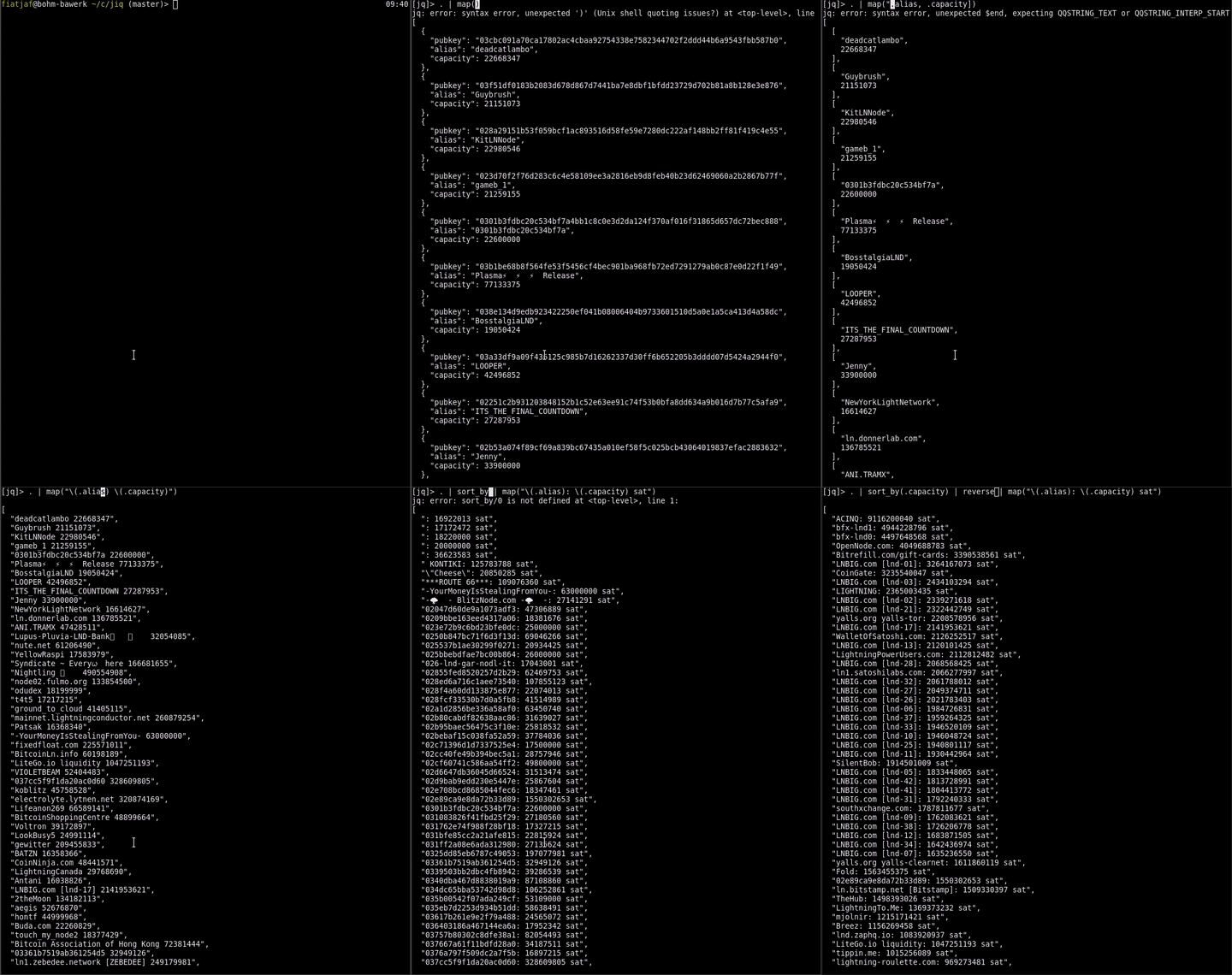
Either prebuilt binary for your system (and make sure to chmod +x it first) or install/compile with Go:
go install github.com/fiatjaf/jiq/cmd/jiq@latest
If you don't have jq installed, follow instructions at https://stedolan.github.io/jq/download/ and make sure to put it in your PATH.
Execute the following command:
echo '{"aa":"2AA2","bb":{"aaa":[123,"cccc",[1,2]],"c":321}}'| jiq
Then jiq will be running. Now you can dig JSON data incrementally.
When you enter .bb.aaa[2], you will see the following.
[jq]> .bb.aaa[2]
[
  1,
  2
]
If you press Enter now it will output
[
  1,
  2
]
and exit (if you want all the output in a single line you can either call jiq -c or pipe it into jq as jiq | jq -c .).
If you have ever used jq, you'll be familiar with these:
echo '{"economists": [{"id": 1, "name": "menger"}, {"id": 2, "name": "mises"}, {"name": "hayek", "id": 3}]}' | jiq
Now try writing .economists | "\(.[0].name), \(.[1].name) and \(.[2].name) are economists." or [.economists.[].id], or even .economists | map({key: "\(.id)", value: .name}) | from_entries
Sample for using RDAP data.
curl -s http://rdg.afilias.info/rdap/domain/example.info | jiq
-q : print the jq filter instead of the resulting filtered JSON to stdout (if you plan to use this with jq later)
Plus all the arguments jq accepts -- they will affect both the JSON output inside jiq and the output that is printed to stdout (beware that some may cause bugs).
traffic analytics for this repo:
| key | description |
|---|---|
TAB / CTRL + I | Show available items and choice them |
CTRL + W | Delete from the cursor to the start of the word |
CTRL + U | Delete whole query |
CTRL + F / Right Arrow (➡️) | Move cursor a character to the right |
ALT + F | Move one word forward |
CTRL + B / Left Arrow (⬅️) | Move cursor a character to the left |
ALT + B | Move one word backward |
CTRL + A / Home | To the first character of the 'Filter' |
CTRL + E/ End | To the end of the 'Filter' |
CTRL + J / Down Arrow (⬇️) | Scroll json buffer 1 line downwards |
CTRL + K / Up Arrow (⬆️) | Scroll json buffer 1 line upwards |
CTRL + G | Scroll json buffer to bottom |
CTRL + T | Scroll json buffer to top |
CTRL + N / PageDown | Scroll json buffer 'Page Down' |
CTRL + P / PageUp | Scroll json buffer 'Page Up' |
ESC | Hide a candidate box |
Overall
Maintained
Code review
Go module
Latest release
Releases this year
(top 24 of 25)
1,282 followers · starred Feb 2017
493 followers · starred Jan 2020
285 followers · starred Dec 2021
234 followers · starred Jun 2021
jid on jq - interactive JSON query tool using jq expressions
Go
930
98 commits
updated Jan 9, 2023
You can drill down interactively by using jq filtering queries.
jiq uses jq internally, and it requires you to have jq in your PATH.
If you prefer, there's an experimental, standalone, purely client-side web version of this on https://jq.alhur.es/jiq/.
Either prebuilt binary for your system (and make sure to chmod +x it first) or install/compile with Go:
go install github.com/fiatjaf/jiq/cmd/jiq@latest
If you don't have jq installed, follow instructions at https://stedolan.github.io/jq/download/ and make sure to put it in your PATH.
Execute the following command:
echo '{"aa":"2AA2","bb":{"aaa":[123,"cccc",[1,2]],"c":321}}'| jiq
Then jiq will be running. Now you can dig JSON data incrementally.
When you enter .bb.aaa[2], you will see the following.
[jq]> .bb.aaa[2]
[
  1,
  2
]
If you press Enter now it will output
[
  1,
  2
]
and exit (if you want all the output in a single line you can either call jiq -c or pipe it into jq as jiq | jq -c .).
If you have ever used jq, you'll be familiar with these:
echo '{"economists": [{"id": 1, "name": "menger"}, {"id": 2, "name": "mises"}, {"name": "hayek", "id": 3}]}' | jiq
Now try writing .economists | "\(.[0].name), \(.[1].name) and \(.[2].name) are economists." or [.economists.[].id], or even .economists | map({key: "\(.id)", value: .name}) | from_entries
Sample for using RDAP data.
curl -s http://rdg.afilias.info/rdap/domain/example.info | jiq
-q : print the jq filter instead of the resulting filtered JSON to stdout (if you plan to use this with jq later)
Plus all the arguments jq accepts -- they will affect both the JSON output inside jiq and the output that is printed to stdout (beware that some may cause bugs).
traffic analytics for this repo:
| key | description |
|---|---|
TAB / CTRL + I | Show available items and choice them |
CTRL + W | Delete from the cursor to the start of the word |
CTRL + U | Delete whole query |
CTRL + F / Right Arrow (➡️) | Move cursor a character to the right |
ALT + F | Move one word forward |
CTRL + B / Left Arrow (⬅️) | Move cursor a character to the left |
ALT + B | Move one word backward |
CTRL + A / Home | To the first character of the 'Filter' |
CTRL + E/ End | To the end of the 'Filter' |
CTRL + J / Down Arrow (⬇️) | Scroll json buffer 1 line downwards |
CTRL + K / Up Arrow (⬆️) | Scroll json buffer 1 line upwards |
CTRL + G | Scroll json buffer to bottom |
CTRL + T | Scroll json buffer to top |
CTRL + N / PageDown | Scroll json buffer 'Page Down' |
CTRL + P / PageUp | Scroll json buffer 'Page Up' |
ESC | Hide a candidate box |
Overall
Maintained
Code review
Go module
Latest release
Releases this year
(top 24 of 25)
1,282 followers · starred Feb 2017
493 followers · starred Jan 2020
285 followers · starred Dec 2021
234 followers · starred Jun 2021



