
Apple Notes, Photos and Find My as native apps for Omarchy and Arch Linux, sharing one iCloud sign-in. Notes sync both ways as Markdown.
See the codeSee what people are saying
README
icloud-for-omarchy
iCloud apps for Omarchy (and any Arch Linux), sharing one Apple sign-in, published as one signed pacman repository.
- Notes: your Apple Notes as a folder of Markdown files, synced both
ways. Edit, rename, move or delete them in the app, in Neovim or Obsidian,
or with
mvandrm, and iCloud follows. - Photos: browse, download, upload and delete your iCloud Photos.
- Find My: your devices on a map, with play sound, Lost Mode and a location trail.
- Every window action also works from the terminal, with
--jsonoutput for scripts and AI agents.
curl -fsSL https://github.com/ferdousbhai/icloud-for-omarchy/releases/latest/download/install.sh | sudo bash
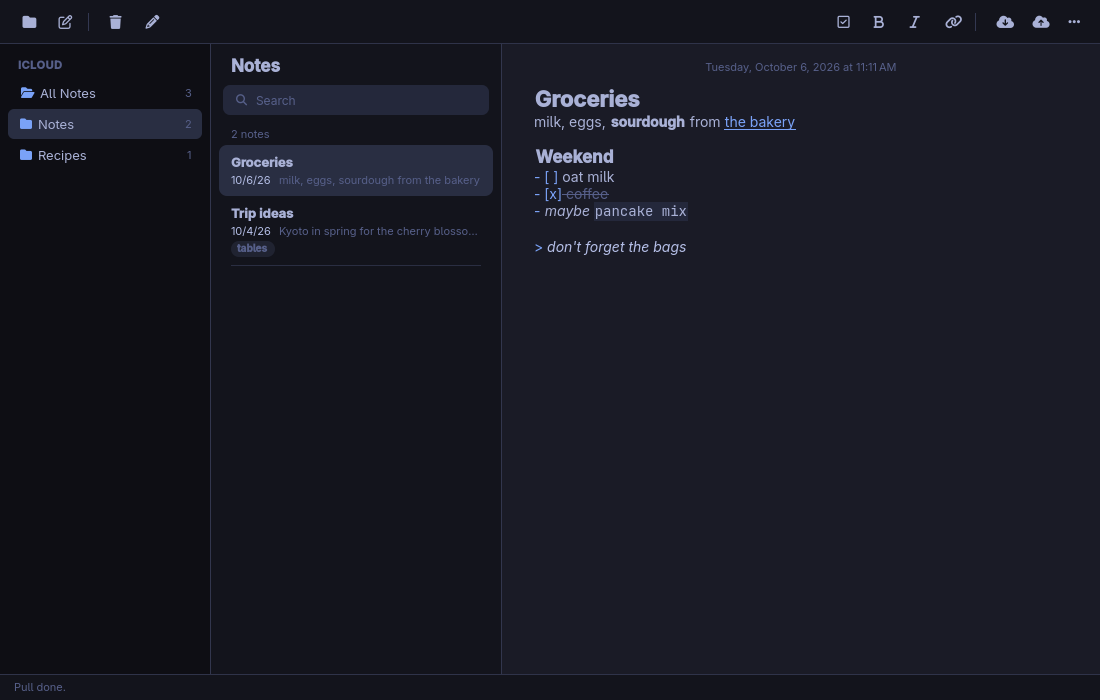
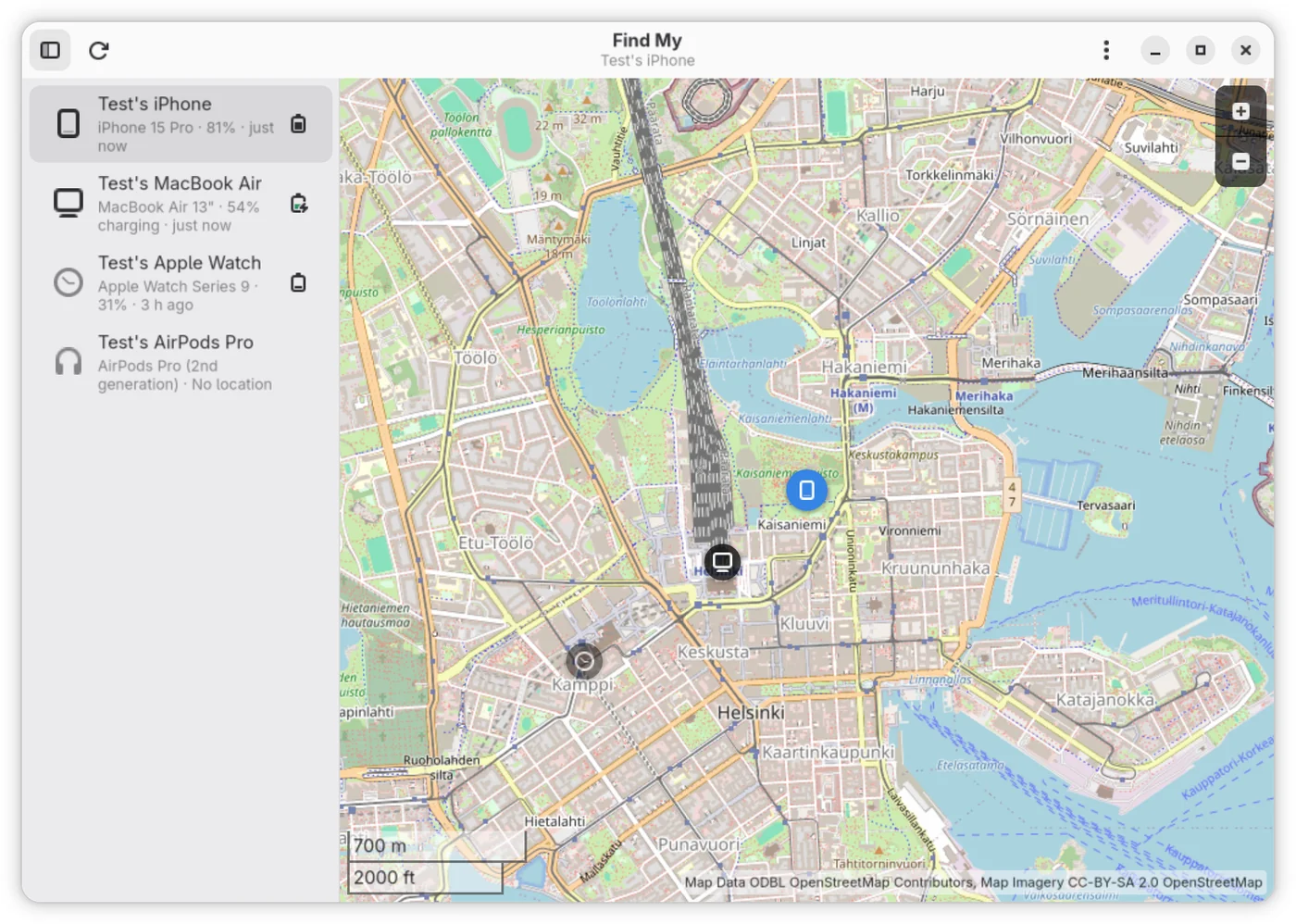
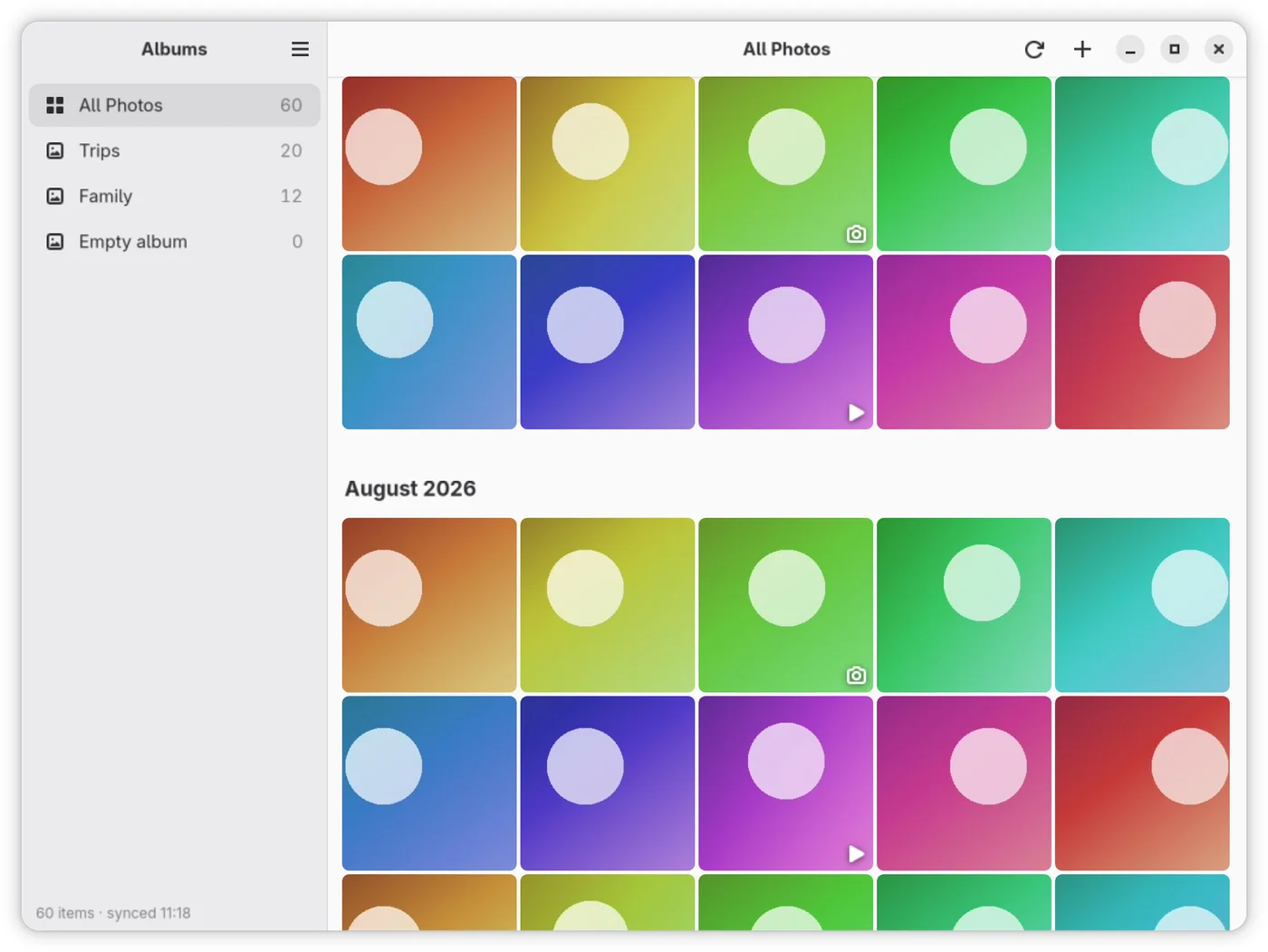
Screenshots use demo data.
| Directory | Package | What it is |
|---|---|---|
| notes/, notes-sync/ | icloud-notes | Apple Notes as a Qt/QML app and the icloud-notes command, synced with iCloud by its engine, icloud-notes-sync (notes-sync/, in Rust, originally derived from icloud-md), which the package installs off PATH. |
| photos/ | icloud-photos | iCloud Photos in GTK4/libadwaita: browse, download, upload and delete. |
| findmy/ | icloud-findmy | Find My devices in GTK4/libadwaita: locate, play a sound, Lost Mode, history trail. |
| session/, sessiond/ | icloud-session | The shared sign-in: a D-Bus daemon, a sign-in window and a CLI (sessiond/), plus the Rust client crate every app links (session/). |
The shared sign-in's design (the daemon, its D-Bus interface, the session files) is in session/README.md.
Command line and agents
Everything the windows do can be done from a terminal, or by an AI agent:
icloud-notes, icloud-photos and icloud-findmy take commands
(icloud-notes list, icloud-photos download, icloud-findmy locate, ...)
and run them without a window, and icloud-session owns the sign-in. They
share --json output, one JSON error shape and one table of exit codes.
- docs/AGENTS.md: the reference to give an agent (auth, commands with example JSON, safety rules, recipes).
- docs/skills/icloud/SKILL.md: the same as a
Claude Code skill; copy
docs/skills/icloudinto~/.claude/skills/. - docs/CLI.md: every GUI feature mapped to its command, the exit and error codes, the JSON shapes.
Signing in is the one thing a person must do: Apple's page (password, 2FA)
opens in a window from icloud-session sign-in.
Is this safe?
- You sign in on Apple's own page, password and two-factor code
included, in a window opened by
icloud-session sign-in. The apps never see your password. - What's kept is the session cookies, in
~/.local/state/icloud-session/account.json, readable only by you. - Your password is stored only if you choose to, for Find My, which asks
for it again from time to time:
icloud-session set-passwordputs it in your system keyring (the Secret Service, e.g. GNOME Keyring), andicloud-session forget-passwordremoves it. - The apps talk only to Apple, plus OpenStreetMap for Find My's map tiles.
- Notes deletes are recoverable: a note you delete goes to Recently Deleted in iCloud (about 30 days).
- It's all open source, and the packages are signed with a key whose fingerprint is pinned in install.sh.
Install
curl -fsSL https://github.com/ferdousbhai/icloud-for-omarchy/releases/latest/download/install.sh | sudo bash
installs all three apps (icloud-notes, icloud-photos, icloud-findmy), which pull in icloud-session. To install only some, name them:
curl -fsSL .../install.sh | sudo bash -s -- icloud-photos icloud-findmy
The script (install.sh) trusts the package-signing key (after
checking it against the fingerprint pinned in the script), adds the signed
[icloud-for-omarchy] repository as /etc/pacman.d/icloud-for-omarchy.conf
with an Include line in /etc/pacman.conf, installs an Omarchy
pre-refresh-pacman hook that restores the repository after
omarchy refresh pacman, and installs the packages in one pacman -Syu.
Re-running it is safe. Updates then arrive with omarchy update.
Install by hand
Rather not pipe a script into sudo bash? These are the same steps, one
at a time:
# 1. Download the package-signing key and check its fingerprint is
#    35C47A06567940B6796B4D0F9B3C7BDF85268B31
curl -fsSLO https://github.com/ferdousbhai/icloud-for-omarchy/releases/latest/download/icloud-for-omarchy-signing-key.asc
gpg --show-keys icloud-for-omarchy-signing-key.asc

# 2. Let pacman trust it
sudo pacman-key --add icloud-for-omarchy-signing-key.asc
sudo pacman-key --lsign-key 35C47A06567940B6796B4D0F9B3C7BDF85268B31

# 3. Add the signed repository
printf '[icloud-for-omarchy]\nSigLevel = Required DatabaseRequired\nServer = https://github.com/ferdousbhai/icloud-for-omarchy/releases/latest/download\n' \
  | sudo tee /etc/pacman.d/icloud-for-omarchy.conf
echo 'Include = /etc/pacman.d/icloud-for-omarchy.conf' | sudo tee -a /etc/pacman.conf

# 4. Install (on Omarchy: sudo pacman -Sy && omarchy-pkg-add icloud-notes icloud-photos icloud-findmy)
sudo pacman -Syu icloud-notes icloud-photos icloud-findmy
On Omarchy, omarchy refresh pacman rewrites /etc/pacman.conf; the
script installs a hook that adds the Include line back, so by hand you
would re-add it after a refresh.
Machines set up from earlier Notes releases, which had a repository of
their own ([icloud-notes]), are migrated: once [icloud-for-omarchy] is
added, the script removes /etc/pacman.d/icloud-notes.conf, its Include
line and its Omarchy hook.
The icloud-notes-sync package of earlier releases needs nothing from the
script: icloud-notes now carries the engine and replaces it, so the next
omarchy update swaps it out.
Every release also carries one installer per app, install-notes.sh,
install-photos.sh and install-findmy.sh: install.sh with its default
set to that one app, generated by bin/make-installers. The website (not
in this repository) redirects its one-liners to these assets:
https://ferdousbhai.com/icloud/install.sh to install.sh, and
https://ferdousbhai.com/icloud-<app>/install.sh to that app's installer,
e.g. .../releases/latest/download/install-photos.sh, so
curl ... | sudo bash keeps installing just that app. The apps' page is
https://ferdousbhai.com/icloud.
To uninstall: omarchy pkg drop <packages>, then remove
/etc/pacman.d/icloud-for-omarchy.conf, its Include line in
/etc/pacman.conf, and
~/.config/omarchy/hooks/pre-refresh-pacman.d/icloud-for-omarchy.
Layout
Cargo.toml, Cargo.lock   one Cargo workspace: session, sessiond, notes-sync, photos, findmy
session/  sessiond/      icloud-session: client crate / daemon, sign-in window, CLI
notes/                   icloud-notes (qmake project, QML, tests, its own bin/build and bin/test)
notes-sync/              icloud-notes-sync, the sync engine the icloud-notes package ships
photos/  findmy/         icloud-photos, icloud-findmy
packaging/<package>/     one PKGBUILD per package
install.sh               the one installer (per-app copies are generated at release)
bin/                     build, test, release, verify-release, make-installers; dev-install/dev-uninstall for the daemon
tests/                   the add_signed_repo hash pin; install_test.sh, the installers against stubbed pacman
docs/                    the command-line reference (CLI.md, AGENTS.md, skills/)
Each directory kept its history: the five former repositories
(ferdousbhai/icloud-session, icloud-notes-sync, icloud-photos, icloud-findmy
and icloud-notes) were imported with git filter-repo into their
subdirectories and merged, so git log --follow on a file reaches back past
the move. icloud-notes' release tags v0.1.0...v0.3.8 are here as
notes-v0.1.0...notes-v0.3.8.
Development
Needs rust, sqlite, gtk4, libadwaita, libshumate (findmy) and
webkitgtk-6.0 (the sign-in window) for the Rust crates, and qt6-base,
qt6-declarative and make for Notes. The apps talk to the icloud-session
daemon over D-Bus; for development without the package, bin/dev-install
puts a release build of it in ~/.local/bin with a user D-Bus activation
file (bin/dev-uninstall undoes it).
bin/build                       # every package; or name some: bin/build icloud-photos
bin/test                        # clippy, all Rust tests, notes/bin/test, the installer checks
tests/install_test.sh           # the installers alone: stubbed pacman, scratch /etc in a user namespace
cargo test -p icloud-findmy     # one crate
notes/bin/test                  # the Qt app's tests alone (they run on a private D-Bus)
Rust binaries land in target/release/, Notes in notes/build/. Each app
can also run against a local fake of Apple's servers; its README says how.
notes-sync's recorded scenarios and golden corpora run with cargo test;
ICLOUD_NOTES_SYNC_REGEN=1 cargo test -p icloud-notes-sync re-records them
from the current code (see notes-sync/README.md).
Releasing
Releases are cut from a checkout with the package-signing key in its keyring, no CI involved:
bin/release icloud-notes 0.4.1
bin/release icloud-session 0.3.0 icloud-notes 0.6.0   # several at once
Versions are per package and so are the tags: <name>-v<version>, where
<name> is the package name without icloud- (session, photos,
findmy, notes), e.g. notes-v0.4.1. Each PKGBUILD takes its
pkgver from its own newest tag: at the tag it is the plain version, and a
later commit builds <version>.r<count>.<sha> (0.0.0.r<count> for a package
never tagged).
bin/release runs bin/test, sets the named packages' versions (PKGBUILD,
and Cargo.toml for the Rust ones), commits and tags them, and builds only
those packages with makepkg from packaging/, each from the committed
HEAD via git archive. Every other package is downloaded from the latest
release, its signature checked against the pinned key, and carried forward
unchanged, so the new repository database, icloud-for-omarchy.db, always
lists all four. It signs the database with the key whose fingerprint
install.sh pins and publishes it, the packages, the public key,
install.sh and the per-app installers as one GitHub release on the first
tag named; releases/latest/download resolves to it.
The Notes sync engine (notes-sync/) is not released on its own: it ships
inside icloud-notes, built from the same commit, so releasing icloud-notes
releases it, and its Cargo.toml version only names the engine
(icloud-notes-sync --version). The notes-sync-v* tags are historical,
from when it was the separate icloud-notes-sync package (last
notes-sync-v0.2.0); the first icloud-notes that carries it must be
released before any other package, and bin/release refuses to carry
forward an icloud-notes that still depends on the old package.
A release counts as shipped only once bin/verify-release has installed
each named package in a clean Arch container, the apps through their
per-app installers and the shared packages through install.sh, and found
that version installed; otherwise bin/release deletes the release and the
tags. With PUBLISH_CRATE=1, releasing icloud-session also publishes its client
crate to crates.io after the release is verified, unless crates.io already has
that version; by default it does not.
The add_signed_repo function in install.sh is shared verbatim with the
Ghost installer (ferdousbhai/ghost), and both repositories pin its hash in
their tests (tests/add_signed_repo.sha256 here): change it in both places,
and both hashes, together.
The signing key
One key signs these packages and Ghost's; its fingerprint is pinned in both installers and it lives only in the releasing machine's keyring, protected by a passphrase. Losing it would break the trust chain on every machine that installed from these repositories, so keep an encrypted backup somewhere off this machine:
gpg --armor --export-secret-keys 35C47A06567940B6796B4D0F9B3C7BDF85268B31 \
  | gpg --symmetric --armor --output package-signing-key.backup.asc
Restoring is gpg --decrypt package-signing-key.backup.asc | gpg --import.
To rotate the key: generate the new one, publish one release from each
project signed with the old key that also ships the new public key as
<repository>-signing-key.asc, update the pinned fingerprint in both
installers and the tests, then sign the next releases with the new key.
Machines that installed earlier pick up the new key by re-running the
one-liner, which is idempotent.
License
MIT, see LICENSE. Third-party credits (icloud-md, node-diff3, the mdast/micromark utilities, yaml) are in NOTICE.
Similar repos


Apple Notes, Photos and Find My as native apps for Omarchy and Arch Linux, sharing one iCloud sign-in. Notes sync both ways as Markdown.
See the codeSee what people are saying
README
icloud-for-omarchy
iCloud apps for Omarchy (and any Arch Linux), sharing one Apple sign-in, published as one signed pacman repository.
- Notes: your Apple Notes as a folder of Markdown files, synced both
ways. Edit, rename, move or delete them in the app, in Neovim or Obsidian,
or with
mvandrm, and iCloud follows. - Photos: browse, download, upload and delete your iCloud Photos.
- Find My: your devices on a map, with play sound, Lost Mode and a location trail.
- Every window action also works from the terminal, with
--jsonoutput for scripts and AI agents.
curl -fsSL https://github.com/ferdousbhai/icloud-for-omarchy/releases/latest/download/install.sh | sudo bash
Screenshots use demo data.
| Directory | Package | What it is |
|---|---|---|
| notes/, notes-sync/ | icloud-notes | Apple Notes as a Qt/QML app and the icloud-notes command, synced with iCloud by its engine, icloud-notes-sync (notes-sync/, in Rust, originally derived from icloud-md), which the package installs off PATH. |
| photos/ | icloud-photos | iCloud Photos in GTK4/libadwaita: browse, download, upload and delete. |
| findmy/ | icloud-findmy | Find My devices in GTK4/libadwaita: locate, play a sound, Lost Mode, history trail. |
| session/, sessiond/ | icloud-session | The shared sign-in: a D-Bus daemon, a sign-in window and a CLI (sessiond/), plus the Rust client crate every app links (session/). |
The shared sign-in's design (the daemon, its D-Bus interface, the session files) is in session/README.md.
Command line and agents
Everything the windows do can be done from a terminal, or by an AI agent:
icloud-notes, icloud-photos and icloud-findmy take commands
(icloud-notes list, icloud-photos download, icloud-findmy locate, ...)
and run them without a window, and icloud-session owns the sign-in. They
share --json output, one JSON error shape and one table of exit codes.
- docs/AGENTS.md: the reference to give an agent (auth, commands with example JSON, safety rules, recipes).
- docs/skills/icloud/SKILL.md: the same as a
Claude Code skill; copy
docs/skills/icloudinto~/.claude/skills/. - docs/CLI.md: every GUI feature mapped to its command, the exit and error codes, the JSON shapes.
Signing in is the one thing a person must do: Apple's page (password, 2FA)
opens in a window from icloud-session sign-in.
Is this safe?
- You sign in on Apple's own page, password and two-factor code
included, in a window opened by
icloud-session sign-in. The apps never see your password. - What's kept is the session cookies, in
~/.local/state/icloud-session/account.json, readable only by you. - Your password is stored only if you choose to, for Find My, which asks
for it again from time to time:
icloud-session set-passwordputs it in your system keyring (the Secret Service, e.g. GNOME Keyring), andicloud-session forget-passwordremoves it. - The apps talk only to Apple, plus OpenStreetMap for Find My's map tiles.
- Notes deletes are recoverable: a note you delete goes to Recently Deleted in iCloud (about 30 days).
- It's all open source, and the packages are signed with a key whose fingerprint is pinned in install.sh.
Install
curl -fsSL https://github.com/ferdousbhai/icloud-for-omarchy/releases/latest/download/install.sh | sudo bash
installs all three apps (icloud-notes, icloud-photos, icloud-findmy), which pull in icloud-session. To install only some, name them:
curl -fsSL .../install.sh | sudo bash -s -- icloud-photos icloud-findmy
The script (install.sh) trusts the package-signing key (after
checking it against the fingerprint pinned in the script), adds the signed
[icloud-for-omarchy] repository as /etc/pacman.d/icloud-for-omarchy.conf
with an Include line in /etc/pacman.conf, installs an Omarchy
pre-refresh-pacman hook that restores the repository after
omarchy refresh pacman, and installs the packages in one pacman -Syu.
Re-running it is safe. Updates then arrive with omarchy update.
Install by hand
Rather not pipe a script into sudo bash? These are the same steps, one
at a time:
# 1. Download the package-signing key and check its fingerprint is
#    35C47A06567940B6796B4D0F9B3C7BDF85268B31
curl -fsSLO https://github.com/ferdousbhai/icloud-for-omarchy/releases/latest/download/icloud-for-omarchy-signing-key.asc
gpg --show-keys icloud-for-omarchy-signing-key.asc

# 2. Let pacman trust it
sudo pacman-key --add icloud-for-omarchy-signing-key.asc
sudo pacman-key --lsign-key 35C47A06567940B6796B4D0F9B3C7BDF85268B31

# 3. Add the signed repository
printf '[icloud-for-omarchy]\nSigLevel = Required DatabaseRequired\nServer = https://github.com/ferdousbhai/icloud-for-omarchy/releases/latest/download\n' \
  | sudo tee /etc/pacman.d/icloud-for-omarchy.conf
echo 'Include = /etc/pacman.d/icloud-for-omarchy.conf' | sudo tee -a /etc/pacman.conf

# 4. Install (on Omarchy: sudo pacman -Sy && omarchy-pkg-add icloud-notes icloud-photos icloud-findmy)
sudo pacman -Syu icloud-notes icloud-photos icloud-findmy
On Omarchy, omarchy refresh pacman rewrites /etc/pacman.conf; the
script installs a hook that adds the Include line back, so by hand you
would re-add it after a refresh.
Machines set up from earlier Notes releases, which had a repository of
their own ([icloud-notes]), are migrated: once [icloud-for-omarchy] is
added, the script removes /etc/pacman.d/icloud-notes.conf, its Include
line and its Omarchy hook.
The icloud-notes-sync package of earlier releases needs nothing from the
script: icloud-notes now carries the engine and replaces it, so the next
omarchy update swaps it out.
Every release also carries one installer per app, install-notes.sh,
install-photos.sh and install-findmy.sh: install.sh with its default
set to that one app, generated by bin/make-installers. The website (not
in this repository) redirects its one-liners to these assets:
https://ferdousbhai.com/icloud/install.sh to install.sh, and
https://ferdousbhai.com/icloud-<app>/install.sh to that app's installer,
e.g. .../releases/latest/download/install-photos.sh, so
curl ... | sudo bash keeps installing just that app. The apps' page is
https://ferdousbhai.com/icloud.
To uninstall: omarchy pkg drop <packages>, then remove
/etc/pacman.d/icloud-for-omarchy.conf, its Include line in
/etc/pacman.conf, and
~/.config/omarchy/hooks/pre-refresh-pacman.d/icloud-for-omarchy.
Layout
Cargo.toml, Cargo.lock   one Cargo workspace: session, sessiond, notes-sync, photos, findmy
session/  sessiond/      icloud-session: client crate / daemon, sign-in window, CLI
notes/                   icloud-notes (qmake project, QML, tests, its own bin/build and bin/test)
notes-sync/              icloud-notes-sync, the sync engine the icloud-notes package ships
photos/  findmy/         icloud-photos, icloud-findmy
packaging/<package>/     one PKGBUILD per package
install.sh               the one installer (per-app copies are generated at release)
bin/                     build, test, release, verify-release, make-installers; dev-install/dev-uninstall for the daemon
tests/                   the add_signed_repo hash pin; install_test.sh, the installers against stubbed pacman
docs/                    the command-line reference (CLI.md, AGENTS.md, skills/)
Each directory kept its history: the five former repositories
(ferdousbhai/icloud-session, icloud-notes-sync, icloud-photos, icloud-findmy
and icloud-notes) were imported with git filter-repo into their
subdirectories and merged, so git log --follow on a file reaches back past
the move. icloud-notes' release tags v0.1.0...v0.3.8 are here as
notes-v0.1.0...notes-v0.3.8.
Development
Needs rust, sqlite, gtk4, libadwaita, libshumate (findmy) and
webkitgtk-6.0 (the sign-in window) for the Rust crates, and qt6-base,
qt6-declarative and make for Notes. The apps talk to the icloud-session
daemon over D-Bus; for development without the package, bin/dev-install
puts a release build of it in ~/.local/bin with a user D-Bus activation
file (bin/dev-uninstall undoes it).
bin/build                       # every package; or name some: bin/build icloud-photos
bin/test                        # clippy, all Rust tests, notes/bin/test, the installer checks
tests/install_test.sh           # the installers alone: stubbed pacman, scratch /etc in a user namespace
cargo test -p icloud-findmy     # one crate
notes/bin/test                  # the Qt app's tests alone (they run on a private D-Bus)
Rust binaries land in target/release/, Notes in notes/build/. Each app
can also run against a local fake of Apple's servers; its README says how.
notes-sync's recorded scenarios and golden corpora run with cargo test;
ICLOUD_NOTES_SYNC_REGEN=1 cargo test -p icloud-notes-sync re-records them
from the current code (see notes-sync/README.md).
Releasing
Releases are cut from a checkout with the package-signing key in its keyring, no CI involved:
bin/release icloud-notes 0.4.1
bin/release icloud-session 0.3.0 icloud-notes 0.6.0   # several at once
Versions are per package and so are the tags: <name>-v<version>, where
<name> is the package name without icloud- (session, photos,
findmy, notes), e.g. notes-v0.4.1. Each PKGBUILD takes its
pkgver from its own newest tag: at the tag it is the plain version, and a
later commit builds <version>.r<count>.<sha> (0.0.0.r<count> for a package
never tagged).
bin/release runs bin/test, sets the named packages' versions (PKGBUILD,
and Cargo.toml for the Rust ones), commits and tags them, and builds only
those packages with makepkg from packaging/, each from the committed
HEAD via git archive. Every other package is downloaded from the latest
release, its signature checked against the pinned key, and carried forward
unchanged, so the new repository database, icloud-for-omarchy.db, always
lists all four. It signs the database with the key whose fingerprint
install.sh pins and publishes it, the packages, the public key,
install.sh and the per-app installers as one GitHub release on the first
tag named; releases/latest/download resolves to it.
The Notes sync engine (notes-sync/) is not released on its own: it ships
inside icloud-notes, built from the same commit, so releasing icloud-notes
releases it, and its Cargo.toml version only names the engine
(icloud-notes-sync --version). The notes-sync-v* tags are historical,
from when it was the separate icloud-notes-sync package (last
notes-sync-v0.2.0); the first icloud-notes that carries it must be
released before any other package, and bin/release refuses to carry
forward an icloud-notes that still depends on the old package.
A release counts as shipped only once bin/verify-release has installed
each named package in a clean Arch container, the apps through their
per-app installers and the shared packages through install.sh, and found
that version installed; otherwise bin/release deletes the release and the
tags. With PUBLISH_CRATE=1, releasing icloud-session also publishes its client
crate to crates.io after the release is verified, unless crates.io already has
that version; by default it does not.
The add_signed_repo function in install.sh is shared verbatim with the
Ghost installer (ferdousbhai/ghost), and both repositories pin its hash in
their tests (tests/add_signed_repo.sha256 here): change it in both places,
and both hashes, together.
The signing key
One key signs these packages and Ghost's; its fingerprint is pinned in both installers and it lives only in the releasing machine's keyring, protected by a passphrase. Losing it would break the trust chain on every machine that installed from these repositories, so keep an encrypted backup somewhere off this machine:
gpg --armor --export-secret-keys 35C47A06567940B6796B4D0F9B3C7BDF85268B31 \
  | gpg --symmetric --armor --output package-signing-key.backup.asc
Restoring is gpg --decrypt package-signing-key.backup.asc | gpg --import.
To rotate the key: generate the new one, publish one release from each
project signed with the old key that also ships the new public key as
<repository>-signing-key.asc, update the pinned fingerprint in both
installers and the tests, then sign the next releases with the new key.
Machines that installed earlier pick up the new key by re-running the
one-liner, which is idempotent.
License
MIT, see LICENSE. Third-party credits (icloud-md, node-diff3, the mdast/micromark utilities, yaml) are in NOTICE.