
README
Nkululeko


Nkululeko is a very common first name from the Zulu and Xhosa languages in South Africa and means "freedom". It is also the name of a software to detect speaker characteristics by machine learning experiments with a high-level interface. The idea is to have a framework (based on e.g. sklearn and torch) that can be used to rapidly and automatically analyse audio data and explore machine learning models based on that data.
Some abilities that Nkululeko provides: combines acoustic features and machine learning models (including feature selection and features concatenation); performs data exploration, selection and visualization the results; finetuning; ensemble learning models; soft labeling (predicting labels with pre-trained model); and inference the model on a test set.
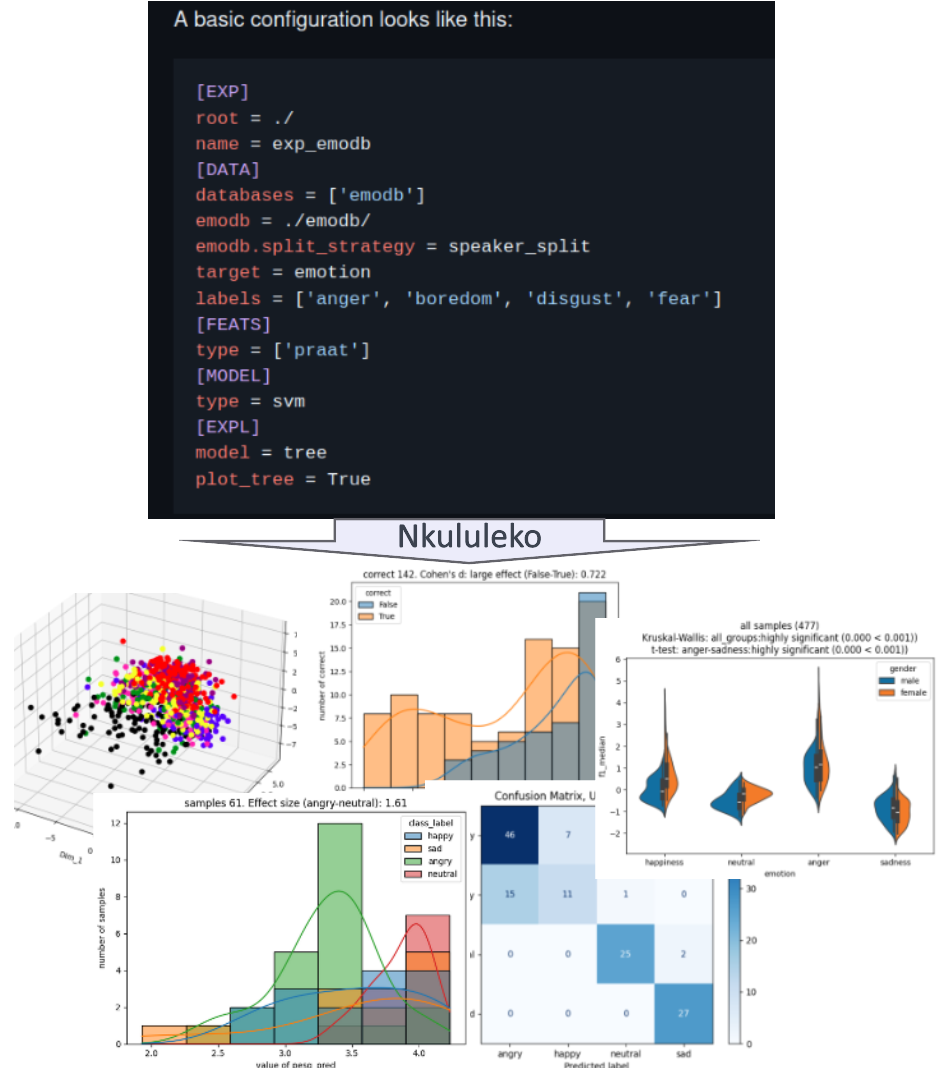
Nkululeko orchestrates data loading, feature extraction, and model training, allowing you to specify your experiment in a configuration file. The framework handles the process from raw data to trained model and evaluation, making it easy to run machine learning experiments without directly coding in Python.
Who is this for?
Nkululeko is for speech processing learners, researchers and ML practitioners focused on speaker characteristics, e.g., emotion, age, gender, or disorder detection.
Installation
Nkululeko requires Python 3.10 or higher with the following build status:


Create and activate a virtual Python environment and simply install Nkululeko:
# using python venv
python -m venv .env
source .env/bin/activate  # specify OS versions, add a separate line for Windows users
pip install nkululeko
# using uv in development mode
uv venv --python 3.12
source .venv/bin/activate
uv pip install -e .
# or run directly using uv run after cloning
uv run python -m nkululeko.train --config examples/exp_polish_tree.ini
Optional Dependencies
Nkululeko supports optional dependencies through extras:
# Install with PyTorch support
pip install nkululeko[torch]

# Install with CPU-only PyTorch
pip install nkululeko[torch-cpu]

# Install with TensorFlow support
pip install nkululeko[tensorflow]

# Install all optional dependencies
pip install nkululeko[all]
Manual Installation Options
You can also install dependencies manually:
PyTorch Installation
For CPU-only installation (recommended for most users):
pip install torch torchvision torchaudio --index-url https://download.pytorch.org/whl/cpu
For GPU support (latest CUDA):
pip install torch torchvision torchaudio
CPU-only Installation with uv
If you encounter issues with CUDA dependencies being installed even with the torch-cpu extra (this can happen with some package managers), you can use this manual installation approach with uv:
# Create virtual environment
uv venv
source .venv/bin/activate

# Install CPU-only PyTorch
uv pip install torch torchvision torchaudio --index-url https://download.pytorch.org/whl/cpu --python .venv/bin/python

# Install nkululeko without dependencies
uv pip install -e . --no-deps --python .venv/bin/python

# Install core dependencies
uv pip install pandas numpy scipy matplotlib seaborn scikit-learn --python .venv/bin/python

# Install audio-related dependencies
uv pip install audb audeer audformat audplot audmodel auglib audinterface audiofile audmetric audonnx confidence-intervals --python .venv/bin/python

# Install remaining packages (excluding xgboost temporarily)
uv pip install opensmile praat-parselmouth sounddevice imageio datasets transformers umap-learn pylatex audiomentations googletrans sentencepiece shap numpy_audio_limiter splitutils --python .venv/bin/python

# Install xgboost (choose one option):
# Option 1: Use older version without CUDA dependencies
uv pip install "xgboost<2.0.0" --python .venv/bin/python

# Option 2: Use the CPU-only xgboost package (recommended for newer versions)
uv pip install xgboost-cpu --python .venv/bin/python
This approach ensures that only CPU-only versions of packages are installed, avoiding CUDA dependencies on systems without GPU support.
Some functionalities require extra packages to be installed, which we didn't include automatically:
- For spotlight adapter:
pip install PyYAML  # Install PyYAML first to avoid dependency issues
pip install nkululeko[spotlight]
Some examples for ini-files (which you use to control nkululeko) are in the examples folder.
Documentation
The documentation, along with extensions of installation, usage, INI file format, and examples, can be found nkululeko.readthedocs.io.
Usage
ini-file values
Basically, you specify your experiment in an "ini" file (e.g. experiment.ini) and then call one of the Nkululeko interfaces to run the experiment like this:
python -m nkululeko.train --config experiment.ini
A basic configuration looks like this:
[EXP]
root = ./
name = exp_emodb
[DATA]
databases = ['emodb']
emodb = ./emodb/
emodb.split_strategy = speaker_split
target = emotion
labels = ['anger', 'boredom', 'disgust', 'fear']
[FEATS]
type = ['praat']
[MODEL]
type = svm
[EXPL]
model = tree
plot_tree = True
Read the Hello World example for initial usage with Emo-DB dataset.
Here is an overview of the interfaces/modules:
All of them take --config <my_config.ini> as an argument.
- nkululeko.train: do machine learning experiments combining features and learners (e.g. opensmile with SVM)
- nkululeko.ensemble: combine several nkululeko experiments and report on late fusion results
- nkululeko.multidb: do multiple experiments, comparing several databases cross and in itself
- nkululeko.explore: perform data exploration
- nkululeko.augment: augment the current training data
- nkululeko.aug_train: augment the current training data and do a training including this data
- nkululeko.predict: unified prediction module — predict labels for audio files, folders, CSVs or microphone input, using a feature extractor, an autopredict target (SNR, MOS, age, gender, emotion, arousal/valence, …) or a previously trained model. Replaces the former
nkululeko.demo,nkululeko.feature_demoandnkululeko.testingmodules. - nkululeko.segment: segment a database based on VAD (voice activity detection)
- nkululeko.resample: check on all sampling rates and change to 16kHz
- nkululeko.optim: do meta parameter optimization (e.g. grid search for SVM C and gamma)
- nkululeko.flags: a convenient module to conduct multiple experiments with different configuration parameters on the command line.
- nkululeko.avqi: compute the Acoustic Voice Quality Index (AVQI v3.01, Barsties & Maryn 2015) and its six sub-measures from a sustained vowel and a continuous speech recording, recording both interactively via the microphone if not supplied as files.
Hello World example
- NEW: Here's a Google colab that runs this example out-of-the-box, and here is the same with Kaggle
- I made a video to show you how to do this on Windows
- Set up Python on your computer, version >= 3.8
- Open a terminal/command line/console window
- Test python by typing
python, python should start with version >3 (NOT 2!). You can leave the Python Interpreter by typing exit() - Create a folder on your computer for this example, let's call it
nkulu_work - Get a copy of the Berlin emodb in audformat and unpack inside the folder you just created (
nkulu_work) - Make sure the folder is called "emodb" and does contain the database files directly (not box-in-a-box)
- Also, in the
nkulu_workfolder:- Create a Python environment
python -m venv venv
- Then, activate it:
- under Linux / mac
source venv/bin/activate
- under Windows
venv\Scripts\activate.bat
- if that worked, you should see a
(venv)in front of your prompt
- under Linux / mac
- Install the required packages in your environment
pip install nkululeko- Repeat until all error messages vanish (or fix them, or try to ignore them)...
- Create a Python environment
- Now you should have two folders in your nkulu_work folder:
- emodb and venv
- Download a copy of the file exp_emodb.ini to the current working directory (
nkulu_work) - Run the demo
python -m nkululeko.train --config exp_emodb.ini
- Find the results in the newly created folder exp_emodb
- Inspect
exp_emodb/images/run_0/emodb_xgb_os_0_000_cnf.png - This is the main result of your experiment: a confusion matrix for the emodb emotional categories
- Inspect
- Inspect and play around with the demo configuration file that defined your experiment, then re-run.
- There are many ways to experiment with different classifiers and acoustic feature sets, all described here
Features
The framework is targeted at the speech domain and supports experiments where different classifiers are combined with different feature extractors.
- Classifiers: Naive Bayes, KNN, Tree, XGBoost, SVM, MLP
- Feature extractors: Praat, Opensmile, openXBOW BoAW, TRILL embeddings, Wav2vec2 embeddings, audModel embeddings, ...
- Feature scaling
- Label encoding
- Binning (continuous to categorical)
- Online demo interface for trained models
- Visualization: confusion matrix, feature importance, feature distribution, epoch progression, t-SNE plot, data distribution, bias checking, uncertainty estimation
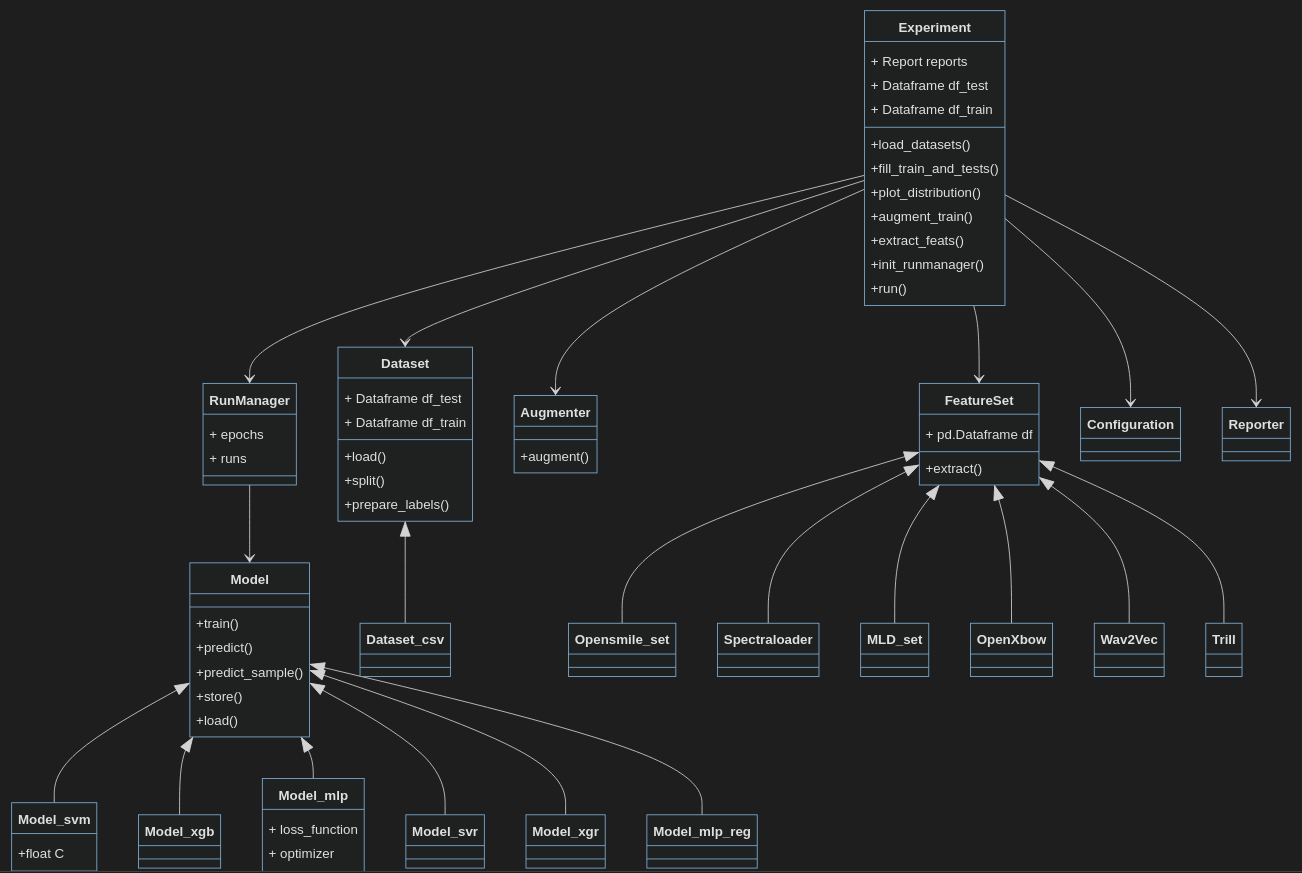
Here's a rough UML-like sketch of the framework (and here's the real one done with pyreverse).
Currently, the following linear classifiers are implemented (integrated from sklearn):
- SVM, SVR, XGB, XGR, Tree, Tree_regressor, KNN, KNN_regressor, NaiveBayes, GMM and the following ANNs (artificial neural networks)
- MLP (multi-layer perceptron), CNN (convolutional neural network)
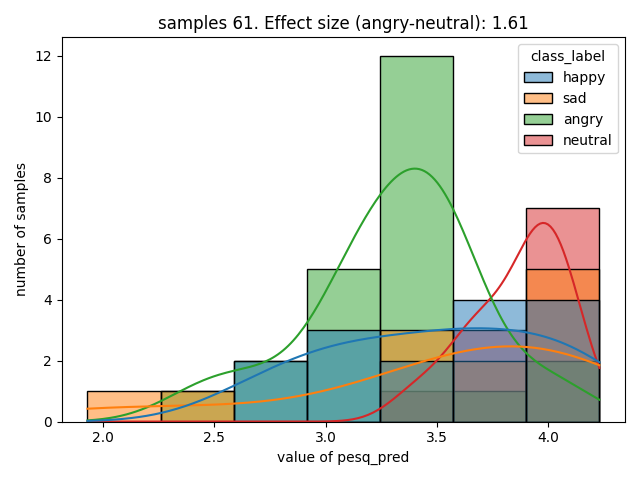
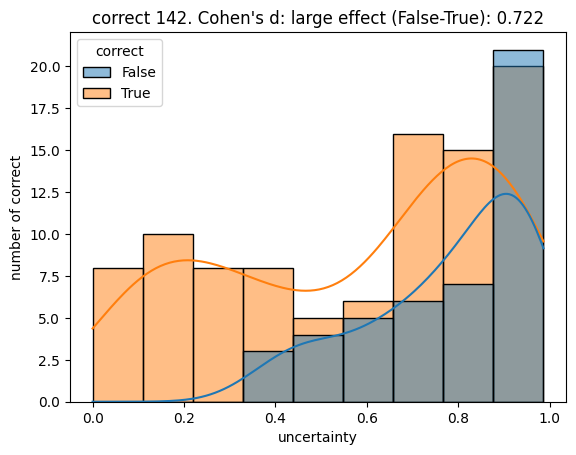
For visualization, besides confusion matrix, feature importance, feature distribution, t-SNE plot, data distribution (just names a few), Nkululeko can also be used for bias checking, uncertainty estimation, and epoch progression.
Bias checking
Uncertainty
Here's an animation that shows the progress of classification done with nkululeko.
News
There's Felix blog with tutorials below:
- Ensemble learning with Nkululeko
- Finetune transformer-models with Nkululeko
- Below is a Hello World example for Nkululeko that should set you up fastly, also on Google Colab, and with Kaggle
- Thanks to deepwiki, here's an analysis of the source code
- Here's a blog post on how to set up nkululeko on your computer.
- Here's a slide presentation about nkululeko
- Here's a video presentation about nkululeko
- Here's the 2022 LREC article on nkululeko
- Introduction
- Nkululeko FAQ
- How to set up your first nkululeko project
- Setting up a base nkululeko experiment
- How to import a database
- Comparing classifiers and features
- Use Praat features
- Combine feature sets
- Classifying continuous variables
- Try out / demo a trained model
- Perform cross-database experiments
- Meta parameter optimization
- How to set up wav2vec embedding
- How to soft-label a database
- Re-generate the progressing confusion matrix animation wit a different framerate
- How to limit/filter a dataset
- Specifying database disk location
- Add dropout with MLP models
- Do cross-validation
- Combine predictions per speaker
- Run multiple experiments in one go
- Compare several MLP layer layouts with each other
- Import features from outside the software
- Export acoustic features
- Explore feature importance
- Plot distributions for feature values
- Show feature importance
- Augment the training set
- Visualize clusters of acoustic features
- Visualize your data distribution
- Check your dataset
- Segmenting a database
- Predict new labels for your data from public models and check bias
- Resample
- Get some statistics on correlation and effect-size
- Automatic generation of a latex/pdf report
- Inspect your data with Spotlight
- Automatically stratify your split sets
- re-name data column names
- Oversample the training set
- Compare several databases
- Tweak the target variable for database comparison
- How to run multiple experiments in one go
- How to finetune a transformer-model
- Ensemble (combine) classifiers with late-fusion
- Use train, dev and test splits
License
Nkululeko can be used under the MIT license.
Contributing
Contributions are welcome and encouraged. To learn more about how to contribute to nkululeko, please refer to the Contributing guidelines.
Citation
If you use Nkululeko, please cite the paper:
F. Burkhardt and B. Tris Atmaja, (2025). Nkululeko 1.0: A Python package to predict speaker characteristics with a high-level interface. Journal of Open Source Software, 10(115), 8049, https://doi.org/10.21105/joss.08049
@article{Burkhardt2025, doi = {10.21105/joss.08049}, url = {https://doi.org/10.21105/joss.08049}, year = {2025}, publisher = {The Open Journal}, volume = {10}, number = {115}, pages = {8049}, author = {Burkhardt, Felix and Atmaja, Bagus Tris}, title = {Nkululeko 1.0: A Python package to predict speaker characteristics with a high-level interface}, journal = {Journal of Open Source Software} }
Contributors


Similar repos


Languages
Python
98.3%
README
Nkululeko
Nkululeko is a very common first name from the Zulu and Xhosa languages in South Africa and means "freedom". It is also the name of a software to detect speaker characteristics by machine learning experiments with a high-level interface. The idea is to have a framework (based on e.g. sklearn and torch) that can be used to rapidly and automatically analyse audio data and explore machine learning models based on that data.
Some abilities that Nkululeko provides: combines acoustic features and machine learning models (including feature selection and features concatenation); performs data exploration, selection and visualization the results; finetuning; ensemble learning models; soft labeling (predicting labels with pre-trained model); and inference the model on a test set.
Nkululeko orchestrates data loading, feature extraction, and model training, allowing you to specify your experiment in a configuration file. The framework handles the process from raw data to trained model and evaluation, making it easy to run machine learning experiments without directly coding in Python.
Who is this for?
Nkululeko is for speech processing learners, researchers and ML practitioners focused on speaker characteristics, e.g., emotion, age, gender, or disorder detection.
Installation
Nkululeko requires Python 3.10 or higher with the following build status:
Create and activate a virtual Python environment and simply install Nkululeko:
# using python venv
python -m venv .env
source .env/bin/activate  # specify OS versions, add a separate line for Windows users
pip install nkululeko
# using uv in development mode
uv venv --python 3.12
source .venv/bin/activate
uv pip install -e .
# or run directly using uv run after cloning
uv run python -m nkululeko.train --config examples/exp_polish_tree.ini
Optional Dependencies
Nkululeko supports optional dependencies through extras:
# Install with PyTorch support
pip install nkululeko[torch]

# Install with CPU-only PyTorch
pip install nkululeko[torch-cpu]

# Install with TensorFlow support
pip install nkululeko[tensorflow]

# Install all optional dependencies
pip install nkululeko[all]
Manual Installation Options
You can also install dependencies manually:
PyTorch Installation
For CPU-only installation (recommended for most users):
pip install torch torchvision torchaudio --index-url https://download.pytorch.org/whl/cpu
For GPU support (latest CUDA):
pip install torch torchvision torchaudio
CPU-only Installation with uv
If you encounter issues with CUDA dependencies being installed even with the torch-cpu extra (this can happen with some package managers), you can use this manual installation approach with uv:
# Create virtual environment
uv venv
source .venv/bin/activate

# Install CPU-only PyTorch
uv pip install torch torchvision torchaudio --index-url https://download.pytorch.org/whl/cpu --python .venv/bin/python

# Install nkululeko without dependencies
uv pip install -e . --no-deps --python .venv/bin/python

# Install core dependencies
uv pip install pandas numpy scipy matplotlib seaborn scikit-learn --python .venv/bin/python

# Install audio-related dependencies
uv pip install audb audeer audformat audplot audmodel auglib audinterface audiofile audmetric audonnx confidence-intervals --python .venv/bin/python

# Install remaining packages (excluding xgboost temporarily)
uv pip install opensmile praat-parselmouth sounddevice imageio datasets transformers umap-learn pylatex audiomentations googletrans sentencepiece shap numpy_audio_limiter splitutils --python .venv/bin/python

# Install xgboost (choose one option):
# Option 1: Use older version without CUDA dependencies
uv pip install "xgboost<2.0.0" --python .venv/bin/python

# Option 2: Use the CPU-only xgboost package (recommended for newer versions)
uv pip install xgboost-cpu --python .venv/bin/python
This approach ensures that only CPU-only versions of packages are installed, avoiding CUDA dependencies on systems without GPU support.
Some functionalities require extra packages to be installed, which we didn't include automatically:
- For spotlight adapter:
pip install PyYAML  # Install PyYAML first to avoid dependency issues
pip install nkululeko[spotlight]
Some examples for ini-files (which you use to control nkululeko) are in the examples folder.
Documentation
The documentation, along with extensions of installation, usage, INI file format, and examples, can be found nkululeko.readthedocs.io.
Usage
ini-file values
Basically, you specify your experiment in an "ini" file (e.g. experiment.ini) and then call one of the Nkululeko interfaces to run the experiment like this:
python -m nkululeko.train --config experiment.ini
A basic configuration looks like this:
[EXP]
root = ./
name = exp_emodb
[DATA]
databases = ['emodb']
emodb = ./emodb/
emodb.split_strategy = speaker_split
target = emotion
labels = ['anger', 'boredom', 'disgust', 'fear']
[FEATS]
type = ['praat']
[MODEL]
type = svm
[EXPL]
model = tree
plot_tree = True
Read the Hello World example for initial usage with Emo-DB dataset.
Here is an overview of the interfaces/modules:
All of them take --config <my_config.ini> as an argument.
- nkululeko.train: do machine learning experiments combining features and learners (e.g. opensmile with SVM)
- nkululeko.ensemble: combine several nkululeko experiments and report on late fusion results
- nkululeko.multidb: do multiple experiments, comparing several databases cross and in itself
- nkululeko.explore: perform data exploration
- nkululeko.augment: augment the current training data
- nkululeko.aug_train: augment the current training data and do a training including this data
- nkululeko.predict: unified prediction module — predict labels for audio files, folders, CSVs or microphone input, using a feature extractor, an autopredict target (SNR, MOS, age, gender, emotion, arousal/valence, …) or a previously trained model. Replaces the former
nkululeko.demo,nkululeko.feature_demoandnkululeko.testingmodules. - nkululeko.segment: segment a database based on VAD (voice activity detection)
- nkululeko.resample: check on all sampling rates and change to 16kHz
- nkululeko.optim: do meta parameter optimization (e.g. grid search for SVM C and gamma)
- nkululeko.flags: a convenient module to conduct multiple experiments with different configuration parameters on the command line.
- nkululeko.avqi: compute the Acoustic Voice Quality Index (AVQI v3.01, Barsties & Maryn 2015) and its six sub-measures from a sustained vowel and a continuous speech recording, recording both interactively via the microphone if not supplied as files.
Hello World example
- NEW: Here's a Google colab that runs this example out-of-the-box, and here is the same with Kaggle
- I made a video to show you how to do this on Windows
- Set up Python on your computer, version >= 3.8
- Open a terminal/command line/console window
- Test python by typing
python, python should start with version >3 (NOT 2!). You can leave the Python Interpreter by typing exit() - Create a folder on your computer for this example, let's call it
nkulu_work - Get a copy of the Berlin emodb in audformat and unpack inside the folder you just created (
nkulu_work) - Make sure the folder is called "emodb" and does contain the database files directly (not box-in-a-box)
- Also, in the
nkulu_workfolder:- Create a Python environment
python -m venv venv
- Then, activate it:
- under Linux / mac
source venv/bin/activate
- under Windows
venv\Scripts\activate.bat
- if that worked, you should see a
(venv)in front of your prompt
- under Linux / mac
- Install the required packages in your environment
pip install nkululeko- Repeat until all error messages vanish (or fix them, or try to ignore them)...
- Create a Python environment
- Now you should have two folders in your nkulu_work folder:
- emodb and venv
- Download a copy of the file exp_emodb.ini to the current working directory (
nkulu_work) - Run the demo
python -m nkululeko.train --config exp_emodb.ini
- Find the results in the newly created folder exp_emodb
- Inspect
exp_emodb/images/run_0/emodb_xgb_os_0_000_cnf.png - This is the main result of your experiment: a confusion matrix for the emodb emotional categories
- Inspect
- Inspect and play around with the demo configuration file that defined your experiment, then re-run.
- There are many ways to experiment with different classifiers and acoustic feature sets, all described here
Features
The framework is targeted at the speech domain and supports experiments where different classifiers are combined with different feature extractors.
- Classifiers: Naive Bayes, KNN, Tree, XGBoost, SVM, MLP
- Feature extractors: Praat, Opensmile, openXBOW BoAW, TRILL embeddings, Wav2vec2 embeddings, audModel embeddings, ...
- Feature scaling
- Label encoding
- Binning (continuous to categorical)
- Online demo interface for trained models
- Visualization: confusion matrix, feature importance, feature distribution, epoch progression, t-SNE plot, data distribution, bias checking, uncertainty estimation
Here's a rough UML-like sketch of the framework (and here's the real one done with pyreverse).
Currently, the following linear classifiers are implemented (integrated from sklearn):
- SVM, SVR, XGB, XGR, Tree, Tree_regressor, KNN, KNN_regressor, NaiveBayes, GMM and the following ANNs (artificial neural networks)
- MLP (multi-layer perceptron), CNN (convolutional neural network)
For visualization, besides confusion matrix, feature importance, feature distribution, t-SNE plot, data distribution (just names a few), Nkululeko can also be used for bias checking, uncertainty estimation, and epoch progression.
Bias checking
Uncertainty
Here's an animation that shows the progress of classification done with nkululeko.
News
There's Felix blog with tutorials below:
- Ensemble learning with Nkululeko
- Finetune transformer-models with Nkululeko
- Below is a Hello World example for Nkululeko that should set you up fastly, also on Google Colab, and with Kaggle
- Thanks to deepwiki, here's an analysis of the source code
- Here's a blog post on how to set up nkululeko on your computer.
- Here's a slide presentation about nkululeko
- Here's a video presentation about nkululeko
- Here's the 2022 LREC article on nkululeko
- Introduction
- Nkululeko FAQ
- How to set up your first nkululeko project
- Setting up a base nkululeko experiment
- How to import a database
- Comparing classifiers and features
- Use Praat features
- Combine feature sets
- Classifying continuous variables
- Try out / demo a trained model
- Perform cross-database experiments
- Meta parameter optimization
- How to set up wav2vec embedding
- How to soft-label a database
- Re-generate the progressing confusion matrix animation wit a different framerate
- How to limit/filter a dataset
- Specifying database disk location
- Add dropout with MLP models
- Do cross-validation
- Combine predictions per speaker
- Run multiple experiments in one go
- Compare several MLP layer layouts with each other
- Import features from outside the software
- Export acoustic features
- Explore feature importance
- Plot distributions for feature values
- Show feature importance
- Augment the training set
- Visualize clusters of acoustic features
- Visualize your data distribution
- Check your dataset
- Segmenting a database
- Predict new labels for your data from public models and check bias
- Resample
- Get some statistics on correlation and effect-size
- Automatic generation of a latex/pdf report
- Inspect your data with Spotlight
- Automatically stratify your split sets
- re-name data column names
- Oversample the training set
- Compare several databases
- Tweak the target variable for database comparison
- How to run multiple experiments in one go
- How to finetune a transformer-model
- Ensemble (combine) classifiers with late-fusion
- Use train, dev and test splits
License
Nkululeko can be used under the MIT license.
Contributing
Contributions are welcome and encouraged. To learn more about how to contribute to nkululeko, please refer to the Contributing guidelines.
Citation
If you use Nkululeko, please cite the paper:
F. Burkhardt and B. Tris Atmaja, (2025). Nkululeko 1.0: A Python package to predict speaker characteristics with a high-level interface. Journal of Open Source Software, 10(115), 8049, https://doi.org/10.21105/joss.08049
@article{Burkhardt2025, doi = {10.21105/joss.08049}, url = {https://doi.org/10.21105/joss.08049}, year = {2025}, publisher = {The Open Journal}, volume = {10}, number = {115}, pages = {8049}, author = {Burkhardt, Felix and Atmaja, Bagus Tris}, title = {Nkululeko 1.0: A Python package to predict speaker characteristics with a high-level interface}, journal = {Journal of Open Source Software} }
Similar repos
Contributors
Languages
Python
98.3%