Wirebrowser is a CDP-based runtime instrumentation platform for the browser. Think Frida, but for JavaScript running in Chrome — without monkeypatching.
See the code


Wirebrowser is a runtime instrumentation platform for JavaScript the browser, built on top of the Chrome DevTools Protocol (CDP).
It brings some Frida-like capabilities to Chrome — hooking functions, inspecting runtime state, search memory, and modifying behavior without monkeypatching.
Wirebrowser lets you observe, intercept, and modify execution at runtime, even inside closures and non-global scopes that are normally unreachable.
It is designed for:
Core capabilities include:
Unlike traditional tools, Wirebrowser focuses on causality and execution flow, not just inspection.
Wirebrowser is built around one core idea:
Move from inspection → to runtime control
Hook functions at runtime using CDP breakpoints — without modifying source code.
window)No monkeypatching. No fragile overrides.
Understand not just what exists, but where it comes from.
This bridges the causality gap in traditional debugging.
Intercept and modify inputs, then observe their effects in runtime:
Traditional tools answer:
“What is happening?”
Wirebrowser answers:
“Where did this come from, and how can I change it?”
Below is a quick visual tour of Wirebrowser’s most distinctive capabilities.
A short walkthrough of Wirebrowser’s advanced memory-analysis capabilities:
Hook functions at runtime using CDP breakpoints — without modifying source code.
window)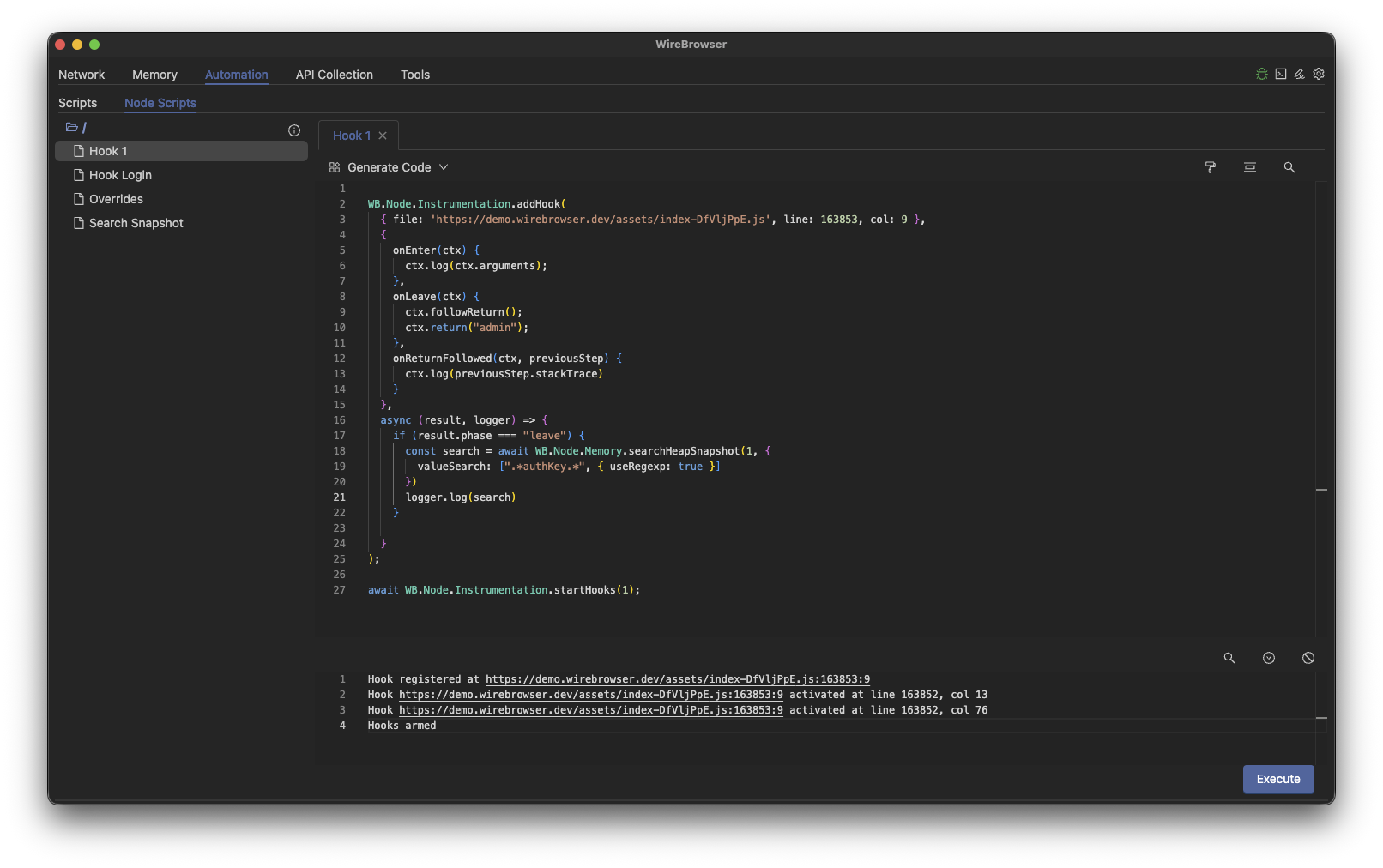
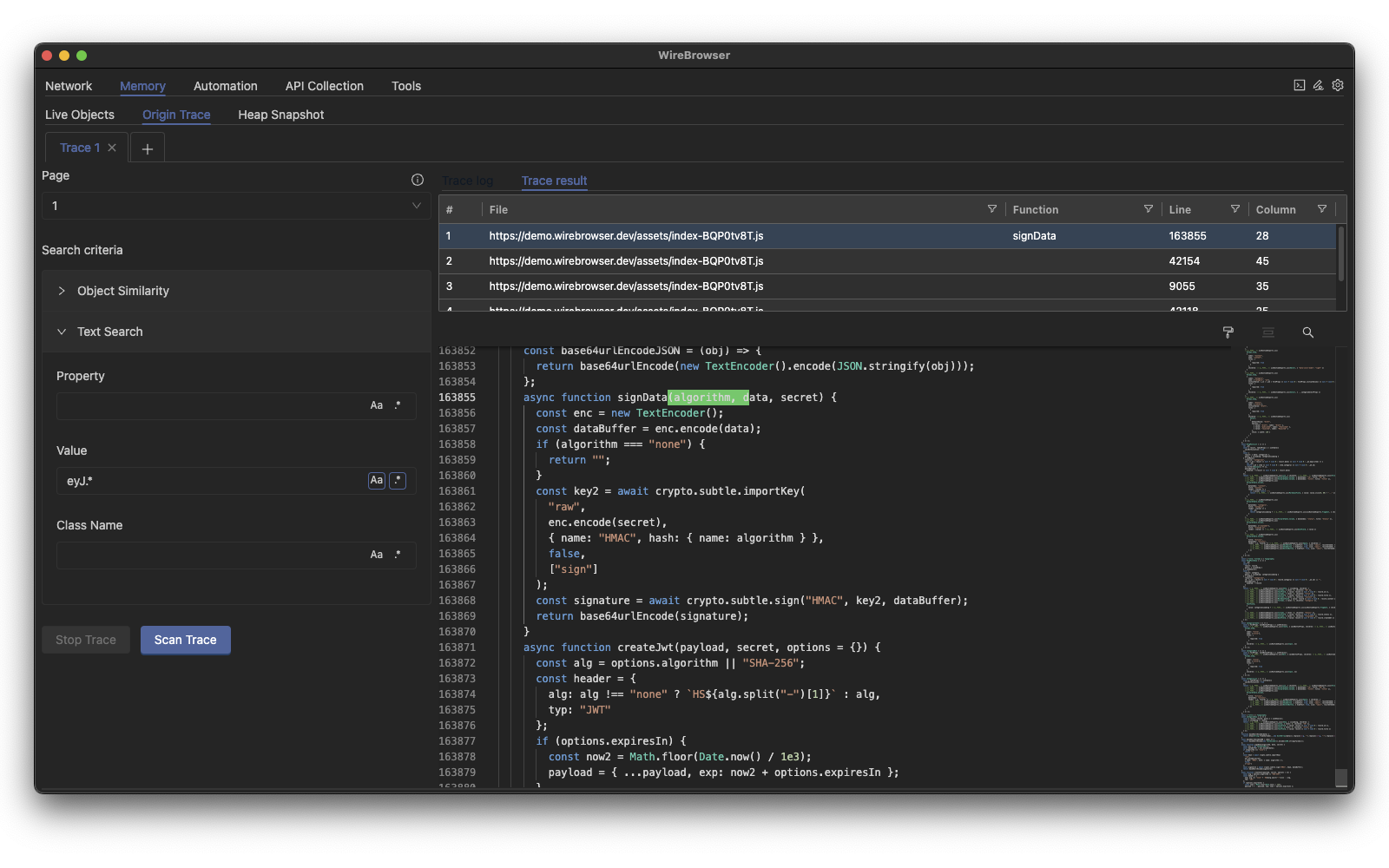
Automatically identify the function responsible for creating or mutating a value.
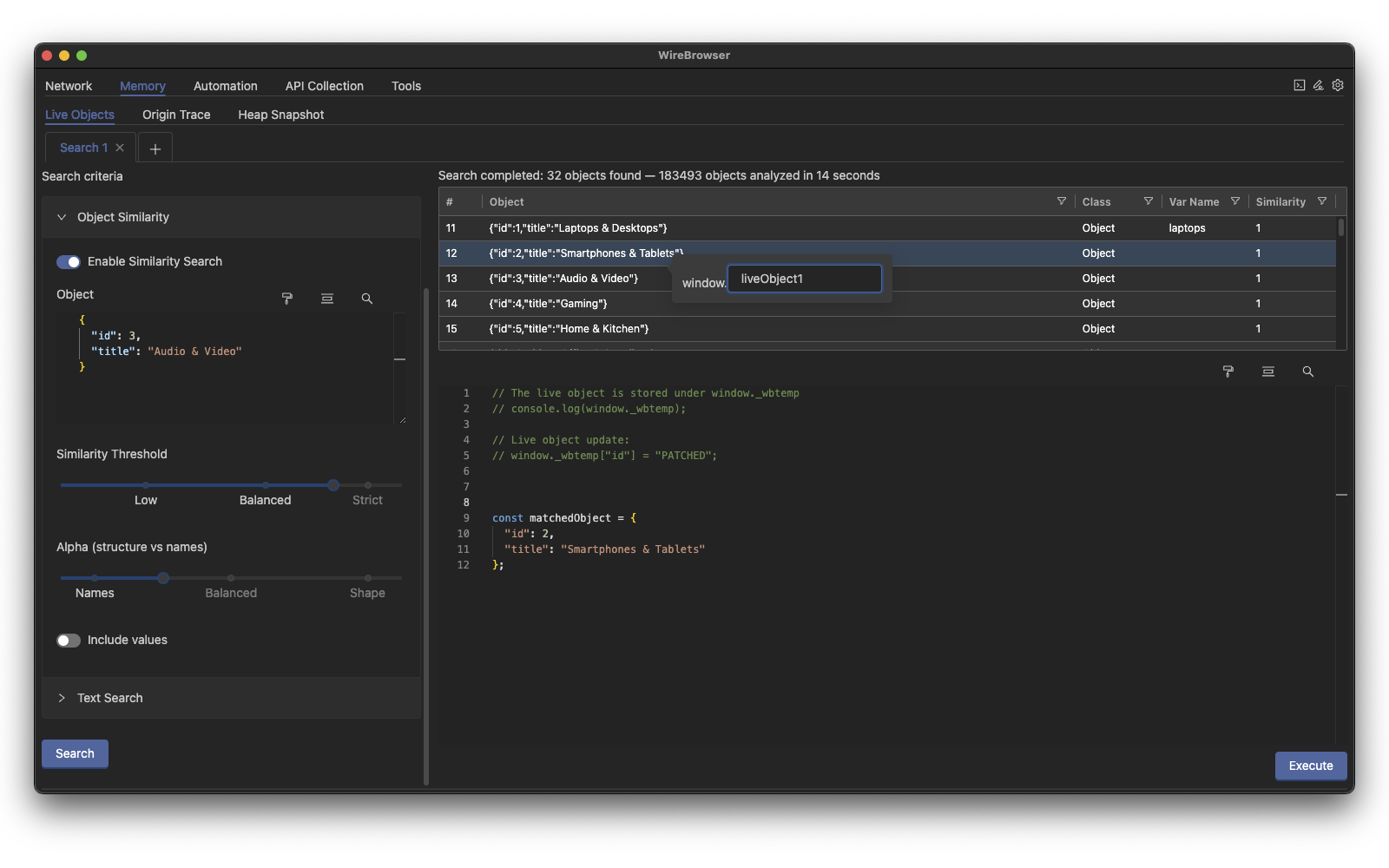
Search and patch live JS objects using regex or structural matching.
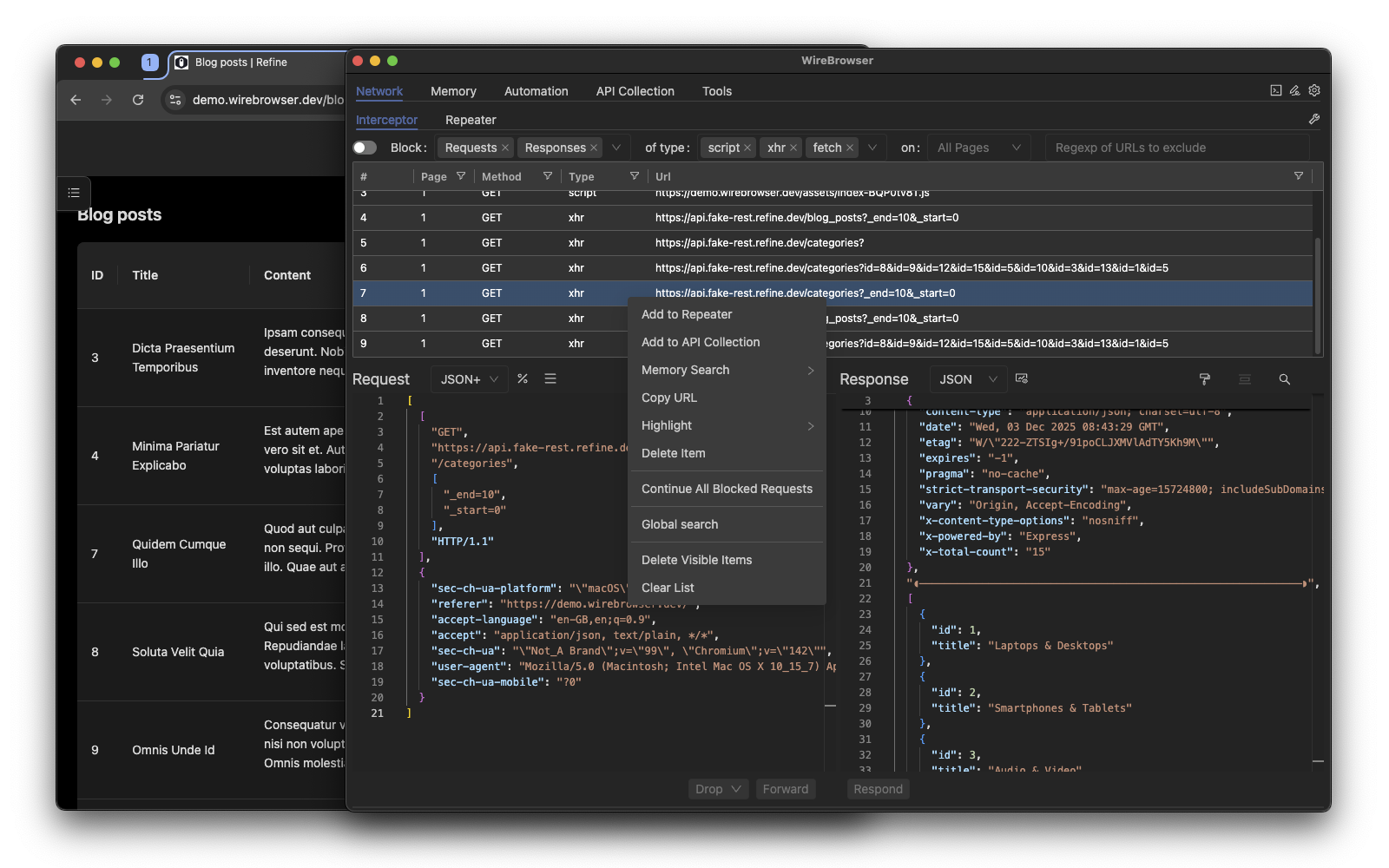
Intercept, rewrite, block, and replay HTTP requests and responses.
Pre-built desktop applications are available for:
You can download the latest builds from the GitHub Releases page:
👉 https://github.com/fcavallarin/wirebrowser/releases
If you prefer to run Wirebrowser from source:
git clone https://github.com/fcavallarin/wirebrowser.git
cd wirebrowser
npm install
npm run build
npm run wirebrowser
On some Linux distributions, Electron may fail to start due to process sandboxing restrictions, showing errors such as:
The SUID sandbox helper binary was found, but is not configured correctly.
This is a known issue in Electron ([https://github.com/electron/electron/issues/42510]).
The most common solution is to disable AppArmor restrictions:
sudo sysctl -w kernel.apparmor_restrict_unprivileged_userns=0
When running Wirebrowser on Linux via the AppImage, Chromium security policies require unpacked extensions to be stored in a visible (non-hidden) directory.
For this reason, the Wirebrowser Chrome extension is installed in:
~/wirebrowser/chrome-extension
This behavior is intentional and required for Chromium to load the extension correctly.
⚠️ Do not move, rename, or hide this directory, otherwise the extension will fail to load.
Most Wirebrowser actions can be performed either globally (across all open tabs/pages) or targeted to a single tab. This lets you choose whether a rule or inspection should affect the whole browser session or only a specific page.
Every tab/page opened by Wirebrowser has a unique integer tabId. Use this tabId to scope actions.
UI Notes
Contributions and pull requests are welcome!
Open an issue or pull request — even small suggestions help improve Wirebrowser.
Wirebrowser™ is distributed under the MIT License.
See the LICENSE file for more details.
3,107 followers · starred Dec 2025
32,150 followers · starred Dec 2025
831 followers · starred Dec 2025
475 followers · starred Dec 2025
Wirebrowser is a CDP-based runtime instrumentation platform for the browser. Think Frida, but for JavaScript running in Chrome — without monkeypatching.
See the code
Wirebrowser is a runtime instrumentation platform for JavaScript the browser, built on top of the Chrome DevTools Protocol (CDP).
It brings some Frida-like capabilities to Chrome — hooking functions, inspecting runtime state, search memory, and modifying behavior without monkeypatching.
Wirebrowser lets you observe, intercept, and modify execution at runtime, even inside closures and non-global scopes that are normally unreachable.
It is designed for:
Core capabilities include:
Unlike traditional tools, Wirebrowser focuses on causality and execution flow, not just inspection.
Wirebrowser is built around one core idea:
Move from inspection → to runtime control
Hook functions at runtime using CDP breakpoints — without modifying source code.
window)No monkeypatching. No fragile overrides.
Understand not just what exists, but where it comes from.
This bridges the causality gap in traditional debugging.
Intercept and modify inputs, then observe their effects in runtime:
Traditional tools answer:
“What is happening?”
Wirebrowser answers:
“Where did this come from, and how can I change it?”
Below is a quick visual tour of Wirebrowser’s most distinctive capabilities.
A short walkthrough of Wirebrowser’s advanced memory-analysis capabilities:
Hook functions at runtime using CDP breakpoints — without modifying source code.
window)
Automatically identify the function responsible for creating or mutating a value.
Search and patch live JS objects using regex or structural matching.
Intercept, rewrite, block, and replay HTTP requests and responses.
Pre-built desktop applications are available for:
You can download the latest builds from the GitHub Releases page:
👉 https://github.com/fcavallarin/wirebrowser/releases
If you prefer to run Wirebrowser from source:
git clone https://github.com/fcavallarin/wirebrowser.git
cd wirebrowser
npm install
npm run build
npm run wirebrowser
On some Linux distributions, Electron may fail to start due to process sandboxing restrictions, showing errors such as:
The SUID sandbox helper binary was found, but is not configured correctly.
This is a known issue in Electron ([https://github.com/electron/electron/issues/42510]).
The most common solution is to disable AppArmor restrictions:
sudo sysctl -w kernel.apparmor_restrict_unprivileged_userns=0
When running Wirebrowser on Linux via the AppImage, Chromium security policies require unpacked extensions to be stored in a visible (non-hidden) directory.
For this reason, the Wirebrowser Chrome extension is installed in:
~/wirebrowser/chrome-extension
This behavior is intentional and required for Chromium to load the extension correctly.
⚠️ Do not move, rename, or hide this directory, otherwise the extension will fail to load.
Most Wirebrowser actions can be performed either globally (across all open tabs/pages) or targeted to a single tab. This lets you choose whether a rule or inspection should affect the whole browser session or only a specific page.
Every tab/page opened by Wirebrowser has a unique integer tabId. Use this tabId to scope actions.
UI Notes
Contributions and pull requests are welcome!
Open an issue or pull request — even small suggestions help improve Wirebrowser.
Wirebrowser™ is distributed under the MIT License.
See the LICENSE file for more details.
3,107 followers · starred Dec 2025
32,150 followers · starred Dec 2025
831 followers · starred Dec 2025
475 followers · starred Dec 2025