We estimate dense, flicker-free, geometrically consistent depth from monocular video, for example hand-held cell phone video.
Python
1,634
0 commits
updated Jul 23, 2023

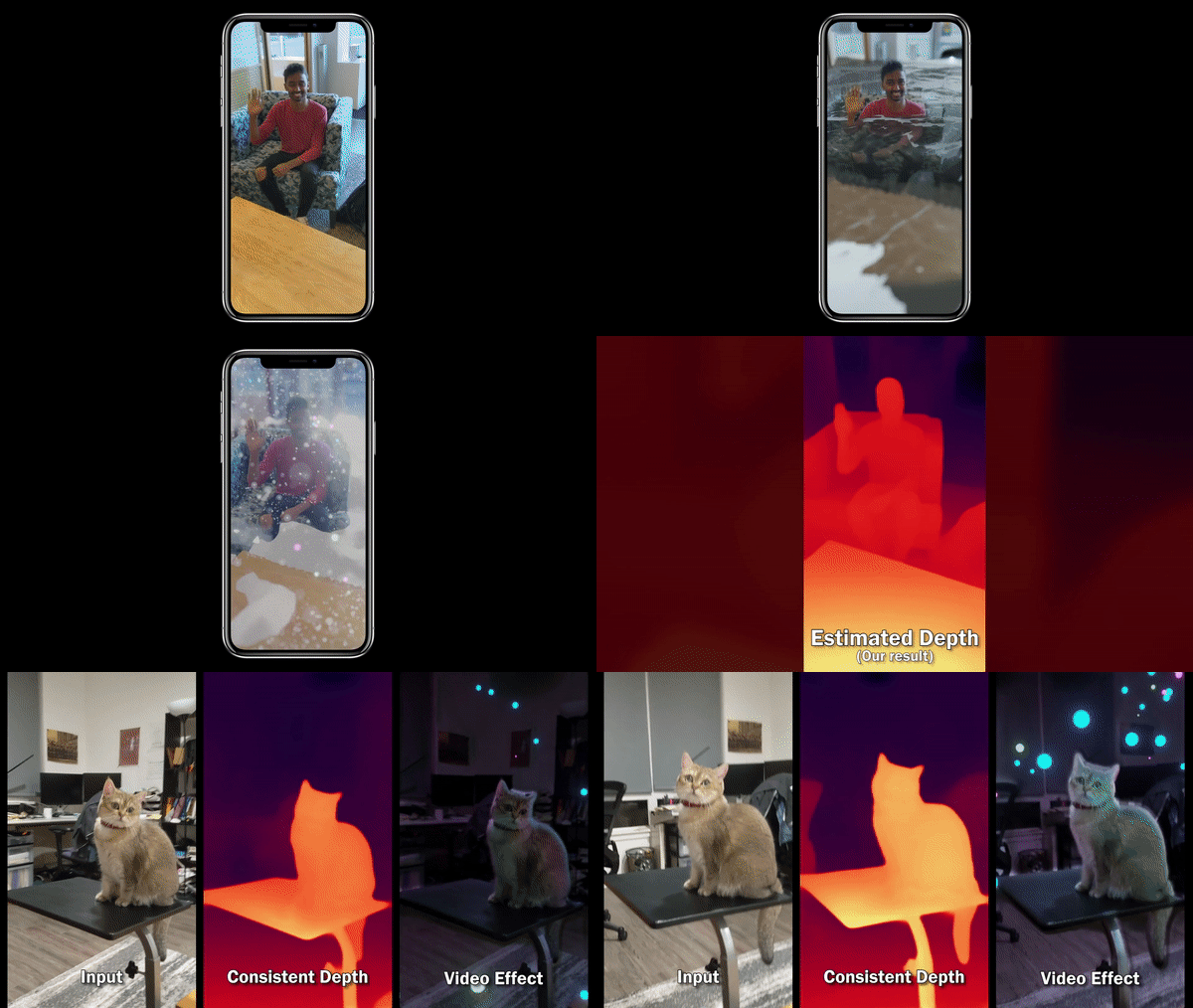
We present an algorithm for reconstructing dense, geometrically consistent depth for all pixels in a monocular video. We leverage a conventional structure-from-motion reconstruction to establish geometric constraints on pixels in the video. Unlike the ad-hoc priors in classical reconstruction, we use a learning-based prior, i.e., a convolutional neural network trained for single-image depth estimation. At test time, we fine-tune this network to satisfy the geometric constraints of a particular input video, while retaining its ability to synthesize plausible depth details in parts of the video that are less constrained. We show through quantitative validation that our method achieves higher accuracy and a higher degree of geometric consistency than previous monocular reconstruction methods. Visually, our results appear more stable. Our algorithm is able to handle challenging hand-held captured input videos with a moderate degree of dynamic motion. The improved quality of the reconstruction enables several applications, such as scene reconstruction and advanced video-based visual effects.
Consistent Video Despth Estimation
Xuan Luo,
Jia-Bin Huang,
Richard Szeliski,
Kevin Matzen, and
Johannes Kopf
In SIGGRAPH 2020.
git submodule update --init --recursive
conda create -n consistent_depth python=3.6
conda activate consistent_depth
./scripts/install.sh
./scripts/install_colmap_ubuntu.sh.You can run the following demo without installing COLMAP. The demo takes 37 min when tested on one NVIDIA GeForce RTX 2080 GPU.
./scripts/download_model.sh
./scripts/download_demo.sh results/ayush
python main.py --video_file data/videos/ayush.mp4 --path results/ayush \
  --camera_params "1671.770118, 540, 960" --camera_model "SIMPLE_PINHOLE" \
  --make_video
1671.770118, 540, 960 is camera intrinsics (f, cx, cy) and SIMPLE_PINHOLE is the camera model.tensorboard --logdir results/ayush/R_hierarchical2_mc/B0.1_R1.0_PL1-0_LR0.0004_BS4_Oadam/tensorboard/
results/ayush/R_hierarchical2_mc
  videos/
    color_depth_mc_depth_colmap_dense_B0.1_R1.0_PL1-0_LR0.0004_BS4_Oadam.mp4    # comparison of disparity maps from mannequin challenge, COLMAP and ours
  B0.1_R1.0_PL1-0_LR0.0004_BS4_Oadam/
    depth/                      # final disparity maps
    checkpoints/0020.pth        # final checkpoint
    eval/                       # disparity maps and losses after each epoch of training
The demo runs everything including flow estimation, test-time training, etc. except the COLMAP part for quick demonstration and ease of installation.
To enable testing the COLMAP part, you can delete results/ayush/colmap_dense and results/ayush/depth_colmap_dense.
And then run the python command above again.
Please refer to params.py or run python main.py --help for the full list of parameters.
Here I demonstrate some examples for common usage of the system.
$video_file_path.PINHOLE (fx, fy, cx, cy) or SIMPLE_PINHOLE (f, cx, cy) model.
Camera intrinsics calibration is optional but suggested for more accurate and faster camera registration.
We typically calibrate the camera by capturing a video of a textured plane with really slow camera motion while trying to let target features
cover the full field of view, selecting non-blurry frames, running COLMAP on these images.python main.py --video_file $video_file_path --path $output_path --make_video
PINHOLE model and fx, fy, cx, cy = 1660.161322, 1600, 540, 960
python main.py --video_file $video_file_path --path $output_path \
  --camera_model "PINHOLE" --camera_params "1660.161322, 1600, 540, 960" \
  --make_video
python main.py --video_file $video_file_path --path $output_path \
  --camera_model "PINHOLE" --camera_params "1660.161322, 1600, 540, 960" \
  --make_video --model_type "${model_type}"
mc (Mannequin Challenge by Zhang et al. 2019),
, midas2 (MiDaS by Ranftl el al. 2019)
and monodepth2 (Monodepth2 by Godard et al. 2019).We rely on COLMAP to for camera pose registration. If you have precomputed camera poses instead,
you can provide them to the system in folder $path as follows.
(Example file structure of $path see here.)
color_full/frame_%06d.png.frame.txt of format (example see here):
number_of_frames
width
height
frame_000000_timestamp_in_seconds
frame_000001_timestamp_in_seconds
...
images.txt, cameras.txt and points3D.txt (or .bin) under colmap_dense/pose_init/.
Note that the POINTS2D in images.txt and the points3D.txt can be empty.python main.py --path $path --initialize_pose
To get better pose for dynamic scene, you can mask out dynamic objects when extracting features with COLMAP. Note COLMAP >= 3.6 is required to extract features in masked regions.
Extract frames
python main.py --video_file $video_file_path --path $output_path --op extract_frames
Run your favourite segmentation method (e.g., Mask-RCNN)
on images in $output_path/color_full to extract binary mask for dynamic objects (e.g., human).
No features will be extracted in regions, where the mask image is black (pixel intensity value 0 in grayscale).
Following COLMAP document,
save the mask of frame $output_path/color_full/frame_000010.png, for instance, at $output_path/mask/frame_000010.png.png.
Run the rest of the pipeline.
python main.py --path $output_path --mask_path $output_path/mask \
  --camera_model "${camera_model}" --camera_params "${camera_intrinsics}" \
  --make_video
The result folder is of the following structure. Lots of files are saved only for debugging purposes.
frames.txt              # meta data about number of frames, image resolution and timestamps for each frame
color_full/             # extracted frames in the original resolution
color_down/             # extracted frames in the resolution for disparity estimation
color_down_png/
color_flow/             # extracted frames in the resolution for flow estimation
flow_list.json          # indices of frame pairs to finetune the model with
flow/                   # optical flow
mask/                   # mask of consistent flow estimation between frame pairs.
vis_flow/               # optical flow visualization. Green regions contain inconsistent flow.
vis_flow_warped/        # visualzing flow accuracy by warping one frame to another using the estimated flow. e.g., frame_000000_000032_warped.png warps frame_000032 to frame_000000.
colmap_dense/           # COLMAP results
    metadata.npz        # camera intrinsics and extrinsics converted from COLMAP sparse reconstruction.
    sparse/             # COLMAP sparse reconstruction
    dense/              # COLMAP dense reconstruction
depth_colmap_dense/     # COLMAP dense depth maps converted to disparity maps in .raw format
depth_${model_type}/    # initial disparity estimation using the original monocular depth model before test-time training
R_hierarchical2_${model_type}/
    flow_list_0.20.json                 # indices of frame pairs passing overlap ratio test of threshold 0.2. Same content as ../flow_list.json.
    metadata_scaled.npz                 # camera intrinsics and extrinsics after scale calibration. It is the camera parameters used in the test-time training process.
    scales.csv                          # frame indices and corresponding scales between initial monocular disparity estimation and COLMAP dense disparity maps.
    depth_scaled_by_colmap_dense/       # monocular disparity estimation scaled to match COLMAP disparity results
    vis_calibration_dense/              # for debugging scale calibration. frame_000000_warped_to_000029.png warps frame_000000 to frame_000029 by scaled camera translations and disparity maps from initial monocular depth estimation.
    videos/                             # video visualization of results
    B0.1_R1.0_PL1-0_LR0.0004_BS4_Oadam/
        checkpoints/                    # checkpoint after each epoch
        depth/                          # final disparity map results after finishing test-time training
        eval/                           # intermediate losses and disparity maps after each epoch
        tensorboard/                    # tensorboard log for the test-time training process
If you find our code useful, please consider citing our paper:
@article{Luo-VideoDepth-2020,
  author    = {Luo, Xuan and Huang, Jia{-}Bin and Szeliski, Richard and Matzen, Kevin and Kopf, Johannes},
  title     = {Consistent Video Depth Estimation},
  booktitle = {ACM Transactions on Graphics (Proceedings of ACM SIGGRAPH)},
  publisher = {ACM},
  volume = {39},
  number = {4},
  year = {2020}
}
This work is licensed under MIT License. See LICENSE for details.
We would like to thank Patricio Gonzales Vivo, Dionisio Blanco, and Ocean Quigley for creating the artistic effects in the accompanying video. We thank True Price for his practical and insightful advice on reconstruction and Ayush Saraf for his suggestions in engineering.
683 followers · starred Aug 2020
354 followers · starred Nov 2020
196 followers · starred Oct 2022
2,031 followers · starred Aug 2020
We estimate dense, flicker-free, geometrically consistent depth from monocular video, for example hand-held cell phone video.
Python
1,634
0 commits
updated Jul 23, 2023
We present an algorithm for reconstructing dense, geometrically consistent depth for all pixels in a monocular video. We leverage a conventional structure-from-motion reconstruction to establish geometric constraints on pixels in the video. Unlike the ad-hoc priors in classical reconstruction, we use a learning-based prior, i.e., a convolutional neural network trained for single-image depth estimation. At test time, we fine-tune this network to satisfy the geometric constraints of a particular input video, while retaining its ability to synthesize plausible depth details in parts of the video that are less constrained. We show through quantitative validation that our method achieves higher accuracy and a higher degree of geometric consistency than previous monocular reconstruction methods. Visually, our results appear more stable. Our algorithm is able to handle challenging hand-held captured input videos with a moderate degree of dynamic motion. The improved quality of the reconstruction enables several applications, such as scene reconstruction and advanced video-based visual effects.
Consistent Video Despth Estimation
Xuan Luo,
Jia-Bin Huang,
Richard Szeliski,
Kevin Matzen, and
Johannes Kopf
In SIGGRAPH 2020.
git submodule update --init --recursive
conda create -n consistent_depth python=3.6
conda activate consistent_depth
./scripts/install.sh
./scripts/install_colmap_ubuntu.sh.You can run the following demo without installing COLMAP. The demo takes 37 min when tested on one NVIDIA GeForce RTX 2080 GPU.
./scripts/download_model.sh
./scripts/download_demo.sh results/ayush
python main.py --video_file data/videos/ayush.mp4 --path results/ayush \
  --camera_params "1671.770118, 540, 960" --camera_model "SIMPLE_PINHOLE" \
  --make_video
1671.770118, 540, 960 is camera intrinsics (f, cx, cy) and SIMPLE_PINHOLE is the camera model.tensorboard --logdir results/ayush/R_hierarchical2_mc/B0.1_R1.0_PL1-0_LR0.0004_BS4_Oadam/tensorboard/
results/ayush/R_hierarchical2_mc
  videos/
    color_depth_mc_depth_colmap_dense_B0.1_R1.0_PL1-0_LR0.0004_BS4_Oadam.mp4    # comparison of disparity maps from mannequin challenge, COLMAP and ours
  B0.1_R1.0_PL1-0_LR0.0004_BS4_Oadam/
    depth/                      # final disparity maps
    checkpoints/0020.pth        # final checkpoint
    eval/                       # disparity maps and losses after each epoch of training
The demo runs everything including flow estimation, test-time training, etc. except the COLMAP part for quick demonstration and ease of installation.
To enable testing the COLMAP part, you can delete results/ayush/colmap_dense and results/ayush/depth_colmap_dense.
And then run the python command above again.
Please refer to params.py or run python main.py --help for the full list of parameters.
Here I demonstrate some examples for common usage of the system.
$video_file_path.PINHOLE (fx, fy, cx, cy) or SIMPLE_PINHOLE (f, cx, cy) model.
Camera intrinsics calibration is optional but suggested for more accurate and faster camera registration.
We typically calibrate the camera by capturing a video of a textured plane with really slow camera motion while trying to let target features
cover the full field of view, selecting non-blurry frames, running COLMAP on these images.python main.py --video_file $video_file_path --path $output_path --make_video
PINHOLE model and fx, fy, cx, cy = 1660.161322, 1600, 540, 960
python main.py --video_file $video_file_path --path $output_path \
  --camera_model "PINHOLE" --camera_params "1660.161322, 1600, 540, 960" \
  --make_video
python main.py --video_file $video_file_path --path $output_path \
  --camera_model "PINHOLE" --camera_params "1660.161322, 1600, 540, 960" \
  --make_video --model_type "${model_type}"
mc (Mannequin Challenge by Zhang et al. 2019),
, midas2 (MiDaS by Ranftl el al. 2019)
and monodepth2 (Monodepth2 by Godard et al. 2019).We rely on COLMAP to for camera pose registration. If you have precomputed camera poses instead,
you can provide them to the system in folder $path as follows.
(Example file structure of $path see here.)
color_full/frame_%06d.png.frame.txt of format (example see here):
number_of_frames
width
height
frame_000000_timestamp_in_seconds
frame_000001_timestamp_in_seconds
...
images.txt, cameras.txt and points3D.txt (or .bin) under colmap_dense/pose_init/.
Note that the POINTS2D in images.txt and the points3D.txt can be empty.python main.py --path $path --initialize_pose
To get better pose for dynamic scene, you can mask out dynamic objects when extracting features with COLMAP. Note COLMAP >= 3.6 is required to extract features in masked regions.
Extract frames
python main.py --video_file $video_file_path --path $output_path --op extract_frames
Run your favourite segmentation method (e.g., Mask-RCNN)
on images in $output_path/color_full to extract binary mask for dynamic objects (e.g., human).
No features will be extracted in regions, where the mask image is black (pixel intensity value 0 in grayscale).
Following COLMAP document,
save the mask of frame $output_path/color_full/frame_000010.png, for instance, at $output_path/mask/frame_000010.png.png.
Run the rest of the pipeline.
python main.py --path $output_path --mask_path $output_path/mask \
  --camera_model "${camera_model}" --camera_params "${camera_intrinsics}" \
  --make_video
The result folder is of the following structure. Lots of files are saved only for debugging purposes.
frames.txt              # meta data about number of frames, image resolution and timestamps for each frame
color_full/             # extracted frames in the original resolution
color_down/             # extracted frames in the resolution for disparity estimation
color_down_png/
color_flow/             # extracted frames in the resolution for flow estimation
flow_list.json          # indices of frame pairs to finetune the model with
flow/                   # optical flow
mask/                   # mask of consistent flow estimation between frame pairs.
vis_flow/               # optical flow visualization. Green regions contain inconsistent flow.
vis_flow_warped/        # visualzing flow accuracy by warping one frame to another using the estimated flow. e.g., frame_000000_000032_warped.png warps frame_000032 to frame_000000.
colmap_dense/           # COLMAP results
    metadata.npz        # camera intrinsics and extrinsics converted from COLMAP sparse reconstruction.
    sparse/             # COLMAP sparse reconstruction
    dense/              # COLMAP dense reconstruction
depth_colmap_dense/     # COLMAP dense depth maps converted to disparity maps in .raw format
depth_${model_type}/    # initial disparity estimation using the original monocular depth model before test-time training
R_hierarchical2_${model_type}/
    flow_list_0.20.json                 # indices of frame pairs passing overlap ratio test of threshold 0.2. Same content as ../flow_list.json.
    metadata_scaled.npz                 # camera intrinsics and extrinsics after scale calibration. It is the camera parameters used in the test-time training process.
    scales.csv                          # frame indices and corresponding scales between initial monocular disparity estimation and COLMAP dense disparity maps.
    depth_scaled_by_colmap_dense/       # monocular disparity estimation scaled to match COLMAP disparity results
    vis_calibration_dense/              # for debugging scale calibration. frame_000000_warped_to_000029.png warps frame_000000 to frame_000029 by scaled camera translations and disparity maps from initial monocular depth estimation.
    videos/                             # video visualization of results
    B0.1_R1.0_PL1-0_LR0.0004_BS4_Oadam/
        checkpoints/                    # checkpoint after each epoch
        depth/                          # final disparity map results after finishing test-time training
        eval/                           # intermediate losses and disparity maps after each epoch
        tensorboard/                    # tensorboard log for the test-time training process
If you find our code useful, please consider citing our paper:
@article{Luo-VideoDepth-2020,
  author    = {Luo, Xuan and Huang, Jia{-}Bin and Szeliski, Richard and Matzen, Kevin and Kopf, Johannes},
  title     = {Consistent Video Depth Estimation},
  booktitle = {ACM Transactions on Graphics (Proceedings of ACM SIGGRAPH)},
  publisher = {ACM},
  volume = {39},
  number = {4},
  year = {2020}
}
This work is licensed under MIT License. See LICENSE for details.
We would like to thank Patricio Gonzales Vivo, Dionisio Blanco, and Ocean Quigley for creating the artistic effects in the accompanying video. We thank True Price for his practical and insightful advice on reconstruction and Ayush Saraf for his suggestions in engineering.
683 followers · starred Aug 2020
354 followers · starred Nov 2020
196 followers · starred Oct 2022
2,031 followers · starred Aug 2020



