
Training Large Language Model to Reason in a Continuous Latent Space
Python
1,711
4 commits
updated Jul 2, 2026
README
Coconut
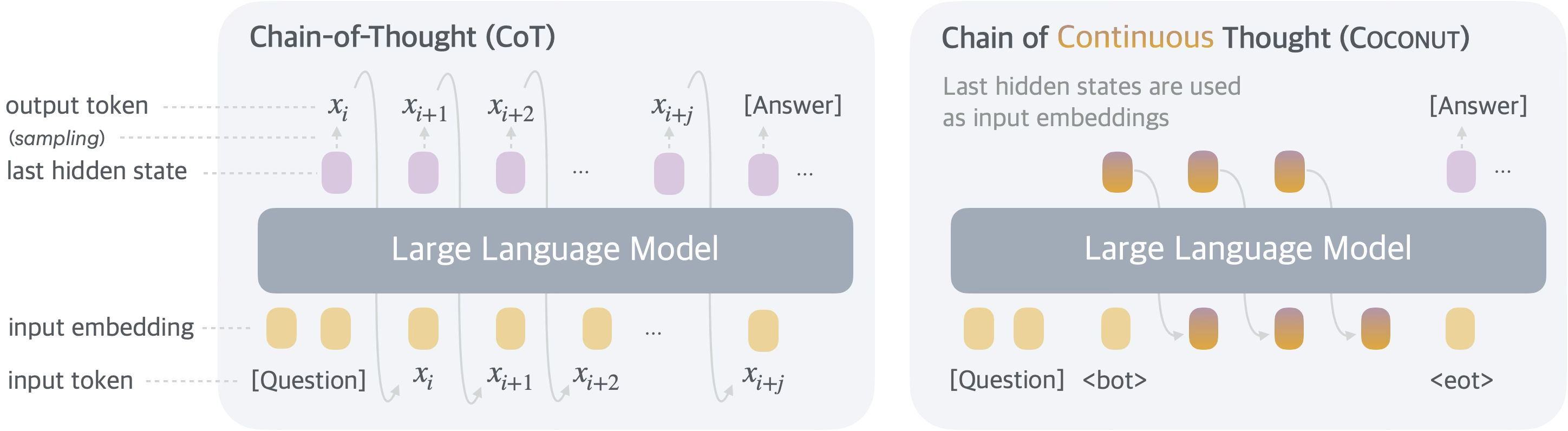
The code base is the official implementation of Training Large Language Models to Reason in a Continuous Latent Space.
Getting Started
Clone repo:
git clone git@github.com:facebookresearch/coconut.git
cd coconut
Setup environment:
conda create --name coconut python=3.12
conda activate coconut
pip install -r requirements.txt
The code relies on wandb for logging. Please log in your wandb account following this document before running any experiments.
Data
The data for training and evaluation should be presented as a json file like below:
[
  {
    "question": "...",
    "answer": "...",
    "steps": ["...", "...", ...]
  },
  ...
]
The file should contain a list of data points. Each data point is composed of a question (str), an answer (str), and a list of steps (str), where each of them is a string.
For example, you can download and process the GSM8K dataset (with augmented training and validation sets) by running:
bash preprocessing/gsm_icot.bash
Arguments
The configuration of a run should be specified in a yaml file (an example can be found here).
-
General settings
- project: Project name for wandb
- save_path: Your path to store the checkpoints
- only_eval: If true, only load a model and test on the data from
val_path(must used along withload_model_path). Otherwise, train the model ontrain_pathand test onval_pathafter every epoch.
-
Method
- coconut: Train coconut model
- cot: Train cot model
- no_thoughts: Train coconut (w/o thought) model
- no_cot: Train no-cot model
-
Training settings
- c_thought: Number of continuous thoughts for each reasoning step
- epochs_per_stage: Number of epochs for every training stage
- max_latent_stage: The maximum number of training stages (in addition to the initial stage)
- pad_latent_to_max: If the number of reasoning steps is fewer than the index of current training stage, pad the number of continuous thoughts.
- save_only_improve: Save the model only when there the best validation accuracy is updated. Recommended to set
Falsefor Coconut model training, because otherwise the checkpoints in the last stage might now get saved. - uniform_prob: The probability to mix data from other stages. 0 for standard experiment, 0.3 for analysis experiment.
- model_id: Huggingface model id to load as the initialization, e.g.,
openai-community/gpt2 - load_model_path: The path to a checkpoint to load. Used in two cases: (1) for evaluation (2) to initialize coconut from a CoT-tuned model.
- seed: Random seed.
- resume: The epoch to resume. Can be used when we want to skip the initial training stages.
- bf16: Whether to use bf16 training.
- train_path: Path to the training set.
- val_path: Path to the validation or test set (depending on
only_eval) - reset_optimizer: Whether to reset the optimizer when swtiching training stages.
- batch_size_training: Batch size to train the model per GPU.
- debug: If true, there is no wandb and model saving. A subset of data will be used.
- gradient_accumulation_steps: Gradient accumulation steps
- num_epochs: Maximum training epoches.
- lr: Learning rate
- weight_decay: Weight decay
Training
Run the following commands (replacing N_GPUS and PATH_TO_ARGS):
torchrun --nnodes 1 --nproc_per_node N_GPUS run.py PATH_TO_ARGS
Reproducing Experiments
Here we provide instructions to reproduce our experiments in the paper.
All the commands below assume 4 * A100 (80GB) GPUs. You may change the corresponding arguments in the config file (batch_size_training, gradient_accumulation_steps) and nproc_per_node when launching the run, to adapt your resources.
GSM8K
Preprocessing data:
bash preprocessing/gsm_icot.bash
First train the model with CoT (as the stage 0 training)
torchrun --nnodes 1 --nproc_per_node 4 run.py args/gsm_cot.yaml
Select a checkpoint as the initialization of Coconut (the validation accuracy is expected to be around 40%). Replace the load_model_path in the args/gsm_coconut.yaml with your selected checkpoint, and run:
torchrun --nnodes 1 --nproc_per_node 4 run.py args/gsm_coconut.yaml
Find the checkpoint with best validation accuracy, and put the path as load_model_path in args/gsm_coconut_eval.yaml. To evaluate:
torchrun --nnodes 1 --nproc_per_node 4 run.py args/gsm_coconut_eval.yaml
ProntoQA
Please clone the official github repo of ProntoQA and generate a raw dataset with:
cd prontoqa
python run_experiment.py --model-name json --model-size dummy --ordering random --num-trials 10000 --few-shot-examples 0 --ontology fictional --min-hops 5 --max-hops 5 --hops-skip 1
Then copy the generated 5hop_0shot_random.json file to data directory, and preprocess the dataset with:
python preprocessing/prontoqa.py
Then run the following to train the model:
torchrun --nnodes 1 --nproc_per_node 4 run.py args/prontoqa_coconut.yaml
Find the checkpoint with best validation accuracy, and put the path as load_model_path in args/prosqa_coconut_eval.yaml. To evaluate:
torchrun --nnodes 1 --nproc_per_node 4 run.py args/prosqa_coconut_eval.yaml
ProsQA
The ProsQA dataset is at data/prosqa_*.json.
Then run the following to train the model:
torchrun --nnodes 1 --nproc_per_node 4 run.py args/prosqa_coconut.yaml
Find the checkpoint with best validation accuracy, and put the path as load_model_path in args/prosqa_coconut_eval.yaml. To evaluate:
torchrun --nnodes 1 --nproc_per_node 4 run.py args/prosqa_coconut_eval.yaml
Citation
If you use this code base in your research, please cite our paper with the following BibTex entry:
@article{hao2024training,
  title={Training Large Language Models to Reason in a Continuous Latent Space},
  author={Hao, Shibo and Sukhbaatar, Sainbayar and Su, DiJia and Li, Xian and Hu, Zhiting and Weston, Jason and Tian, Yuandong},
  journal={arXiv preprint arXiv:2412.06769},
  year={2024}
}
License
This code is released under the MIT license (see LICENSE).
Contributors

3 commits

1 commits
Similar repos


Languages
Python
98.1%
Shell
1.9%
Training Large Language Model to Reason in a Continuous Latent Space
Python
1,711
4 commits
updated Jul 2, 2026
README
Coconut
The code base is the official implementation of Training Large Language Models to Reason in a Continuous Latent Space.
Getting Started
Clone repo:
git clone git@github.com:facebookresearch/coconut.git
cd coconut
Setup environment:
conda create --name coconut python=3.12
conda activate coconut
pip install -r requirements.txt
The code relies on wandb for logging. Please log in your wandb account following this document before running any experiments.
Data
The data for training and evaluation should be presented as a json file like below:
[
  {
    "question": "...",
    "answer": "...",
    "steps": ["...", "...", ...]
  },
  ...
]
The file should contain a list of data points. Each data point is composed of a question (str), an answer (str), and a list of steps (str), where each of them is a string.
For example, you can download and process the GSM8K dataset (with augmented training and validation sets) by running:
bash preprocessing/gsm_icot.bash
Arguments
The configuration of a run should be specified in a yaml file (an example can be found here).
-
General settings
- project: Project name for wandb
- save_path: Your path to store the checkpoints
- only_eval: If true, only load a model and test on the data from
val_path(must used along withload_model_path). Otherwise, train the model ontrain_pathand test onval_pathafter every epoch.
-
Method
- coconut: Train coconut model
- cot: Train cot model
- no_thoughts: Train coconut (w/o thought) model
- no_cot: Train no-cot model
-
Training settings
- c_thought: Number of continuous thoughts for each reasoning step
- epochs_per_stage: Number of epochs for every training stage
- max_latent_stage: The maximum number of training stages (in addition to the initial stage)
- pad_latent_to_max: If the number of reasoning steps is fewer than the index of current training stage, pad the number of continuous thoughts.
- save_only_improve: Save the model only when there the best validation accuracy is updated. Recommended to set
Falsefor Coconut model training, because otherwise the checkpoints in the last stage might now get saved. - uniform_prob: The probability to mix data from other stages. 0 for standard experiment, 0.3 for analysis experiment.
- model_id: Huggingface model id to load as the initialization, e.g.,
openai-community/gpt2 - load_model_path: The path to a checkpoint to load. Used in two cases: (1) for evaluation (2) to initialize coconut from a CoT-tuned model.
- seed: Random seed.
- resume: The epoch to resume. Can be used when we want to skip the initial training stages.
- bf16: Whether to use bf16 training.
- train_path: Path to the training set.
- val_path: Path to the validation or test set (depending on
only_eval) - reset_optimizer: Whether to reset the optimizer when swtiching training stages.
- batch_size_training: Batch size to train the model per GPU.
- debug: If true, there is no wandb and model saving. A subset of data will be used.
- gradient_accumulation_steps: Gradient accumulation steps
- num_epochs: Maximum training epoches.
- lr: Learning rate
- weight_decay: Weight decay
Training
Run the following commands (replacing N_GPUS and PATH_TO_ARGS):
torchrun --nnodes 1 --nproc_per_node N_GPUS run.py PATH_TO_ARGS
Reproducing Experiments
Here we provide instructions to reproduce our experiments in the paper.
All the commands below assume 4 * A100 (80GB) GPUs. You may change the corresponding arguments in the config file (batch_size_training, gradient_accumulation_steps) and nproc_per_node when launching the run, to adapt your resources.
GSM8K
Preprocessing data:
bash preprocessing/gsm_icot.bash
First train the model with CoT (as the stage 0 training)
torchrun --nnodes 1 --nproc_per_node 4 run.py args/gsm_cot.yaml
Select a checkpoint as the initialization of Coconut (the validation accuracy is expected to be around 40%). Replace the load_model_path in the args/gsm_coconut.yaml with your selected checkpoint, and run:
torchrun --nnodes 1 --nproc_per_node 4 run.py args/gsm_coconut.yaml
Find the checkpoint with best validation accuracy, and put the path as load_model_path in args/gsm_coconut_eval.yaml. To evaluate:
torchrun --nnodes 1 --nproc_per_node 4 run.py args/gsm_coconut_eval.yaml
ProntoQA
Please clone the official github repo of ProntoQA and generate a raw dataset with:
cd prontoqa
python run_experiment.py --model-name json --model-size dummy --ordering random --num-trials 10000 --few-shot-examples 0 --ontology fictional --min-hops 5 --max-hops 5 --hops-skip 1
Then copy the generated 5hop_0shot_random.json file to data directory, and preprocess the dataset with:
python preprocessing/prontoqa.py
Then run the following to train the model:
torchrun --nnodes 1 --nproc_per_node 4 run.py args/prontoqa_coconut.yaml
Find the checkpoint with best validation accuracy, and put the path as load_model_path in args/prosqa_coconut_eval.yaml. To evaluate:
torchrun --nnodes 1 --nproc_per_node 4 run.py args/prosqa_coconut_eval.yaml
ProsQA
The ProsQA dataset is at data/prosqa_*.json.
Then run the following to train the model:
torchrun --nnodes 1 --nproc_per_node 4 run.py args/prosqa_coconut.yaml
Find the checkpoint with best validation accuracy, and put the path as load_model_path in args/prosqa_coconut_eval.yaml. To evaluate:
torchrun --nnodes 1 --nproc_per_node 4 run.py args/prosqa_coconut_eval.yaml
Citation
If you use this code base in your research, please cite our paper with the following BibTex entry:
@article{hao2024training,
  title={Training Large Language Models to Reason in a Continuous Latent Space},
  author={Hao, Shibo and Sukhbaatar, Sainbayar and Su, DiJia and Li, Xian and Hu, Zhiting and Weston, Jason and Tian, Yuandong},
  journal={arXiv preprint arXiv:2412.06769},
  year={2024}
}
License
This code is released under the MIT license (see LICENSE).
Similar repos
Contributors
3 commits
1 commits
Languages
Python
98.1%
Shell
1.9%