Generate images locally on your GPU using FLUX.1-schnell or Stable Diffusion, and short videos with Wan2.1 — no external API, no cost per image or clip.
| Prompt | Result |
|---|---|
a cat astronaut on the moon |  |
a samurai cat at sunset | 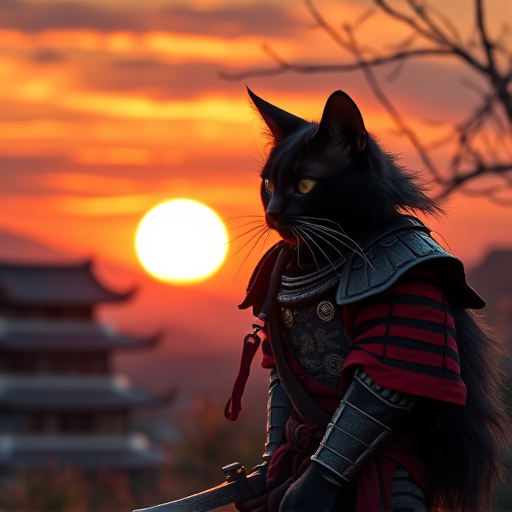 |
cyberpunk city at night | 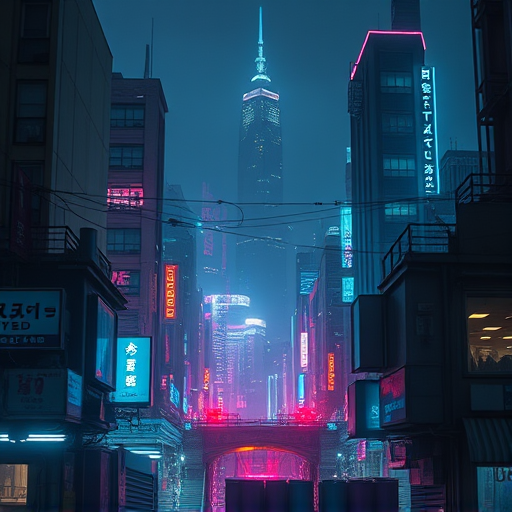 |
a dragon breathing fire over a medieval castle | 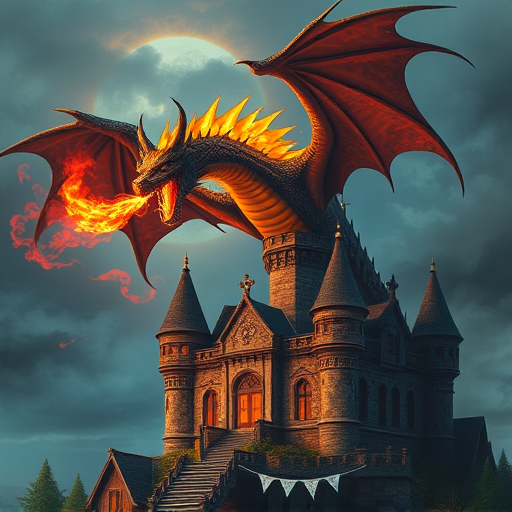 |
Generated locally with FLUX.1-schnell, low quality preset. Speed varies by GPU.
Short clips generated locally with Wan2.1 (Wan-AI/Wan2.1-T2V-1.3B, mid quality):
| Prompt | Result |
|---|---|
a horse standing on a rocky beach at sunset | |
a black cat walking along the shoreline in backlight | |
a black cat standing in shallow surf, yellow-green eyes | |
a glowing blue whale shark swimming in dark water | |
a neon sign glowing pink-purple at night | |
a golden light streak flowing on a dark navy background | |
a flowing gold ribbon on a dark background | |
a small camera robot sitting among lush green plants |
Generated locally with Wan2.1, mid quality preset. ~5s clips at 480P.
/fantasia <prompt> with inline buttonsGenerate a short MP4 clip from a text prompt using Wan-AI/Wan2.1-T2V-1.3B
(~8.19 GB VRAM, 480P, ~4 min for a 5s clip on an RTX 4090):
curl -X POST http://localhost:8765/video \
  -H "Content-Type: application/json" \
  -d '{"prompt":"a cat walking through a neon city at night","quality":"mid"}'
Returns raw video/mp4 bytes. Saved to ~/.openclaw/media/fantasia/videos/<timestamp>.mp4.
| Field | Default | Notes |
|---|---|---|
quality | mid | low (480×480, 49f, 20 steps) · mid (480×832, 81f, 30 steps) · high (480×832, 81f, 50 steps) |
steps | 30 | Inference steps |
num_frames | 81 | 16 fps → 81 ≈ 5s |
guidance_scale | 6.0 | Wan recommends 6.0 |
seed | 42 | Reproducibility |
Model aliases: wan, wan13, wan2.1, wan-1.3b → Wan-AI/Wan2.1-T2V-1.3B
VRAM note: The server auto-unloads the image/Qwen pipelines before loading Wan2.1 to free VRAM, and reloads them on the next image request.
HF_TOKEN in .env (see .env.example)git clone https://github.com/fabiopacifici-bot/open-fantasia-imagegen
cd open-fantasia-imagegen
cp .env.example .env # add your HF_TOKEN
bash setup.sh
setup.sh will:
http://localhost:8765/fantasia a samurai cat at sunset
/fantasia cyberpunk city --quality high
/fantasia quick sketch --quality low --count 3
/fantasia portrait --model klein
/fantasia setup ← first-time setup
Inline buttons: Call /fantasia with no prompt to get model/quality/count selection buttons.
# Generate an image
curl -X POST http://localhost:8765/generate \
  -H "Content-Type: application/json" \
  -d '{"prompt": "a cat in space", "quality": "low", "enhance": true, "count": 1}'

# Health check
curl http://localhost:8765/health
.venv/bin/python src/imagegen.py \
  --prompt "a samurai cat at sunset" \
  --quality low \
  --output output.png
| Preset | Resolution | Steps | Approx. Speed |
|---|---|---|---|
low | 512×512 | 4 | ~1-5 min (GPU dependent) |
mid | 768×768 | 8 | ~3-10 min (GPU dependent) |
high | 1024×1024 | 20 | ~10-20 min (GPU dependent) |
Note: Speed varies significantly by GPU. FLUX runs in BF16 precision. Use torchao autoquant to reduce VRAM usage and improve throughput.
| Flag | Model | VRAM | Notes |
|---|---|---|---|
schnell (default) | black-forest-labs/FLUX.1-schnell | ~16GB | Best quality, BF16 precision |
klein | black-forest-labs/FLUX.2-klein-base-9B | ~16GB | Experimental, lighter |
sd15 | stable-diffusion-v1-5/stable-diffusion-v1-5 | ~4GB | Fast, classic |
turbo | stabilityai/sd-turbo | ~4GB | Near-instant, ~1-3s at 512×512 |
# Start / stop / restart
systemctl --user start fantasia.service
systemctl --user stop fantasia.service
systemctl --user restart fantasia.service

# Status & logs
systemctl --user status fantasia.service
journalctl --user -u fantasia.service -f
Output images are saved to ~/.openclaw/media/fantasia/.
open-fantasia-imagegen/
├── src/
│   ├── server.py       # FastAPI inference server
│   └── imagegen.py     # Pipeline loader + generation logic
├── assets/             # README demo images
├── setup.sh            # First-time setup script
├── .env.example        # Environment variable template
├── requirements.txt
└── .specs/             # Plans, docs, debugging notes
MIT
sd-turbo available as --model turbo (stabilityai/sd-turbo)POST /edit — { "image": "<path>", "instruction": "make the sky purple" }/fantasia edit <image> <instruction>Generate images locally on your GPU using FLUX.1-schnell or Stable Diffusion, and short videos with Wan2.1 — no external API, no cost per image or clip.
| Prompt | Result |
|---|---|
a cat astronaut on the moon | |
a samurai cat at sunset | |
cyberpunk city at night | |
a dragon breathing fire over a medieval castle | |
Generated locally with FLUX.1-schnell, low quality preset. Speed varies by GPU.
Short clips generated locally with Wan2.1 (Wan-AI/Wan2.1-T2V-1.3B, mid quality):
| Prompt | Result |
|---|---|
a horse standing on a rocky beach at sunset | |
a black cat walking along the shoreline in backlight | |
a black cat standing in shallow surf, yellow-green eyes | |
a glowing blue whale shark swimming in dark water | |
a neon sign glowing pink-purple at night | |
a golden light streak flowing on a dark navy background | |
a flowing gold ribbon on a dark background | |
a small camera robot sitting among lush green plants |
Generated locally with Wan2.1, mid quality preset. ~5s clips at 480P.
/fantasia <prompt> with inline buttonsGenerate a short MP4 clip from a text prompt using Wan-AI/Wan2.1-T2V-1.3B
(~8.19 GB VRAM, 480P, ~4 min for a 5s clip on an RTX 4090):
curl -X POST http://localhost:8765/video \
  -H "Content-Type: application/json" \
  -d '{"prompt":"a cat walking through a neon city at night","quality":"mid"}'
Returns raw video/mp4 bytes. Saved to ~/.openclaw/media/fantasia/videos/<timestamp>.mp4.
| Field | Default | Notes |
|---|---|---|
quality | mid | low (480×480, 49f, 20 steps) · mid (480×832, 81f, 30 steps) · high (480×832, 81f, 50 steps) |
steps | 30 | Inference steps |
num_frames | 81 | 16 fps → 81 ≈ 5s |
guidance_scale | 6.0 | Wan recommends 6.0 |
seed | 42 | Reproducibility |
Model aliases: wan, wan13, wan2.1, wan-1.3b → Wan-AI/Wan2.1-T2V-1.3B
VRAM note: The server auto-unloads the image/Qwen pipelines before loading Wan2.1 to free VRAM, and reloads them on the next image request.
HF_TOKEN in .env (see .env.example)git clone https://github.com/fabiopacifici-bot/open-fantasia-imagegen
cd open-fantasia-imagegen
cp .env.example .env # add your HF_TOKEN
bash setup.sh
setup.sh will:
http://localhost:8765/fantasia a samurai cat at sunset
/fantasia cyberpunk city --quality high
/fantasia quick sketch --quality low --count 3
/fantasia portrait --model klein
/fantasia setup ← first-time setup
Inline buttons: Call /fantasia with no prompt to get model/quality/count selection buttons.
# Generate an image
curl -X POST http://localhost:8765/generate \
  -H "Content-Type: application/json" \
  -d '{"prompt": "a cat in space", "quality": "low", "enhance": true, "count": 1}'

# Health check
curl http://localhost:8765/health
.venv/bin/python src/imagegen.py \
  --prompt "a samurai cat at sunset" \
  --quality low \
  --output output.png
| Preset | Resolution | Steps | Approx. Speed |
|---|---|---|---|
low | 512×512 | 4 | ~1-5 min (GPU dependent) |
mid | 768×768 | 8 | ~3-10 min (GPU dependent) |
high | 1024×1024 | 20 | ~10-20 min (GPU dependent) |
Note: Speed varies significantly by GPU. FLUX runs in BF16 precision. Use torchao autoquant to reduce VRAM usage and improve throughput.
| Flag | Model | VRAM | Notes |
|---|---|---|---|
schnell (default) | black-forest-labs/FLUX.1-schnell | ~16GB | Best quality, BF16 precision |
klein | black-forest-labs/FLUX.2-klein-base-9B | ~16GB | Experimental, lighter |
sd15 | stable-diffusion-v1-5/stable-diffusion-v1-5 | ~4GB | Fast, classic |
turbo | stabilityai/sd-turbo | ~4GB | Near-instant, ~1-3s at 512×512 |
# Start / stop / restart
systemctl --user start fantasia.service
systemctl --user stop fantasia.service
systemctl --user restart fantasia.service

# Status & logs
systemctl --user status fantasia.service
journalctl --user -u fantasia.service -f
Output images are saved to ~/.openclaw/media/fantasia/.
open-fantasia-imagegen/
├── src/
│   ├── server.py       # FastAPI inference server
│   └── imagegen.py     # Pipeline loader + generation logic
├── assets/             # README demo images
├── setup.sh            # First-time setup script
├── .env.example        # Environment variable template
├── requirements.txt
└── .specs/             # Plans, docs, debugging notes
MIT
sd-turbo available as --model turbo (stabilityai/sd-turbo)POST /edit — { "image": "<path>", "instruction": "make the sky purple" }/fantasia edit <image> <instruction>