
The Orpheus System transforms static slides into interactive lecture videos with lifelike professor avatars, combining expressive narration, visual presence, and dynamic content to create engaging, personalized learning experiences
Python
21
218 commits
updated May 26, 2026
README
Orpheus
The Orpheus System transforms static slides into interactive lecture videos with lifelike professor avatars, combining expressive narration, visual presence, and dynamic content to create engaging, personalized learning experiences.
Table of Contents
Architecture
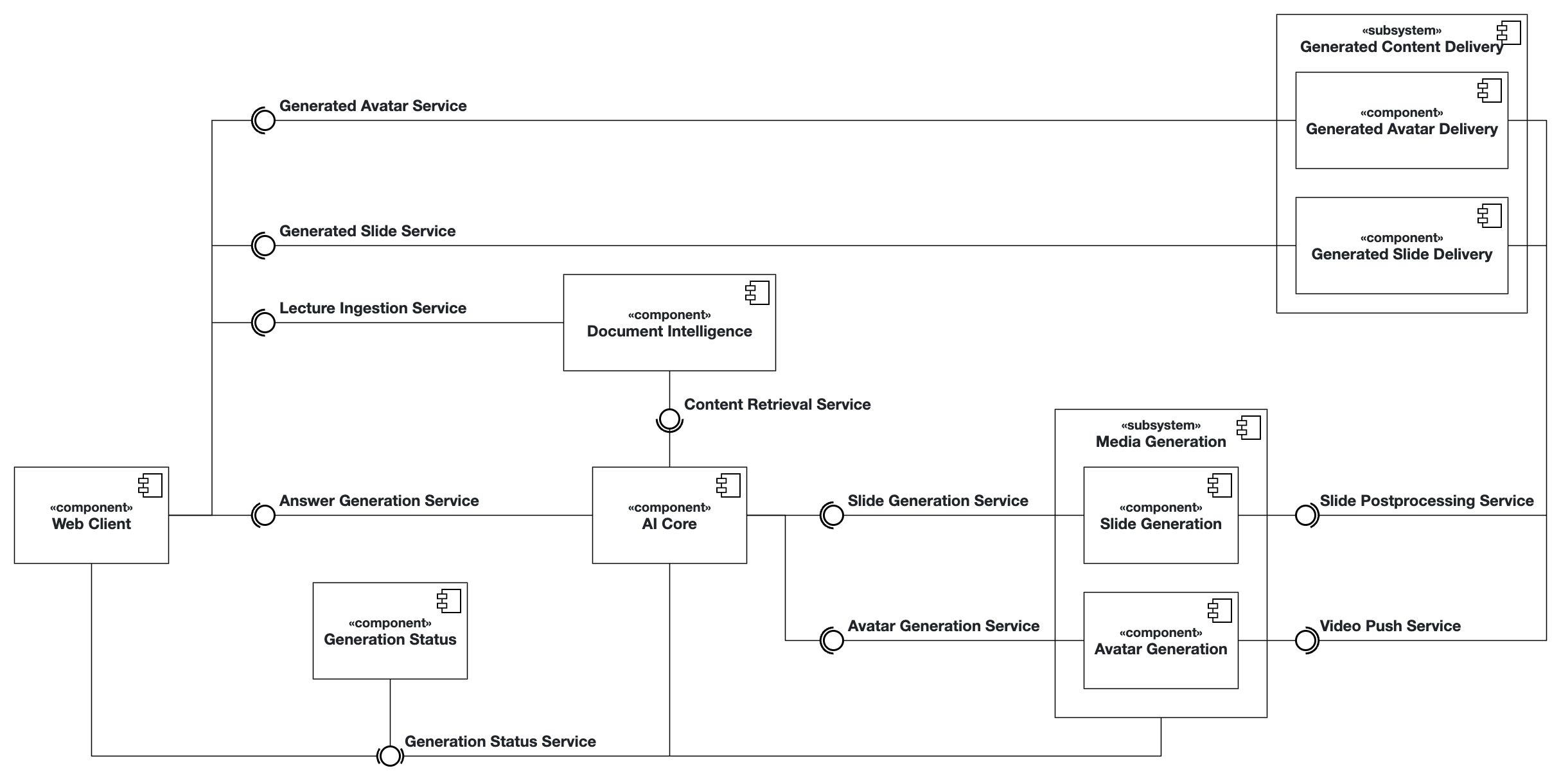
Service Components
The Orpheus system is composed of multiple specialized services, each handling different aspects of the lecture generation pipeline. Below you can find links to the technology-specific documentation and implementation details for each service component.
| Service | Documentation |
|---|---|
| Avatar Service | orpheus/avatar |
| Core Service | orpheus/core |
| Document Intelligence Service | orpheus/docint |
| Slides Service | orpheus/slides |
| Status Service | orpheus/status |
| User Interface | orpheus/ui |
API Interface Documentation
| Service | Description | OpenAPI Specification |
|---|---|---|
| Answer Generation Service | Handles user prompts, creates lecture generation jobs, and returns a lectureId. | Answer Generation Service |
| Avatar Generation Service | Produces short videos of lifelike professor avatars from a given text for the voice track with expressive narration. | Code not generated from API spec yet Avatar Generation Service, instead the endpoint definition is found in video.py |
| Content Retrieval Service | Extracts and retrieves relevant content from instructor-provided slides and materials to support question answering. | Content Retrieval Service |
| Generation Status Service | Handles the status of a lecture generation job. | Generation Status Service |
| Generated Avatar Service | Provides the generated avatar videos, retrieved by related promptId. | Generated Avatar Service |
| Generated Slide Service | Provides the generated slides. Retrieval is done with the related promptId. | Generated Slides Service |
| Lecture Ingestion Service | Loads received lectures into vector database and allows deleting information related to already uploaded lecture slides. | Lecture Ingestion Service |
| Slide Generation Service | Generates lecture slides that conform to the layout of the respective course from a detailed lecture script. | Slide Generation Service |
| Slide Postprocessing Service | Converts slides to HTML and uploads generated code to the Generated Slide Delivery (CDN) for distribution. | Slide Postprocessing Service |
| Video Push Service | Uploads generated avatar videos to the Generated Avatar Delivery (CDN) for distribution. | Code not generated from API spec yet Video Push Service |
Getting Started
User Guide
Lecturer View
The lecturer view can be accessed via the Admin Button located at the top right.
To personalize the course delivery, the lecturer is required to upload both avatar images and voice samples, followed by the relevant course materials.
👤 Avatar Uploads
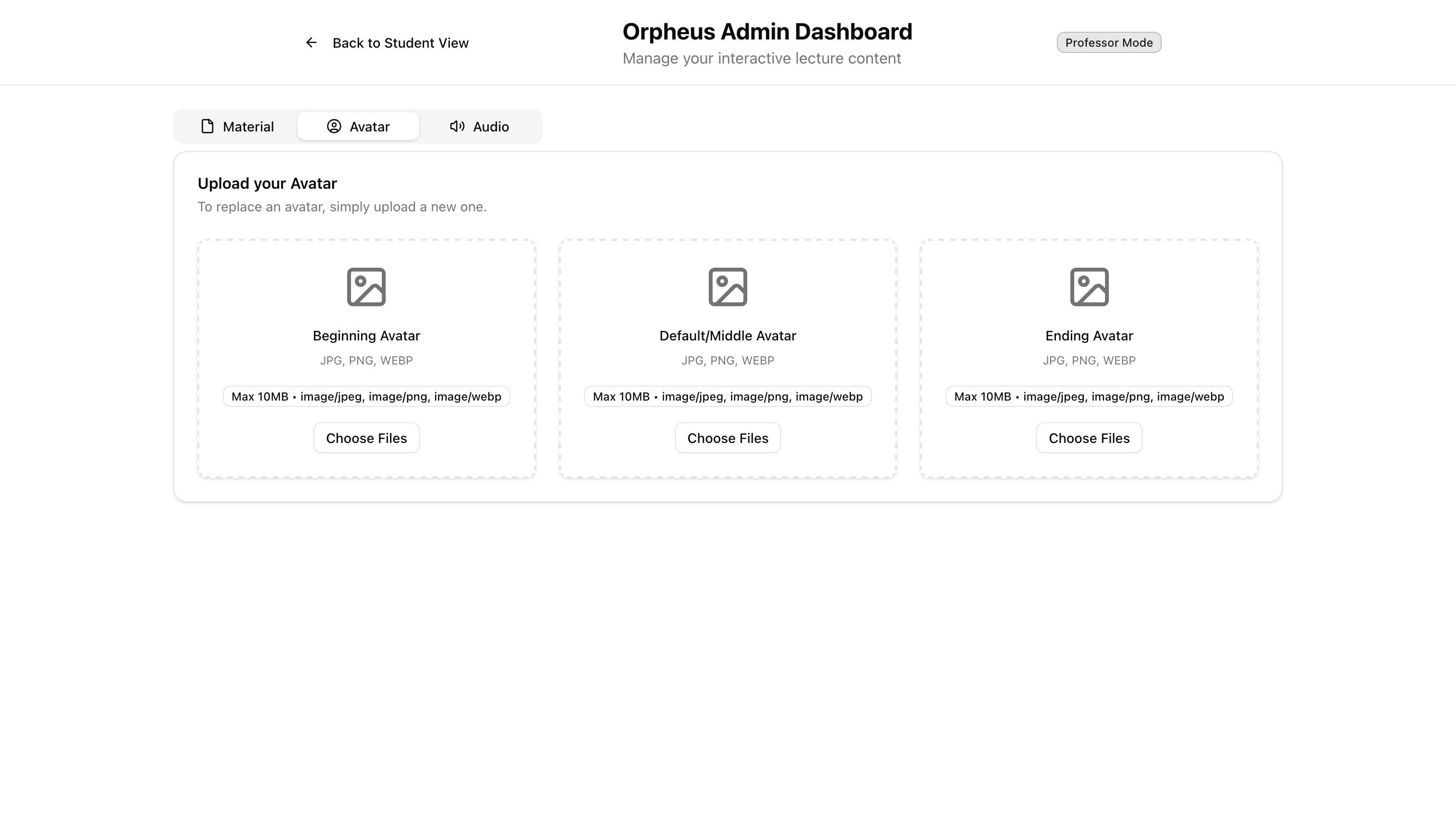
Three distinct avatars should be provided to represent different stages of the lecture:
-
Beginning Avatar
- Used at the beginning of the lecture.
- Recommended: a happy facial expression to create a welcoming atmosphere.
-
Default/Middle Avatar
- Used during the main lecture delivery.
- Recommended: a neutral facial expression to maintain focus.
-
Ending Avatar
- Used at the end of the lecture.
- Recommended: a happy facial expression to close on a positive note.
🎙️ Voice Samples
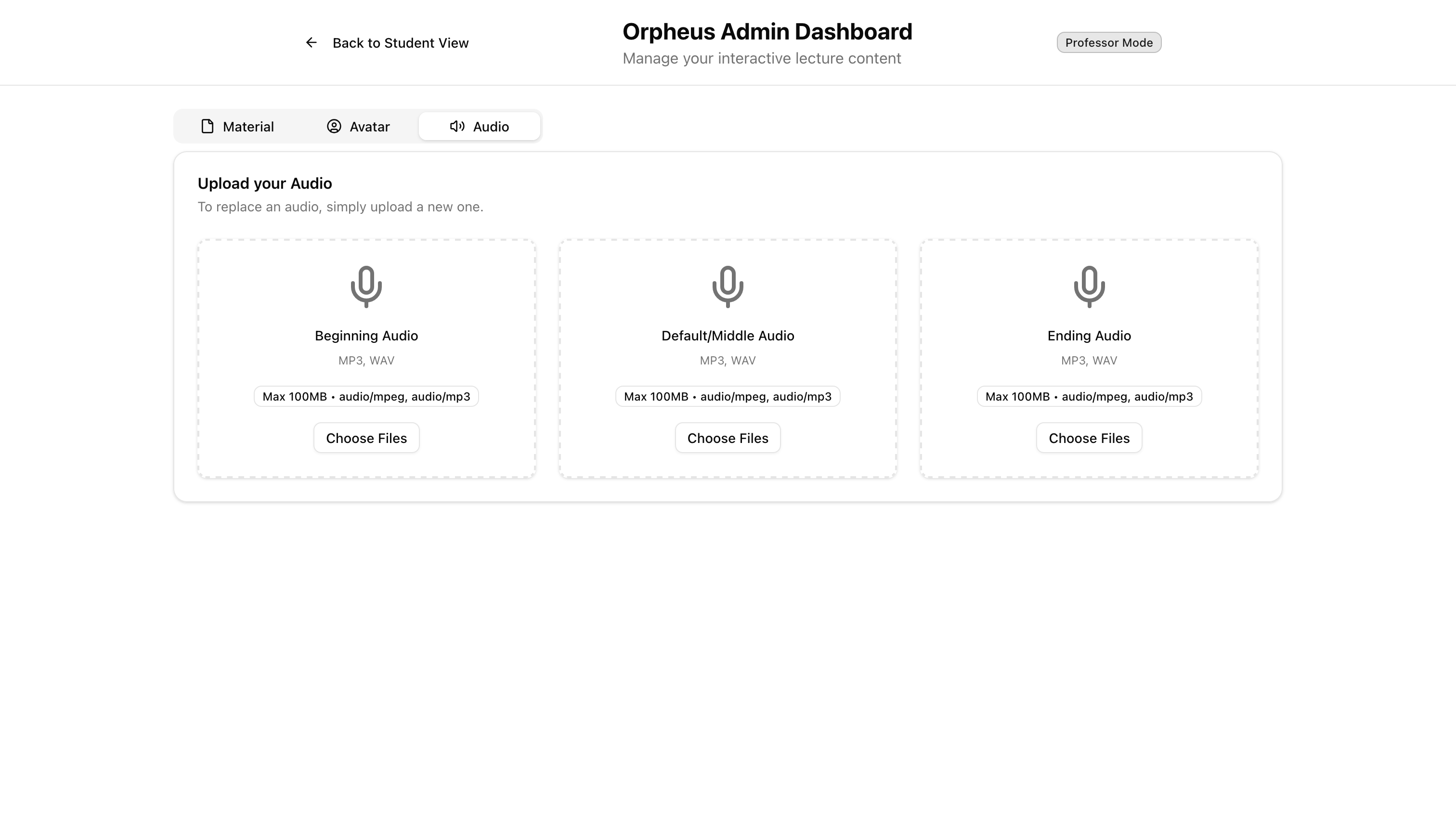
Similarly, three voice samples should be uploaded, aligned with the same lecture stages as the avatars:
- Beginning Voice Sample — welcoming and engaging.
- Default/Middle Voice Sample — clear and neutral delivery.
- Ending Voice Sample — positive and encouraging tone.
📑 Course Materials
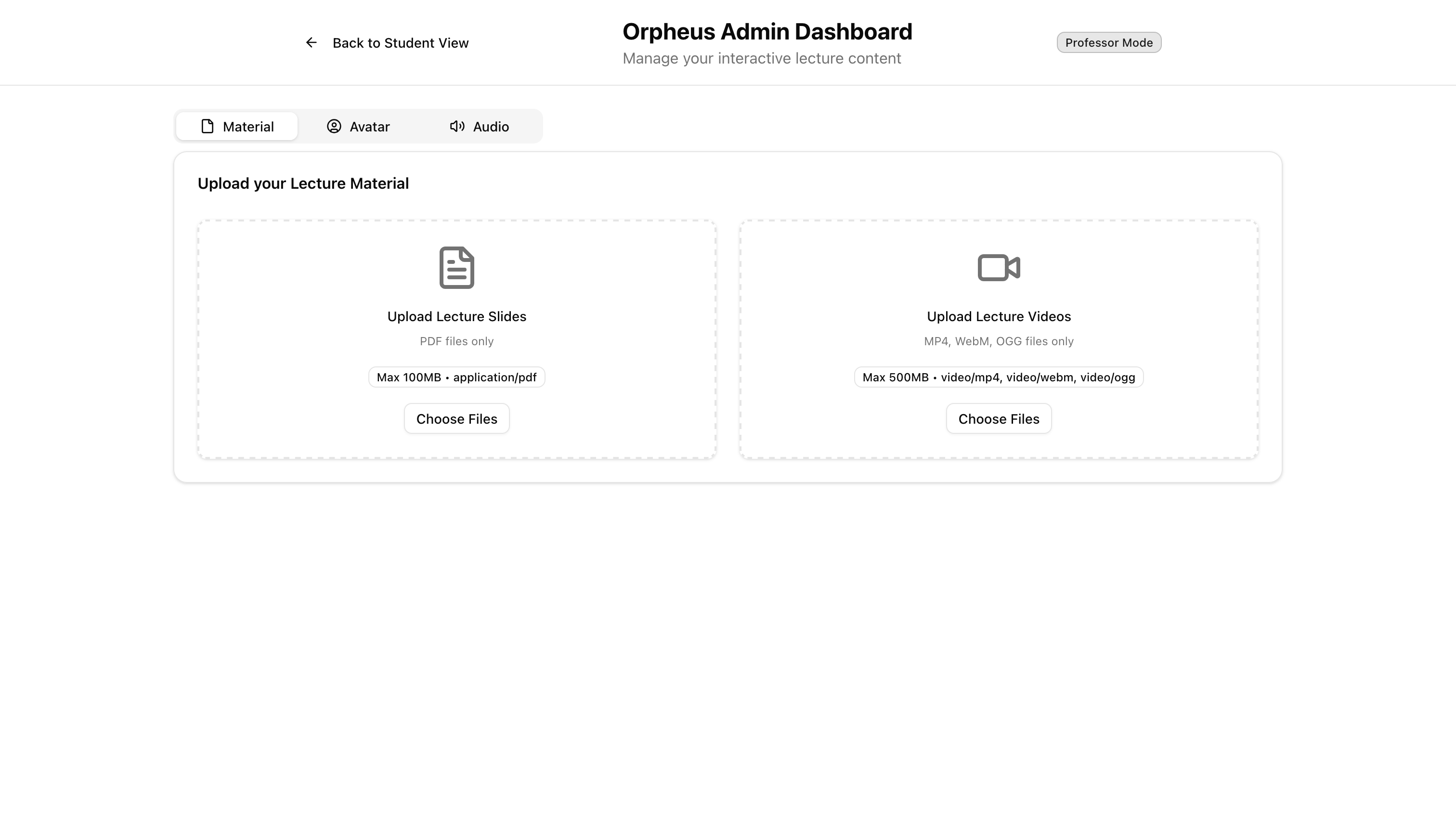
- Upload course slides and/or pre-recorded lecture videos.
- These materials will be processed and integrated into the system by the Document Intelligence Team.
- For further details, refer to the Document Intelligence README.
Student View
-
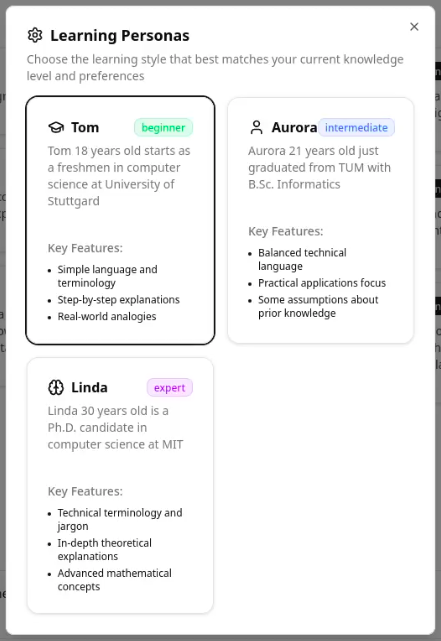
Choose your level of expertise by selecting a suitable character:
-
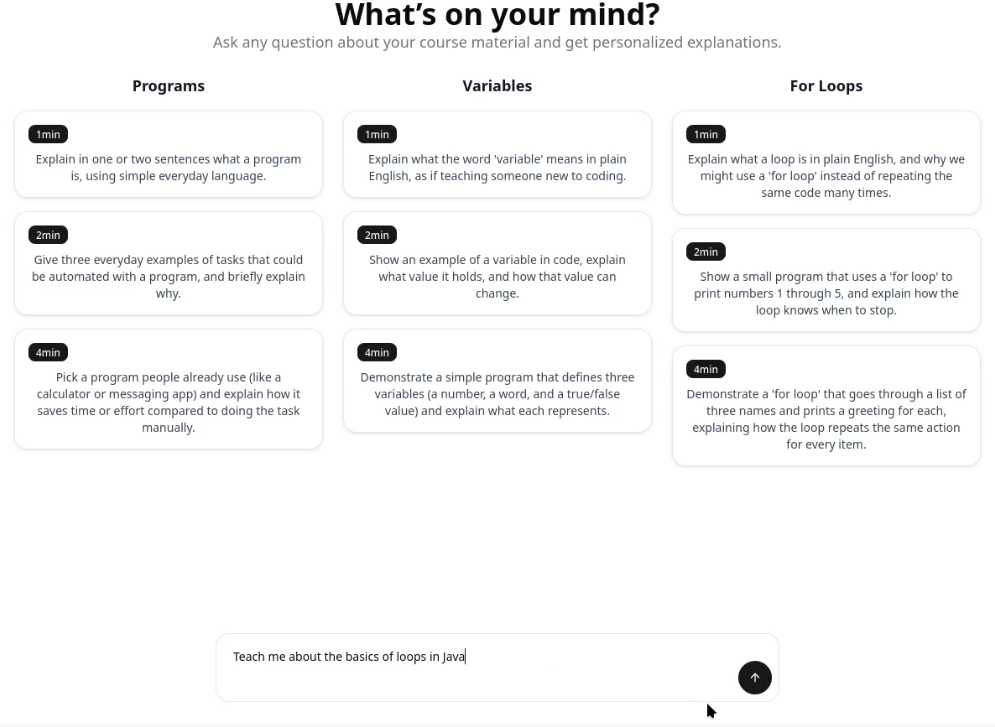
Enter your question or choose from the predefined ones:
-
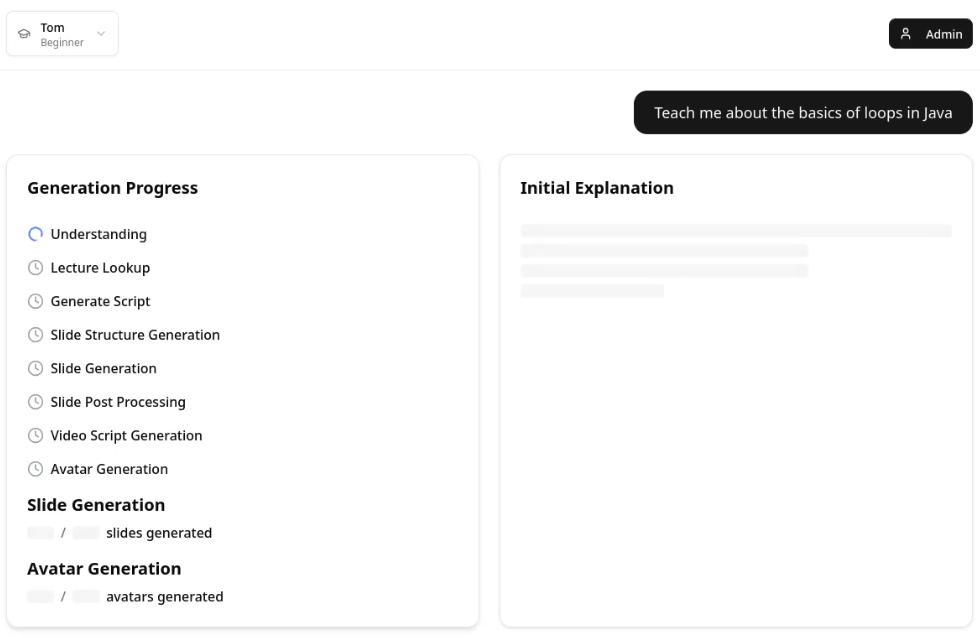
Wait for for the generation process. In the meantime a textual answer will be given. The lectre will start as soon as the first video is done:
-
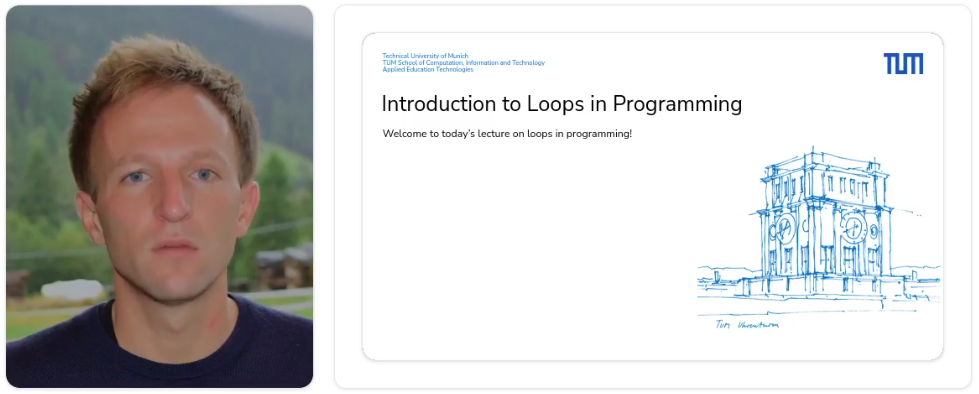
Watch the video:
Development Setup
Environment Variables
- Add a
.envfile in the root directorycp exampleEnv .env - Make sure to supply values for at least one AI-Model (e.g. AWS) and define the respective model names (
MODEL_NAME,SPLITTING_MODEL,SLIDESGEN_MODEL)- How to get AWS Keys? (with Hackathon license)
- You need an AWS Hackathon Account
- Login at https://slalom-hackathon.awsapps.com/start/#/?tab=accounts
- Go to slalom_IsbUsersPS
- Go to Amazon Bedrock
- View API keys
- Click
Generate short-term API keys(Generate long-term API keysdid not work with our license) - Copy the upper
API Keythat starts withbedrock-api-key...
- Update the model (AWS includes some user specific tag there, so API keys of other people won't work)
- You need an AWS Hackathon Account
- Login at https://slalom-hackathon.awsapps.com/start/#/?tab=accounts
- Go to slalom_IsbUsersPS
- Go to Amazon Bedrock
- Infer -> Cross-region inference
- Choose the model that you want to use, copy the
Inference profile ARNthat starts witharn:aws:bedrock:...
- How to get AWS Keys? (with Hackathon license)
- You can overwrite the global
.envfile values with service specific.envfiles
1. Install Python 3.13.7 using pyenv
The project is based on python 3.13.7. We recommend using pyenv to manage your python versions.
Linux (Debian/Ubuntu)
- Install system dependencies for building Python (one-time setup)
sudo apt update sudo apt install -y build-essential curl git \ libssl-dev zlib1g-dev libncurses5-dev libbz2-dev libreadline-dev \ libsqlite3-dev libffi-dev liblzma-dev tk-dev uuid-dev - Install pyenv (via the pyenv-installer)
curl https://pyenv.run | bash - Add pyenv to your shell and reload it
- For bash
echo 'export PYENV_ROOT="$HOME/.pyenv"' >> ~/.bashrc echo 'command -v pyenv >/dev/null || export PATH="$PYENV_ROOT/bin:$PATH"' >> ~/.bashrc echo 'eval "$(pyenv init -)"' >> ~/.bashrc - For zsh
echo 'export PYENV_ROOT="$HOME/.pyenv"' >> ~/.zshrc
echo 'command -v pyenv >/dev/null || export PATH="$PYENV_ROOT/bin:$PATH"' >> ~/.zshrc
echo 'eval "$(pyenv init -)"' >> ~/.zshrc
exec "$SHELL"for the changes to take effectexec "$SHELL" - For bash
- Install Python 3.13.7 and set it as the global default version
pyenv install 3.13.7
pyenv global 3.13.7
- Verify the installation
python --version
Expected output: Python 3.13.7
macOS
- Install Homebrew if you haven't already
/bin/bash -c "$(curl -fsSL https://raw.githubusercontent.com/Homebrew/install/HEAD/install.sh)" - Install pyenv
brew install pyenv - Add pyenv to your shell and reload it
For zsh (the default on modern macOS):
Important: Restart your terminal or runecho 'export PYENV_ROOT="$HOME/.pyenv"' >> ~/.zshrc echo 'command -v pyenv >/dev/null || export PATH="$PYENV_ROOT/bin:$PATH"' >> ~/.zshrc echo 'eval "$(pyenv init -)"' >> ~/.zshrcexec "$SHELL"for the changes to take effectexec "$SHELL" - Install Python 3.13.7 and set it as the global default version
pyenv install 3.13.7 pyenv global 3.13.7 - Verify the installation
Expected output: Python 3.13.7python --version
Windows (PowerShell, run as Administrator)
- Install pyenv-win via PowerShell
Invoke-WebRequest -UseBasicParsing -Uri "https://raw.githubusercontent.com/pyenv-win/pyenv-win/master/pyenv-win/install-pyenv-win.ps1" -OutFile "./install-pyenv-win.ps1"; &"./install-pyenv-win.ps1"; Remove-Item "./install-pyenv-win.ps1"
Troubleshooting Common Installation Issues
1. Script Execution is Disabled
- Issue: You receive an error in PowerShell stating
...cannot be loaded because running scripts is disabled on this system. - What to do: This is due to PowerShell's Execution Policy. Run PowerShell as Administrator and execute the
following command to allow the script to run for the current session, then try the installation command again.
Set-ExecutionPolicy -ExecutionPolicy RemoteSigned -Scope Process
2. pyenv Command Not Found After Installation
- Issue: After the installer finishes, opening a new terminal and typing
pyenvresults in acommand not founderror. - What to do: The installer couldn't modify your User
PATHenvironment variable correctly, or your terminal session needs to be refreshed.- Restart your terminal: Close and reopen PowerShell/CMD completely.
- Restart your computer: A full restart will ensure environment variables are reloaded.
- Manually add to PATH: If it still fails, you must add the following two paths to your User
PATHenvironment variables.%USERPROFILE%\.pyenv\pyenv-win\bin%USERPROFILE%\.pyenv\pyenv-win\shims
3. System Python Overrides pyenv Version
- Issue: You've set a Python version with
pyenv globalorpyenv local, but runningpython --versionshows your old system version (or opens the Microsoft Store). - What to do: This is a
PATHpriority issue.- Disable Windows App Execution Aliases: Go to
Start > Manage App Execution Aliasesand turn off the aliases forpython.exeandpython3.exe. This is the most common cause. - Check your
PATHorder: Ensure thepyenvshimsandbinpaths appear before any other Python installation paths in your environment variables.
- Disable Windows App Execution Aliases: Go to
4. Shims Are Not Working for New Packages
- Issue: You install a package with a command-line tool (like
pipxorpoetry) usingpip, but the command isn't available in your terminal. - What to do: You need to rebuild the
pyenvshims so it's aware of the new executable.pyenv rehash
(Optional) Check which version pyenv is managing
pyenv version
Expected output: 3.13.7 (set by C:\Users\YourUser.pyenv\pyenv-win\version)
2. Install Poetry 2.2.1
We use Poetry as our dependency and environment management tool.
Linux / macOS
- Install Poetry using the official installer script
curl -sSL https://install.python-poetry.org | python3 - - Update Poetry to version 2.2.1
~/.local/bin/poetry self update 2.2.1 - Ensure Poetry is on PATH for the current shell session
export PATH="$HOME/.local/bin:$PATH"- Persist Poetry on PATH for bash
echo 'export PATH="$HOME/.local/bin:$PATH"' >> ~/.bashrc - Persist Poetry on PATH for zsh
echo 'export PATH="$HOME/.local/bin:$PATH"' >> ~/.zshrc
- Persist Poetry on PATH for bash
- Verify Poetry installation
poetry --version
Windows (PowerShell)
- Install Poetry using the official installer script
Poetry is typically installed under:(Invoke-WebRequest -Uri https://install.python-poetry.org -UseBasicParsing).Content | python -$env:APPDATA\Python\Scripts - Update Poetry to version 2.2.1
poetry self update 2.2.1 - Ensure Poetry is on PATH for the current PowerShell session
$env:Path += ";$env:APPDATA\Python\Scripts" - Persist Poetry on PATH for future sessions
setx PATH "$($env:PATH)" - Verify Poetry installation
poetry --version
Deployment
Run this command in your root directory to build all services, start them up under the project name orpheus, and pull any necessary images:
docker compose -p orpheus up --build
Contributors


Similar repos


Languages
Python
77.2%
TypeScript
21.3%
The Orpheus System transforms static slides into interactive lecture videos with lifelike professor avatars, combining expressive narration, visual presence, and dynamic content to create engaging, personalized learning experiences
Python
21
218 commits
updated May 26, 2026
README
Orpheus
The Orpheus System transforms static slides into interactive lecture videos with lifelike professor avatars, combining expressive narration, visual presence, and dynamic content to create engaging, personalized learning experiences.
Table of Contents
Architecture
Service Components
The Orpheus system is composed of multiple specialized services, each handling different aspects of the lecture generation pipeline. Below you can find links to the technology-specific documentation and implementation details for each service component.
| Service | Documentation |
|---|---|
| Avatar Service | orpheus/avatar |
| Core Service | orpheus/core |
| Document Intelligence Service | orpheus/docint |
| Slides Service | orpheus/slides |
| Status Service | orpheus/status |
| User Interface | orpheus/ui |
API Interface Documentation
| Service | Description | OpenAPI Specification |
|---|---|---|
| Answer Generation Service | Handles user prompts, creates lecture generation jobs, and returns a lectureId. | Answer Generation Service |
| Avatar Generation Service | Produces short videos of lifelike professor avatars from a given text for the voice track with expressive narration. | Code not generated from API spec yet Avatar Generation Service, instead the endpoint definition is found in video.py |
| Content Retrieval Service | Extracts and retrieves relevant content from instructor-provided slides and materials to support question answering. | Content Retrieval Service |
| Generation Status Service | Handles the status of a lecture generation job. | Generation Status Service |
| Generated Avatar Service | Provides the generated avatar videos, retrieved by related promptId. | Generated Avatar Service |
| Generated Slide Service | Provides the generated slides. Retrieval is done with the related promptId. | Generated Slides Service |
| Lecture Ingestion Service | Loads received lectures into vector database and allows deleting information related to already uploaded lecture slides. | Lecture Ingestion Service |
| Slide Generation Service | Generates lecture slides that conform to the layout of the respective course from a detailed lecture script. | Slide Generation Service |
| Slide Postprocessing Service | Converts slides to HTML and uploads generated code to the Generated Slide Delivery (CDN) for distribution. | Slide Postprocessing Service |
| Video Push Service | Uploads generated avatar videos to the Generated Avatar Delivery (CDN) for distribution. | Code not generated from API spec yet Video Push Service |
Getting Started
User Guide
Lecturer View
The lecturer view can be accessed via the Admin Button located at the top right.
To personalize the course delivery, the lecturer is required to upload both avatar images and voice samples, followed by the relevant course materials.
👤 Avatar Uploads
Three distinct avatars should be provided to represent different stages of the lecture:
-
Beginning Avatar
- Used at the beginning of the lecture.
- Recommended: a happy facial expression to create a welcoming atmosphere.
-
Default/Middle Avatar
- Used during the main lecture delivery.
- Recommended: a neutral facial expression to maintain focus.
-
Ending Avatar
- Used at the end of the lecture.
- Recommended: a happy facial expression to close on a positive note.
🎙️ Voice Samples
Similarly, three voice samples should be uploaded, aligned with the same lecture stages as the avatars:
- Beginning Voice Sample — welcoming and engaging.
- Default/Middle Voice Sample — clear and neutral delivery.
- Ending Voice Sample — positive and encouraging tone.
📑 Course Materials
- Upload course slides and/or pre-recorded lecture videos.
- These materials will be processed and integrated into the system by the Document Intelligence Team.
- For further details, refer to the Document Intelligence README.
Student View
-
Choose your level of expertise by selecting a suitable character:
-
Enter your question or choose from the predefined ones:
-
Wait for for the generation process. In the meantime a textual answer will be given. The lectre will start as soon as the first video is done:
-
Watch the video:
Development Setup
Environment Variables
- Add a
.envfile in the root directorycp exampleEnv .env - Make sure to supply values for at least one AI-Model (e.g. AWS) and define the respective model names (
MODEL_NAME,SPLITTING_MODEL,SLIDESGEN_MODEL)- How to get AWS Keys? (with Hackathon license)
- You need an AWS Hackathon Account
- Login at https://slalom-hackathon.awsapps.com/start/#/?tab=accounts
- Go to slalom_IsbUsersPS
- Go to Amazon Bedrock
- View API keys
- Click
Generate short-term API keys(Generate long-term API keysdid not work with our license) - Copy the upper
API Keythat starts withbedrock-api-key...
- Update the model (AWS includes some user specific tag there, so API keys of other people won't work)
- You need an AWS Hackathon Account
- Login at https://slalom-hackathon.awsapps.com/start/#/?tab=accounts
- Go to slalom_IsbUsersPS
- Go to Amazon Bedrock
- Infer -> Cross-region inference
- Choose the model that you want to use, copy the
Inference profile ARNthat starts witharn:aws:bedrock:...
- How to get AWS Keys? (with Hackathon license)
- You can overwrite the global
.envfile values with service specific.envfiles
1. Install Python 3.13.7 using pyenv
The project is based on python 3.13.7. We recommend using pyenv to manage your python versions.
Linux (Debian/Ubuntu)
- Install system dependencies for building Python (one-time setup)
sudo apt update sudo apt install -y build-essential curl git \ libssl-dev zlib1g-dev libncurses5-dev libbz2-dev libreadline-dev \ libsqlite3-dev libffi-dev liblzma-dev tk-dev uuid-dev - Install pyenv (via the pyenv-installer)
curl https://pyenv.run | bash - Add pyenv to your shell and reload it
- For bash
echo 'export PYENV_ROOT="$HOME/.pyenv"' >> ~/.bashrc echo 'command -v pyenv >/dev/null || export PATH="$PYENV_ROOT/bin:$PATH"' >> ~/.bashrc echo 'eval "$(pyenv init -)"' >> ~/.bashrc - For zsh
echo 'export PYENV_ROOT="$HOME/.pyenv"' >> ~/.zshrc
echo 'command -v pyenv >/dev/null || export PATH="$PYENV_ROOT/bin:$PATH"' >> ~/.zshrc
echo 'eval "$(pyenv init -)"' >> ~/.zshrc
exec "$SHELL"for the changes to take effectexec "$SHELL" - For bash
- Install Python 3.13.7 and set it as the global default version
pyenv install 3.13.7
pyenv global 3.13.7
- Verify the installation
python --version
Expected output: Python 3.13.7
macOS
- Install Homebrew if you haven't already
/bin/bash -c "$(curl -fsSL https://raw.githubusercontent.com/Homebrew/install/HEAD/install.sh)" - Install pyenv
brew install pyenv - Add pyenv to your shell and reload it
For zsh (the default on modern macOS):
Important: Restart your terminal or runecho 'export PYENV_ROOT="$HOME/.pyenv"' >> ~/.zshrc echo 'command -v pyenv >/dev/null || export PATH="$PYENV_ROOT/bin:$PATH"' >> ~/.zshrc echo 'eval "$(pyenv init -)"' >> ~/.zshrcexec "$SHELL"for the changes to take effectexec "$SHELL" - Install Python 3.13.7 and set it as the global default version
pyenv install 3.13.7 pyenv global 3.13.7 - Verify the installation
Expected output: Python 3.13.7python --version
Windows (PowerShell, run as Administrator)
- Install pyenv-win via PowerShell
Invoke-WebRequest -UseBasicParsing -Uri "https://raw.githubusercontent.com/pyenv-win/pyenv-win/master/pyenv-win/install-pyenv-win.ps1" -OutFile "./install-pyenv-win.ps1"; &"./install-pyenv-win.ps1"; Remove-Item "./install-pyenv-win.ps1"
Troubleshooting Common Installation Issues
1. Script Execution is Disabled
- Issue: You receive an error in PowerShell stating
...cannot be loaded because running scripts is disabled on this system. - What to do: This is due to PowerShell's Execution Policy. Run PowerShell as Administrator and execute the
following command to allow the script to run for the current session, then try the installation command again.
Set-ExecutionPolicy -ExecutionPolicy RemoteSigned -Scope Process
2. pyenv Command Not Found After Installation
- Issue: After the installer finishes, opening a new terminal and typing
pyenvresults in acommand not founderror. - What to do: The installer couldn't modify your User
PATHenvironment variable correctly, or your terminal session needs to be refreshed.- Restart your terminal: Close and reopen PowerShell/CMD completely.
- Restart your computer: A full restart will ensure environment variables are reloaded.
- Manually add to PATH: If it still fails, you must add the following two paths to your User
PATHenvironment variables.%USERPROFILE%\.pyenv\pyenv-win\bin%USERPROFILE%\.pyenv\pyenv-win\shims
3. System Python Overrides pyenv Version
- Issue: You've set a Python version with
pyenv globalorpyenv local, but runningpython --versionshows your old system version (or opens the Microsoft Store). - What to do: This is a
PATHpriority issue.- Disable Windows App Execution Aliases: Go to
Start > Manage App Execution Aliasesand turn off the aliases forpython.exeandpython3.exe. This is the most common cause. - Check your
PATHorder: Ensure thepyenvshimsandbinpaths appear before any other Python installation paths in your environment variables.
- Disable Windows App Execution Aliases: Go to
4. Shims Are Not Working for New Packages
- Issue: You install a package with a command-line tool (like
pipxorpoetry) usingpip, but the command isn't available in your terminal. - What to do: You need to rebuild the
pyenvshims so it's aware of the new executable.pyenv rehash
(Optional) Check which version pyenv is managing
pyenv version
Expected output: 3.13.7 (set by C:\Users\YourUser.pyenv\pyenv-win\version)
2. Install Poetry 2.2.1
We use Poetry as our dependency and environment management tool.
Linux / macOS
- Install Poetry using the official installer script
curl -sSL https://install.python-poetry.org | python3 - - Update Poetry to version 2.2.1
~/.local/bin/poetry self update 2.2.1 - Ensure Poetry is on PATH for the current shell session
export PATH="$HOME/.local/bin:$PATH"- Persist Poetry on PATH for bash
echo 'export PATH="$HOME/.local/bin:$PATH"' >> ~/.bashrc - Persist Poetry on PATH for zsh
echo 'export PATH="$HOME/.local/bin:$PATH"' >> ~/.zshrc
- Persist Poetry on PATH for bash
- Verify Poetry installation
poetry --version
Windows (PowerShell)
- Install Poetry using the official installer script
Poetry is typically installed under:(Invoke-WebRequest -Uri https://install.python-poetry.org -UseBasicParsing).Content | python -$env:APPDATA\Python\Scripts - Update Poetry to version 2.2.1
poetry self update 2.2.1 - Ensure Poetry is on PATH for the current PowerShell session
$env:Path += ";$env:APPDATA\Python\Scripts" - Persist Poetry on PATH for future sessions
setx PATH "$($env:PATH)" - Verify Poetry installation
poetry --version
Deployment
Run this command in your root directory to build all services, start them up under the project name orpheus, and pull any necessary images:
docker compose -p orpheus up --build
Similar repos
Contributors
Languages
Python
77.2%
TypeScript
21.3%