To extract article from given URL
See the codeExtract main article, main image and meta data from URL.


deno add jsr:@extractus/article-extractor
pnpm add jsr:@extractus/article-extractor
# or
npx jsr add @extractus/article-extractor
# or
bunx jsr add @extractus/article-extractor
Alternatively, install from npm:
npm install @extractus/article-extractor
# or
bun add @extractus/article-extractor
import { extract } from "jsr:@extractus/article-extractor";

const data = await extract("https://example.com/article");
console.log(data);
extract()Load and extract article data from a URL or HTML string.
extract(input: string): Promise<ArticleData | null>
extract(input: string, parserOptions?: ParserOptions): Promise<ArticleData | null>
extract(input: string, parserOptions?: ParserOptions, fetcher?: Fetcher): Promise<ArticleData | null>
Example:
import { extract } from "jsr:@extractus/article-extractor";

try {
  const article = await extract("https://example.com/some-article");
  console.log(article);
} catch (err) {
  console.error(err);
}
The result can be null (when no article found) or an ArticleData object:
interface ArticleData {
  url?: string;           // best resolved URL
  links?: string[];       // alternative URLs (canonical, shortlink, amphtml)
  title?: string;         // article title
  description?: string;   // short description / excerpt
  image?: string;         // main image URL
  favicon?: string;       // site favicon URL
  author?: string;        // author name
  content?: string;       // extracted article HTML
  source?: string;        // original publisher domain
  published?: string;     // publication date string
  ttr?: number;           // estimated time to read (seconds), 0 = unknown
  type?: string;          // page type (e.g. "article")
}
input requiredURL string or raw HTML content.
parserOptions optional| Property | Type | Default | Description |
|---|---|---|---|
wordsPerMinute | number | 300 | Words per minute for time-to-read estimation |
descriptionTruncateLen | number | 210 | Max characters for generated description |
descriptionLengthThreshold | number | 180 | Min characters to keep meta description |
contentLengthThreshold | number | 200 | Min characters for article content |
allowedTags | string[] | (semantic/content tags) | HTML tags to keep in output |
allowedAttributes | Record<string, string[]> | (src, href, alt, etc.) | Per-tag attributes to keep |
allowedIframeDomains | string[] | (youtube, vimeo, etc.) | Allowed domains for iframe src |
const article = await extract(url, {
  descriptionLengthThreshold: 120,
  contentLengthThreshold: 500,
});
fetcher optionalA custom fetch function with the signature (url: string) => Promise<Response>.
Use this to customize HTTP behavior: proxy, headers, TLS, authentication, timeouts, etc.
Defaults to globalThis.fetch.
Deno (with proxy):
import { extract } from "@extractus/article-extractor";

const client = Deno.createHttpClient({
  proxy: { url: "http://proxy.example.com:8080" },
});
const myFetcher = (url: string) => fetch(url, { client });

const result = await extract("https://example.com/some-article", {}, myFetcher);
Node.js (with proxy via undici):
import { extract } from "@extractus/article-extractor";
import { fetch, ProxyAgent } from "undici";

const dispatcher = new ProxyAgent("http://proxy.example.com:8080");
const myFetcher = (url: string) => fetch(url, { dispatcher });

const result = await extract("https://example.com/some-article", {}, myFetcher);
Bun (with proxy):
import { extract } from "@extractus/article-extractor";

const myFetcher = (url: string) =>
  fetch(url, {
    proxy: "http://proxy.example.com:8080",
  });

const result = await extract("https://example.com/some-article", {}, myFetcher);
Custom headers:
const myFetcher = (url: string) =>
  fetch(url, {
    headers: {
      "user-agent": "MyBot/1.0",
      authorization: "Bearer token123",
    },
  });

const result = await extract("https://example.com/some-article", {}, myFetcher);
Request timeout:
const myFetcher = (url: string) =>
  fetch(url, {
    signal: AbortSignal.timeout(5000),
  });

const result = await extract("https://example.com/some-article", {}, myFetcher);
extractFromHtml()Extract article data from an HTML string directly.
extractFromHtml(html: string): Promise<ArticleData | null>
extractFromHtml(html: string, url?: string): Promise<ArticleData | null>
extractFromHtml(html: string, url?: string, parserOptions?: ParserOptions): Promise<ArticleData | null>
Example:
import { extractFromHtml } from "jsr:@extractus/article-extractor";

const res = await fetch(url);
const html = await res.text();

const article = await extractFromHtml(html, url);
html requiredHTML string containing the article.
url optionalSource URL for resolving relative links.
parserOptions optionalSee parserOptions above.
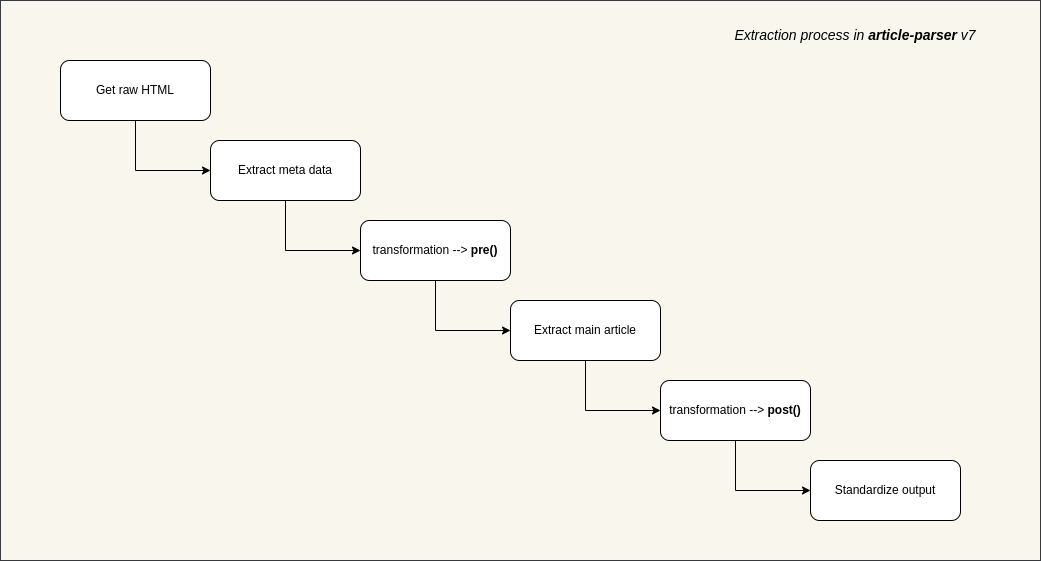
Sometimes the default extraction algorithm may not work well. Transformations let you add pre/post processing per-site.
addTransformations(transformation: Transformation | Transformation[]): numberremoveTransformations(patterns?: RegExp[]): numberTransformation objectinterface Transformation {
patterns: RegExp[]; // URL patterns to match
pre?: (document: Document) => Document; // pre-process raw HTML
post?: (document: Document) => Document; // post-process extracted article
}
For URLs matching
patterns, runpreon raw HTML, extract article, then runposton the result.
Example:
import { addTransformations } from "jsr:@extractus/article-extractor";

addTransformations({
  patterns: [/([\w]+.)?domain\.tld\/*/],
  pre: (document) => {
    document.querySelectorAll(".advertise-area").forEach((el) => {
      el.parentNode?.removeChild(el);
    });
    return document;
  },
  post: (document) => {
    document.querySelectorAll("h4").forEach((el) => {
      const h2 = document.createElement("h2");
      h2.innerHTML = el.innerHTML;
      el.parentNode?.replaceChild(h2, el);
    });
    return document;
  },
});
To write better transformations, refer to linkedom and the Document API.
addTransformations(transformation | Transformation[])Add a single or multiple transformations. Transformations without patterns are ignored.
import { addTransformations } from "jsr:@extractus/article-extractor";

addTransformations([
  {
    patterns: [/([\w]+.)?abc\.tld\/*/],
    pre: (doc) => { /* ... */ return doc; },
    post: (doc) => { /* ... */ return doc; },
  },
  {
    patterns: [/([\w]+.)?xyz\.tld\/*/],
    post: (doc) => { /* ... */ return doc; },
  },
]);
removeTransformations(patterns?: RegExp[])Remove transformations matching the given patterns. Call without arguments to remove all.
import { removeTransformations } from "jsr:@extractus/article-extractor";

removeTransformations([
  /([\w]+.)?abc\.tld\/*/,
  /([\w]+.)?xyz\.tld\/*/,
]);
When multiple transformations match, they all execute in order.
Given two transformations matching goo.gl:
pre_one -> pre_three -> extraction -> post_two -> post_four
Extracted HTML is sanitized using a built-in DOM tree walker. Disallowed tags are removed (not escaped), and disallowed attributes are stripped. Configure via parserOptions:
import { extract } from "jsr:@extractus/article-extractor";

// allow class attributes on <code> and <div>
const article = await extract(url, {
  allowedAttributes: {
    a: ["href", "target", "title"],
    img: ["src", "srcset", "alt", "title"],
    code: ["class"],
    div: ["class"],
  },
});
To see the full defaults, refer to src/config.ts.
git clone https://github.com/extractus/article-extractor.git
cd article-extractor

# run tests
deno test --allow-all

# lint
deno lint

# build npm package
deno run -A ./scripts/build_npm.ts
The MIT License (MIT)
This project is maintained in my spare time. If you find it helpful, there are a few simple ways to support its continued development:
Every bit of support helps keep this project actively maintained. Thank you! ❤️
2,162 followers · starred May 2023
167 followers · starred Aug 2022
153 followers · starred Dec 2025
163 followers · starred Jul 2023
To extract article from given URL
See the codeExtract main article, main image and meta data from URL.
deno add jsr:@extractus/article-extractor
pnpm add jsr:@extractus/article-extractor
# or
npx jsr add @extractus/article-extractor
# or
bunx jsr add @extractus/article-extractor
Alternatively, install from npm:
npm install @extractus/article-extractor
# or
bun add @extractus/article-extractor
import { extract } from "jsr:@extractus/article-extractor";

const data = await extract("https://example.com/article");
console.log(data);
extract()Load and extract article data from a URL or HTML string.
extract(input: string): Promise<ArticleData | null>
extract(input: string, parserOptions?: ParserOptions): Promise<ArticleData | null>
extract(input: string, parserOptions?: ParserOptions, fetcher?: Fetcher): Promise<ArticleData | null>
Example:
import { extract } from "jsr:@extractus/article-extractor";

try {
  const article = await extract("https://example.com/some-article");
  console.log(article);
} catch (err) {
  console.error(err);
}
The result can be null (when no article found) or an ArticleData object:
interface ArticleData {
  url?: string;           // best resolved URL
  links?: string[];       // alternative URLs (canonical, shortlink, amphtml)
  title?: string;         // article title
  description?: string;   // short description / excerpt
  image?: string;         // main image URL
  favicon?: string;       // site favicon URL
  author?: string;        // author name
  content?: string;       // extracted article HTML
  source?: string;        // original publisher domain
  published?: string;     // publication date string
  ttr?: number;           // estimated time to read (seconds), 0 = unknown
  type?: string;          // page type (e.g. "article")
}
input requiredURL string or raw HTML content.
parserOptions optional| Property | Type | Default | Description |
|---|---|---|---|
wordsPerMinute | number | 300 | Words per minute for time-to-read estimation |
descriptionTruncateLen | number | 210 | Max characters for generated description |
descriptionLengthThreshold | number | 180 | Min characters to keep meta description |
contentLengthThreshold | number | 200 | Min characters for article content |
allowedTags | string[] | (semantic/content tags) | HTML tags to keep in output |
allowedAttributes | Record<string, string[]> | (src, href, alt, etc.) | Per-tag attributes to keep |
allowedIframeDomains | string[] | (youtube, vimeo, etc.) | Allowed domains for iframe src |
const article = await extract(url, {
  descriptionLengthThreshold: 120,
  contentLengthThreshold: 500,
});
fetcher optionalA custom fetch function with the signature (url: string) => Promise<Response>.
Use this to customize HTTP behavior: proxy, headers, TLS, authentication, timeouts, etc.
Defaults to globalThis.fetch.
Deno (with proxy):
import { extract } from "@extractus/article-extractor";

const client = Deno.createHttpClient({
  proxy: { url: "http://proxy.example.com:8080" },
});
const myFetcher = (url: string) => fetch(url, { client });

const result = await extract("https://example.com/some-article", {}, myFetcher);
Node.js (with proxy via undici):
import { extract } from "@extractus/article-extractor";
import { fetch, ProxyAgent } from "undici";

const dispatcher = new ProxyAgent("http://proxy.example.com:8080");
const myFetcher = (url: string) => fetch(url, { dispatcher });

const result = await extract("https://example.com/some-article", {}, myFetcher);
Bun (with proxy):
import { extract } from "@extractus/article-extractor";

const myFetcher = (url: string) =>
  fetch(url, {
    proxy: "http://proxy.example.com:8080",
  });

const result = await extract("https://example.com/some-article", {}, myFetcher);
Custom headers:
const myFetcher = (url: string) =>
  fetch(url, {
    headers: {
      "user-agent": "MyBot/1.0",
      authorization: "Bearer token123",
    },
  });

const result = await extract("https://example.com/some-article", {}, myFetcher);
Request timeout:
const myFetcher = (url: string) =>
  fetch(url, {
    signal: AbortSignal.timeout(5000),
  });

const result = await extract("https://example.com/some-article", {}, myFetcher);
extractFromHtml()Extract article data from an HTML string directly.
extractFromHtml(html: string): Promise<ArticleData | null>
extractFromHtml(html: string, url?: string): Promise<ArticleData | null>
extractFromHtml(html: string, url?: string, parserOptions?: ParserOptions): Promise<ArticleData | null>
Example:
import { extractFromHtml } from "jsr:@extractus/article-extractor";

const res = await fetch(url);
const html = await res.text();

const article = await extractFromHtml(html, url);
html requiredHTML string containing the article.
url optionalSource URL for resolving relative links.
parserOptions optionalSee parserOptions above.
Sometimes the default extraction algorithm may not work well. Transformations let you add pre/post processing per-site.
addTransformations(transformation: Transformation | Transformation[]): numberremoveTransformations(patterns?: RegExp[]): numberTransformation objectinterface Transformation {
patterns: RegExp[]; // URL patterns to match
pre?: (document: Document) => Document; // pre-process raw HTML
post?: (document: Document) => Document; // post-process extracted article
}
For URLs matching
patterns, runpreon raw HTML, extract article, then runposton the result.
Example:
import { addTransformations } from "jsr:@extractus/article-extractor";

addTransformations({
  patterns: [/([\w]+.)?domain\.tld\/*/],
  pre: (document) => {
    document.querySelectorAll(".advertise-area").forEach((el) => {
      el.parentNode?.removeChild(el);
    });
    return document;
  },
  post: (document) => {
    document.querySelectorAll("h4").forEach((el) => {
      const h2 = document.createElement("h2");
      h2.innerHTML = el.innerHTML;
      el.parentNode?.replaceChild(h2, el);
    });
    return document;
  },
});
To write better transformations, refer to linkedom and the Document API.
addTransformations(transformation | Transformation[])Add a single or multiple transformations. Transformations without patterns are ignored.
import { addTransformations } from "jsr:@extractus/article-extractor";

addTransformations([
  {
    patterns: [/([\w]+.)?abc\.tld\/*/],
    pre: (doc) => { /* ... */ return doc; },
    post: (doc) => { /* ... */ return doc; },
  },
  {
    patterns: [/([\w]+.)?xyz\.tld\/*/],
    post: (doc) => { /* ... */ return doc; },
  },
]);
removeTransformations(patterns?: RegExp[])Remove transformations matching the given patterns. Call without arguments to remove all.
import { removeTransformations } from "jsr:@extractus/article-extractor";

removeTransformations([
  /([\w]+.)?abc\.tld\/*/,
  /([\w]+.)?xyz\.tld\/*/,
]);
When multiple transformations match, they all execute in order.
Given two transformations matching goo.gl:
pre_one -> pre_three -> extraction -> post_two -> post_four
Extracted HTML is sanitized using a built-in DOM tree walker. Disallowed tags are removed (not escaped), and disallowed attributes are stripped. Configure via parserOptions:
import { extract } from "jsr:@extractus/article-extractor";

// allow class attributes on <code> and <div>
const article = await extract(url, {
  allowedAttributes: {
    a: ["href", "target", "title"],
    img: ["src", "srcset", "alt", "title"],
    code: ["class"],
    div: ["class"],
  },
});
To see the full defaults, refer to src/config.ts.
git clone https://github.com/extractus/article-extractor.git
cd article-extractor

# run tests
deno test --allow-all

# lint
deno lint

# build npm package
deno run -A ./scripts/build_npm.ts
The MIT License (MIT)
This project is maintained in my spare time. If you find it helpful, there are a few simple ways to support its continued development:
Every bit of support helps keep this project actively maintained. Thank you! ❤️
2,162 followers · starred May 2023
167 followers · starred Aug 2022
153 followers · starred Dec 2025
163 followers · starred Jul 2023