
README
Acme text editor
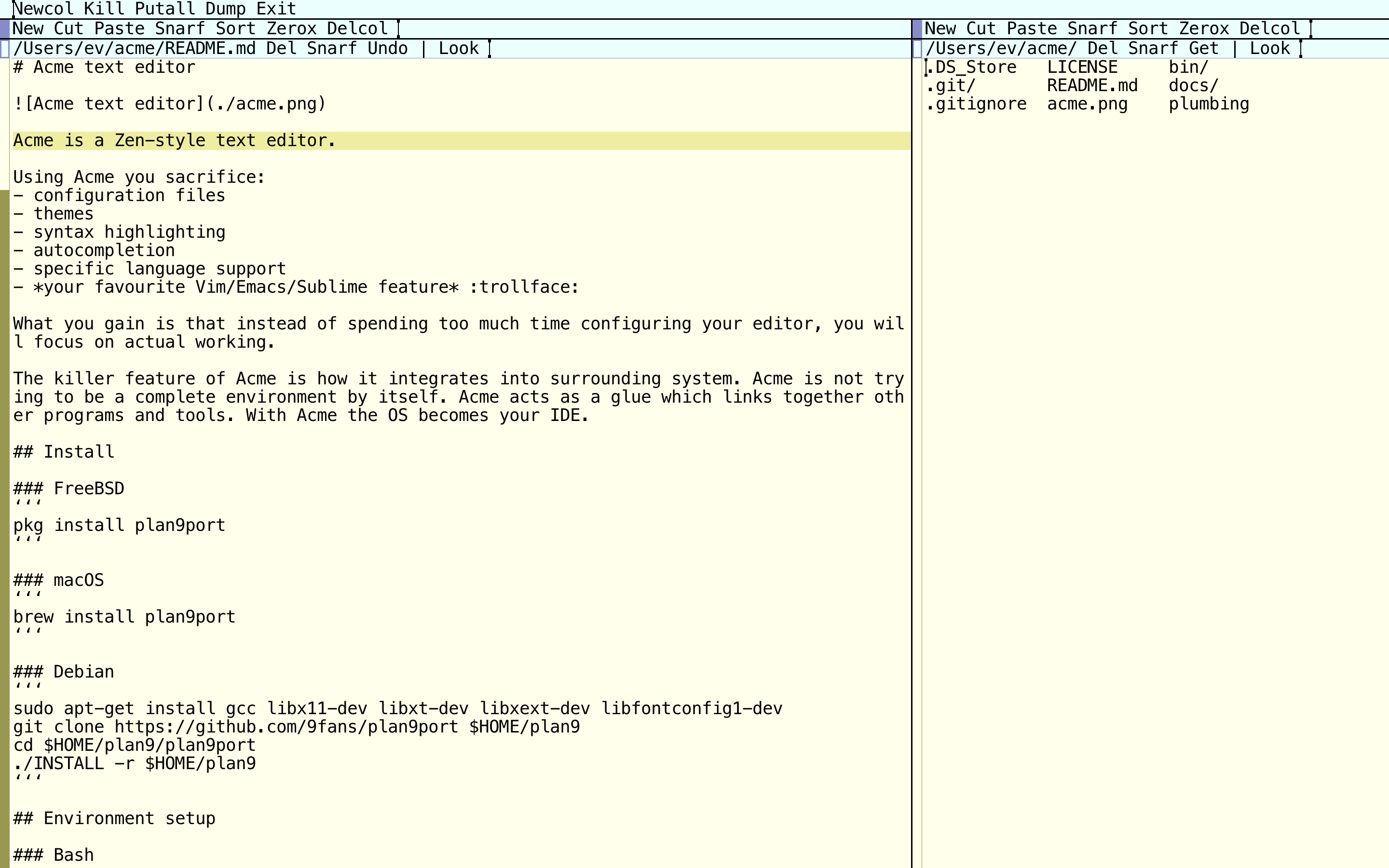
Acme is a Zen-style text editor.
Using Acme you sacrifice:
- configuration files
- themes
- syntax highlighting
- autocompletion
- specific language support
- your favourite Vim/Emacs/Sublime feature :trollface:
What you gain is that instead of spending too much time configuring your editor, you will focus on actual working.
The killer feature of Acme is how it integrates into surrounding system. Acme is not trying to be a complete environment by itself. Acme acts as a glue which links together other programs and tools. With Acme the OS becomes your IDE.
Install
macOS
mkdir $HOME/9 && cd $HOME/9
git clone https://github.com/9fans/plan9port/ && cd plan9port
./INSTALL
Debian
sudo apt-get install gcc libx11-dev libxt-dev libxext-dev libfontconfig1-dev
git clone https://github.com/9fans/plan9port $HOME/plan9
cd $HOME/plan9/plan9port
./INSTALL -r $HOME/plan9
Environment setup
export PLAN9="/path/to/plan9port"
export PATH="$PATH:$PLAN9/bin"
Font
Run font server:
fontsrv
In case it's not installed:
cd /path/to/plan9port/src/cmd/fontsrv/
9 mk install
Have a look at all available fonts:
9p ls font
Try one of them:
acme -f /mnt/font/'Droid Sans Mono'/13a/font
Run
I spawn Acme by running a script.
Scripts
Who is who in bin directory:
astart Acmebcreate an indented C-like block{ ... }c SYMBOL/uc SYMBOLcomment/uncomment selectioncommit MESSAGEcommit and push to mastercssandcssifytransform abbreviations into CSS propertiesf TEXTfind TEXT using The Silver Searcherhd SYMBOLdraw a pretty headinghtmfeed selection to PughtmlHTML boilerplatei/uiindent/unindent selectionlstripremove leading whitespacet2s N_SPACES/s2t N_SPACEStabs <=> spacesupper/lowerconvert selection to uppercase/lowercase
Put these guys in your $PATH.
Random notes
Edit =find out the current line number:13goto 13th line:0goto file beginning:$goto file end:1,$or:,orEdit 1,$orEdit ,select all lines:1,5orEdit 1,5select lines 1..5Edit , dclear windowEdit , < echo hello worldreplace window body with some textEdit , < erl -man mapsreplace window body with erlang manualEdit , s/text/TEXT/gorEdit , | sed 's/text/TEXT/g'global replace$%or$samfilecurrent file name$winidcurrent window idecho some text | 9p write acme/$winid/bodyappend to the end of current window- keyboard shortcuts:
ctrl-udelete from cursor to start of linectrl-wdelete word before the cursorctrl-hdelete character before the cursorctrl-amove cursor to start of the linectrl-emove cursor to end of the linectrl-itabctrl-jenterctrl-ffilepath autocompletionfn-*left arrow*go home (macOS)fn-*right arrow*go end (macOS)
- search with right click:
:+/foobar,:/foobarand justfoobarsearch forward:-/foobarsearch backwards
- press
escto select the last typed text - press
escagain to delete any selected text Fontswitch between fonts:/^helregexp match: lines starting with 'hel':/lo\n/regexp match: lines ending with 'lo':/^b/,/^e/regexp match: lines between starting with 'b' and starting with 'e'Dumpwrite the state of acme to the fileLoadrestore from the dumpEdit , > pythonpipe window body through python interpreter- three-finger tap emulates middle click (macOS)
Sam commands
Edit +/hellosearch 'hello' forwardEdit -/hellosearch 'hello' backwardEdit , > wc -lcount lines in fileEdit , | sortsort linesEdit 3,5pprint lines 3..5 in new windowEdit 3,5 | upperlines 3..5 upper casedEdit 3,5 s/HE/he/greplace on 3..5 lines onlyEdit 2 ddelete 2nd lineEdit 2 c/newchange 2nd lineEdit 2 a/newappend text after 2nd lineEdit 2 i/newinsert text before 2nd lineEdit 2 < datereplace 2nd line with the output of dateEdit ,x/^TODAY$/ < datereplace matching lines with the output of dateEdit ,x/Plan9/ |tr a-z A-Zreplace all instances of Plan9 with upper caseEdit 3,5x/^/ a/ /indent lines 3..5 with 1 tab
You can do amazing things with Sam commands:
Edit ,x/Acme/ {
  i/I love
  c/Sam
  a/ editor!
}
Cut / Copy selection to a file
- select some text
- cut:
| sed '' > file.txt - copy:
> sed '' > file.txt - pipe selection to a file:
> awk '{ print(toupper($1)) }' | sort | nl > file.txt
Games!
Other Plan9 goodies
winstart shell in a new windowpage FILEview graphics filesweb URLopen url in your browser
Wanna use bash inside win?
Put in your .bashrc
## If inside Acme...
if [ "$winid" ]; then
  ## ... then patch the `cd` command
  _cd () {
    \cd "$@" && awd
  }
  alias cd=_cd
fi
Resources
Contributors

46 commits
Similar repos


Languages
Shell
100.0%
README
Acme text editor
Acme is a Zen-style text editor.
Using Acme you sacrifice:
- configuration files
- themes
- syntax highlighting
- autocompletion
- specific language support
- your favourite Vim/Emacs/Sublime feature :trollface:
What you gain is that instead of spending too much time configuring your editor, you will focus on actual working.
The killer feature of Acme is how it integrates into surrounding system. Acme is not trying to be a complete environment by itself. Acme acts as a glue which links together other programs and tools. With Acme the OS becomes your IDE.
Install
macOS
mkdir $HOME/9 && cd $HOME/9
git clone https://github.com/9fans/plan9port/ && cd plan9port
./INSTALL
Debian
sudo apt-get install gcc libx11-dev libxt-dev libxext-dev libfontconfig1-dev
git clone https://github.com/9fans/plan9port $HOME/plan9
cd $HOME/plan9/plan9port
./INSTALL -r $HOME/plan9
Environment setup
export PLAN9="/path/to/plan9port"
export PATH="$PATH:$PLAN9/bin"
Font
Run font server:
fontsrv
In case it's not installed:
cd /path/to/plan9port/src/cmd/fontsrv/
9 mk install
Have a look at all available fonts:
9p ls font
Try one of them:
acme -f /mnt/font/'Droid Sans Mono'/13a/font
Run
I spawn Acme by running a script.
Scripts
Who is who in bin directory:
astart Acmebcreate an indented C-like block{ ... }c SYMBOL/uc SYMBOLcomment/uncomment selectioncommit MESSAGEcommit and push to mastercssandcssifytransform abbreviations into CSS propertiesf TEXTfind TEXT using The Silver Searcherhd SYMBOLdraw a pretty headinghtmfeed selection to PughtmlHTML boilerplatei/uiindent/unindent selectionlstripremove leading whitespacet2s N_SPACES/s2t N_SPACEStabs <=> spacesupper/lowerconvert selection to uppercase/lowercase
Put these guys in your $PATH.
Random notes
Edit =find out the current line number:13goto 13th line:0goto file beginning:$goto file end:1,$or:,orEdit 1,$orEdit ,select all lines:1,5orEdit 1,5select lines 1..5Edit , dclear windowEdit , < echo hello worldreplace window body with some textEdit , < erl -man mapsreplace window body with erlang manualEdit , s/text/TEXT/gorEdit , | sed 's/text/TEXT/g'global replace$%or$samfilecurrent file name$winidcurrent window idecho some text | 9p write acme/$winid/bodyappend to the end of current window- keyboard shortcuts:
ctrl-udelete from cursor to start of linectrl-wdelete word before the cursorctrl-hdelete character before the cursorctrl-amove cursor to start of the linectrl-emove cursor to end of the linectrl-itabctrl-jenterctrl-ffilepath autocompletionfn-*left arrow*go home (macOS)fn-*right arrow*go end (macOS)
- search with right click:
:+/foobar,:/foobarand justfoobarsearch forward:-/foobarsearch backwards
- press
escto select the last typed text - press
escagain to delete any selected text Fontswitch between fonts:/^helregexp match: lines starting with 'hel':/lo\n/regexp match: lines ending with 'lo':/^b/,/^e/regexp match: lines between starting with 'b' and starting with 'e'Dumpwrite the state of acme to the fileLoadrestore from the dumpEdit , > pythonpipe window body through python interpreter- three-finger tap emulates middle click (macOS)
Sam commands
Edit +/hellosearch 'hello' forwardEdit -/hellosearch 'hello' backwardEdit , > wc -lcount lines in fileEdit , | sortsort linesEdit 3,5pprint lines 3..5 in new windowEdit 3,5 | upperlines 3..5 upper casedEdit 3,5 s/HE/he/greplace on 3..5 lines onlyEdit 2 ddelete 2nd lineEdit 2 c/newchange 2nd lineEdit 2 a/newappend text after 2nd lineEdit 2 i/newinsert text before 2nd lineEdit 2 < datereplace 2nd line with the output of dateEdit ,x/^TODAY$/ < datereplace matching lines with the output of dateEdit ,x/Plan9/ |tr a-z A-Zreplace all instances of Plan9 with upper caseEdit 3,5x/^/ a/ /indent lines 3..5 with 1 tab
You can do amazing things with Sam commands:
Edit ,x/Acme/ {
  i/I love
  c/Sam
  a/ editor!
}
Cut / Copy selection to a file
- select some text
- cut:
| sed '' > file.txt - copy:
> sed '' > file.txt - pipe selection to a file:
> awk '{ print(toupper($1)) }' | sort | nl > file.txt
Games!
Other Plan9 goodies
winstart shell in a new windowpage FILEview graphics filesweb URLopen url in your browser
Wanna use bash inside win?
Put in your .bashrc
## If inside Acme...
if [ "$winid" ]; then
  ## ... then patch the `cd` command
  _cd () {
    \cd "$@" && awd
  }
  alias cd=_cd
fi
Resources
Similar repos
Contributors
46 commits
Languages
Shell
100.0%