
A task-manager style TUI for running and monitoring multiple socat relays
Rust
1
0 commits
updated Sep 24, 2026
See what people are saying
README
socatui
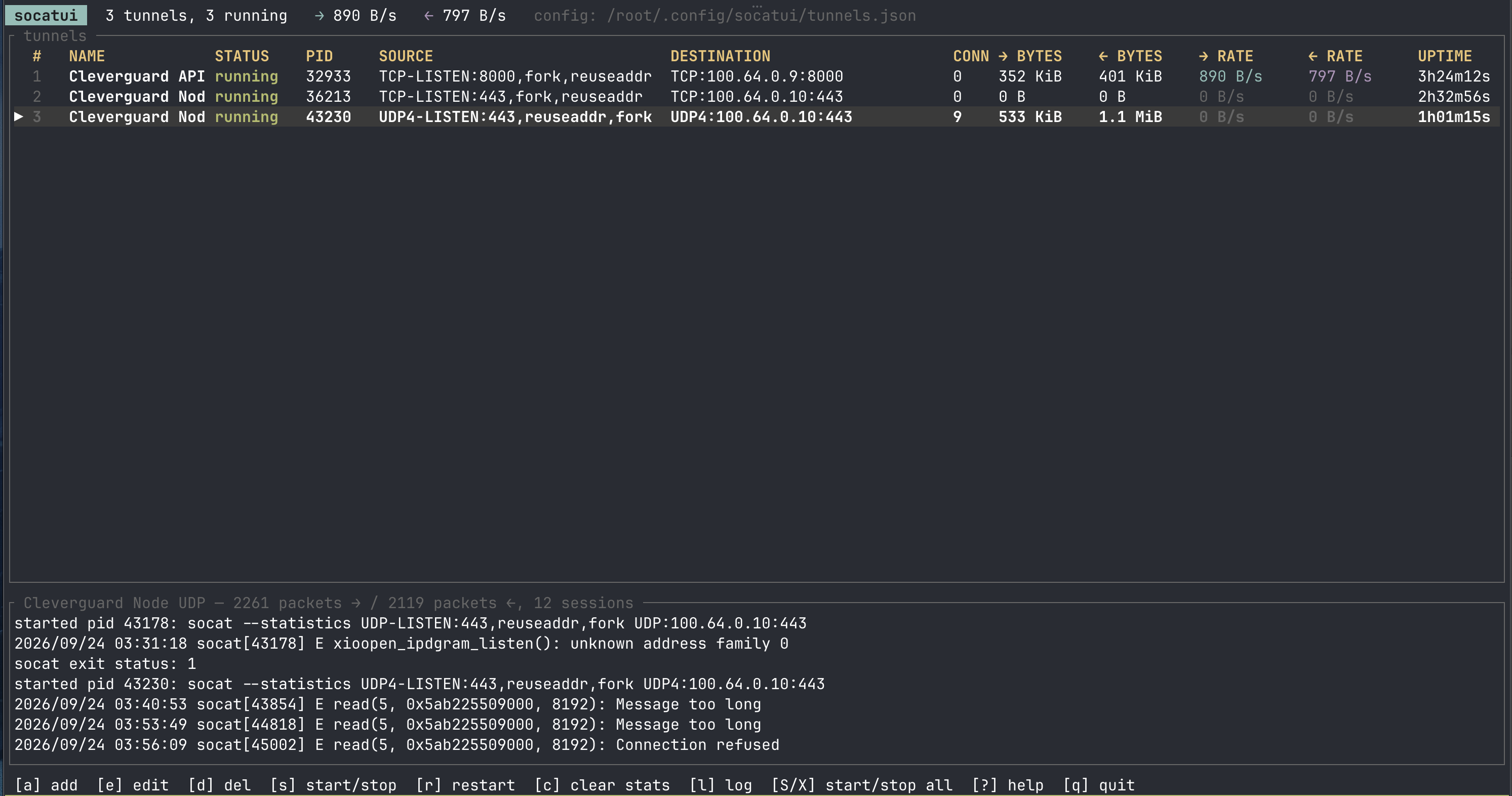
A task-manager style TUI (Rust + ratatui) for running and
monitoring multiple socat relays. Each tunnel is one
socat --statistics [options] SOURCE DESTINATION process; the list shows its
status, PID, active connections, bytes transferred in each direction, live
throughput and uptime, refreshed once per second.
Requirements
socat1.8.0 or newer inPATH(the--statisticsoption and SIGUSR1 stat dumps were introduced in 1.8).- macOS or Linux (uses
psand POSIX signals).
Build and run
cargo build --release
./target/release/socatui                # uses ~/.config/socatui/tunnels.json
./target/release/socatui my-tunnels.json
SOCATUI_CONFIG=/path/tunnels.json ./target/release/socatui
Keys
| Key | Action |
|---|---|
↑/k ↓/j | select tunnel |
a | add tunnel |
e / Enter | edit selected |
d | delete selected (asks for confirmation) |
s / Space | start or stop selected (press again while stopping to SIGKILL) |
r | restart selected |
t | toggle auto-restart for selected |
K | SIGKILL selected |
S / X | start all / stop all |
c / C | clear statistics for selected / all |
J / U | move selected down / up in the list |
l | toggle the log pane |
w / W | export the log of the selected tunnel / of all tunnels to a file |
? | help |
q / Ctrl-C | quit, stopping every tunnel |
In the add/edit form: Tab/↑/↓ move between fields, Space toggles
Autostart, Enter saves, Esc cancels.
Tunnel definition
| Field | Meaning |
|---|---|
| Name | label shown in the list |
| Source | left socat address, e.g. TCP-LISTEN:8080,fork,reuseaddr |
| Destination | right socat address, e.g. TCP:example.com:80, UNIX-CONNECT:/tmp/x.sock, EXEC:/bin/cat |
| Options | extra socat command-line options, split like a shell would, e.g. -d -d -T 30 |
| Autostart | start when socatui launches (A in the FLAGS column) |
| Auto-restart | restart socat whenever it exits without being stopped by you (R in FLAGS). Backoff starts at 1s and doubles up to 30s; a run of 30s or more resets it. Stopping the tunnel (or quitting) cancels a pending restart. |
Source and destination are passed to socat verbatim as single arguments, so no shell quoting is needed (or applied). Definitions are stored as JSON in the config file and saved on every add/edit/delete/reorder.
How the statistics work
socat 1.8 logs its transfer counters to stderr when it exits and whenever it
receives SIGUSR1:
socat[75527] I STATISTICS: left to right: 1 packets(s), 5000 byte(s)
socat[75527] I STATISTICS: right to left: 1 packets(s), 5000 byte(s)
Once per second socatui walks the process tree under each tunnel, sends
SIGUSR1 to every socat process in it (not to programs started via
EXEC:/SYSTEM:, which would die on that signal), and parses the lines that
come back on stderr. With the fork option every connection is a separate
socat child with its own counters, so counters are tracked per PID and summed;
finished children are folded into an archived total after a short grace
period so that PID reuse cannot lose bytes. CONN is the number of live
forked workers, and throughput is the delta between consecutive samples.
All other stderr output from socat (errors, -d diagnostics, exit status) is
shown in the log pane for the selected tunnel. The last 500 lines per tunnel
are kept in memory.
Exporting logs
w exports the selected tunnel's log, W exports every tunnel's log. The
dialog is prefilled with a random path such as
/tmp/socatui-echo-relay-1758640000-a3f9c1.log; press Enter to write it
there, or type another path first (Ctrl-U clears the field, Tab switches
between the selected tunnel and all tunnels). Each tunnel section starts with a
header giving the status, the exact socat command line, the PID and the
transfer counters, followed by the retained log lines.
Similar repos


Languages
Rust
100.0%
A task-manager style TUI for running and monitoring multiple socat relays
Rust
1
0 commits
updated Sep 24, 2026
See what people are saying
README
socatui
A task-manager style TUI (Rust + ratatui) for running and
monitoring multiple socat relays. Each tunnel is one
socat --statistics [options] SOURCE DESTINATION process; the list shows its
status, PID, active connections, bytes transferred in each direction, live
throughput and uptime, refreshed once per second.
Requirements
socat1.8.0 or newer inPATH(the--statisticsoption and SIGUSR1 stat dumps were introduced in 1.8).- macOS or Linux (uses
psand POSIX signals).
Build and run
cargo build --release
./target/release/socatui                # uses ~/.config/socatui/tunnels.json
./target/release/socatui my-tunnels.json
SOCATUI_CONFIG=/path/tunnels.json ./target/release/socatui
Keys
| Key | Action |
|---|---|
↑/k ↓/j | select tunnel |
a | add tunnel |
e / Enter | edit selected |
d | delete selected (asks for confirmation) |
s / Space | start or stop selected (press again while stopping to SIGKILL) |
r | restart selected |
t | toggle auto-restart for selected |
K | SIGKILL selected |
S / X | start all / stop all |
c / C | clear statistics for selected / all |
J / U | move selected down / up in the list |
l | toggle the log pane |
w / W | export the log of the selected tunnel / of all tunnels to a file |
? | help |
q / Ctrl-C | quit, stopping every tunnel |
In the add/edit form: Tab/↑/↓ move between fields, Space toggles
Autostart, Enter saves, Esc cancels.
Tunnel definition
| Field | Meaning |
|---|---|
| Name | label shown in the list |
| Source | left socat address, e.g. TCP-LISTEN:8080,fork,reuseaddr |
| Destination | right socat address, e.g. TCP:example.com:80, UNIX-CONNECT:/tmp/x.sock, EXEC:/bin/cat |
| Options | extra socat command-line options, split like a shell would, e.g. -d -d -T 30 |
| Autostart | start when socatui launches (A in the FLAGS column) |
| Auto-restart | restart socat whenever it exits without being stopped by you (R in FLAGS). Backoff starts at 1s and doubles up to 30s; a run of 30s or more resets it. Stopping the tunnel (or quitting) cancels a pending restart. |
Source and destination are passed to socat verbatim as single arguments, so no shell quoting is needed (or applied). Definitions are stored as JSON in the config file and saved on every add/edit/delete/reorder.
How the statistics work
socat 1.8 logs its transfer counters to stderr when it exits and whenever it
receives SIGUSR1:
socat[75527] I STATISTICS: left to right: 1 packets(s), 5000 byte(s)
socat[75527] I STATISTICS: right to left: 1 packets(s), 5000 byte(s)
Once per second socatui walks the process tree under each tunnel, sends
SIGUSR1 to every socat process in it (not to programs started via
EXEC:/SYSTEM:, which would die on that signal), and parses the lines that
come back on stderr. With the fork option every connection is a separate
socat child with its own counters, so counters are tracked per PID and summed;
finished children are folded into an archived total after a short grace
period so that PID reuse cannot lose bytes. CONN is the number of live
forked workers, and throughput is the delta between consecutive samples.
All other stderr output from socat (errors, -d diagnostics, exit status) is
shown in the log pane for the selected tunnel. The last 500 lines per tunnel
are kept in memory.
Exporting logs
w exports the selected tunnel's log, W exports every tunnel's log. The
dialog is prefilled with a random path such as
/tmp/socatui-echo-relay-1758640000-a3f9c1.log; press Enter to write it
there, or type another path first (Ctrl-U clears the field, Tab switches
between the selected tunnel and all tunnels). Each tunnel section starts with a
header giving the status, the exact socat command line, the PID and the
transfer counters, followed by the retained log lines.
Similar repos
Languages
Rust
100.0%