
README
AutoGo
A minimal codebase for building a strong Go-playing AI from scratch — and, more importantly, for studying how to automate the AI researcher driving the project. AutoGo is less about mastering Go than about exercising an autonomous-research workflow on a domain where data is cheap and signal is fast.
Currently, the best model I have trained plays OK but has some bugs due to not understanding life/death properly due to being trained on Tromp-Taylor scoring rules. Working on fixing this.
Why Go?
AlphaGo and MCTS are so 2016. Why build a research codebase around Go, as opposed to more recent models like reasoning LLMs, VLMs, Diffusion, etc?
This repo is not really about Go. It is about automating the Go researcher. The same skillsets should transfer to many other AI research domains. From Dario Amodei's Machines of Loving Grace:
If our core hypothesis about AI progress is correct, then the right way to think of AI is not as a method of data analysis, but as a virtual biologist who performs all the tasks biologists do, including designing and running experiments in the real world (by controlling lab robots or simply telling humans which experiments to run – as a Principal Investigator would to their graduate students), inventing new biological methods or measurement techniques, and so on. It is by speeding up the whole research process that AI can truly accelerate biology. I want to repeat this because it’s the most common misconception that comes up when I talk about AI’s ability to transform biology: I am not talking about AI as merely a tool to analyze data. In line with the definition of powerful AI at the beginning of this essay, I’m talking about using AI to perform, direct, and improve upon nearly everything biologists do.
As to why Go is a particularly good environment for "automated researcher", it mainly comes down to being a (relatively) computationally lightweight environment that still requires the core competencies of AI researchers.
- Training policy and value networks in Go are fundamentally about minimizing perplexity, like in LLMs. Unlike model-free RL algorithms specialized for single-player games (ALE benchmark, Mujoco), AlphaGo favors fairly simple training methods (supervised learning) + scaling up the system engineering. A similar taste around simple algorithms + performant distributed systems is employed in frontier labs.
- Because Go data is easy to generate and the universe of Go games is very large, I suspect that Go is actually a good fit for studying scaling laws. If Go turns out to not be appropriate for studying scaling laws, we learn something about why scaling laws are hard for robotics. Preliminary experiments in this codebase suggest that similar to reasoning LLMs, neural nets trained on Go exhibit both train-time and test-time scaling law properties.
- Techniques that help train Go networks faster will likely translate to LLMs, as well as action + value prediction for robotics. Evaluating new deep learning techniques in Go offers a de-correlated signal from LLM applications.
- AlphaGo as a system shares many similar elements to a robotics stack: logging, data collection, replay buffers, distributed RL, simulated evaluation - but runs many orders of magnitude faster and removes a lot of pesky details about implementing robotics systems: slowness + complexity + the crushing weight of maintaining real-world datasets. It actually has a "little bit of everything" when it comes to exposure to core deep learning topics.
- I find it deeply profound that simply querying a function approximator for value can be an arbitrarily accurate replacement for simulation. It is a miracle that macroscale effects can be predicted accurately without microscale simulation. Extrapolating this principle, I wonder if long-standing questions of computational hardness (P = NP?) are even the right ones to be asking. Perhaps we should be asking if "P almost NP?"
- Self-play, Nash equilibria, mixed strategies, and recursive self-improvement are top-of-mind for frontier labs. Go is a lightweight yet rich environment for studying those dynamics.
Interested in buying RL environments and data for autonomous game-playing RL research? Please get in touch.
Workflow
Instead of running code yourself, you ask Claude to run your experiments. The human researcher provides interactive feedback, which Claude will use to assist in its interpretation of the data.
There are a few skills in this repository that aid running experiments:
autoresearch: autonomously optimize a metric. Good for hyperparameter tuning (e.g. minimize validation loss) and performance optimization (e.g. maximize moves/sec).experiment: one-off experiment useful for conducting analysis
Architecture
A driver process inside a dev container dispatches jobs to a fleet of GPU worker hosts over SSH. Each job is a one-shot docker run --rm of the worker image (ghcr.io/<owner>/alphago-worker:latest). Worker nodes are listed in cluster.toml; bring them up with infra/cluster.py add <user@host>. Exactly one worker (with roles = ["train", "collect"]) shares the controller's NFS mount, so checkpoints and game data are visible without explicit shipping. The remaining collect-only workers don't share NFS — infra.remote_exec rsyncs each push_files (e.g. the checkpoint) over before docker run and rsyncs each pull_dirs (e.g. the NPZ output dir) back when the job exits.
See infra/cluster.py (cluster bringup, add/ping/build/pull/status subcommands) and infra/remote_exec.py (the SSH dispatcher used by experiment drivers).
┌──────────────────────┐
│  Code Editing Client │
│  (Laptop / VSCode)   │
│                      │
│  thin client,        │
│  SSH remote into     │
│  dev container       │
└──────────┬───────────┘
           │ SSH
┌──────────▼───────────┐
│  Dev Container (CPU) │
│  + /nfs (host mount) │
│                      │
│  development,        │
│  dispatch jobs via   │
│  SSH + docker run    │
└──────────┬───────────┘
           │  Multi-host cluster  (cluster.toml; one job = one `docker run --rm` per GPU)
           ▼
┌────────────────┐ ┌────────────────┐ ┌────────────────┐ ┌────────────────┐
│ RTX 6000 Ada   │ │ RTX 6000 Ada   │ │ RTX PRO 6000B  │ │ RTX PRO 6000B  │
│ train + collect│ │ collect        │ │ collect        │ │ collect        │
│ /nfs (host)    │ │ no /nfs        │ │ no /nfs        │ │ no /nfs        │
│ ┌────────────┐ │ │ ┌────────────┐ │ │ ┌────────────┐ │ │ ┌────────────┐ │
│ │ worker ctr │ │ │ │ worker ctr │ │ │ │ worker ctr │ │ │ │ worker ctr │ │
│ └────────────┘ │ │ └────────────┘ │ │ └────────────┘ │ │ └────────────┘ │
└────────────────┘ └────────────────┘ └────────────────┘ └────────────────┘
Setup
The dev container provides a fully configured GPU-enabled environment with all dependencies pre-built.
Host machine prerequisites
The dev container mounts ~/.ssh and ~/.claude from the host. The container's dev user runs as UID 1000, so the host user must also be UID 1000 for file ownership to match across the bind mount. If you are logged in as root (UID 0), create a non-root user first:
sudo chmod o+x /data
# Create a user with UID 1000 (skip if your host user is already UID 1000)
sudo useradd -m -u 1000 -s /bin/bash dev
# Grant passwordless sudo
echo "dev ALL=(ALL) NOPASSWD:ALL" | sudo tee /etc/sudoers.d/dev

# Copy your SSH keys to the new user
sudo cp -r ~/.ssh /home/dev/.ssh
sudo chown -R dev:dev /home/dev/.ssh
sudo chmod 700 /home/dev/.ssh
sudo chmod 600 /home/dev/.ssh/*
sudo chmod 644 /home/dev/.ssh/*.pub 2>/dev/null

# Copy Claude CLI config if it exists
sudo cp -r ~/.claude /home/dev/.claude 2>/dev/null
sudo chown -R dev:dev /home/dev/.claude 2>/dev/null
sudo cp ~/.claude.json /home/dev/.claude.json 2>/dev/null
sudo chown dev:dev /home/dev/.claude.json 2>/dev/null

# Create files that the container bind-mounts expect
sudo -u dev touch /home/dev/.bash_history
sudo mkdir -p /home/dev/.docker
sudo chown -R dev:dev /home/dev/.docker

# Add dev to docker group so it can run containers
sudo usermod -aG docker dev
Then switch to the new user and launch the dev container from there:
su - dev
Why not just chown to 1000? Changing
~/.sshownership to UID 1000 under root breaks root's own SSH access, since SSH requires key files to be owned by the connecting user. A dedicated UID 1000 host user avoids this tug-of-war entirely.
Clone and launch
- Clone with submodules:
git clone --recursive <your-fork-url> AutoGo
cd AutoGo
-
Open in VS Code and select "Reopen in Container" when prompted (or run
Dev Containers: Reopen in Containerfrom the command palette). -
The container will automatically:
- Initialize git submodules
- Install Python dependencies via
uv sync - Build the C++ pybind11 extension
-
Verify the setup:
uv run -m pytest tests/
uv run python -c "import alpha_go_cpp; print(alpha_go_cpp.__version__)"
nvidia-smi
Launch from terminal
Build and enter the container shell directly:
docker build -f .devcontainer/Dockerfile -t learnalphago-dev .
docker run -it --gpus all --shm-size=8g \
  -v "$PWD:/workspace" \
  -v "$HOME/.ssh:/home/dev/.ssh:ro" \
  -p 8265:8265 -p 8090:8090 \
  learnalphago-dev bash
Then inside the container:
git submodule update --init && uv sync
claude
Development Setup
VSCode: check Terminal: Send Keybindings To Shell so that you can ctrl-Ee and ctrl-g within Calude repl.
Cluster Operations
Worker nodes are listed in cluster.toml; the worker image is ghcr.io/<owner>/alphago-worker:latest (override via cluster.toml's top-level image key).
Build and push the worker image
The first step is to set up authentication to Github Container Registry. Edit a file .secrets like so:
GHCR_TOKEN=<your_github_token>
GHCR_USER=<your_github_username>
Then run
uv run infra/cluster.py build
which builds Dockerfile.worker (on top of the base devcontainer image) and pushes it cluster.py build/add automatically loads login information from .secrets to deploy the containers for pushing & pulling from the registry.
Run uv run infra/cluster.py pull afterward to roll the new tag onto the fleet — docker run does not use --pull=always.
Add a new worker
./infra/cluster.py add user@host          # baremetal or container host
./infra/cluster.py add --ssh-port 2222 user@host
Installs Docker + the NVIDIA toolkit, logs into GHCR, pulls the image, seeds /nfs, and appends [nodes."<ip>"] to cluster.toml.
Inspect the fleet
./infra/cluster.py ping     # SSH-echo every node, ✓/✗ per host
./infra/cluster.py status   # per-GPU lease state from /nfs/cluster_leases
Run an end-to-end iteration of Go training
The selfplay-only loop in experiments/2026-04-26_22-32-train-fromscratch/ dispatches collect jobs across the whole cluster and trains on the gathered data:
EXP=experiments/2026-04-26_22-32-train-fromscratch
bash $EXP/run_iteration.sh 0 5
Auto-Research
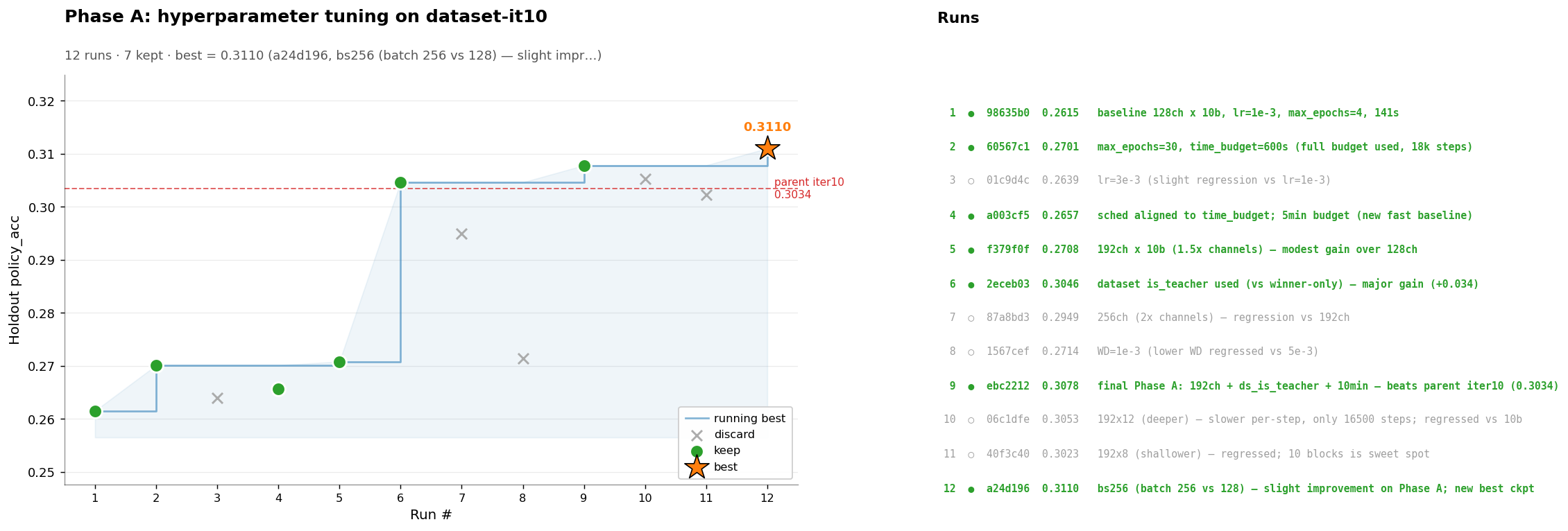
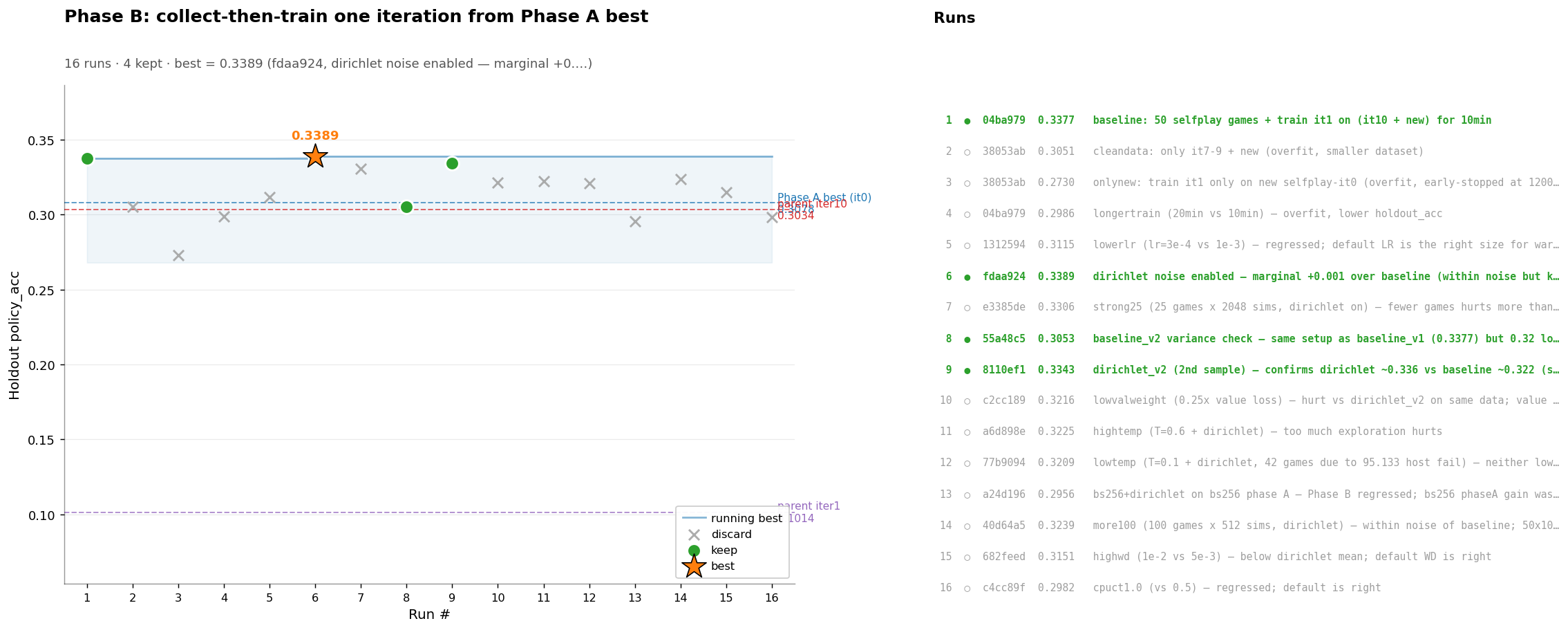
You can use the autoresearch and experiment skills to run new experiments.
Infra Advice
- Having Claude "run the training loop by hand" and stop and remark when a given iteration was going unstable was very useful for catching unstable training early.
- It's very helpful to start with alternating synchronously between train and collect jobs before attempting to max throughput with async RL and simultaneous training + data collect. Helps a lot with catching stability issues in training, which are much harder to diagnose / backtrack in async mode. Once you get synchronous baseline working, then you can look into speeding things up with async.
- I wasted a lot of time wrangling distributed job orchestration frameworks. Falling back to docker exec calls over SSH ended up working best and being agent-friendly.
Acknowledgements
Thanks to Vincent Weisser of Prime Intellect for donating the GPU credits for me to run this project!
Contributors

11 commits
Similar repos


Languages
Python
85.7%
C++
10.9%
Shell
2.8%
README
AutoGo
A minimal codebase for building a strong Go-playing AI from scratch — and, more importantly, for studying how to automate the AI researcher driving the project. AutoGo is less about mastering Go than about exercising an autonomous-research workflow on a domain where data is cheap and signal is fast.
Currently, the best model I have trained plays OK but has some bugs due to not understanding life/death properly due to being trained on Tromp-Taylor scoring rules. Working on fixing this.
Why Go?
AlphaGo and MCTS are so 2016. Why build a research codebase around Go, as opposed to more recent models like reasoning LLMs, VLMs, Diffusion, etc?
This repo is not really about Go. It is about automating the Go researcher. The same skillsets should transfer to many other AI research domains. From Dario Amodei's Machines of Loving Grace:
If our core hypothesis about AI progress is correct, then the right way to think of AI is not as a method of data analysis, but as a virtual biologist who performs all the tasks biologists do, including designing and running experiments in the real world (by controlling lab robots or simply telling humans which experiments to run – as a Principal Investigator would to their graduate students), inventing new biological methods or measurement techniques, and so on. It is by speeding up the whole research process that AI can truly accelerate biology. I want to repeat this because it’s the most common misconception that comes up when I talk about AI’s ability to transform biology: I am not talking about AI as merely a tool to analyze data. In line with the definition of powerful AI at the beginning of this essay, I’m talking about using AI to perform, direct, and improve upon nearly everything biologists do.
As to why Go is a particularly good environment for "automated researcher", it mainly comes down to being a (relatively) computationally lightweight environment that still requires the core competencies of AI researchers.
- Training policy and value networks in Go are fundamentally about minimizing perplexity, like in LLMs. Unlike model-free RL algorithms specialized for single-player games (ALE benchmark, Mujoco), AlphaGo favors fairly simple training methods (supervised learning) + scaling up the system engineering. A similar taste around simple algorithms + performant distributed systems is employed in frontier labs.
- Because Go data is easy to generate and the universe of Go games is very large, I suspect that Go is actually a good fit for studying scaling laws. If Go turns out to not be appropriate for studying scaling laws, we learn something about why scaling laws are hard for robotics. Preliminary experiments in this codebase suggest that similar to reasoning LLMs, neural nets trained on Go exhibit both train-time and test-time scaling law properties.
- Techniques that help train Go networks faster will likely translate to LLMs, as well as action + value prediction for robotics. Evaluating new deep learning techniques in Go offers a de-correlated signal from LLM applications.
- AlphaGo as a system shares many similar elements to a robotics stack: logging, data collection, replay buffers, distributed RL, simulated evaluation - but runs many orders of magnitude faster and removes a lot of pesky details about implementing robotics systems: slowness + complexity + the crushing weight of maintaining real-world datasets. It actually has a "little bit of everything" when it comes to exposure to core deep learning topics.
- I find it deeply profound that simply querying a function approximator for value can be an arbitrarily accurate replacement for simulation. It is a miracle that macroscale effects can be predicted accurately without microscale simulation. Extrapolating this principle, I wonder if long-standing questions of computational hardness (P = NP?) are even the right ones to be asking. Perhaps we should be asking if "P almost NP?"
- Self-play, Nash equilibria, mixed strategies, and recursive self-improvement are top-of-mind for frontier labs. Go is a lightweight yet rich environment for studying those dynamics.
Interested in buying RL environments and data for autonomous game-playing RL research? Please get in touch.
Workflow
Instead of running code yourself, you ask Claude to run your experiments. The human researcher provides interactive feedback, which Claude will use to assist in its interpretation of the data.
There are a few skills in this repository that aid running experiments:
autoresearch: autonomously optimize a metric. Good for hyperparameter tuning (e.g. minimize validation loss) and performance optimization (e.g. maximize moves/sec).experiment: one-off experiment useful for conducting analysis
Architecture
A driver process inside a dev container dispatches jobs to a fleet of GPU worker hosts over SSH. Each job is a one-shot docker run --rm of the worker image (ghcr.io/<owner>/alphago-worker:latest). Worker nodes are listed in cluster.toml; bring them up with infra/cluster.py add <user@host>. Exactly one worker (with roles = ["train", "collect"]) shares the controller's NFS mount, so checkpoints and game data are visible without explicit shipping. The remaining collect-only workers don't share NFS — infra.remote_exec rsyncs each push_files (e.g. the checkpoint) over before docker run and rsyncs each pull_dirs (e.g. the NPZ output dir) back when the job exits.
See infra/cluster.py (cluster bringup, add/ping/build/pull/status subcommands) and infra/remote_exec.py (the SSH dispatcher used by experiment drivers).
┌──────────────────────┐
│  Code Editing Client │
│  (Laptop / VSCode)   │
│                      │
│  thin client,        │
│  SSH remote into     │
│  dev container       │
└──────────┬───────────┘
           │ SSH
┌──────────▼───────────┐
│  Dev Container (CPU) │
│  + /nfs (host mount) │
│                      │
│  development,        │
│  dispatch jobs via   │
│  SSH + docker run    │
└──────────┬───────────┘
           │  Multi-host cluster  (cluster.toml; one job = one `docker run --rm` per GPU)
           ▼
┌────────────────┐ ┌────────────────┐ ┌────────────────┐ ┌────────────────┐
│ RTX 6000 Ada   │ │ RTX 6000 Ada   │ │ RTX PRO 6000B  │ │ RTX PRO 6000B  │
│ train + collect│ │ collect        │ │ collect        │ │ collect        │
│ /nfs (host)    │ │ no /nfs        │ │ no /nfs        │ │ no /nfs        │
│ ┌────────────┐ │ │ ┌────────────┐ │ │ ┌────────────┐ │ │ ┌────────────┐ │
│ │ worker ctr │ │ │ │ worker ctr │ │ │ │ worker ctr │ │ │ │ worker ctr │ │
│ └────────────┘ │ │ └────────────┘ │ │ └────────────┘ │ │ └────────────┘ │
└────────────────┘ └────────────────┘ └────────────────┘ └────────────────┘
Setup
The dev container provides a fully configured GPU-enabled environment with all dependencies pre-built.
Host machine prerequisites
The dev container mounts ~/.ssh and ~/.claude from the host. The container's dev user runs as UID 1000, so the host user must also be UID 1000 for file ownership to match across the bind mount. If you are logged in as root (UID 0), create a non-root user first:
sudo chmod o+x /data
# Create a user with UID 1000 (skip if your host user is already UID 1000)
sudo useradd -m -u 1000 -s /bin/bash dev
# Grant passwordless sudo
echo "dev ALL=(ALL) NOPASSWD:ALL" | sudo tee /etc/sudoers.d/dev

# Copy your SSH keys to the new user
sudo cp -r ~/.ssh /home/dev/.ssh
sudo chown -R dev:dev /home/dev/.ssh
sudo chmod 700 /home/dev/.ssh
sudo chmod 600 /home/dev/.ssh/*
sudo chmod 644 /home/dev/.ssh/*.pub 2>/dev/null

# Copy Claude CLI config if it exists
sudo cp -r ~/.claude /home/dev/.claude 2>/dev/null
sudo chown -R dev:dev /home/dev/.claude 2>/dev/null
sudo cp ~/.claude.json /home/dev/.claude.json 2>/dev/null
sudo chown dev:dev /home/dev/.claude.json 2>/dev/null

# Create files that the container bind-mounts expect
sudo -u dev touch /home/dev/.bash_history
sudo mkdir -p /home/dev/.docker
sudo chown -R dev:dev /home/dev/.docker

# Add dev to docker group so it can run containers
sudo usermod -aG docker dev
Then switch to the new user and launch the dev container from there:
su - dev
Why not just chown to 1000? Changing
~/.sshownership to UID 1000 under root breaks root's own SSH access, since SSH requires key files to be owned by the connecting user. A dedicated UID 1000 host user avoids this tug-of-war entirely.
Clone and launch
- Clone with submodules:
git clone --recursive <your-fork-url> AutoGo
cd AutoGo
-
Open in VS Code and select "Reopen in Container" when prompted (or run
Dev Containers: Reopen in Containerfrom the command palette). -
The container will automatically:
- Initialize git submodules
- Install Python dependencies via
uv sync - Build the C++ pybind11 extension
-
Verify the setup:
uv run -m pytest tests/
uv run python -c "import alpha_go_cpp; print(alpha_go_cpp.__version__)"
nvidia-smi
Launch from terminal
Build and enter the container shell directly:
docker build -f .devcontainer/Dockerfile -t learnalphago-dev .
docker run -it --gpus all --shm-size=8g \
  -v "$PWD:/workspace" \
  -v "$HOME/.ssh:/home/dev/.ssh:ro" \
  -p 8265:8265 -p 8090:8090 \
  learnalphago-dev bash
Then inside the container:
git submodule update --init && uv sync
claude
Development Setup
VSCode: check Terminal: Send Keybindings To Shell so that you can ctrl-Ee and ctrl-g within Calude repl.
Cluster Operations
Worker nodes are listed in cluster.toml; the worker image is ghcr.io/<owner>/alphago-worker:latest (override via cluster.toml's top-level image key).
Build and push the worker image
The first step is to set up authentication to Github Container Registry. Edit a file .secrets like so:
GHCR_TOKEN=<your_github_token>
GHCR_USER=<your_github_username>
Then run
uv run infra/cluster.py build
which builds Dockerfile.worker (on top of the base devcontainer image) and pushes it cluster.py build/add automatically loads login information from .secrets to deploy the containers for pushing & pulling from the registry.
Run uv run infra/cluster.py pull afterward to roll the new tag onto the fleet — docker run does not use --pull=always.
Add a new worker
./infra/cluster.py add user@host          # baremetal or container host
./infra/cluster.py add --ssh-port 2222 user@host
Installs Docker + the NVIDIA toolkit, logs into GHCR, pulls the image, seeds /nfs, and appends [nodes."<ip>"] to cluster.toml.
Inspect the fleet
./infra/cluster.py ping     # SSH-echo every node, ✓/✗ per host
./infra/cluster.py status   # per-GPU lease state from /nfs/cluster_leases
Run an end-to-end iteration of Go training
The selfplay-only loop in experiments/2026-04-26_22-32-train-fromscratch/ dispatches collect jobs across the whole cluster and trains on the gathered data:
EXP=experiments/2026-04-26_22-32-train-fromscratch
bash $EXP/run_iteration.sh 0 5
Auto-Research
You can use the autoresearch and experiment skills to run new experiments.
Infra Advice
- Having Claude "run the training loop by hand" and stop and remark when a given iteration was going unstable was very useful for catching unstable training early.
- It's very helpful to start with alternating synchronously between train and collect jobs before attempting to max throughput with async RL and simultaneous training + data collect. Helps a lot with catching stability issues in training, which are much harder to diagnose / backtrack in async mode. Once you get synchronous baseline working, then you can look into speeding things up with async.
- I wasted a lot of time wrangling distributed job orchestration frameworks. Falling back to docker exec calls over SSH ended up working best and being agent-friendly.
Acknowledgements
Thanks to Vincent Weisser of Prime Intellect for donating the GPU credits for me to run this project!
Similar repos
Contributors
11 commits
Languages
Python
85.7%
C++
10.9%
Shell
2.8%