
Agent Framework Examples for Java and Kotlin Developers
Java
183
232 commits
updated Sep 16, 2026
README
🤖 Embabel Agent Examples











English · 简体中文
Learn agentic AI development with Spring Framework and Java or Kotlin. These examples demonstrate building intelligent agents that can plan, execute workflows, use tools, and interact with humans.
This repository uses the latest Embabel snapshots to illustrate current best practice, whereas the Java and Kotlin template repositories s use the latest milestone release for greater stability. There may be some minor API incompatilibites and not everything you see here may work in your own project created from one of those templates, unless you upgrade the
embabel-agent.versionproperty in the POM file, as in this repository.
🚀 Quick Start
Prerequisites
- Java 21+
- API Key (at least one): OpenAI or Anthropic
- Maven 3.9+ (optional - project includes Maven wrapper)
1. Clone & Build
git clone https://github.com/embabel/embabel-agent-examples.git
cd embabel-agent-examples
./mvnw clean install    # Unix/Linux/macOS
mvnw.cmd clean install  # Windows
2. Set API Keys
# Required (choose one or both)
export OPENAI_API_KEY="your_openai_key"
export ANTHROPIC_API_KEY="your_anthropic_key"
3. Run Examples
Kotlin Examples
cd scripts/kotlin
./shell.sh                    # Unix/Linux/macOS - With Docker tools (default)
shell.cmd                     # Windows - With Docker tools (default)

./shell.sh --no-docker-tools  # Unix/Linux/macOS - Basic features only
shell.cmd --no-docker-tools   # Windows - Basic features only
Java Examples
cd scripts/java
./shell.sh                    # Unix/Linux/macOS - With Docker tools (default)
shell.cmd                     # Windows - With Docker tools (default)

./shell.sh --no-docker-tools  # Unix/Linux/macOS - Basic features only
shell.cmd --no-docker-tools   # Windows - Basic features only
Creating Your Own Project
You can create your own agent repo from our Java or Kotlin GitHub template by clicking the "Use this template" button.
You can also create your own Embabel agent project locally with our quick start tool, which allows some customization:
uvx --from git+https://github.com/embabel/project-creator.git project-creator
Choose Java or Kotlin and specify your project name and package name and you'll have an agent running in under a minute,
if you already have an OPENAI_API_KEY and have Maven installed.
🆕 Spring Boot Integration Architecture
Embabel Agent Starter Guide:
embabel-agent-starter
- ✅ Application decides on startup mode (console, web application, etc)
- ✅ Agent discovery and registration
- ✅ Agent Platform beans are available via Dependency Injection mechanism for Application to use as needed
- ✅ Progress tracking and logging
- ✅ Development-friendly error handling
embabel-agent-starter-shell
- ✅ Interactive command-line interface
- ✅ Agent discovery and registration
- ✅ Human-in-the-loop capabilities
- ✅ Progress tracking and logging
- ✅ Development-friendly error handling
embabel-agent-starter-mcpserver
- ✅ MCP protocol server implementation
- ✅ Tool registration and discovery
- ✅ JSON-RPC communication via SSE (Server-Sent Events)
- ✅ Integration with MCP-compatible clients
- ✅ Security and sandboxing
Application Examples
Shell Mode with Logging Theme
@SpringBootApplication
@ConfigurationPropertiesScan(basePackages = ["com.embabel.example"])
class KotlinAgentShellApplication

fun main(args: Array<String>) {
    runApplication<KotlinAgentShellApplication>(*args) {
        setDefaultProperties(
            mapOf("embabel.agent.logging.personality" to LoggingThemes.STAR_WARS)
        )
    }
}
// Java version
@SpringBootApplication
@ConfigurationPropertiesScan(basePackages = {"com.embabel.example"})
public class JavaAgentShellApplication {
    public static void main(String[] args) {
        SpringApplication app = new SpringApplication(JavaAgentShellApplication.class);
        app.setDefaultProperties(Map.of(
            "embabel.agent.logging.personality", LoggingThemes.STAR_WARS
        ));
        app.run(args);
    }
}
Shell Mode with MCP Client Support (Docker Tools)
@SpringBootApplication
@ConfigurationPropertiesScan(basePackages = ["com.embabel.example"])
class KotlinAgentShellApplication

fun main(args: Array<String>) {
    runApplication<KotlinAgentShellApplication>(*args) {
        setAdditionalProfiles(McpServers.DOCKER)  // Activates application-docker-ce.yml
        setDefaultProperties(
            mapOf("embabel.agent.logging.personality" to LoggingThemes.SEVERANCE)
        )
    }
}
MCP Server Mode
@SpringBootApplication
@ConfigurationPropertiesScan(basePackages = ["com.embabel.example"])
class KotlinAgentMcpServerApplication

fun main(args: Array<String>) {
    runApplication<KotlinAgentMcpServerApplication>(*args) {
        setAdditionalProfiles(McpServers.DOCKER, McpServers.DOCKER_DESKTOP)
    }
}
Configuration Guide
Logging Personality
Set via the embabel.agent.logging.personality property:
"starwars"- May the Force be with your logs!"severance"- Welcome to Lumon Industries (default)
MCP Client Integration
Configure via Spring profiles that define Spring AI MCP client connections in application-{profile}.yml:
# application-docker-ce.yml
spring:
  ai:
    mcp:
      client:
        type: SYNC
        stdio:
          connections:
            docker-mcp:
              command: docker
              args: [mcp, gateway, run]
Setting up MCP Tools
Several of the examples use the Model Context Protocol (MCP) to access tools and services.
The default source is the Docker Desktop MCP server, which is installed with Docker Desktop.
To ensure tools are available and startup doesn't time out, first pull models with:
docker login
docker mcp gateway run
When the gateway has come up you can kill it and start the Embabel server.
📚 Examples by Learning Level
🏆 Beginner: InjectedComponent
Available in: Java | Concept: Just a Little AI
Demonstrates how you can inject any Spring component with an Embabel OperationContext
and use it to call LLMs with the rich Embabel API.
@Component
public record InjectedComponent(Ai ai) {

    public record Joke(String leadup, String punchline) {
    }

    public String tellJokeAbout(String topic) {
        return ai
                .withDefaultLlm()
                .generateText("Tell me a joke about " + topic);
    }

    public Joke createJokeObjectAbout(String topic1, String topic2, String voice) {
        return ai
                .withLlm(LlmOptions.withDefaultLlm().withTemperature(.8))
                .createObject("""
                                Tell me a joke about %s and %s.
                                The voice of the joke should be %s.
                                The joke should have a leadup and a punchline.
                                """.formatted(topic1, topic2, voice),
                        Joke.class);
    }

}
🌟 Beginner: Horoscope News Agent
Available in: Java & Kotlin | Concept: Basic Agent Workflow
A fun introduction to agent development that finds personalized news based on someone's star sign.
What It Teaches:
- 📋 Action-based workflows with
@Actionannotations - 🔍 Data extraction from user input using LLMs
- 🌐 Web tool integration for finding news stories
- 📝 Content generation with personality and context
- 🎯 Goal achievement with
@AchievesGoal
How It Works:
- Extract person's name from user input
- Get their star sign (via form if needed)
- Retrieve daily horoscope
- Search web for relevant news stories
- Create amusing writeup combining horoscope + news
Try It:
Start the agent shell, then type:
x "Find horoscope news for Alice who is a Gemini"
x is short for execute, which triggers the agent to run its workflow.
Code Comparison:
- Kotlin:
examples-kotlin/src/main/kotlin/com/embabel/example/horoscope/StarNewsFinder.kt - Java:
examples-java/src/main/java/com/embabel/example/horoscope/StarNewsFinder.java
Key Patterns:
@Agent(description = "Find news based on a person's star sign")
class StarNewsFinder {

    @Action
    fun extractPerson(userInput: UserInput, context: OperationContext): Person?

    @Action(toolGroups = [CoreToolGroups.WEB])
    fun findNewsStories(person: StarPerson, horoscope: Horoscope, context: OperationContext): RelevantNewsStories

    @AchievesGoal(description = "Create an amusing writeup")
    @Action
    fun starNewsWriteup(/* params */): Writeup
}
🔬 Expert: Multi-LLM Research Agent
Available in: Java, Kotlin | Concept: Self-Improving AI Workflows
A sophisticated research agent using multiple AI models with self-critique capabilities.
What It Teaches:
- 🧠 Multi-model consensus (GPT-4 + Claude working together)
- 🔍 Self-improvement loops with critique and retry
- ⚙️ Configuration-driven behavior with Spring Boot properties
- 🌊 Parallel processing of research tasks
- 📝 Quality control through automated review
Architecture:
@ConfigurationProperties(prefix = "embabel.examples.researcher")
data class ResearcherProperties(
    val maxWordCount: Int = 300,
    val claudeModelName: String = AnthropicModels.CLAUDE_35_HAIKU,
    val openAiModelName: String = OpenAiModels.GPT_41_MINI
)
Self-Improvement Pattern:
@Action(outputBinding = "gpt4Report")
fun researchWithGpt4(/* params */): SingleLlmReport

@Action(outputBinding = "claudeReport")
fun researchWithClaude(/* params */): SingleLlmReport

@Action(outputBinding = "mergedReport")
fun mergeReports(gpt4: SingleLlmReport, claude: SingleLlmReport): ResearchReport

@Action
fun critiqueReport(report: ResearchReport): Critique

@AchievesGoal(description = "Completes research with quality assurance")
fun acceptReport(report: ResearchReport, critique: Critique): ResearchReport
Try It:
"Research the latest developments in renewable energy adoption"
Location: examples-kotlin/src/main/kotlin/com/embabel/example/researcher/
✅ Expert: Fact-Checking Agent (DSL Style)
Available in: Kotlin | Concept: Functional Agent Construction
A fact-verification agent built using Embabel's functional DSL approach instead of annotations.
What It Teaches:
- 🔧 Functional DSL construction for agents
- 🔍 Parallel fact verification across multiple claims
- 📊 Confidence scoring and source trust evaluation
- 🌐 Web research integration for verification
- ⚡ Functional programming patterns in agent design
DSL Construction:
fun factCheckerAgent(llms: List<LlmOptions>, properties: FactCheckerProperties) =
    agent(name = "FactChecker", description = "Check content for factual accuracy") {

        flow {
            aggregate<UserInput, FactualAssertions, RationalizedFactualAssertions>(
                transforms = llms.map { llm ->
                    { context -> /* extract assertions with this LLM */ }
                },
                merge = { list, context -> /* rationalize overlapping claims */ }
            )
        }

        transformation<RationalizedFactualAssertions, FactCheck> {
            /* parallel fact-checking */
        }
    }
Domain Model:
data class FactualAssertion(
    val claim: String,
    val reasoning: String
)

data class AssertionCheck(
    val assertion: FactualAssertion,
    val isFactual: Boolean,
    val confidence: Double,
    val sources: List<String>
)
Try It:
"Check these facts: The Earth is flat. Paris is the capital of France."
Location: examples-kotlin/src/main/kotlin/com/embabel/example/factchecker/
🔒 Expert: Secured Agents
Available in: Java & Kotlin | Concept: MCP Tool Access Control
Demonstrates JWT-secured MCP tool exposure using @SecureAgentTool. Each agent class
declares the Spring Security SpEL expression required to invoke any of its actions.
What It Teaches:
- 🔒 Class-level access control with
@SecureAgentTool - 🔑 JWT Bearer token validation at the HTTP transport layer
- 🛡️ Two-layer security — filter chain rejects unauthenticated requests;
@SecureAgentToolenforces per-agent authority checks - ⚡ Fail-fast security — denied calls return a clean MCP error without retrying or burning LLM tokens
Agents:
| Agent | Required authority | What it does |
|---|---|---|
NewsDigestAgent | news:read | Researches a topic via web search and returns a curated digest |
MarketIntelligenceAgent | market:admin | Produces a SWOT + competitive intelligence report |
Key Pattern:
@Agent(description = "Research a topic and return a news digest")
@SecureAgentTool("hasAuthority('news:read')")  // protects every @Action in this agent
class NewsDigestAgent {

    @Action  // also requires news:read
    fun extractTopic(userInput: UserInput, context: OperationContext): NewsTopic

    @AchievesGoal(description = "Produce a curated news digest",
                  export = Export(remote = true, name = "newsDigest",
                                  startingInputTypes = [UserInput::class]))
    @Action  // also requires news:read
    fun produceDigest(topic: NewsTopic, context: OperationContext): NewsDigest
}
Run it:
cd scripts/kotlin && ./mcp_secured_server.sh
See Secured MCP Server Mode for token generation and MCP Inspector setup.
Code:
- Kotlin:
examples-kotlin/src/main/kotlin/com/embabel/example/secured/ - Java:
examples-java/src/main/java/com/embabel/example/secured/
🛠️ Core Concepts You'll Learn
Spring Framework Integration
- Auto-Configuration: Starters handle all configuration automatically
- Profile-Based Configuration: MCP clients configured via Spring profiles
- Maven Profiles:
enable-shell,enable-shell-mcp-client,enable-agent-mcp-server - Dependency Injection: Constructor-based injection with agents as Spring beans
- Configuration Properties: Type-safe configuration with
@ConfigurationProperties - Conditional Beans: Environment-specific components with
@ConditionalOnBean - Repository Pattern: Spring Data integration for domain entities
Modern Spring Boot Patterns
- Auto-Configuration: Starters handle all configuration automatically
- Profile-Based Configuration: MCP clients configured via Spring profiles
- Profile-Based Execution: Maven profiles control which application class runs
- Auto-Configuration Classes: Understanding Spring Boot's auto-configuration
- Conditional Configuration: Mode-specific bean loading
- Theme-Based Customization: Dynamic behavior based on properties
Modern Kotlin Features
- Data Classes: Rich domain models with computed properties
- Type Aliases: Domain-specific types (
typealias OneThroughTen = Int) - Extension Functions: Enhanced functionality for existing types
- Delegation: Clean composition patterns
- DSL Construction: Functional agent building
- Coroutines: Parallel execution with structured concurrency
Agent Design Patterns
- Workflow Orchestration: Multi-step processes with
@Actionchains - Blackboard Pattern: Shared workspace for data between actions
- Human-in-the-Loop: User confirmations and form submissions
- Self-Improvement: Critique and retry loops for quality
- Multi-Model Consensus: Combining results from different LLMs
- Condition-Based Flow: Workflow control with
@Condition - Progress Tracking: Event publishing for monitoring
Additional Examples
Some of our examples are projects in their own right, and are therefore in separate repositories.
See:
- Coding Agent: An open source coding agent
- Flicker: A movie recommendation engine that takes into account the user's tastes and what's available to them in their country on the streaming services they subscribe to. Uses external APIs and PostgreSQL via JPA. Illustrates a complex workflow where recommendations are generated until enough available movies have been found.
- Decker: An agent to build presentations using Embabel
- Tripper: Travel planning agent. Uses mapping APIs to find routes and places of interest, and generates a travel itinerary. Performs research on points of interest in parallel.
🔧 Running Specific Examples
Interactive Shell Mode (Default)
cd scripts/kotlin && ./shell.sh          # With Docker tools (default)
cd scripts/kotlin && shell.cmd           # With Docker tools (Windows)
# or
cd scripts/java && ./shell.sh            # With Docker tools (default)
cd scripts/java && shell.cmd             # With Docker tools (Windows)
Uses Maven profile: enable-shell-mcp-client
Shell Without Docker Tools
cd scripts/kotlin && ./shell.sh --no-docker-tools     # Basic features only
cd scripts/kotlin && shell.cmd --no-docker-tools      # Basic features (Windows)
# or
cd scripts/java && ./shell.sh --no-docker-tools       # Basic features only
cd scripts/java && shell.cmd --no-docker-tools        # Basic features (Windows)
Uses Maven profile: enable-shell
With Observability (Zipkin Tracing)
Enable distributed tracing with Zipkin by adding the --observability flag:
cd scripts/kotlin && ./shell.sh --observability    # Enable observability
cd scripts/kotlin && shell.cmd --observability     # Enable observability (Windows)
# or
cd scripts/java && ./shell.sh --observability      # Enable observability
cd scripts/java && shell.cmd --observability       # Enable observability (Windows)
Make sure to run docker compose up in the project root to start Zipkin trace collector:
docker compose up
You should be able to access Zipkin Console: http://127.0.0.1:9411/zipkin/
MCP Server Mode
cd scripts/kotlin && ./mcp_server.sh
cd scripts/kotlin && mcp_server.cmd      # Windows
# or
cd scripts/java && ./mcp_server.sh
cd scripts/java && mcp_server.cmd        # Windows
Uses Maven profile: enable-agent-mcp-server
Secured MCP Server Mode
cd scripts/kotlin && ./mcp_secured_server.sh
cd scripts/kotlin && mcp_secured_server.cmd  # Windows
Uses Maven profile: enable-secured-agent-mcp-server
See Secured MCP Server Mode for token setup and connection instructions.
You can use the Embabel agent platform as an MCP server from a UI like Claude Desktop. The Embabel MCP server is available over SSE.
Configure Claude Desktop as follows in your claude_desktop_config.yml:
{
  "mcpServers": {
    "embabel-examples": {
      "command": "npx",
      "args": [
        "-y",
        "mcp-remote",
        "http://localhost:8080/sse"
      ]
    }
  }
}
See MCP Quickstart for Claude Desktop Users for how to configure Claude Desktop.
Create a project in Claude Desktop to work with Embabel examples. This will enable you to add a custom system prompt.
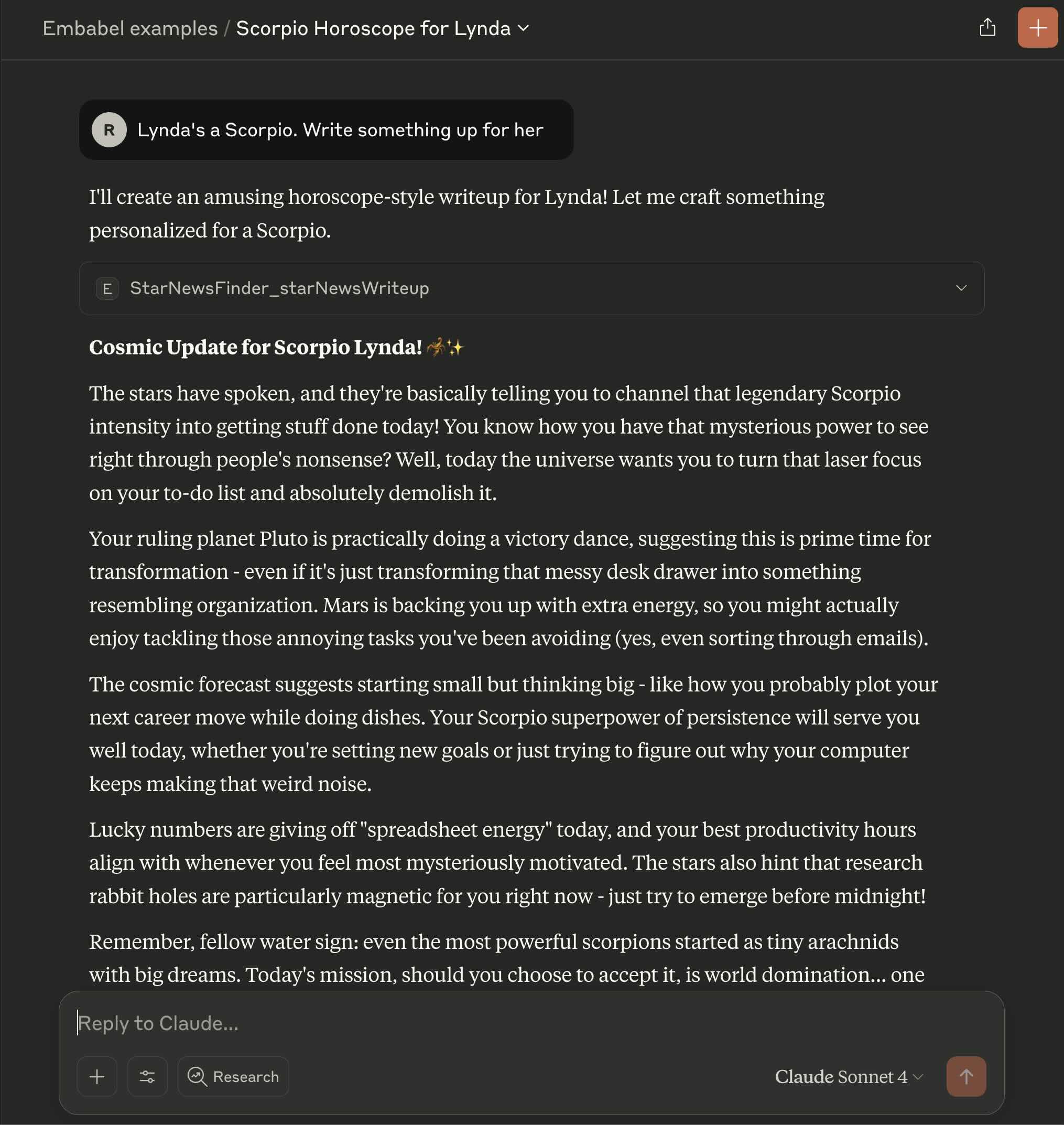
The Embabel server will expose each goal as an MCP tool, enabling Claude Desktop to invoke them like this:
The MCP Inspector is a helpful tool for interacting with your Embabel SSE server, manually invoking tools and checking the exposed prompts and resources.
Start the MCP Inspector with:
npx @modelcontextprotocol/inspector
Manual Execution
# Kotlin shell mode with MCP client (default)
cd examples-kotlin
mvn -P enable-shell-mcp-client spring-boot:run

# Kotlin shell mode without MCP client
cd examples-kotlin
mvn -P enable-shell spring-boot:run

# Kotlin MCP server mode
cd examples-kotlin
mvn -P enable-agent-mcp-server spring-boot:run

# Java equivalents use the same pattern
cd examples-java
mvn -P enable-shell-mcp-client spring-boot:run
Testing
# Run all tests
./mvnw test             # Unix/Linux/macOS
mvnw.cmd test           # Windows

# Module-specific tests
cd examples-kotlin && ../mvnw test
cd examples-java && ../mvnw test
🌐 MCP (Model Context Protocol) Support
What is MCP?
MCP (Model Context Protocol) is an open protocol that enables AI assistants and applications to securely connect to data sources and tools. Embabel supports MCP in two ways:
- MCP Server Mode: Your agents become tools that can be called by MCP clients
- MCP Client Support: Your agents can call external MCP servers (like Docker Desktop)
MCP Server Mode
Run your agents as an MCP server that exposes tools over Server-Sent Events (SSE):
# Start Kotlin agents as MCP server
cd scripts/kotlin && ./mcp_server.sh

# Start Java agents as MCP server
cd scripts/java && ./mcp_server.sh
Your agents become available as tools:
- StarNewsFinder -
find_horoscope_news - Researcher -
research_topic - FactChecker -
check_facts
Secured MCP Server Mode
Run a JWT-secured MCP server that enforces per-agent access control using @SecureAgentTool.
This mode requires a valid Bearer token on every MCP request.
# Start secured Kotlin agents as MCP server
cd scripts/kotlin && ./mcp_secured_server.sh
mcp_secured_server.cmd     # Windows
Uses Maven profile: enable-secured-agent-mcp-server
The secured server exposes two agents, each requiring specific JWT authorities:
| Agent | Tool name | Required authority |
|---|---|---|
NewsDigestAgent | newsDigest | news:read |
MarketIntelligenceAgent | marketIntelligenceReport | market:admin |
All @Action methods in each agent are protected — not just the goal-achieving action.
Intermediate steps like topic extraction and web research also require the authority,
so unauthorised callers cannot burn LLM tokens on partial execution.
Generating a JWT token
A keypair and token generator script are included for local development:
# Generate RSA keypair (one-time setup, from the keys/ directory)
openssl genrsa -out private.pem 2048
openssl rsa -in private.pem -pubout -out public.pem
The keys directory is at:
examples-common/src/main/resources/keys/
Generate a token:
pip install pyjwt cryptography
cd examples-common/src/main/resources/keys
python generate_token.py
The generated token includes news:read and market:admin authorities.
Paste it into your MCP client as a Bearer <token> Authorization header.
Connecting MCP Inspector
Start MCP Inspector and connect with transport type SSE, URL http://localhost:8443/sse,
and Authorization header:
Bearer <your_token>
How it works
Security is enforced in two layers:
- HTTP filter chain — all requests to
/sse/**and/mcp/**require a valid JWT (401 if missing or invalid) @SecureAgentTool— each agent class declares the required authority; denied calls return a clean MCP error response without retrying
The secured Spring profile activates both layers. Without that profile, the server runs without authentication (standard MCP server mode).
MCP Client Support
Docker tools are enabled by default. To disable:
# Disable Docker MCP integration
cd scripts/kotlin && ./shell.sh --no-docker-tools
cd scripts/java && ./shell.sh --no-docker-tools
With Docker tools enabled, your agents can:
- Execute commands in Docker containers
- Access containerized services
- Integrate with other MCP-compatible tools
Benefits of MCP
- 🔄 Tool Interoperability - Agents can use and be used as tools
- 🎯 Domain Expertise - Specialized agents for specific tasks
- 🛠️ Tool Composition - Combine multiple tools in workflows
- 🔒 Secure Access - MCP handles authentication and sandboxing
- 📈 Scalable Architecture - Add new tools without changing code
🎯 Creating Your Own Agent Application
Basic Shell Application
@SpringBootApplication
class MyAgentApplication

fun main(args: Array<String>) {
    runApplication<MyAgentApplication>(*args)
}
Add the shell starter to your pom.xml:
<dependency>
    <groupId>com.embabel.agent</groupId>
    <artifactId>embabel-agent-starter-shell</artifactId>
</dependency>
Shell with Theme and MCP Client
@SpringBootApplication
@ConfigurationPropertiesScan(basePackages = ["com.example"])
class MyThemedAgentApplication

fun main(args: Array<String>) {
    runApplication<MyThemedAgentApplication>(*args) {
        setAdditionalProfiles("docker-ce")  // Enable MCP client via profile
        setDefaultProperties(
            mapOf("embabel.agent.logging.personality" to LoggingThemes.STAR_WARS)
        )
    }
}
MCP Server Application
@SpringBootApplication
class MyMcpServerApplication

fun main(args: Array<String>) {
    runApplication<MyMcpServerApplication>(*args)
}
Add the MCP server starter to your pom.xml:
<dependency>
    <groupId>com.embabel.agent</groupId>
    <artifactId>embabel-agent-starter-mcpserver</artifactId>
</dependency>
🎯 Getting Started Recommendations
New to Agents?
- Start with Horoscope News Agent (Java or Kotlin)
- Compare the Java vs Kotlin implementations
- Experiment with different prompts and see how the agent plans different workflows
- Try different logging themes to make development more fun!
Spring Developer?
- Look at the configuration classes and repository integration
- Study the domain model design and service composition
- Explore the different application modes and Maven profiles
- See how profiles and properties configure MCP clients
Kotlin Enthusiast?
- Progress to Researcher for multi-model patterns
- Explore Fact Checker for functional DSL approaches
AI/ML Developer?
- Study prompt engineering techniques in any example
- Examine the Researcher for multi-model consensus patterns
- Look at Fact Checker for confidence scoring and source evaluation
- Explore MCP integration for tool composition
🚨 Common Issues & Solutions
| Problem | Solution |
|---|---|
| "No API keys found" | Set OPENAI_API_KEY or ANTHROPIC_API_KEY |
| Wrong examples load | Use correct script: kotlin/shell.sh vs java/shell.sh |
| Build failures | Run ./mvnw clean install (Unix/macOS) or mvnw.cmd clean install (Windows) from project root |
| Application class not found | Check Maven profile matches application class |
| MCP client fails to connect | Check port availability and Docker Desktop status. See instructions on pulling models above. |
Look at the log output in the event of failure as it may contain hints as to the solution.
📁 Project Structure
embabel-agent-examples/
├── examples-kotlin/                 # 🏆 Kotlin implementations
│   ├── src/main/kotlin/com/embabel/example/
│   │   ├── KotlinAgentShellApplication.kt           # Shell + MCP client (default)
│   │   ├── KotlinAgentSimpleShellApplication.kt     # Shell without MCP
│   │   ├── KotlinAgentMcpServerApplication.kt       # MCP server mode
│   │   ├── KotlinAgentSecuredMcpServerApplication.kt# 🔒 Secured MCP server mode
│   │   ├── horoscope/              # 🌟 Beginner: Star news agent
│   │   ├── secured/                # 🔒 Expert: JWT-secured agents
│   ├── pom.xml                     # Maven profiles for each mode
│   └── README.md                   # 📖 Kotlin-specific documentation
│
├── examples-java/                   # ☕ Java implementations
│   ├── src/main/java/com/embabel/example/
│   │   ├── JavaAgentShellApplication.java       # Shell with themes
│   │   ├── JavaAgentSimpleShellApplication.java # Shell without MCP
│   │   ├── JavaMcpServerApplication.java        # MCP server mode
│   │   └── horoscope/              # 🌟 Beginner: Star news agent
│   └── README.md                   # 📖 Java-specific documentation
│
├── examples-common/                 # 🔧 Shared services & utilities
├── scripts/                        # 🚀 Quick-start scripts
│   ├── kotlin/
│   │   ├── shell.sh               # Launch shell (--no-docker-tools to disable)
│   │   ├── mcp_server.sh          # Launch MCP server
│   │   └── mcp_secured_server.sh  # Launch JWT-secured MCP server
│   ├── java/
│   │   ├── shell.sh               # Launch shell (--no-docker-tools to disable)
│   │   └── mcp_server.sh          # Launch MCP server
│   ├── support/                   # Shared script utilities
│   └── README.md                  # 📖 Scripts documentation
└── pom.xml                         # Parent Maven configuration
📄 License
Licensed under the Apache License 2.0. See LICENSE for details.
🎉 Happy coding with Spring Framework and agentic AI!
🌟 May the Force be with your agents! 🌟
Contributors
Significant stargazers

6 followers · starred Jul 2025
Similar repos


Languages
Java
60.7%
Kotlin
30.7%
Batchfile
4.3%
Shell
3.8%
Agent Framework Examples for Java and Kotlin Developers
Java
183
232 commits
updated Sep 16, 2026
README
🤖 Embabel Agent Examples
English · 简体中文
Learn agentic AI development with Spring Framework and Java or Kotlin. These examples demonstrate building intelligent agents that can plan, execute workflows, use tools, and interact with humans.
This repository uses the latest Embabel snapshots to illustrate current best practice, whereas the Java and Kotlin template repositories s use the latest milestone release for greater stability. There may be some minor API incompatilibites and not everything you see here may work in your own project created from one of those templates, unless you upgrade the
embabel-agent.versionproperty in the POM file, as in this repository.
🚀 Quick Start
Prerequisites
- Java 21+
- API Key (at least one): OpenAI or Anthropic
- Maven 3.9+ (optional - project includes Maven wrapper)
1. Clone & Build
git clone https://github.com/embabel/embabel-agent-examples.git
cd embabel-agent-examples
./mvnw clean install    # Unix/Linux/macOS
mvnw.cmd clean install  # Windows
2. Set API Keys
# Required (choose one or both)
export OPENAI_API_KEY="your_openai_key"
export ANTHROPIC_API_KEY="your_anthropic_key"
3. Run Examples
Kotlin Examples
cd scripts/kotlin
./shell.sh                    # Unix/Linux/macOS - With Docker tools (default)
shell.cmd                     # Windows - With Docker tools (default)

./shell.sh --no-docker-tools  # Unix/Linux/macOS - Basic features only
shell.cmd --no-docker-tools   # Windows - Basic features only
Java Examples
cd scripts/java
./shell.sh                    # Unix/Linux/macOS - With Docker tools (default)
shell.cmd                     # Windows - With Docker tools (default)

./shell.sh --no-docker-tools  # Unix/Linux/macOS - Basic features only
shell.cmd --no-docker-tools   # Windows - Basic features only
Creating Your Own Project
You can create your own agent repo from our Java or Kotlin GitHub template by clicking the "Use this template" button.
You can also create your own Embabel agent project locally with our quick start tool, which allows some customization:
uvx --from git+https://github.com/embabel/project-creator.git project-creator
Choose Java or Kotlin and specify your project name and package name and you'll have an agent running in under a minute,
if you already have an OPENAI_API_KEY and have Maven installed.
🆕 Spring Boot Integration Architecture
Embabel Agent Starter Guide:
embabel-agent-starter
- ✅ Application decides on startup mode (console, web application, etc)
- ✅ Agent discovery and registration
- ✅ Agent Platform beans are available via Dependency Injection mechanism for Application to use as needed
- ✅ Progress tracking and logging
- ✅ Development-friendly error handling
embabel-agent-starter-shell
- ✅ Interactive command-line interface
- ✅ Agent discovery and registration
- ✅ Human-in-the-loop capabilities
- ✅ Progress tracking and logging
- ✅ Development-friendly error handling
embabel-agent-starter-mcpserver
- ✅ MCP protocol server implementation
- ✅ Tool registration and discovery
- ✅ JSON-RPC communication via SSE (Server-Sent Events)
- ✅ Integration with MCP-compatible clients
- ✅ Security and sandboxing
Application Examples
Shell Mode with Logging Theme
@SpringBootApplication
@ConfigurationPropertiesScan(basePackages = ["com.embabel.example"])
class KotlinAgentShellApplication

fun main(args: Array<String>) {
    runApplication<KotlinAgentShellApplication>(*args) {
        setDefaultProperties(
            mapOf("embabel.agent.logging.personality" to LoggingThemes.STAR_WARS)
        )
    }
}
// Java version
@SpringBootApplication
@ConfigurationPropertiesScan(basePackages = {"com.embabel.example"})
public class JavaAgentShellApplication {
    public static void main(String[] args) {
        SpringApplication app = new SpringApplication(JavaAgentShellApplication.class);
        app.setDefaultProperties(Map.of(
            "embabel.agent.logging.personality", LoggingThemes.STAR_WARS
        ));
        app.run(args);
    }
}
Shell Mode with MCP Client Support (Docker Tools)
@SpringBootApplication
@ConfigurationPropertiesScan(basePackages = ["com.embabel.example"])
class KotlinAgentShellApplication

fun main(args: Array<String>) {
    runApplication<KotlinAgentShellApplication>(*args) {
        setAdditionalProfiles(McpServers.DOCKER)  // Activates application-docker-ce.yml
        setDefaultProperties(
            mapOf("embabel.agent.logging.personality" to LoggingThemes.SEVERANCE)
        )
    }
}
MCP Server Mode
@SpringBootApplication
@ConfigurationPropertiesScan(basePackages = ["com.embabel.example"])
class KotlinAgentMcpServerApplication

fun main(args: Array<String>) {
    runApplication<KotlinAgentMcpServerApplication>(*args) {
        setAdditionalProfiles(McpServers.DOCKER, McpServers.DOCKER_DESKTOP)
    }
}
Configuration Guide
Logging Personality
Set via the embabel.agent.logging.personality property:
"starwars"- May the Force be with your logs!"severance"- Welcome to Lumon Industries (default)
MCP Client Integration
Configure via Spring profiles that define Spring AI MCP client connections in application-{profile}.yml:
# application-docker-ce.yml
spring:
  ai:
    mcp:
      client:
        type: SYNC
        stdio:
          connections:
            docker-mcp:
              command: docker
              args: [mcp, gateway, run]
Setting up MCP Tools
Several of the examples use the Model Context Protocol (MCP) to access tools and services.
The default source is the Docker Desktop MCP server, which is installed with Docker Desktop.
To ensure tools are available and startup doesn't time out, first pull models with:
docker login
docker mcp gateway run
When the gateway has come up you can kill it and start the Embabel server.
📚 Examples by Learning Level
🏆 Beginner: InjectedComponent
Available in: Java | Concept: Just a Little AI
Demonstrates how you can inject any Spring component with an Embabel OperationContext
and use it to call LLMs with the rich Embabel API.
@Component
public record InjectedComponent(Ai ai) {

    public record Joke(String leadup, String punchline) {
    }

    public String tellJokeAbout(String topic) {
        return ai
                .withDefaultLlm()
                .generateText("Tell me a joke about " + topic);
    }

    public Joke createJokeObjectAbout(String topic1, String topic2, String voice) {
        return ai
                .withLlm(LlmOptions.withDefaultLlm().withTemperature(.8))
                .createObject("""
                                Tell me a joke about %s and %s.
                                The voice of the joke should be %s.
                                The joke should have a leadup and a punchline.
                                """.formatted(topic1, topic2, voice),
                        Joke.class);
    }

}
🌟 Beginner: Horoscope News Agent
Available in: Java & Kotlin | Concept: Basic Agent Workflow
A fun introduction to agent development that finds personalized news based on someone's star sign.
What It Teaches:
- 📋 Action-based workflows with
@Actionannotations - 🔍 Data extraction from user input using LLMs
- 🌐 Web tool integration for finding news stories
- 📝 Content generation with personality and context
- 🎯 Goal achievement with
@AchievesGoal
How It Works:
- Extract person's name from user input
- Get their star sign (via form if needed)
- Retrieve daily horoscope
- Search web for relevant news stories
- Create amusing writeup combining horoscope + news
Try It:
Start the agent shell, then type:
x "Find horoscope news for Alice who is a Gemini"
x is short for execute, which triggers the agent to run its workflow.
Code Comparison:
- Kotlin:
examples-kotlin/src/main/kotlin/com/embabel/example/horoscope/StarNewsFinder.kt - Java:
examples-java/src/main/java/com/embabel/example/horoscope/StarNewsFinder.java
Key Patterns:
@Agent(description = "Find news based on a person's star sign")
class StarNewsFinder {

    @Action
    fun extractPerson(userInput: UserInput, context: OperationContext): Person?

    @Action(toolGroups = [CoreToolGroups.WEB])
    fun findNewsStories(person: StarPerson, horoscope: Horoscope, context: OperationContext): RelevantNewsStories

    @AchievesGoal(description = "Create an amusing writeup")
    @Action
    fun starNewsWriteup(/* params */): Writeup
}
🔬 Expert: Multi-LLM Research Agent
Available in: Java, Kotlin | Concept: Self-Improving AI Workflows
A sophisticated research agent using multiple AI models with self-critique capabilities.
What It Teaches:
- 🧠 Multi-model consensus (GPT-4 + Claude working together)
- 🔍 Self-improvement loops with critique and retry
- ⚙️ Configuration-driven behavior with Spring Boot properties
- 🌊 Parallel processing of research tasks
- 📝 Quality control through automated review
Architecture:
@ConfigurationProperties(prefix = "embabel.examples.researcher")
data class ResearcherProperties(
    val maxWordCount: Int = 300,
    val claudeModelName: String = AnthropicModels.CLAUDE_35_HAIKU,
    val openAiModelName: String = OpenAiModels.GPT_41_MINI
)
Self-Improvement Pattern:
@Action(outputBinding = "gpt4Report")
fun researchWithGpt4(/* params */): SingleLlmReport

@Action(outputBinding = "claudeReport")
fun researchWithClaude(/* params */): SingleLlmReport

@Action(outputBinding = "mergedReport")
fun mergeReports(gpt4: SingleLlmReport, claude: SingleLlmReport): ResearchReport

@Action
fun critiqueReport(report: ResearchReport): Critique

@AchievesGoal(description = "Completes research with quality assurance")
fun acceptReport(report: ResearchReport, critique: Critique): ResearchReport
Try It:
"Research the latest developments in renewable energy adoption"
Location: examples-kotlin/src/main/kotlin/com/embabel/example/researcher/
✅ Expert: Fact-Checking Agent (DSL Style)
Available in: Kotlin | Concept: Functional Agent Construction
A fact-verification agent built using Embabel's functional DSL approach instead of annotations.
What It Teaches:
- 🔧 Functional DSL construction for agents
- 🔍 Parallel fact verification across multiple claims
- 📊 Confidence scoring and source trust evaluation
- 🌐 Web research integration for verification
- ⚡ Functional programming patterns in agent design
DSL Construction:
fun factCheckerAgent(llms: List<LlmOptions>, properties: FactCheckerProperties) =
    agent(name = "FactChecker", description = "Check content for factual accuracy") {

        flow {
            aggregate<UserInput, FactualAssertions, RationalizedFactualAssertions>(
                transforms = llms.map { llm ->
                    { context -> /* extract assertions with this LLM */ }
                },
                merge = { list, context -> /* rationalize overlapping claims */ }
            )
        }

        transformation<RationalizedFactualAssertions, FactCheck> {
            /* parallel fact-checking */
        }
    }
Domain Model:
data class FactualAssertion(
    val claim: String,
    val reasoning: String
)

data class AssertionCheck(
    val assertion: FactualAssertion,
    val isFactual: Boolean,
    val confidence: Double,
    val sources: List<String>
)
Try It:
"Check these facts: The Earth is flat. Paris is the capital of France."
Location: examples-kotlin/src/main/kotlin/com/embabel/example/factchecker/
🔒 Expert: Secured Agents
Available in: Java & Kotlin | Concept: MCP Tool Access Control
Demonstrates JWT-secured MCP tool exposure using @SecureAgentTool. Each agent class
declares the Spring Security SpEL expression required to invoke any of its actions.
What It Teaches:
- 🔒 Class-level access control with
@SecureAgentTool - 🔑 JWT Bearer token validation at the HTTP transport layer
- 🛡️ Two-layer security — filter chain rejects unauthenticated requests;
@SecureAgentToolenforces per-agent authority checks - ⚡ Fail-fast security — denied calls return a clean MCP error without retrying or burning LLM tokens
Agents:
| Agent | Required authority | What it does |
|---|---|---|
NewsDigestAgent | news:read | Researches a topic via web search and returns a curated digest |
MarketIntelligenceAgent | market:admin | Produces a SWOT + competitive intelligence report |
Key Pattern:
@Agent(description = "Research a topic and return a news digest")
@SecureAgentTool("hasAuthority('news:read')")  // protects every @Action in this agent
class NewsDigestAgent {

    @Action  // also requires news:read
    fun extractTopic(userInput: UserInput, context: OperationContext): NewsTopic

    @AchievesGoal(description = "Produce a curated news digest",
                  export = Export(remote = true, name = "newsDigest",
                                  startingInputTypes = [UserInput::class]))
    @Action  // also requires news:read
    fun produceDigest(topic: NewsTopic, context: OperationContext): NewsDigest
}
Run it:
cd scripts/kotlin && ./mcp_secured_server.sh
See Secured MCP Server Mode for token generation and MCP Inspector setup.
Code:
- Kotlin:
examples-kotlin/src/main/kotlin/com/embabel/example/secured/ - Java:
examples-java/src/main/java/com/embabel/example/secured/
🛠️ Core Concepts You'll Learn
Spring Framework Integration
- Auto-Configuration: Starters handle all configuration automatically
- Profile-Based Configuration: MCP clients configured via Spring profiles
- Maven Profiles:
enable-shell,enable-shell-mcp-client,enable-agent-mcp-server - Dependency Injection: Constructor-based injection with agents as Spring beans
- Configuration Properties: Type-safe configuration with
@ConfigurationProperties - Conditional Beans: Environment-specific components with
@ConditionalOnBean - Repository Pattern: Spring Data integration for domain entities
Modern Spring Boot Patterns
- Auto-Configuration: Starters handle all configuration automatically
- Profile-Based Configuration: MCP clients configured via Spring profiles
- Profile-Based Execution: Maven profiles control which application class runs
- Auto-Configuration Classes: Understanding Spring Boot's auto-configuration
- Conditional Configuration: Mode-specific bean loading
- Theme-Based Customization: Dynamic behavior based on properties
Modern Kotlin Features
- Data Classes: Rich domain models with computed properties
- Type Aliases: Domain-specific types (
typealias OneThroughTen = Int) - Extension Functions: Enhanced functionality for existing types
- Delegation: Clean composition patterns
- DSL Construction: Functional agent building
- Coroutines: Parallel execution with structured concurrency
Agent Design Patterns
- Workflow Orchestration: Multi-step processes with
@Actionchains - Blackboard Pattern: Shared workspace for data between actions
- Human-in-the-Loop: User confirmations and form submissions
- Self-Improvement: Critique and retry loops for quality
- Multi-Model Consensus: Combining results from different LLMs
- Condition-Based Flow: Workflow control with
@Condition - Progress Tracking: Event publishing for monitoring
Additional Examples
Some of our examples are projects in their own right, and are therefore in separate repositories.
See:
- Coding Agent: An open source coding agent
- Flicker: A movie recommendation engine that takes into account the user's tastes and what's available to them in their country on the streaming services they subscribe to. Uses external APIs and PostgreSQL via JPA. Illustrates a complex workflow where recommendations are generated until enough available movies have been found.
- Decker: An agent to build presentations using Embabel
- Tripper: Travel planning agent. Uses mapping APIs to find routes and places of interest, and generates a travel itinerary. Performs research on points of interest in parallel.
🔧 Running Specific Examples
Interactive Shell Mode (Default)
cd scripts/kotlin && ./shell.sh          # With Docker tools (default)
cd scripts/kotlin && shell.cmd           # With Docker tools (Windows)
# or
cd scripts/java && ./shell.sh            # With Docker tools (default)
cd scripts/java && shell.cmd             # With Docker tools (Windows)
Uses Maven profile: enable-shell-mcp-client
Shell Without Docker Tools
cd scripts/kotlin && ./shell.sh --no-docker-tools     # Basic features only
cd scripts/kotlin && shell.cmd --no-docker-tools      # Basic features (Windows)
# or
cd scripts/java && ./shell.sh --no-docker-tools       # Basic features only
cd scripts/java && shell.cmd --no-docker-tools        # Basic features (Windows)
Uses Maven profile: enable-shell
With Observability (Zipkin Tracing)
Enable distributed tracing with Zipkin by adding the --observability flag:
cd scripts/kotlin && ./shell.sh --observability    # Enable observability
cd scripts/kotlin && shell.cmd --observability     # Enable observability (Windows)
# or
cd scripts/java && ./shell.sh --observability      # Enable observability
cd scripts/java && shell.cmd --observability       # Enable observability (Windows)
Make sure to run docker compose up in the project root to start Zipkin trace collector:
docker compose up
You should be able to access Zipkin Console: http://127.0.0.1:9411/zipkin/
MCP Server Mode
cd scripts/kotlin && ./mcp_server.sh
cd scripts/kotlin && mcp_server.cmd      # Windows
# or
cd scripts/java && ./mcp_server.sh
cd scripts/java && mcp_server.cmd        # Windows
Uses Maven profile: enable-agent-mcp-server
Secured MCP Server Mode
cd scripts/kotlin && ./mcp_secured_server.sh
cd scripts/kotlin && mcp_secured_server.cmd  # Windows
Uses Maven profile: enable-secured-agent-mcp-server
See Secured MCP Server Mode for token setup and connection instructions.
You can use the Embabel agent platform as an MCP server from a UI like Claude Desktop. The Embabel MCP server is available over SSE.
Configure Claude Desktop as follows in your claude_desktop_config.yml:
{
  "mcpServers": {
    "embabel-examples": {
      "command": "npx",
      "args": [
        "-y",
        "mcp-remote",
        "http://localhost:8080/sse"
      ]
    }
  }
}
See MCP Quickstart for Claude Desktop Users for how to configure Claude Desktop.
Create a project in Claude Desktop to work with Embabel examples. This will enable you to add a custom system prompt.
The Embabel server will expose each goal as an MCP tool, enabling Claude Desktop to invoke them like this:
The MCP Inspector is a helpful tool for interacting with your Embabel SSE server, manually invoking tools and checking the exposed prompts and resources.
Start the MCP Inspector with:
npx @modelcontextprotocol/inspector
Manual Execution
# Kotlin shell mode with MCP client (default)
cd examples-kotlin
mvn -P enable-shell-mcp-client spring-boot:run

# Kotlin shell mode without MCP client
cd examples-kotlin
mvn -P enable-shell spring-boot:run

# Kotlin MCP server mode
cd examples-kotlin
mvn -P enable-agent-mcp-server spring-boot:run

# Java equivalents use the same pattern
cd examples-java
mvn -P enable-shell-mcp-client spring-boot:run
Testing
# Run all tests
./mvnw test             # Unix/Linux/macOS
mvnw.cmd test           # Windows

# Module-specific tests
cd examples-kotlin && ../mvnw test
cd examples-java && ../mvnw test
🌐 MCP (Model Context Protocol) Support
What is MCP?
MCP (Model Context Protocol) is an open protocol that enables AI assistants and applications to securely connect to data sources and tools. Embabel supports MCP in two ways:
- MCP Server Mode: Your agents become tools that can be called by MCP clients
- MCP Client Support: Your agents can call external MCP servers (like Docker Desktop)
MCP Server Mode
Run your agents as an MCP server that exposes tools over Server-Sent Events (SSE):
# Start Kotlin agents as MCP server
cd scripts/kotlin && ./mcp_server.sh

# Start Java agents as MCP server
cd scripts/java && ./mcp_server.sh
Your agents become available as tools:
- StarNewsFinder -
find_horoscope_news - Researcher -
research_topic - FactChecker -
check_facts
Secured MCP Server Mode
Run a JWT-secured MCP server that enforces per-agent access control using @SecureAgentTool.
This mode requires a valid Bearer token on every MCP request.
# Start secured Kotlin agents as MCP server
cd scripts/kotlin && ./mcp_secured_server.sh
mcp_secured_server.cmd     # Windows
Uses Maven profile: enable-secured-agent-mcp-server
The secured server exposes two agents, each requiring specific JWT authorities:
| Agent | Tool name | Required authority |
|---|---|---|
NewsDigestAgent | newsDigest | news:read |
MarketIntelligenceAgent | marketIntelligenceReport | market:admin |
All @Action methods in each agent are protected — not just the goal-achieving action.
Intermediate steps like topic extraction and web research also require the authority,
so unauthorised callers cannot burn LLM tokens on partial execution.
Generating a JWT token
A keypair and token generator script are included for local development:
# Generate RSA keypair (one-time setup, from the keys/ directory)
openssl genrsa -out private.pem 2048
openssl rsa -in private.pem -pubout -out public.pem
The keys directory is at:
examples-common/src/main/resources/keys/
Generate a token:
pip install pyjwt cryptography
cd examples-common/src/main/resources/keys
python generate_token.py
The generated token includes news:read and market:admin authorities.
Paste it into your MCP client as a Bearer <token> Authorization header.
Connecting MCP Inspector
Start MCP Inspector and connect with transport type SSE, URL http://localhost:8443/sse,
and Authorization header:
Bearer <your_token>
How it works
Security is enforced in two layers:
- HTTP filter chain — all requests to
/sse/**and/mcp/**require a valid JWT (401 if missing or invalid) @SecureAgentTool— each agent class declares the required authority; denied calls return a clean MCP error response without retrying
The secured Spring profile activates both layers. Without that profile, the server runs without authentication (standard MCP server mode).
MCP Client Support
Docker tools are enabled by default. To disable:
# Disable Docker MCP integration
cd scripts/kotlin && ./shell.sh --no-docker-tools
cd scripts/java && ./shell.sh --no-docker-tools
With Docker tools enabled, your agents can:
- Execute commands in Docker containers
- Access containerized services
- Integrate with other MCP-compatible tools
Benefits of MCP
- 🔄 Tool Interoperability - Agents can use and be used as tools
- 🎯 Domain Expertise - Specialized agents for specific tasks
- 🛠️ Tool Composition - Combine multiple tools in workflows
- 🔒 Secure Access - MCP handles authentication and sandboxing
- 📈 Scalable Architecture - Add new tools without changing code
🎯 Creating Your Own Agent Application
Basic Shell Application
@SpringBootApplication
class MyAgentApplication

fun main(args: Array<String>) {
    runApplication<MyAgentApplication>(*args)
}
Add the shell starter to your pom.xml:
<dependency>
    <groupId>com.embabel.agent</groupId>
    <artifactId>embabel-agent-starter-shell</artifactId>
</dependency>
Shell with Theme and MCP Client
@SpringBootApplication
@ConfigurationPropertiesScan(basePackages = ["com.example"])
class MyThemedAgentApplication

fun main(args: Array<String>) {
    runApplication<MyThemedAgentApplication>(*args) {
        setAdditionalProfiles("docker-ce")  // Enable MCP client via profile
        setDefaultProperties(
            mapOf("embabel.agent.logging.personality" to LoggingThemes.STAR_WARS)
        )
    }
}
MCP Server Application
@SpringBootApplication
class MyMcpServerApplication

fun main(args: Array<String>) {
    runApplication<MyMcpServerApplication>(*args)
}
Add the MCP server starter to your pom.xml:
<dependency>
    <groupId>com.embabel.agent</groupId>
    <artifactId>embabel-agent-starter-mcpserver</artifactId>
</dependency>
🎯 Getting Started Recommendations
New to Agents?
- Start with Horoscope News Agent (Java or Kotlin)
- Compare the Java vs Kotlin implementations
- Experiment with different prompts and see how the agent plans different workflows
- Try different logging themes to make development more fun!
Spring Developer?
- Look at the configuration classes and repository integration
- Study the domain model design and service composition
- Explore the different application modes and Maven profiles
- See how profiles and properties configure MCP clients
Kotlin Enthusiast?
- Progress to Researcher for multi-model patterns
- Explore Fact Checker for functional DSL approaches
AI/ML Developer?
- Study prompt engineering techniques in any example
- Examine the Researcher for multi-model consensus patterns
- Look at Fact Checker for confidence scoring and source evaluation
- Explore MCP integration for tool composition
🚨 Common Issues & Solutions
| Problem | Solution |
|---|---|
| "No API keys found" | Set OPENAI_API_KEY or ANTHROPIC_API_KEY |
| Wrong examples load | Use correct script: kotlin/shell.sh vs java/shell.sh |
| Build failures | Run ./mvnw clean install (Unix/macOS) or mvnw.cmd clean install (Windows) from project root |
| Application class not found | Check Maven profile matches application class |
| MCP client fails to connect | Check port availability and Docker Desktop status. See instructions on pulling models above. |
Look at the log output in the event of failure as it may contain hints as to the solution.
📁 Project Structure
embabel-agent-examples/
├── examples-kotlin/                 # 🏆 Kotlin implementations
│   ├── src/main/kotlin/com/embabel/example/
│   │   ├── KotlinAgentShellApplication.kt           # Shell + MCP client (default)
│   │   ├── KotlinAgentSimpleShellApplication.kt     # Shell without MCP
│   │   ├── KotlinAgentMcpServerApplication.kt       # MCP server mode
│   │   ├── KotlinAgentSecuredMcpServerApplication.kt# 🔒 Secured MCP server mode
│   │   ├── horoscope/              # 🌟 Beginner: Star news agent
│   │   ├── secured/                # 🔒 Expert: JWT-secured agents
│   ├── pom.xml                     # Maven profiles for each mode
│   └── README.md                   # 📖 Kotlin-specific documentation
│
├── examples-java/                   # ☕ Java implementations
│   ├── src/main/java/com/embabel/example/
│   │   ├── JavaAgentShellApplication.java       # Shell with themes
│   │   ├── JavaAgentSimpleShellApplication.java # Shell without MCP
│   │   ├── JavaMcpServerApplication.java        # MCP server mode
│   │   └── horoscope/              # 🌟 Beginner: Star news agent
│   └── README.md                   # 📖 Java-specific documentation
│
├── examples-common/                 # 🔧 Shared services & utilities
├── scripts/                        # 🚀 Quick-start scripts
│   ├── kotlin/
│   │   ├── shell.sh               # Launch shell (--no-docker-tools to disable)
│   │   ├── mcp_server.sh          # Launch MCP server
│   │   └── mcp_secured_server.sh  # Launch JWT-secured MCP server
│   ├── java/
│   │   ├── shell.sh               # Launch shell (--no-docker-tools to disable)
│   │   └── mcp_server.sh          # Launch MCP server
│   ├── support/                   # Shared script utilities
│   └── README.md                  # 📖 Scripts documentation
└── pom.xml                         # Parent Maven configuration
📄 License
Licensed under the Apache License 2.0. See LICENSE for details.
🎉 Happy coding with Spring Framework and agentic AI!
🌟 May the Force be with your agents! 🌟
Contributors
Similar repos
Significant stargazers
6 followers · starred Jul 2025
Languages
Java
60.7%
Kotlin
30.7%
Batchfile
4.3%
Shell
3.8%