
See what people are saying
README
OpenXW


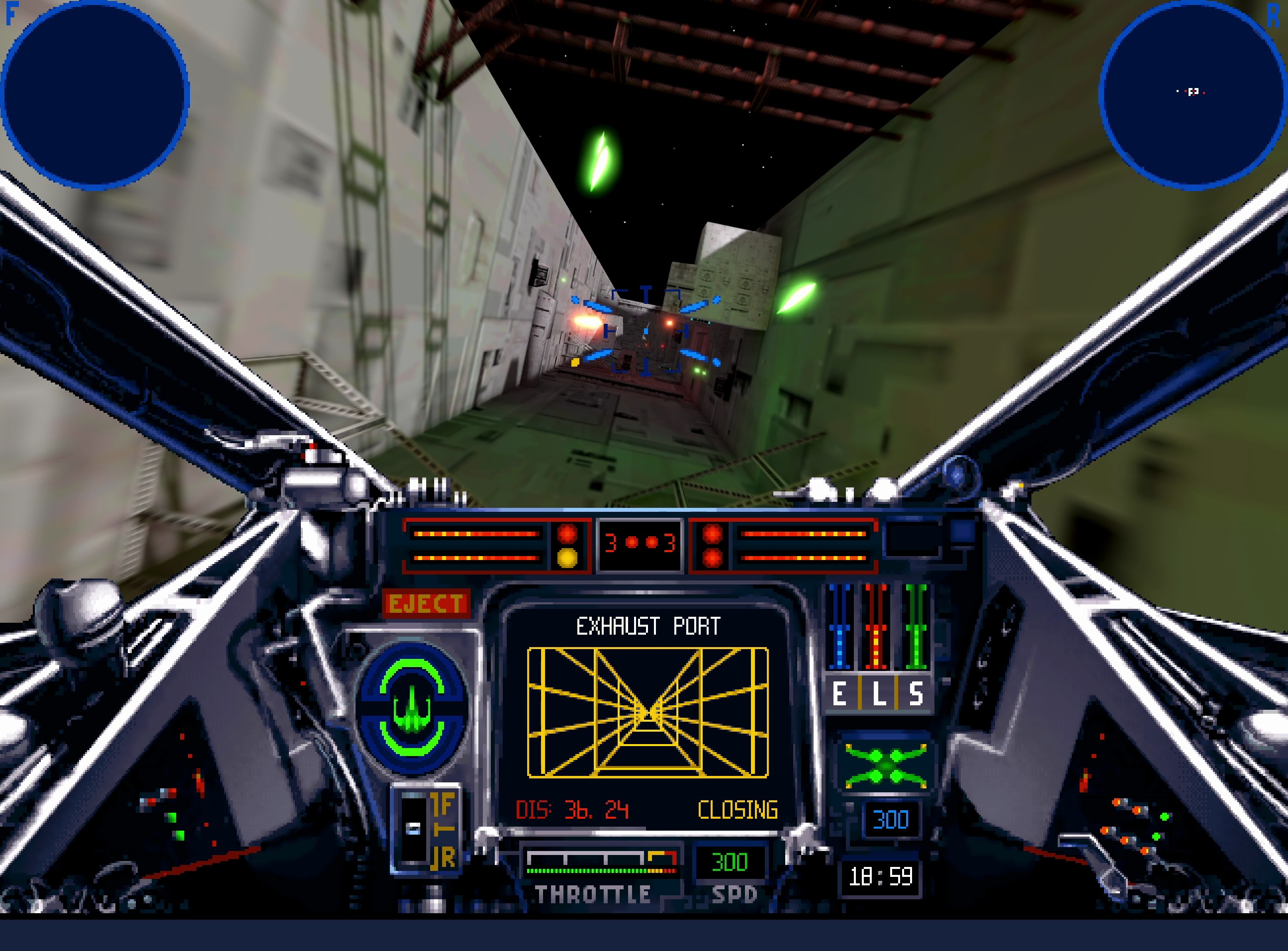
OpenXW is an open-source reimplementation of Star Wars: X-Wing for Windows, macOS, and Linux. It runs the original game data natively on current systems and supports both the 1994 Collector's CD-ROM and the 1998 Windows release.
With both editions installed, OpenXW can combine the 1994 menus, cutscenes, and adaptive iMUSE soundtrack with the 1998 flight simulation and 3D assets.
[!IMPORTANT] OpenXW does not include any content from the original game. A complete installation of at least one supported edition is required. Install both editions to use the recommended combination.
Star Wars: X-Wing Special Edition is available from GOG and Steam.
The best of both editions
The 1994 and 1998 releases each have their own presentation, flight simulation, and soundtrack. OpenXW lets the menus and cutscenes, flight simulation, and music be selected independently.
The recommended configuration combines:
- the 1994 menus and cutscenes
- the 1998 flight simulation and 3D assets
- the adaptive 1994 iMUSE soundtrack
This retains the 1998 flight presentation without giving up the interactive music of the Collector's CD-ROM. Either supported edition can also be played on its own.
The original 1993 flight graphics and missions are also available with an extracted 1993 installation including the B-Wing expansion. This mode uses the menus and cutscenes from an installed 1994 or 1998 edition.
Adaptive music
OpenXW reimplements the adaptive iMUSE soundtrack from the 1994 Collector's CD-ROM. The music responds to mission events and moves seamlessly between themes during flight.
OpenXW can emulate Roland MT-32 and SC-55 Sound Canvas synthesizers. These require compatible ROMs supplied by the user.
Built-in AdLib and OPL3 emulation are available for the classic FM-synth sound, while FluidSynth can play the General MIDI soundtrack with a user-selected SoundFont.
The original prerecorded 1998 music remains available when the complete 1998 experience is preferred.
Graphics
OpenXW offers classic and modern graphics modes. Classic mode preserves the original game's appearance, while modern mode combines the original models and cockpit artwork with high-resolution rendering.
With the 1998 flight graphics, modern enhancements include:
- shadows, ambient occlusion, bloom, and motion blur
- anisotropic texture filtering
- 2x, 4x, or 8x MSAA
- AMD FidelityFX FSR anti-aliasing and upscaling
- HDR output
- optional smoothing of dithered cockpit artwork
The DOS flight graphics can also be rendered at higher resolutions with MSAA, preserving their original untextured models.
Press TAB during flight to switch between classic and modern graphics.
Smoother flight and modern controls
Unlocked flight timing provides smoother motion and more responsive input on modern displays. Native timing remains available in settings when the original flight timing is preferred.
Flight can be played with a mouse and keyboard, gamepad, or joystick. Mouse flight offers both classic controls and a virtual stick, with adjustable sensitivity and Y-axis inversion. Modern gamepads and joysticks are supported, with configurable axes, deadzones, and button bindings.
Getting started
- Download the latest package for your platform from GitHub Releases.
- Extract or install the package and launch OpenXW.
- Select the complete 1994 and/or 1998 installation folders when prompted.
For 1998, select the main installation folder containing
X-Wing Data,IVFiles, andMUSIC. - If both editions are available, select the recommended configuration to combine the 1994 presentation and music with the 1998 flight experience.
OpenXW validates the selected installations and remembers them for future launches.
Press ESC to open OpenXW Settings. The Mouse tab lets you choose
between classic and virtual-stick mouse flight controls.
Useful shortcuts:
| Key | Action |
|---|---|
ESC | Open OpenXW Settings |
TAB | Switch between classic and modern graphics during flight |
Ctrl+Alt+M | Release or recapture the mouse during flight |
Supported platforms
| Platform | Target | Graphics backend |
|---|---|---|
| Windows | x86-64 | Direct3D 12 or Vulkan |
| macOS | macOS 13 or later; arm64 or x86-64 | Metal |
| Linux | x86-64; glibc 2.35 or later | Vulkan |
Current state
OpenXW remains under active development. Bugs and differences from the original releases are still possible.
OpenTIE, OpenXvT, and OpenXWA
Fans of Totally Games' space simulators may also be interested in OpenTIE, an open-source reimplementation of Star Wars: TIE Fighter, OpenXvT, an open-source reimplementation of Star Wars: X-Wing vs. TIE Fighter with Balance of Power, and OpenXWA, an open-source reimplementation of Star Wars: X-Wing Alliance. All run on Windows, macOS, and Linux.
Community
Join the TotallyOpen Discord server to discuss OpenXW, OpenTIE, OpenXvT, OpenXWA, development, and the Totally Games flight simulators.
System requirements
- a 64-bit system with a modern GPU
- a complete installation of the 1994 Collector's CD-ROM or the 1998 Windows release
- a mouse and keyboard, gamepad, or joystick for flight
Release packages include the required runtime libraries. Keep the executable, libraries, resources, and shader directories together when moving an installation. Linux also requires the system GLib and GThread libraries.
Building from source
The build requires CMake 3.20 or later, a C/C++ toolchain, SDL3 3.4, zstd, FFmpeg, pkg-config, and SDL_shadercross. Release packages also include FluidSynth and SpeexDSP for MIDI playback. Release packaging pins its dependencies and provides the reference for reproducible builds.
Platform-specific instructions for Windows, macOS, and Linux are available in the packaging guide.
Similar repos


Languages
C
98.1%
See what people are saying
README
OpenXW
OpenXW is an open-source reimplementation of Star Wars: X-Wing for Windows, macOS, and Linux. It runs the original game data natively on current systems and supports both the 1994 Collector's CD-ROM and the 1998 Windows release.
With both editions installed, OpenXW can combine the 1994 menus, cutscenes, and adaptive iMUSE soundtrack with the 1998 flight simulation and 3D assets.
[!IMPORTANT] OpenXW does not include any content from the original game. A complete installation of at least one supported edition is required. Install both editions to use the recommended combination.
Star Wars: X-Wing Special Edition is available from GOG and Steam.
The best of both editions
The 1994 and 1998 releases each have their own presentation, flight simulation, and soundtrack. OpenXW lets the menus and cutscenes, flight simulation, and music be selected independently.
The recommended configuration combines:
- the 1994 menus and cutscenes
- the 1998 flight simulation and 3D assets
- the adaptive 1994 iMUSE soundtrack
This retains the 1998 flight presentation without giving up the interactive music of the Collector's CD-ROM. Either supported edition can also be played on its own.
The original 1993 flight graphics and missions are also available with an extracted 1993 installation including the B-Wing expansion. This mode uses the menus and cutscenes from an installed 1994 or 1998 edition.
Adaptive music
OpenXW reimplements the adaptive iMUSE soundtrack from the 1994 Collector's CD-ROM. The music responds to mission events and moves seamlessly between themes during flight.
OpenXW can emulate Roland MT-32 and SC-55 Sound Canvas synthesizers. These require compatible ROMs supplied by the user.
Built-in AdLib and OPL3 emulation are available for the classic FM-synth sound, while FluidSynth can play the General MIDI soundtrack with a user-selected SoundFont.
The original prerecorded 1998 music remains available when the complete 1998 experience is preferred.
Graphics
OpenXW offers classic and modern graphics modes. Classic mode preserves the original game's appearance, while modern mode combines the original models and cockpit artwork with high-resolution rendering.
With the 1998 flight graphics, modern enhancements include:
- shadows, ambient occlusion, bloom, and motion blur
- anisotropic texture filtering
- 2x, 4x, or 8x MSAA
- AMD FidelityFX FSR anti-aliasing and upscaling
- HDR output
- optional smoothing of dithered cockpit artwork
The DOS flight graphics can also be rendered at higher resolutions with MSAA, preserving their original untextured models.
Press TAB during flight to switch between classic and modern graphics.
Smoother flight and modern controls
Unlocked flight timing provides smoother motion and more responsive input on modern displays. Native timing remains available in settings when the original flight timing is preferred.
Flight can be played with a mouse and keyboard, gamepad, or joystick. Mouse flight offers both classic controls and a virtual stick, with adjustable sensitivity and Y-axis inversion. Modern gamepads and joysticks are supported, with configurable axes, deadzones, and button bindings.
Getting started
- Download the latest package for your platform from GitHub Releases.
- Extract or install the package and launch OpenXW.
- Select the complete 1994 and/or 1998 installation folders when prompted.
For 1998, select the main installation folder containing
X-Wing Data,IVFiles, andMUSIC. - If both editions are available, select the recommended configuration to combine the 1994 presentation and music with the 1998 flight experience.
OpenXW validates the selected installations and remembers them for future launches.
Press ESC to open OpenXW Settings. The Mouse tab lets you choose
between classic and virtual-stick mouse flight controls.
Useful shortcuts:
| Key | Action |
|---|---|
ESC | Open OpenXW Settings |
TAB | Switch between classic and modern graphics during flight |
Ctrl+Alt+M | Release or recapture the mouse during flight |
Supported platforms
| Platform | Target | Graphics backend |
|---|---|---|
| Windows | x86-64 | Direct3D 12 or Vulkan |
| macOS | macOS 13 or later; arm64 or x86-64 | Metal |
| Linux | x86-64; glibc 2.35 or later | Vulkan |
Current state
OpenXW remains under active development. Bugs and differences from the original releases are still possible.
OpenTIE, OpenXvT, and OpenXWA
Fans of Totally Games' space simulators may also be interested in OpenTIE, an open-source reimplementation of Star Wars: TIE Fighter, OpenXvT, an open-source reimplementation of Star Wars: X-Wing vs. TIE Fighter with Balance of Power, and OpenXWA, an open-source reimplementation of Star Wars: X-Wing Alliance. All run on Windows, macOS, and Linux.
Community
Join the TotallyOpen Discord server to discuss OpenXW, OpenTIE, OpenXvT, OpenXWA, development, and the Totally Games flight simulators.
System requirements
- a 64-bit system with a modern GPU
- a complete installation of the 1994 Collector's CD-ROM or the 1998 Windows release
- a mouse and keyboard, gamepad, or joystick for flight
Release packages include the required runtime libraries. Keep the executable, libraries, resources, and shader directories together when moving an installation. Linux also requires the system GLib and GThread libraries.
Building from source
The build requires CMake 3.20 or later, a C/C++ toolchain, SDL3 3.4, zstd, FFmpeg, pkg-config, and SDL_shadercross. Release packages also include FluidSynth and SpeexDSP for MIDI playback. Release packaging pins its dependencies and provides the reference for reproducible builds.
Platform-specific instructions for Windows, macOS, and Linux are available in the packaging guide.
Similar repos
Languages
C
98.1%