
🐍⚡🚀 Viperlith: the Hypermedia-Based Monolith for Python built with Datastar
Python
1
235 commits
updated Sep 16, 2026
README
🐍⚡🚀 Viperlith: the Hypermedia-Based Monolith for Python

Introduction
A demo application to illustrate how Datastar works.
datastar.js is a lightweight (11kB) hypermedia framework similar to HTMX (but not).
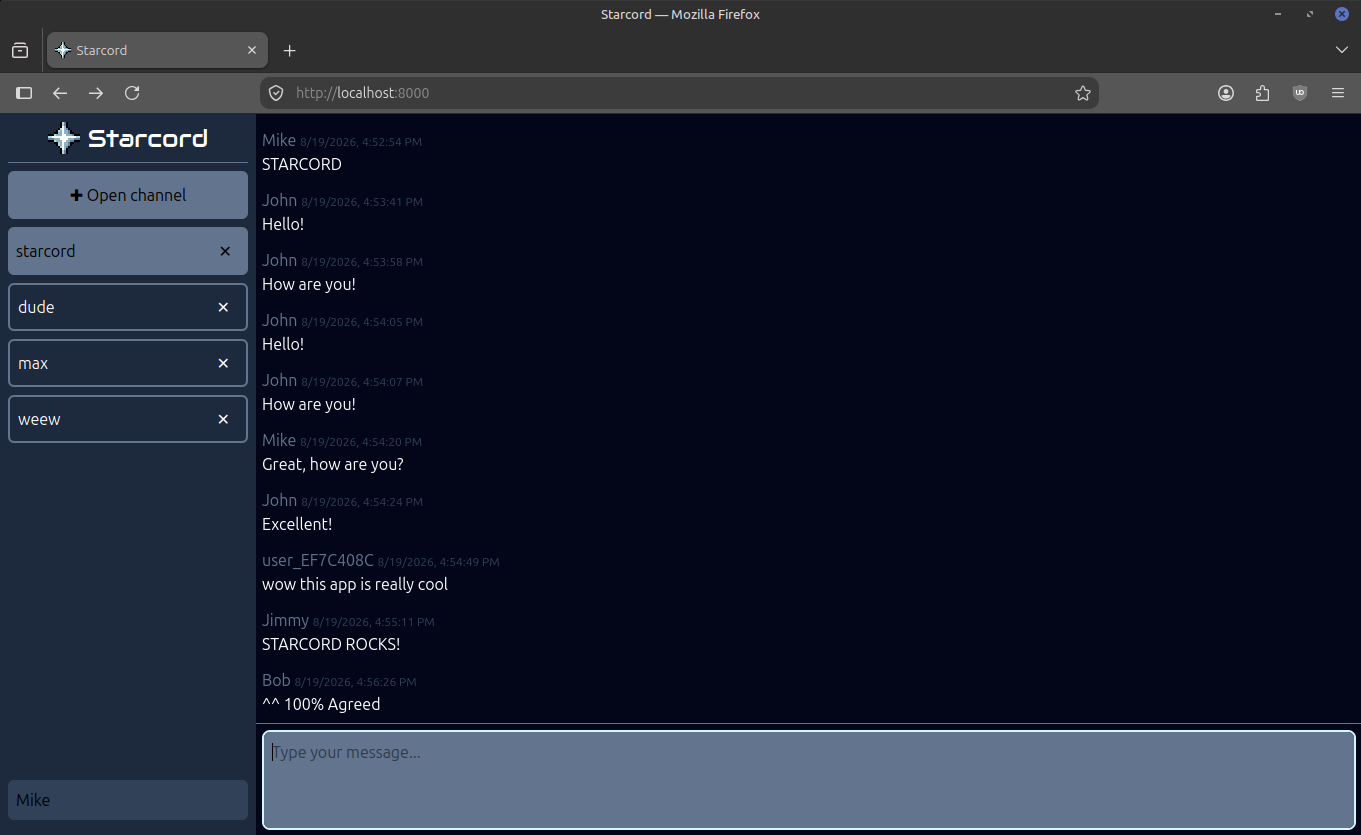
A Discord-like chat sample application is currently implemented with real-time chat rooms, creating/removing channels and setting nicknames.
🔴 Live demo: https://starcord.fastserial.com
Benchmarks
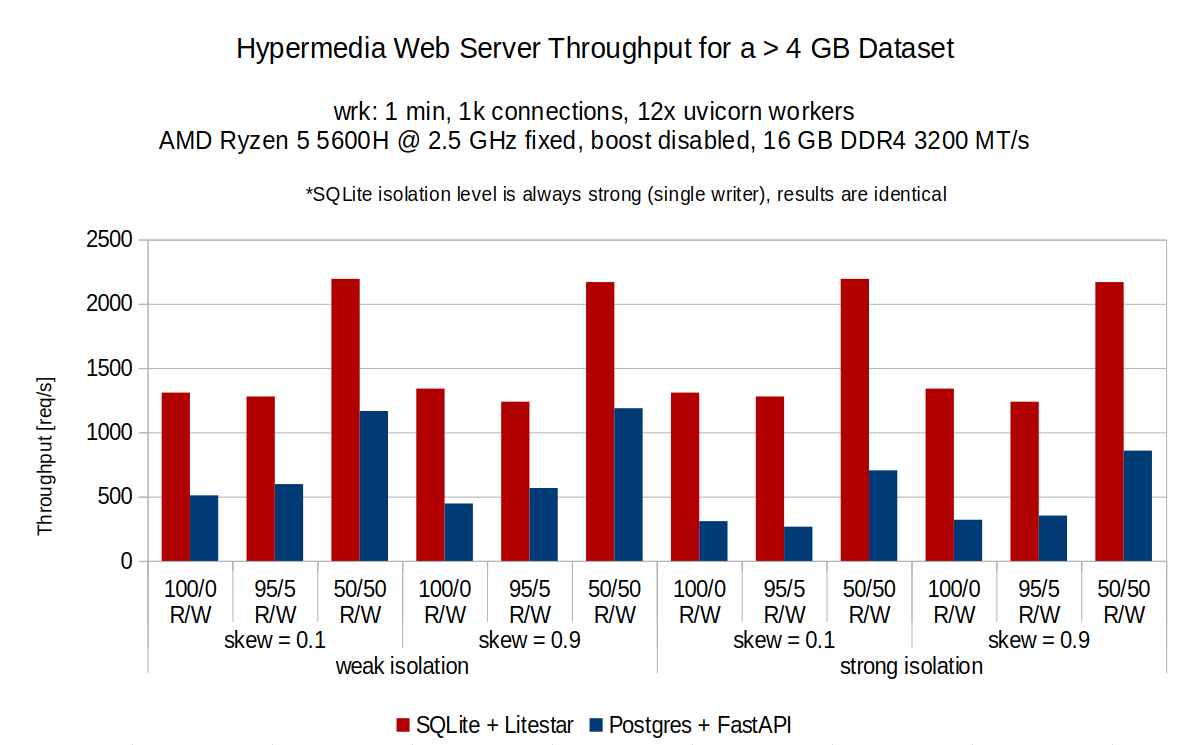
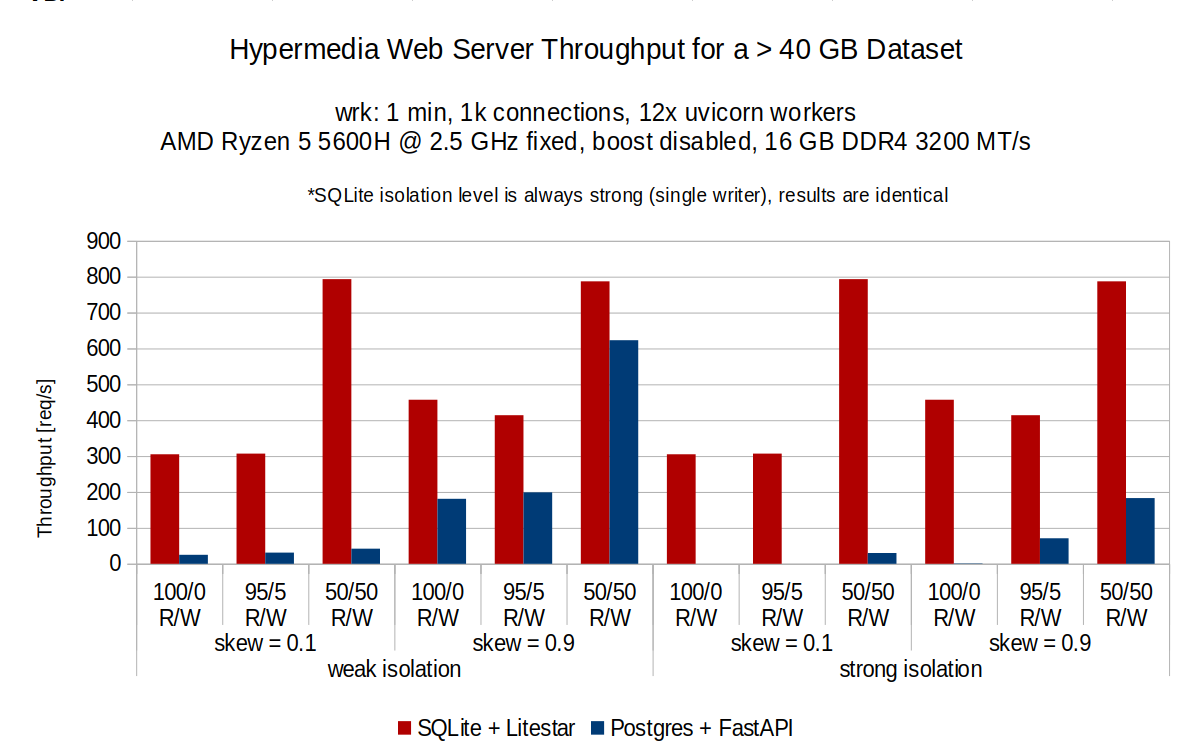
This benchmark measures requests per second (RPS) under different workloads in the context of a hypermedia application. To serve a read request, the server must issue 3 separate DB queries touching all 4 tables. The queries perform several joins and require at least 500 completely (pseudo-)random pages from the database. This data is then used to render a ~190 kB HTML template (using Jinja), which must then be Brotli-compressed and returned to the client.
4 GB Dataset
40 GB Dataset
Benchmark Results
Ths exact application was also built using FastAPI and Postgres 🐘. Check it out here.
To see all benchmark results or to replicate them yourself, see the benchmark respository.
The Stack
Viperlith consists of the following components:
- Datastar hypermedia framework.
- Litestar ASGI framework: Uses up to 10x less memory as compared to FastAPI.
- uvicorn: Popular ASGI web server.
- MsgSpec: Provides the same validation capabilities as Pydantic while serializing an order of magnitude faster.
- SQLite through APSW: Local SQLite offers minimal operational overhead, and when properly tuned, significantly outperforms Postgres & MySQL for most workloads. APSW provides better control, features and error handling compared to Python's builtin
sqlite3module. - Jinja templates: Templating engine used to render HTML templates.
- Tailwind CSS: For declarative styling directly inside the markup.
- Brotli compression: Used in Litestar's
CompressionConfigto minimize bandwidth for streaming HTML over the wire. - spsc-ring-threadsafe: A ring buffer C extension for inter-process communication on shared memory, up to 100x faster than the standard library's
multiprocessing.Queue. Used to queue commands to the single-writer process with exclusive write access to SQLite.
Architecture
HTML Streaming
Hypermedia-driven applications (HDA), unlike SPA frameworks (e.g. React, Vue, Angular), eliminate state and logic on the client side. Instead, interactive logic is moved to the backend and page updates are streamed to the client as server-rendered templates over a Server-Sent Events stream and morphed into the local DOM. This is a bit like streaming a movie, except the movie is HTML and you receive new content from updates and UI interactions. The client's browser is effectively reduced to a rendering viewport only capable of displaying raw HTML.
See docs/HTML_STREAMING.md for an introduction to the concept of HTML streaming.
Also see: the Tao of Datastar and Datastar: Why another framework?.
Quick Start
1. Copy .env.example and name it .env
cp .env.example .env
Generate a SESSION_KEY with openssl rand -hex 16 and change configurations if necessary.
2: Create directory for database file in /var/lib
sudo mkdir -p /var/lib/viperlith
sudo chown $USER /var/lib/viperlith
3: (Optional) Enable launch script permissions
sudo chmod +x ./launch.sh
4: Run the launch script
./launch.sh
This will launch the application in debug mode with hot reload.
Alternatively, it is possible to launch in production mode with multiple workers:
DEBUG=0 ./launch.sh
Deploy
Before running compose, make sure environment variables such as SESSION_KEY are present in the shell environment by configuring them in CI. These will take precedence before the defaults inside .env.example.
docker compose --env-file .env.example up --build
By default, the application will bind to localhost on 127.0.0.1:8000. The application will only be accessible from the internet if you have a reverse proxy with an appropriate proxy_pass pointed there. If you have a different setup, edit the compose config as needed.
See .gitea/workflows/deploy.yml for an actual CI deploy job example.
Tuning
Disable block device readahead
Block device readahead makes it so when any page is read from disk, the next N sectors are also read automatically (256 by default). This triggers excess page faults and can significantly worsen performance for larger-than-RAM databases.
Readahead can be disabled by setting it to zero like so:
sudo blockdev --setra 0 /dev/sda1
Unfortunately, this setting will not persist across reboots. To make the it persist, a series of steps are required:
1. Check block devices with lsblk:
$ lsblk
NAME    MAJ:MIN RM  SIZE RO TYPE MOUNTPOINTS
sda       8:0    0   75G  0 disk
|-sda1    8:1    0 74.9G  0 part /
|-sda14   8:14   0    3M  0 part
`-sda15   8:15   0  124M  0 part /boot/efi
Pick your primary storage disk, in this case sda1.
2. Create a systemd service to apply the setting at startup
sudo nano /etc/systemd/system/sda1-readahead-disable.service
3. Paste the configuration (replace sda1 with your block device)
[Unit]
Description=Disable readahead on sda1
Requires=dev-sda1.device
After=dev-sda1.device

[Service]
Type=oneshot
ExecStart=/usr/sbin/blockdev --setra 0 /dev/sda1

[Install]
WantedBy=multi-user.target
Save and quit the file.
4. Reload and enable the service
sudo systemctl daemon-reload
sudo systemctl enable --now sda1-readahead-disable.service
5. Verify that readahead is set to zero
sudo blockdev --getra /dev/sda1
You should see:
0
Credits
Inspired by Anders Murphy's Hyperlith.
Contributors

235 commits
See what people are saying
Similar repos


Languages
Python
58.0%
HTML
23.8%
Shell
8.5%
Lua
6.0%
Dockerfile
2.9%
🐍⚡🚀 Viperlith: the Hypermedia-Based Monolith for Python built with Datastar
Python
1
235 commits
updated Sep 16, 2026
README
🐍⚡🚀 Viperlith: the Hypermedia-Based Monolith for Python
Introduction
A demo application to illustrate how Datastar works.
datastar.js is a lightweight (11kB) hypermedia framework similar to HTMX (but not).
A Discord-like chat sample application is currently implemented with real-time chat rooms, creating/removing channels and setting nicknames.
🔴 Live demo: https://starcord.fastserial.com
Benchmarks
This benchmark measures requests per second (RPS) under different workloads in the context of a hypermedia application. To serve a read request, the server must issue 3 separate DB queries touching all 4 tables. The queries perform several joins and require at least 500 completely (pseudo-)random pages from the database. This data is then used to render a ~190 kB HTML template (using Jinja), which must then be Brotli-compressed and returned to the client.
4 GB Dataset
40 GB Dataset
Benchmark Results
Ths exact application was also built using FastAPI and Postgres 🐘. Check it out here.
To see all benchmark results or to replicate them yourself, see the benchmark respository.
The Stack
Viperlith consists of the following components:
- Datastar hypermedia framework.
- Litestar ASGI framework: Uses up to 10x less memory as compared to FastAPI.
- uvicorn: Popular ASGI web server.
- MsgSpec: Provides the same validation capabilities as Pydantic while serializing an order of magnitude faster.
- SQLite through APSW: Local SQLite offers minimal operational overhead, and when properly tuned, significantly outperforms Postgres & MySQL for most workloads. APSW provides better control, features and error handling compared to Python's builtin
sqlite3module. - Jinja templates: Templating engine used to render HTML templates.
- Tailwind CSS: For declarative styling directly inside the markup.
- Brotli compression: Used in Litestar's
CompressionConfigto minimize bandwidth for streaming HTML over the wire. - spsc-ring-threadsafe: A ring buffer C extension for inter-process communication on shared memory, up to 100x faster than the standard library's
multiprocessing.Queue. Used to queue commands to the single-writer process with exclusive write access to SQLite.
Architecture
HTML Streaming
Hypermedia-driven applications (HDA), unlike SPA frameworks (e.g. React, Vue, Angular), eliminate state and logic on the client side. Instead, interactive logic is moved to the backend and page updates are streamed to the client as server-rendered templates over a Server-Sent Events stream and morphed into the local DOM. This is a bit like streaming a movie, except the movie is HTML and you receive new content from updates and UI interactions. The client's browser is effectively reduced to a rendering viewport only capable of displaying raw HTML.
See docs/HTML_STREAMING.md for an introduction to the concept of HTML streaming.
Also see: the Tao of Datastar and Datastar: Why another framework?.
Quick Start
1. Copy .env.example and name it .env
cp .env.example .env
Generate a SESSION_KEY with openssl rand -hex 16 and change configurations if necessary.
2: Create directory for database file in /var/lib
sudo mkdir -p /var/lib/viperlith
sudo chown $USER /var/lib/viperlith
3: (Optional) Enable launch script permissions
sudo chmod +x ./launch.sh
4: Run the launch script
./launch.sh
This will launch the application in debug mode with hot reload.
Alternatively, it is possible to launch in production mode with multiple workers:
DEBUG=0 ./launch.sh
Deploy
Before running compose, make sure environment variables such as SESSION_KEY are present in the shell environment by configuring them in CI. These will take precedence before the defaults inside .env.example.
docker compose --env-file .env.example up --build
By default, the application will bind to localhost on 127.0.0.1:8000. The application will only be accessible from the internet if you have a reverse proxy with an appropriate proxy_pass pointed there. If you have a different setup, edit the compose config as needed.
See .gitea/workflows/deploy.yml for an actual CI deploy job example.
Tuning
Disable block device readahead
Block device readahead makes it so when any page is read from disk, the next N sectors are also read automatically (256 by default). This triggers excess page faults and can significantly worsen performance for larger-than-RAM databases.
Readahead can be disabled by setting it to zero like so:
sudo blockdev --setra 0 /dev/sda1
Unfortunately, this setting will not persist across reboots. To make the it persist, a series of steps are required:
1. Check block devices with lsblk:
$ lsblk
NAME    MAJ:MIN RM  SIZE RO TYPE MOUNTPOINTS
sda       8:0    0   75G  0 disk
|-sda1    8:1    0 74.9G  0 part /
|-sda14   8:14   0    3M  0 part
`-sda15   8:15   0  124M  0 part /boot/efi
Pick your primary storage disk, in this case sda1.
2. Create a systemd service to apply the setting at startup
sudo nano /etc/systemd/system/sda1-readahead-disable.service
3. Paste the configuration (replace sda1 with your block device)
[Unit]
Description=Disable readahead on sda1
Requires=dev-sda1.device
After=dev-sda1.device

[Service]
Type=oneshot
ExecStart=/usr/sbin/blockdev --setra 0 /dev/sda1

[Install]
WantedBy=multi-user.target
Save and quit the file.
4. Reload and enable the service
sudo systemctl daemon-reload
sudo systemctl enable --now sda1-readahead-disable.service
5. Verify that readahead is set to zero
sudo blockdev --getra /dev/sda1
You should see:
0
Credits
Inspired by Anders Murphy's Hyperlith.
See what people are saying
Similar repos
Contributors
235 commits
Languages
Python
58.0%
HTML
23.8%
Shell
8.5%
Lua
6.0%
Dockerfile
2.9%