
README
ElevenAgents SDK for Android (Kotlin)
Official ElevenAgents SDK for Android.
Features
- Audio‑first, low‑latency sessions over LiveKit (WebRTC)
- Text‑only sessions over the ConvAI WebSocket (no LiveKit, no mic permission)
- Public agents (token fetched client‑side from
agentId) and private agents (pre‑issuedconversationTokenfor voice orsignedUrlfor text‑only) - Strongly‑typed events and callbacks (connect, messages, mode changes, feedback availability, unhandled client tools)
- Data channel messaging (user message, contextual update, user activity/typing)
- Feedback (like/dislike) associated with agent responses
- Microphone mute/unmute control
- Real-time audio level tracking for agent voice volume (0.0 to 1.0)
Installation
Add Maven Central and the SDK dependency to your Gradle configuration.
settings.gradle.kts
pluginManagement {
    repositories {
        gradlePluginPortal()
        google()
        mavenCentral()
    }
}

dependencyResolutionManagement {
    repositoriesMode.set(RepositoriesMode.FAIL_ON_PROJECT_REPOS)
    repositories {
        google()
        mavenCentral()
    }
}
app/build.gradle.kts
dependencies {
    // ElevenAgents SDK (Android)
    implementation("io.elevenlabs:elevenlabs-android:<latest>")

    // Kotlin coroutines, AndroidX, etc., as needed by your app
}
Permissions
You have to request the android.permission.RECORD_AUDIO runtime permission yourself before starting a voice session. Text‑only sessions don't need this permission.
Permissions (and a service) are added to your AndroidManifest.xml automatically by the LiveKit SDK.
Certain ones are not needed to use the ElevenLabs SDK so you can remove them if don't need them:
<manifest>
    [...]
    <uses-permission android:name="android.permission.CAMERA" tools:node="remove" />
    <uses-permission android:name="android.permission.FOREGROUND_SERVICE_MEDIA_PROJECTION" tools:node="remove" />
    [...]
    <application>
        [...]
        <!--suppress AndroidDomInspection -->
        <service
            android:name="io.livekit.android.room.track.screencapture.ScreenCaptureService"
            tools:node="remove" />
    </application>
</manifest>
Quick Start
ConversationConfig requires exactly one of three credentials, depending on the agent and transport:
| Agent | Transport | Field |
|---|---|---|
| Public | Voice or text | agentId |
| Private | Voice (LiveKit/WebRTC) | conversationToken |
| Private | Text‑only (raw WebSocket) | signedUrl |
Private credentials are provisioned by your backend — never ship API keys.
Kotlin (Application/Activity)
import io.elevenlabs.ConversationClient
import io.elevenlabs.ConversationConfig
import io.elevenlabs.ConversationSession
import io.elevenlabs.ClientTool
import io.elevenlabs.ClientToolResult

// Start a public agent session (token generated for you)
val config = ConversationConfig(
    agentId = "<your_public_agent_id>", // OR conversationToken = "<token>" (voice) / signedUrl = "wss://…" (text-only)
    userId = "your-user-id",
    audioInputSampleRate = "48000", // Optional parameter, defaults to 48kHz. Lower values can help with audio input issues on slower connections
    apiEndpoint = "https://api.elevenlabs.io", // Optional: Custom API endpoint
    websocketUrl = "wss://livekit.rtc.elevenlabs.io", // Optional: Custom WebSocket URL
    // Optional callbacks
    onConnect = { conversationId ->
        // Connected, you can store conversationId via session.getId() too
    },
    onDisconnect = { reason ->
        // Disconnected, reason indicates who initiated the disconnect, either "Agent", "User" or "Error"
    },
    onMessage = { source, messageJson ->
        // Raw JSON messages from data channel; useful for logging/telemetry
    },
    onModeChange = { mode ->
        // ConversationMode.SPEAKING | ConversationMode.LISTENING — drive UI indicators
    },
    onStatusChange = { status ->
        // ConversationStatus enum: CONNECTED, CONNECTING, DISCONNECTED, DISCONNECTING, ERROR
    },
    onCanSendFeedbackChange = { canSend ->
        // Enable/disable thumbs up/down
    },
    onUnhandledClientToolCall = { call ->
        // Agent requested a client tool not registered on the device
    },
    onVadScore = { score ->
        // Voice Activity Detection score, range from 0 to 1 where higher values indicate higher confidence of speech
    },
    onAudioLevelChanged = { level ->
        // Agent audio level (volume), range from 0.0 to 1.0
        // Log.d("MyApp", "Agent audio level: $level")
    },
    onAudioFrame = { frame ->
        // Decoded PCM chunk from the agent's audio track (little-endian).
        // The ByteBuffer is only valid for the duration of this callback — copy what you need.
        // Useful for visualizations, recording, or custom DSP.
    },
    onUserTranscriptEvent = { text, eventId ->
        // User's speech transcribed to text (finalized)
    },
    onTentativeUserTranscriptEvent = { text, eventId ->
        // In-progress user transcript
    },
    onAgentResponseEvent = { text, eventId ->
        // Agent's finalized text response
    },
    onAgentResponsePartEvent = { partType, text, eventId ->
        // Streaming agent text part: AgentResponsePartType.START / DELTA / STOP
    },
    onAgentResponseCorrectionEvent = { text, eventId ->
        // Agent response was corrected after interruption
    },
    onAgentToolResponse = { toolName, toolCallId, toolType, isError ->
        // Agent tool execution completed
    },
    onConversationInitiationMetadata = { conversationId, agentOutputFormat, userInputFormat ->
        // Conversation metadata including audio formats
    },
    onInterruption = { eventId ->
        // User interrupted the agent while speaking
    },
    // List of client tools the agent can invoke
    clientTools = mapOf(
        "logMessage" to object : ClientTool {
            override suspend fun execute(parameters: Map<String, Any>): ClientToolResult? {
                val message = parameters["message"] as? String

                Log.d("ExampleApp", "[INFO] Client Tool Log: $message")
                return ClientToolResult.success("Message logged successfully")
            }
        }
    ),
)
Note: If a tool is configured with
expects_response=falseon the server, returnnullfromexecuteto skip sending a tool result back to the agent.
// In an Activity context
val session: ConversationSession = ConversationClient.startSession(config, this)

// Send messages via the data channel
session.sendUserMessage("Hello!")
session.sendContextualUpdate("User navigated to the settings screen")
session.sendUserActivity() // useful while user is typing

// Feedback for the latest agent response
session.sendFeedback(isPositive = true) // or false

// Microphone control
session.toggleMute() // toggle
session.setMicMuted(true) // explicit

// Conversation ID
val id: String? = session.getId() // e.g., "conv_123" once connected

// End the session
session.endSession()
Public vs Private Agents
- Public agents (no auth): Initialize with
agentIdinConversationConfig. The SDK requests a conversation token from ElevenLabs without needing an API key on device. - Private agents — voice (auth): Initialize with
conversationTokeninConversationConfig. Your backend mints the WebRTC token via/v1/convai/conversation/token?agent_id=…using your API key. - Private agents — text‑only (auth): Initialize with
signedUrlinConversationConfig. Your backend signs a WebSocket URL via/v1/convai/conversation/get-signed-url?agent_id=…using your API key.
Never embed API keys in clients. ConversationConfig enforces that exactly one credential is set, and that the credential matches the transport (textOnly = true → signedUrl, textOnly = false → conversationToken).
Text‑only mode
For text‑only conversations, set textOnly = true on ConversationConfig. The SDK switches transports automatically:
- Voice mode (default) → LiveKit / WebRTC.
- Text‑only mode → ConvAI WebSocket (
wss://api.elevenlabs.io/v1/convai/conversation).
The transport switch is required because LiveKit drops rooms that never publish an audio or video track, which would tear down a text‑only conversation after a few seconds. Text‑only sessions don't need RECORD_AUDIO.
val session = ConversationClient.startSession(
    ConversationConfig(
        agentId = "<your_public_agent_id>",
        textOnly = true,
        onAgentResponseEvent = { reply, _ -> /* render reply */ },
    ),
    this,
)

session.sendUserMessage("Hello!")
Private agents in text‑only mode
For private agents, pass the signed WebSocket URL returned by your backend's call to /v1/convai/conversation/get-signed-url?agent_id=… as signedUrl. The SDK opens it verbatim — no need to pass agentId separately.
val signedUrl = backendApi.fetchSignedUrl() // e.g., wss://api.elevenlabs.io/v1/convai/conversation?agent_id=…&conversation_signature=…

val session = ConversationClient.startSession(
    ConversationConfig(
        signedUrl = signedUrl,
        textOnly = true,
    ),
    this,
)
Custom regions / data residency
The text‑only WebSocket lives on the same host as apiEndpoint, so data residency is honored automatically:
ConversationConfig(
    agentId = "<your_public_agent_id>",
    textOnly = true,
    apiEndpoint = "https://api.eu.residency.elevenlabs.io",
)
Advanced Configuration
Custom Endpoints
For self-hosted or custom deployments, you can configure custom endpoints:
val config = ConversationConfig(
    agentId = "<your_agent_id>",
    apiEndpoint = "https://custom-api.example.com",      // Custom API endpoint (default: "https://api.elevenlabs.io")
    websocketUrl = "wss://custom-webrtc.example.com"     // Custom WebSocket URL (default: "wss://livekit.rtc.elevenlabs.io")
)
- apiEndpoint: Base URL for the ElevenLabs API. Used for fetching conversation tokens when using public agents.
- websocketUrl: WebSocket URL for the LiveKit WebRTC connection. Used for the real-time audio/data channel connection.
Both parameters are optional and default to the standard ElevenLabs production endpoints.
Note: If you are using data residency, make sure that both apiEndpoint and websocketUrl point to the same geographic region. For example https://api.eu.residency.elevenlabs.io and wss://livekit.rtc.eu.residency.elevenlabs.io respectively. A mismatch will result in errors when authenticating.
Callbacks Overview
Core Callbacks
- onConnect(conversationId: String): Fired once connected. Conversation ID can also be read via
session.getId(). - onDisconnect(reason: DisconnectionDetails): Called when the conversation ends. The reason can be:
DisconnectionDetails.User- Your code ended the conversation by callingendSession()/disconnect(). Never fired for a connection that timed out or was closed by the remote side on its own.DisconnectionDetails.Agent- The remote side closed the connection without a localendSession()/disconnect()call. For text-only (WebSocket) sessions this also covers a server-enforced idle/inactivity timeout, since the SDK can't distinguish that from the agent gracefully ending the call - both close the socket normally.DisconnectionDetails.Error(exception: Exception)- Connection error occurred
- onMessage(source: String, message: String): Raw JSON messages from data channel.
sourceis"ai"or"user". - onModeChange(mode: ConversationMode):
ConversationMode.SPEAKINGorConversationMode.LISTENING; drive your speaking indicator. - onStatusChange(status: ConversationStatus): Enum values:
CONNECTED,CONNECTING,DISCONNECTED,DISCONNECTING,ERROR.
Conversation Event Callbacks
- onUserTranscriptEvent(text: String, eventId: Int?): Finalized user transcript for a turn, with its server event id.
- onTentativeUserTranscriptEvent(text: String, eventId: Int?): In-progress user transcript, updated as recognition refines.
- onAgentResponseEvent(text: String, eventId: Int?): Agent's finalized text response for a turn, with its server event id.
- onAgentResponsePartEvent(partType: AgentResponsePartType, text: String, eventId: Int?): Streaming agent text parts.
partTypeisSTART,DELTA, orSTOP. - onAgentResponseCorrectionEvent(text: String, eventId: Int?): Corrected agent response (after user interruption), with its server event id.
- onInterruption(eventId: Int): User interrupted the agent while speaking.
Deprecated:
onUserTranscript(transcript: String),onAgentResponse(response: String), andonAgentResponseCorrection(originalResponse: String, correctedResponse: String)are superseded by the…Eventcallbacks above, which also surface the server event id. They still fire for backward compatibility.
Tool & Feedback Callbacks
- onCanSendFeedbackChange(canSend: Boolean): Enable/disable feedback buttons based on whether feedback can be sent.
- onUnhandledClientToolCall(call): Agent attempted to call a client tool not registered on the device.
- onAgentToolResponse(toolName: String, toolCallId: String, toolType: String, isError: Boolean): Agent tool execution completed (server-side or client-side).
Audio & Metadata Callbacks
- onVadScore(score: Float): Voice Activity Detection score. Ranges from 0 to 1 where higher values indicate confidence of speech.
- onAudioLevelChanged(level: Float): Agent audio level (volume) in real-time. Ranges from 0.0 (silent) to 1.0 (loudest). Typically shows small variations during speech.
- onAudioFrame(frame: AudioFrame): Decoded PCM chunks from the agent's remote audio track, delivered as they arrive.
AudioFrameexposesaudioData: ByteBuffer(little-endian PCM),bitsPerSample,sampleRate,channelCount,numberOfFrames, andabsoluteCaptureTimestampMs. TheByteBufferis only valid for the duration of the callback — copy the bytes if you need to keep them. Useful for waveform visualizations, recording, or custom audio processing. The callback runs on LiveKit's audio thread, so keep work short and avoid blocking. - onConversationInitiationMetadata(conversationId: String, agentOutputFormat: String, userInputFormat: String): Conversation metadata including audio format details.
Client Tools (optional)
Register client tools to allow the agent to call local capabilities on the device.
val config = ConversationConfig(
    agentId = "<public_agent>",
    clientTools = mapOf(
        "logMessage" to object : io.elevenlabs.ClientTool {
            override suspend fun execute(parameters: Map<String, Any>): io.elevenlabs.ClientToolResult? {
                val message = parameters["message"] as? String ?: return io.elevenlabs.ClientToolResult.failure("Missing 'message'")
                android.util.Log.d("ClientTool", "Log: $message")
                return null // No response needed for fire-and-forget tools
            }
        }
    )
)
When the agent issues a client_tool_call, the SDK executes the matching tool and responds with a client_tool_result. If the tool is not registered:
- If
onUnhandledClientToolCallcallback is provided, it will be invoked and you must handle the response manually usingsendToolResult() - If no callback is provided and the tool expects a response, an automatic failure will be sent to prevent the agent from hanging
Dynamic Client Tools
For runtime-defined tools or tools that can't be registered upfront, you can handle them dynamically using the onUnhandledClientToolCall callback combined with sendToolResult():
val config = ConversationConfig(
    agentId = "<public_agent>",
    onUnhandledClientToolCall = { toolCall ->
        // Handle dynamic tool execution
        when (toolCall.toolName) {
            "getDeviceInfo" -> {
                // Send result as a string
                session.sendToolResult(toolCall.toolCallId, "Device: ${Build.MODEL}", isError = false)
            }
            "fetchUserData" -> {
                // Perform async operation
                coroutineScope.launch {
                    val data = fetchDataFromAPI(toolCall.parameters)
                    session.sendToolResult(toolCall.toolCallId, data, isError = false)
                }
            }
            else -> {
                // Unknown tool - send error
                session.sendToolResult(toolCall.toolCallId, "Unknown tool: ${toolCall.toolName}", isError = true)
            }
        }
    }
)
Key methods:
session.sendToolResult(toolCallId, result, isError): Send tool execution results back to the agent manually. Theresultparameter is a string (use JSON string for complex data). Use this in theonUnhandledClientToolCallcallback to respond to dynamic tool calls.toolCall.expectsResponse: Check this property to determine if the agent expects a response. Iffalse, the tool is fire-and-forget and you can skip callingsendToolResult().
This approach is useful for:
- Tools that are determined at runtime based on user settings
- Tools that require complex async operations
- Integration with external APIs or databases
- Scenarios where tool availability depends on app state or permissions
User activity and messaging
session.sendUserMessage(text: String): user message that should elicit a response from the agentsession.sendContextualUpdate(text: String): context that should not prompt a response from the agentsession.sendUserActivity(): signal that the user is typing/active
Feedback
Use onCanSendFeedbackChange to enable your thumbs up/down UI when feedback is allowed. When pressed:
session.sendFeedback(isPositive = true)  // like
session.sendFeedback(isPositive = false) // dislike
The SDK ensures duplicates are not sent for the same/older agent event.
Mute / Unmute
session.toggleMute()
session.setMicMuted(true)   // mute
session.setMicMuted(false)  // unmute
Observe session.isMuted to update the UI label between "Mute" and "Unmute".
Observing Session State
The SDK uses Kotlin StateFlow for reactive state management. The ConversationSession exposes four StateFlow properties:
status: StateFlow<ConversationStatus>- Connection status (CONNECTED, CONNECTING, DISCONNECTED, etc.)mode: StateFlow<ConversationMode>- Conversation mode (SPEAKING, LISTENING)isMuted: StateFlow<Boolean>- Microphone mute stateaudioLevel: StateFlow<Float>- Agent audio level (0.0 to 1.0)
In a ViewModel (Recommended)
Collect flows in your ViewModel's coroutine scope:
class MyViewModel : ViewModel() {
    private val _statusText = MutableLiveData<String>()
    val statusText: LiveData<String> = _statusText

    fun observeSession(session: ConversationSession) {
        viewModelScope.launch {
            session.status.collect { status ->
                _statusText.value = when (status) {
                    ConversationStatus.CONNECTED -> "Connected"
                    ConversationStatus.CONNECTING -> "Connecting..."
                    ConversationStatus.DISCONNECTED -> "Disconnected"
                    ConversationStatus.DISCONNECTING -> "Disconnecting..."
                    ConversationStatus.ERROR -> "Error"
                }
            }
        }

        viewModelScope.launch {
            session.mode.collect { mode ->
                // Update UI based on speaking/listening mode
                when (mode) {
                    ConversationMode.SPEAKING -> showSpeakingIndicator()
                    ConversationMode.LISTENING -> showListeningIndicator()
                }
            }
        }

        viewModelScope.launch {
            session.audioLevel.collect { level ->
                // Agent audio level updates during speech
                Log.d("MyViewModel", "Audio level: $level")
            }
        }
    }
}
In an Activity or Fragment
Use lifecycleScope with repeatOnLifecycle for lifecycle-aware collection:
class MyActivity : AppCompatActivity() {
    override fun onCreate(savedInstanceState: Bundle?) {
        super.onCreate(savedInstanceState)

        val session = ConversationClient.startSession(config, this)

        lifecycleScope.launch {
            repeatOnLifecycle(Lifecycle.State.STARTED) {
                launch {
                    session.status.collect { status ->
                        updateStatusUI(status)
                    }
                }
                launch {
                    session.isMuted.collect { muted ->
                        muteButton.text = if (muted) "Unmute" else "Mute"
                    }
                }
                launch {
                    session.audioLevel.collect { level ->
                        // Agent audio level updates
                        Log.d("MyActivity", "Audio level: $level")
                    }
                }
            }
        }
    }
}
Converting to LiveData (Optional)
If you prefer LiveData, use the provided extension function:
import io.elevenlabs.utils.asLiveData

val statusLiveData: LiveData<ConversationStatus> = session.status.asLiveData()
val modeLiveData: LiveData<ConversationMode> = session.mode.asLiveData()
val audioLevelLiveData: LiveData<Float> = session.audioLevel.asLiveData()

statusLiveData.observe(this) { status ->
    // Handle status changes
}

audioLevelLiveData.observe(this) { level ->
    // Handle audio level changes
    Log.d("MyActivity", "Audio level: $level")
}
Example App
This repository includes an example app demonstrating:
- One‑tap connect/disconnect
- Speaking/listening indicator
- Feedback buttons with UI enable/disable
- Typing indicator via
sendUserActivity() - Contextual and user messages from an input
- Microphone mute/unmute button
Run:
./gradlew example-app:assembleDebug
Install the APK on an emulator or device (note: emulators may have audio routing limitations). Use Android Studio for best results.
Emulator permissions
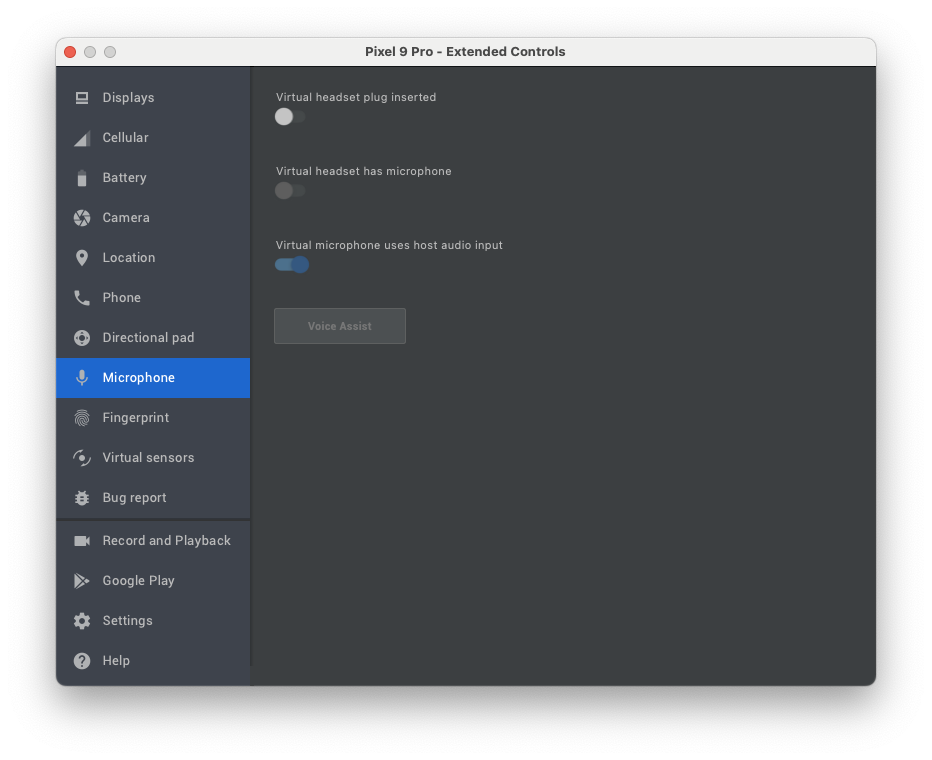
Ensure to allow the virtual microphone to use host audio input in the emulator settings.
ProGuard / R8
If you shrink/obfuscate, ensure Gson models and LiveKit are kept. Example rules (adjust as needed):
-keep class io.elevenlabs.** { *; }
-keep class io.livekit.** { *; }
-keepattributes *Annotation*
Troubleshooting
- Ensure microphone permission is granted at runtime
- If reconnect hangs, verify your app calls
session.endSession()and that you start a new session instance before reconnecting - For emulators, verify audio input/output routes are working; physical devices tend to behave more reliably


Similar repos


Languages
Kotlin
100.0%
README
ElevenAgents SDK for Android (Kotlin)
Official ElevenAgents SDK for Android.
Features
- Audio‑first, low‑latency sessions over LiveKit (WebRTC)
- Text‑only sessions over the ConvAI WebSocket (no LiveKit, no mic permission)
- Public agents (token fetched client‑side from
agentId) and private agents (pre‑issuedconversationTokenfor voice orsignedUrlfor text‑only) - Strongly‑typed events and callbacks (connect, messages, mode changes, feedback availability, unhandled client tools)
- Data channel messaging (user message, contextual update, user activity/typing)
- Feedback (like/dislike) associated with agent responses
- Microphone mute/unmute control
- Real-time audio level tracking for agent voice volume (0.0 to 1.0)
Installation
Add Maven Central and the SDK dependency to your Gradle configuration.
settings.gradle.kts
pluginManagement {
    repositories {
        gradlePluginPortal()
        google()
        mavenCentral()
    }
}

dependencyResolutionManagement {
    repositoriesMode.set(RepositoriesMode.FAIL_ON_PROJECT_REPOS)
    repositories {
        google()
        mavenCentral()
    }
}
app/build.gradle.kts
dependencies {
    // ElevenAgents SDK (Android)
    implementation("io.elevenlabs:elevenlabs-android:<latest>")

    // Kotlin coroutines, AndroidX, etc., as needed by your app
}
Permissions
You have to request the android.permission.RECORD_AUDIO runtime permission yourself before starting a voice session. Text‑only sessions don't need this permission.
Permissions (and a service) are added to your AndroidManifest.xml automatically by the LiveKit SDK.
Certain ones are not needed to use the ElevenLabs SDK so you can remove them if don't need them:
<manifest>
    [...]
    <uses-permission android:name="android.permission.CAMERA" tools:node="remove" />
    <uses-permission android:name="android.permission.FOREGROUND_SERVICE_MEDIA_PROJECTION" tools:node="remove" />
    [...]
    <application>
        [...]
        <!--suppress AndroidDomInspection -->
        <service
            android:name="io.livekit.android.room.track.screencapture.ScreenCaptureService"
            tools:node="remove" />
    </application>
</manifest>
Quick Start
ConversationConfig requires exactly one of three credentials, depending on the agent and transport:
| Agent | Transport | Field |
|---|---|---|
| Public | Voice or text | agentId |
| Private | Voice (LiveKit/WebRTC) | conversationToken |
| Private | Text‑only (raw WebSocket) | signedUrl |
Private credentials are provisioned by your backend — never ship API keys.
Kotlin (Application/Activity)
import io.elevenlabs.ConversationClient
import io.elevenlabs.ConversationConfig
import io.elevenlabs.ConversationSession
import io.elevenlabs.ClientTool
import io.elevenlabs.ClientToolResult

// Start a public agent session (token generated for you)
val config = ConversationConfig(
    agentId = "<your_public_agent_id>", // OR conversationToken = "<token>" (voice) / signedUrl = "wss://…" (text-only)
    userId = "your-user-id",
    audioInputSampleRate = "48000", // Optional parameter, defaults to 48kHz. Lower values can help with audio input issues on slower connections
    apiEndpoint = "https://api.elevenlabs.io", // Optional: Custom API endpoint
    websocketUrl = "wss://livekit.rtc.elevenlabs.io", // Optional: Custom WebSocket URL
    // Optional callbacks
    onConnect = { conversationId ->
        // Connected, you can store conversationId via session.getId() too
    },
    onDisconnect = { reason ->
        // Disconnected, reason indicates who initiated the disconnect, either "Agent", "User" or "Error"
    },
    onMessage = { source, messageJson ->
        // Raw JSON messages from data channel; useful for logging/telemetry
    },
    onModeChange = { mode ->
        // ConversationMode.SPEAKING | ConversationMode.LISTENING — drive UI indicators
    },
    onStatusChange = { status ->
        // ConversationStatus enum: CONNECTED, CONNECTING, DISCONNECTED, DISCONNECTING, ERROR
    },
    onCanSendFeedbackChange = { canSend ->
        // Enable/disable thumbs up/down
    },
    onUnhandledClientToolCall = { call ->
        // Agent requested a client tool not registered on the device
    },
    onVadScore = { score ->
        // Voice Activity Detection score, range from 0 to 1 where higher values indicate higher confidence of speech
    },
    onAudioLevelChanged = { level ->
        // Agent audio level (volume), range from 0.0 to 1.0
        // Log.d("MyApp", "Agent audio level: $level")
    },
    onAudioFrame = { frame ->
        // Decoded PCM chunk from the agent's audio track (little-endian).
        // The ByteBuffer is only valid for the duration of this callback — copy what you need.
        // Useful for visualizations, recording, or custom DSP.
    },
    onUserTranscriptEvent = { text, eventId ->
        // User's speech transcribed to text (finalized)
    },
    onTentativeUserTranscriptEvent = { text, eventId ->
        // In-progress user transcript
    },
    onAgentResponseEvent = { text, eventId ->
        // Agent's finalized text response
    },
    onAgentResponsePartEvent = { partType, text, eventId ->
        // Streaming agent text part: AgentResponsePartType.START / DELTA / STOP
    },
    onAgentResponseCorrectionEvent = { text, eventId ->
        // Agent response was corrected after interruption
    },
    onAgentToolResponse = { toolName, toolCallId, toolType, isError ->
        // Agent tool execution completed
    },
    onConversationInitiationMetadata = { conversationId, agentOutputFormat, userInputFormat ->
        // Conversation metadata including audio formats
    },
    onInterruption = { eventId ->
        // User interrupted the agent while speaking
    },
    // List of client tools the agent can invoke
    clientTools = mapOf(
        "logMessage" to object : ClientTool {
            override suspend fun execute(parameters: Map<String, Any>): ClientToolResult? {
                val message = parameters["message"] as? String

                Log.d("ExampleApp", "[INFO] Client Tool Log: $message")
                return ClientToolResult.success("Message logged successfully")
            }
        }
    ),
)
Note: If a tool is configured with
expects_response=falseon the server, returnnullfromexecuteto skip sending a tool result back to the agent.
// In an Activity context
val session: ConversationSession = ConversationClient.startSession(config, this)

// Send messages via the data channel
session.sendUserMessage("Hello!")
session.sendContextualUpdate("User navigated to the settings screen")
session.sendUserActivity() // useful while user is typing

// Feedback for the latest agent response
session.sendFeedback(isPositive = true) // or false

// Microphone control
session.toggleMute() // toggle
session.setMicMuted(true) // explicit

// Conversation ID
val id: String? = session.getId() // e.g., "conv_123" once connected

// End the session
session.endSession()
Public vs Private Agents
- Public agents (no auth): Initialize with
agentIdinConversationConfig. The SDK requests a conversation token from ElevenLabs without needing an API key on device. - Private agents — voice (auth): Initialize with
conversationTokeninConversationConfig. Your backend mints the WebRTC token via/v1/convai/conversation/token?agent_id=…using your API key. - Private agents — text‑only (auth): Initialize with
signedUrlinConversationConfig. Your backend signs a WebSocket URL via/v1/convai/conversation/get-signed-url?agent_id=…using your API key.
Never embed API keys in clients. ConversationConfig enforces that exactly one credential is set, and that the credential matches the transport (textOnly = true → signedUrl, textOnly = false → conversationToken).
Text‑only mode
For text‑only conversations, set textOnly = true on ConversationConfig. The SDK switches transports automatically:
- Voice mode (default) → LiveKit / WebRTC.
- Text‑only mode → ConvAI WebSocket (
wss://api.elevenlabs.io/v1/convai/conversation).
The transport switch is required because LiveKit drops rooms that never publish an audio or video track, which would tear down a text‑only conversation after a few seconds. Text‑only sessions don't need RECORD_AUDIO.
val session = ConversationClient.startSession(
    ConversationConfig(
        agentId = "<your_public_agent_id>",
        textOnly = true,
        onAgentResponseEvent = { reply, _ -> /* render reply */ },
    ),
    this,
)

session.sendUserMessage("Hello!")
Private agents in text‑only mode
For private agents, pass the signed WebSocket URL returned by your backend's call to /v1/convai/conversation/get-signed-url?agent_id=… as signedUrl. The SDK opens it verbatim — no need to pass agentId separately.
val signedUrl = backendApi.fetchSignedUrl() // e.g., wss://api.elevenlabs.io/v1/convai/conversation?agent_id=…&conversation_signature=…

val session = ConversationClient.startSession(
    ConversationConfig(
        signedUrl = signedUrl,
        textOnly = true,
    ),
    this,
)
Custom regions / data residency
The text‑only WebSocket lives on the same host as apiEndpoint, so data residency is honored automatically:
ConversationConfig(
    agentId = "<your_public_agent_id>",
    textOnly = true,
    apiEndpoint = "https://api.eu.residency.elevenlabs.io",
)
Advanced Configuration
Custom Endpoints
For self-hosted or custom deployments, you can configure custom endpoints:
val config = ConversationConfig(
    agentId = "<your_agent_id>",
    apiEndpoint = "https://custom-api.example.com",      // Custom API endpoint (default: "https://api.elevenlabs.io")
    websocketUrl = "wss://custom-webrtc.example.com"     // Custom WebSocket URL (default: "wss://livekit.rtc.elevenlabs.io")
)
- apiEndpoint: Base URL for the ElevenLabs API. Used for fetching conversation tokens when using public agents.
- websocketUrl: WebSocket URL for the LiveKit WebRTC connection. Used for the real-time audio/data channel connection.
Both parameters are optional and default to the standard ElevenLabs production endpoints.
Note: If you are using data residency, make sure that both apiEndpoint and websocketUrl point to the same geographic region. For example https://api.eu.residency.elevenlabs.io and wss://livekit.rtc.eu.residency.elevenlabs.io respectively. A mismatch will result in errors when authenticating.
Callbacks Overview
Core Callbacks
- onConnect(conversationId: String): Fired once connected. Conversation ID can also be read via
session.getId(). - onDisconnect(reason: DisconnectionDetails): Called when the conversation ends. The reason can be:
DisconnectionDetails.User- Your code ended the conversation by callingendSession()/disconnect(). Never fired for a connection that timed out or was closed by the remote side on its own.DisconnectionDetails.Agent- The remote side closed the connection without a localendSession()/disconnect()call. For text-only (WebSocket) sessions this also covers a server-enforced idle/inactivity timeout, since the SDK can't distinguish that from the agent gracefully ending the call - both close the socket normally.DisconnectionDetails.Error(exception: Exception)- Connection error occurred
- onMessage(source: String, message: String): Raw JSON messages from data channel.
sourceis"ai"or"user". - onModeChange(mode: ConversationMode):
ConversationMode.SPEAKINGorConversationMode.LISTENING; drive your speaking indicator. - onStatusChange(status: ConversationStatus): Enum values:
CONNECTED,CONNECTING,DISCONNECTED,DISCONNECTING,ERROR.
Conversation Event Callbacks
- onUserTranscriptEvent(text: String, eventId: Int?): Finalized user transcript for a turn, with its server event id.
- onTentativeUserTranscriptEvent(text: String, eventId: Int?): In-progress user transcript, updated as recognition refines.
- onAgentResponseEvent(text: String, eventId: Int?): Agent's finalized text response for a turn, with its server event id.
- onAgentResponsePartEvent(partType: AgentResponsePartType, text: String, eventId: Int?): Streaming agent text parts.
partTypeisSTART,DELTA, orSTOP. - onAgentResponseCorrectionEvent(text: String, eventId: Int?): Corrected agent response (after user interruption), with its server event id.
- onInterruption(eventId: Int): User interrupted the agent while speaking.
Deprecated:
onUserTranscript(transcript: String),onAgentResponse(response: String), andonAgentResponseCorrection(originalResponse: String, correctedResponse: String)are superseded by the…Eventcallbacks above, which also surface the server event id. They still fire for backward compatibility.
Tool & Feedback Callbacks
- onCanSendFeedbackChange(canSend: Boolean): Enable/disable feedback buttons based on whether feedback can be sent.
- onUnhandledClientToolCall(call): Agent attempted to call a client tool not registered on the device.
- onAgentToolResponse(toolName: String, toolCallId: String, toolType: String, isError: Boolean): Agent tool execution completed (server-side or client-side).
Audio & Metadata Callbacks
- onVadScore(score: Float): Voice Activity Detection score. Ranges from 0 to 1 where higher values indicate confidence of speech.
- onAudioLevelChanged(level: Float): Agent audio level (volume) in real-time. Ranges from 0.0 (silent) to 1.0 (loudest). Typically shows small variations during speech.
- onAudioFrame(frame: AudioFrame): Decoded PCM chunks from the agent's remote audio track, delivered as they arrive.
AudioFrameexposesaudioData: ByteBuffer(little-endian PCM),bitsPerSample,sampleRate,channelCount,numberOfFrames, andabsoluteCaptureTimestampMs. TheByteBufferis only valid for the duration of the callback — copy the bytes if you need to keep them. Useful for waveform visualizations, recording, or custom audio processing. The callback runs on LiveKit's audio thread, so keep work short and avoid blocking. - onConversationInitiationMetadata(conversationId: String, agentOutputFormat: String, userInputFormat: String): Conversation metadata including audio format details.
Client Tools (optional)
Register client tools to allow the agent to call local capabilities on the device.
val config = ConversationConfig(
    agentId = "<public_agent>",
    clientTools = mapOf(
        "logMessage" to object : io.elevenlabs.ClientTool {
            override suspend fun execute(parameters: Map<String, Any>): io.elevenlabs.ClientToolResult? {
                val message = parameters["message"] as? String ?: return io.elevenlabs.ClientToolResult.failure("Missing 'message'")
                android.util.Log.d("ClientTool", "Log: $message")
                return null // No response needed for fire-and-forget tools
            }
        }
    )
)
When the agent issues a client_tool_call, the SDK executes the matching tool and responds with a client_tool_result. If the tool is not registered:
- If
onUnhandledClientToolCallcallback is provided, it will be invoked and you must handle the response manually usingsendToolResult() - If no callback is provided and the tool expects a response, an automatic failure will be sent to prevent the agent from hanging
Dynamic Client Tools
For runtime-defined tools or tools that can't be registered upfront, you can handle them dynamically using the onUnhandledClientToolCall callback combined with sendToolResult():
val config = ConversationConfig(
    agentId = "<public_agent>",
    onUnhandledClientToolCall = { toolCall ->
        // Handle dynamic tool execution
        when (toolCall.toolName) {
            "getDeviceInfo" -> {
                // Send result as a string
                session.sendToolResult(toolCall.toolCallId, "Device: ${Build.MODEL}", isError = false)
            }
            "fetchUserData" -> {
                // Perform async operation
                coroutineScope.launch {
                    val data = fetchDataFromAPI(toolCall.parameters)
                    session.sendToolResult(toolCall.toolCallId, data, isError = false)
                }
            }
            else -> {
                // Unknown tool - send error
                session.sendToolResult(toolCall.toolCallId, "Unknown tool: ${toolCall.toolName}", isError = true)
            }
        }
    }
)
Key methods:
session.sendToolResult(toolCallId, result, isError): Send tool execution results back to the agent manually. Theresultparameter is a string (use JSON string for complex data). Use this in theonUnhandledClientToolCallcallback to respond to dynamic tool calls.toolCall.expectsResponse: Check this property to determine if the agent expects a response. Iffalse, the tool is fire-and-forget and you can skip callingsendToolResult().
This approach is useful for:
- Tools that are determined at runtime based on user settings
- Tools that require complex async operations
- Integration with external APIs or databases
- Scenarios where tool availability depends on app state or permissions
User activity and messaging
session.sendUserMessage(text: String): user message that should elicit a response from the agentsession.sendContextualUpdate(text: String): context that should not prompt a response from the agentsession.sendUserActivity(): signal that the user is typing/active
Feedback
Use onCanSendFeedbackChange to enable your thumbs up/down UI when feedback is allowed. When pressed:
session.sendFeedback(isPositive = true)  // like
session.sendFeedback(isPositive = false) // dislike
The SDK ensures duplicates are not sent for the same/older agent event.
Mute / Unmute
session.toggleMute()
session.setMicMuted(true)   // mute
session.setMicMuted(false)  // unmute
Observe session.isMuted to update the UI label between "Mute" and "Unmute".
Observing Session State
The SDK uses Kotlin StateFlow for reactive state management. The ConversationSession exposes four StateFlow properties:
status: StateFlow<ConversationStatus>- Connection status (CONNECTED, CONNECTING, DISCONNECTED, etc.)mode: StateFlow<ConversationMode>- Conversation mode (SPEAKING, LISTENING)isMuted: StateFlow<Boolean>- Microphone mute stateaudioLevel: StateFlow<Float>- Agent audio level (0.0 to 1.0)
In a ViewModel (Recommended)
Collect flows in your ViewModel's coroutine scope:
class MyViewModel : ViewModel() {
    private val _statusText = MutableLiveData<String>()
    val statusText: LiveData<String> = _statusText

    fun observeSession(session: ConversationSession) {
        viewModelScope.launch {
            session.status.collect { status ->
                _statusText.value = when (status) {
                    ConversationStatus.CONNECTED -> "Connected"
                    ConversationStatus.CONNECTING -> "Connecting..."
                    ConversationStatus.DISCONNECTED -> "Disconnected"
                    ConversationStatus.DISCONNECTING -> "Disconnecting..."
                    ConversationStatus.ERROR -> "Error"
                }
            }
        }

        viewModelScope.launch {
            session.mode.collect { mode ->
                // Update UI based on speaking/listening mode
                when (mode) {
                    ConversationMode.SPEAKING -> showSpeakingIndicator()
                    ConversationMode.LISTENING -> showListeningIndicator()
                }
            }
        }

        viewModelScope.launch {
            session.audioLevel.collect { level ->
                // Agent audio level updates during speech
                Log.d("MyViewModel", "Audio level: $level")
            }
        }
    }
}
In an Activity or Fragment
Use lifecycleScope with repeatOnLifecycle for lifecycle-aware collection:
class MyActivity : AppCompatActivity() {
    override fun onCreate(savedInstanceState: Bundle?) {
        super.onCreate(savedInstanceState)

        val session = ConversationClient.startSession(config, this)

        lifecycleScope.launch {
            repeatOnLifecycle(Lifecycle.State.STARTED) {
                launch {
                    session.status.collect { status ->
                        updateStatusUI(status)
                    }
                }
                launch {
                    session.isMuted.collect { muted ->
                        muteButton.text = if (muted) "Unmute" else "Mute"
                    }
                }
                launch {
                    session.audioLevel.collect { level ->
                        // Agent audio level updates
                        Log.d("MyActivity", "Audio level: $level")
                    }
                }
            }
        }
    }
}
Converting to LiveData (Optional)
If you prefer LiveData, use the provided extension function:
import io.elevenlabs.utils.asLiveData

val statusLiveData: LiveData<ConversationStatus> = session.status.asLiveData()
val modeLiveData: LiveData<ConversationMode> = session.mode.asLiveData()
val audioLevelLiveData: LiveData<Float> = session.audioLevel.asLiveData()

statusLiveData.observe(this) { status ->
    // Handle status changes
}

audioLevelLiveData.observe(this) { level ->
    // Handle audio level changes
    Log.d("MyActivity", "Audio level: $level")
}
Example App
This repository includes an example app demonstrating:
- One‑tap connect/disconnect
- Speaking/listening indicator
- Feedback buttons with UI enable/disable
- Typing indicator via
sendUserActivity() - Contextual and user messages from an input
- Microphone mute/unmute button
Run:
./gradlew example-app:assembleDebug
Install the APK on an emulator or device (note: emulators may have audio routing limitations). Use Android Studio for best results.
Emulator permissions
Ensure to allow the virtual microphone to use host audio input in the emulator settings.
ProGuard / R8
If you shrink/obfuscate, ensure Gson models and LiveKit are kept. Example rules (adjust as needed):
-keep class io.elevenlabs.** { *; }
-keep class io.livekit.** { *; }
-keepattributes *Annotation*
Troubleshooting
- Ensure microphone permission is granted at runtime
- If reconnect hangs, verify your app calls
session.endSession()and that you start a new session instance before reconnecting - For emulators, verify audio input/output routes are working; physical devices tend to behave more reliably
Similar repos
Languages
Kotlin
100.0%