
HLSL/GLSL/Slang library for debugging shaders
See the codeREADME
Shader To Human (S2H) - HLSL/GLSL/Slang library for debugging shaders
This tool helps you with shader writing and debugging. It's meant to be used for small specific use cases (printing or drawing a few number, 2D or 3D elements) as it was optimized for ease of integration (~ one file, few lines of code). It is not targeting complex UI or minimal performance impact.
If you want to get a introduction, check out the GPC 2026 video. You also can browse the interactive documentation. Check out more samples in Gigi (Search in GigiBrowser for "Human") and you will see how rapid prototyping in shaders becomes straightforward. Use PrintF debugging, draw a watch window in the viewport or use 2d and 3d shapes with ease. No C++ code changes, no buffer setup or content setup required.
The permissive license makes it free for commercial use.
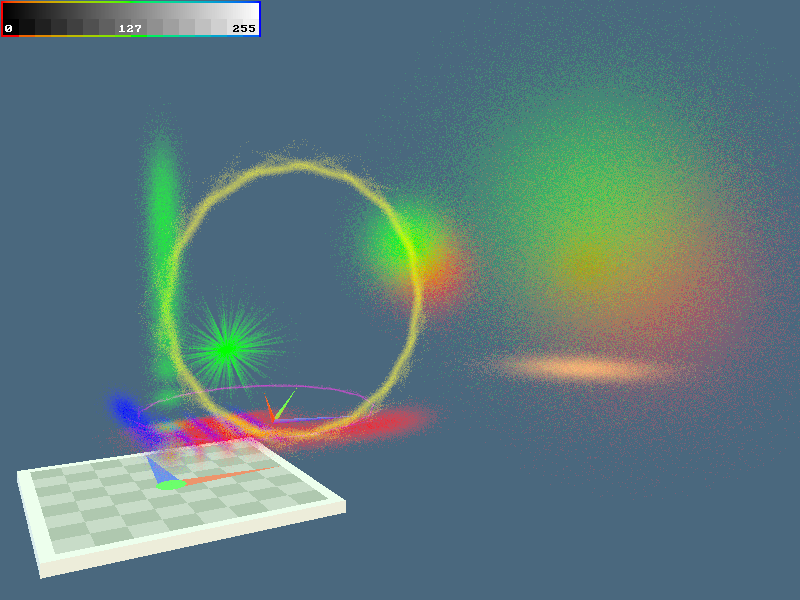
S2H Features in Gigi: 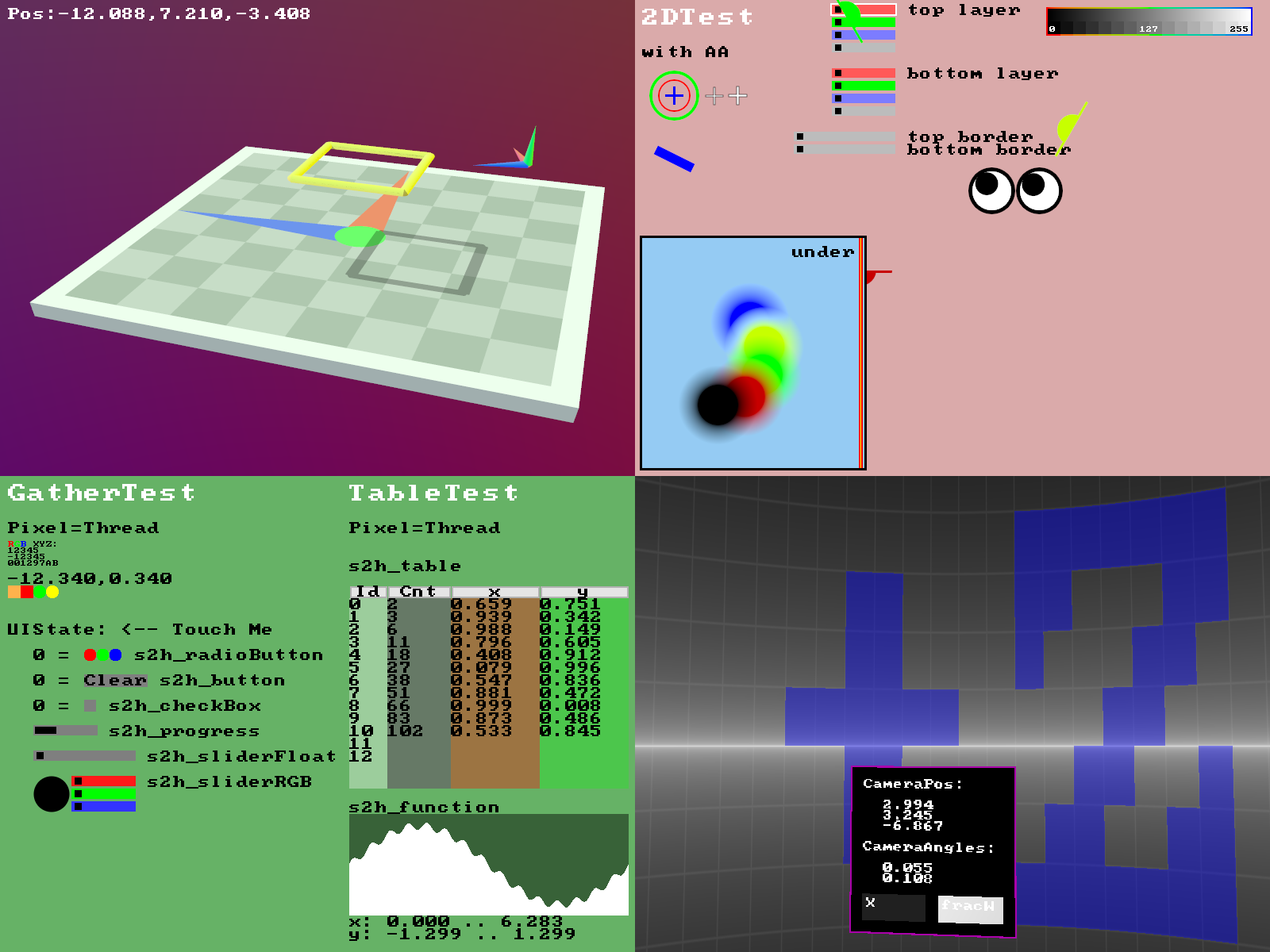 S2H used to render Gaussian Splatting with a stochastic rasterizer (input .ply was procedurally generated):
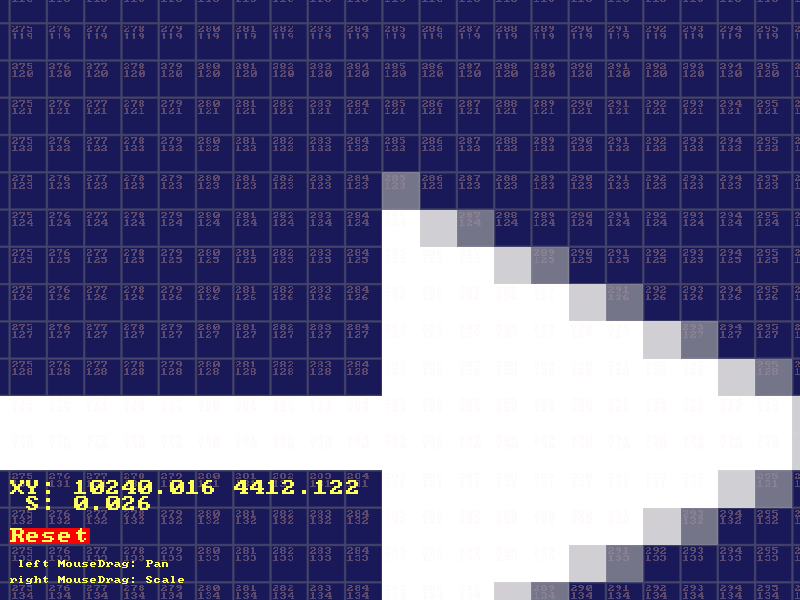
S2H used to implement interactive pannig, zooming and debugging pixel colors:
Installing the web documentation and running locally
This is only needed for development on the library. Windows only.
- NodeJS: Install https://nodejs.org/en/download 'Windows Installer x64(.msi)'. Reboot.
- Run startLocalServer.bat (double click, on first start it will install 'express')
- Connect a web browser to the shown web address.
Roadmap / Plans
- Reach out for suggestions, maybe CUDA support
Support / Authors
- Martin Mittring MMittring@ea.com Kosmokleaner@Kosmokleaner.de (main author)
- Anushka Nair AnuNair@ea.com
Acknowledgment
- Alan Wolfe for Gigi
- Electronic Arts and the SEED team
License
The source code is released under an open license as detailed in License.txt.
Folder structure
-
'include' S2H core include files in HLSL (all you need for hlsl or glsl with preprocessor)
-
'docs/include' S2H core include files in HLSL (all you need for glsl without preprocessor)
-
'examples' S2H core examples to be run with Gigi
-
'unittests' Gigi technique and shaders to verify function, run python from Gigi DX12 Viewer.
-
'docs_src' S2H examples for the web documenation, source for transpileToGLSL.bat
-
'README.md' this file, github/gitlab start page
-
'teaser.png' used for README.md and Gigi technique browser
-
'transpileToGLSL.bat' to converts hlsl code to glsl, needed for server or if you want to use glsl directly
-
'startLocalServer.bat' to locally browse and iterate on the documentation
-
'server.js', 'utils', 'docs' HTML documentation, needed to locally browse the documentation
-
'node_modules' generated by node.js, to browse the documentation locally
Project status
Functional, Open Source
To do:
Smaller task with the size in days (d) or hours (h) for a some programmer (the value does not matter but ratio between tasks should be about right).
- 4h Pass text in string literals e.g. (ui, “text”) vs (ui, _t, _e, _x, _t) as optional API (for modern HLSL only) link
- 1d Fix table and function plotting for GLSL. Seems GLSL forward declaration of functions is different from HLSL and we have to find a different solution
- 1d Implement a 80x25 text screen optional API (another .hlsl include file) for better performance with similar functions as it gather and scatter API. A simple start would just write ASCII characters into a uint per character (80x25*4 bytes). We can store the characters and text + background color. A post process or quad pixel shader can project the final text screen (80x25 * 8x8 char pixels), ideally with a C64 style border. Vertical scrolling on bottom of screen would be nice but not needed. It could be implemented without a lot of memory copies if we implement a cyclic view into the memory (store start Y, scrolling is simply ).
- 1h Add vertical slider
- 1h Add 2d slider (x and y position in a box)
- 4h Horizontal and vertical scroll bar (drag bars show the size of the view)
- 1d Combine scroll bars with table view to scroll larger views vertically, optional as table API should not get more complex
- 5d Implement for other APIs ? e.g. WebGPU, CUDA, only if there is interest
- 3d Documentation only offer GLSL fragment shader and HLSL compute shader, we should add HLSL pixel shader.
- 5d Add working GLSL samples other than WebGL (browsers might emulate with DirectX), ideally OpenGL and Vulkan
- 7d Optional API (another .hlsl include file) to record operations to be persistent (Atomic to serialize function id and parameters, reader to play back the commands)
- 1h Polish documentation for triangle and arrow to show the available options
- 2d Make all documentation interactive (e.g. respond to mouse) or animated (time dependent)
- 3d Fix documentation needs a while to compile shaders before it can show content.
- 4h Interactive texture zoom (pixelated) in postprocess with color RGB debugger
- 3d Interactive buffer debug with hex / float / int, scrollbars for large content
- 1d Add drawOBB() (3d oriented bounding box, passing in position and 3x3 base, can transform the ray and use drawAABB())
- 5d Implement various reproducible Benchmarks for runtime and compile time on different GPUs and APIs
Contributing
Before you can contribute, EA must have a Contributor License Agreement (CLA) on file that has been signed by each contributor. You can sign here: http://bit.ly/electronic-arts-cla
Any contribution - large or small - is much appreciated and earns you a spot on the contributors list. Just add your name to the list (alpha sorted) as part of your pull request!
As far as coding standards, we need to write them up and automate them as much as we can, but for now, try to make your code look like other code.
With each pull request, besides testing any functionality you are touching, please also verify that all .gg files in Gigi and that the the Python unit test are still passing, consider adding unit tests if appropriate. Run transpileToGLSL.bat as it generates .hlsl and .glsl files derived from input .hlsl files, those are used by the WebGL documentation. Cycle through the affected documentation pages.
To run the viewer unit tests, from inside the viewer select File->Run Python Script and choose unittests/GigiTest.py. It should report that it has zero errors.
How to make a release
- run transpileToGLSL.bat. There should be no errors (cl.exe path might not be right on your system)
- run startLocalServer.bat. Open the printed link in Chrome.
- Click the tab "Get Started". Verify the correct version number is rendered. Verify the other tabs.
- Open "examples\Features\s2h_features.gg" in Gigi, no errors, verify visuals
- Open "unittests\GigiTest.py" from Gigi "Run Python script", verify no errors, update gold images if needed
- Update Version in README.md
- git pull / add / commit / push
- Verify online documentation works like the local version
Versions Date Changes
- 10 first public release
- 11 1/16/2025 added include guards
- 12
- 13 3/8/2026 added s2h_coordinateSystem(), added feature example with mouse pan and zoom
- 14 added Slang support (tested with Vulkan and one new DX12 example in Gigi), changed FLT_MAX to prevent warning with slang it becoming inf, fixed warnings
seed.ea.com
SEED is a pioneering group within Electronic Arts, combining creativity with applied research.
We explore, build, and help define the future of interactive entertainment.
Contributors


Similar repos






Languages
HLSL
93.5%
Batchfile
3.5%
Python
1.9%
JavaScript
1.1%
HLSL/GLSL/Slang library for debugging shaders
See the codeREADME
Shader To Human (S2H) - HLSL/GLSL/Slang library for debugging shaders
This tool helps you with shader writing and debugging. It's meant to be used for small specific use cases (printing or drawing a few number, 2D or 3D elements) as it was optimized for ease of integration (~ one file, few lines of code). It is not targeting complex UI or minimal performance impact.
If you want to get a introduction, check out the GPC 2026 video. You also can browse the interactive documentation. Check out more samples in Gigi (Search in GigiBrowser for "Human") and you will see how rapid prototyping in shaders becomes straightforward. Use PrintF debugging, draw a watch window in the viewport or use 2d and 3d shapes with ease. No C++ code changes, no buffer setup or content setup required.
The permissive license makes it free for commercial use.
S2H Features in Gigi:
S2H used to render Gaussian Splatting with a stochastic rasterizer (input .ply was procedurally generated):
S2H used to implement interactive pannig, zooming and debugging pixel colors:
Installing the web documentation and running locally
This is only needed for development on the library. Windows only.
- NodeJS: Install https://nodejs.org/en/download 'Windows Installer x64(.msi)'. Reboot.
- Run startLocalServer.bat (double click, on first start it will install 'express')
- Connect a web browser to the shown web address.
Roadmap / Plans
- Reach out for suggestions, maybe CUDA support
Support / Authors
- Martin Mittring MMittring@ea.com Kosmokleaner@Kosmokleaner.de (main author)
- Anushka Nair AnuNair@ea.com
Acknowledgment
- Alan Wolfe for Gigi
- Electronic Arts and the SEED team
License
The source code is released under an open license as detailed in License.txt.
Folder structure
-
'include' S2H core include files in HLSL (all you need for hlsl or glsl with preprocessor)
-
'docs/include' S2H core include files in HLSL (all you need for glsl without preprocessor)
-
'examples' S2H core examples to be run with Gigi
-
'unittests' Gigi technique and shaders to verify function, run python from Gigi DX12 Viewer.
-
'docs_src' S2H examples for the web documenation, source for transpileToGLSL.bat
-
'README.md' this file, github/gitlab start page
-
'teaser.png' used for README.md and Gigi technique browser
-
'transpileToGLSL.bat' to converts hlsl code to glsl, needed for server or if you want to use glsl directly
-
'startLocalServer.bat' to locally browse and iterate on the documentation
-
'server.js', 'utils', 'docs' HTML documentation, needed to locally browse the documentation
-
'node_modules' generated by node.js, to browse the documentation locally
Project status
Functional, Open Source
To do:
Smaller task with the size in days (d) or hours (h) for a some programmer (the value does not matter but ratio between tasks should be about right).
- 4h Pass text in string literals e.g. (ui, “text”) vs (ui, _t, _e, _x, _t) as optional API (for modern HLSL only) link
- 1d Fix table and function plotting for GLSL. Seems GLSL forward declaration of functions is different from HLSL and we have to find a different solution
- 1d Implement a 80x25 text screen optional API (another .hlsl include file) for better performance with similar functions as it gather and scatter API. A simple start would just write ASCII characters into a uint per character (80x25*4 bytes). We can store the characters and text + background color. A post process or quad pixel shader can project the final text screen (80x25 * 8x8 char pixels), ideally with a C64 style border. Vertical scrolling on bottom of screen would be nice but not needed. It could be implemented without a lot of memory copies if we implement a cyclic view into the memory (store start Y, scrolling is simply ).
- 1h Add vertical slider
- 1h Add 2d slider (x and y position in a box)
- 4h Horizontal and vertical scroll bar (drag bars show the size of the view)
- 1d Combine scroll bars with table view to scroll larger views vertically, optional as table API should not get more complex
- 5d Implement for other APIs ? e.g. WebGPU, CUDA, only if there is interest
- 3d Documentation only offer GLSL fragment shader and HLSL compute shader, we should add HLSL pixel shader.
- 5d Add working GLSL samples other than WebGL (browsers might emulate with DirectX), ideally OpenGL and Vulkan
- 7d Optional API (another .hlsl include file) to record operations to be persistent (Atomic to serialize function id and parameters, reader to play back the commands)
- 1h Polish documentation for triangle and arrow to show the available options
- 2d Make all documentation interactive (e.g. respond to mouse) or animated (time dependent)
- 3d Fix documentation needs a while to compile shaders before it can show content.
- 4h Interactive texture zoom (pixelated) in postprocess with color RGB debugger
- 3d Interactive buffer debug with hex / float / int, scrollbars for large content
- 1d Add drawOBB() (3d oriented bounding box, passing in position and 3x3 base, can transform the ray and use drawAABB())
- 5d Implement various reproducible Benchmarks for runtime and compile time on different GPUs and APIs
Contributing
Before you can contribute, EA must have a Contributor License Agreement (CLA) on file that has been signed by each contributor. You can sign here: http://bit.ly/electronic-arts-cla
Any contribution - large or small - is much appreciated and earns you a spot on the contributors list. Just add your name to the list (alpha sorted) as part of your pull request!
As far as coding standards, we need to write them up and automate them as much as we can, but for now, try to make your code look like other code.
With each pull request, besides testing any functionality you are touching, please also verify that all .gg files in Gigi and that the the Python unit test are still passing, consider adding unit tests if appropriate. Run transpileToGLSL.bat as it generates .hlsl and .glsl files derived from input .hlsl files, those are used by the WebGL documentation. Cycle through the affected documentation pages.
To run the viewer unit tests, from inside the viewer select File->Run Python Script and choose unittests/GigiTest.py. It should report that it has zero errors.
How to make a release
- run transpileToGLSL.bat. There should be no errors (cl.exe path might not be right on your system)
- run startLocalServer.bat. Open the printed link in Chrome.
- Click the tab "Get Started". Verify the correct version number is rendered. Verify the other tabs.
- Open "examples\Features\s2h_features.gg" in Gigi, no errors, verify visuals
- Open "unittests\GigiTest.py" from Gigi "Run Python script", verify no errors, update gold images if needed
- Update Version in README.md
- git pull / add / commit / push
- Verify online documentation works like the local version
Versions Date Changes
- 10 first public release
- 11 1/16/2025 added include guards
- 12
- 13 3/8/2026 added s2h_coordinateSystem(), added feature example with mouse pan and zoom
- 14 added Slang support (tested with Vulkan and one new DX12 example in Gigi), changed FLT_MAX to prevent warning with slang it becoming inf, fixed warnings
seed.ea.com
SEED is a pioneering group within Electronic Arts, combining creativity with applied research.
We explore, build, and help define the future of interactive entertainment.
Similar repos
Contributors
Languages
HLSL
93.5%
Batchfile
3.5%
Python
1.9%
JavaScript
1.1%