
The Apple Silicon continuation of the classic native Markdown editor for macOS. Maintained by Eldris.
See the codeSee what people are saying (1)
README
MacDown SE
The Apple Silicon continuation of the classic native Markdown editor.

-lightgrey.svg)

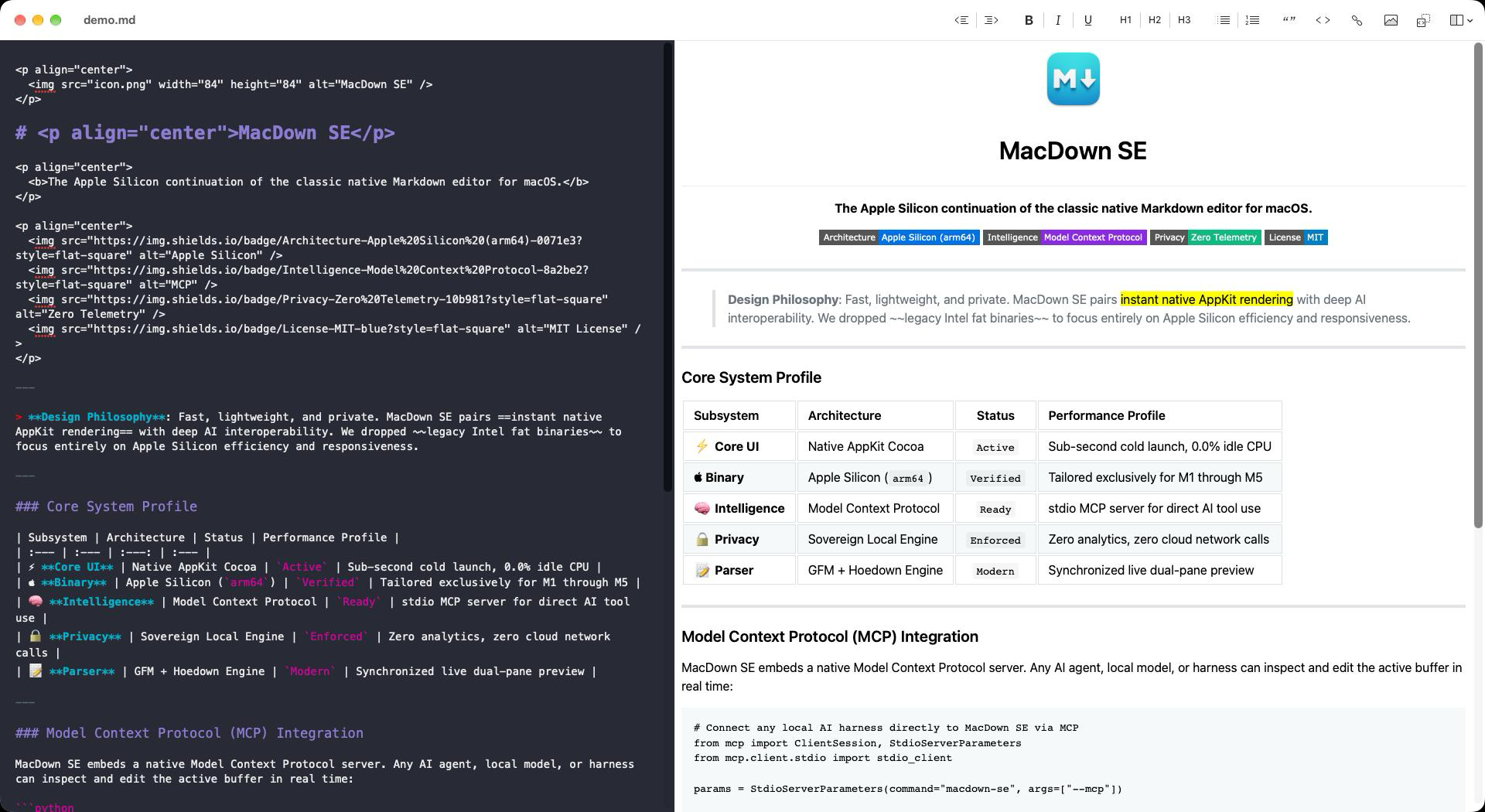
MacDown SE is an open-source, pure native AppKit Markdown editor for macOS. Maintained by Eldris Inc. and released under the terms of the MIT License, MacDown SE continues the beloved foundation created by Tzu-ping Chung (uranusjr) between 2014 and 2020, modernizing it exclusively for Apple Silicon and modern macOS.
Why MacDown SE?
- Pure Native AppKit: Sub-second launch times, minimal memory consumption, and zero Electron or Chromium battery drain.
- Native Apple Silicon Architecture: Built exclusively for Apple Silicon (M-series), delivering maximum efficiency and instantaneous performance on macOS 12 Monterey through modern macOS.
- Synchronized Live Preview: Dual-pane editor with instant HTML rendering and synchronized vertical scrolling.
- Completely Private and Offline: Zero telemetry, zero analytics, zero network tracking, and zero cloud lock-in. Your files live on your Mac.
- Comprehensive Syntax: Full support for standard Markdown, CommonMark, GitHub-Flavored Markdown tables, task lists, Jekyll YAML front matter, TeX math rendering, and Prism syntax highlighting for fenced code blocks.
Installation
Homebrew (Recommended)
Install MacDown SE directly via the official Eldris tap:
brew install --cask eldris-io/tap/macdown-se
Or add the tap and install:
brew tap eldris-io/tap
brew install --cask macdown-se
Pre-built Apple Silicon Disk Image (.dmg)
Download MacDown-SE-1.0.0.dmg from our GitHub Releases. Open the disk image and drag MacDown SE.app into your /Applications directory.
(Note: When installed via Homebrew, the command-line utilities macdown-se and macdown are automatically linked into your PATH).
Command-Line Integration
MacDown SE includes a bundled command-line utility. To install it into your path, link it from the application bundle:
sudo ln -sf "/Applications/MacDown SE.app/Contents/SharedSupport/bin/macdown-se" /usr/local/bin/macdown-se
sudo ln -sf /usr/local/bin/macdown-se /usr/local/bin/macdown
You can then open files or pipes directly from your terminal:
macdown README.md
git diff | macdown
AI & Model Context Protocol (MCP)
MacDown SE includes a native MCP server. An AI client can read the active editor buffer, replace selected text, insert Markdown, open a new document, and render HTML with MacDown's parser. Edits stay in the visible, unsaved document and can be undone with Edit → Undo AI Edit (⌘Z). Nothing is saved automatically.
For Claude Desktop, add this entry to the mcpServers object in
~/Library/Application Support/Claude/claude_desktop_config.json, then restart
Claude Desktop:
{
  "mcpServers": {
    "macdown-se": {
      "command": "/Applications/MacDown SE.app/Contents/SharedSupport/bin/macdown-se",
      "args": ["--mcp"]
    }
  }
}
For Cursor, use the same server entry in .cursor/mcp.json (project) or
~/.cursor/mcp.json (user). For Hermes,
OOMU, or another client with stdio MCP support, register that executable as the
server command with --mcp as its only argument. Use the actual app location if
you have not installed it in Applications. The helper starts its bundled app in
the background on --mcp startup when needed; new-document requests display a document window.
| Tool | Arguments | Result |
|---|---|---|
macdown_get_active_document | {} | Path, title, content, selection, UTF-16 selectedRange, dirty state, word count |
macdown_replace_selection | {"text":"replacement"} | Updated document; replaces highlighted text |
macdown_insert_at_cursor | {"text":"inserted text"} | Updated document; inserts at selection start without deleting selected text |
macdown_new_document | {"markdown":"# New document"} | New unsaved document |
macdown_render_preview | {"markdown":"**Hello**"} | HTML fragment using current parser preferences |
The macdown://active resource returns the current buffer as text/markdown.
Document tool results contain a JSON object inside MCP text content; preview
results contain HTML. With no active document, document operations report an
error. Focus the intended editor window before asking an AI client to edit it.
The bridge supports MCP protocol 2024-11-05, using newline-delimited JSON-RPC
on stdin/stdout. It opens no TCP listener and requires no network service. The
GUI socket is ~/Library/Application Support/MacDown SE/macdown_se.sock, with
owner-only directory/socket permissions and same-user peer checks. Other
processes running as your macOS user can access this socket. Your chosen AI
client controls whether document contents are sent to an external model.
Requests are limited to 8 MiB, with a 15-second socket I/O timeout.
Run live integration tests from a logged-in macOS desktop session after quitting MacDown SE (the test refuses to touch an existing session):
python3 scripts/test_mcp.py --app "build/Build/Products/Release/MacDown SE.app"
python3 scripts/test_mcp.py --app "build/Build/Products/Release/MacDown SE.app" --auto-launch --leaks
The test creates disposable unsaved documents and quits its test app without
saving. --auto-launch exercises CLI cold start; --leaks additionally requires
Apple's leaks diagnostic to report zero detected leaks for the app and helper.
The legacy bundled macdown command is a symlink to macdown-se.
References: MCP stdio specification, Claude Desktop setup, and Cursor MCP configuration.
Screenshot
Building from Source
Prerequisites
- macOS 12.0 or later
- Xcode 15 or later (tested on Xcode 27)
- CocoaPods 1.17.0 (
brew install cocoapods) - Node.js 20 or later
Setup & Build Steps
Clone the repository with all submodules:
git clone --recurse-submodules https://github.com/eldris-io/macdown-se.git
cd macdown-se
Install dependencies and build the C parser and styles:
pod install
npm ci --prefix Tools/GitHub-style-generator
make -C Tools/GitHub-style-generator
make -C Dependency/peg-markdown-highlight -j$(sysctl -n hw.ncpu)
Compile a Native Apple Silicon Release build:
xcodebuild -workspace MacDown.xcworkspace -scheme MacDown -configuration Release \
  ARCHS="arm64" ONLY_ACTIVE_ARCH=YES -derivedDataPath build build
The resulting MacDown SE.app will be available in:
build/Build/Products/Release/MacDown SE.app
Running Native Tests
To execute the unit test suite on Apple Silicon:
xcodebuild test -workspace MacDown.xcworkspace -scheme MacDown \
  -destination 'platform=macOS,arch=arm64'
Lineage and Attribution
MacDown SE is an independent open-source continuation. We proudly acknowledge and honor the foundational work of:
- Tzu-ping Chung (@uranusjr): Original creator and principal maintainer of MacDown (2014-2020).
- Chen Luo (@chenluois): Creator of Mou, the pioneering Mac Markdown editor that inspired MacDown.
- The MacDown Open Source Contributors: Dozens of developers, translators, and style designers whose contributions are preserved in full inside
MacDown/Localization/en.lproj/Credits.rtf.
Third-party components include:
- Hoedown: High-performance Markdown processing.
- Prism: Code syntax highlighting.
- PEG Markdown Highlight: Fast in-editor syntax coloring.
- Sparkle: Software update framework (Universal 1.27.x).
Community & Support
- Bug Reports & Issues: Submit detailed reports via GitHub Issues.
- Discussions & Ideas: Join the conversation on GitHub Discussions.
- Contributions: Pull requests are welcome. Please read CONTRIBUTING.md before submitting code.
License
MacDown SE is released under the terms of the MIT License. Full license texts for the project and bundled third-party libraries are located in the LICENSE directory and the application About panel.
Contributors
(top 30 of 53)



Similar repos


Languages
Rich Text Format
50.9%
Objective-C
30.2%
C
13.2%
CSS
2.3%
Python
1.7%
The Apple Silicon continuation of the classic native Markdown editor for macOS. Maintained by Eldris.
See the codeSee what people are saying (1)
README
MacDown SE
The Apple Silicon continuation of the classic native Markdown editor.
MacDown SE is an open-source, pure native AppKit Markdown editor for macOS. Maintained by Eldris Inc. and released under the terms of the MIT License, MacDown SE continues the beloved foundation created by Tzu-ping Chung (uranusjr) between 2014 and 2020, modernizing it exclusively for Apple Silicon and modern macOS.
Why MacDown SE?
- Pure Native AppKit: Sub-second launch times, minimal memory consumption, and zero Electron or Chromium battery drain.
- Native Apple Silicon Architecture: Built exclusively for Apple Silicon (M-series), delivering maximum efficiency and instantaneous performance on macOS 12 Monterey through modern macOS.
- Synchronized Live Preview: Dual-pane editor with instant HTML rendering and synchronized vertical scrolling.
- Completely Private and Offline: Zero telemetry, zero analytics, zero network tracking, and zero cloud lock-in. Your files live on your Mac.
- Comprehensive Syntax: Full support for standard Markdown, CommonMark, GitHub-Flavored Markdown tables, task lists, Jekyll YAML front matter, TeX math rendering, and Prism syntax highlighting for fenced code blocks.
Installation
Homebrew (Recommended)
Install MacDown SE directly via the official Eldris tap:
brew install --cask eldris-io/tap/macdown-se
Or add the tap and install:
brew tap eldris-io/tap
brew install --cask macdown-se
Pre-built Apple Silicon Disk Image (.dmg)
Download MacDown-SE-1.0.0.dmg from our GitHub Releases. Open the disk image and drag MacDown SE.app into your /Applications directory.
(Note: When installed via Homebrew, the command-line utilities macdown-se and macdown are automatically linked into your PATH).
Command-Line Integration
MacDown SE includes a bundled command-line utility. To install it into your path, link it from the application bundle:
sudo ln -sf "/Applications/MacDown SE.app/Contents/SharedSupport/bin/macdown-se" /usr/local/bin/macdown-se
sudo ln -sf /usr/local/bin/macdown-se /usr/local/bin/macdown
You can then open files or pipes directly from your terminal:
macdown README.md
git diff | macdown
AI & Model Context Protocol (MCP)
MacDown SE includes a native MCP server. An AI client can read the active editor buffer, replace selected text, insert Markdown, open a new document, and render HTML with MacDown's parser. Edits stay in the visible, unsaved document and can be undone with Edit → Undo AI Edit (⌘Z). Nothing is saved automatically.
For Claude Desktop, add this entry to the mcpServers object in
~/Library/Application Support/Claude/claude_desktop_config.json, then restart
Claude Desktop:
{
  "mcpServers": {
    "macdown-se": {
      "command": "/Applications/MacDown SE.app/Contents/SharedSupport/bin/macdown-se",
      "args": ["--mcp"]
    }
  }
}
For Cursor, use the same server entry in .cursor/mcp.json (project) or
~/.cursor/mcp.json (user). For Hermes,
OOMU, or another client with stdio MCP support, register that executable as the
server command with --mcp as its only argument. Use the actual app location if
you have not installed it in Applications. The helper starts its bundled app in
the background on --mcp startup when needed; new-document requests display a document window.
| Tool | Arguments | Result |
|---|---|---|
macdown_get_active_document | {} | Path, title, content, selection, UTF-16 selectedRange, dirty state, word count |
macdown_replace_selection | {"text":"replacement"} | Updated document; replaces highlighted text |
macdown_insert_at_cursor | {"text":"inserted text"} | Updated document; inserts at selection start without deleting selected text |
macdown_new_document | {"markdown":"# New document"} | New unsaved document |
macdown_render_preview | {"markdown":"**Hello**"} | HTML fragment using current parser preferences |
The macdown://active resource returns the current buffer as text/markdown.
Document tool results contain a JSON object inside MCP text content; preview
results contain HTML. With no active document, document operations report an
error. Focus the intended editor window before asking an AI client to edit it.
The bridge supports MCP protocol 2024-11-05, using newline-delimited JSON-RPC
on stdin/stdout. It opens no TCP listener and requires no network service. The
GUI socket is ~/Library/Application Support/MacDown SE/macdown_se.sock, with
owner-only directory/socket permissions and same-user peer checks. Other
processes running as your macOS user can access this socket. Your chosen AI
client controls whether document contents are sent to an external model.
Requests are limited to 8 MiB, with a 15-second socket I/O timeout.
Run live integration tests from a logged-in macOS desktop session after quitting MacDown SE (the test refuses to touch an existing session):
python3 scripts/test_mcp.py --app "build/Build/Products/Release/MacDown SE.app"
python3 scripts/test_mcp.py --app "build/Build/Products/Release/MacDown SE.app" --auto-launch --leaks
The test creates disposable unsaved documents and quits its test app without
saving. --auto-launch exercises CLI cold start; --leaks additionally requires
Apple's leaks diagnostic to report zero detected leaks for the app and helper.
The legacy bundled macdown command is a symlink to macdown-se.
References: MCP stdio specification, Claude Desktop setup, and Cursor MCP configuration.
Screenshot
Building from Source
Prerequisites
- macOS 12.0 or later
- Xcode 15 or later (tested on Xcode 27)
- CocoaPods 1.17.0 (
brew install cocoapods) - Node.js 20 or later
Setup & Build Steps
Clone the repository with all submodules:
git clone --recurse-submodules https://github.com/eldris-io/macdown-se.git
cd macdown-se
Install dependencies and build the C parser and styles:
pod install
npm ci --prefix Tools/GitHub-style-generator
make -C Tools/GitHub-style-generator
make -C Dependency/peg-markdown-highlight -j$(sysctl -n hw.ncpu)
Compile a Native Apple Silicon Release build:
xcodebuild -workspace MacDown.xcworkspace -scheme MacDown -configuration Release \
  ARCHS="arm64" ONLY_ACTIVE_ARCH=YES -derivedDataPath build build
The resulting MacDown SE.app will be available in:
build/Build/Products/Release/MacDown SE.app
Running Native Tests
To execute the unit test suite on Apple Silicon:
xcodebuild test -workspace MacDown.xcworkspace -scheme MacDown \
  -destination 'platform=macOS,arch=arm64'
Lineage and Attribution
MacDown SE is an independent open-source continuation. We proudly acknowledge and honor the foundational work of:
- Tzu-ping Chung (@uranusjr): Original creator and principal maintainer of MacDown (2014-2020).
- Chen Luo (@chenluois): Creator of Mou, the pioneering Mac Markdown editor that inspired MacDown.
- The MacDown Open Source Contributors: Dozens of developers, translators, and style designers whose contributions are preserved in full inside
MacDown/Localization/en.lproj/Credits.rtf.
Third-party components include:
- Hoedown: High-performance Markdown processing.
- Prism: Code syntax highlighting.
- PEG Markdown Highlight: Fast in-editor syntax coloring.
- Sparkle: Software update framework (Universal 1.27.x).
Community & Support
- Bug Reports & Issues: Submit detailed reports via GitHub Issues.
- Discussions & Ideas: Join the conversation on GitHub Discussions.
- Contributions: Pull requests are welcome. Please read CONTRIBUTING.md before submitting code.
License
MacDown SE is released under the terms of the MIT License. Full license texts for the project and bundled third-party libraries are located in the LICENSE directory and the application About panel.
Similar repos
Contributors
(top 30 of 53)
Languages
Rich Text Format
50.9%
Objective-C
30.2%
C
13.2%
CSS
2.3%
Python
1.7%