This project is no longer maintained. For alternative getting started experiences, you may want to try one of these options:
This example Docker Compose configuration demonstrates many components of the Elastic Stack, all running on a single machine under Docker.
Windows and Mac users get Compose installed automatically with Docker for Windows/Mac.
Linux users can read the install instructions or can install via pip:
pip install docker-compose
Windows Users must set the following 2 ENV vars:
COMPOSE_CONVERT_WINDOWS_PATHS=1PWD=/path/to/checkout/for/stack-docker
/c/Users/nick/elastic/stack-docker/c/path/to/place using C:\path\to\place will not work$Env:COMPOSE_CONVERT_WINDOWS_PATHS=1[Environment]::SetEnvironmentVariable("COMPOSE_CONVERT_WINDOWS_PATHS", "1", "Machine")Note: you will need to refresh or create a new powershell for this env var to take effect
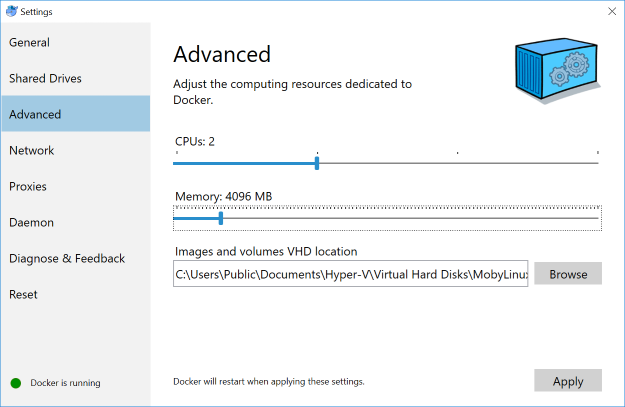
At least 4GiB of RAM for the containers. Windows and Mac users must configure their Docker virtual machine to have more than the default 2 GiB of RAM:
root:sysctl -w vm.max_map_count=262144
By default, the amount of Virtual Memory is not enough.
First we need to:
This is accomplished using the setup.yml file:
docker-compose -f setup.yml up
Please take note after the setup completes it will output the password
that is used for the elastic login.
Now we can launch the stack with docker-compose up -d to create a demonstration Elastic Stack with
Elasticsearch, Kibana, Logstash, Auditbeat, Metricbeat, Filebeat, Packetbeat,
and Heartbeat.
Point a browser at http://localhost:5601 to see the results.
NOTE: Elasticsearch is now setup with self-signed certs.
Log in with elastic and what ever your auto generated elastic password is from the
setup.
1,517 followers · starred Oct 2018
204 followers · starred Jun 2017
17 followers · starred Aug 2018
157 followers · starred Oct 2019
This project is no longer maintained. For alternative getting started experiences, you may want to try one of these options:
This example Docker Compose configuration demonstrates many components of the Elastic Stack, all running on a single machine under Docker.
Windows and Mac users get Compose installed automatically with Docker for Windows/Mac.
Linux users can read the install instructions or can install via pip:
pip install docker-compose
Windows Users must set the following 2 ENV vars:
COMPOSE_CONVERT_WINDOWS_PATHS=1PWD=/path/to/checkout/for/stack-docker
/c/Users/nick/elastic/stack-docker/c/path/to/place using C:\path\to\place will not work$Env:COMPOSE_CONVERT_WINDOWS_PATHS=1[Environment]::SetEnvironmentVariable("COMPOSE_CONVERT_WINDOWS_PATHS", "1", "Machine")Note: you will need to refresh or create a new powershell for this env var to take effect
At least 4GiB of RAM for the containers. Windows and Mac users must configure their Docker virtual machine to have more than the default 2 GiB of RAM:
root:sysctl -w vm.max_map_count=262144
By default, the amount of Virtual Memory is not enough.
First we need to:
This is accomplished using the setup.yml file:
docker-compose -f setup.yml up
Please take note after the setup completes it will output the password
that is used for the elastic login.
Now we can launch the stack with docker-compose up -d to create a demonstration Elastic Stack with
Elasticsearch, Kibana, Logstash, Auditbeat, Metricbeat, Filebeat, Packetbeat,
and Heartbeat.
Point a browser at http://localhost:5601 to see the results.
NOTE: Elasticsearch is now setup with self-signed certs.
Log in with elastic and what ever your auto generated elastic password is from the
setup.
1,517 followers · starred Oct 2018
204 followers · starred Jun 2017
17 followers · starred Aug 2018
157 followers · starred Oct 2019