
A video quality control and VMAF-related ladder optimizer CLI and library
See the codeSee what people are saying
README
qc - Video Quality Control


Fast, statistically honest video quality analysis: a Go library and a CLI that take a video and give you technical metrics, a VMAF score and a per-title adaptive streaming ladder (H.264, HEVC, AV1) as fast as the reliability you ask for allows.
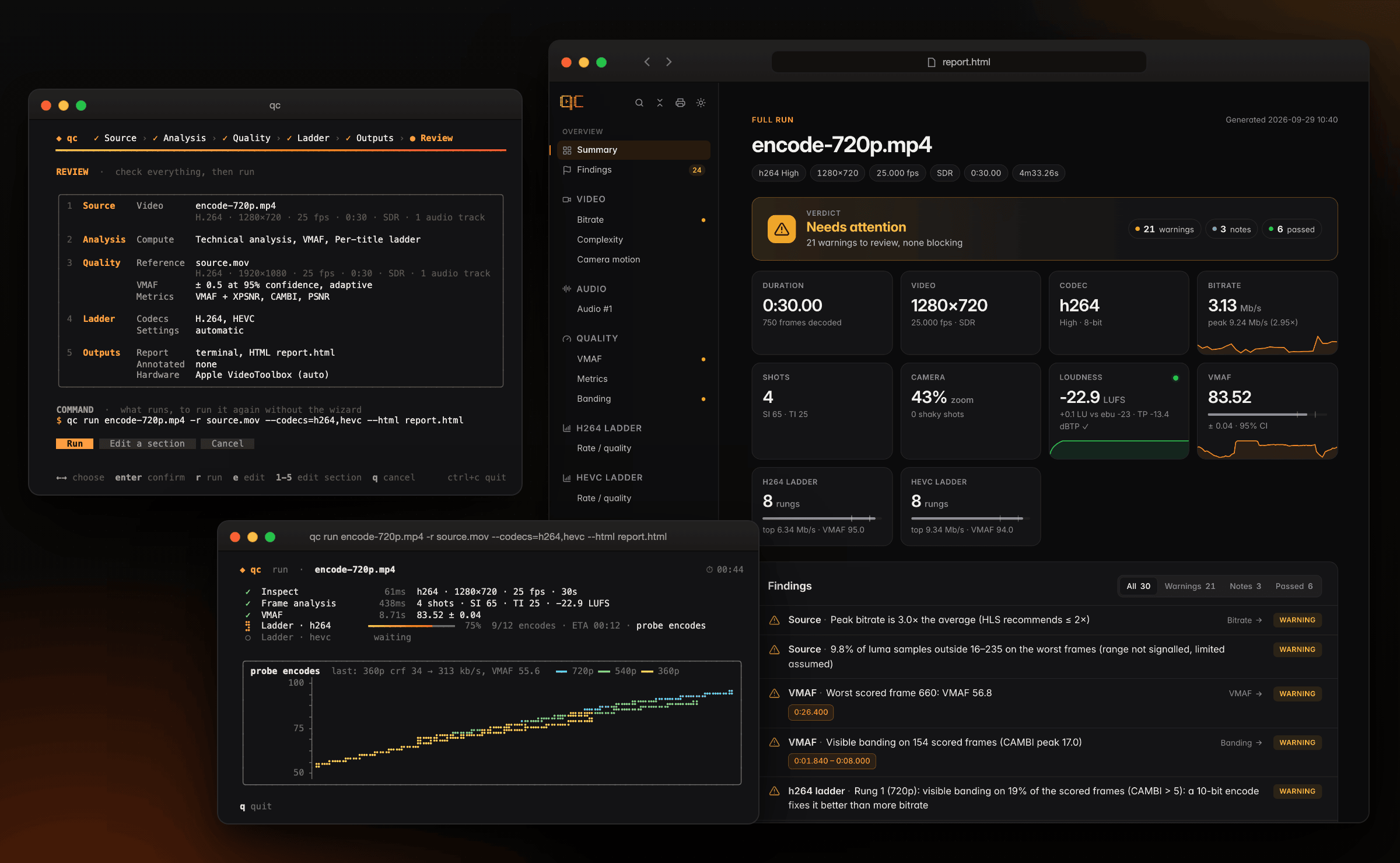
- Technical analysis in seconds: bitrate, peaks and GOP structure without decoding. Then one decode fanned out to SI/TI (ITU-T P.910), shot detection, black and frozen segments, letterbox/pillarbox, luma levels and camera motion (each shot static, pan, tilt, zoom, tracking or handheld, with a shake measure).
- Audio QC at no extra wall time: every audio track measured while the
video decodes: loudness per ITU-R BS.1770-5 (integrated, range, true
peak, EBU Tech 3341/3342 conformant, within 0.01 LU of ffmpeg's
ebur128) against EBU R 128, ATSC A/85 or a streaming target; silence, muted channels, clipping, DC offset and phase problems (audio). - VMAF with a confidence interval: short clips sampled across shots until
the 95% interval is narrower than your target. The intervals really cover
the truth 95% of the time, measured by replaying thousands of runs.
--exactscores every frame, bit-exact with Netflix'svmaftool, at 8 and 10 bits. Or pick a fixed budget (--sample 2%,--sample 1/scene). - Beyond VMAF, on the same frames: XPSNR (a pure-Go port matching ffmpeg's filter), CAMBI banding, PSNR, PSNR-HVS, SSIM, MS-SSIM, CIEDE2000 or the whole AV2 CTC set, each with its own confidence interval, and VMAF per viewing device (phone, TV, 4K).
- Per-title ladders, verified: probe encodes of a representative digest,
rate-quality curves per resolution, their upper envelope, rungs one
just-noticeable difference apart, then a real encode of every rung. It lands
on the exhaustive optimum (−0.04 VMAF, −0.7% bitrate on average) in a
fraction of the time. Impose the shape (
--rungs 1080,720,540), probe adaptively where the rungs are uncertain, add per-shot rungs, or let AV1 synthesise film grain; verified rungs are checked for banding and for VMAF/XPSNR disagreements. - HDR aware: HDR10/HLG checked, MaxCLL/MaxFALL measured, wPSNR and ΔE ITP next to VMAF, 10-bit ladders carrying the HDR10 metadata (HDR).
- See what was measured:
--overlay annotated.mp4burns the analysis into a copy of the video, frame by frame: timecode, bitrate, shots, camera motion, SI/TI, levels, VMAF of each scored frame and a timeline (annotated videos). - A terminal UI you'll enjoy: a live dashboard with progress, ETA and panels that show VMAF converging and probes landing on a braille chart. There is also an interactive wizard, plus JSON and self-contained HTML reports.
Install
Docker (linux/amd64, linux/arm64): qc, libvmaf 3.2.1 with its models and
ffmpeg with x264, x265 and SVT-AV1, nothing else to install. Mount your
videos on /data:
docker run --rm -v "$PWD:/data" ghcr.io/eko/qc vmaf reference.mov encode.mp4
docker run --rm -v "$PWD:/data" ghcr.io/eko/qc ladder source.mov -c av1 --html ladder.html
Homebrew (macOS, Linux):
brew install eko/tap/qc
Prebuilt binaries (Linux amd64/arm64, static; macOS arm64): on every release, with libvmaf and the VMAF models built in; only ffmpeg is needed (install).
From source: Go (see go.mod) with cgo, ffmpeg and ffprobe with
libx264, libx265 and libsvtav1, libvmaf ≥ 3.2.1 with its models and
pkg-config:
brew install ffmpeg libvmaf pkgconf   # macOS; Debian/Ubuntu: see docs/install.md
go install github.com/eko/qc/cmd/qc@latest
qc version --check checks the installation. Linux prerequisites, the image
contents and troubleshooting: docs/install.md.
Quick start
qc                                                        # interactive wizard
qc run source.mov --codecs h264,av1 --html report.html    # analysis + ladders
qc run encode.mp4 -r source.mov                           # + VMAF against the source

qc analyze video.mp4 [--fast]                             # technical analysis (--fast: no decoding)
qc analyze video.mp4 --loudness-target atsc               # audio checked against ATSC A/85 (default: EBU R 128)
qc vmaf reference.mov distorted.mp4 [--exact]             # VMAF ± 95% CI, or every frame
qc vmaf reference.mov distorted.mp4 --sample 5%           # fixed budget (or 2/scene), one pass, CI reported
qc vmaf reference.mov distorted.mp4 --exact --overlay annotated.mp4   # + a copy with per-frame VMAF burnt in
qc ladder source.mov -c av1 --encode-bit-depth 10         # per-title Main10 AV1 ladder
qc ladder source.mov --rungs 1080,720,540,360 --top-vmaf 93   # impose the rungs, bitrates computed
qc ladder source.mov -c av1 --encode-ladder renditions/    # + the renditions, checked on the whole title
Every command accepts -o report.json, --html report.html and -f json.
See the CLI reference.
Performance
Apple M2 Max, real 1080p25 H.264 sources:
| Task | Exact / exhaustive | qc |
|---|---|---|
| Frame analysis of a 59 min title (every frame: SI/TI, shots, black, freeze, crop, levels, camera motion) | 225 s (one CPU decode) | 62–71 s at 26 Mbit/s, 49–52 s at 6 Mbit/s, same report to the bit (VideoToolbox segments, details) |
| VMAF of a 10:36 title (x264 720p rendition) | 149 s (131 s with VideoToolbox decoding) | 18.6 s at ±0.5 (26.5 s with CPU decoding; real 95% CI coverage: 94.5%) |
| VMAF of a 59 min title | 897 s (704 s with VideoToolbox decoding) | 42.1 s at ±0.5, 108 s at --sample 5% (58.7 / 184 s with CPU decoding) |
| H.264 ladder of a 10:36 title | ≈ 2 h (dense grid on the full title) | 1 min 39 s, every rung verified |
| H.264 ladder of a 1 min title vs the exhaustive optimum | 13 min | 2 min, −0.04 VMAF / −0.7% bitrate from the optimum |
How these numbers were obtained, and how to reproduce them on your own content: docs/validation.md.
Documentation
- Install
- How it works
- Architecture
- Technical analysis
- VMAF engine
- HDR: detection, light levels, HDR metrics, HDR ladders
- Audio: loudness (BS.1770, EBU R 128, ATSC A/85) and defects
- Ladder engine
- Validation
- CLI
- NVIDIA GPUs: NVDEC decoding, NVENC ladders and CUDA VMAF with
--gpu - Annotated videos: the analysis burnt into a copy of the video with
--overlay - Innovation landscape and roadmap: beyond VMAF
Library
dec := decode.NewFFmpeg("ffmpeg", 0) // decode.WithHWAccel(decode.HWAccelAuto): VideoToolbox segments on macOS; HWAccelCUDA: NVDEC
analyzer := analysis.New(logger,
	probe.NewFFprobe("ffprobe"),
	bitstream.NewFFprobeReader("ffprobe"),
	dec,
	quality.NewMeter(dec, libvmaf.NewEngine()),
)

report, err := analyzer.Analyze(ctx, "video.mp4", analysis.Options{})
cmp, err := analyzer.Compare(ctx, "reference.mov", "encode.mp4", analysis.CompareOptions{})
ffmpeg := encode.NewFFmpeg("ffmpeg") // encodes, digests, grain measurements, renditions
engine := ladder.NewEngine(analyzer, ffmpeg, ffmpeg,
	ladder.WithGrainLab(ffmpeg), ladder.WithRenditionEncoder(ffmpeg))
res, err := engine.Build(ctx, "source.mov", ladder.Options{Codec: "av1"})
Every options struct has a useful zero value, except that ladder.Options
needs its Codec. To go further:
cmp, err := analyzer.Compare(ctx, "reference.mov", "encode.mp4", analysis.CompareOptions{
	Quality: quality.Options{
		Precision: 0.25,                                         // or Exact: true, or Sample below
		Metrics:   []string{quality.MetricXPSNR, quality.MetricCAMBI},
		Devices:   []string{vmaf.DevicePhone, vmaf.Device4K},
	},
})
xpsnrY, _ := cmp.VMAF.Metric(quality.SeriesXPSNRY)  // mean and 95% CI, like VMAF
phone, _ := cmp.VMAF.Device(vmaf.DevicePhone)
banding := cmp.VMAF.Banding                         // segments where CAMBI > 5

// A fixed budget instead of a precision; the analysed encode gives its shot
// cuts to per-scene budgets and is not inspected again.
budget, _ := quality.ParseSample("2/scene")        // or "5%"
cmp, err = analyzer.Compare(ctx, "reference.mov", "encode.mp4", analysis.CompareOptions{
	Quality:   quality.Options{Sample: budget},
	Distorted: report,
})

// An imposed AV1 ladder, probed adaptively, with checked rungs.
res, err = engine.Build(ctx, "source.mov", ladder.Options{
	Codec:       "av1",
	Constraints: ladder.Constraints{Resolutions: []int{1080, 720, 540, 360}, TopVMAF: 93},
	Probing:     ladder.ProbingAdaptive,
	FilmGrain:   ladder.FilmGrainAuto,
	Metrics:     []string{quality.MetricXPSNR, quality.MetricCAMBI},
})
banded := ladder.BandedRungs(res.Rungs)        // rungs capped by banding
conflicts := ladder.RankConflicts(res.Rungs)   // VMAF and XPSNR disagree

// Per-shot rungs: one CRF per shot at an equal rate-quality slope.
res, err = engine.Build(ctx, "source.mov", ladder.Options{Codec: "hevc", PerShot: true})
for shot, cell := range res.ShotLadder(0) {    // the top rung, shot by shot
	fmt.Println(res.ShotInterval(shot).Start, cell.CRF, cell.PredictedBitrate)
}
if top := res.Rungs[0].PerShot; top != nil {
	fmt.Println(top.PooledBitrate(res.Shots))  // its bitrate over the whole title
}

// The renditions: every rung (and per-shot version) encoded on the whole
// title, each checked against the source.
renditions, err := engine.Encode(ctx, "source.mov", res, ladder.RenditionOptions{
	Dir:   "renditions",
	Check: &quality.Options{Precision: 0.5},
})
for _, rd := range renditions {
	vmafPredicted, bitratePredicted := res.Prediction(rd)
	fmt.Println(rd.Path, rd.Bitrate, bitratePredicted, rd.Checked.VMAFLabel(), vmafPredicted)
}
On an NVIDIA GPU, check first: NVDEC falls back to the CPU by itself, but an
NVENC ladder would fail at its first encode. CUDA VMAF needs a binary built
with -tags cuda against a CUDA libvmaf (libvmaf.CUDABuilt), and a model
with CUDA features (VMAF v1, the default, has none):
err = nvidia.Check(ctx, "ffmpeg", nvidia.Requirements{
	HWAccel: decode.HWAccelCUDA,   // the decoder's decode.WithHWAccel
	Codecs:  []string{"hevc"},     // ladders on NVENC
})
res, err = engine.Build(ctx, "source.mov", ladder.Options{
	Codec:   "hevc",
	Encoder: encode.HardwareNVENC, // no per-shot rungs nor film grain synthesis
	Backend: vmaf.BackendAuto,     // CUDA VMAF when the model and the build allow it
})
fmt.Println(cmp.VMAF.GPUSummary()) // e.g. "NVDEC decoding (cuda) · VMAF features on CUDA"
quality/xpsnr also works on its own, on decoded frames, and matches
ffmpeg's xpsnr filter. Runnable examples are on
pkg.go.dev for analysis,
quality, quality/xpsnr, quality/hdr, ladder, pipeline, nvidia,
overlay and vmaf/libvmaf. To run everything with progress hooks, use
pipeline.Runner as described in
docs/architecture.md.
Contributing
Contributions are welcome. See CONTRIBUTING.md: make check
runs what CI runs, and changes to the sampler or the ladder engine come with
their validation numbers.
License
Similar repos


Languages
Go
95.2%
JavaScript
1.9%
CSS
1.4%
A video quality control and VMAF-related ladder optimizer CLI and library
See the codeSee what people are saying
README
qc - Video Quality Control
Fast, statistically honest video quality analysis: a Go library and a CLI that take a video and give you technical metrics, a VMAF score and a per-title adaptive streaming ladder (H.264, HEVC, AV1) as fast as the reliability you ask for allows.
- Technical analysis in seconds: bitrate, peaks and GOP structure without decoding. Then one decode fanned out to SI/TI (ITU-T P.910), shot detection, black and frozen segments, letterbox/pillarbox, luma levels and camera motion (each shot static, pan, tilt, zoom, tracking or handheld, with a shake measure).
- Audio QC at no extra wall time: every audio track measured while the
video decodes: loudness per ITU-R BS.1770-5 (integrated, range, true
peak, EBU Tech 3341/3342 conformant, within 0.01 LU of ffmpeg's
ebur128) against EBU R 128, ATSC A/85 or a streaming target; silence, muted channels, clipping, DC offset and phase problems (audio). - VMAF with a confidence interval: short clips sampled across shots until
the 95% interval is narrower than your target. The intervals really cover
the truth 95% of the time, measured by replaying thousands of runs.
--exactscores every frame, bit-exact with Netflix'svmaftool, at 8 and 10 bits. Or pick a fixed budget (--sample 2%,--sample 1/scene). - Beyond VMAF, on the same frames: XPSNR (a pure-Go port matching ffmpeg's filter), CAMBI banding, PSNR, PSNR-HVS, SSIM, MS-SSIM, CIEDE2000 or the whole AV2 CTC set, each with its own confidence interval, and VMAF per viewing device (phone, TV, 4K).
- Per-title ladders, verified: probe encodes of a representative digest,
rate-quality curves per resolution, their upper envelope, rungs one
just-noticeable difference apart, then a real encode of every rung. It lands
on the exhaustive optimum (−0.04 VMAF, −0.7% bitrate on average) in a
fraction of the time. Impose the shape (
--rungs 1080,720,540), probe adaptively where the rungs are uncertain, add per-shot rungs, or let AV1 synthesise film grain; verified rungs are checked for banding and for VMAF/XPSNR disagreements. - HDR aware: HDR10/HLG checked, MaxCLL/MaxFALL measured, wPSNR and ΔE ITP next to VMAF, 10-bit ladders carrying the HDR10 metadata (HDR).
- See what was measured:
--overlay annotated.mp4burns the analysis into a copy of the video, frame by frame: timecode, bitrate, shots, camera motion, SI/TI, levels, VMAF of each scored frame and a timeline (annotated videos). - A terminal UI you'll enjoy: a live dashboard with progress, ETA and panels that show VMAF converging and probes landing on a braille chart. There is also an interactive wizard, plus JSON and self-contained HTML reports.
Install
Docker (linux/amd64, linux/arm64): qc, libvmaf 3.2.1 with its models and
ffmpeg with x264, x265 and SVT-AV1, nothing else to install. Mount your
videos on /data:
docker run --rm -v "$PWD:/data" ghcr.io/eko/qc vmaf reference.mov encode.mp4
docker run --rm -v "$PWD:/data" ghcr.io/eko/qc ladder source.mov -c av1 --html ladder.html
Homebrew (macOS, Linux):
brew install eko/tap/qc
Prebuilt binaries (Linux amd64/arm64, static; macOS arm64): on every release, with libvmaf and the VMAF models built in; only ffmpeg is needed (install).
From source: Go (see go.mod) with cgo, ffmpeg and ffprobe with
libx264, libx265 and libsvtav1, libvmaf ≥ 3.2.1 with its models and
pkg-config:
brew install ffmpeg libvmaf pkgconf   # macOS; Debian/Ubuntu: see docs/install.md
go install github.com/eko/qc/cmd/qc@latest
qc version --check checks the installation. Linux prerequisites, the image
contents and troubleshooting: docs/install.md.
Quick start
qc                                                        # interactive wizard
qc run source.mov --codecs h264,av1 --html report.html    # analysis + ladders
qc run encode.mp4 -r source.mov                           # + VMAF against the source

qc analyze video.mp4 [--fast]                             # technical analysis (--fast: no decoding)
qc analyze video.mp4 --loudness-target atsc               # audio checked against ATSC A/85 (default: EBU R 128)
qc vmaf reference.mov distorted.mp4 [--exact]             # VMAF ± 95% CI, or every frame
qc vmaf reference.mov distorted.mp4 --sample 5%           # fixed budget (or 2/scene), one pass, CI reported
qc vmaf reference.mov distorted.mp4 --exact --overlay annotated.mp4   # + a copy with per-frame VMAF burnt in
qc ladder source.mov -c av1 --encode-bit-depth 10         # per-title Main10 AV1 ladder
qc ladder source.mov --rungs 1080,720,540,360 --top-vmaf 93   # impose the rungs, bitrates computed
qc ladder source.mov -c av1 --encode-ladder renditions/    # + the renditions, checked on the whole title
Every command accepts -o report.json, --html report.html and -f json.
See the CLI reference.
Performance
Apple M2 Max, real 1080p25 H.264 sources:
| Task | Exact / exhaustive | qc |
|---|---|---|
| Frame analysis of a 59 min title (every frame: SI/TI, shots, black, freeze, crop, levels, camera motion) | 225 s (one CPU decode) | 62–71 s at 26 Mbit/s, 49–52 s at 6 Mbit/s, same report to the bit (VideoToolbox segments, details) |
| VMAF of a 10:36 title (x264 720p rendition) | 149 s (131 s with VideoToolbox decoding) | 18.6 s at ±0.5 (26.5 s with CPU decoding; real 95% CI coverage: 94.5%) |
| VMAF of a 59 min title | 897 s (704 s with VideoToolbox decoding) | 42.1 s at ±0.5, 108 s at --sample 5% (58.7 / 184 s with CPU decoding) |
| H.264 ladder of a 10:36 title | ≈ 2 h (dense grid on the full title) | 1 min 39 s, every rung verified |
| H.264 ladder of a 1 min title vs the exhaustive optimum | 13 min | 2 min, −0.04 VMAF / −0.7% bitrate from the optimum |
How these numbers were obtained, and how to reproduce them on your own content: docs/validation.md.
Documentation
- Install
- How it works
- Architecture
- Technical analysis
- VMAF engine
- HDR: detection, light levels, HDR metrics, HDR ladders
- Audio: loudness (BS.1770, EBU R 128, ATSC A/85) and defects
- Ladder engine
- Validation
- CLI
- NVIDIA GPUs: NVDEC decoding, NVENC ladders and CUDA VMAF with
--gpu - Annotated videos: the analysis burnt into a copy of the video with
--overlay - Innovation landscape and roadmap: beyond VMAF
Library
dec := decode.NewFFmpeg("ffmpeg", 0) // decode.WithHWAccel(decode.HWAccelAuto): VideoToolbox segments on macOS; HWAccelCUDA: NVDEC
analyzer := analysis.New(logger,
	probe.NewFFprobe("ffprobe"),
	bitstream.NewFFprobeReader("ffprobe"),
	dec,
	quality.NewMeter(dec, libvmaf.NewEngine()),
)

report, err := analyzer.Analyze(ctx, "video.mp4", analysis.Options{})
cmp, err := analyzer.Compare(ctx, "reference.mov", "encode.mp4", analysis.CompareOptions{})
ffmpeg := encode.NewFFmpeg("ffmpeg") // encodes, digests, grain measurements, renditions
engine := ladder.NewEngine(analyzer, ffmpeg, ffmpeg,
	ladder.WithGrainLab(ffmpeg), ladder.WithRenditionEncoder(ffmpeg))
res, err := engine.Build(ctx, "source.mov", ladder.Options{Codec: "av1"})
Every options struct has a useful zero value, except that ladder.Options
needs its Codec. To go further:
cmp, err := analyzer.Compare(ctx, "reference.mov", "encode.mp4", analysis.CompareOptions{
	Quality: quality.Options{
		Precision: 0.25,                                         // or Exact: true, or Sample below
		Metrics:   []string{quality.MetricXPSNR, quality.MetricCAMBI},
		Devices:   []string{vmaf.DevicePhone, vmaf.Device4K},
	},
})
xpsnrY, _ := cmp.VMAF.Metric(quality.SeriesXPSNRY)  // mean and 95% CI, like VMAF
phone, _ := cmp.VMAF.Device(vmaf.DevicePhone)
banding := cmp.VMAF.Banding                         // segments where CAMBI > 5

// A fixed budget instead of a precision; the analysed encode gives its shot
// cuts to per-scene budgets and is not inspected again.
budget, _ := quality.ParseSample("2/scene")        // or "5%"
cmp, err = analyzer.Compare(ctx, "reference.mov", "encode.mp4", analysis.CompareOptions{
	Quality:   quality.Options{Sample: budget},
	Distorted: report,
})

// An imposed AV1 ladder, probed adaptively, with checked rungs.
res, err = engine.Build(ctx, "source.mov", ladder.Options{
	Codec:       "av1",
	Constraints: ladder.Constraints{Resolutions: []int{1080, 720, 540, 360}, TopVMAF: 93},
	Probing:     ladder.ProbingAdaptive,
	FilmGrain:   ladder.FilmGrainAuto,
	Metrics:     []string{quality.MetricXPSNR, quality.MetricCAMBI},
})
banded := ladder.BandedRungs(res.Rungs)        // rungs capped by banding
conflicts := ladder.RankConflicts(res.Rungs)   // VMAF and XPSNR disagree

// Per-shot rungs: one CRF per shot at an equal rate-quality slope.
res, err = engine.Build(ctx, "source.mov", ladder.Options{Codec: "hevc", PerShot: true})
for shot, cell := range res.ShotLadder(0) {    // the top rung, shot by shot
	fmt.Println(res.ShotInterval(shot).Start, cell.CRF, cell.PredictedBitrate)
}
if top := res.Rungs[0].PerShot; top != nil {
	fmt.Println(top.PooledBitrate(res.Shots))  // its bitrate over the whole title
}

// The renditions: every rung (and per-shot version) encoded on the whole
// title, each checked against the source.
renditions, err := engine.Encode(ctx, "source.mov", res, ladder.RenditionOptions{
	Dir:   "renditions",
	Check: &quality.Options{Precision: 0.5},
})
for _, rd := range renditions {
	vmafPredicted, bitratePredicted := res.Prediction(rd)
	fmt.Println(rd.Path, rd.Bitrate, bitratePredicted, rd.Checked.VMAFLabel(), vmafPredicted)
}
On an NVIDIA GPU, check first: NVDEC falls back to the CPU by itself, but an
NVENC ladder would fail at its first encode. CUDA VMAF needs a binary built
with -tags cuda against a CUDA libvmaf (libvmaf.CUDABuilt), and a model
with CUDA features (VMAF v1, the default, has none):
err = nvidia.Check(ctx, "ffmpeg", nvidia.Requirements{
	HWAccel: decode.HWAccelCUDA,   // the decoder's decode.WithHWAccel
	Codecs:  []string{"hevc"},     // ladders on NVENC
})
res, err = engine.Build(ctx, "source.mov", ladder.Options{
	Codec:   "hevc",
	Encoder: encode.HardwareNVENC, // no per-shot rungs nor film grain synthesis
	Backend: vmaf.BackendAuto,     // CUDA VMAF when the model and the build allow it
})
fmt.Println(cmp.VMAF.GPUSummary()) // e.g. "NVDEC decoding (cuda) · VMAF features on CUDA"
quality/xpsnr also works on its own, on decoded frames, and matches
ffmpeg's xpsnr filter. Runnable examples are on
pkg.go.dev for analysis,
quality, quality/xpsnr, quality/hdr, ladder, pipeline, nvidia,
overlay and vmaf/libvmaf. To run everything with progress hooks, use
pipeline.Runner as described in
docs/architecture.md.
Contributing
Contributions are welcome. See CONTRIBUTING.md: make check
runs what CI runs, and changes to the sampler or the ladder engine come with
their validation numbers.
License
Similar repos
Languages
Go
95.2%
JavaScript
1.9%
CSS
1.4%