[TIP-2020] Official Pytorch implementation of "Towards Unsupervised Deep Image Enhancement with Generative Adversarial Network"
Python
124
96 commits
updated Aug 23, 2026
Zhangkai Ni1, Wenhan Yang1, Shiqi Wang1, Lin Ma2, Sam Kwong1
1City University of Hong Kong, 2Meituan Group
IEEE Transactions on Image Processing (TIP), 2025
This website shares the Pytorch codes of the "Towards Unsupervised Deep Image Enhancement with Generative Adversarial Network," IEEE Transactions on Image Processing (T-IP), vol. 29, pp. 9140-9151, September 2020. Paper-official | Paper-arXiv
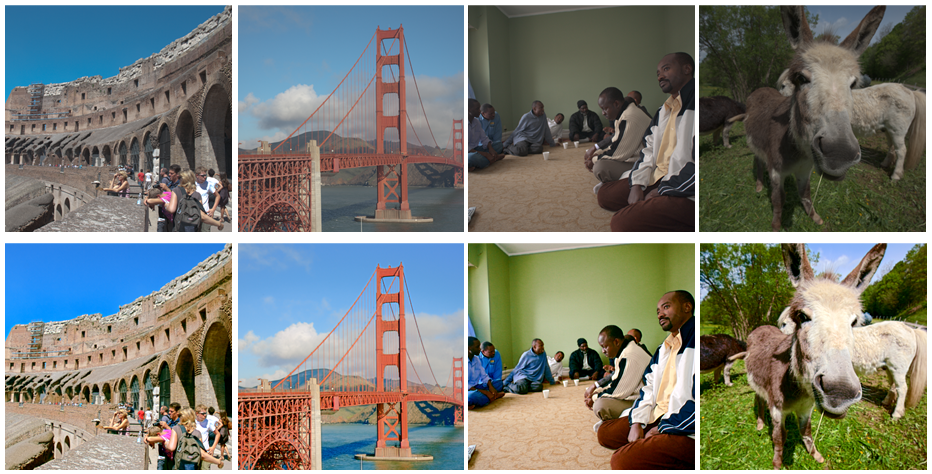
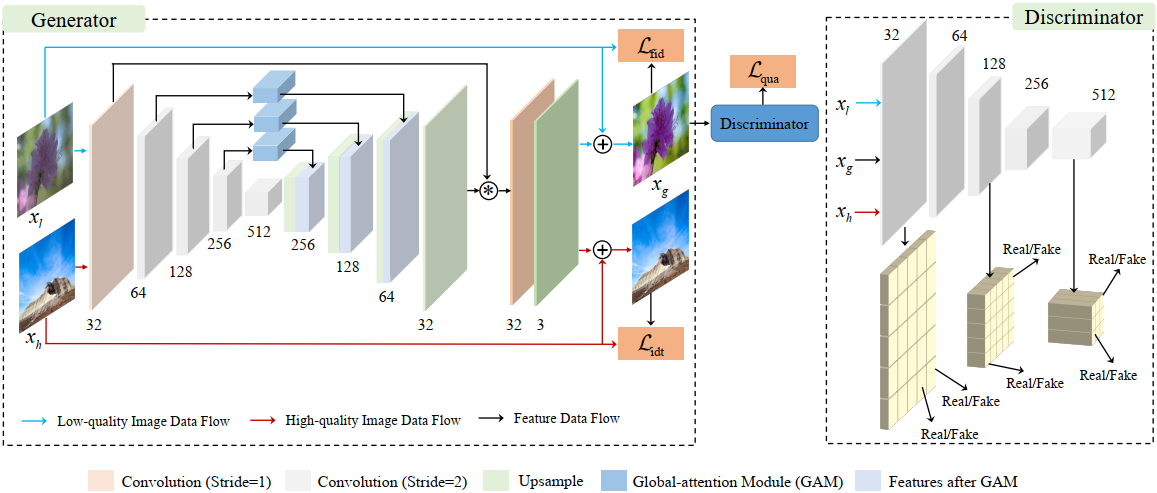
Improving the aesthetic quality of images is challenging and eager for the public. To address this problem, most existing algorithms are based on supervised learning methods to learn an automatic photo enhancer for paired data, which consists of low-quality photos and corresponding expert-retouched versions. However, the style and characteristics of photos retouched by experts may not meet the needs or preferences of general users. In this paper, we present an unsupervised image enhancement generative adversarial network (UEGAN), which learns the corresponding image-to-image mapping from a set of images with desired characteristics in an unsupervised manner, rather than learning on a large number of paired images. The proposed model is based on single deep GAN which embeds the modulation and attention mechanisms to capture richer global and local features. Based on the proposed model, we introduce two losses to deal with the unsupervised image enhancement: (1) fidelity loss, which is defined as a ℓ2 regularization in the feature domain of a pre-trained VGG network to ensure the content between the enhanced image and the input image is the same, and (2) quality loss that is formulated as a relativistic hinge adversarial loss to endow the input image the desired characteristics. Both quantitative and qualitative results show that the proposed model effectively improves the aesthetic quality of images.
We recommended the following dependencies.
git clone https://github.com/eezkni/UEGAN --recursive
cd UEGAN
You can follow the instructions below to generate your own training images. Or, you can directly download our exported images FiveK_dataset_nzk. (~6GB)
fivek.lrcat with Lightroom. Just click "upgrade" if Lightroom asks you to upgrade.Collections list (bottom left), select collection Inputs/InputAsShotZeroed.Ctrl-A), right-click any of them and select Export/Export....Export to=Specific folder, Folder=Your folder for low-quality images.Image Format=PNG, Color Space=sRGB, Bit Depth=8 bit/componentResize to Fit=Short Edge, select Don't Enlarge, Fill in 512 pixels, Resolution doesn't matter to ignort it.Export.Collections list (bottom left), select collection Experts/C.Ctrl-A), right-click any of them and select Export/Export....Export to=Specific folder, Folder=Your folder for high-quality images.Image Format=PNG, Color Space=sRGB, Bit Depth=8 bit/componentResize to Fit=Short Edge, select Don't Enlarge, Fill in 512 pixels, Resolution doesn't matter to ignort it.Export.Having trained your models or the pre-trained model on MIT-Adobe FiveK Dataset (put into ./results/UEGAN-FiveK/models/), to test the pre-trained UEGAN on FiveK, run the test script below.
python main.py --mode test --version UEGAN-FiveK --pretrained_model 92 --is_test_nima True --is_test_psnr_ssim True
Prepare the training, testing, and validation data. The folder structure should be:
data_path
	└── fiveK
			├── train
			│   ├── exp
			|   |   ├── a1.png
			|   |   ├── a2.png
			|   |   ...
			|   └── raw
			|       ├── b1.png
			|       ├── b2.png
			|       ...
			├── val
			│   ├── label
			|   |   ├── c1.png
			|   |   ├── c2.png
			|   |   ...
			|   └── raw
			|       ├── c1.png
			|       ├── c2.png
			|       ...
			└── test
				├── label
				|   ├── d1.png
				|   ├── d2.png
				|   ...
				└── raw
					├── d1.png
					├── d2.png
					...
To train UEGAN on FiveK, run the training script below.
python main.py --mode train --version UEGAN-FiveK --use_tensorboard True --is_test_nima True --is_test_psnr_ssim True
This script will create a folder named ./results in which the resulting are saved.
./results/psnr_val_results (including PSNR for each valiaded epoch and the summary)./results/ssim_val_results (including SSIM for each valiaded epoch and the summary)./results/nima_val_results (including NIMA for each valiaded epoch and the summary)./results/UEGAN-FiveK/logs./results/UEGAN-FiveK/models./results/UEGAN-FiveK/samples./results/UEGAN-FiveK/validation./results/UEGAN-FiveK/testTo view training results and loss plots, run tensorboard --logdir=results/UEGAN-FiveK/logs, and click the URL accordingly (For example, http://nzk-ub:6007/).
The summary of PSNR test results will be save to ./results/psnr_val_results/PSNR_total_results_epoch_avgpsnr.csv. Find the best epoch in the last line of PSNR_total_results_epoch_avgpsnr.csv.
If this code/UEGAN is useful for your research, please cite our paper:
@article{ni2020towards,
  title={Towards unsupervised deep image enhancement with generative adversarial network},
  author={Ni, Zhangkai and Yang, Wenhan and Wang, Shiqi and Ma, Lin and Kwong, Sam},
  journal={IEEE Transactions on Image Processing},
  volume={29},
  pages={9140--9151},
  year={2020},
  publisher={IEEE}
}
Thanks for your attention! If you have any suggestion or question, feel free to leave a message here or contact Dr. Zhangkai Ni ([email protected]).
[TIP-2020] Official Pytorch implementation of "Towards Unsupervised Deep Image Enhancement with Generative Adversarial Network"
Python
124
96 commits
updated Aug 23, 2026
Zhangkai Ni1, Wenhan Yang1, Shiqi Wang1, Lin Ma2, Sam Kwong1
1City University of Hong Kong, 2Meituan Group
IEEE Transactions on Image Processing (TIP), 2025
This website shares the Pytorch codes of the "Towards Unsupervised Deep Image Enhancement with Generative Adversarial Network," IEEE Transactions on Image Processing (T-IP), vol. 29, pp. 9140-9151, September 2020. Paper-official | Paper-arXiv
Improving the aesthetic quality of images is challenging and eager for the public. To address this problem, most existing algorithms are based on supervised learning methods to learn an automatic photo enhancer for paired data, which consists of low-quality photos and corresponding expert-retouched versions. However, the style and characteristics of photos retouched by experts may not meet the needs or preferences of general users. In this paper, we present an unsupervised image enhancement generative adversarial network (UEGAN), which learns the corresponding image-to-image mapping from a set of images with desired characteristics in an unsupervised manner, rather than learning on a large number of paired images. The proposed model is based on single deep GAN which embeds the modulation and attention mechanisms to capture richer global and local features. Based on the proposed model, we introduce two losses to deal with the unsupervised image enhancement: (1) fidelity loss, which is defined as a ℓ2 regularization in the feature domain of a pre-trained VGG network to ensure the content between the enhanced image and the input image is the same, and (2) quality loss that is formulated as a relativistic hinge adversarial loss to endow the input image the desired characteristics. Both quantitative and qualitative results show that the proposed model effectively improves the aesthetic quality of images.
We recommended the following dependencies.
git clone https://github.com/eezkni/UEGAN --recursive
cd UEGAN
You can follow the instructions below to generate your own training images. Or, you can directly download our exported images FiveK_dataset_nzk. (~6GB)
fivek.lrcat with Lightroom. Just click "upgrade" if Lightroom asks you to upgrade.Collections list (bottom left), select collection Inputs/InputAsShotZeroed.Ctrl-A), right-click any of them and select Export/Export....Export to=Specific folder, Folder=Your folder for low-quality images.Image Format=PNG, Color Space=sRGB, Bit Depth=8 bit/componentResize to Fit=Short Edge, select Don't Enlarge, Fill in 512 pixels, Resolution doesn't matter to ignort it.Export.Collections list (bottom left), select collection Experts/C.Ctrl-A), right-click any of them and select Export/Export....Export to=Specific folder, Folder=Your folder for high-quality images.Image Format=PNG, Color Space=sRGB, Bit Depth=8 bit/componentResize to Fit=Short Edge, select Don't Enlarge, Fill in 512 pixels, Resolution doesn't matter to ignort it.Export.Having trained your models or the pre-trained model on MIT-Adobe FiveK Dataset (put into ./results/UEGAN-FiveK/models/), to test the pre-trained UEGAN on FiveK, run the test script below.
python main.py --mode test --version UEGAN-FiveK --pretrained_model 92 --is_test_nima True --is_test_psnr_ssim True
Prepare the training, testing, and validation data. The folder structure should be:
data_path
	└── fiveK
			├── train
			│   ├── exp
			|   |   ├── a1.png
			|   |   ├── a2.png
			|   |   ...
			|   └── raw
			|       ├── b1.png
			|       ├── b2.png
			|       ...
			├── val
			│   ├── label
			|   |   ├── c1.png
			|   |   ├── c2.png
			|   |   ...
			|   └── raw
			|       ├── c1.png
			|       ├── c2.png
			|       ...
			└── test
				├── label
				|   ├── d1.png
				|   ├── d2.png
				|   ...
				└── raw
					├── d1.png
					├── d2.png
					...
To train UEGAN on FiveK, run the training script below.
python main.py --mode train --version UEGAN-FiveK --use_tensorboard True --is_test_nima True --is_test_psnr_ssim True
This script will create a folder named ./results in which the resulting are saved.
./results/psnr_val_results (including PSNR for each valiaded epoch and the summary)./results/ssim_val_results (including SSIM for each valiaded epoch and the summary)./results/nima_val_results (including NIMA for each valiaded epoch and the summary)./results/UEGAN-FiveK/logs./results/UEGAN-FiveK/models./results/UEGAN-FiveK/samples./results/UEGAN-FiveK/validation./results/UEGAN-FiveK/testTo view training results and loss plots, run tensorboard --logdir=results/UEGAN-FiveK/logs, and click the URL accordingly (For example, http://nzk-ub:6007/).
The summary of PSNR test results will be save to ./results/psnr_val_results/PSNR_total_results_epoch_avgpsnr.csv. Find the best epoch in the last line of PSNR_total_results_epoch_avgpsnr.csv.
If this code/UEGAN is useful for your research, please cite our paper:
@article{ni2020towards,
  title={Towards unsupervised deep image enhancement with generative adversarial network},
  author={Ni, Zhangkai and Yang, Wenhan and Wang, Shiqi and Ma, Lin and Kwong, Sam},
  journal={IEEE Transactions on Image Processing},
  volume={29},
  pages={9140--9151},
  year={2020},
  publisher={IEEE}
}
Thanks for your attention! If you have any suggestion or question, feel free to leave a message here or contact Dr. Zhangkai Ni ([email protected]).



