
Split an ultrawide (or any external) monitor into two independent screens on macOS
Swift
1
5 commits
updated Oct 5, 2026
See what people are saying
README
Telas
Split an ultrawide (or any external) monitor into two independent screens on macOS.
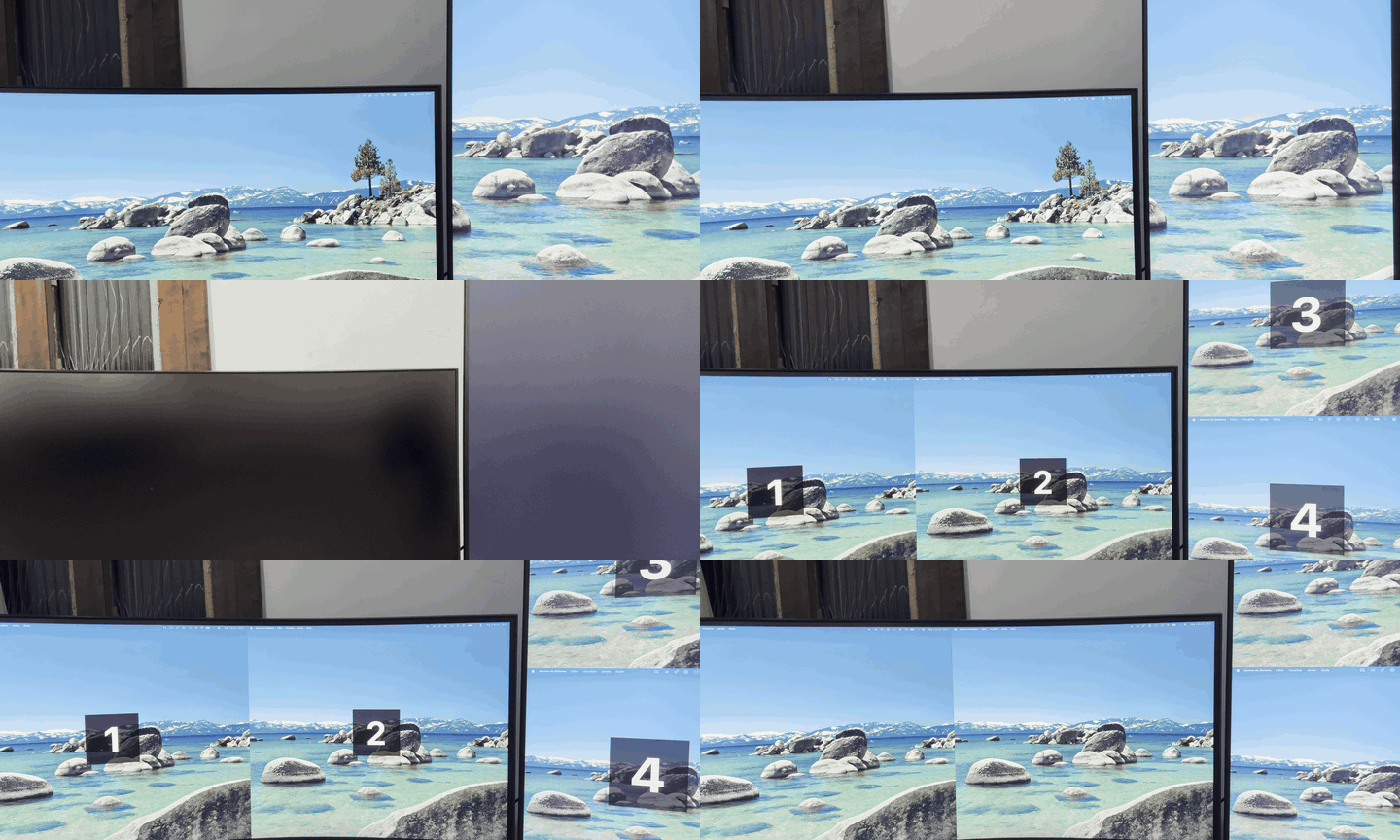
Each half behaves like a real display: its own menu bar, its own full-screen space, its own Mission Control. Landscape monitors are split left/right, portrait monitors top/bottom.
⚠️ Experimental. Telas relies on a private macOS API (
CGVirtualDisplay). It works on the machines it was built on, but Apple may change it at any time.
How it works
macOS cannot split a physical display, so Telas fakes it:
- For each half, it creates a virtual display of exactly that size (same refresh rate as the monitor, 60 Hz fallback).
- It streams each virtual display with ScreenCaptureKit into a borderless window that covers the matching half of the physical monitor.
- It routes the mouse: the cursor moves at native speed inside a half and is teleported only when it crosses into another half or display, so movement follows what you see. The cursor is drawn on top in real time, not taken from the video.
- Windows that were on the monitor are moved into the halves when you split, and back when you join.
Requirements
- macOS 14 Sonoma or later (developed on macOS 26, Apple Silicon)
- Xcode Command Line Tools (
xcode-select --install) - Permissions: Screen Recording (to show the halves) and Accessibility (to route the mouse and move windows)
Install
There is no signed release yet; build it from source:
git clone https://github.com/eduardoworrel/telas.git
cd telas
./build.sh --install
--install copies the app to /Applications and opens it. It lives in the menu bar (▭▭ icon).
On first launch a window walks you through the two permissions: click Allow on each one, enable
Telas in System Settings (if it is not listed, use + and pick Telas in Applications), then click
Reopen Telas (macOS only confirms the permissions after a restart).
Rebuilding produces a new ad-hoc signature, so macOS asks for the permissions again after each build. You can reopen it any time from the menu → Permissions….
Usage
| Action | How |
|---|---|
| Choose which monitors to split | Menu → Screens to split (landscape monitors are selected by default) |
| Split / join | Menu → Split screens / Join screens |
| Split or join one monitor while active | Toggle it in Screens to split |
| See which half is which | Menu → Identify screens |
| Emergency: undo everything | ⌃⌥⌘J (works even if the mouse gets lost) |
Known limitations
- When a display appears or disappears, macOS rearranges windows on all screens. That happens on split and join and cannot be prevented from the outside.
- Full-screen windows are not moved; leave full screen before splitting.
- Windows larger than a half are shrunk to fit and stay smaller after joining.
- The halves are a video of the virtual display: expect a small amount of latency and GPU use.
- The built-in display is never split.
License
Português
Divide um monitor ultrawide (ou qualquer monitor externo) em duas telas independentes no macOS.
Cada metade funciona como um monitor de verdade: barra de menus, tela cheia e Mission Control próprios. Monitores na horizontal são divididos em esquerda/direita; na vertical, em cima/baixo.
⚠️ Experimental. Usa uma API privada do macOS (
CGVirtualDisplay), que a Apple pode mudar a qualquer momento.
Como funciona: cria um monitor virtual do tamanho de cada metade, mostra cada um numa janela sem borda sobre a metade física (via ScreenCaptureKit) e guia o mouse para que o movimento siga o que você vê. As janelas que estavam no monitor vão para as metades ao dividir e voltam ao juntar.
Instalar: git clone https://github.com/eduardoworrel/telas.git && cd telas && ./build.sh --install.
Requer macOS 14+ e Command Line Tools. Na primeira vez, uma janela guia a liberação de Acessibilidade e
Gravação de Tela (clique em Permitir, ative o Telas nos Ajustes e depois em Reabrir o Telas).
Emergência: ⌃⌥⌘J desfaz tudo, mesmo que o mouse se perca.
A interface aparece em português quando o idioma principal do Mac é português.
Similar repos


Split an ultrawide (or any external) monitor into two independent screens on macOS
Swift
1
5 commits
updated Oct 5, 2026
See what people are saying
README
Telas
Split an ultrawide (or any external) monitor into two independent screens on macOS.
Each half behaves like a real display: its own menu bar, its own full-screen space, its own Mission Control. Landscape monitors are split left/right, portrait monitors top/bottom.
⚠️ Experimental. Telas relies on a private macOS API (
CGVirtualDisplay). It works on the machines it was built on, but Apple may change it at any time.
How it works
macOS cannot split a physical display, so Telas fakes it:
- For each half, it creates a virtual display of exactly that size (same refresh rate as the monitor, 60 Hz fallback).
- It streams each virtual display with ScreenCaptureKit into a borderless window that covers the matching half of the physical monitor.
- It routes the mouse: the cursor moves at native speed inside a half and is teleported only when it crosses into another half or display, so movement follows what you see. The cursor is drawn on top in real time, not taken from the video.
- Windows that were on the monitor are moved into the halves when you split, and back when you join.
Requirements
- macOS 14 Sonoma or later (developed on macOS 26, Apple Silicon)
- Xcode Command Line Tools (
xcode-select --install) - Permissions: Screen Recording (to show the halves) and Accessibility (to route the mouse and move windows)
Install
There is no signed release yet; build it from source:
git clone https://github.com/eduardoworrel/telas.git
cd telas
./build.sh --install
--install copies the app to /Applications and opens it. It lives in the menu bar (▭▭ icon).
On first launch a window walks you through the two permissions: click Allow on each one, enable
Telas in System Settings (if it is not listed, use + and pick Telas in Applications), then click
Reopen Telas (macOS only confirms the permissions after a restart).
Rebuilding produces a new ad-hoc signature, so macOS asks for the permissions again after each build. You can reopen it any time from the menu → Permissions….
Usage
| Action | How |
|---|---|
| Choose which monitors to split | Menu → Screens to split (landscape monitors are selected by default) |
| Split / join | Menu → Split screens / Join screens |
| Split or join one monitor while active | Toggle it in Screens to split |
| See which half is which | Menu → Identify screens |
| Emergency: undo everything | ⌃⌥⌘J (works even if the mouse gets lost) |
Known limitations
- When a display appears or disappears, macOS rearranges windows on all screens. That happens on split and join and cannot be prevented from the outside.
- Full-screen windows are not moved; leave full screen before splitting.
- Windows larger than a half are shrunk to fit and stay smaller after joining.
- The halves are a video of the virtual display: expect a small amount of latency and GPU use.
- The built-in display is never split.
License
Português
Divide um monitor ultrawide (ou qualquer monitor externo) em duas telas independentes no macOS.
Cada metade funciona como um monitor de verdade: barra de menus, tela cheia e Mission Control próprios. Monitores na horizontal são divididos em esquerda/direita; na vertical, em cima/baixo.
⚠️ Experimental. Usa uma API privada do macOS (
CGVirtualDisplay), que a Apple pode mudar a qualquer momento.
Como funciona: cria um monitor virtual do tamanho de cada metade, mostra cada um numa janela sem borda sobre a metade física (via ScreenCaptureKit) e guia o mouse para que o movimento siga o que você vê. As janelas que estavam no monitor vão para as metades ao dividir e voltam ao juntar.
Instalar: git clone https://github.com/eduardoworrel/telas.git && cd telas && ./build.sh --install.
Requer macOS 14+ e Command Line Tools. Na primeira vez, uma janela guia a liberação de Acessibilidade e
Gravação de Tela (clique em Permitir, ative o Telas nos Ajustes e depois em Reabrir o Telas).
Emergência: ⌃⌥⌘J desfaz tudo, mesmo que o mouse se perca.
A interface aparece em português quando o idioma principal do Mac é português.