
Coauthor supercollaboration/discussion forum
CoffeeScript
274
1,901 commits
updated Sep 20, 2026
README
Coauthor
Coauthor is a tool for group collaboration, discussion, keeping track of notes/results of meetings, etc., in particular to enable supercollaboration. Coauthor's primary goal is to ease multiauthor collaboration on unsolved problems in theoretical computer science, so e.g. you'll find LaTeX math support, but it has proved useful in other fields too.
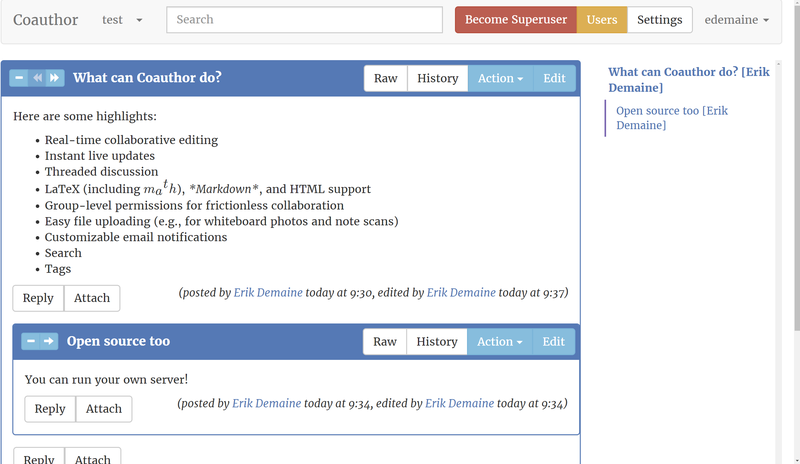
To see what's changed in Coauthor recently, check out the Changelog.
Features
-
Live updates/redraw of everything, thanks to Meteor. If you're looking at a problem and someone posts/edits something, you see it as quickly as they see their preview (roughly 1-second delay). You should never have to hit "reload" (except in case of a bug).
-
Real-time editing of messages in the style of Google Docs/EtherPad (Operational Transforms), if people feel like editing together (useful if e.g. working on a proof together).
- When editing, you see near-instant updates from the other side(s).
- Keeps track of coauthorship by who is in edit mode at the time.
- Can also manually add coauthors (e.g. when one person scribes the work of many) or remove coauthors (e.g. accidents or minor edits)
- Live previews of formatted message with ~1-second delay, after the data has round-tripped with the server. (The delay is to reduce the crazy number of "old versions" that get saved in the history: the server only pushes after the document has not changed for 1 second.)
-
Four formats for writing messages (and easy to add additional formats). All formats support LaTeX math (via
$...$,$$...$$,\(...\),\[...\], or\begin{align/alignat/equation/eqnarray/gather/CD}...\end{align/alignat/equation/eqnarray/gather/CD}) via KaTeX, so math mode supports this list of supported functions (see also this support table). Macros defined with\gdefcan be used throughout one message.- GitHub-flavored Markdown
(default), e.g.,
*italic*,**bold**,~~strikethrough~~,# Heading,## Subheading,`code`,> Block quote,```multiple lines of code```(including language-based highlighting if you start with```language), links via[text](url), images via, lists via*or1., to-do lists via* [ ]and* [x], tables, etc. Also supports all LaTeX commands listed below that start with a letter (notably, not some accents) and math mode, and all HTML commands listed below. - Texlish combines the best of Markdown and LaTeX with indentation-based syntax, and compiles to LaTeX. Supports all LaTeX features listed below.
- LaTeX, limited. Beyond extensive math mode support (see above),
the following features are supported in text mode; feel free to ask
for more.
Also supports all HTML commands listed below.
- Macros defined for all math expressions and for basic use in text mode:
\newcommand\macro{...},\renewcommand\macro{...},\providecommand\macro{...},\def\macro{...},\gdef\macro{...},\edef\macro{...},\xdef\macro{...},\let\macro=\mac. If you define macros in the root post of a thread, they are available in all messages in that thread. - Text formatting:
\sout,\emph,\defn,\textit,\textup,\textnormal,\textrm,\textlf,\textmd,\textbf,\textsf,\texttt,\textsc,\textsl,\em,\itshape,\upshape,\rmfamily,\lfseries,\mdseries,\bfseries,\rmfamily,\sffamily,\ttfamily,\scshape,\slshape,\rm,\normalfont,\md,\bf,\it,\sl,\sf,\tt,\sc,\bfseries,\itseries,\mdseries,\sffamily,\slshape,\scshape,\ttfamily,\centering,\raggedright,\raggedleft,\uppercase,\MakeTextUppercase,\lowercase,\MakeTextLowercase,\underline,\textcolor{color}{text},\colorbox{backcolor}{text},\raisebox{amount}{text},\par,\BY{...},\YEAR{...}, - Hyperlinks:
\url,\href{url}{text},\pdftooltip{hovertext}{text},\includegraphics[width/height/scale]{url}, - Sections:
\chapter,\section,\subsection,\subsubsection,\footnote - Spaces:
\smallskip,\medskip,\bigskip,\noindent,\indent,\,,\thinspace,\enspace,\space,\quad,\qquad,\negthinspace,\negmedspace,\negthickspace - Accents:
\",\',\`,\^,\~,\=,\c,\v,\u,\H,\aa,\AA,\i,\j,\ss,\ae,\AE,\oe,\OE,\o,\O,\S,\P, - Symbols:
\checkmark,\textasciitilde,\textasciicircum,\textbackslash,\textbar,\textbardbl,\textbraceleft,\textbraceright,\lbrack,\rbrack,\textcopyright,\copyright,\textregistered,\circledR,\textdagger,\dag,\textdaggerdbl,\ddag,\textdegree,\degree,\textdollar,\textellipsis,\dots,\ldots,\textendash,\textemdash,\textless,\textgreater,\textquoteleft,\lq,\textquoteright,\rq,\textquotedblleft,\textquotedblright,\textsterling,\pounds,\yen,\maltese,\textunderscore,\&,\$,\{,\},\%,\#,``,'',~,--,--- - Misc:
%...,\protect,{,},\\,\item,\item[...]; - Environments via
\begin/\end:verbatim,CJK,itemize,enumerate(including enumerate.sty's optional argument)quote,center,tabular(including\multicolumnand\multirow, column stylesl,c,r,p{width},m{width},b{width}, and*{n}{...}repetition),equation,eqnarray,align,alignat,gather,CD,problem,question,hint,example,remark,note,idea,theorem,conjecture,lemma,corollary,fact,observation,proposition,claim,proof, and some extra environments:detailsor+(text that's hidden until clicked, like HTML<details>tag, with optional argument for<summary>),proof+,theorem+, etc. (likeproof,theorem, etc. wrapped indetailsenvironment).
- Macros defined for all math expressions and for basic use in text mode:
- HTML, sanitized. The following tags are allowed; feel free to ask for
more.
<h1>,<h2>,<h3>,<h4>,<h5>,<h6>,<blockquote>,<p>,<div>,<span>,<a href/name/target>,<ul>,<ol start>,<nl>,<li>,<b>,<strong>,<i>,<em>,<u>,<s>,<strike>,<del>,<code>,<tt>,<kbd>,<pre>,<hr>,<br>,<table>,<thead>,<caption>,<tbody>,<tr>,<th>,<td>,<details><summary>Title</summary> Folded-away text</details>,<img src/alt/width/height>,<video controls>,<source src>; attributestitle,style,class(limited),aria-*. Also supports LaTeX math mode.
- GitHub-flavored Markdown
(default), e.g.,
-
Light and dark themes available under Settings.
-
CodeMirror editor supports syntax highlighting, block folding, bracket matching, line numbering, light and dark themes, spell checking, "regular" keybindings as well as Vim and Emacs keybindings (especially useful for rectangular selection for e.g. ASCII art), multiple cursors for simultaneous editing (ctrl-click).
- Copy/paste produces text by default. Special handling of Coauthor
URLs produces
coauthor:...links or embeds images. Special handling of user URLs produces @mentions. To paste rich text, you can toggle HTML paste mode via Ctrl-Shift-H. - @mentioning has automatic completion of all users in group. You can type any substring of the real name or username (but skipping spaces, like GitHub), and select by pressing enter, or ignore by pressing space.
- Copy/paste produces text by default. Special handling of Coauthor
URLs produces
-
Messages are organized by groups (intended to correspond to groups of people who meet), so it's easy to share material with everyone in the group. But it's also possible to share part of a group (only certain threads) with specific users, for visitors or paper merges etc.
-
Sorting of threads within a group by title, creator, creation date, last update, number of posts, number of positive emoji responses, or whether subscribed (by clicking on the corresponding column, once for default sort order and again for opposite sort order). Intelligent handling of numbers while sorting, e.g. "9." comes before "10.". Deleted messages always sort to the very bottom; minimized messages always sort near the bottom; pinned messages always sort near the top; and unpublished messages always sort near the very top.
-
"Live Feed" to watch messages as they get changed/posted. Useful for projecting the latest activity onto a big screen while a group is gathered and some are maybe editing.
-
"Catchup on Recent Posts" to see all messages since a particular date/time (including relative specifications like "1 week" or "12 hours"). Useful for progress reports since the last meeting.
-
Threaded message organization, with arbitrary tree structure (root messages, replies with arbitrary depth). You can focus on the subthread rooted at any message (click on the arrow), or fold away the contents of a subthread to focus on the rest (click on the minus sign). Folding with the minus/plus sign is a local and temporary change (resets when reloading the page), while minimizing the message makes it start out folded for all users (e.g., when a discussion/question resolves and is no longer important, but you want to preserve it for future reference).
-
Move (reparent) messages by selecting Action / Move, or by dragging messages around in the table of contents on the right. (You can also start a drag in the main view from the right-arrow of a message, but the drag must end at the table of contents.) Dragging directly onto a message makes the dragged message the last child, while dragging onto the slot before a message makes the dragged message the immediately preceding sibling. Dialog confirms move, and allows you to type another message title/creator/ID, or the name of a group if you want to make the message into a new thread's root message.
-
Tags: attach an arbitrary set of strings to a message. Find other messages with the same tag by clicking on a tag.
-
Emoji for super-short responses that show appreciation but don't cause email notifications or take up much space. (Like GitHub and Slack.) Hover over an emoji to see a list of people who added the emoji; click to toggle your own status. Emoji are positive (purple) or negative (red). Positive emoji on root messages are counted on the group page, enabling a simple voting system for e.g. which problems to work on.
-
Search across the current group, thread, or across all groups, for posts by keywords using the search bar at the top.
- Search for a word as a whole
word(default behavior), or specify asterisks to search for partial word matches:prefix*,*suffix,*substring*, orprefix*suffix. - Lower-case letters are case insensitive, while upper-case letters are case sensitive.
- Restrict search to title or body via
title:...orbody:...(default is to search both). - Negative match with minus sign
(e.g.,
-wordexcludes documents with wholeword). - Search for a regular expression via
regex:.... - Use double quotes (
"...") to search for phrases orregex:"..."to search for regular expressions with spaces in them; normally, spaces act as an AND query. - Connect words/phrases with
|to get an OR query instead. - Use parentheses to mix AND and OR arbitrarily, e.g.
always (this | that). - Escape special characters with backslash:
\:,\",\|,\(,\),\\,\*. by:usernamesearches for messages coauthored by a specified username (which can include*s or use regular expressions viaregex:);by:meis shorthand for searching for your own username.tag:...does an exact match for a specified tag; it can be negated.emoji:heart,emoji:thumbs-up,emoji:thumbs*,emoji:*etc. search for messages with (certain) emoji symbol responses;emoji:@usernamesearches for messages with emoji response by a specific user (emoji:@mefinds your own emoji responses); or you can combine the two with e.g.emoji:thumbs*@username.root:idmatches messages in thread with specified root message ID.is:rootmatches root messages (tops of threads).is:filematches file messages (made via Attach).is:deleted,is:published,is:private,is:minimized,is:pinned,is:protectedmatch various states of messages.is:emptymatches empty messages (no title, body, or file).not:...orisnt:...are negated forms of the aboveis:...operators, equivalent to-is:....
- Search for a word as a whole
-
User search: find posts by a particular user by clicking on their username. Search for your own posts in a group by clicking the "My Posts" button.
-
Statistics about user's and all posts within a group, by day, week (with configurable week start), month, year, or hour within a day. Your own statistics are available via the Statistics button on the group page, while other users' stats are available from their user page.
-
Permanent URLs for all messages, groups, etc., for easy emailing etc. (but other than group name, not revealing, so only those with permission can open). Links to other messages via specical
coauthor:xxxsyntax. Drag messages (via their arrow icon) into other messages to make such links. -
Files (another type of message) can be attached to other messages, as another type of reply. You can click on the Attach button to select a file to attach, or drag the file from the operating system onto the Attach button. Similarly, files can be modified by clicking the Replace File button or dragging a file onto that button. File messages can have title and body too; title defaults to the filename. Image/video files (including PNG, JPEG, SVG, MP4) are displayed inline. Images automatically detect EXIF orientation, and can be further rotated by multiples of 90 degrees in edit mode. PDF files are rendered using pdf.js, only when visible on screen, and displayed inline with page-turning buttons.
-
Messages can start/be marked Unpublished (not yet finished) or Deleted (mistake / no longer useful). In either state, the message is hidden from people who are not coauthors (as listed in the "by" line and editable at the bottom of the Edit view) or superusers who click "Become Superuser". The default published state is initially true (so everyone sees the new message and live updates immediately), but can vary by user (e.g., if they are "shy" and only want to post finished thoughts).
-
Threads can be marked as allowing public replies only (the default, for maximum collaboration), private replies only (useful for solved problems/puzzles, to prevent accidentally spoiling the fun), or public and private replies (useful for feedback on lectures, for example, which can have varying relevance to the entire group).
- Private messages have an access list of users who can see the message beyond the coauthors, initially set to include the access list and all coauthors of the parent message being replied to ("Reply All" behavior for back-and-forth private conversation). Unlike coauthors, access users can only see the message when it is published and not deleted. You can add or remove users from the access list, but note that permissions are not synchronized between parent and children, so if you change a parent's permissions you might also want to change the children's.
- Replies to replies inherit the public/private state of their parent.
- Superusers can see all the messages and change them between public and private.
- Superusers can also mark messages as protected, meaning they can be edited only by coauthors and superusers. This is useful to prevent someone from accidentally becoming a coauthor on the root message of a private-replies thread, thereby gaining access to all subsequent replies. Protected messages can still be seen normally and gain emoji responses.
-
Email notifications for subscribed threads, clustering together all updates since the last email, with a maximum lag of a specified number of hours or minutes (default 1 hour). Each user can specify in Settings whether they are, by default, subscribed to all threads or none, both globally and local to each group. Either way, the default can be overridden in the group view using the checkbox on the right (checked means "subscribed"). Users can choose in Settings whether to receive notifications about their own edits, and whether to receive separate email messages for each group (e.g. for email folder separation) or bundle them altogether.
-
Time travel: You can drag through history and see past versions. Versions of messages where the user explicitly clicked "Stop Editing" are marked as "finished" versions, and only those are shown by default. But if you need to see more intermediate versions, you can click "Show All Versions". In general, Coauthor aims to automatically track all history in case it's useful later.
-
Download ZIP: You can archive an entire group's contents into a ZIP file of raw HTML/CSS and attached files which requires no JavaScript to run. This future-proofs your content against software rot, making it suitable for NSF's Data Archiving Policy. It is also useful for offline viewing of content, e.g., while traveling.
-
Permissions can be specified for each user at the group level (typical case --- user can access the entire group of messages), at the thread level (user can access only certain threads within group), or at the global level: just click "Users" in the appropriate view. Levels of access:
- read: see the group and read the messages (otherwise invisible)
- post: create new messages, replies, etc. in the group
- edit: modify other people's messages
- super: somewhat dangerous "super" operations like history-destroying superdelete, history-creating import, and the ability to see other users' deleted messages
- admin: administer over other users, in particular setting permissions
Anonymous access means that everyone, even not-logged-in users, can see the messages and group. This is generally not recommended as it opens Coauthor to spam, so it requires global admin privileges to enable.
-
Superuser operations (only for superusers):
- Import from LaTeX document with figures attached as a ZIP file
- Import from osqa's XML dump, including old edit history
- Superdelete (permanently destroying a message including its history)
- Setting the default sort for a group
- Setting message threads as allowing public and/or private messages
User Tips
- On Android, the Chrome browser with SwiftKey keyboard seems to work best for editing messages in Coauthor. (Firefox and Gboard have cursor positioning issues.)
- LaTeX mode supports LaTeX accents (like
\'e), but other modes do not. To easily type Unicode accented characters, use WinCompose on Windows, set up a compose key on Linux, or press and hold keys on MacOS. - Conversely, if you're on modern MacOS, holding down letter keys will bring
up an accent tool instead of repeating the key. If you'd rather repeat the
key (e.g. for Vim mode),
follow these instructions:
defaults write NSGlobalDomain ApplePressAndHoldEnabled -bool falsethen restart your web browser. - Vimium is incompatible with the Vim editor mode (specifically, both capture the Escape key), so be sure to disable Vimium if you want to use Vim keybindings in the message editor.
Installation
Contributors


Similar repos


Languages
CoffeeScript
84.8%
Pug
5.0%
JavaScript
3.2%
Stylus
2.9%
CSS
2.9%
Coauthor supercollaboration/discussion forum
CoffeeScript
274
1,901 commits
updated Sep 20, 2026
README
Coauthor
Coauthor is a tool for group collaboration, discussion, keeping track of notes/results of meetings, etc., in particular to enable supercollaboration. Coauthor's primary goal is to ease multiauthor collaboration on unsolved problems in theoretical computer science, so e.g. you'll find LaTeX math support, but it has proved useful in other fields too.
To see what's changed in Coauthor recently, check out the Changelog.
Features
-
Live updates/redraw of everything, thanks to Meteor. If you're looking at a problem and someone posts/edits something, you see it as quickly as they see their preview (roughly 1-second delay). You should never have to hit "reload" (except in case of a bug).
-
Real-time editing of messages in the style of Google Docs/EtherPad (Operational Transforms), if people feel like editing together (useful if e.g. working on a proof together).
- When editing, you see near-instant updates from the other side(s).
- Keeps track of coauthorship by who is in edit mode at the time.
- Can also manually add coauthors (e.g. when one person scribes the work of many) or remove coauthors (e.g. accidents or minor edits)
- Live previews of formatted message with ~1-second delay, after the data has round-tripped with the server. (The delay is to reduce the crazy number of "old versions" that get saved in the history: the server only pushes after the document has not changed for 1 second.)
-
Four formats for writing messages (and easy to add additional formats). All formats support LaTeX math (via
$...$,$$...$$,\(...\),\[...\], or\begin{align/alignat/equation/eqnarray/gather/CD}...\end{align/alignat/equation/eqnarray/gather/CD}) via KaTeX, so math mode supports this list of supported functions (see also this support table). Macros defined with\gdefcan be used throughout one message.- GitHub-flavored Markdown
(default), e.g.,
*italic*,**bold**,~~strikethrough~~,# Heading,## Subheading,`code`,> Block quote,```multiple lines of code```(including language-based highlighting if you start with```language), links via[text](url), images via, lists via*or1., to-do lists via* [ ]and* [x], tables, etc. Also supports all LaTeX commands listed below that start with a letter (notably, not some accents) and math mode, and all HTML commands listed below. - Texlish combines the best of Markdown and LaTeX with indentation-based syntax, and compiles to LaTeX. Supports all LaTeX features listed below.
- LaTeX, limited. Beyond extensive math mode support (see above),
the following features are supported in text mode; feel free to ask
for more.
Also supports all HTML commands listed below.
- Macros defined for all math expressions and for basic use in text mode:
\newcommand\macro{...},\renewcommand\macro{...},\providecommand\macro{...},\def\macro{...},\gdef\macro{...},\edef\macro{...},\xdef\macro{...},\let\macro=\mac. If you define macros in the root post of a thread, they are available in all messages in that thread. - Text formatting:
\sout,\emph,\defn,\textit,\textup,\textnormal,\textrm,\textlf,\textmd,\textbf,\textsf,\texttt,\textsc,\textsl,\em,\itshape,\upshape,\rmfamily,\lfseries,\mdseries,\bfseries,\rmfamily,\sffamily,\ttfamily,\scshape,\slshape,\rm,\normalfont,\md,\bf,\it,\sl,\sf,\tt,\sc,\bfseries,\itseries,\mdseries,\sffamily,\slshape,\scshape,\ttfamily,\centering,\raggedright,\raggedleft,\uppercase,\MakeTextUppercase,\lowercase,\MakeTextLowercase,\underline,\textcolor{color}{text},\colorbox{backcolor}{text},\raisebox{amount}{text},\par,\BY{...},\YEAR{...}, - Hyperlinks:
\url,\href{url}{text},\pdftooltip{hovertext}{text},\includegraphics[width/height/scale]{url}, - Sections:
\chapter,\section,\subsection,\subsubsection,\footnote - Spaces:
\smallskip,\medskip,\bigskip,\noindent,\indent,\,,\thinspace,\enspace,\space,\quad,\qquad,\negthinspace,\negmedspace,\negthickspace - Accents:
\",\',\`,\^,\~,\=,\c,\v,\u,\H,\aa,\AA,\i,\j,\ss,\ae,\AE,\oe,\OE,\o,\O,\S,\P, - Symbols:
\checkmark,\textasciitilde,\textasciicircum,\textbackslash,\textbar,\textbardbl,\textbraceleft,\textbraceright,\lbrack,\rbrack,\textcopyright,\copyright,\textregistered,\circledR,\textdagger,\dag,\textdaggerdbl,\ddag,\textdegree,\degree,\textdollar,\textellipsis,\dots,\ldots,\textendash,\textemdash,\textless,\textgreater,\textquoteleft,\lq,\textquoteright,\rq,\textquotedblleft,\textquotedblright,\textsterling,\pounds,\yen,\maltese,\textunderscore,\&,\$,\{,\},\%,\#,``,'',~,--,--- - Misc:
%...,\protect,{,},\\,\item,\item[...]; - Environments via
\begin/\end:verbatim,CJK,itemize,enumerate(including enumerate.sty's optional argument)quote,center,tabular(including\multicolumnand\multirow, column stylesl,c,r,p{width},m{width},b{width}, and*{n}{...}repetition),equation,eqnarray,align,alignat,gather,CD,problem,question,hint,example,remark,note,idea,theorem,conjecture,lemma,corollary,fact,observation,proposition,claim,proof, and some extra environments:detailsor+(text that's hidden until clicked, like HTML<details>tag, with optional argument for<summary>),proof+,theorem+, etc. (likeproof,theorem, etc. wrapped indetailsenvironment).
- Macros defined for all math expressions and for basic use in text mode:
- HTML, sanitized. The following tags are allowed; feel free to ask for
more.
<h1>,<h2>,<h3>,<h4>,<h5>,<h6>,<blockquote>,<p>,<div>,<span>,<a href/name/target>,<ul>,<ol start>,<nl>,<li>,<b>,<strong>,<i>,<em>,<u>,<s>,<strike>,<del>,<code>,<tt>,<kbd>,<pre>,<hr>,<br>,<table>,<thead>,<caption>,<tbody>,<tr>,<th>,<td>,<details><summary>Title</summary> Folded-away text</details>,<img src/alt/width/height>,<video controls>,<source src>; attributestitle,style,class(limited),aria-*. Also supports LaTeX math mode.
- GitHub-flavored Markdown
(default), e.g.,
-
Light and dark themes available under Settings.
-
CodeMirror editor supports syntax highlighting, block folding, bracket matching, line numbering, light and dark themes, spell checking, "regular" keybindings as well as Vim and Emacs keybindings (especially useful for rectangular selection for e.g. ASCII art), multiple cursors for simultaneous editing (ctrl-click).
- Copy/paste produces text by default. Special handling of Coauthor
URLs produces
coauthor:...links or embeds images. Special handling of user URLs produces @mentions. To paste rich text, you can toggle HTML paste mode via Ctrl-Shift-H. - @mentioning has automatic completion of all users in group. You can type any substring of the real name or username (but skipping spaces, like GitHub), and select by pressing enter, or ignore by pressing space.
- Copy/paste produces text by default. Special handling of Coauthor
URLs produces
-
Messages are organized by groups (intended to correspond to groups of people who meet), so it's easy to share material with everyone in the group. But it's also possible to share part of a group (only certain threads) with specific users, for visitors or paper merges etc.
-
Sorting of threads within a group by title, creator, creation date, last update, number of posts, number of positive emoji responses, or whether subscribed (by clicking on the corresponding column, once for default sort order and again for opposite sort order). Intelligent handling of numbers while sorting, e.g. "9." comes before "10.". Deleted messages always sort to the very bottom; minimized messages always sort near the bottom; pinned messages always sort near the top; and unpublished messages always sort near the very top.
-
"Live Feed" to watch messages as they get changed/posted. Useful for projecting the latest activity onto a big screen while a group is gathered and some are maybe editing.
-
"Catchup on Recent Posts" to see all messages since a particular date/time (including relative specifications like "1 week" or "12 hours"). Useful for progress reports since the last meeting.
-
Threaded message organization, with arbitrary tree structure (root messages, replies with arbitrary depth). You can focus on the subthread rooted at any message (click on the arrow), or fold away the contents of a subthread to focus on the rest (click on the minus sign). Folding with the minus/plus sign is a local and temporary change (resets when reloading the page), while minimizing the message makes it start out folded for all users (e.g., when a discussion/question resolves and is no longer important, but you want to preserve it for future reference).
-
Move (reparent) messages by selecting Action / Move, or by dragging messages around in the table of contents on the right. (You can also start a drag in the main view from the right-arrow of a message, but the drag must end at the table of contents.) Dragging directly onto a message makes the dragged message the last child, while dragging onto the slot before a message makes the dragged message the immediately preceding sibling. Dialog confirms move, and allows you to type another message title/creator/ID, or the name of a group if you want to make the message into a new thread's root message.
-
Tags: attach an arbitrary set of strings to a message. Find other messages with the same tag by clicking on a tag.
-
Emoji for super-short responses that show appreciation but don't cause email notifications or take up much space. (Like GitHub and Slack.) Hover over an emoji to see a list of people who added the emoji; click to toggle your own status. Emoji are positive (purple) or negative (red). Positive emoji on root messages are counted on the group page, enabling a simple voting system for e.g. which problems to work on.
-
Search across the current group, thread, or across all groups, for posts by keywords using the search bar at the top.
- Search for a word as a whole
word(default behavior), or specify asterisks to search for partial word matches:prefix*,*suffix,*substring*, orprefix*suffix. - Lower-case letters are case insensitive, while upper-case letters are case sensitive.
- Restrict search to title or body via
title:...orbody:...(default is to search both). - Negative match with minus sign
(e.g.,
-wordexcludes documents with wholeword). - Search for a regular expression via
regex:.... - Use double quotes (
"...") to search for phrases orregex:"..."to search for regular expressions with spaces in them; normally, spaces act as an AND query. - Connect words/phrases with
|to get an OR query instead. - Use parentheses to mix AND and OR arbitrarily, e.g.
always (this | that). - Escape special characters with backslash:
\:,\",\|,\(,\),\\,\*. by:usernamesearches for messages coauthored by a specified username (which can include*s or use regular expressions viaregex:);by:meis shorthand for searching for your own username.tag:...does an exact match for a specified tag; it can be negated.emoji:heart,emoji:thumbs-up,emoji:thumbs*,emoji:*etc. search for messages with (certain) emoji symbol responses;emoji:@usernamesearches for messages with emoji response by a specific user (emoji:@mefinds your own emoji responses); or you can combine the two with e.g.emoji:thumbs*@username.root:idmatches messages in thread with specified root message ID.is:rootmatches root messages (tops of threads).is:filematches file messages (made via Attach).is:deleted,is:published,is:private,is:minimized,is:pinned,is:protectedmatch various states of messages.is:emptymatches empty messages (no title, body, or file).not:...orisnt:...are negated forms of the aboveis:...operators, equivalent to-is:....
- Search for a word as a whole
-
User search: find posts by a particular user by clicking on their username. Search for your own posts in a group by clicking the "My Posts" button.
-
Statistics about user's and all posts within a group, by day, week (with configurable week start), month, year, or hour within a day. Your own statistics are available via the Statistics button on the group page, while other users' stats are available from their user page.
-
Permanent URLs for all messages, groups, etc., for easy emailing etc. (but other than group name, not revealing, so only those with permission can open). Links to other messages via specical
coauthor:xxxsyntax. Drag messages (via their arrow icon) into other messages to make such links. -
Files (another type of message) can be attached to other messages, as another type of reply. You can click on the Attach button to select a file to attach, or drag the file from the operating system onto the Attach button. Similarly, files can be modified by clicking the Replace File button or dragging a file onto that button. File messages can have title and body too; title defaults to the filename. Image/video files (including PNG, JPEG, SVG, MP4) are displayed inline. Images automatically detect EXIF orientation, and can be further rotated by multiples of 90 degrees in edit mode. PDF files are rendered using pdf.js, only when visible on screen, and displayed inline with page-turning buttons.
-
Messages can start/be marked Unpublished (not yet finished) or Deleted (mistake / no longer useful). In either state, the message is hidden from people who are not coauthors (as listed in the "by" line and editable at the bottom of the Edit view) or superusers who click "Become Superuser". The default published state is initially true (so everyone sees the new message and live updates immediately), but can vary by user (e.g., if they are "shy" and only want to post finished thoughts).
-
Threads can be marked as allowing public replies only (the default, for maximum collaboration), private replies only (useful for solved problems/puzzles, to prevent accidentally spoiling the fun), or public and private replies (useful for feedback on lectures, for example, which can have varying relevance to the entire group).
- Private messages have an access list of users who can see the message beyond the coauthors, initially set to include the access list and all coauthors of the parent message being replied to ("Reply All" behavior for back-and-forth private conversation). Unlike coauthors, access users can only see the message when it is published and not deleted. You can add or remove users from the access list, but note that permissions are not synchronized between parent and children, so if you change a parent's permissions you might also want to change the children's.
- Replies to replies inherit the public/private state of their parent.
- Superusers can see all the messages and change them between public and private.
- Superusers can also mark messages as protected, meaning they can be edited only by coauthors and superusers. This is useful to prevent someone from accidentally becoming a coauthor on the root message of a private-replies thread, thereby gaining access to all subsequent replies. Protected messages can still be seen normally and gain emoji responses.
-
Email notifications for subscribed threads, clustering together all updates since the last email, with a maximum lag of a specified number of hours or minutes (default 1 hour). Each user can specify in Settings whether they are, by default, subscribed to all threads or none, both globally and local to each group. Either way, the default can be overridden in the group view using the checkbox on the right (checked means "subscribed"). Users can choose in Settings whether to receive notifications about their own edits, and whether to receive separate email messages for each group (e.g. for email folder separation) or bundle them altogether.
-
Time travel: You can drag through history and see past versions. Versions of messages where the user explicitly clicked "Stop Editing" are marked as "finished" versions, and only those are shown by default. But if you need to see more intermediate versions, you can click "Show All Versions". In general, Coauthor aims to automatically track all history in case it's useful later.
-
Download ZIP: You can archive an entire group's contents into a ZIP file of raw HTML/CSS and attached files which requires no JavaScript to run. This future-proofs your content against software rot, making it suitable for NSF's Data Archiving Policy. It is also useful for offline viewing of content, e.g., while traveling.
-
Permissions can be specified for each user at the group level (typical case --- user can access the entire group of messages), at the thread level (user can access only certain threads within group), or at the global level: just click "Users" in the appropriate view. Levels of access:
- read: see the group and read the messages (otherwise invisible)
- post: create new messages, replies, etc. in the group
- edit: modify other people's messages
- super: somewhat dangerous "super" operations like history-destroying superdelete, history-creating import, and the ability to see other users' deleted messages
- admin: administer over other users, in particular setting permissions
Anonymous access means that everyone, even not-logged-in users, can see the messages and group. This is generally not recommended as it opens Coauthor to spam, so it requires global admin privileges to enable.
-
Superuser operations (only for superusers):
- Import from LaTeX document with figures attached as a ZIP file
- Import from osqa's XML dump, including old edit history
- Superdelete (permanently destroying a message including its history)
- Setting the default sort for a group
- Setting message threads as allowing public and/or private messages
User Tips
- On Android, the Chrome browser with SwiftKey keyboard seems to work best for editing messages in Coauthor. (Firefox and Gboard have cursor positioning issues.)
- LaTeX mode supports LaTeX accents (like
\'e), but other modes do not. To easily type Unicode accented characters, use WinCompose on Windows, set up a compose key on Linux, or press and hold keys on MacOS. - Conversely, if you're on modern MacOS, holding down letter keys will bring
up an accent tool instead of repeating the key. If you'd rather repeat the
key (e.g. for Vim mode),
follow these instructions:
defaults write NSGlobalDomain ApplePressAndHoldEnabled -bool falsethen restart your web browser. - Vimium is incompatible with the Vim editor mode (specifically, both capture the Escape key), so be sure to disable Vimium if you want to use Vim keybindings in the message editor.
Installation
Similar repos
Contributors
Languages
CoffeeScript
84.8%
Pug
5.0%
JavaScript
3.2%
Stylus
2.9%
CSS
2.9%