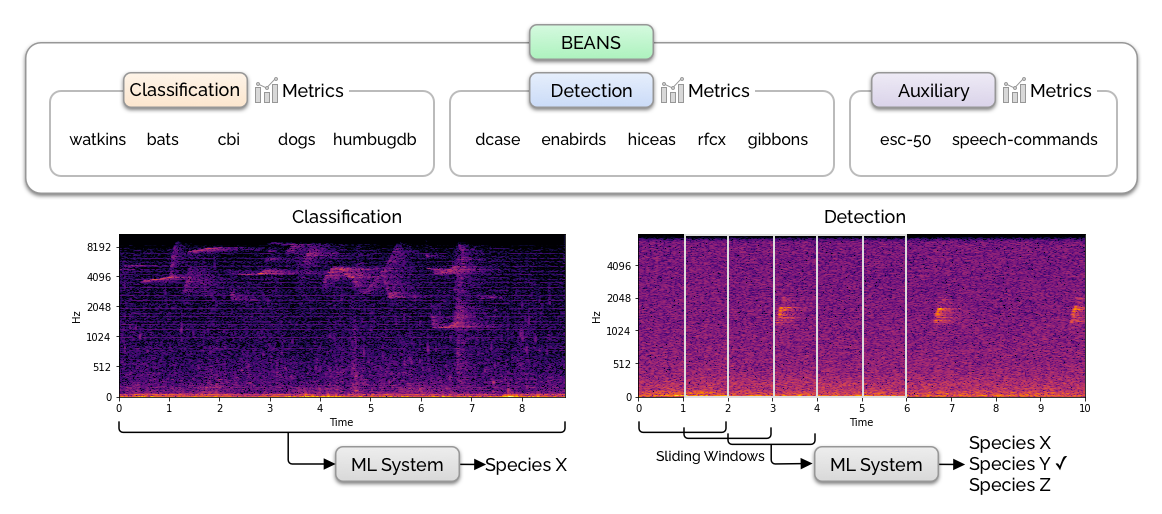
BEANS (the BEnchmark of ANimal Sounds) is a collection of bioacoustics tasks and public datasets, specifically designed to measure the performance of machine learning algorithms in the field of bioacoustics. The benchmark proposed here consists of two common tasks in bioacoustics: classification and detection. It includes 12 datasets covering various species, including birds, land and marine mammals, anurans, and insects. See our paper for more details.
This repository contains the code for downloading the datasets and running the baselines.
conda create -n beans python=3.8 pytorch==1.12.1 cudatoolkit=11.3 torchvision torchaudio cudnn -c pytorch -c conda-forge
pip install -r requirements.txt
pip install -e .
BEANS uses SoX for pre-processing some datasets. For Ubuntu/Debian you can install it via:
sudo apt-get install sox
sudo apt-get install libsox-fmt-mp3
The benchmark also relies on a few Kaggle datasets. Install the Kaggle CLI via pip install kaggle and make sure to put your API token in ~/.kaggle/kaggle.json. You will also need to go to the individual competition pages (namely, cbi and rcfx) and choose "late submission" in order to download their datasets.
Download the dataset by running the following script. It also runs a Python script which verifies the MD5 hashes of all the data files. Note that you'll need about 300GB of disk space for storing the original and the processed datasets.
scripts/download_data.sh
If the data download and validation finish successfully, you'll see a Validation succeeded! message.
Note: We verified that this setup works with SoX v14.4.2 on Ubuntu 20.04.6 LTS, torch==1.12.1, and torchaudio==0.12.1. If you encounter any validation issues, please check your software versions.
You can run all the baseline models by running:
python run_benchmark.py
This will write result files into the logs directory.
Implementing new models on BEANS is easy! You'll need to make a few changes in the code:
nn.Module. Make sure your forward() method returns the loss and the logits. See the existing model implementations.train_pytorch_model() method in scripts/evaluate.py. You may also need to modify the main() method, especially the ArgumentParser part so that the script takes the new model name and parameters from the command line arguments.feature_type parameter passed to the dataset.
BEANS (the BEnchmark of ANimal Sounds) is a collection of bioacoustics tasks and public datasets, specifically designed to measure the performance of machine learning algorithms in the field of bioacoustics. The benchmark proposed here consists of two common tasks in bioacoustics: classification and detection. It includes 12 datasets covering various species, including birds, land and marine mammals, anurans, and insects. See our paper for more details.
This repository contains the code for downloading the datasets and running the baselines.
conda create -n beans python=3.8 pytorch==1.12.1 cudatoolkit=11.3 torchvision torchaudio cudnn -c pytorch -c conda-forge
pip install -r requirements.txt
pip install -e .
BEANS uses SoX for pre-processing some datasets. For Ubuntu/Debian you can install it via:
sudo apt-get install sox
sudo apt-get install libsox-fmt-mp3
The benchmark also relies on a few Kaggle datasets. Install the Kaggle CLI via pip install kaggle and make sure to put your API token in ~/.kaggle/kaggle.json. You will also need to go to the individual competition pages (namely, cbi and rcfx) and choose "late submission" in order to download their datasets.
Download the dataset by running the following script. It also runs a Python script which verifies the MD5 hashes of all the data files. Note that you'll need about 300GB of disk space for storing the original and the processed datasets.
scripts/download_data.sh
If the data download and validation finish successfully, you'll see a Validation succeeded! message.
Note: We verified that this setup works with SoX v14.4.2 on Ubuntu 20.04.6 LTS, torch==1.12.1, and torchaudio==0.12.1. If you encounter any validation issues, please check your software versions.
You can run all the baseline models by running:
python run_benchmark.py
This will write result files into the logs directory.
Implementing new models on BEANS is easy! You'll need to make a few changes in the code:
nn.Module. Make sure your forward() method returns the loss and the logits. See the existing model implementations.train_pytorch_model() method in scripts/evaluate.py. You may also need to modify the main() method, especially the ArgumentParser part so that the script takes the new model name and parameters from the command line arguments.feature_type parameter passed to the dataset.


