
A keyboard-driven terminal file manager built on fzf, eza, and Kitty — icons, thumbnails, gallery grid, trash browser.
Shell
2
3 commits
updated Oct 4, 2026
See what people are saying
README
fm
A keyboard-driven terminal file manager built on
fzf,eza, and Kitty's image protocol.




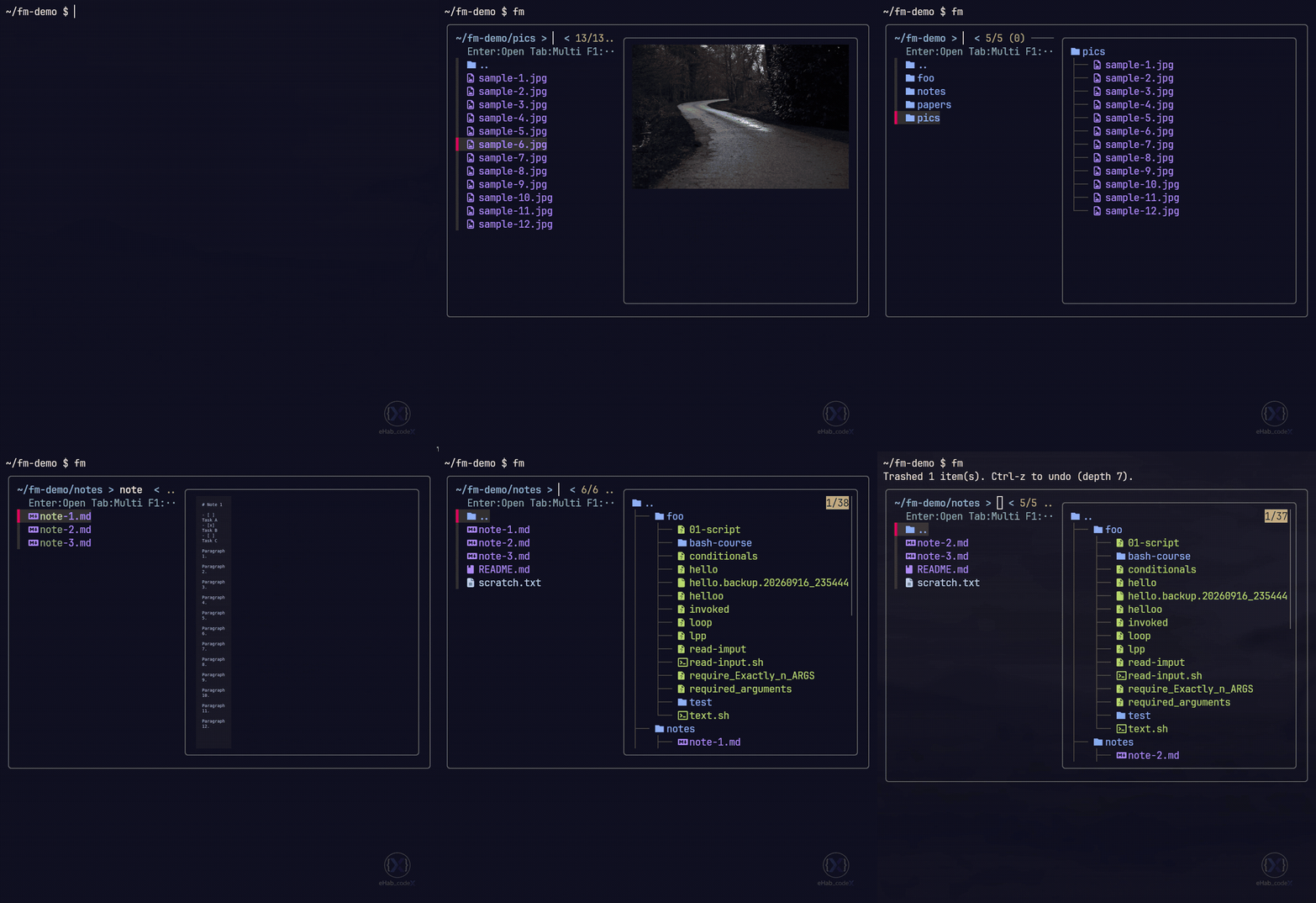
Features
- 🗂️ Fuzzy navigation —
fzf-driven file list with instant filtering - 🖼️ Inline previews — images, videos, PDFs, and Markdown, rendered by Kitty
- 🖼️ Gallery grid — full-screen thumbnail browser with vim-style keys
- 🗑️ Trash with undo —
Ctrl-Zwalks back through your last 10 trash operations - 🔍 Content search —
Ctrl-Frunsripgrepon selected files - 📝 Bulk rename — edit a list of names in
$EDITOR, then commit - 🌳 Smart sorting — by name, size, mtime, or extension
- 🧭 Jump anywhere —
zoxidefrecency, bookmarks, git mode - ⚡ Cached thumbnails — invalidation via
mtime+size, parallel workers - 🎨 Nerd Font icons — via
eza, with syntax highlighting viabat
Install
Manual
git clone https://github.com/eHab-codeX/fm.git ~/.local/share/fm
ln -sf ~/.local/share/fm/fm ~/.local/bin/fm
Keybindings
Press F1 inside fm for the same list. All bindings work in a
standard terminal; some mouse actions require Kitty.
File list
| Key | Action |
|---|---|
| Enter | Open file / enter directory (on ..: go up) |
| Tab | Multi-select |
| Esc | Quit |
| F1 / Alt+H | Help |
Actions
| Key | Action |
|---|---|
| Ctrl+D / Alt+D | Move selection to trash |
| Ctrl+Z | Undo last trash batch (pops the undo stack) |
| Alt+T | Open trash browser |
| Ctrl+Y | Copy absolute path(s) to clipboard |
| Ctrl+O | Force open externally (xdg-open) |
| Ctrl+N | New file (end with / for a directory) |
| Ctrl+E | Rename selected item |
| Alt+M / Ctrl+W | Bulk rename via $EDITOR |
| Ctrl+K | Move selection to a destination |
| Ctrl+P | Copy selection to a destination |
| Ctrl+L | Create symlink(s) to selection |
| Alt+I | Show file info (stat, file, exiftool) |
Search & jump
| Key | Action |
|---|---|
| Ctrl+F | Search inside selected file(s) with ripgrep |
| Alt+Z | Zoxide jump (frecency-ranked directories) |
| Ctrl+B | Bookmarks (Enter: jump/add, Ctrl+X: delete) |
fm <query> | Shell-side: jump to best zoxide match |
View
| Key | Action |
|---|---|
| Ctrl+S | Cycle sort: name → size → mtime → ext |
| Ctrl+R | Toggle recursive listing (depth 1 ↔ 5) |
| Ctrl+H / Alt+. | Toggle hidden files |
| Ctrl+G | Git mode (modified/untracked files) |
| Ctrl+T | Toggle contact-sheet preview |
| Alt+J / Alt+K | Next / previous page of contact sheet |
| Alt+N / Alt+P | Same as above |
| Alt+G | Open full-screen gallery grid |
Preview pane
| Key | Action |
|---|---|
| Ctrl+V | Scroll text preview one page down |
| Ctrl+U | Scroll text preview one page up |
| F3 / F2 | Same as above (backup keys) |
Contact sheets are a single image — use Alt+J / Alt+K to page them, not the scroll keys.
Trash browser (Alt+T)
| Key | Action |
|---|---|
| Enter | Restore selected item(s) |
| Ctrl+D | Permanently delete (asks to confirm) |
| Ctrl+Y | Copy original path(s) to clipboard |
| Ctrl+F | Search inside all trashed files |
| Ctrl+X | Empty the entire trash (asks to confirm) |
Gallery grid (Alt+G)
| Key | Action |
|---|---|
| ← ↓ ↑ → / H J K L | Move selection |
| PgUp / PgDn | Move one screen |
| g / G | First / last |
| Mouse wheel | Scroll rows |
| Left click | Select item |
| Double click | Open (folder: enter / file: full screen) |
| Enter | Folder: enter · File: full-screen view |
| Backspace / - | Parent directory |
| Space | Mark / unmark |
| a / A | Mark-all visible / Unmark-all |
| o | Open marked (or selected) externally |
| y | Copy absolute path(s) |
| x / Delete | Move to trash (asks to confirm) |
| s | Cycle sort: name / mtime / size |
| + / = · _ | Bigger / smaller thumbnails |
| r | Reload |
| f | Leave gallery, focus file in file list |
| ? | Help |
| q / Esc | Close gallery |
Mouse
| Action | Where | Effect |
|---|---|---|
| Double-click | File list | Open file / enter directory |
| Right-click | File list | Go to parent directory |
| Wheel | File list | Scroll list (or preview, if hovering it) |
| Double-click | Any picker | Select |
| Right-click | Any picker | Cancel |
Note: Backspace can't go up in the file list —
fzfuses it for editing the query. Use the..entry, or Backspace in the gallery grid.
Requirements
| Dep | Purpose | Required |
|---|---|---|
bash >= 5 | Uses EPOCHREALTIME, ${var,,} | ✅ |
fzf | The picker itself | ✅ |
eza | Icons + colored listing | ✅ |
ripgrep | Ctrl-F content search | ✅ |
trash-cli | Ctrl-D / undo stack | ✅ |
kitty + kitten | Inline previews, gallery grid | recommended |
bat | Syntax highlighting | recommended |
imagemagick | Contact sheets, MD → PNG | recommended |
fd | Faster file discovery | optional |
pdftoppm (poppler) | PDF thumbnails | optional |
ffmpeg / ffmpegthumbnailer | Video thumbnails | optional |
glow or mdcat | Rendered Markdown previews | optional |
zoxide | Alt-Z frecency jump | optional |
Arch one-liner:
sudo pacman -S fzf eza ripgrep trash-cli bat imagemagick fd poppler ffmpegthumbnailer glow zoxide
Similar repos


A keyboard-driven terminal file manager built on fzf, eza, and Kitty — icons, thumbnails, gallery grid, trash browser.
Shell
2
3 commits
updated Oct 4, 2026
See what people are saying
README
fm
A keyboard-driven terminal file manager built on
fzf,eza, and Kitty's image protocol.
Features
- 🗂️ Fuzzy navigation —
fzf-driven file list with instant filtering - 🖼️ Inline previews — images, videos, PDFs, and Markdown, rendered by Kitty
- 🖼️ Gallery grid — full-screen thumbnail browser with vim-style keys
- 🗑️ Trash with undo —
Ctrl-Zwalks back through your last 10 trash operations - 🔍 Content search —
Ctrl-Frunsripgrepon selected files - 📝 Bulk rename — edit a list of names in
$EDITOR, then commit - 🌳 Smart sorting — by name, size, mtime, or extension
- 🧭 Jump anywhere —
zoxidefrecency, bookmarks, git mode - ⚡ Cached thumbnails — invalidation via
mtime+size, parallel workers - 🎨 Nerd Font icons — via
eza, with syntax highlighting viabat
Install
Manual
git clone https://github.com/eHab-codeX/fm.git ~/.local/share/fm
ln -sf ~/.local/share/fm/fm ~/.local/bin/fm
Keybindings
Press F1 inside fm for the same list. All bindings work in a
standard terminal; some mouse actions require Kitty.
File list
| Key | Action |
|---|---|
| Enter | Open file / enter directory (on ..: go up) |
| Tab | Multi-select |
| Esc | Quit |
| F1 / Alt+H | Help |
Actions
| Key | Action |
|---|---|
| Ctrl+D / Alt+D | Move selection to trash |
| Ctrl+Z | Undo last trash batch (pops the undo stack) |
| Alt+T | Open trash browser |
| Ctrl+Y | Copy absolute path(s) to clipboard |
| Ctrl+O | Force open externally (xdg-open) |
| Ctrl+N | New file (end with / for a directory) |
| Ctrl+E | Rename selected item |
| Alt+M / Ctrl+W | Bulk rename via $EDITOR |
| Ctrl+K | Move selection to a destination |
| Ctrl+P | Copy selection to a destination |
| Ctrl+L | Create symlink(s) to selection |
| Alt+I | Show file info (stat, file, exiftool) |
Search & jump
| Key | Action |
|---|---|
| Ctrl+F | Search inside selected file(s) with ripgrep |
| Alt+Z | Zoxide jump (frecency-ranked directories) |
| Ctrl+B | Bookmarks (Enter: jump/add, Ctrl+X: delete) |
fm <query> | Shell-side: jump to best zoxide match |
View
| Key | Action |
|---|---|
| Ctrl+S | Cycle sort: name → size → mtime → ext |
| Ctrl+R | Toggle recursive listing (depth 1 ↔ 5) |
| Ctrl+H / Alt+. | Toggle hidden files |
| Ctrl+G | Git mode (modified/untracked files) |
| Ctrl+T | Toggle contact-sheet preview |
| Alt+J / Alt+K | Next / previous page of contact sheet |
| Alt+N / Alt+P | Same as above |
| Alt+G | Open full-screen gallery grid |
Preview pane
| Key | Action |
|---|---|
| Ctrl+V | Scroll text preview one page down |
| Ctrl+U | Scroll text preview one page up |
| F3 / F2 | Same as above (backup keys) |
Contact sheets are a single image — use Alt+J / Alt+K to page them, not the scroll keys.
Trash browser (Alt+T)
| Key | Action |
|---|---|
| Enter | Restore selected item(s) |
| Ctrl+D | Permanently delete (asks to confirm) |
| Ctrl+Y | Copy original path(s) to clipboard |
| Ctrl+F | Search inside all trashed files |
| Ctrl+X | Empty the entire trash (asks to confirm) |
Gallery grid (Alt+G)
| Key | Action |
|---|---|
| ← ↓ ↑ → / H J K L | Move selection |
| PgUp / PgDn | Move one screen |
| g / G | First / last |
| Mouse wheel | Scroll rows |
| Left click | Select item |
| Double click | Open (folder: enter / file: full screen) |
| Enter | Folder: enter · File: full-screen view |
| Backspace / - | Parent directory |
| Space | Mark / unmark |
| a / A | Mark-all visible / Unmark-all |
| o | Open marked (or selected) externally |
| y | Copy absolute path(s) |
| x / Delete | Move to trash (asks to confirm) |
| s | Cycle sort: name / mtime / size |
| + / = · _ | Bigger / smaller thumbnails |
| r | Reload |
| f | Leave gallery, focus file in file list |
| ? | Help |
| q / Esc | Close gallery |
Mouse
| Action | Where | Effect |
|---|---|---|
| Double-click | File list | Open file / enter directory |
| Right-click | File list | Go to parent directory |
| Wheel | File list | Scroll list (or preview, if hovering it) |
| Double-click | Any picker | Select |
| Right-click | Any picker | Cancel |
Note: Backspace can't go up in the file list —
fzfuses it for editing the query. Use the..entry, or Backspace in the gallery grid.
Requirements
| Dep | Purpose | Required |
|---|---|---|
bash >= 5 | Uses EPOCHREALTIME, ${var,,} | ✅ |
fzf | The picker itself | ✅ |
eza | Icons + colored listing | ✅ |
ripgrep | Ctrl-F content search | ✅ |
trash-cli | Ctrl-D / undo stack | ✅ |
kitty + kitten | Inline previews, gallery grid | recommended |
bat | Syntax highlighting | recommended |
imagemagick | Contact sheets, MD → PNG | recommended |
fd | Faster file discovery | optional |
pdftoppm (poppler) | PDF thumbnails | optional |
ffmpeg / ffmpegthumbnailer | Video thumbnails | optional |
glow or mdcat | Rendered Markdown previews | optional |
zoxide | Alt-Z frecency jump | optional |
Arch one-liner:
sudo pacman -S fzf eza ripgrep trash-cli bat imagemagick fd poppler ffmpegthumbnailer glow zoxide