
A declarative desktop GUI framework for Go.
See the codeSee what people are saying (1)
README

A declarative desktop GUI framework for Go.


Quick start · Examples · Documents
Highlights
- Write your UI in Go. Compose immutable
Viewdescriptions with typed props and callbacks. dxui reconciles them with an internal retained tree. - Build without cgo. Framework and application builds support
CGO_ENABLED=0. - Render on demand. An event- and deadline-driven loop waits when idle.
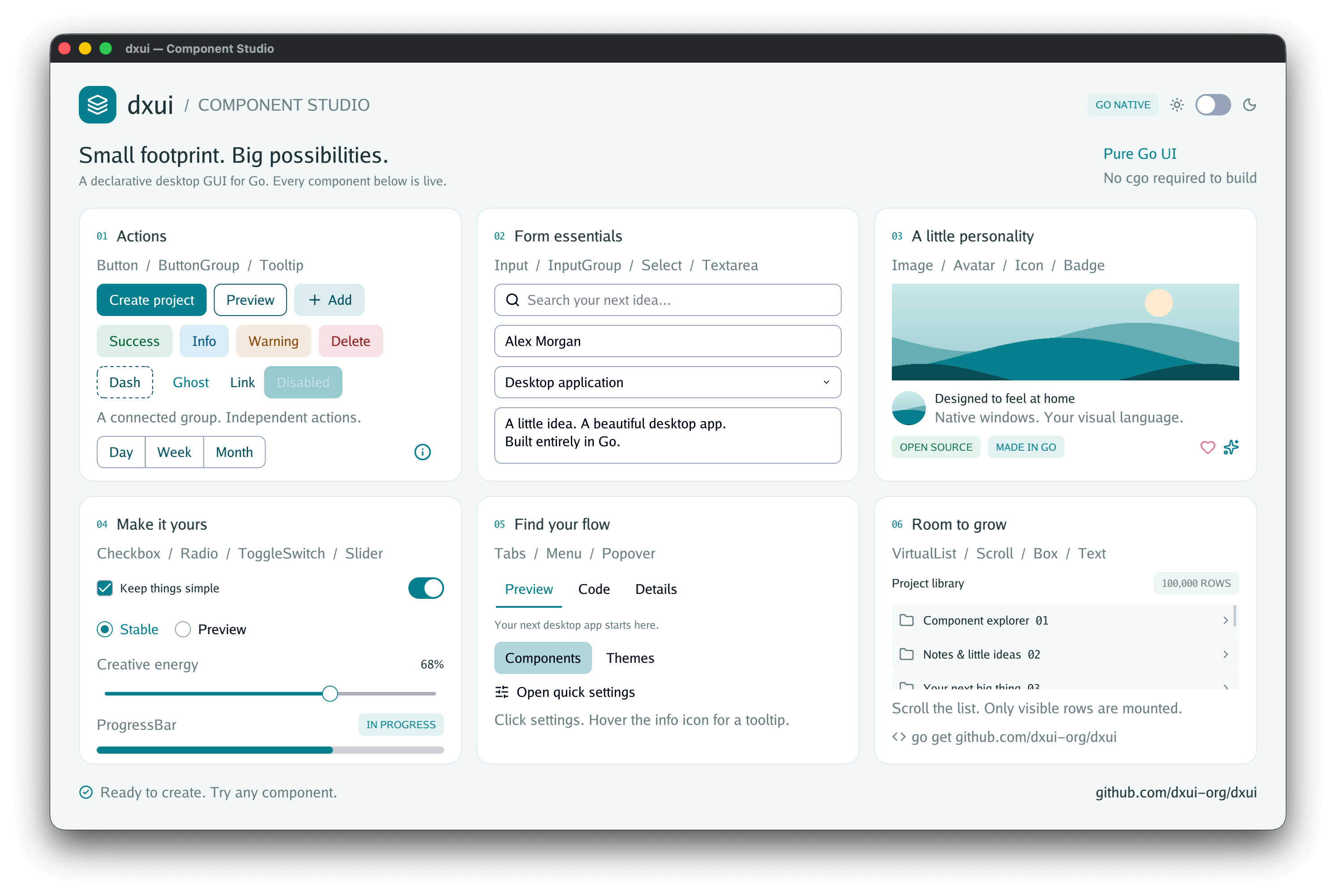
- Compose everyday interfaces. Inputs, buttons, menus, tabs, overlays, images, and other controls share one styling and interaction model.
- Customize the appearance. Typed theme tokens, runtime light/dark switching, borders, rounded corners, shadows, and interaction states.
- Handle larger applications. Independent native child windows and a keyed, fixed-height virtual list for long collections.
- Use Go-native resources. Pure-Go text and image processing, plus
individually linkable Lucide icons through
github.com/dxui-org/dxui/icon.
Quick start
Requirements
- Go 1.25 or newer.
- A native desktop environment to run GUI examples.
Run an example
From a local checkout of this repository:
go run ./examples/components
Explore the component catalog, or try a smaller application:
go run ./examples/calc
go run ./examples/login
To try the login example with software rendering:
go run ./examples/login -software
Create an application
Initialize the project:
go mod init example.com/hello-dxui
go get github.com/dxui-org/dxui
Save the following as main.go:
package main

import (
	"log"

	"github.com/dxui-org/dxui"
)

func main() {
	app := dxui.NewApp(dxui.AppOptions{
		Title: "Hello dxui", Width: 480, Height: 240,
	})
	name := ""

	root := func() dxui.View {
		return dxui.Box(dxui.BoxProps{
			Style: dxui.Style{Padding: dxui.Padding(24)},
			Gap:   12,
		},
			dxui.Label("What is your name?"),
			dxui.Input(dxui.InputProps{
				Key: "name", Value: name, Placeholder: "Your name",
				OnChange: dxui.Assign(&name),
			}),
			dxui.Label("Hello, " + name + "!"),
			dxui.TextButton(dxui.ButtonProps{OnPress: app.Close}, "Close"),
		)
	}

	if err := app.Run(root); err != nil {
		log.Fatal(err)
	}
}
Run it with go run .. To build explicitly without cgo:
# macOS / Linux
env CGO_ENABLED=0 go build .
# Windows PowerShell
$env:CGO_ENABLED = "0"
go build .
State belongs to your application. UI callbacks update it, and dxui rebuilds
and reconciles the root description. Call App.Run directly from main; it
blocks until the application closes. Use App.Update to schedule state changes
from background goroutines.
Components
| Area | Components |
|---|---|
| Layout and scrolling | Box, Scroll, VirtualList |
| Text and media | Text, Label, Icon, Image, Avatar |
| Actions and groups | Button, TextButton, ButtonGroup, InputGroup |
| Forms | Input, Textarea, Select, Checkbox, Radio, ToggleSwitch, Slider |
| Navigation and overlays | Tabs, Menu, Popover, Tooltip |
| Status | Badge, ProgressBar |
Most components use props-first constructors.
Examples
Run any example from the repository root with go run ./examples/<name>.
| Example | What it demonstrates |
|---|---|
| components | Searchable component catalog, live properties, themes, and compositions |
| login | A complete login form and input interactions |
| calc | An interactive calculator with light/dark themes |
| multi_window | Independent child windows, state, and lifecycle |
| virtual_list | 100,000 fixed-height rows, keyed updates, and scrolling |
| icon_gallery | Lucide icon names, sizes, colors, and stroke widths |
| layout_gallery | Flex sizing, alignment, absolute positioning, and clipping |
| style_gallery | Borders, rounded corners, shadows, opacity, and themes |
| text_gallery | Fonts, CJK fallback, wrapping, alignment, and scaling |
| scroll_gallery | Scrolling and scrollbars |
| select_gallery | Selection controls and popup behavior |
Contributing
Bug reports, documentation improvements, and focused contributions are welcome. For a rendering or input issue, include your OS/architecture, Go version, reproduction steps, and a minimal example.
In a POSIX-compatible shell with make installed, run:
make ci
make race # requires a host/toolchain with cgo race support
make ci checks formatting, runs vet and tests, builds the framework and public
examples with cgo disabled, and invokes the tagged native lifecycle smoke test.
A skipped native test is not evidence that the GUI runs on that platform.
For core tests and example compilation in PowerShell:
$env:CGO_ENABLED = "0"
go test ./...
go build ./examples/...
License
dxui is licensed under the MIT License.
Bundled dependencies and assets have their own licenses. See third-party notices for icons, fonts, and other dependencies.
Contributors

5 commits
Similar repos


Languages
Go
98.7%
PowerShell
1.2%
A declarative desktop GUI framework for Go.
See the codeSee what people are saying (1)
README
A declarative desktop GUI framework for Go.
Quick start · Examples · Documents
Highlights
- Write your UI in Go. Compose immutable
Viewdescriptions with typed props and callbacks. dxui reconciles them with an internal retained tree. - Build without cgo. Framework and application builds support
CGO_ENABLED=0. - Render on demand. An event- and deadline-driven loop waits when idle.
- Compose everyday interfaces. Inputs, buttons, menus, tabs, overlays, images, and other controls share one styling and interaction model.
- Customize the appearance. Typed theme tokens, runtime light/dark switching, borders, rounded corners, shadows, and interaction states.
- Handle larger applications. Independent native child windows and a keyed, fixed-height virtual list for long collections.
- Use Go-native resources. Pure-Go text and image processing, plus
individually linkable Lucide icons through
github.com/dxui-org/dxui/icon.
Quick start
Requirements
- Go 1.25 or newer.
- A native desktop environment to run GUI examples.
Run an example
From a local checkout of this repository:
go run ./examples/components
Explore the component catalog, or try a smaller application:
go run ./examples/calc
go run ./examples/login
To try the login example with software rendering:
go run ./examples/login -software
Create an application
Initialize the project:
go mod init example.com/hello-dxui
go get github.com/dxui-org/dxui
Save the following as main.go:
package main

import (
	"log"

	"github.com/dxui-org/dxui"
)

func main() {
	app := dxui.NewApp(dxui.AppOptions{
		Title: "Hello dxui", Width: 480, Height: 240,
	})
	name := ""

	root := func() dxui.View {
		return dxui.Box(dxui.BoxProps{
			Style: dxui.Style{Padding: dxui.Padding(24)},
			Gap:   12,
		},
			dxui.Label("What is your name?"),
			dxui.Input(dxui.InputProps{
				Key: "name", Value: name, Placeholder: "Your name",
				OnChange: dxui.Assign(&name),
			}),
			dxui.Label("Hello, " + name + "!"),
			dxui.TextButton(dxui.ButtonProps{OnPress: app.Close}, "Close"),
		)
	}

	if err := app.Run(root); err != nil {
		log.Fatal(err)
	}
}
Run it with go run .. To build explicitly without cgo:
# macOS / Linux
env CGO_ENABLED=0 go build .
# Windows PowerShell
$env:CGO_ENABLED = "0"
go build .
State belongs to your application. UI callbacks update it, and dxui rebuilds
and reconciles the root description. Call App.Run directly from main; it
blocks until the application closes. Use App.Update to schedule state changes
from background goroutines.
Components
| Area | Components |
|---|---|
| Layout and scrolling | Box, Scroll, VirtualList |
| Text and media | Text, Label, Icon, Image, Avatar |
| Actions and groups | Button, TextButton, ButtonGroup, InputGroup |
| Forms | Input, Textarea, Select, Checkbox, Radio, ToggleSwitch, Slider |
| Navigation and overlays | Tabs, Menu, Popover, Tooltip |
| Status | Badge, ProgressBar |
Most components use props-first constructors.
Examples
Run any example from the repository root with go run ./examples/<name>.
| Example | What it demonstrates |
|---|---|
| components | Searchable component catalog, live properties, themes, and compositions |
| login | A complete login form and input interactions |
| calc | An interactive calculator with light/dark themes |
| multi_window | Independent child windows, state, and lifecycle |
| virtual_list | 100,000 fixed-height rows, keyed updates, and scrolling |
| icon_gallery | Lucide icon names, sizes, colors, and stroke widths |
| layout_gallery | Flex sizing, alignment, absolute positioning, and clipping |
| style_gallery | Borders, rounded corners, shadows, opacity, and themes |
| text_gallery | Fonts, CJK fallback, wrapping, alignment, and scaling |
| scroll_gallery | Scrolling and scrollbars |
| select_gallery | Selection controls and popup behavior |
Contributing
Bug reports, documentation improvements, and focused contributions are welcome. For a rendering or input issue, include your OS/architecture, Go version, reproduction steps, and a minimal example.
In a POSIX-compatible shell with make installed, run:
make ci
make race # requires a host/toolchain with cgo race support
make ci checks formatting, runs vet and tests, builds the framework and public
examples with cgo disabled, and invokes the tagged native lifecycle smoke test.
A skipped native test is not evidence that the GUI runs on that platform.
For core tests and example compilation in PowerShell:
$env:CGO_ENABLED = "0"
go test ./...
go build ./examples/...
License
dxui is licensed under the MIT License.
Bundled dependencies and assets have their own licenses. See third-party notices for icons, fonts, and other dependencies.
Similar repos
Contributors
5 commits
Languages
Go
98.7%
PowerShell
1.2%