
Headless Model Context Protocol server that gives coding agents
semantic access to Java code: the parser, index and refactoring engine of Apache NetBeans, which
runs headless underneath. Its technical name, used for the launcher, the artifacts and the data
directory, is dukehoff-mcp; agents see its tools under the server name java.
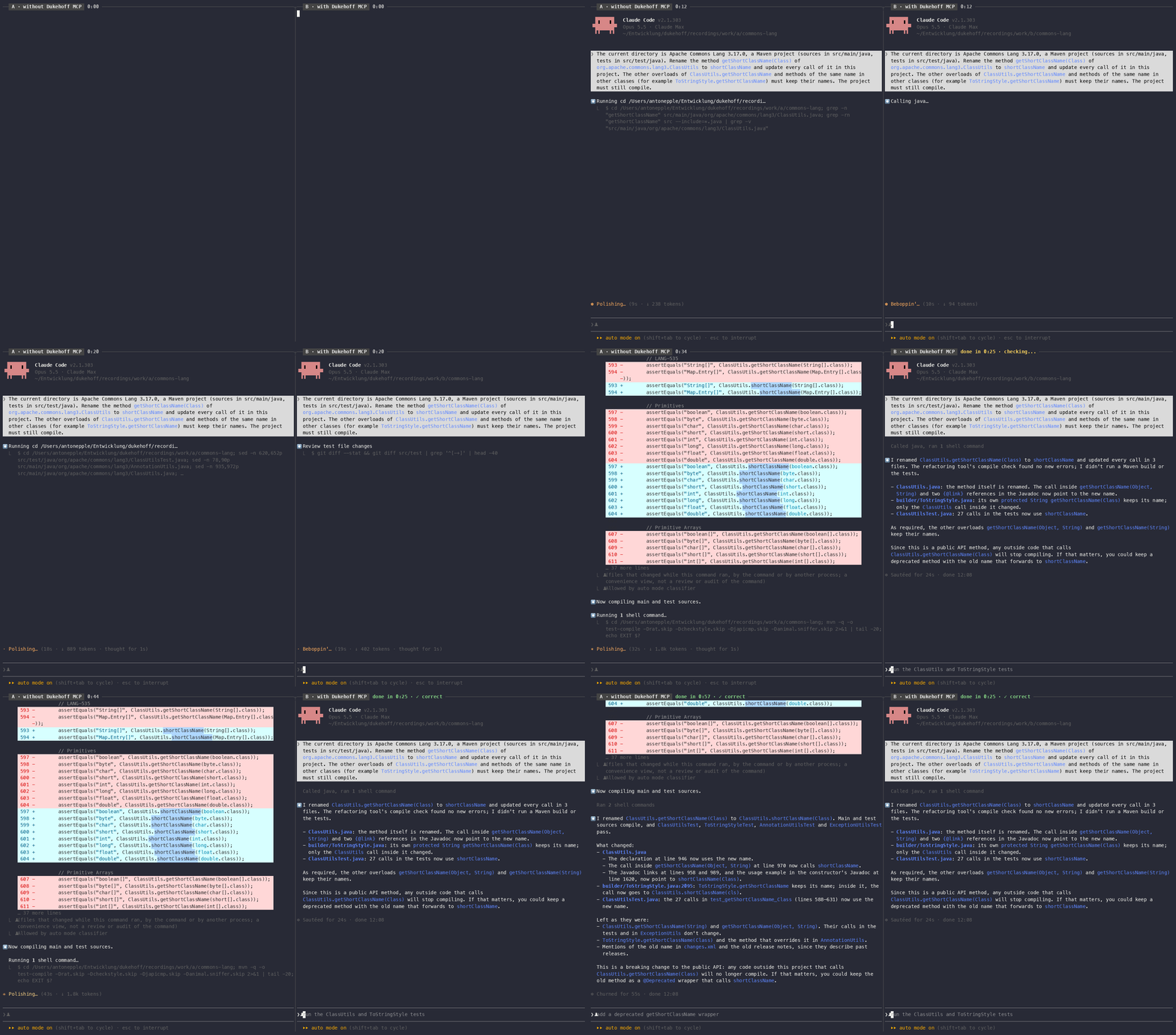
Same model, same task, at the same time: Claude Opus 5.5 renames one overload of
ClassUtils.getShortClassName in Apache Commons Lang, leaving the other overloads and a same-named
method of another class alone. Without the server (left) it searches with grep, edits with sed and
compiles with Maven; with it (right) it makes one rename call, which also checks that everything
still compiles. Both results are correct. In three runs this took 0:46–1:07 without and 0:18–0:25 with
the server; shown is the run with the middle time without it. Pauses are shortened in the video, the
times in the headers are real. Task and check,
recording script.
| Tool | What it does |
|---|---|
find_symbol | Types declared in the workspace by prefix, glob or partially qualified name, or members of them; with include_libraries also the JDK and the dependencies |
find_usages | Semantic references to a type, method, constructor or field (WhereUsedQuery); grouped by file, or with group_by: "caller" by the method, constructor or field that contains them, named by signature |
find_implementations | Subtypes of a type (all or direct) or overriding methods of a method; for a method also what it overrides or implements upwards, library declarations included |
outline | Members of a type or file: modifiers, canonical signatures, declared types, line numbers; for types of the JDK and the dependencies their public API (overloads, generics, deprecations) from the class files |
diagnostics | Compile errors (optionally warnings) of given files or the whole workspace, without a build |
rename | Renames a type, method or field with the refactoring engine; writes to disk, returns a unified diff |
move | Moves a top-level class to another package, updating package declaration, imports and references |
change_signature | Adds, removes, reorders, renames or retypes parameters, or changes name, return type or visibility of a method; updates callers and overriders |
safe_delete | Deletes a type or member only if it is unused; otherwise lists the blocking usages |
inline | Inlines a method or constant into all usages and removes it |
apply_rule | Structural search, or search and replace with a NetBeans declarative hint rule (Jackpot) across the workspace; dry run and path scope supported. Tested rule packs instead of a rule: junit5 (JUnit 4 to 5: assertions with the message moved last, assertThat to Hamcrest, annotations) modernize (try-with-resources, for-each, getOrDefault, isEmpty, valueOf) and jakarta (javax to jakarta for Servlet, JSP, EL, Persistence, Validation, Annotation, Inject, CDI, EJB, JAX-RS, Transaction, JAXB, Activation, Mail, JSON-P, JSON-B, JMS, Faces, WebSocket; the JDK's own javax packages and JCache stay); the result lists what is left for hand edits |
debug | Runs a JUnit test under the debugger (Maven, Gradle, or a NetBeans module through Ant) and stops once: at a method, a line or a thrown exception, optionally only where a condition holds. Returns where it stopped, the project's stack, the local variables of the top frames and the values of given expressions; the test JVM ends afterwards |
workspace_status | Opened projects, source roots, indexing state |
All refactoring tools write their changes to disk and return warnings plus a unified diff (git diff
format). Fatal problems stop them before anything changes.
They write only inside the workspace (in an IDE: the open projects), like an agent harness that treats
everything outside the session's folder as external. A refactoring that would also change a file
outside (a source folder of the build that lies elsewhere, for example) changes nothing and names those
files; the agent is told to ask the user and then call again with allow_outside (files or folders).
Folders that may always be changed are set per registration with --allow-writes <folder,...>
(relative to the workspace), in VS Code with the setting dukehoffMcp.allowedWritePaths.
Symbols are addressed by name, not by cursor position:
com.acme.Foo                    com.acme.Foo.Inner  /  com.acme.Foo$Inner
com.acme.Foo#count              com.acme.Foo#bar(String,int)
com.acme.Foo#<init>()           com.acme.Foo#Foo(String)
Requirements on the target machine:
java -jar bin\dukehoff-mcp.jar
(bin/dukehoff-mcp, a bash script, does the same on macOS and Linux). CI runs the end-to-end
smoke test on all three.javac (a JRE is not enough). dukehoff-mcp takes --jdk,
$DUKEHOFF_MCP_JDK, $JAVA_HOME, the java on the PATH or (macOS) /usr/libexec/java_home, in
this order. Use a JDK at least as new as the Java version of your projects: NetBeans compiles
them against that JDK's class library unless a project names another platform.Working in VS Code or NetBeans? Then you need no archive: the VS Code extension or the NetBeans plugin brings the server along.
Download the archive of the latest release from the
Releases page: dukehoff-mcp-<version>.tar.gz
for macOS and Linux, dukehoff-mcp-<version>.zip for Windows (SHA256SUMS has their checksums;
building it yourself: see Building). Unpack it anywhere, for example to /opt or C:\tools:
tar xzf dukehoff-mcp-<version>.tar.gz -C /opt      # creates /opt/dukehoffmcp, about 270 MB
/opt/dukehoffmcp/bin/dukehoff-mcp --version
/opt/dukehoffmcp/bin/dukehoff-mcp --check /path/to/project   # which JDK, data directory and workspace would be used
On Windows, unpack dukehoff-mcp-<version>.zip (Explorer, or tar -xf dukehoff-mcp-<version>.zip -C C:\tools), then:
java -jar C:\tools\dukehoffmcp\bin\dukehoff-mcp.jar --version
java -jar C:\tools\dukehoffmcp\bin\dukehoff-mcp.jar --check C:\path\to\project
The indexes are kept in %LOCALAPPDATA%\dukehoff-mcp on Windows and ~/.cache/dukehoff-mcp elsewhere.
For a team, unpack it to the same path on every machine: then a project's .mcp.json or
.vscode/mcp.json can be committed and works for everyone. To update, replace the folder; the
indexes under ~/.cache/dukehoff-mcp stay and are checked on the next start. To remove dukehoff-mcp, delete the
folder and ~/.cache/dukehoff-mcp.
The agent starts the launcher itself and talks to it over stdin/stdout; the launcher connects to the workspace's server (see What to expect). Let the launcher print the configuration with its own absolute path:
/opt/dukehoffmcp/bin/dukehoff-mcp --config claude                      # also: copilot, vscode, cursor, codex, omp
java -jar C:\tools\dukehoffmcp\bin\dukehoff-mcp.jar --config vscode    # Windows: java.exe -jar dukehoff-mcp.jar
On Windows, register java.exe with -jar ...\dukehoff-mcp.jar as --config prints it, not dukehoff-mcp.cmd:
clients start .cmd files through cmd /c, which breaks paths with spaces. The JDK --config
names is the one that ran it; java -jar works with any Java 17+ on the PATH.
claude mcp add --scope user java -- /opt/dukehoffmcp/bin/dukehoff-mcp
or, shared with the team, .mcp.json in the project:
{ "mcpServers": { "java": { "command": "/opt/dukehoffmcp/bin/dukehoff-mcp", "args": [] } } }
The first start indexes the project, and a refactoring right after a start waits for the index
check, so allow time: MCP_TIMEOUT=120000 MCP_TOOL_TIMEOUT=600000 (shell profile, or "env" in
~/.claude/settings.json).
The easiest way is the extension Dukehoff MCP for Java from the
VS Code Marketplace
(Extensions view, search "Dukehoff MCP"; or code --install-extension dukehoff.dukehoff-mcp-java).
Each release also carries it as dukehoff-mcp-java-<version>.vsix on the
Releases page ("..." menu of the Extensions
view, "Install from VSIX..."). It needs no download of the runtime above: it brings the Apache NetBeans
Language Server extension along and runs inside its NetBeans; the tools appear in Copilot's agent mode
as the server Java. It needs NetBeans' Java support enabled (netbeans.javaSupport.enabled, the
default). Claude Code's VS Code extension has its own MCP configuration and does not see that server;
the command Dukehoff MCP: Use the Java tools in Claude Code registers it there for the folder.
Refactorings write their files themselves, apart from the agent's own edits. The extension shows each
one in a notification with Review (a diff of all files it changed) and Undo; the setting
dukehoffMcp.refactoringReview chooses notify (default), openDiff (open the diff right away) or
off.
With the standalone runtime instead: .vscode/mcp.json in the project (or the user configuration,
command palette "MCP: Open User Configuration", for all projects):
{ "servers": { "java": { "type": "stdio", "command": "/opt/dukehoffmcp/bin/dukehoff-mcp", "args": ["${workspaceFolder}"] } } }
Windows:
{ "servers": { "java": { "type": "stdio",
    "command": "C:\\Program Files\\Eclipse Adoptium\\jdk-21\\bin\\java.exe",
    "args": ["-jar", "C:\\tools\\dukehoffmcp\\bin\\dukehoff-mcp.jar", "${workspaceFolder}"] } } }
Then start the server from the MCP view or mcp.json ("Start"), and use Copilot Chat in agent mode;
the tools appear under the java server.
~/.copilot/mcp-config.json (Windows: %USERPROFILE%\.copilot\mcp-config.json); merge it into the
file if it exists. "tools": ["*"] is required and enables all tools:
{ "mcpServers": { "java": { "type": "local", "command": "/opt/dukehoffmcp/bin/dukehoff-mcp", "args": [], "tools": ["*"] } } }
Windows:
{ "mcpServers": { "java": { "type": "local",
    "command": "C:\\Program Files\\Eclipse Adoptium\\jdk-21\\bin\\java.exe",
    "args": ["-jar", "C:\\tools\\dukehoffmcp\\bin\\dukehoff-mcp.jar"], "tools": ["*"] } } }
Or interactively: /mcp add in a Copilot CLI session, with the command and arguments above. Start
copilot in the project directory: the server works on the directory it is started in. /mcp show
lists the server and its tools.
~/.codex/config.toml:
[mcp_servers.java]
command = "/opt/dukehoffmcp/bin/dukehoff-mcp"
args = []
startup_timeout_sec = 120
.cursor/mcp.json or .omp/mcp.json in the project (omp also reads .mcp.json, .cursor/ and
.vscode/ files):
{ "mcpServers": { "java": { "command": "/opt/dukehoffmcp/bin/dukehoff-mcp", "args": [] } } }
Clients start the server in the project directory, so no workspace argument is needed; give one
(dukehoff-mcp /path/to/project) if your client starts servers elsewhere. A workspace can be one project
or a folder of projects (Maven, Gradle, Ant).
If you work in NetBeans, an agent in a terminal can use the running IDE instead of a NetBeans of its own: the same index, the projects you have open, and the refactorings show in the editor at once. This needs no runtime archive:
dukehoff-mcp-netbeans-<version>.nbm from the
Releases page, then in NetBeans 31 or
newer Tools > Plugins > Downloaded > Add Plugins..., Install, and restart if asked.
The IDE then starts the server by itself.dukehoff-mcp-launcher-<version>.jar from the same release and let it print the
registration with --ide, e.g. java -jar dukehoff-mcp-launcher-<version>.jar --config claude --ide.With the runtime installed, dukehoff-mcp --config claude --ide does the same. The agent's folder (where it was started) is its workspace: the
tools see the projects open in NetBeans there, name files relative to it and write only inside it. If
no project there is open, the tools say so; open it in NetBeans. NetBeans announces the server in
~/.dukehoff-mcp/ide/; -J-Ddukehoffmcp.ide.server=false (in etc/netbeans.conf) turns it off.
Agents pick tools by what they read, and project instructions weigh most. A short section in the
project's CLAUDE.md (Claude Code) or AGENTS.md (Copilot, Codex, Cursor and others) makes them use
the tools where they pay. In our evaluation, with this section in CLAUDE.md, Claude Code used
apply_rule for a modernization on its own in 3 of 3 sessions (0 of 3 without), with a third fewer
turns; the VS Code extension offers to add it (command "Add Java tool hints to AGENTS.md").
## Java code

To rename, move or delete Java code or change a method's signature, use the Java MCP tools
(`rename`, `move`, `change_signature`, `safe_delete`) instead of editing files: one call updates
every reference, also in other modules, and checks that everything still compiles.
To find who calls or uses a method, field or class, use `find_usages` (`group_by: "caller"` names the
calling methods).
For the same kind of change at many places (migrations, modernizations, replacing an API), use
`apply_rule`: structural rewrite rules that check types and match whole statements, not text.
For JUnit 4 to 5, javax to jakarta or a Java modernization, start with `apply_rule` and
`pack: "junit5"`, `"jakarta"` or `"modernize"` (a dry run first), then finish what the result lists by hand.
Before calling a method of the JDK or a dependency whose exact signature you are unsure of, look it
up with `outline`.
Clients limit the number of tools, and every tool description costs context in each session. A
registration can offer a subset with --tools: tool names, groups and presets, comma separated.
--config puts the selection into the printed configuration:
dukehoff-mcp --config copilot --tools copilot          # the core group: diagnostics, find_usages, outline, rename
dukehoff-mcp --config claude --tools core,refactor     # plus change_signature, move, safe_delete, inline
| Group | Tools |
|---|---|
core | diagnostics, find_usages, outline, rename |
refactor | change_signature, move, safe_delete, inline, find_usages, diagnostics |
migrate | apply_rule |
debug | debug |
all | every tool (the default) |
Presets: copilot (= core), claude-code (= all). Several registrations with different
selections (e.g. one per client) share the workspace's server and index. The server's instructions
and hints name only the tools a registration offers. To change the selection, edit the registration's
args and restart the session; nothing needs reinstalling.
workspace_status shows the progress. The limit stays below the clients'
request timeouts (Copilot CLI: 3 minutes); for a client with a shorter one, pass e.g.
-- -J-Ddukehoffmcp.wait.seconds=50 to the launcher.find_usages on Commons Lang, against 10 s when NetBeans has
to start and check its index. NetBeans watches the files meanwhile, so the index stays current.
Refactorings of different sessions run one after the other. An idle server holds about 1.5–2 GB of
memory; it stops after 30 minutes without a session (-- -J-Ddukehoffmcp.idle.minutes=<n>), when the
workspace folder is deleted, or with dukehoff-mcp --stop <workspace>; --check shows whether one runs.
After an update the next session replaces a server of the old version. --no-daemon runs a
server only for one session (as before; also what a NetBeans installation with the module does).~/.cache/dukehoff-mcp
(--data / $DUKEHOFF_MCP_DATA). Other NetBeans instances, including a running IDE, are not affected.--locale to change).~/.cache/dukehoff-mcp/<workspace>-<id>/userdir/var/log/messages.log, on Windows
%LOCALAPPDATA%\dukehoff-mcp\<workspace>-<id>\userdir\var\log\messages.log (usually
C:\Users\<you>\AppData\Local\...; --check <workspace> prints the directory). The persistent
server's own output goes to daemon.log in that directory. Each start rotates
the log; the previous two are messages.log.1 and .2. Every tool call logs its duration
(dukehoff-mcp call:), a wait for the index longer than a second its phases (dukehoff-mcp wait:), and a call
still running after 30 s its stack, the first one also all threads (dukehoff-mcp slow call:): send these
lines when a client reports a timeout.--no-daemon, or a NetBeans
installation): each gets its own NetBeans; the second uses the data directory <workspace>-<id>-2
(then -3, ...), which indexes once on its first use and then needs about as much memory as the
first. The same happens when a server for one session already runs where a persistent one would go.dukehoff-mcp call: ... ms for it means the answer did not reach the client: check that only one
dukehoff-mcp timing: initialize line per log carries the same JVM start time.mvn does not show (diagnostics): the dependencies could not be
resolved. NetBeans' Maven reads ~/.m2/settings.xml (on Windows %USERPROFILE%\.m2\settings.xml)
like mvn does, so an Artifactory or Nexus mirror, proxies and credentials configured there apply;
running mvn dependency:go-offline once in the project fills the local repository. Gradle
projects use Gradle's own configuration (~/.gradle/gradle.properties, init scripts, the
project's wrapper).--check shows which one is used; set $DUKEHOFF_MCP_JDK or pass --jdk.xattr -dr com.apple.quarantine /opt/dukehoffmcp.Needs a JDK 17+ and Maven 3.9:
mvn clean package    # runtime/target/dukehoff-mcp-<version>.tar.gz and .zip (and the module, server/target/*.nbm)
tests/smoke/smoke.sh runtime/target/dukehoffmcp/bin/dukehoff-mcp          # end-to-end test, exit 0 = pass
python3 tests/smoke/project-types.py runtime/target/dukehoffmcp/bin/dukehoff-mcp   # Maven, Gradle, Ant
The runtime is a headless NetBeans built from the NetBeans clusters on Maven Central (release set in
pom.xml, netbeans.version, currently NetBeans 31), without the modules a headless server does
not need, plus the module of this repository. It ships LICENSE, NOTICE and the license texts of
everything bundled; see runtime/LICENSING.md. The module uses public NetBeans
APIs only and also runs in a NetBeans 31 installation (unpack the NBM's netbeans/ folder into the
java/ cluster and copy launcher/dukehoff-mcp to java/bin/).
mkdir -p <userdir>/var && touch <userdir>/var/imported
/opt/dukehoffmcp/bin/dukehoffmcp --nogui --nosplash \
    -J-Djava.awt.headless=true -J-Duser.language=en -J-Duser.country=US \
    --jdkhome /path/to/jdk-17+ --userdir <userdir> --cachedir <cachedir> \
    --start-mcp-server --mcp-workspace /path/to/project
<userdir>/var/imported, a fresh userdir offers to import the settings of an installed
NetBeans; the dialog fails headless and NetBeans exits before the server starts.eval/run.sh measures whether the server helps: it runs four tasks with Claude Code in headless
mode, once with only its built-in tools and once with this server added, each on a fresh copy of a
generated two-module project full of traps for text search (overloads, same-named methods of
unrelated classes, names in comments and strings, String next to StringBuilder):
| Task | Checked by |
|---|---|
| 01 find the callers of one overload | exact path:line list, no source changes |
| 02 rename a method across modules | compiles, only the right apply renamed |
| 03 remove a deprecated method, migrate callers | compiles, tests pass, no call left |
04 String.length() == 0 to isEmpty() | compiles, StringBuilder, arrays and collections untouched |
It records correctness, turns, tokens, cost, time and the tools the agent called per run (the
session transcripts are kept as stream-json; --reps N for repetitions) and prints a Markdown
summary. Results so far: eval/RESULTS.md. Every run is a real Claude Code session
on your login and costs tokens. The checks were validated by solving all tasks with the server's
own tools. eval/nb-tasks has three tasks for the java/ folder of an Apache NetBeans checkout
(run.sh --repo <checkout> --workspace java --tasks-dir eval/nb-tasks --dukehoff-mcp <launcher>); their
expected answers fit apache/netbeans at commit c080a039d.
eval/record.sh records a task as a side-by-side terminal video, without and with the server (usage in the script).
McpServer) is a small JSON-RPC-over-stdio implementation on top of
json_simple, so the module needs no new external libraries. Only the tools capability is
implemented. If more of the protocol is needed it can be replaced by the official MCP Java SDK
without touching the tools.OpenProjects, then waiting for the initial scan.Contributions are welcome; see CONTRIBUTING.md for building, testing and the contributor license agreement.
dukehoff-mcp is developed with AI assistance: most of the code, tests and documentation are written by
Claude (Anthropic) in Claude Code, directed, reviewed and tested by the maintainers. Commits made
that way carry a Co-Authored-By: Claude trailer. The evaluation in eval/ is how we check that
the tools actually help agents, and the smoke tests run every tool end to end.
dukehoff-mcp is licensed under the Apache License, Version 2.0. Copyright 2026 Dukehoff GmbH.
It runs on Apache NetBeans, which is licensed under the Apache
License 2.0 as well; dukehoff-mcp is not part of, nor endorsed by, the Apache NetBeans project or the
Apache Software Foundation. "Apache", "NetBeans" and "Apache NetBeans" are trademarks of the Apache
Software Foundation. The runtime distribution bundles NetBeans and third-party components under
their own licenses; see runtime/LICENSING.md and runtime/src/main/licenses.
5 followers · starred Oct 2026
Headless Model Context Protocol server that gives coding agents
semantic access to Java code: the parser, index and refactoring engine of Apache NetBeans, which
runs headless underneath. Its technical name, used for the launcher, the artifacts and the data
directory, is dukehoff-mcp; agents see its tools under the server name java.
Same model, same task, at the same time: Claude Opus 5.5 renames one overload of
ClassUtils.getShortClassName in Apache Commons Lang, leaving the other overloads and a same-named
method of another class alone. Without the server (left) it searches with grep, edits with sed and
compiles with Maven; with it (right) it makes one rename call, which also checks that everything
still compiles. Both results are correct. In three runs this took 0:46–1:07 without and 0:18–0:25 with
the server; shown is the run with the middle time without it. Pauses are shortened in the video, the
times in the headers are real. Task and check,
recording script.
| Tool | What it does |
|---|---|
find_symbol | Types declared in the workspace by prefix, glob or partially qualified name, or members of them; with include_libraries also the JDK and the dependencies |
find_usages | Semantic references to a type, method, constructor or field (WhereUsedQuery); grouped by file, or with group_by: "caller" by the method, constructor or field that contains them, named by signature |
find_implementations | Subtypes of a type (all or direct) or overriding methods of a method; for a method also what it overrides or implements upwards, library declarations included |
outline | Members of a type or file: modifiers, canonical signatures, declared types, line numbers; for types of the JDK and the dependencies their public API (overloads, generics, deprecations) from the class files |
diagnostics | Compile errors (optionally warnings) of given files or the whole workspace, without a build |
rename | Renames a type, method or field with the refactoring engine; writes to disk, returns a unified diff |
move | Moves a top-level class to another package, updating package declaration, imports and references |
change_signature | Adds, removes, reorders, renames or retypes parameters, or changes name, return type or visibility of a method; updates callers and overriders |
safe_delete | Deletes a type or member only if it is unused; otherwise lists the blocking usages |
inline | Inlines a method or constant into all usages and removes it |
apply_rule | Structural search, or search and replace with a NetBeans declarative hint rule (Jackpot) across the workspace; dry run and path scope supported. Tested rule packs instead of a rule: junit5 (JUnit 4 to 5: assertions with the message moved last, assertThat to Hamcrest, annotations) modernize (try-with-resources, for-each, getOrDefault, isEmpty, valueOf) and jakarta (javax to jakarta for Servlet, JSP, EL, Persistence, Validation, Annotation, Inject, CDI, EJB, JAX-RS, Transaction, JAXB, Activation, Mail, JSON-P, JSON-B, JMS, Faces, WebSocket; the JDK's own javax packages and JCache stay); the result lists what is left for hand edits |
debug | Runs a JUnit test under the debugger (Maven, Gradle, or a NetBeans module through Ant) and stops once: at a method, a line or a thrown exception, optionally only where a condition holds. Returns where it stopped, the project's stack, the local variables of the top frames and the values of given expressions; the test JVM ends afterwards |
workspace_status | Opened projects, source roots, indexing state |
All refactoring tools write their changes to disk and return warnings plus a unified diff (git diff
format). Fatal problems stop them before anything changes.
They write only inside the workspace (in an IDE: the open projects), like an agent harness that treats
everything outside the session's folder as external. A refactoring that would also change a file
outside (a source folder of the build that lies elsewhere, for example) changes nothing and names those
files; the agent is told to ask the user and then call again with allow_outside (files or folders).
Folders that may always be changed are set per registration with --allow-writes <folder,...>
(relative to the workspace), in VS Code with the setting dukehoffMcp.allowedWritePaths.
Symbols are addressed by name, not by cursor position:
com.acme.Foo                    com.acme.Foo.Inner  /  com.acme.Foo$Inner
com.acme.Foo#count              com.acme.Foo#bar(String,int)
com.acme.Foo#<init>()           com.acme.Foo#Foo(String)
Requirements on the target machine:
java -jar bin\dukehoff-mcp.jar
(bin/dukehoff-mcp, a bash script, does the same on macOS and Linux). CI runs the end-to-end
smoke test on all three.javac (a JRE is not enough). dukehoff-mcp takes --jdk,
$DUKEHOFF_MCP_JDK, $JAVA_HOME, the java on the PATH or (macOS) /usr/libexec/java_home, in
this order. Use a JDK at least as new as the Java version of your projects: NetBeans compiles
them against that JDK's class library unless a project names another platform.Working in VS Code or NetBeans? Then you need no archive: the VS Code extension or the NetBeans plugin brings the server along.
Download the archive of the latest release from the
Releases page: dukehoff-mcp-<version>.tar.gz
for macOS and Linux, dukehoff-mcp-<version>.zip for Windows (SHA256SUMS has their checksums;
building it yourself: see Building). Unpack it anywhere, for example to /opt or C:\tools:
tar xzf dukehoff-mcp-<version>.tar.gz -C /opt      # creates /opt/dukehoffmcp, about 270 MB
/opt/dukehoffmcp/bin/dukehoff-mcp --version
/opt/dukehoffmcp/bin/dukehoff-mcp --check /path/to/project   # which JDK, data directory and workspace would be used
On Windows, unpack dukehoff-mcp-<version>.zip (Explorer, or tar -xf dukehoff-mcp-<version>.zip -C C:\tools), then:
java -jar C:\tools\dukehoffmcp\bin\dukehoff-mcp.jar --version
java -jar C:\tools\dukehoffmcp\bin\dukehoff-mcp.jar --check C:\path\to\project
The indexes are kept in %LOCALAPPDATA%\dukehoff-mcp on Windows and ~/.cache/dukehoff-mcp elsewhere.
For a team, unpack it to the same path on every machine: then a project's .mcp.json or
.vscode/mcp.json can be committed and works for everyone. To update, replace the folder; the
indexes under ~/.cache/dukehoff-mcp stay and are checked on the next start. To remove dukehoff-mcp, delete the
folder and ~/.cache/dukehoff-mcp.
The agent starts the launcher itself and talks to it over stdin/stdout; the launcher connects to the workspace's server (see What to expect). Let the launcher print the configuration with its own absolute path:
/opt/dukehoffmcp/bin/dukehoff-mcp --config claude                      # also: copilot, vscode, cursor, codex, omp
java -jar C:\tools\dukehoffmcp\bin\dukehoff-mcp.jar --config vscode    # Windows: java.exe -jar dukehoff-mcp.jar
On Windows, register java.exe with -jar ...\dukehoff-mcp.jar as --config prints it, not dukehoff-mcp.cmd:
clients start .cmd files through cmd /c, which breaks paths with spaces. The JDK --config
names is the one that ran it; java -jar works with any Java 17+ on the PATH.
claude mcp add --scope user java -- /opt/dukehoffmcp/bin/dukehoff-mcp
or, shared with the team, .mcp.json in the project:
{ "mcpServers": { "java": { "command": "/opt/dukehoffmcp/bin/dukehoff-mcp", "args": [] } } }
The first start indexes the project, and a refactoring right after a start waits for the index
check, so allow time: MCP_TIMEOUT=120000 MCP_TOOL_TIMEOUT=600000 (shell profile, or "env" in
~/.claude/settings.json).
The easiest way is the extension Dukehoff MCP for Java from the
VS Code Marketplace
(Extensions view, search "Dukehoff MCP"; or code --install-extension dukehoff.dukehoff-mcp-java).
Each release also carries it as dukehoff-mcp-java-<version>.vsix on the
Releases page ("..." menu of the Extensions
view, "Install from VSIX..."). It needs no download of the runtime above: it brings the Apache NetBeans
Language Server extension along and runs inside its NetBeans; the tools appear in Copilot's agent mode
as the server Java. It needs NetBeans' Java support enabled (netbeans.javaSupport.enabled, the
default). Claude Code's VS Code extension has its own MCP configuration and does not see that server;
the command Dukehoff MCP: Use the Java tools in Claude Code registers it there for the folder.
Refactorings write their files themselves, apart from the agent's own edits. The extension shows each
one in a notification with Review (a diff of all files it changed) and Undo; the setting
dukehoffMcp.refactoringReview chooses notify (default), openDiff (open the diff right away) or
off.
With the standalone runtime instead: .vscode/mcp.json in the project (or the user configuration,
command palette "MCP: Open User Configuration", for all projects):
{ "servers": { "java": { "type": "stdio", "command": "/opt/dukehoffmcp/bin/dukehoff-mcp", "args": ["${workspaceFolder}"] } } }
Windows:
{ "servers": { "java": { "type": "stdio",
    "command": "C:\\Program Files\\Eclipse Adoptium\\jdk-21\\bin\\java.exe",
    "args": ["-jar", "C:\\tools\\dukehoffmcp\\bin\\dukehoff-mcp.jar", "${workspaceFolder}"] } } }
Then start the server from the MCP view or mcp.json ("Start"), and use Copilot Chat in agent mode;
the tools appear under the java server.
~/.copilot/mcp-config.json (Windows: %USERPROFILE%\.copilot\mcp-config.json); merge it into the
file if it exists. "tools": ["*"] is required and enables all tools:
{ "mcpServers": { "java": { "type": "local", "command": "/opt/dukehoffmcp/bin/dukehoff-mcp", "args": [], "tools": ["*"] } } }
Windows:
{ "mcpServers": { "java": { "type": "local",
    "command": "C:\\Program Files\\Eclipse Adoptium\\jdk-21\\bin\\java.exe",
    "args": ["-jar", "C:\\tools\\dukehoffmcp\\bin\\dukehoff-mcp.jar"], "tools": ["*"] } } }
Or interactively: /mcp add in a Copilot CLI session, with the command and arguments above. Start
copilot in the project directory: the server works on the directory it is started in. /mcp show
lists the server and its tools.
~/.codex/config.toml:
[mcp_servers.java]
command = "/opt/dukehoffmcp/bin/dukehoff-mcp"
args = []
startup_timeout_sec = 120
.cursor/mcp.json or .omp/mcp.json in the project (omp also reads .mcp.json, .cursor/ and
.vscode/ files):
{ "mcpServers": { "java": { "command": "/opt/dukehoffmcp/bin/dukehoff-mcp", "args": [] } } }
Clients start the server in the project directory, so no workspace argument is needed; give one
(dukehoff-mcp /path/to/project) if your client starts servers elsewhere. A workspace can be one project
or a folder of projects (Maven, Gradle, Ant).
If you work in NetBeans, an agent in a terminal can use the running IDE instead of a NetBeans of its own: the same index, the projects you have open, and the refactorings show in the editor at once. This needs no runtime archive:
dukehoff-mcp-netbeans-<version>.nbm from the
Releases page, then in NetBeans 31 or
newer Tools > Plugins > Downloaded > Add Plugins..., Install, and restart if asked.
The IDE then starts the server by itself.dukehoff-mcp-launcher-<version>.jar from the same release and let it print the
registration with --ide, e.g. java -jar dukehoff-mcp-launcher-<version>.jar --config claude --ide.With the runtime installed, dukehoff-mcp --config claude --ide does the same. The agent's folder (where it was started) is its workspace: the
tools see the projects open in NetBeans there, name files relative to it and write only inside it. If
no project there is open, the tools say so; open it in NetBeans. NetBeans announces the server in
~/.dukehoff-mcp/ide/; -J-Ddukehoffmcp.ide.server=false (in etc/netbeans.conf) turns it off.
Agents pick tools by what they read, and project instructions weigh most. A short section in the
project's CLAUDE.md (Claude Code) or AGENTS.md (Copilot, Codex, Cursor and others) makes them use
the tools where they pay. In our evaluation, with this section in CLAUDE.md, Claude Code used
apply_rule for a modernization on its own in 3 of 3 sessions (0 of 3 without), with a third fewer
turns; the VS Code extension offers to add it (command "Add Java tool hints to AGENTS.md").
## Java code

To rename, move or delete Java code or change a method's signature, use the Java MCP tools
(`rename`, `move`, `change_signature`, `safe_delete`) instead of editing files: one call updates
every reference, also in other modules, and checks that everything still compiles.
To find who calls or uses a method, field or class, use `find_usages` (`group_by: "caller"` names the
calling methods).
For the same kind of change at many places (migrations, modernizations, replacing an API), use
`apply_rule`: structural rewrite rules that check types and match whole statements, not text.
For JUnit 4 to 5, javax to jakarta or a Java modernization, start with `apply_rule` and
`pack: "junit5"`, `"jakarta"` or `"modernize"` (a dry run first), then finish what the result lists by hand.
Before calling a method of the JDK or a dependency whose exact signature you are unsure of, look it
up with `outline`.
Clients limit the number of tools, and every tool description costs context in each session. A
registration can offer a subset with --tools: tool names, groups and presets, comma separated.
--config puts the selection into the printed configuration:
dukehoff-mcp --config copilot --tools copilot          # the core group: diagnostics, find_usages, outline, rename
dukehoff-mcp --config claude --tools core,refactor     # plus change_signature, move, safe_delete, inline
| Group | Tools |
|---|---|
core | diagnostics, find_usages, outline, rename |
refactor | change_signature, move, safe_delete, inline, find_usages, diagnostics |
migrate | apply_rule |
debug | debug |
all | every tool (the default) |
Presets: copilot (= core), claude-code (= all). Several registrations with different
selections (e.g. one per client) share the workspace's server and index. The server's instructions
and hints name only the tools a registration offers. To change the selection, edit the registration's
args and restart the session; nothing needs reinstalling.
workspace_status shows the progress. The limit stays below the clients'
request timeouts (Copilot CLI: 3 minutes); for a client with a shorter one, pass e.g.
-- -J-Ddukehoffmcp.wait.seconds=50 to the launcher.find_usages on Commons Lang, against 10 s when NetBeans has
to start and check its index. NetBeans watches the files meanwhile, so the index stays current.
Refactorings of different sessions run one after the other. An idle server holds about 1.5–2 GB of
memory; it stops after 30 minutes without a session (-- -J-Ddukehoffmcp.idle.minutes=<n>), when the
workspace folder is deleted, or with dukehoff-mcp --stop <workspace>; --check shows whether one runs.
After an update the next session replaces a server of the old version. --no-daemon runs a
server only for one session (as before; also what a NetBeans installation with the module does).~/.cache/dukehoff-mcp
(--data / $DUKEHOFF_MCP_DATA). Other NetBeans instances, including a running IDE, are not affected.--locale to change).~/.cache/dukehoff-mcp/<workspace>-<id>/userdir/var/log/messages.log, on Windows
%LOCALAPPDATA%\dukehoff-mcp\<workspace>-<id>\userdir\var\log\messages.log (usually
C:\Users\<you>\AppData\Local\...; --check <workspace> prints the directory). The persistent
server's own output goes to daemon.log in that directory. Each start rotates
the log; the previous two are messages.log.1 and .2. Every tool call logs its duration
(dukehoff-mcp call:), a wait for the index longer than a second its phases (dukehoff-mcp wait:), and a call
still running after 30 s its stack, the first one also all threads (dukehoff-mcp slow call:): send these
lines when a client reports a timeout.--no-daemon, or a NetBeans
installation): each gets its own NetBeans; the second uses the data directory <workspace>-<id>-2
(then -3, ...), which indexes once on its first use and then needs about as much memory as the
first. The same happens when a server for one session already runs where a persistent one would go.dukehoff-mcp call: ... ms for it means the answer did not reach the client: check that only one
dukehoff-mcp timing: initialize line per log carries the same JVM start time.mvn does not show (diagnostics): the dependencies could not be
resolved. NetBeans' Maven reads ~/.m2/settings.xml (on Windows %USERPROFILE%\.m2\settings.xml)
like mvn does, so an Artifactory or Nexus mirror, proxies and credentials configured there apply;
running mvn dependency:go-offline once in the project fills the local repository. Gradle
projects use Gradle's own configuration (~/.gradle/gradle.properties, init scripts, the
project's wrapper).--check shows which one is used; set $DUKEHOFF_MCP_JDK or pass --jdk.xattr -dr com.apple.quarantine /opt/dukehoffmcp.Needs a JDK 17+ and Maven 3.9:
mvn clean package    # runtime/target/dukehoff-mcp-<version>.tar.gz and .zip (and the module, server/target/*.nbm)
tests/smoke/smoke.sh runtime/target/dukehoffmcp/bin/dukehoff-mcp          # end-to-end test, exit 0 = pass
python3 tests/smoke/project-types.py runtime/target/dukehoffmcp/bin/dukehoff-mcp   # Maven, Gradle, Ant
The runtime is a headless NetBeans built from the NetBeans clusters on Maven Central (release set in
pom.xml, netbeans.version, currently NetBeans 31), without the modules a headless server does
not need, plus the module of this repository. It ships LICENSE, NOTICE and the license texts of
everything bundled; see runtime/LICENSING.md. The module uses public NetBeans
APIs only and also runs in a NetBeans 31 installation (unpack the NBM's netbeans/ folder into the
java/ cluster and copy launcher/dukehoff-mcp to java/bin/).
mkdir -p <userdir>/var && touch <userdir>/var/imported
/opt/dukehoffmcp/bin/dukehoffmcp --nogui --nosplash \
    -J-Djava.awt.headless=true -J-Duser.language=en -J-Duser.country=US \
    --jdkhome /path/to/jdk-17+ --userdir <userdir> --cachedir <cachedir> \
    --start-mcp-server --mcp-workspace /path/to/project
<userdir>/var/imported, a fresh userdir offers to import the settings of an installed
NetBeans; the dialog fails headless and NetBeans exits before the server starts.eval/run.sh measures whether the server helps: it runs four tasks with Claude Code in headless
mode, once with only its built-in tools and once with this server added, each on a fresh copy of a
generated two-module project full of traps for text search (overloads, same-named methods of
unrelated classes, names in comments and strings, String next to StringBuilder):
| Task | Checked by |
|---|---|
| 01 find the callers of one overload | exact path:line list, no source changes |
| 02 rename a method across modules | compiles, only the right apply renamed |
| 03 remove a deprecated method, migrate callers | compiles, tests pass, no call left |
04 String.length() == 0 to isEmpty() | compiles, StringBuilder, arrays and collections untouched |
It records correctness, turns, tokens, cost, time and the tools the agent called per run (the
session transcripts are kept as stream-json; --reps N for repetitions) and prints a Markdown
summary. Results so far: eval/RESULTS.md. Every run is a real Claude Code session
on your login and costs tokens. The checks were validated by solving all tasks with the server's
own tools. eval/nb-tasks has three tasks for the java/ folder of an Apache NetBeans checkout
(run.sh --repo <checkout> --workspace java --tasks-dir eval/nb-tasks --dukehoff-mcp <launcher>); their
expected answers fit apache/netbeans at commit c080a039d.
eval/record.sh records a task as a side-by-side terminal video, without and with the server (usage in the script).
McpServer) is a small JSON-RPC-over-stdio implementation on top of
json_simple, so the module needs no new external libraries. Only the tools capability is
implemented. If more of the protocol is needed it can be replaced by the official MCP Java SDK
without touching the tools.OpenProjects, then waiting for the initial scan.Contributions are welcome; see CONTRIBUTING.md for building, testing and the contributor license agreement.
dukehoff-mcp is developed with AI assistance: most of the code, tests and documentation are written by
Claude (Anthropic) in Claude Code, directed, reviewed and tested by the maintainers. Commits made
that way carry a Co-Authored-By: Claude trailer. The evaluation in eval/ is how we check that
the tools actually help agents, and the smoke tests run every tool end to end.
dukehoff-mcp is licensed under the Apache License, Version 2.0. Copyright 2026 Dukehoff GmbH.
It runs on Apache NetBeans, which is licensed under the Apache
License 2.0 as well; dukehoff-mcp is not part of, nor endorsed by, the Apache NetBeans project or the
Apache Software Foundation. "Apache", "NetBeans" and "Apache NetBeans" are trademarks of the Apache
Software Foundation. The runtime distribution bundles NetBeans and third-party components under
their own licenses; see runtime/LICENSING.md and runtime/src/main/licenses.
5 followers · starred Oct 2026



