We win the 1st place in UG2+, a task in CVPR 2024 UAV Tracking and Pose-Estimation Challenge.
Python
118
27 commits
updated May 22, 2025
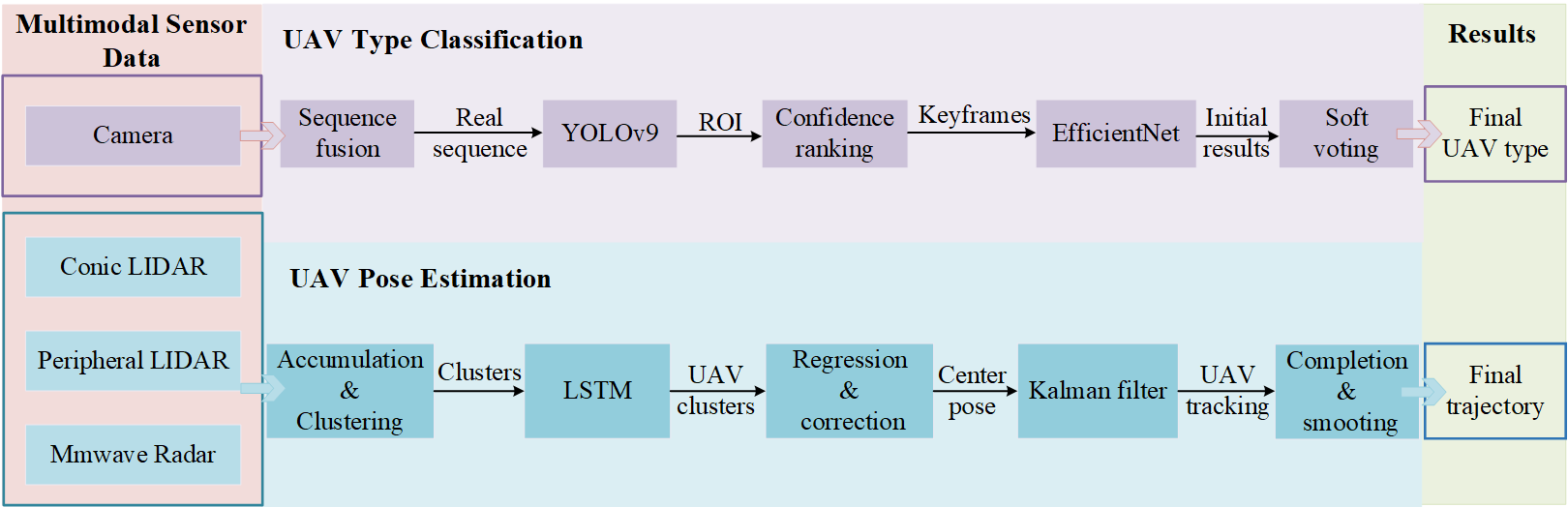
Our method has been tested on python 3.10, CUDA>=11.6. The simplest way to install all dependences is to use anaconda and pip in the following steps:
conda create -n MMUAV python=3.10
conda activate MMUAV
conda install -c "nvidia/label/cuda-11.6.0" cuda-toolkit
conda install pytorch==1.12.1 torchvision==0.13.1 torchaudio==0.12.1 cudatoolkit=11.6 -c pytorch -c conda-forge
pip install -r requirements.txt
Install Yolov9 Dependency
> pip install yolov9/requirements.txt
And download pretrained weight of Yolov9 under ./yolov9.
Then Prepare the dataset utilizing the zero-shot UAV detection by Yolov9
> python3 yolov9/detect.py --source $SOURCE --img 640 --device 0 --weights './yolov9-e.pt' --name $OUTPUT --num_kf 5 --kf_int 50 --save-crop
Replace $SOURCE and $OUTPUT to the source and desired output directories of the target trajectory. num_kf is the maximum number of keyframe selected from the trajectory. kf_int is the interval threshold between each keyframe to prevent selecting similar keyframes. save-crop will save the cropped image for detected drones, necessary for the training of efficientnet.
This section introduces Python scripts for processing LiDAR point cloud data, tracking objects, and visualizing trajectories. The pipeline consists of three main stages: preprocessing, fusion tracking, and postprocessing. Each stage is executed via a separate script with configurable command-line arguments.
pip install numpy sklearn torch matplotlib scipy stonesoup
dataset_loader.py, extract_feature.py, lidar_360_detector.py). Ensure these are available in your project directory..npy files within the specified dataset folder.C:\Users\Yi\Desktop\val) with subfolders for sequences (e.g., seq1).C:\Users\Yi\Desktop\result, C:\Users\Yi\Desktop\figure).preprocess.py)This script processes raw LiDAR data from Livox Avia and 360-degree LiDAR sensors, performs clustering, and fuses the results.
python .\point_cloud_processing\tracker\preprocess.py --dataset_folder "C:\Users\Yi\Desktop\val"
livox_avia_processed, lidar_360_processed, lidar_fusion).--dataset_folder: Path to the folder containing sequence subfolders (default: C:\Users\Yi\Desktop\val).--model_path: (Optional) Path to the LSTM model file. Defaults to lstm_model.pth in the script directory if not specified..npy files in the sequence subfolders.livox_avia and lidar_360 directories.fusion_tracking.py)This script performs object tracking on the fused LiDAR data using a Kalman filter-based tracker from the Stone Soup library.
python .\point_cloud_processing\tracker\fusion_tracking.py --dataset_folder "C:\Users\Yi\Desktop\val" --result_folder "C:\Users\Yi\Desktop\result" --sequence "seq1"
--dataset_folder: Path to the folder containing the preprocessed data (e.g., C:\Users\Yi\Desktop\val).--result_folder: Path to save the tracking results (e.g., C:\Users\Yi\Desktop\result).--sequence: Specific sequence to process (e.g., seq1). If omitted, all sequences in the dataset folder are processed.--eps: DBSCAN epsilon parameter (default: 1.0).--min_samples: DBSCAN minimum samples (default: 1).--noise_covar: Measurement noise covariance (default: 0.001).--missed_distance: Distance threshold for missed detections (default: 3.0).--covar_trace_thresh: Covariance threshold for track deletion (default: 30.0).--min_points: Minimum points for track initiation (default: 1)..npy files containing tracked object positions in the result folder (e.g., C:\Users\Yi\Desktop\result\seq1).lidar_fusion subfolder from the preprocessing step.--eps, --missed_distance) based on your data characteristics.postprocess.py)This script interpolates tracked trajectories and generates visualizations of positions and velocities.
python .\point_cloud_processing\tracker\postprocess.py --dataset_folder "C:\Users\Yi\Desktop\result" --figure_folder "C:\Users\Yi\Desktop\figure" --seq_folder "seq1" --spline_smoothing 0.7
--dataset_folder: Path to the folder containing tracking results (e.g., C:\Users\Yi\Desktop\result).--figure_folder: Path to save the output figures (e.g., C:\Users\Yi\Desktop\figure).--seq_folder: Sequence folder name to process (e.g., seq1).--spline_smoothing: Smoothing factor for spline interpolation (default: 0.5, example: 0.7)..png file (e.g., seq1.png) in the figure folder, showing X/Y/Z positions and velocities.--spline_smoothing to control the smoothness of the interpolated trajectory.To process a single sequence (seq1) from start to finish:
python .\point_cloud_processing\tracker\preprocess.py --dataset_folder "C:\Users\Yi\Desktop\val"
python .\point_cloud_processing\tracker\fusion_tracking.py --dataset_folder "C:\Users\Yi\Desktop\val" --result_folder "C:\Users\Yi\Desktop\result" --sequence "seq1"
python .\point_cloud_processing\tracker\postprocess.py --dataset_folder "C:\Users\Yi\Desktop\result" --figure_folder "C:\Users\Yi\Desktop\figure" --seq_folder "seq1" --spline_smoothing 0.7
We win the 1st place in UG2+, a task in CVPR 2024 UAV Tracking and Pose-Estimation Challenge.
Python
118
27 commits
updated May 22, 2025
Our method has been tested on python 3.10, CUDA>=11.6. The simplest way to install all dependences is to use anaconda and pip in the following steps:
conda create -n MMUAV python=3.10
conda activate MMUAV
conda install -c "nvidia/label/cuda-11.6.0" cuda-toolkit
conda install pytorch==1.12.1 torchvision==0.13.1 torchaudio==0.12.1 cudatoolkit=11.6 -c pytorch -c conda-forge
pip install -r requirements.txt
Install Yolov9 Dependency
> pip install yolov9/requirements.txt
And download pretrained weight of Yolov9 under ./yolov9.
Then Prepare the dataset utilizing the zero-shot UAV detection by Yolov9
> python3 yolov9/detect.py --source $SOURCE --img 640 --device 0 --weights './yolov9-e.pt' --name $OUTPUT --num_kf 5 --kf_int 50 --save-crop
Replace $SOURCE and $OUTPUT to the source and desired output directories of the target trajectory. num_kf is the maximum number of keyframe selected from the trajectory. kf_int is the interval threshold between each keyframe to prevent selecting similar keyframes. save-crop will save the cropped image for detected drones, necessary for the training of efficientnet.
This section introduces Python scripts for processing LiDAR point cloud data, tracking objects, and visualizing trajectories. The pipeline consists of three main stages: preprocessing, fusion tracking, and postprocessing. Each stage is executed via a separate script with configurable command-line arguments.
pip install numpy sklearn torch matplotlib scipy stonesoup
dataset_loader.py, extract_feature.py, lidar_360_detector.py). Ensure these are available in your project directory..npy files within the specified dataset folder.C:\Users\Yi\Desktop\val) with subfolders for sequences (e.g., seq1).C:\Users\Yi\Desktop\result, C:\Users\Yi\Desktop\figure).preprocess.py)This script processes raw LiDAR data from Livox Avia and 360-degree LiDAR sensors, performs clustering, and fuses the results.
python .\point_cloud_processing\tracker\preprocess.py --dataset_folder "C:\Users\Yi\Desktop\val"
livox_avia_processed, lidar_360_processed, lidar_fusion).--dataset_folder: Path to the folder containing sequence subfolders (default: C:\Users\Yi\Desktop\val).--model_path: (Optional) Path to the LSTM model file. Defaults to lstm_model.pth in the script directory if not specified..npy files in the sequence subfolders.livox_avia and lidar_360 directories.fusion_tracking.py)This script performs object tracking on the fused LiDAR data using a Kalman filter-based tracker from the Stone Soup library.
python .\point_cloud_processing\tracker\fusion_tracking.py --dataset_folder "C:\Users\Yi\Desktop\val" --result_folder "C:\Users\Yi\Desktop\result" --sequence "seq1"
--dataset_folder: Path to the folder containing the preprocessed data (e.g., C:\Users\Yi\Desktop\val).--result_folder: Path to save the tracking results (e.g., C:\Users\Yi\Desktop\result).--sequence: Specific sequence to process (e.g., seq1). If omitted, all sequences in the dataset folder are processed.--eps: DBSCAN epsilon parameter (default: 1.0).--min_samples: DBSCAN minimum samples (default: 1).--noise_covar: Measurement noise covariance (default: 0.001).--missed_distance: Distance threshold for missed detections (default: 3.0).--covar_trace_thresh: Covariance threshold for track deletion (default: 30.0).--min_points: Minimum points for track initiation (default: 1)..npy files containing tracked object positions in the result folder (e.g., C:\Users\Yi\Desktop\result\seq1).lidar_fusion subfolder from the preprocessing step.--eps, --missed_distance) based on your data characteristics.postprocess.py)This script interpolates tracked trajectories and generates visualizations of positions and velocities.
python .\point_cloud_processing\tracker\postprocess.py --dataset_folder "C:\Users\Yi\Desktop\result" --figure_folder "C:\Users\Yi\Desktop\figure" --seq_folder "seq1" --spline_smoothing 0.7
--dataset_folder: Path to the folder containing tracking results (e.g., C:\Users\Yi\Desktop\result).--figure_folder: Path to save the output figures (e.g., C:\Users\Yi\Desktop\figure).--seq_folder: Sequence folder name to process (e.g., seq1).--spline_smoothing: Smoothing factor for spline interpolation (default: 0.5, example: 0.7)..png file (e.g., seq1.png) in the figure folder, showing X/Y/Z positions and velocities.--spline_smoothing to control the smoothness of the interpolated trajectory.To process a single sequence (seq1) from start to finish:
python .\point_cloud_processing\tracker\preprocess.py --dataset_folder "C:\Users\Yi\Desktop\val"
python .\point_cloud_processing\tracker\fusion_tracking.py --dataset_folder "C:\Users\Yi\Desktop\val" --result_folder "C:\Users\Yi\Desktop\result" --sequence "seq1"
python .\point_cloud_processing\tracker\postprocess.py --dataset_folder "C:\Users\Yi\Desktop\result" --figure_folder "C:\Users\Yi\Desktop\figure" --seq_folder "seq1" --spline_smoothing 0.7



