
Confined cursor-agent turns and inline hunk review for Neovim
Lua
1
29 commits
updated Sep 30, 2026
See what people are saying
README

Yana
Yana is a Neovim plugin for using Cursor, Claude Code or Codex in your
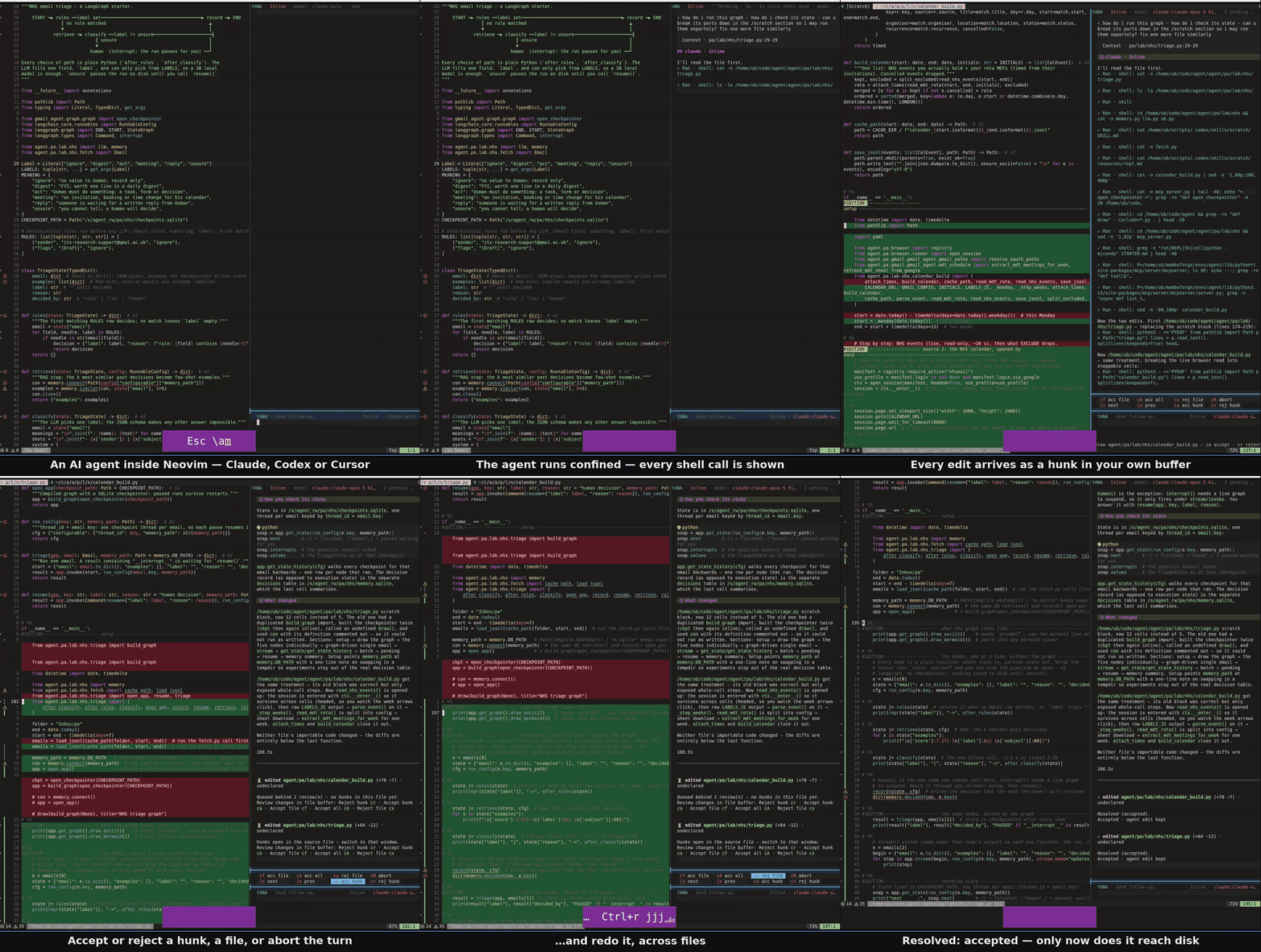
project. In inline mode, the agent's edits appear as hunks in your buffers;
you review and accept them before they reach disk.
Features
askanswers questions without writing files.inlineproposes edits for review, with accept, reject, undo and redo.agenticwrites files directly, without hunk review.- Switch agent and model, queue prompts, stop a turn, paste images, and resume sessions across tabs.
Install
Prerequisites
Yana requires Neovim 0.11.2+.
1. Install an agent
Choose an installed agent CLI: Claude Code (claude), Codex
(codex) or Cursor (cursor-agent). Use the matching backend value
"claude", "codex" or "cursor" in the Neovim setup below.
After setup, run :YanaLogin to sign in through that agent's official login
in a Neovim terminal. Existing API-key authentication keeps working.
2. Install Bubblewrap
In Linux ask and inline modes, Bubblewrap, also used by
Flatpak, keeps the agent's file writes in
a private workspace until you accept them. Install it and its capability tool:
sudo apt-get install bubblewrap libcap2-bin
3. Allow Bubblewrap on Ubuntu
AppArmor is Ubuntu's application security system.
On Ubuntu 24.04 and newer with AppArmor's user-namespace restriction, add this one-time permission for Bubblewrap. First check for an existing profile:
grep -rl /usr/bin/bwrap /etc/apparmor.d/
If a file is printed, ask your administrator to add userns, to that profile
and reload it with sudo apparmor_parser -r FILE. Otherwise, create it below.
Do not add a second profile for the same executable.
sudo apt-get install apparmor
sudo tee /etc/apparmor.d/yana-bwrap <<'EOF'
abi <abi/4.0>,
include <tunables/global>
profile yana-bwrap /usr/bin/bwrap flags=(unconfined) {
  userns,
}
EOF
sudo apparmor_parser -r /etc/apparmor.d/yana-bwrap
This allows Bubblewrap to create its private environment (a user namespace)
while retaining the restriction for other programs. macOS supports agentic
mode only. See the full requirements and troubleshooting guide.
Neovim setup
Add this plugin declaration to your lazy.nvim configuration. The example
starts with Claude; change backend to "codex" or "cursor" for another CLI.
{
  "drusmanbashir/yana.nvim",
  dependencies = { "drusmanbashir/yana-ui.nvim" },
  event = "VeryLazy",
  opts = { backend = "claude" },
}
lazy.nvim installs the required yana-ui.nvim dependency. If you omit
backend, Yana starts with Cursor; it does not guess from installed CLIs.
Restart Neovim in your project, run :checkhealth yana, then :Yana. The
opened project is included automatically. Use :YanaRoots only to add other
folders; no model or project-path setting is needed for normal use.
Use
Run :Yana, enter a prompt and press <C-s>. Or select lines and run
:YanaEdit. Review the proposed hunks with ca / cr, accept the whole turn
with cA, and undo or redo a decision with u / <C-r>.
See all commands and keys,
configuration and optional overrides,
known issues, alternatives,
and the roadmap. The full reference is :help yana.
License
Similar repos


Languages
Lua
84.8%
Shell
9.4%
Python
5.8%
Confined cursor-agent turns and inline hunk review for Neovim
Lua
1
29 commits
updated Sep 30, 2026
See what people are saying
README
Yana
Yana is a Neovim plugin for using Cursor, Claude Code or Codex in your
project. In inline mode, the agent's edits appear as hunks in your buffers;
you review and accept them before they reach disk.
Features
askanswers questions without writing files.inlineproposes edits for review, with accept, reject, undo and redo.agenticwrites files directly, without hunk review.- Switch agent and model, queue prompts, stop a turn, paste images, and resume sessions across tabs.
Install
Prerequisites
Yana requires Neovim 0.11.2+.
1. Install an agent
Choose an installed agent CLI: Claude Code (claude), Codex
(codex) or Cursor (cursor-agent). Use the matching backend value
"claude", "codex" or "cursor" in the Neovim setup below.
After setup, run :YanaLogin to sign in through that agent's official login
in a Neovim terminal. Existing API-key authentication keeps working.
2. Install Bubblewrap
In Linux ask and inline modes, Bubblewrap, also used by
Flatpak, keeps the agent's file writes in
a private workspace until you accept them. Install it and its capability tool:
sudo apt-get install bubblewrap libcap2-bin
3. Allow Bubblewrap on Ubuntu
AppArmor is Ubuntu's application security system.
On Ubuntu 24.04 and newer with AppArmor's user-namespace restriction, add this one-time permission for Bubblewrap. First check for an existing profile:
grep -rl /usr/bin/bwrap /etc/apparmor.d/
If a file is printed, ask your administrator to add userns, to that profile
and reload it with sudo apparmor_parser -r FILE. Otherwise, create it below.
Do not add a second profile for the same executable.
sudo apt-get install apparmor
sudo tee /etc/apparmor.d/yana-bwrap <<'EOF'
abi <abi/4.0>,
include <tunables/global>
profile yana-bwrap /usr/bin/bwrap flags=(unconfined) {
  userns,
}
EOF
sudo apparmor_parser -r /etc/apparmor.d/yana-bwrap
This allows Bubblewrap to create its private environment (a user namespace)
while retaining the restriction for other programs. macOS supports agentic
mode only. See the full requirements and troubleshooting guide.
Neovim setup
Add this plugin declaration to your lazy.nvim configuration. The example
starts with Claude; change backend to "codex" or "cursor" for another CLI.
{
  "drusmanbashir/yana.nvim",
  dependencies = { "drusmanbashir/yana-ui.nvim" },
  event = "VeryLazy",
  opts = { backend = "claude" },
}
lazy.nvim installs the required yana-ui.nvim dependency. If you omit
backend, Yana starts with Cursor; it does not guess from installed CLIs.
Restart Neovim in your project, run :checkhealth yana, then :Yana. The
opened project is included automatically. Use :YanaRoots only to add other
folders; no model or project-path setting is needed for normal use.
Use
Run :Yana, enter a prompt and press <C-s>. Or select lines and run
:YanaEdit. Review the proposed hunks with ca / cr, accept the whole turn
with cA, and undo or redo a decision with u / <C-r>.
See all commands and keys,
configuration and optional overrides,
known issues, alternatives,
and the roadmap. The full reference is :help yana.
License
Similar repos
Languages
Lua
84.8%
Shell
9.4%
Python
5.8%