(DEPRECATED) ⚛ Library to prevent issues of keyboard sliding up and cover inputs on React-Native iOS projects.
See the codeThis library was created to address iOS-only keyboard issues (e.g., the keyboard covering inputs) by integrating IQKeyboardManager.
With Android moving to edge-to-edge by default, similar “keyboard covering inputs” problems can now happen on Android as well. Because of that, maintaining a library that only targets iOS no longer makes sense.
For this reason, this project is now in maintenance mode: bug fixes and small PRs are welcome, but no new features are planned.
Thank you for all the partnership and collaboration over these 9 years of this project’s journey, it truly made a difference.
Recommended alternatives:



Library to prevent issues of keyboard sliding up and cover inputs on React-Native iOS projects ⚛. Thanks to awesome IQKeyboardManager ❤️.
This is only for iOS, Android no needed. For Android just add android:windowSoftInputMode="adjustResize" to your activity.
| Enabled | Disabled |
|---|---|
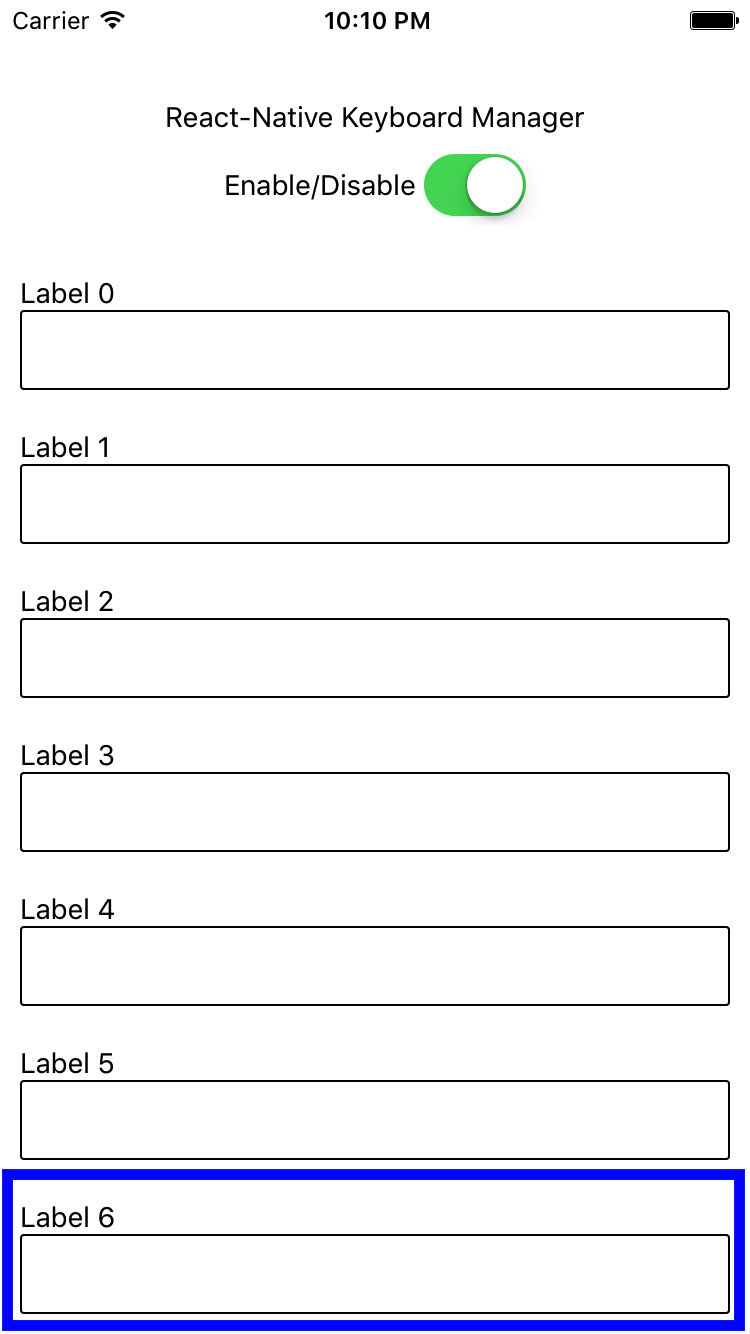 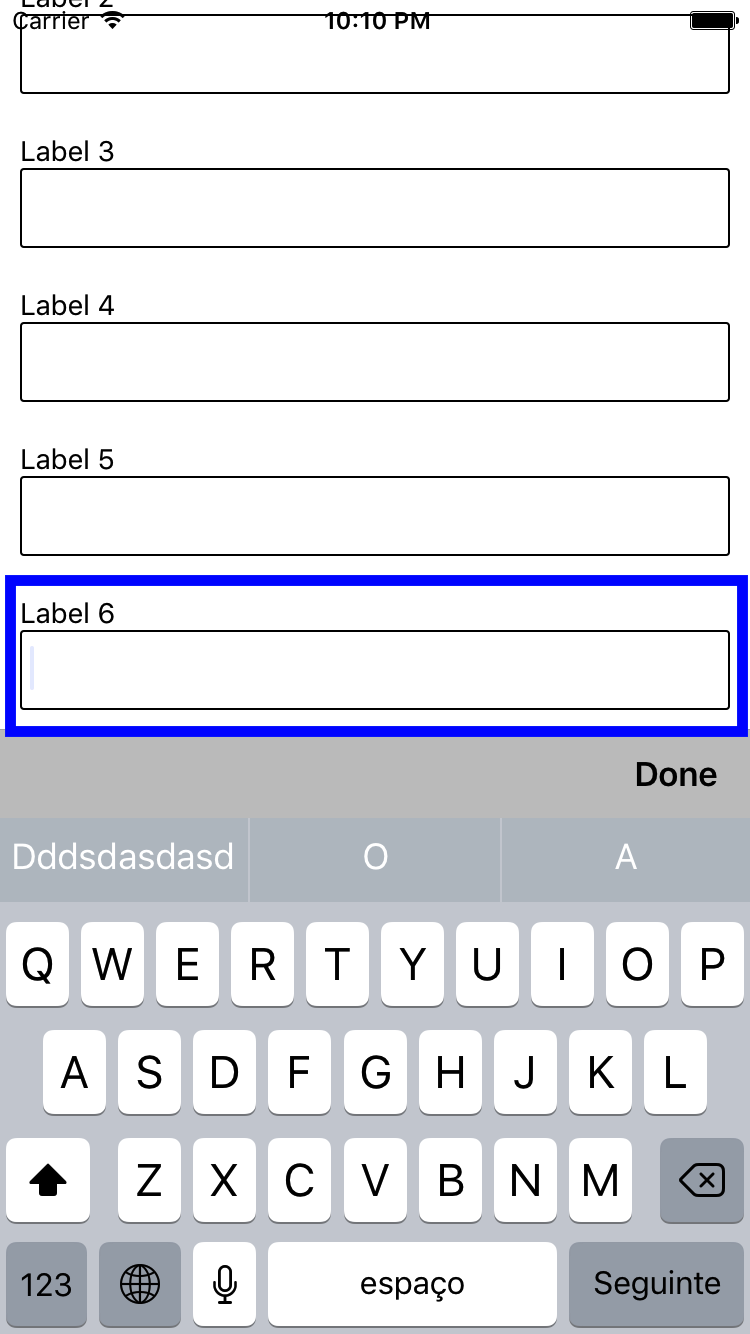 | 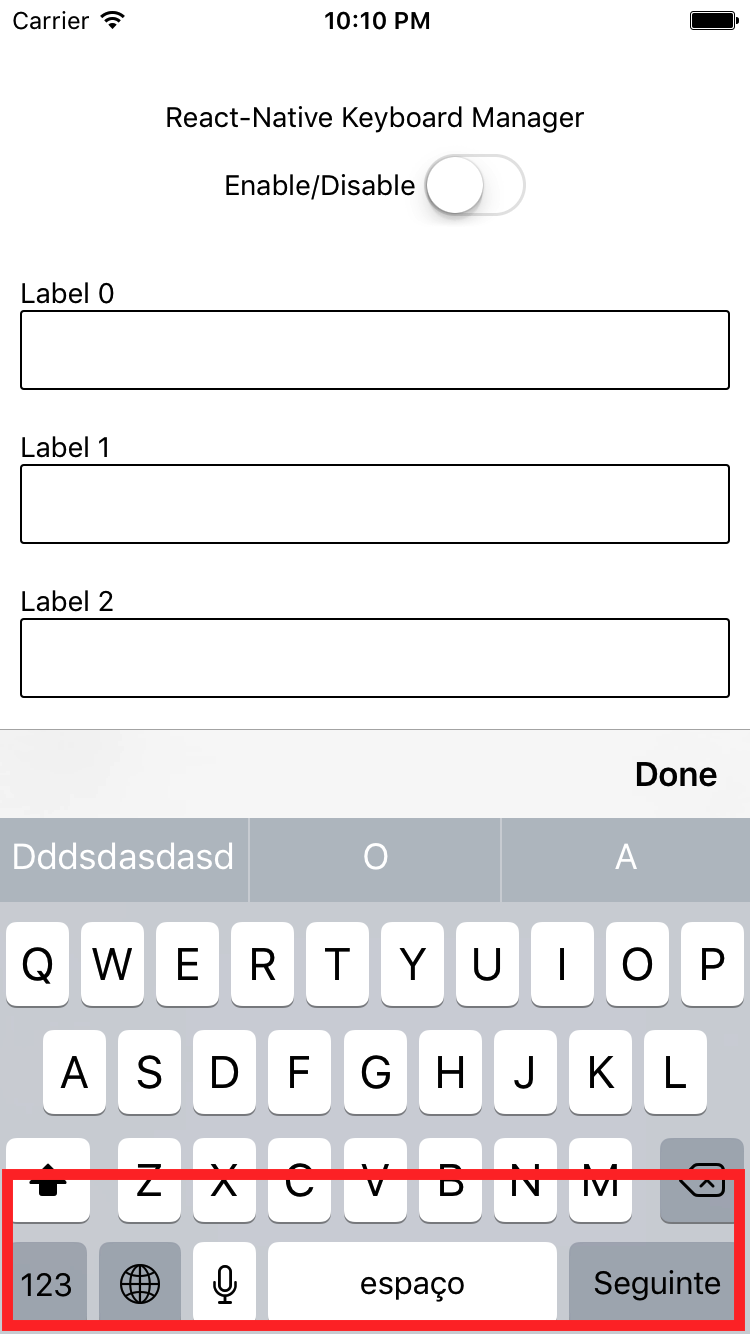 |
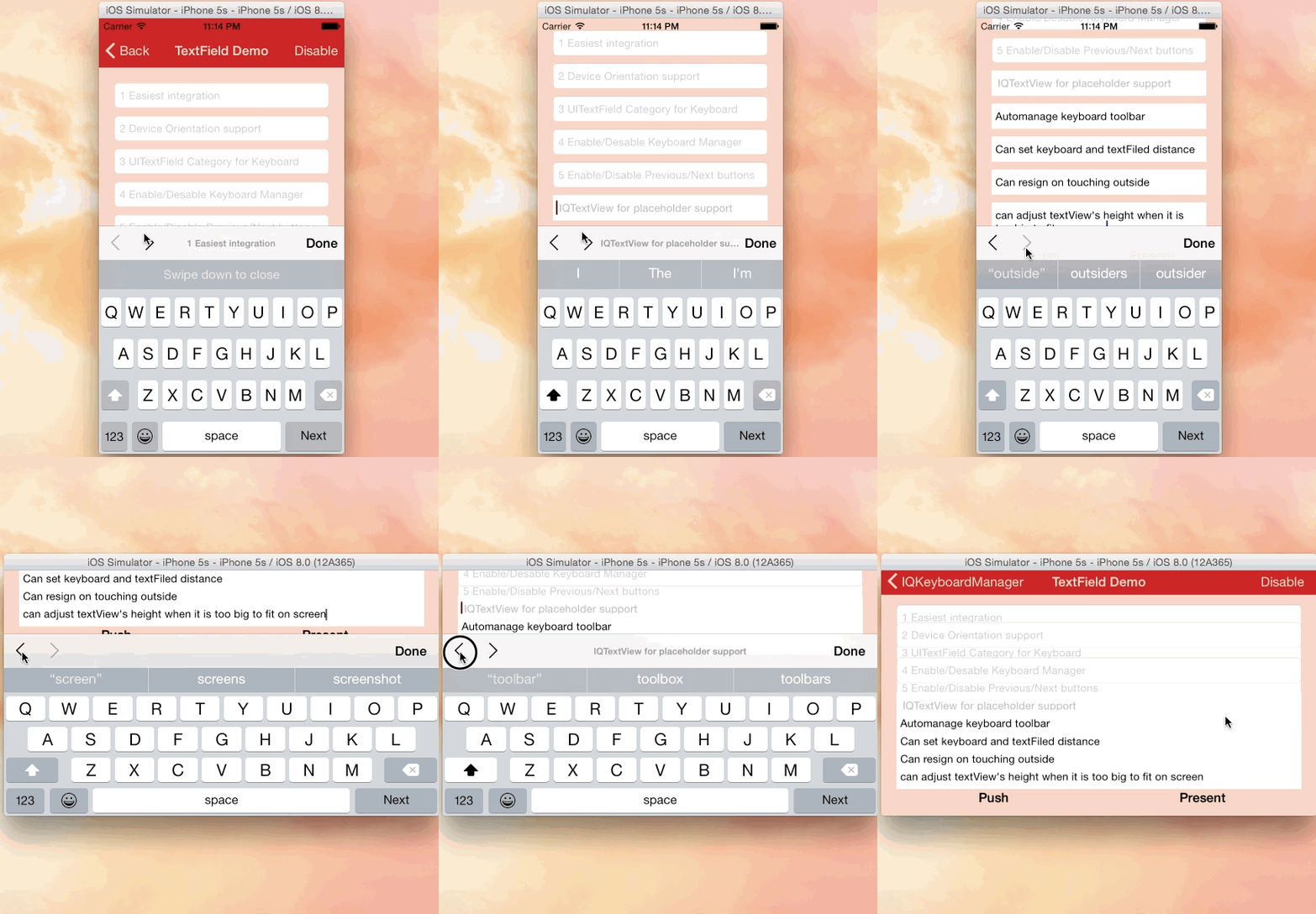 |
|---|
| Credits: IQKeyboardManager |
react-native-keyboard-manager@latestreact-native-keyboard-manager@6.5.11-2react-native-keyboard-manager@4.0.13-12react-native-keyboard-manager@4.0.13-5react-native-keyboard-manager@4.0.13-1Install the JavaScript dependency:
yarn add react-native-keyboard-manager
Or
npm i -S react-native-keyboard-manager
Add the CocoaPods dependency to your ios/Podfile:
# Add temporary IQKeyboardManagerSwift fork to solve problems with PrivacyInfo.xcprivacy
pod 'IQKeyboardManagerSwift', :git => 'https://github.com/douglasjunior/IQKeyboardManager.git', :branch => 'react-native-keyboard-manager'
To automate this process on Expo you may need to create a plugin, see https://github.com/douglasjunior/react-native-keyboard-manager/issues/111#issuecomment-2153101561
Run the CocoaPods installation:
cd ios
pod install
(optional) To force IQKeyboardManagerSwift update with the latest commit:
cd ios
pod update IQKeyboardManagerSwift
Done! 🎉
Because IQKeyboardManager is written in Swift, you need to enable Swift on your native Xcode project.
ios/YourAppName.xcworkspace in XcodeYourAppName in the Project Navigator on the left, and click New File.Swift file to the project (make sure that YourAppName target is selected when adding)Swift file then.It does not need any extra library setup to work, just install and go.
But, if you need some configuration, there are some options available.
import { Platform } from 'react-native';
import KeyboardManager from 'react-native-keyboard-manager';

if (Platform.OS === 'ios') {
    KeyboardManager.setEnable(true);
    KeyboardManager.setEnableDebugging(false);
    KeyboardManager.setKeyboardDistanceFromTextField(10);
    KeyboardManager.setLayoutIfNeededOnUpdate(true);
    KeyboardManager.setEnableAutoToolbar(true);
    KeyboardManager.setToolbarDoneBarButtonItemText("Done");
    KeyboardManager.setToolbarManageBehaviourBy("subviews"); // "subviews" | "tag" | "position"
    KeyboardManager.setToolbarPreviousNextButtonEnable(false);
    KeyboardManager.setToolbarTintColor('#0000FF'); // Only #000000 format is supported
    KeyboardManager.setToolbarBarTintColor('#FFFFFF'); // Only #000000 format is supported
    KeyboardManager.setShouldShowToolbarPlaceholder(true);
    KeyboardManager.setOverrideKeyboardAppearance(false);
    KeyboardManager.setKeyboardAppearance("default"); // "default" | "light" | "dark"
    KeyboardManager.setShouldResignOnTouchOutside(true);
    KeyboardManager.setShouldPlayInputClicks(true);
    KeyboardManager.resignFirstResponder();
    KeyboardManager.isKeyboardShowing()
      .then((isShowing) => {
          // ...
      });
}
For more details, see the Sample Project and the official IQKeyboardManager documentation.
If you want to use Next/Previous buttons, enable it.
if (Platform.OS === 'ios') {
    KeyboardManager.setToolbarPreviousNextButtonEnable(true);
}
And if you want to use Next/Previous buttons inside a Modal, you need to wrap the fields in a PreviousNextView.
import { PreviousNextView } from 'react-native-keyboard-manager';

class App extends Component {
  render() {
      return (
          <View {...} >
              // others views
              <Modal {...} >
                  // others views
                  <PreviousNextView style={...} >
                      // all TextInput
                  </PreviousNextView>
              </Modal>
          </View>
      );
  }
}
jest.mock('react-native-keyboard-manager', () => require('react-native-keyboard-manager/jest/mock'));
6.5.16-0New features, bug fixes and improvements are welcome! For questions and suggestions use the issues.


The MIT License (MIT)

Copyright (c) 2017 Douglas Nassif Roma Junior
See the full license file.
The MIT License (MIT)

Copyright (c) 2013-16 Iftekhar Qurashi
See the full IQKeyboardManager license file.
Overall
Maintained
Code review
Latest release
Releases this year
130 followers · starred Oct 2024
740 followers · starred Sep 2022
346 followers · starred Mar 2024
46 followers · starred Jun 2020
(DEPRECATED) ⚛ Library to prevent issues of keyboard sliding up and cover inputs on React-Native iOS projects.
See the codeThis library was created to address iOS-only keyboard issues (e.g., the keyboard covering inputs) by integrating IQKeyboardManager.
With Android moving to edge-to-edge by default, similar “keyboard covering inputs” problems can now happen on Android as well. Because of that, maintaining a library that only targets iOS no longer makes sense.
For this reason, this project is now in maintenance mode: bug fixes and small PRs are welcome, but no new features are planned.
Thank you for all the partnership and collaboration over these 9 years of this project’s journey, it truly made a difference.
Recommended alternatives:
Library to prevent issues of keyboard sliding up and cover inputs on React-Native iOS projects ⚛. Thanks to awesome IQKeyboardManager ❤️.
This is only for iOS, Android no needed. For Android just add android:windowSoftInputMode="adjustResize" to your activity.
| Enabled | Disabled |
|---|---|
| | |
|
|---|
| Credits: IQKeyboardManager |
react-native-keyboard-manager@latestreact-native-keyboard-manager@6.5.11-2react-native-keyboard-manager@4.0.13-12react-native-keyboard-manager@4.0.13-5react-native-keyboard-manager@4.0.13-1Install the JavaScript dependency:
yarn add react-native-keyboard-manager
Or
npm i -S react-native-keyboard-manager
Add the CocoaPods dependency to your ios/Podfile:
# Add temporary IQKeyboardManagerSwift fork to solve problems with PrivacyInfo.xcprivacy
pod 'IQKeyboardManagerSwift', :git => 'https://github.com/douglasjunior/IQKeyboardManager.git', :branch => 'react-native-keyboard-manager'
To automate this process on Expo you may need to create a plugin, see https://github.com/douglasjunior/react-native-keyboard-manager/issues/111#issuecomment-2153101561
Run the CocoaPods installation:
cd ios
pod install
(optional) To force IQKeyboardManagerSwift update with the latest commit:
cd ios
pod update IQKeyboardManagerSwift
Done! 🎉
Because IQKeyboardManager is written in Swift, you need to enable Swift on your native Xcode project.
ios/YourAppName.xcworkspace in XcodeYourAppName in the Project Navigator on the left, and click New File.Swift file to the project (make sure that YourAppName target is selected when adding)Swift file then.It does not need any extra library setup to work, just install and go.
But, if you need some configuration, there are some options available.
import { Platform } from 'react-native';
import KeyboardManager from 'react-native-keyboard-manager';

if (Platform.OS === 'ios') {
    KeyboardManager.setEnable(true);
    KeyboardManager.setEnableDebugging(false);
    KeyboardManager.setKeyboardDistanceFromTextField(10);
    KeyboardManager.setLayoutIfNeededOnUpdate(true);
    KeyboardManager.setEnableAutoToolbar(true);
    KeyboardManager.setToolbarDoneBarButtonItemText("Done");
    KeyboardManager.setToolbarManageBehaviourBy("subviews"); // "subviews" | "tag" | "position"
    KeyboardManager.setToolbarPreviousNextButtonEnable(false);
    KeyboardManager.setToolbarTintColor('#0000FF'); // Only #000000 format is supported
    KeyboardManager.setToolbarBarTintColor('#FFFFFF'); // Only #000000 format is supported
    KeyboardManager.setShouldShowToolbarPlaceholder(true);
    KeyboardManager.setOverrideKeyboardAppearance(false);
    KeyboardManager.setKeyboardAppearance("default"); // "default" | "light" | "dark"
    KeyboardManager.setShouldResignOnTouchOutside(true);
    KeyboardManager.setShouldPlayInputClicks(true);
    KeyboardManager.resignFirstResponder();
    KeyboardManager.isKeyboardShowing()
      .then((isShowing) => {
          // ...
      });
}
For more details, see the Sample Project and the official IQKeyboardManager documentation.
If you want to use Next/Previous buttons, enable it.
if (Platform.OS === 'ios') {
    KeyboardManager.setToolbarPreviousNextButtonEnable(true);
}
And if you want to use Next/Previous buttons inside a Modal, you need to wrap the fields in a PreviousNextView.
import { PreviousNextView } from 'react-native-keyboard-manager';

class App extends Component {
  render() {
      return (
          <View {...} >
              // others views
              <Modal {...} >
                  // others views
                  <PreviousNextView style={...} >
                      // all TextInput
                  </PreviousNextView>
              </Modal>
          </View>
      );
  }
}
jest.mock('react-native-keyboard-manager', () => require('react-native-keyboard-manager/jest/mock'));
6.5.16-0New features, bug fixes and improvements are welcome! For questions and suggestions use the issues.
The MIT License (MIT)

Copyright (c) 2017 Douglas Nassif Roma Junior
See the full license file.
The MIT License (MIT)

Copyright (c) 2013-16 Iftekhar Qurashi
See the full IQKeyboardManager license file.
Overall
Maintained
Code review
Latest release
Releases this year
130 followers · starred Oct 2024
740 followers · starred Sep 2022
346 followers · starred Mar 2024
46 followers · starred Jun 2020



