
Menu bar utility for JSON formatting, clipboard transformations, encoding/decoding, password generation, and AI queries via GitHub Copilot or OpenAI. Extensible with JavaScript plugins.
JavaScript
22
10 commits
updated Sep 30, 2026
See what people are saying
README
DMTool
A menu bar utility for clipboard transformations, password generation, and AI queries.
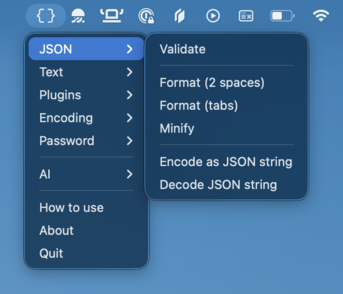
Features
- JSON — Validate, format, minify, encode/decode JSON strings
- Text — Sort lines and trim whitespace around clipboard text
- Plugins — Extend with custom JS plugins (see PLUGINS.md)
- Encoding — Base64, URL, HTML entities (encode/decode)
- Password — Generate 16-character passwords or choose a custom length from 1 to 128, with or without symbols
- AI — Query GitHub Copilot or OpenAI (ChatGPT/Codex) models with your clipboard as context
- How to use — Open instructions directly from the tray menu
Usage
- Copy text to your clipboard
- Click the DMTool icon in the menu bar
- Select an operation
- The result is automatically copied — just paste
JSON validation shows a status message instead of replacing clipboard text. AI opens a prompt window; copy the response when it is ready.
Passwords
Choose letters and digits, with or without symbols. Generate 16 characters or set a custom length (1–128). Passwords use cryptographic randomness and copy directly to the clipboard.
Choose How to use above About for in-app instructions.
AI
- Choose AI → Provider: GitHub Copilot or OpenAI (ChatGPT). Sign in, select a model, and choose Ask AI…; clipboard text provides context. Use Copy response to copy the answer or Refresh models to update the catalog.
- OpenAI uses browser device-code login and requires Codex access; account model availability and usage limits apply.
Plugins
DMTool supports user-defined plugins loaded from ~/.dmtool/plugins/. Plugins are ES modules that add custom actions to the tray menu. Environment variables can be provided via ~/.dmtool/.env.
See PLUGINS.md for the full plugin API and examples.
Download
Download the latest version from the releases page.
License
MIT.
Similar repos


Languages
JavaScript
89.1%
HTML
10.8%
Menu bar utility for JSON formatting, clipboard transformations, encoding/decoding, password generation, and AI queries via GitHub Copilot or OpenAI. Extensible with JavaScript plugins.
JavaScript
22
10 commits
updated Sep 30, 2026
See what people are saying
README
DMTool
A menu bar utility for clipboard transformations, password generation, and AI queries.
Features
- JSON — Validate, format, minify, encode/decode JSON strings
- Text — Sort lines and trim whitespace around clipboard text
- Plugins — Extend with custom JS plugins (see PLUGINS.md)
- Encoding — Base64, URL, HTML entities (encode/decode)
- Password — Generate 16-character passwords or choose a custom length from 1 to 128, with or without symbols
- AI — Query GitHub Copilot or OpenAI (ChatGPT/Codex) models with your clipboard as context
- How to use — Open instructions directly from the tray menu
Usage
- Copy text to your clipboard
- Click the DMTool icon in the menu bar
- Select an operation
- The result is automatically copied — just paste
JSON validation shows a status message instead of replacing clipboard text. AI opens a prompt window; copy the response when it is ready.
Passwords
Choose letters and digits, with or without symbols. Generate 16 characters or set a custom length (1–128). Passwords use cryptographic randomness and copy directly to the clipboard.
Choose How to use above About for in-app instructions.
AI
- Choose AI → Provider: GitHub Copilot or OpenAI (ChatGPT). Sign in, select a model, and choose Ask AI…; clipboard text provides context. Use Copy response to copy the answer or Refresh models to update the catalog.
- OpenAI uses browser device-code login and requires Codex access; account model availability and usage limits apply.
Plugins
DMTool supports user-defined plugins loaded from ~/.dmtool/plugins/. Plugins are ES modules that add custom actions to the tray menu. Environment variables can be provided via ~/.dmtool/.env.
See PLUGINS.md for the full plugin API and examples.
Download
Download the latest version from the releases page.
License
MIT.
Similar repos
Languages
JavaScript
89.1%
HTML
10.8%