Audio device and application capture for OBS Studio using PipeWire
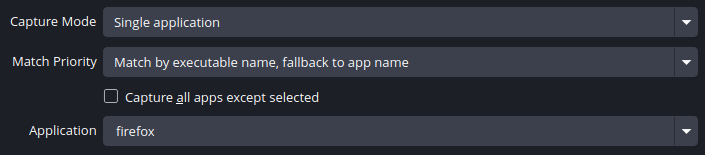
See the codeThis plugin adds 3 sources for capturing audio outputs, inputs and applications using PipeWire

PipeWire 0.3.62 or later is highly recommended (#17, PipeWire#2874)
For the plugin to be able to capture applications, PipeWire should be set up to handle audio on your system.
For most applications, the pipewire-pulse compatibility layer should be enough, but there are also
pipewire-jack and pipewire-alsa. If applications aren't showing up in the plugin, your system may be
missing one of those components.
If you're using the Flatpak version of OBS Studio, install the plugin from Flathub.
flatpak install flathub com.obsproject.Studio.Plugin.PipeWireAudioCapture
If the sources show no devices or apps, run flatpak override --filesystem=xdg-run/pipewire-0 com.obsproject.Studio and restart OBS Studio.
linux-pipewire-audio-(version).tar.gz archive from the latest releaseplugins if it doesn't already existplugins folderYour files should look like this
.../obs-studio/plugins
├── linux-pipewire-audio
│   ├── bin
│   │   └── 64bit
│   │       └── linux-pipewire-audio.so
│   └── data
│       └── locale
│           ...
Ensure you have CMake, PipeWire and OBS Studio/libobs development packages, then in the repo's root:
cmake -B build -DCMAKE_INSTALL_PREFIX="/usr" -DCMAKE_BUILD_TYPE=RelWithDebInfo
cmake --build build
# To install it system-wide:
cmake --install build
This plugin is currently in the process of being worked on to merge into upstream OBS Studio. See https://github.com/obsproject/obs-studio/pull/6207
625 followers · starred Feb 2026
165 followers · starred Nov 2023
1,436 followers · starred Jul 2026
295 followers · starred Apr 2022
Audio device and application capture for OBS Studio using PipeWire
See the codeThis plugin adds 3 sources for capturing audio outputs, inputs and applications using PipeWire
PipeWire 0.3.62 or later is highly recommended (#17, PipeWire#2874)
For the plugin to be able to capture applications, PipeWire should be set up to handle audio on your system.
For most applications, the pipewire-pulse compatibility layer should be enough, but there are also
pipewire-jack and pipewire-alsa. If applications aren't showing up in the plugin, your system may be
missing one of those components.
If you're using the Flatpak version of OBS Studio, install the plugin from Flathub.
flatpak install flathub com.obsproject.Studio.Plugin.PipeWireAudioCapture
If the sources show no devices or apps, run flatpak override --filesystem=xdg-run/pipewire-0 com.obsproject.Studio and restart OBS Studio.
linux-pipewire-audio-(version).tar.gz archive from the latest releaseplugins if it doesn't already existplugins folderYour files should look like this
.../obs-studio/plugins
├── linux-pipewire-audio
│   ├── bin
│   │   └── 64bit
│   │       └── linux-pipewire-audio.so
│   └── data
│       └── locale
│           ...
Ensure you have CMake, PipeWire and OBS Studio/libobs development packages, then in the repo's root:
cmake -B build -DCMAKE_INSTALL_PREFIX="/usr" -DCMAKE_BUILD_TYPE=RelWithDebInfo
cmake --build build
# To install it system-wide:
cmake --install build
This plugin is currently in the process of being worked on to merge into upstream OBS Studio. See https://github.com/obsproject/obs-studio/pull/6207
625 followers · starred Feb 2026
165 followers · starred Nov 2023
1,436 followers · starred Jul 2026
295 followers · starred Apr 2022



