
Offer a *visual* way to choose a window to switch to
See the codeREADME
目录
- What is switch-window
- Installation
- Configure and Usage
- Tips
- I want to select a window with "a-z" instead of "1-9".
- I want to let window to show bigger label.
- I want to hide window label when window's number < 3
- I want to select minibuffer with label "z".
- I want to auto resize a window when switch to it
- Switch-window seem to conflict with Exwm, how to do?
- I use text terminal, but I want bigger label.
- I want to use image or icon as label.
- `switch-window-shortcut-appearance' can't satisfy my need. how to do?
- Have any other similar package exist?
- Changelog
What is switch-window
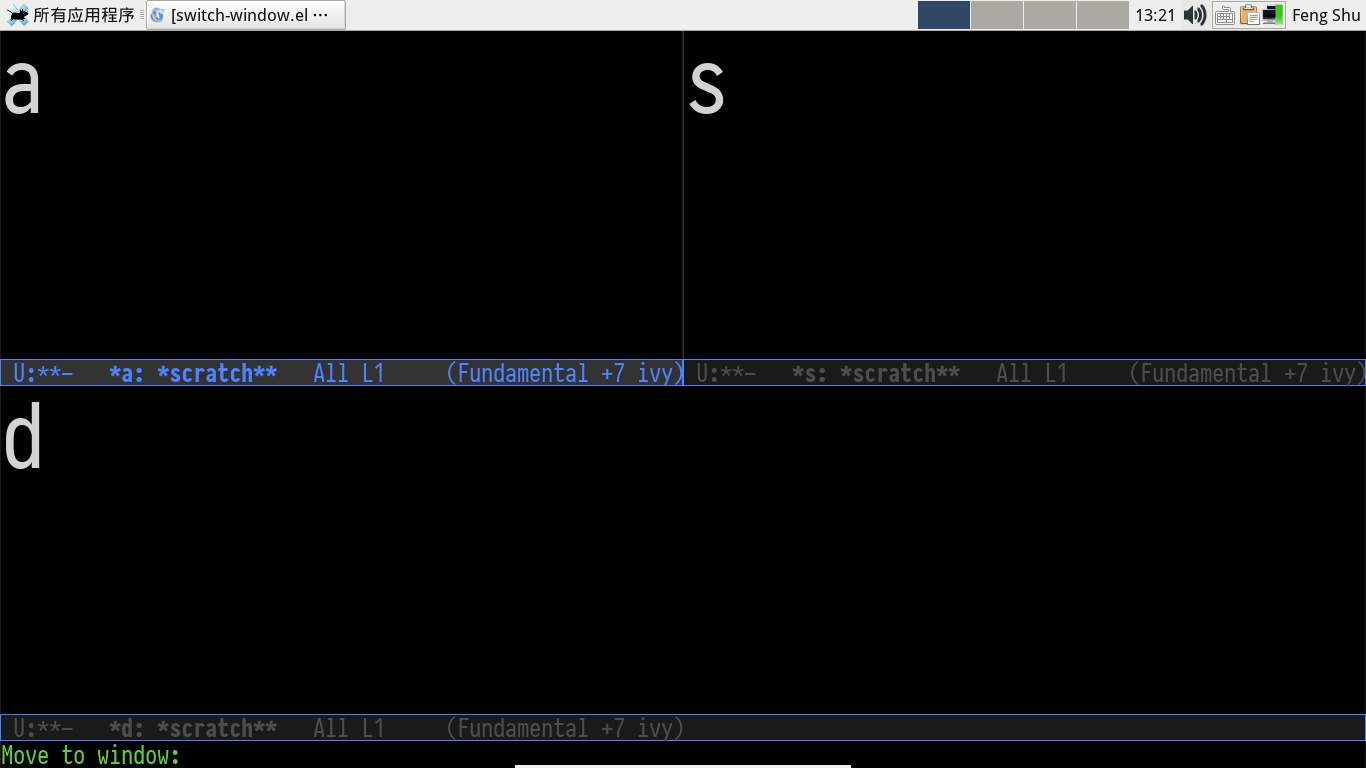
switch-window is an Emacs window switch tool, which offer a visual way to choose a window to switch to, delete, split or other operations.
Installation
- Config melpa source, please read: http://melpa.org/#/getting-started
- M-x package-install RET switch-window RET
Note: User can install switch-window with El-Get too.
Configure and Usage
(require 'switch-window)
(global-set-key (kbd "C-x o") 'switch-window)
(global-set-key (kbd "C-x 1") 'switch-window-then-maximize)
(global-set-key (kbd "C-x 2") 'switch-window-then-split-below)
(global-set-key (kbd "C-x 3") 'switch-window-then-split-right)
(global-set-key (kbd "C-x 0") 'switch-window-then-delete)

(global-set-key (kbd "C-x 4 d") 'switch-window-then-dired)
(global-set-key (kbd "C-x 4 f") 'switch-window-then-find-file)
(global-set-key (kbd "C-x 4 m") 'switch-window-then-compose-mail)
(global-set-key (kbd "C-x 4 r") 'switch-window-then-find-file-read-only)

(global-set-key (kbd "C-x 4 C-f") 'switch-window-then-find-file)
(global-set-key (kbd "C-x 4 C-o") 'switch-window-then-display-buffer)

(global-set-key (kbd "C-x 4 0") 'switch-window-then-kill-buffer)
When switch-window is enabled, user can use the below five keys:
| key | command description |
|---|---|
| "i" | Move the border up |
| "k" | Move the border down |
| "j" | Move the border left |
| "l" | Move the border right |
| "b" | Balance windows |
| "SPC" | Resume auto-resize |
If you want to customize this feature, please see variable: `switch-window-extra-map'.
Note: if you use auto-resize window feature, you must know that when you execute above window operate commands, auto-resize feature will be disabled temporarily, you should use above "SPC" key to resume.
Tips
I want to select a window with "a-z" instead of "1-9".
(setq switch-window-shortcut-style 'qwerty)
Note: user can arrange qwerty shortcuts by variable `switch-window-qwerty-shortcuts'.
I want to let window to show bigger label.
The face of label is switch-window-label, user can change it :height with custiomize-face
I want to hide window label when window's number < 3
(setq switch-window-threshold 2)
I want to select minibuffer with label "z".
(setq switch-window-minibuffer-shortcut ?z)
I want to auto resize a window when switch to it
(setq switch-window-auto-resize-window t)
(setq switch-window-default-window-size 0.8) ;80% of frame size
(switch-window-mouse-mode) ;auto resize when switch window with mouse
Advanced usage:
(setq switch-window-auto-resize-window
      (lambda ()
        (equal (buffer-name) "*scratch*"))) ;when return t, run auto switch
(setq switch-window-default-window-size '(0.8 . 0.6)) ;80% width and 60% height of frame
By the way, you can use package golden-ratio also.
Switch-window seem to conflict with Exwm, how to do?
By default, switch-window get user's input with the help of function `read-event', this approach does not work well with Exwm (Emacs X window manager), user should set the below variable and use minibuffer to get input instead:
(setq switch-window-input-style 'minibuffer)
Note: if you use minibuffer to get input, the feature about `switch-window-minibuffer-shortcut' will not work well.
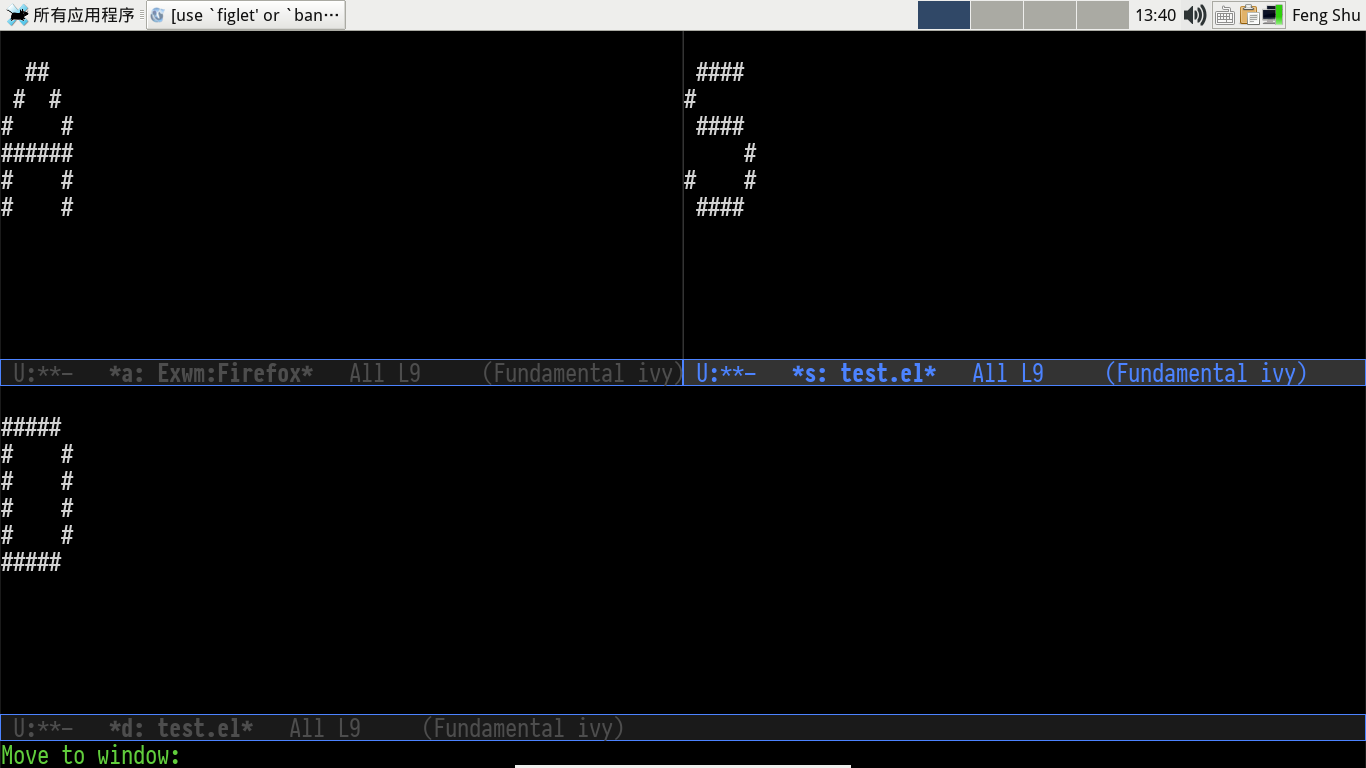
I use text terminal, but I want bigger label.
The only choice is using asciiart, which draw a bigger label with small ascii char.
(setq switch-window-shortcut-appearance 'asciiart)
I want to use image or icon as label.
-
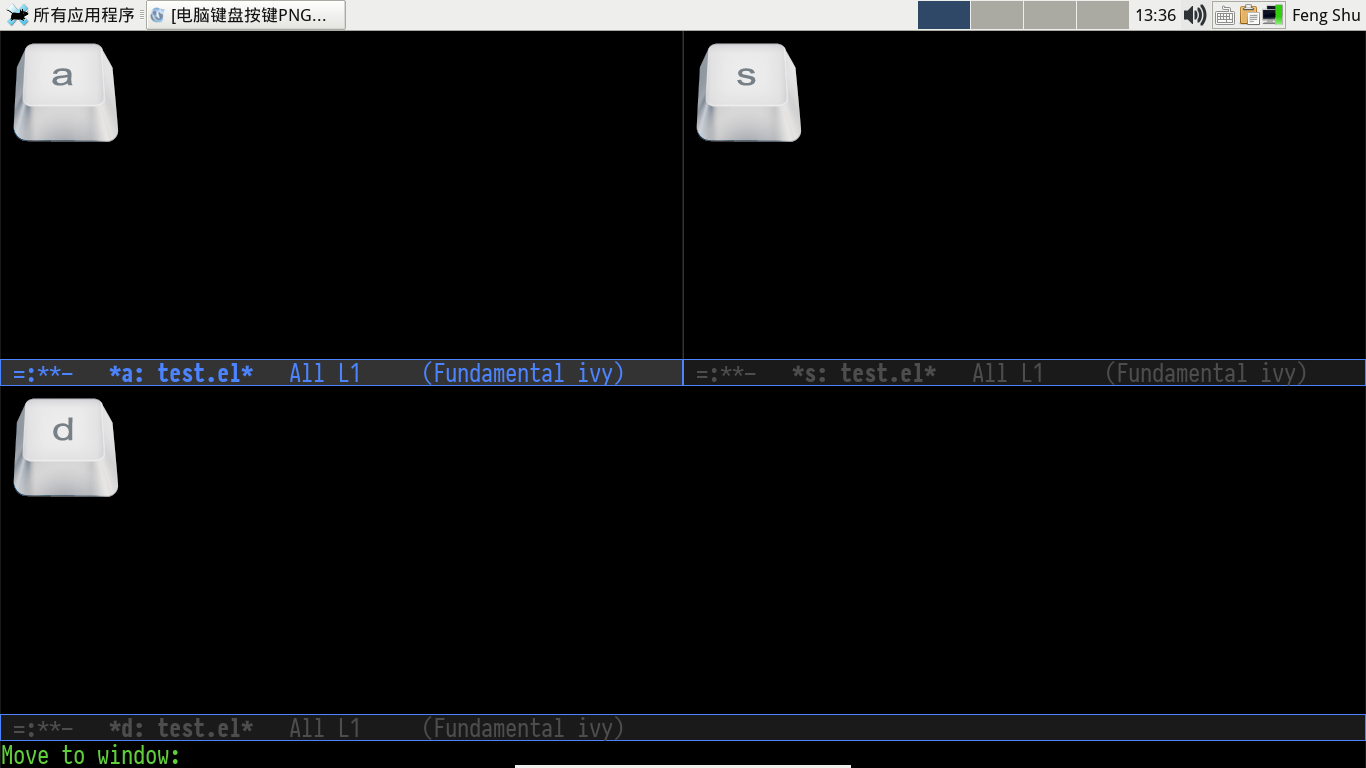
Prepare your label images, rename them to: 1.png … 9.png, a.png … z.png.
You can use other image types supported by Emacs, please see: `image-types'.
-
Put all above images to directory: `switch-window-image-directory'.
-
Set variable: `switch-window-shortcut-appearance'
(setq switch-window-shortcut-appearance 'image)
`switch-window-shortcut-appearance' can't satisfy my need. how to do?
All you should do is hacking you own label buffer function, for example: my-switch-window-label-buffer-function, and set the below variable:
(setq switch-window-label-buffer-function
      'my-switch-window-label-buffer-function)
Have any other similar package exist?
Changelog
1.6.0 - 2018-06-06
- Add switch-window-label face to control the appearance of label.
- Remove `switch-window-increase', use switch-window-label face instead.
- Show orig text with label: see `switch-window-background'
- Switch between frames: see `switch-window-multiple-frames'
- [incompatible] `switch-window-label-buffer-function''s arguments have changed, user should update when use it.
1.5.0 - 2017-04-29
- Implement commands:
- switch-window-then-maximize
- switch-window-then-delete
- switch-window-then-split-below
- switch-window-then-split-right
- switch-window-then-split-horizontally
- switch-window-then-split-vertically
- switch-window-then-swap-buffer
- Let switch-window work well with Exwm (Emacs X window manager).
- User can customize switch-window label's appearance.
1.0.0 - 2015-01-14
- Please fixme.
0.11 - 2013-09-14
- restore point to end-of-buffer for windows where it was the case after switching, fixing an anoying bug.
0.10 - 2011-06-19
- implement M-x delete-other-window (thanks developernotes on github)
0.9 - 2010-11-11 - emacs22 called, it wants some support
- implement a propertize based hack to support emacs22
0.8 - 2010-09-13 - 999
- Suport more than 9 windows (with a single key to type)
- Use quail-keyboard-layout to choose single key labels for windows
0.7 - 2010-08-23 - window-dedicated-p
- temporarily unset the window dedicated flag for displaying the numbers, patch from René Kyllingstad Rene@Kyllingstad.com
- fix timeout and RET handling wrt to not changing window selection
0.6 - 2010-08-12 - Minibuf-1
- add support for selecting the minibuffer when it's active
- some try at a better horizontal centering
- assorted cleanup
0.5 - 2010-08-08 - Polishing
- dim:switch-window-increase is now a maximum value
Converted from switch-window.el by el2org .


Similar repos


Languages
Emacs Lisp
100.0%
Offer a *visual* way to choose a window to switch to
See the codeREADME
目录
- What is switch-window
- Installation
- Configure and Usage
- Tips
- I want to select a window with "a-z" instead of "1-9".
- I want to let window to show bigger label.
- I want to hide window label when window's number < 3
- I want to select minibuffer with label "z".
- I want to auto resize a window when switch to it
- Switch-window seem to conflict with Exwm, how to do?
- I use text terminal, but I want bigger label.
- I want to use image or icon as label.
- `switch-window-shortcut-appearance' can't satisfy my need. how to do?
- Have any other similar package exist?
- Changelog
What is switch-window
switch-window is an Emacs window switch tool, which offer a visual way to choose a window to switch to, delete, split or other operations.
Installation
- Config melpa source, please read: http://melpa.org/#/getting-started
- M-x package-install RET switch-window RET
Note: User can install switch-window with El-Get too.
Configure and Usage
(require 'switch-window)
(global-set-key (kbd "C-x o") 'switch-window)
(global-set-key (kbd "C-x 1") 'switch-window-then-maximize)
(global-set-key (kbd "C-x 2") 'switch-window-then-split-below)
(global-set-key (kbd "C-x 3") 'switch-window-then-split-right)
(global-set-key (kbd "C-x 0") 'switch-window-then-delete)

(global-set-key (kbd "C-x 4 d") 'switch-window-then-dired)
(global-set-key (kbd "C-x 4 f") 'switch-window-then-find-file)
(global-set-key (kbd "C-x 4 m") 'switch-window-then-compose-mail)
(global-set-key (kbd "C-x 4 r") 'switch-window-then-find-file-read-only)

(global-set-key (kbd "C-x 4 C-f") 'switch-window-then-find-file)
(global-set-key (kbd "C-x 4 C-o") 'switch-window-then-display-buffer)

(global-set-key (kbd "C-x 4 0") 'switch-window-then-kill-buffer)
When switch-window is enabled, user can use the below five keys:
| key | command description |
|---|---|
| "i" | Move the border up |
| "k" | Move the border down |
| "j" | Move the border left |
| "l" | Move the border right |
| "b" | Balance windows |
| "SPC" | Resume auto-resize |
If you want to customize this feature, please see variable: `switch-window-extra-map'.
Note: if you use auto-resize window feature, you must know that when you execute above window operate commands, auto-resize feature will be disabled temporarily, you should use above "SPC" key to resume.
Tips
I want to select a window with "a-z" instead of "1-9".
(setq switch-window-shortcut-style 'qwerty)
Note: user can arrange qwerty shortcuts by variable `switch-window-qwerty-shortcuts'.
I want to let window to show bigger label.
The face of label is switch-window-label, user can change it :height with custiomize-face
I want to hide window label when window's number < 3
(setq switch-window-threshold 2)
I want to select minibuffer with label "z".
(setq switch-window-minibuffer-shortcut ?z)
I want to auto resize a window when switch to it
(setq switch-window-auto-resize-window t)
(setq switch-window-default-window-size 0.8) ;80% of frame size
(switch-window-mouse-mode) ;auto resize when switch window with mouse
Advanced usage:
(setq switch-window-auto-resize-window
      (lambda ()
        (equal (buffer-name) "*scratch*"))) ;when return t, run auto switch
(setq switch-window-default-window-size '(0.8 . 0.6)) ;80% width and 60% height of frame
By the way, you can use package golden-ratio also.
Switch-window seem to conflict with Exwm, how to do?
By default, switch-window get user's input with the help of function `read-event', this approach does not work well with Exwm (Emacs X window manager), user should set the below variable and use minibuffer to get input instead:
(setq switch-window-input-style 'minibuffer)
Note: if you use minibuffer to get input, the feature about `switch-window-minibuffer-shortcut' will not work well.
I use text terminal, but I want bigger label.
The only choice is using asciiart, which draw a bigger label with small ascii char.
(setq switch-window-shortcut-appearance 'asciiart)
I want to use image or icon as label.
-
Prepare your label images, rename them to: 1.png … 9.png, a.png … z.png.
You can use other image types supported by Emacs, please see: `image-types'.
-
Put all above images to directory: `switch-window-image-directory'.
-
Set variable: `switch-window-shortcut-appearance'
(setq switch-window-shortcut-appearance 'image)
`switch-window-shortcut-appearance' can't satisfy my need. how to do?
All you should do is hacking you own label buffer function, for example: my-switch-window-label-buffer-function, and set the below variable:
(setq switch-window-label-buffer-function
      'my-switch-window-label-buffer-function)
Have any other similar package exist?
Changelog
1.6.0 - 2018-06-06
- Add switch-window-label face to control the appearance of label.
- Remove `switch-window-increase', use switch-window-label face instead.
- Show orig text with label: see `switch-window-background'
- Switch between frames: see `switch-window-multiple-frames'
- [incompatible] `switch-window-label-buffer-function''s arguments have changed, user should update when use it.
1.5.0 - 2017-04-29
- Implement commands:
- switch-window-then-maximize
- switch-window-then-delete
- switch-window-then-split-below
- switch-window-then-split-right
- switch-window-then-split-horizontally
- switch-window-then-split-vertically
- switch-window-then-swap-buffer
- Let switch-window work well with Exwm (Emacs X window manager).
- User can customize switch-window label's appearance.
1.0.0 - 2015-01-14
- Please fixme.
0.11 - 2013-09-14
- restore point to end-of-buffer for windows where it was the case after switching, fixing an anoying bug.
0.10 - 2011-06-19
- implement M-x delete-other-window (thanks developernotes on github)
0.9 - 2010-11-11 - emacs22 called, it wants some support
- implement a propertize based hack to support emacs22
0.8 - 2010-09-13 - 999
- Suport more than 9 windows (with a single key to type)
- Use quail-keyboard-layout to choose single key labels for windows
0.7 - 2010-08-23 - window-dedicated-p
- temporarily unset the window dedicated flag for displaying the numbers, patch from René Kyllingstad Rene@Kyllingstad.com
- fix timeout and RET handling wrt to not changing window selection
0.6 - 2010-08-12 - Minibuf-1
- add support for selecting the minibuffer when it's active
- some try at a better horizontal centering
- assorted cleanup
0.5 - 2010-08-08 - Polishing
- dim:switch-window-increase is now a maximum value
Converted from switch-window.el by el2org .
Similar repos
Languages
Emacs Lisp
100.0%