MapToPoster JS is a client-side web app that turns any location into a high-resolution, customizable map poster with various themes, layouts, and export options.
See the code







MapToPoster JS is a professional-grade, client-side web application designed to help you generate a custom Map To Poster with ease. Whether you're looking to create minimalist city art or a vibrant geographic keepsake, this tool allows you to search for any location in the world and transform it into a stunning Map To Poster piece with fully customizable themes, layouts, and high-fidelity export options. As a versatile Map To Poster generator, the application focuses on high-resolution output suitable for large-format printing, making it the perfect tool for creating unique wall art or personalized gifts.
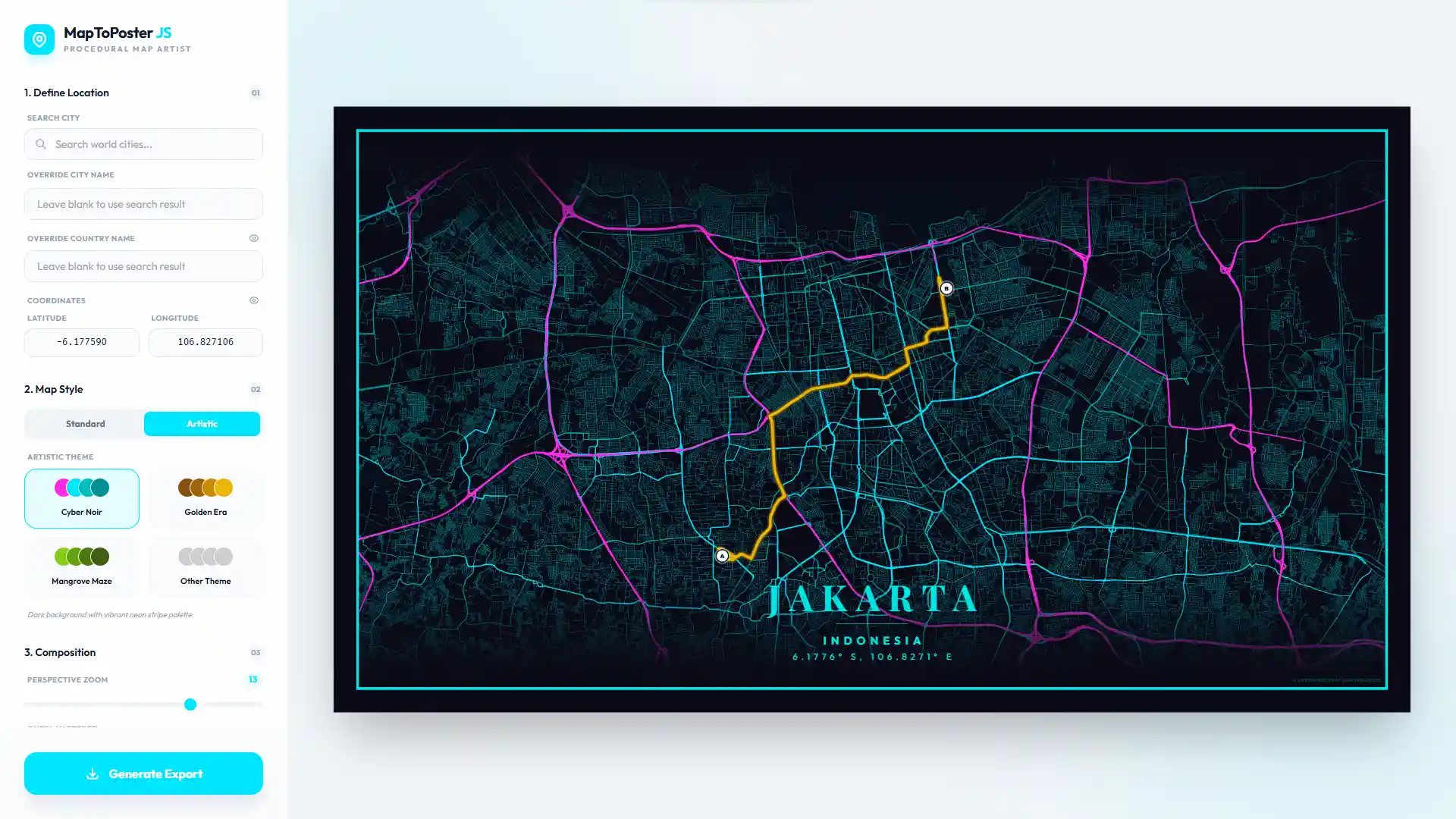
MapToPoster JS offers two distinct ways to style your maps:
Based on high-quality raster tiles from established providers:
Hand-crafted vector styles with procedural colors:
You can easily add your own artistic themes by editing src/core/artistic-themes.js:
artistic-themes.js.artisticThemes export:your_theme_key: {
name: "Your Theme Name",
description: "Brief description of the style",
bg: "#HEXCODE",
text: "#HEXCODE",
water: "#HEXCODE",
parks: "#HEXCODE",
road_motorway: "#HEXCODE",
road_primary: "#HEXCODE",
road_secondary: "#HEXCODE",
road_default: "#HEXCODE"
}
The application will automatically pick up the new theme and display it in the selection menu.
Follow these steps to get a local copy up and running.
Clone the repository
git clone https://github.com/dimartarmizi/map-to-poster.git
cd map-to-poster
Install dependencies
npm install
Start development server
npm run dev
The app will be available at http://localhost:5173.
Build for production
npm run build
Optimized files will be generated in the dist/ folder.
This project is ready to run as a lightweight Docker container using a multi-stage build:
dist/.docker build -t map-to-poster .
docker run -d -p 8080:80 --name map-to-poster map-to-poster
Then open http://localhost:8080.
After pulling new changes, rebuild and recreate the container:
docker build -t map-to-poster .
docker rm -f map-to-poster
docker run -d -p 8080:80 --name map-to-poster map-to-poster
Dockerfile — multi-stage production image.dockerignore — keeps the build context smalldocker/nginx.conf — Nginx config with SPA fallback to index.htmllocalStorage.html2canvas and the onclone callback.If you have any questions, suggestions, or just want to reach out, feel free to contact me at dimartarmizi@gmail.com.
This project is open-source and available under the MIT License.
154 followers · starred May 2026
153 followers · starred May 2026
18 followers · starred Feb 2026
101 followers · starred Feb 2026
MapToPoster JS is a client-side web app that turns any location into a high-resolution, customizable map poster with various themes, layouts, and export options.
See the code
MapToPoster JS is a professional-grade, client-side web application designed to help you generate a custom Map To Poster with ease. Whether you're looking to create minimalist city art or a vibrant geographic keepsake, this tool allows you to search for any location in the world and transform it into a stunning Map To Poster piece with fully customizable themes, layouts, and high-fidelity export options. As a versatile Map To Poster generator, the application focuses on high-resolution output suitable for large-format printing, making it the perfect tool for creating unique wall art or personalized gifts.
MapToPoster JS offers two distinct ways to style your maps:
Based on high-quality raster tiles from established providers:
Hand-crafted vector styles with procedural colors:
You can easily add your own artistic themes by editing src/core/artistic-themes.js:
artistic-themes.js.artisticThemes export:your_theme_key: {
name: "Your Theme Name",
description: "Brief description of the style",
bg: "#HEXCODE",
text: "#HEXCODE",
water: "#HEXCODE",
parks: "#HEXCODE",
road_motorway: "#HEXCODE",
road_primary: "#HEXCODE",
road_secondary: "#HEXCODE",
road_default: "#HEXCODE"
}
The application will automatically pick up the new theme and display it in the selection menu.
Follow these steps to get a local copy up and running.
Clone the repository
git clone https://github.com/dimartarmizi/map-to-poster.git
cd map-to-poster
Install dependencies
npm install
Start development server
npm run dev
The app will be available at http://localhost:5173.
Build for production
npm run build
Optimized files will be generated in the dist/ folder.
This project is ready to run as a lightweight Docker container using a multi-stage build:
dist/.docker build -t map-to-poster .
docker run -d -p 8080:80 --name map-to-poster map-to-poster
Then open http://localhost:8080.
After pulling new changes, rebuild and recreate the container:
docker build -t map-to-poster .
docker rm -f map-to-poster
docker run -d -p 8080:80 --name map-to-poster map-to-poster
Dockerfile — multi-stage production image.dockerignore — keeps the build context smalldocker/nginx.conf — Nginx config with SPA fallback to index.htmllocalStorage.html2canvas and the onclone callback.If you have any questions, suggestions, or just want to reach out, feel free to contact me at dimartarmizi@gmail.com.
This project is open-source and available under the MIT License.
154 followers · starred May 2026
153 followers · starred May 2026
18 followers · starred Feb 2026
101 followers · starred Feb 2026



