
README
Meteor + Solr Search Application Demo
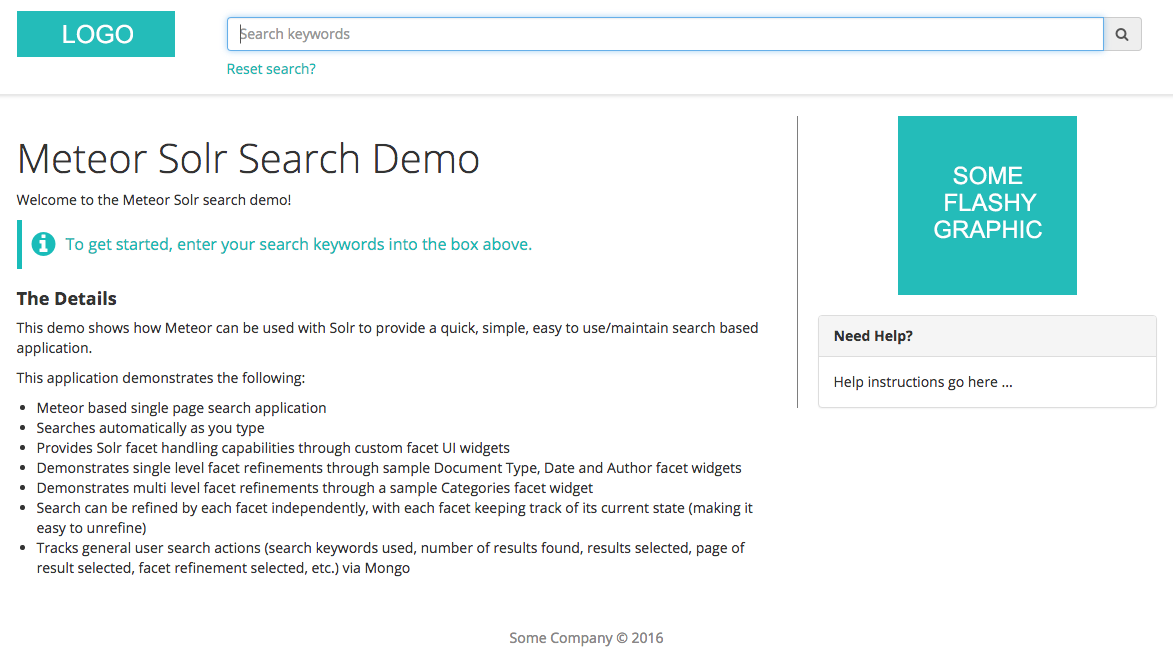
This project demonstrates one approach for using Solr with Meteor. It provides the following functionality:
- Meteor based single page search application
- Searches automatically as you type
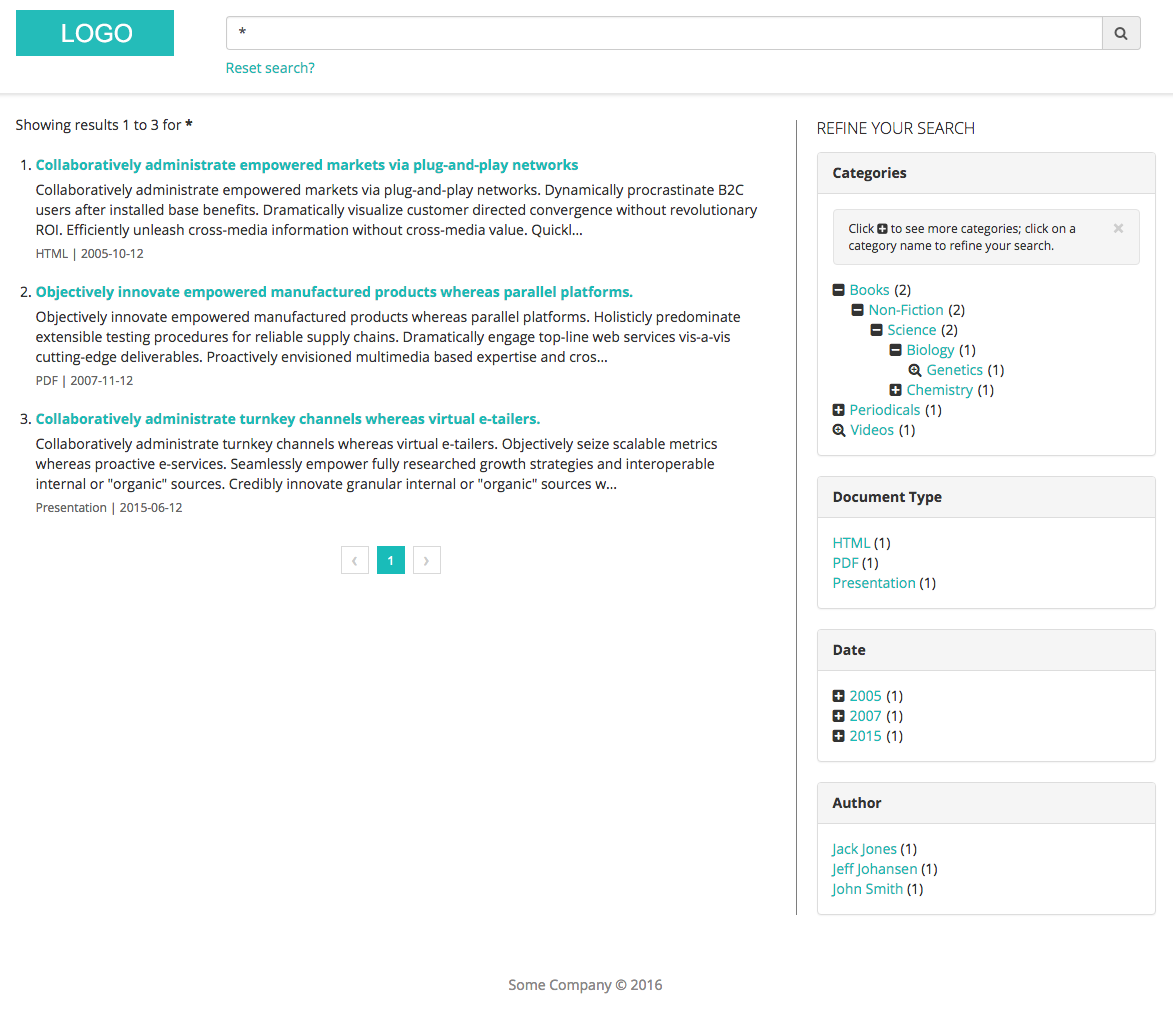
- Provides Solr facet handling capabilities through custom facet UI widgets
- Demonstrates single level facet refinements through sample Document Type, Date, Author, Location, Organization and Related Terms facet widgets
- Demonstrates multi level facet refinements through a sample Categories facet widget
- Search can be refined by each facet independently, with each facet keeping track of its current state (making it easy to unrefine)
- Tracks general user search actions (search keywords used, number of results found, results selected, page of result selected, facet refinement selected, etc.) via Mongo
Example: Search Home
Example: Search Results
Technical Details
This demo is built using Meteor for all client/server code, with Solr handling the backend search functionality, and MongoDB holding all search analytics. React is used to render all Meteor based view components (instead of Blaze). Solr integration is wired using the meteorhacks:search-source Meteor package, alongside the solr-client npm package.
Demo Installation
Solr Setup / Config
-
Make sure you first have Java 8+ installed, then download and install a recent version of Solr (tested with version 6.1.0). The steps assume you've installed Solr in something like
/opt/solr-6.1.0, and have added/opt/solr-6.1.0/binto yourPATH. -
Start solr:
solr start -
Create a new core:
solr create -c testcore -
Backup the new core's
solrconfig.xml:
cd /opt/solr-6.1.0/server/solr/testcore/conf
cp solrconfig.xml solrconfig.xml.bak
- Copy the
solrconfig.xmlandschema.xmlsample config files from this repo into your new Solr core'sconfdirectory:
cp meteor-solr-demo/private/solr/config/* /opt/solr-6.1.0/server/solr/testcore/conf
-
Restart solr:
solr restart -
Index the test docs:
post -c testcore /vagrant/solr/data/*.xml -
Verify the search is working: http://localhost:8983/solr/testcore/select?indent=on&q=:&wt=json
-
Manually trigger a suggester rebuild: http://localhost:8983/solr/testcore/suggesthandler2?suggest.q=Obj&suggest.build=true
Running the Search Application
git clone https://github.com/hwillson/meteor-solr-demo.git- Update
deploy/settings.jsonwith your Solr install details. - Run
meteor --settings=deploy/settings.jsonin the root of your project, and access the search at http://localhost:3000.
Search Analytics
Search analytics logging can be turned on/off in the deploy/settings.json file:
{
  "public": {
    "analyticsControl": {
      "loggingEnabled": true
    }
  }
}
The following analytics are captured for each user:
- Username of user making the search
- Search keywords used
- If the search is a facet refinement, the name of the field used to refine
- If the search is a facet refinement, the value of the field used to refine
- Total number of search results from this search
- Clicked on search result URLs
- Page clicked on search result was found
- Timestamp
Search analytics can be captured in a couple of ways:
- In a Mongo database.
- In a supported 3rd party cloud based analytics system.
Define the analytics data capture approach in the deploy/settings.json file. You can define one or both.
Mongo DB:
{
  "public": {
    "analyticsControl": {
      "containers": [ "database" ]
    }
  }
}
Cloud analytics system:
{
  "public": {
    "analyticsControl": {
      "containers": [ "cloud" ]
    }
  }
}
Search Analytics: Database (Mongo)
Using this approach search analytics are captured and stored in the Meteor provided Mongo DB instance. These analytics are only captured for now; this POC does not provide a way to view the captured details (data can be exported from Mongo as needed).
Searches made are stored in the Mongo DB logged_searches collection. Search results selected are stored in the Mongo DB logged_search_results collection, along with a search record ID to associate selected results back to the search keywords and fields used.
Search Analytics: 3rd Party Analytics
Using this approach search analytics are fired up to a 3rd party cloud based analytics system. This approach uses the okgrow:analytics package. Follow that packages configuration instructions to wire up your analytics system of choice. This project assumes a default of Google Analytics (but can be easily changed as needed).
Cloud analytics settings are configured in the deploy/settings.json file:
{
  "public": {
    "analyticsSettings": {
      "Google Analytics": {
        "trackingId": "Your tracking ID"
      }
    }
  }
}
Analytics Helpers
1. Exporting Summarized Analytics
Captured search analytics (if using the database analytics method) can be summarized and sent to an external system/API, on a scheduled basis. This can be helpful if you want to track user search details in a 3rd party user management / reporting system. Enabling this feature, as well as configuring the receiving endpoint details, can be adjusted in deploy/settings.json. The analytics export job is disabled by default.
{
  "private": {
    "analytics": {
      "jobs": {
        ...
        "export": {
          "enabled": true,
          // Uses [Later.js](http://bunkat.github.io/later/) formatting
          "schedule": "every 1 hour",
          "endpointUrl": "https://someurl.xyz/analytics-capture"
        }
        ...
      }
    }
  }
}
2. Routinely Clearing Database Stored Analytics
If you're using the database method of capturing analytics and want to routinely clear out old analytics, enable and adjust the analytics removal cron entry in deploy/settings.json (disabled by default):
{
  "private": {
    "analytics": {
      "jobs": {
        ...
        "cleanup": {
          "enabled": true,
          // Uses [Later.js](http://bunkat.github.io/later/) formatting
          "schedule": "on the first day of the month",
          // Retain analytics captured within this number of months (so in this example
          // analytics will be removed on the first day of each month, that are older than
          // one month ago)
          "monthRetainCount": "1"
        }
        ...
      }
    }
  }
}
Contributors

97 commits

1 commits
Similar repos


Languages
JavaScript
99.1%
README
Meteor + Solr Search Application Demo
This project demonstrates one approach for using Solr with Meteor. It provides the following functionality:
- Meteor based single page search application
- Searches automatically as you type
- Provides Solr facet handling capabilities through custom facet UI widgets
- Demonstrates single level facet refinements through sample Document Type, Date, Author, Location, Organization and Related Terms facet widgets
- Demonstrates multi level facet refinements through a sample Categories facet widget
- Search can be refined by each facet independently, with each facet keeping track of its current state (making it easy to unrefine)
- Tracks general user search actions (search keywords used, number of results found, results selected, page of result selected, facet refinement selected, etc.) via Mongo
Example: Search Home
Example: Search Results
Technical Details
This demo is built using Meteor for all client/server code, with Solr handling the backend search functionality, and MongoDB holding all search analytics. React is used to render all Meteor based view components (instead of Blaze). Solr integration is wired using the meteorhacks:search-source Meteor package, alongside the solr-client npm package.
Demo Installation
Solr Setup / Config
-
Make sure you first have Java 8+ installed, then download and install a recent version of Solr (tested with version 6.1.0). The steps assume you've installed Solr in something like
/opt/solr-6.1.0, and have added/opt/solr-6.1.0/binto yourPATH. -
Start solr:
solr start -
Create a new core:
solr create -c testcore -
Backup the new core's
solrconfig.xml:
cd /opt/solr-6.1.0/server/solr/testcore/conf
cp solrconfig.xml solrconfig.xml.bak
- Copy the
solrconfig.xmlandschema.xmlsample config files from this repo into your new Solr core'sconfdirectory:
cp meteor-solr-demo/private/solr/config/* /opt/solr-6.1.0/server/solr/testcore/conf
-
Restart solr:
solr restart -
Index the test docs:
post -c testcore /vagrant/solr/data/*.xml -
Verify the search is working: http://localhost:8983/solr/testcore/select?indent=on&q=:&wt=json
-
Manually trigger a suggester rebuild: http://localhost:8983/solr/testcore/suggesthandler2?suggest.q=Obj&suggest.build=true
Running the Search Application
git clone https://github.com/hwillson/meteor-solr-demo.git- Update
deploy/settings.jsonwith your Solr install details. - Run
meteor --settings=deploy/settings.jsonin the root of your project, and access the search at http://localhost:3000.
Search Analytics
Search analytics logging can be turned on/off in the deploy/settings.json file:
{
  "public": {
    "analyticsControl": {
      "loggingEnabled": true
    }
  }
}
The following analytics are captured for each user:
- Username of user making the search
- Search keywords used
- If the search is a facet refinement, the name of the field used to refine
- If the search is a facet refinement, the value of the field used to refine
- Total number of search results from this search
- Clicked on search result URLs
- Page clicked on search result was found
- Timestamp
Search analytics can be captured in a couple of ways:
- In a Mongo database.
- In a supported 3rd party cloud based analytics system.
Define the analytics data capture approach in the deploy/settings.json file. You can define one or both.
Mongo DB:
{
  "public": {
    "analyticsControl": {
      "containers": [ "database" ]
    }
  }
}
Cloud analytics system:
{
  "public": {
    "analyticsControl": {
      "containers": [ "cloud" ]
    }
  }
}
Search Analytics: Database (Mongo)
Using this approach search analytics are captured and stored in the Meteor provided Mongo DB instance. These analytics are only captured for now; this POC does not provide a way to view the captured details (data can be exported from Mongo as needed).
Searches made are stored in the Mongo DB logged_searches collection. Search results selected are stored in the Mongo DB logged_search_results collection, along with a search record ID to associate selected results back to the search keywords and fields used.
Search Analytics: 3rd Party Analytics
Using this approach search analytics are fired up to a 3rd party cloud based analytics system. This approach uses the okgrow:analytics package. Follow that packages configuration instructions to wire up your analytics system of choice. This project assumes a default of Google Analytics (but can be easily changed as needed).
Cloud analytics settings are configured in the deploy/settings.json file:
{
  "public": {
    "analyticsSettings": {
      "Google Analytics": {
        "trackingId": "Your tracking ID"
      }
    }
  }
}
Analytics Helpers
1. Exporting Summarized Analytics
Captured search analytics (if using the database analytics method) can be summarized and sent to an external system/API, on a scheduled basis. This can be helpful if you want to track user search details in a 3rd party user management / reporting system. Enabling this feature, as well as configuring the receiving endpoint details, can be adjusted in deploy/settings.json. The analytics export job is disabled by default.
{
  "private": {
    "analytics": {
      "jobs": {
        ...
        "export": {
          "enabled": true,
          // Uses [Later.js](http://bunkat.github.io/later/) formatting
          "schedule": "every 1 hour",
          "endpointUrl": "https://someurl.xyz/analytics-capture"
        }
        ...
      }
    }
  }
}
2. Routinely Clearing Database Stored Analytics
If you're using the database method of capturing analytics and want to routinely clear out old analytics, enable and adjust the analytics removal cron entry in deploy/settings.json (disabled by default):
{
  "private": {
    "analytics": {
      "jobs": {
        ...
        "cleanup": {
          "enabled": true,
          // Uses [Later.js](http://bunkat.github.io/later/) formatting
          "schedule": "on the first day of the month",
          // Retain analytics captured within this number of months (so in this example
          // analytics will be removed on the first day of each month, that are older than
          // one month ago)
          "monthRetainCount": "1"
        }
        ...
      }
    }
  }
}
Similar repos
Contributors
97 commits
1 commits
Languages
JavaScript
99.1%