
README
changedetection.io-cloak-browser
Stealth browser fetcher plugin for changedetection.io powered by CloakBrowser.
- ✅ Bypasses Cloudflare Turnstile, reCAPTCHA v3, FingerprintJS, BrowserScan and more
- ✅ 33 source-level C++ patches compiled into Chromium — no JS injection tricks
- ✅ Full browser steps support (same Playwright page API)
- ✅ Full screenshot and visual selector support
- ✅ Drop-in replacement — select "CloakBrowser" per-watch in the UI
- ✅ Proxy support with optional geo-IP auto-detection
- ✅ Human-like behaviour mode to avoid timing-based detection
Requirements
- changedetection.io >= 0.54.5
- Python 3.10+
- ~200 MB disk space for the CloakBrowser Chromium binary (downloaded automatically on first run)
NOTE: - The biggest red-flag is still your IP address "quality", always use a high quality 'residential IP address' through a SOCKS style proxy - When you sign up using https://brightdata.grsm.io/n0r16zf7eivq BrightData will match any first deposit up to $150 .
Cloak Browser works by downloading a pre-compiled binary chrome-browser from CloakHQ, remember, you are running a black-box piece of software that you do not know what's inside of it.
Quick Start
1. Install the plugin
Docker (docker-compose.yml):
services:
  changedetection:
    environment:
      - EXTRA_PACKAGES=changedetection.io-cloak-browser
Local install:
pip install changedetection.io-cloak-browser
# Download the Chromium binary
python -m cloakbrowser install
2. Select CloakBrowser for a watch
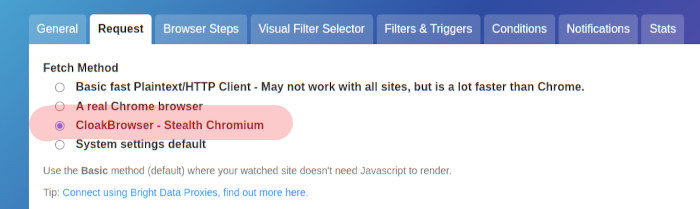
In the changedetection.io UI, open any watch → Edit → Fetch tab → choose "CloakBrowser - Stealth Chromium (anti-bot bypass)" from the fetcher dropdown.
3. (Optional) Environment variables
| Variable | Default | Description |
|---|---|---|
CLOAKBROWSER_HUMANIZE | true | Enable human-like mouse/keyboard/scroll behaviour |
playwright_proxy_server | (none) | Proxy URL, e.g. http://proxy:8080 |
playwright_proxy_username | (none) | Proxy username |
playwright_proxy_password | (none) | Proxy password |
PLAYWRIGHT_SERVICE_WORKERS | allow | allow or block service workers |
WEBDRIVER_DELAY_BEFORE_CONTENT_READY | 5 | Seconds to wait after page load |
SCREENSHOT_MAX_HEIGHT | 20000 | Maximum screenshot height in pixels |
Docker Compose Example
version: '3'

services:
  changedetection:
    image: ghcr.io/dgtlmoon/changedetection.io:latest
    container_name: changedetection
    volumes:
      - ./datastore:/datastore
    environment:
      - EXTRA_PACKAGES=changedetection.io-cloak-browser
      - CLOAKBROWSER_HUMANIZE=true
      # Optional proxy
      # - playwright_proxy_server=http://proxy.example.com:8080
      # - playwright_proxy_username=user
      # - playwright_proxy_password=pass
    ports:
      - "5000:5000"
    restart: unless-stopped
How It Works
CloakBrowser is a patched Chromium binary with 33 source-level C++ modifications that make it indistinguishable from a real user's Chrome browser. Unlike JavaScript-injection approaches (which detection services can identify), these patches operate at the binary level.
The Python cloakbrowser package wraps the Playwright Python library but connects to the
patched binary instead of stock Chromium. This means the page API is 100% identical to
Playwright — browser steps, screenshots, visual selectors, and JS execution all work
unchanged.
Warnings!
- A pre-built binary chrome will be downloaded from the CloakHQ/Cloak-browser source, this repository has no control over that file, please consider the implications of running unknown binaries! See https://github.com/CloakHQ/CloakBrowser
- Other leakage such as WebRTC, timezone information, RTT triangulation etc can still reveal the browser type!
Detection bypass results
| Service | Stock Playwright | CloakBrowser |
|---|---|---|
| reCAPTCHA v3 score | 0.1 (bot) | 0.9 (human) |
| Cloudflare Turnstile | FAIL | PASS |
| FingerprintJS | DETECTED | PASS |
| BrowserScan | DETECTED | NORMAL |
navigator.webdriver | true | false |
| TLS fingerprint | Mismatch | Identical to Chrome |
Browser Steps
CloakBrowser fully supports all changedetection.io browser steps:
- Click element / Click element if exists
- Enter text in field
- Execute JS
- Wait for text / Wait for seconds
- Scroll down
- Check/uncheck checkbox
- Select by label
- Remove elements
- … and all others
This works because CloakBrowser pages are standard Playwright page objects — the browser steps engine requires no modification.
Troubleshooting
Plugin not loading?
from changedetectionio.pluggy_interface import plugin_manager
print([name for name, _ in plugin_manager.list_name_plugin()])
# Should include: cloak_browser
Binary not downloaded?
python -m cloakbrowser install
python -m cloakbrowser info
Test that the fetcher registers:
from changedetectionio.content_fetchers import available_fetchers
print(available_fetchers())
# Should include: ('html_cloakbrowser', 'CloakBrowser - Stealth Chromium (anti-bot bypass)')
Check for CloakBrowser updates:
python -m cloakbrowser update
License
MIT License — see LICENSE.
CloakBrowser binary: free-to-use, no redistribution. See CloakBrowser BINARY-LICENSE.
By using this software you agree to both the MIT LICENCE and the Cloak Browser licence(s).
Contributors

7 commits
Similar repos


Languages
Python
100.0%
README
changedetection.io-cloak-browser
Stealth browser fetcher plugin for changedetection.io powered by CloakBrowser.
- ✅ Bypasses Cloudflare Turnstile, reCAPTCHA v3, FingerprintJS, BrowserScan and more
- ✅ 33 source-level C++ patches compiled into Chromium — no JS injection tricks
- ✅ Full browser steps support (same Playwright page API)
- ✅ Full screenshot and visual selector support
- ✅ Drop-in replacement — select "CloakBrowser" per-watch in the UI
- ✅ Proxy support with optional geo-IP auto-detection
- ✅ Human-like behaviour mode to avoid timing-based detection
Requirements
- changedetection.io >= 0.54.5
- Python 3.10+
- ~200 MB disk space for the CloakBrowser Chromium binary (downloaded automatically on first run)
NOTE: - The biggest red-flag is still your IP address "quality", always use a high quality 'residential IP address' through a SOCKS style proxy - When you sign up using https://brightdata.grsm.io/n0r16zf7eivq BrightData will match any first deposit up to $150 .
Cloak Browser works by downloading a pre-compiled binary chrome-browser from CloakHQ, remember, you are running a black-box piece of software that you do not know what's inside of it.
Quick Start
1. Install the plugin
Docker (docker-compose.yml):
services:
  changedetection:
    environment:
      - EXTRA_PACKAGES=changedetection.io-cloak-browser
Local install:
pip install changedetection.io-cloak-browser
# Download the Chromium binary
python -m cloakbrowser install
2. Select CloakBrowser for a watch
In the changedetection.io UI, open any watch → Edit → Fetch tab → choose "CloakBrowser - Stealth Chromium (anti-bot bypass)" from the fetcher dropdown.
3. (Optional) Environment variables
| Variable | Default | Description |
|---|---|---|
CLOAKBROWSER_HUMANIZE | true | Enable human-like mouse/keyboard/scroll behaviour |
playwright_proxy_server | (none) | Proxy URL, e.g. http://proxy:8080 |
playwright_proxy_username | (none) | Proxy username |
playwright_proxy_password | (none) | Proxy password |
PLAYWRIGHT_SERVICE_WORKERS | allow | allow or block service workers |
WEBDRIVER_DELAY_BEFORE_CONTENT_READY | 5 | Seconds to wait after page load |
SCREENSHOT_MAX_HEIGHT | 20000 | Maximum screenshot height in pixels |
Docker Compose Example
version: '3'

services:
  changedetection:
    image: ghcr.io/dgtlmoon/changedetection.io:latest
    container_name: changedetection
    volumes:
      - ./datastore:/datastore
    environment:
      - EXTRA_PACKAGES=changedetection.io-cloak-browser
      - CLOAKBROWSER_HUMANIZE=true
      # Optional proxy
      # - playwright_proxy_server=http://proxy.example.com:8080
      # - playwright_proxy_username=user
      # - playwright_proxy_password=pass
    ports:
      - "5000:5000"
    restart: unless-stopped
How It Works
CloakBrowser is a patched Chromium binary with 33 source-level C++ modifications that make it indistinguishable from a real user's Chrome browser. Unlike JavaScript-injection approaches (which detection services can identify), these patches operate at the binary level.
The Python cloakbrowser package wraps the Playwright Python library but connects to the
patched binary instead of stock Chromium. This means the page API is 100% identical to
Playwright — browser steps, screenshots, visual selectors, and JS execution all work
unchanged.
Warnings!
- A pre-built binary chrome will be downloaded from the CloakHQ/Cloak-browser source, this repository has no control over that file, please consider the implications of running unknown binaries! See https://github.com/CloakHQ/CloakBrowser
- Other leakage such as WebRTC, timezone information, RTT triangulation etc can still reveal the browser type!
Detection bypass results
| Service | Stock Playwright | CloakBrowser |
|---|---|---|
| reCAPTCHA v3 score | 0.1 (bot) | 0.9 (human) |
| Cloudflare Turnstile | FAIL | PASS |
| FingerprintJS | DETECTED | PASS |
| BrowserScan | DETECTED | NORMAL |
navigator.webdriver | true | false |
| TLS fingerprint | Mismatch | Identical to Chrome |
Browser Steps
CloakBrowser fully supports all changedetection.io browser steps:
- Click element / Click element if exists
- Enter text in field
- Execute JS
- Wait for text / Wait for seconds
- Scroll down
- Check/uncheck checkbox
- Select by label
- Remove elements
- … and all others
This works because CloakBrowser pages are standard Playwright page objects — the browser steps engine requires no modification.
Troubleshooting
Plugin not loading?
from changedetectionio.pluggy_interface import plugin_manager
print([name for name, _ in plugin_manager.list_name_plugin()])
# Should include: cloak_browser
Binary not downloaded?
python -m cloakbrowser install
python -m cloakbrowser info
Test that the fetcher registers:
from changedetectionio.content_fetchers import available_fetchers
print(available_fetchers())
# Should include: ('html_cloakbrowser', 'CloakBrowser - Stealth Chromium (anti-bot bypass)')
Check for CloakBrowser updates:
python -m cloakbrowser update
License
MIT License — see LICENSE.
CloakBrowser binary: free-to-use, no redistribution. See CloakBrowser BINARY-LICENSE.
By using this software you agree to both the MIT LICENCE and the Cloak Browser licence(s).
Similar repos
Contributors
7 commits
Languages
Python
100.0%