
Convenience functions to work with emacs org mode clocking from the agenda view
Emacs Lisp
131
68 commits
updated Jun 7, 2025
README
org-clock-convenience


This is a collection of functions to make Org mode's clocking work-flow easier.
My aim is to do as much of the clocking from the agenda buffer without constantly leaving it for visiting the agenda org source files, except to open a new task.
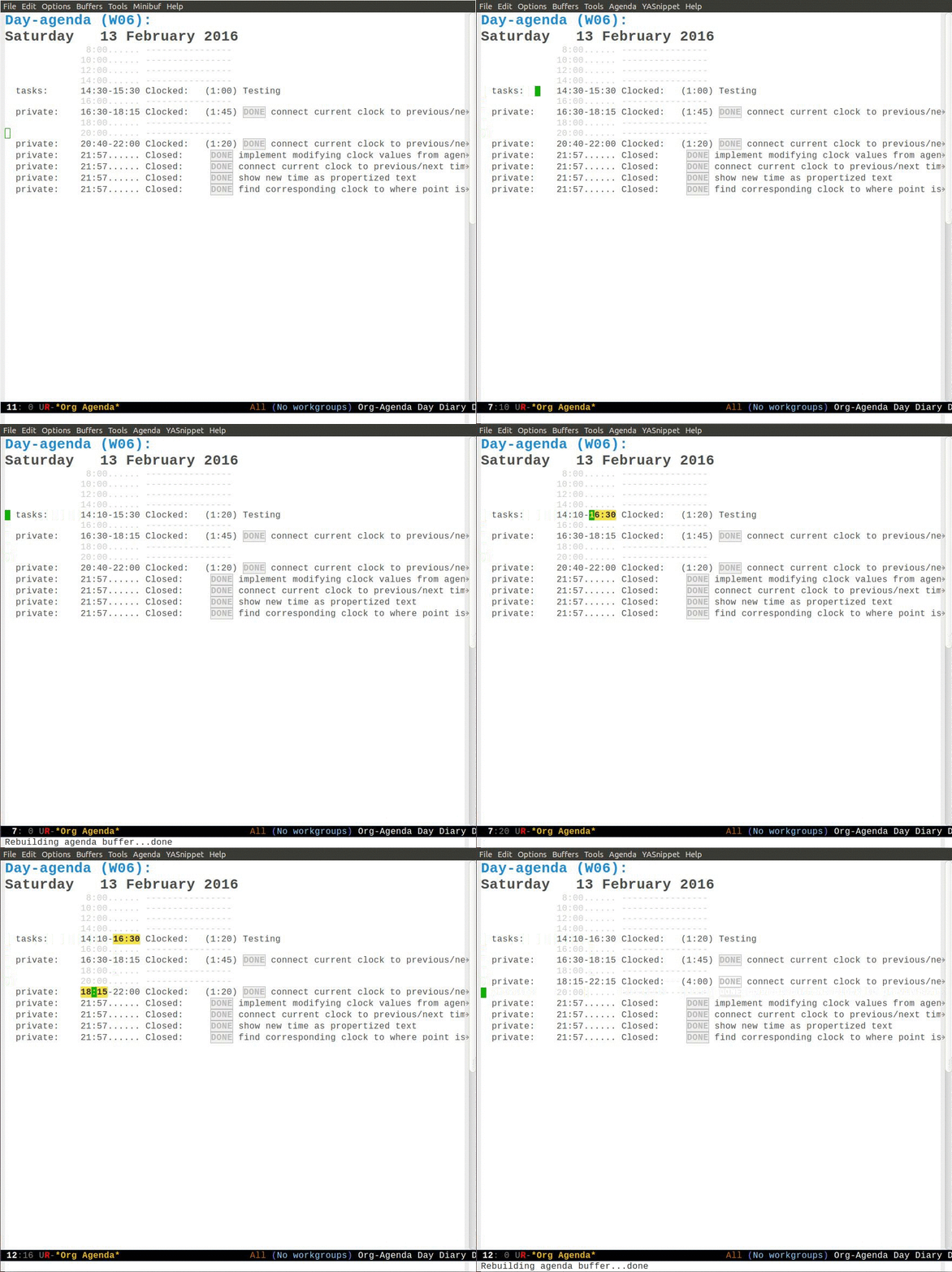
Table of Contents
- org-clock-convenience
- Motivation
- Interactive functions
- Installation
- Current shortcomings
- Dealing with changes in
org-agenda-prefix-format
Motivation
It happens quite often that I get distracted by other tasks, e.g. a colleague involving me in a longer discussion, while I am still clocked in to the previous task. So, frequently I need to adapt the clock history to fill gaps or to correct for tasks happening when I was not in front of the screen. I want to have my whole day clocked seamlessly, and I have done so over the last 4 years using Org. Formerly, this involved a lot of jumping to the clock lines of org files to adapt the timestamps, which is cumbersome and needs time.
I always wanted to have commands with which I can change the clock
values directly from the log lines in the agenda view in the same
way that one can change timestamps under the cursor inside of an org
file using org-timestamp-up and org-timestamp-down (usually
mapped to <S-up> and <S-down>).
Interactive functions
org-clock-convenience-timestamp-upandorg-clock-convenience-timestamp-down: When on a clocked line in the agenda buffer, this function will increase/decrease the time according to the position of the cursor. If the cursor is on the hour field, change the hour. If it is on the minutes field, change the minutes. Undo works on the agenda and on the source buffer.org-clock-convenience-fill-gapmodifies the timestamp at point to connect to the previous/next logged time range.org-clock-convenience-fill-gap-bothconnects both timestamps of the current clock log line at point to fill the interval between the previous and the next clock range. The cursor need not be on a timestamp of the line. This is the most efficient way to fill the interval for a forgotten task.org-clock-convenience-goto-tsgoto the associated timestamp in the org file. Position the cursor respective to where the cursor was placed in the agenda view (e.g. on the minutes part of the starting time).org-clock-convenience-goto-last-clockout: goto timestamp of the last clockout (this is based on a real search through the buffer and not based on the saved clockout value).
Note that the agenda clock changing commands work with undo in the
same way as other org agenda commands. They will undo in the agenda
buffer as well as in the org source buffers. But if the agenda
buffer is rebuilt after a change (e.g. by g), the undo information
is lost.
The package also contains a number of utility functions to associate a list with field names with the subgroup of a regular expression and position point at a named field or read its value.
Installation
basic installation and configuration
-
The package is available from MELPA.
-
You can always install the raw package and then do
(require 'org-clock-convenience)
I did not include a minor mode, since I think that these commands will be bound
in a very individual way by users. I recommend defining a setup function and
adding it to the functions run by org-agenda-mode-hook like here:
(defun dfeich/org-agenda-mode-fn ()
  (define-key org-agenda-mode-map
    (kbd "<S-up>") #'org-clock-convenience-timestamp-up)
  (define-key org-agenda-mode-map
    (kbd "<S-down>") #'org-clock-convenience-timestamp-down)
  (define-key org-agenda-mode-map
    (kbd "ö") #'org-clock-convenience-fill-gap)
  (define-key org-agenda-mode-map
    (kbd "é") #'org-clock-convenience-fill-gap-both))
(add-hook 'org-agenda-mode-hook #'dfeich/org-agenda-mode-fn)
installation and configuration by use-package
If you are using John Wiegley's nice use-package to manage your configuration, the configuration becomes much easier. may want to use something like the following
(use-package org-clock-convenience
  :ensure t
  :bind (:map org-agenda-mode-map
   	   ("<S-up>" . org-clock-convenience-timestamp-up)
   	   ("<S-down>" . org-clock-convenience-timestamp-down)
   	   ("ö" . org-clock-convenience-fill-gap)
   	   ("é" . org-clock-convenience-fill-gap-both)))
Tip: using helm for efficiently clocking into tasks
In order not having to leave the agenda view for clocking into a
task that is not displayed in some way in the agenda view (where
you could use I with cursor on the task), I customize helm. It is
easy to just add the clocking-in as another possible action to the
helm-org-agenda-files-headings command:
(defun dfeich/helm-org-clock-in (marker)
  "Clock into the item at MARKER"
  (with-current-buffer (marker-buffer marker)
    (goto-char (marker-position marker))
    (org-clock-in)))
(eval-after-load 'helm-org
  '(nconc helm-org-headings-actions
          (list
           (cons "Clock into task" #'dfeich/helm-org-clock-in))))
Again, if you are using use-package, you may want to include this in
the configuration (:config) stanza of helm-config. E.g. in my own config:
(use-package helm-config
  :demand t
  :bind (( "<f5> <f5>" . helm-org-agenda-files-headings)
      ( "<f5> a" . helm-apropos)
      ( "<f5> A" . helm-apt)
      ( "<f5> b" . helm-buffers-list)
      ( "<f5> c" . helm-colors)
      ( "<f5> f" . helm-find-files)
      ( "<f5> i" . helm-semantic-or-imenu)
      ( "<f5> k" . helm-show-kill-ring)
      ( "<f5> K" . helm-execute-kmacro)
      ( "<f5> l" . helm-locate)
      ( "<f5> m" . helm-man-woman)
      ( "<f5> o" . helm-occur)
      ( "<f5> r" . helm-resume)
      ( "<f5> R" . helm-register)
      ( "<f5> t" . helm-top)
      ( "<f5> u" . helm-ucs)
      ( "<f5> p" . helm-list-emacs-process)
      ( "<f5> x" . helm-M-x))
  :config (progn
   	 ;; extend helm for org headings with the clock in action
   	 (defun dfeich/helm-org-clock-in (marker)
   	   "Clock into the item at MARKER"
   	   (with-current-buffer (marker-buffer marker)
   	     (goto-char (marker-position marker))
   	     (org-clock-in)))
   	 (eval-after-load 'helm-org
   	   '(nconc helm-org-headings-actions
   		   (list
   		    (cons "Clock into task" #'dfeich/helm-org-clock-in)))))
  )
Current shortcomings
- the calculated time span in the agenda buffer (the duration given in parentheses in each clock line) is only corrected after the user rebuilds the buffer. Since the changed fields are clearly marked by the temporary font, and the time span is clearly not marked, this should not confuse the user. I consider this secondary for the moment and will maybe add it at some point.
Dealing with changes in org-agenda-prefix-format
The problem
Org mode allows for full flexibility and so it is no surprise that you also can customize the log line format for clocked times used in the agenda view.
The format can be configured with the org-agenda-prefix-format
variable. This is the current default definition
(setq org-agenda-prefix-format
      '((agenda . " %i %-12:c%?-12t% s")
    (todo . " %i %-12:c")
    (tags . " %i %-12:c")
    (search . " %i %-12:c")))
The alist element (agenda . " %i %-12:c%?-12t% s") defines the
clock line format.
By default, a clocked line will look like this
testfile: 8:00- 9:00 Clocked: (1:00) TODO TaskA
But somebody wanting to display the effort estimates as well, may
set (agenda . " %i %-12:c%?-12t%-10e% s") and end up with the
effort (1:00) just following the time range
testfile: 8:00- 9:00 1:00 Clocked: (1:00) TODO TaskA
org-clock-convenience needs to be able and parse the clocked lines,
and the parsing of the line is given by the regular expression
stored in org-clock-convenience-clocked-agenda-re together with a
list naming the subexpressions in
org-clock-convenience-clocked-agenda-fields:
(defvar org-clock-convenience-clocked-agenda-re
  "^ +\\([^:]+\\):[[:space:]]*\\(\\([ \t012][0-9]\\):\\([0-5][0-9]\\)\\)\\(?:-\\(\\( ?[012]?[0-9]\\):\\([0-5][0-9]\\)\\)\\|.*\\)?[[:space:]]+Clocked:[[:space:]]+\\(([0-9]+:[0-5][0-9])\\|(-)\\)"
  "Regexp of a clocked time range log line in the Org agenda buffer.")

(defvar org-clock-convenience-clocked-agenda-fields
  '(filename d1-time d1-hours d1-minutes d2-time d2-hours d2-minutes duration)
  "Field names corresponding to submatches of `org-clock-convenience-clocked-agenda-re'.")
Adapting org-clock-convenience's configuration
You need to adapt org-clock-convenience-clocked-agenda-re and the
field list in org-clock-convenience-clocked-agenda-fields and put
it into your emacs configuration.
For the functioning of org-clock-convenience only the fields
d1-time, d1-hours, d1-minutes, d2-time, d2-hours, and
d2-minutes are important.
If you change org-agenda-prefix-format, you need to adapt the
regular expression and the matching fieldnames. You can put it
inside your emacs configuration.
For the example above where we changed org-agenda-prefix-format to
contain (agenda . " %i %-12:c%?-12t%-6e% s"), the following
definitions will work
(setq org-clock-convenience-clocked-agenda-re
      "^ +\\([^:]+\\):[[:space:]]*\\(\\([ \t012][0-9]\\):\\([0-5][0-9]\\)\\)\\(?:-\\(\\( ?[012]?[0-9]\\):\\([0-5][0-9]\\)\\)\\|.*\\)?\\(?:[[:space:]]+\\([0-9:dhmin]+\\)\\)?[[:space:]]+Clocked:[[:space:]]+\\(([0-9]+:[0-5][0-9])\\|(-)\\)")

(setq org-clock-convenience-clocked-agenda-fields
      '(filename d1-time d1-hours d1-minutes d2-time d2-hours d2-minutes effort duration))
Tools for checking the settings
This repository contains testing code that allows importing new configuration definitions and run the test suite on it, but I also provide a make target for displaying the matches from a built test agenda.
For this example I defined new settings in the custom/with-effort.el file of this repository:
(setq org-agenda-prefix-format '((agenda . " %i %-12:c%?-12t %?-10e% s")
                                 (todo . " %i %-12:c")
                                 (tags . " %i %-12:c")
                                 (search . " %i %-12:c")))

(setq org-clock-convenience-clocked-agenda-re
      "^ +\\([^:]+\\):[[:space:]]*\\(\\([ \t012][0-9]\\):\\([0-5][0-9]\\)\\)\\(?:-\\(\\( ?[012]?[0-9]\\):\\([0-5][0-9]\\)\\)\\|.*\\)?\\(?:[[:space:]]+\\([0-9:dhmin]+\\)\\)?[[:space:]]+Clocked:[[:space:]]+\\(([0-9]+:[0-5][0-9])\\|(-)\\)")

(setq org-clock-convenience-clocked-agenda-fields
      '(filename d1-time d1-hours d1-minutes d2-time d2-hours d2-minutes effort duration))
And now we can pass the new configuration into the test that is
executed by the test-regx make target by giving its location in the
OCC_CONFIG variable
OCC_CONFIG=custom/with-effort.el make test-regx

emacs --batch \
                     \
                            -l org-clock-convenience.el \
                            -l test/test-org-clock-convenience.el \
                    -l custom/with-effort.el \
                            --eval "(occ-print-all-agendaline-vals)"
Emacs version: GNU Emacs 27.2 (build 1, x86_64-pc-linux-gnu, GTK+ Version 3.22.30)
 of 2021-08-29
Org version: 9.4.4
org-agenda-prefix-format set to:
((agenda . " %i %-12:c%?-12t %?-10e% s")
 (todo . " %i %-12:c")
 (tags . " %i %-12:c")
 (search . " %i %-12:c"))

########## GENERATED AGENDA ##########
Day-agenda (W15):
Friday     15 April 2022
  testfile:    8:00- 9:00  1:00      Clocked:   (1:00) TODO TaskA - State "TODO"       from              [2022-04-15 Fri 07:30]
               8:00......  ----------------
  testfile:    9:00......  1:00      TODO TaskA
  testfile:    9:30- 9:55  1d3h5min  Clocked:   (0:25) WAIT [#A] TaskB - State "WAIT"       from "TODO"       [2022-04-15 Fri 09:50] \
  testfile:    9:50......  1d3h5min  Scheduled:  WAIT [#A] TaskB
              10:00......  ----------------
  testcat:    11:00-12:00  Clocked:   (1:00) TaskC
              12:00......  ----------------
              14:00......  ----------------
              16:00......  ----------------
              18:00......  ----------------
              20:00......  ----------------
######################################
AGENDA_LINE:   testfile:    8:00- 9:00  1:00      Clocked:   (1:00) TODO TaskA - State "TODO"       from              [2022-04-15 Fri 07:30]
((filename "testfile")
 (d1-time " 8:00")
 (d1-hours " 8")
 (d1-minutes "00")
 (d2-time " 9:00")
 (d2-hours " 9")
 (d2-minutes "00")
 (effort "1:00")
 (duration "(1:00)"))
AGENDA_LINE:   testfile:    9:30- 9:55  1d3h5min  Clocked:   (0:25) WAIT [#A] TaskB - State "WAIT"       from "TODO"       [2022-04-15 Fri 09:50] \
((filename "testfile")
 (d1-time " 9:30")
 (d1-hours " 9")
 (d1-minutes "30")
 (d2-time " 9:55")
 (d2-hours " 9")
 (d2-minutes "55")
 (effort "1d3h5min")
 (duration "(0:25)"))
AGENDA_LINE:   testcat:    11:00-12:00  Clocked:   (1:00) TaskC
((filename "testcat")
 (d1-time "11:00")
 (d1-hours "11")
 (d1-minutes "00")
 (d2-time "12:00")
 (d2-hours "12")
 (d2-minutes "00")
 (effort nil)
 (duration "(1:00)"))
Found 3 matching lines in the agenda
Naturally, you can also execute the test suite for checking the new configuration
OCC_CONFIG=custom/with-effort.el make test

Emacs binary at /usr/local/emacs/bin/emacs
emacs --batch \
                     \
                            -l org-clock-convenience.el \
                            -l test/test-org-clock-convenience.el \
                    -l custom/with-effort.el \
             --eval "(princ (format \"Emacs version: %s\n\" (emacs-version)) t)" \
     --eval "(princ (format \"Org version: %s\n\" (org-version)) t)" \
             --eval "(ert-run-tests-batch-and-exit nil)"

Running 6 tests (2022-05-01 18:31:30+0200, selector ‘t’)

   passed  1/6  occ-test-agenda-re1 (0.318694 sec)

   passed  2/6  occ-test-agenda-re2 (0.021884 sec)
   passed  3/6  occ-test-clockline-re1 (0.000152 sec)

   passed  4/6  occ-test-fill-gap-both (0.026258 sec)

   passed  5/6  occ-test-timestamp-change-hours (0.006018 sec)

   passed  6/6  occ-test-timestamp-change-minutes (0.023669 sec)

Ran 6 tests, 6 results as expected, 0 unexpected (2022-05-01 18:31:30+0200, 0.396951 sec)

Emacs version: GNU Emacs 27.2 (build 1, x86_64-pc-linux-gnu, GTK+ Version 3.22.30)
 of 2021-08-29
Org version: 9.4.4
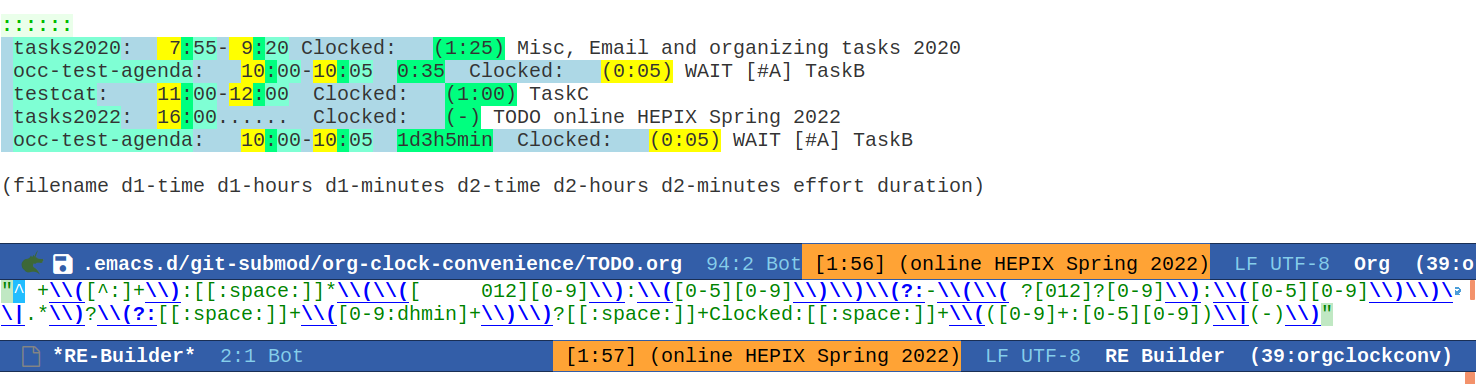
Constructing new regular expressions
The regular expressions are fairly complex and in order to
construct them I recommend using tools like Emacs' own
regexp-builder that will visualize the matches and highlight
subexpressions:
Keg and testing a newer org version
If keg is available for installing the test environment the make targets will use it to install dependencies and run the commands.
I also included a keg script that will install the newest org
version available from elpa inside of the .keg folder. It can be
invoked like this
keg run new-org


Similar repos


Languages
Emacs Lisp
93.7%
Makefile
5.9%
Convenience functions to work with emacs org mode clocking from the agenda view
Emacs Lisp
131
68 commits
updated Jun 7, 2025
README
org-clock-convenience
This is a collection of functions to make Org mode's clocking work-flow easier.
My aim is to do as much of the clocking from the agenda buffer without constantly leaving it for visiting the agenda org source files, except to open a new task.
Table of Contents
- org-clock-convenience
- Motivation
- Interactive functions
- Installation
- Current shortcomings
- Dealing with changes in
org-agenda-prefix-format
Motivation
It happens quite often that I get distracted by other tasks, e.g. a colleague involving me in a longer discussion, while I am still clocked in to the previous task. So, frequently I need to adapt the clock history to fill gaps or to correct for tasks happening when I was not in front of the screen. I want to have my whole day clocked seamlessly, and I have done so over the last 4 years using Org. Formerly, this involved a lot of jumping to the clock lines of org files to adapt the timestamps, which is cumbersome and needs time.
I always wanted to have commands with which I can change the clock
values directly from the log lines in the agenda view in the same
way that one can change timestamps under the cursor inside of an org
file using org-timestamp-up and org-timestamp-down (usually
mapped to <S-up> and <S-down>).
Interactive functions
org-clock-convenience-timestamp-upandorg-clock-convenience-timestamp-down: When on a clocked line in the agenda buffer, this function will increase/decrease the time according to the position of the cursor. If the cursor is on the hour field, change the hour. If it is on the minutes field, change the minutes. Undo works on the agenda and on the source buffer.org-clock-convenience-fill-gapmodifies the timestamp at point to connect to the previous/next logged time range.org-clock-convenience-fill-gap-bothconnects both timestamps of the current clock log line at point to fill the interval between the previous and the next clock range. The cursor need not be on a timestamp of the line. This is the most efficient way to fill the interval for a forgotten task.org-clock-convenience-goto-tsgoto the associated timestamp in the org file. Position the cursor respective to where the cursor was placed in the agenda view (e.g. on the minutes part of the starting time).org-clock-convenience-goto-last-clockout: goto timestamp of the last clockout (this is based on a real search through the buffer and not based on the saved clockout value).
Note that the agenda clock changing commands work with undo in the
same way as other org agenda commands. They will undo in the agenda
buffer as well as in the org source buffers. But if the agenda
buffer is rebuilt after a change (e.g. by g), the undo information
is lost.
The package also contains a number of utility functions to associate a list with field names with the subgroup of a regular expression and position point at a named field or read its value.
Installation
basic installation and configuration
-
The package is available from MELPA.
-
You can always install the raw package and then do
(require 'org-clock-convenience)
I did not include a minor mode, since I think that these commands will be bound
in a very individual way by users. I recommend defining a setup function and
adding it to the functions run by org-agenda-mode-hook like here:
(defun dfeich/org-agenda-mode-fn ()
  (define-key org-agenda-mode-map
    (kbd "<S-up>") #'org-clock-convenience-timestamp-up)
  (define-key org-agenda-mode-map
    (kbd "<S-down>") #'org-clock-convenience-timestamp-down)
  (define-key org-agenda-mode-map
    (kbd "ö") #'org-clock-convenience-fill-gap)
  (define-key org-agenda-mode-map
    (kbd "é") #'org-clock-convenience-fill-gap-both))
(add-hook 'org-agenda-mode-hook #'dfeich/org-agenda-mode-fn)
installation and configuration by use-package
If you are using John Wiegley's nice use-package to manage your configuration, the configuration becomes much easier. may want to use something like the following
(use-package org-clock-convenience
  :ensure t
  :bind (:map org-agenda-mode-map
   	   ("<S-up>" . org-clock-convenience-timestamp-up)
   	   ("<S-down>" . org-clock-convenience-timestamp-down)
   	   ("ö" . org-clock-convenience-fill-gap)
   	   ("é" . org-clock-convenience-fill-gap-both)))
Tip: using helm for efficiently clocking into tasks
In order not having to leave the agenda view for clocking into a
task that is not displayed in some way in the agenda view (where
you could use I with cursor on the task), I customize helm. It is
easy to just add the clocking-in as another possible action to the
helm-org-agenda-files-headings command:
(defun dfeich/helm-org-clock-in (marker)
  "Clock into the item at MARKER"
  (with-current-buffer (marker-buffer marker)
    (goto-char (marker-position marker))
    (org-clock-in)))
(eval-after-load 'helm-org
  '(nconc helm-org-headings-actions
          (list
           (cons "Clock into task" #'dfeich/helm-org-clock-in))))
Again, if you are using use-package, you may want to include this in
the configuration (:config) stanza of helm-config. E.g. in my own config:
(use-package helm-config
  :demand t
  :bind (( "<f5> <f5>" . helm-org-agenda-files-headings)
      ( "<f5> a" . helm-apropos)
      ( "<f5> A" . helm-apt)
      ( "<f5> b" . helm-buffers-list)
      ( "<f5> c" . helm-colors)
      ( "<f5> f" . helm-find-files)
      ( "<f5> i" . helm-semantic-or-imenu)
      ( "<f5> k" . helm-show-kill-ring)
      ( "<f5> K" . helm-execute-kmacro)
      ( "<f5> l" . helm-locate)
      ( "<f5> m" . helm-man-woman)
      ( "<f5> o" . helm-occur)
      ( "<f5> r" . helm-resume)
      ( "<f5> R" . helm-register)
      ( "<f5> t" . helm-top)
      ( "<f5> u" . helm-ucs)
      ( "<f5> p" . helm-list-emacs-process)
      ( "<f5> x" . helm-M-x))
  :config (progn
   	 ;; extend helm for org headings with the clock in action
   	 (defun dfeich/helm-org-clock-in (marker)
   	   "Clock into the item at MARKER"
   	   (with-current-buffer (marker-buffer marker)
   	     (goto-char (marker-position marker))
   	     (org-clock-in)))
   	 (eval-after-load 'helm-org
   	   '(nconc helm-org-headings-actions
   		   (list
   		    (cons "Clock into task" #'dfeich/helm-org-clock-in)))))
  )
Current shortcomings
- the calculated time span in the agenda buffer (the duration given in parentheses in each clock line) is only corrected after the user rebuilds the buffer. Since the changed fields are clearly marked by the temporary font, and the time span is clearly not marked, this should not confuse the user. I consider this secondary for the moment and will maybe add it at some point.
Dealing with changes in org-agenda-prefix-format
The problem
Org mode allows for full flexibility and so it is no surprise that you also can customize the log line format for clocked times used in the agenda view.
The format can be configured with the org-agenda-prefix-format
variable. This is the current default definition
(setq org-agenda-prefix-format
      '((agenda . " %i %-12:c%?-12t% s")
    (todo . " %i %-12:c")
    (tags . " %i %-12:c")
    (search . " %i %-12:c")))
The alist element (agenda . " %i %-12:c%?-12t% s") defines the
clock line format.
By default, a clocked line will look like this
testfile: 8:00- 9:00 Clocked: (1:00) TODO TaskA
But somebody wanting to display the effort estimates as well, may
set (agenda . " %i %-12:c%?-12t%-10e% s") and end up with the
effort (1:00) just following the time range
testfile: 8:00- 9:00 1:00 Clocked: (1:00) TODO TaskA
org-clock-convenience needs to be able and parse the clocked lines,
and the parsing of the line is given by the regular expression
stored in org-clock-convenience-clocked-agenda-re together with a
list naming the subexpressions in
org-clock-convenience-clocked-agenda-fields:
(defvar org-clock-convenience-clocked-agenda-re
  "^ +\\([^:]+\\):[[:space:]]*\\(\\([ \t012][0-9]\\):\\([0-5][0-9]\\)\\)\\(?:-\\(\\( ?[012]?[0-9]\\):\\([0-5][0-9]\\)\\)\\|.*\\)?[[:space:]]+Clocked:[[:space:]]+\\(([0-9]+:[0-5][0-9])\\|(-)\\)"
  "Regexp of a clocked time range log line in the Org agenda buffer.")

(defvar org-clock-convenience-clocked-agenda-fields
  '(filename d1-time d1-hours d1-minutes d2-time d2-hours d2-minutes duration)
  "Field names corresponding to submatches of `org-clock-convenience-clocked-agenda-re'.")
Adapting org-clock-convenience's configuration
You need to adapt org-clock-convenience-clocked-agenda-re and the
field list in org-clock-convenience-clocked-agenda-fields and put
it into your emacs configuration.
For the functioning of org-clock-convenience only the fields
d1-time, d1-hours, d1-minutes, d2-time, d2-hours, and
d2-minutes are important.
If you change org-agenda-prefix-format, you need to adapt the
regular expression and the matching fieldnames. You can put it
inside your emacs configuration.
For the example above where we changed org-agenda-prefix-format to
contain (agenda . " %i %-12:c%?-12t%-6e% s"), the following
definitions will work
(setq org-clock-convenience-clocked-agenda-re
      "^ +\\([^:]+\\):[[:space:]]*\\(\\([ \t012][0-9]\\):\\([0-5][0-9]\\)\\)\\(?:-\\(\\( ?[012]?[0-9]\\):\\([0-5][0-9]\\)\\)\\|.*\\)?\\(?:[[:space:]]+\\([0-9:dhmin]+\\)\\)?[[:space:]]+Clocked:[[:space:]]+\\(([0-9]+:[0-5][0-9])\\|(-)\\)")

(setq org-clock-convenience-clocked-agenda-fields
      '(filename d1-time d1-hours d1-minutes d2-time d2-hours d2-minutes effort duration))
Tools for checking the settings
This repository contains testing code that allows importing new configuration definitions and run the test suite on it, but I also provide a make target for displaying the matches from a built test agenda.
For this example I defined new settings in the custom/with-effort.el file of this repository:
(setq org-agenda-prefix-format '((agenda . " %i %-12:c%?-12t %?-10e% s")
                                 (todo . " %i %-12:c")
                                 (tags . " %i %-12:c")
                                 (search . " %i %-12:c")))

(setq org-clock-convenience-clocked-agenda-re
      "^ +\\([^:]+\\):[[:space:]]*\\(\\([ \t012][0-9]\\):\\([0-5][0-9]\\)\\)\\(?:-\\(\\( ?[012]?[0-9]\\):\\([0-5][0-9]\\)\\)\\|.*\\)?\\(?:[[:space:]]+\\([0-9:dhmin]+\\)\\)?[[:space:]]+Clocked:[[:space:]]+\\(([0-9]+:[0-5][0-9])\\|(-)\\)")

(setq org-clock-convenience-clocked-agenda-fields
      '(filename d1-time d1-hours d1-minutes d2-time d2-hours d2-minutes effort duration))
And now we can pass the new configuration into the test that is
executed by the test-regx make target by giving its location in the
OCC_CONFIG variable
OCC_CONFIG=custom/with-effort.el make test-regx

emacs --batch \
                     \
                            -l org-clock-convenience.el \
                            -l test/test-org-clock-convenience.el \
                    -l custom/with-effort.el \
                            --eval "(occ-print-all-agendaline-vals)"
Emacs version: GNU Emacs 27.2 (build 1, x86_64-pc-linux-gnu, GTK+ Version 3.22.30)
 of 2021-08-29
Org version: 9.4.4
org-agenda-prefix-format set to:
((agenda . " %i %-12:c%?-12t %?-10e% s")
 (todo . " %i %-12:c")
 (tags . " %i %-12:c")
 (search . " %i %-12:c"))

########## GENERATED AGENDA ##########
Day-agenda (W15):
Friday     15 April 2022
  testfile:    8:00- 9:00  1:00      Clocked:   (1:00) TODO TaskA - State "TODO"       from              [2022-04-15 Fri 07:30]
               8:00......  ----------------
  testfile:    9:00......  1:00      TODO TaskA
  testfile:    9:30- 9:55  1d3h5min  Clocked:   (0:25) WAIT [#A] TaskB - State "WAIT"       from "TODO"       [2022-04-15 Fri 09:50] \
  testfile:    9:50......  1d3h5min  Scheduled:  WAIT [#A] TaskB
              10:00......  ----------------
  testcat:    11:00-12:00  Clocked:   (1:00) TaskC
              12:00......  ----------------
              14:00......  ----------------
              16:00......  ----------------
              18:00......  ----------------
              20:00......  ----------------
######################################
AGENDA_LINE:   testfile:    8:00- 9:00  1:00      Clocked:   (1:00) TODO TaskA - State "TODO"       from              [2022-04-15 Fri 07:30]
((filename "testfile")
 (d1-time " 8:00")
 (d1-hours " 8")
 (d1-minutes "00")
 (d2-time " 9:00")
 (d2-hours " 9")
 (d2-minutes "00")
 (effort "1:00")
 (duration "(1:00)"))
AGENDA_LINE:   testfile:    9:30- 9:55  1d3h5min  Clocked:   (0:25) WAIT [#A] TaskB - State "WAIT"       from "TODO"       [2022-04-15 Fri 09:50] \
((filename "testfile")
 (d1-time " 9:30")
 (d1-hours " 9")
 (d1-minutes "30")
 (d2-time " 9:55")
 (d2-hours " 9")
 (d2-minutes "55")
 (effort "1d3h5min")
 (duration "(0:25)"))
AGENDA_LINE:   testcat:    11:00-12:00  Clocked:   (1:00) TaskC
((filename "testcat")
 (d1-time "11:00")
 (d1-hours "11")
 (d1-minutes "00")
 (d2-time "12:00")
 (d2-hours "12")
 (d2-minutes "00")
 (effort nil)
 (duration "(1:00)"))
Found 3 matching lines in the agenda
Naturally, you can also execute the test suite for checking the new configuration
OCC_CONFIG=custom/with-effort.el make test

Emacs binary at /usr/local/emacs/bin/emacs
emacs --batch \
                     \
                            -l org-clock-convenience.el \
                            -l test/test-org-clock-convenience.el \
                    -l custom/with-effort.el \
             --eval "(princ (format \"Emacs version: %s\n\" (emacs-version)) t)" \
     --eval "(princ (format \"Org version: %s\n\" (org-version)) t)" \
             --eval "(ert-run-tests-batch-and-exit nil)"

Running 6 tests (2022-05-01 18:31:30+0200, selector ‘t’)

   passed  1/6  occ-test-agenda-re1 (0.318694 sec)

   passed  2/6  occ-test-agenda-re2 (0.021884 sec)
   passed  3/6  occ-test-clockline-re1 (0.000152 sec)

   passed  4/6  occ-test-fill-gap-both (0.026258 sec)

   passed  5/6  occ-test-timestamp-change-hours (0.006018 sec)

   passed  6/6  occ-test-timestamp-change-minutes (0.023669 sec)

Ran 6 tests, 6 results as expected, 0 unexpected (2022-05-01 18:31:30+0200, 0.396951 sec)

Emacs version: GNU Emacs 27.2 (build 1, x86_64-pc-linux-gnu, GTK+ Version 3.22.30)
 of 2021-08-29
Org version: 9.4.4
Constructing new regular expressions
The regular expressions are fairly complex and in order to
construct them I recommend using tools like Emacs' own
regexp-builder that will visualize the matches and highlight
subexpressions:
Keg and testing a newer org version
If keg is available for installing the test environment the make targets will use it to install dependencies and run the commands.
I also included a keg script that will install the newest org
version available from elpa inside of the .keg folder. It can be
invoked like this
keg run new-org
Similar repos
Languages
Emacs Lisp
93.7%
Makefile
5.9%