
README
Branch Deck
Branch Deck is a workaround for performance issues with GitButler on large repositories.
Automatically create Git branches from commits with prefixed messages. Organize your work into separate branches without manual branch management.
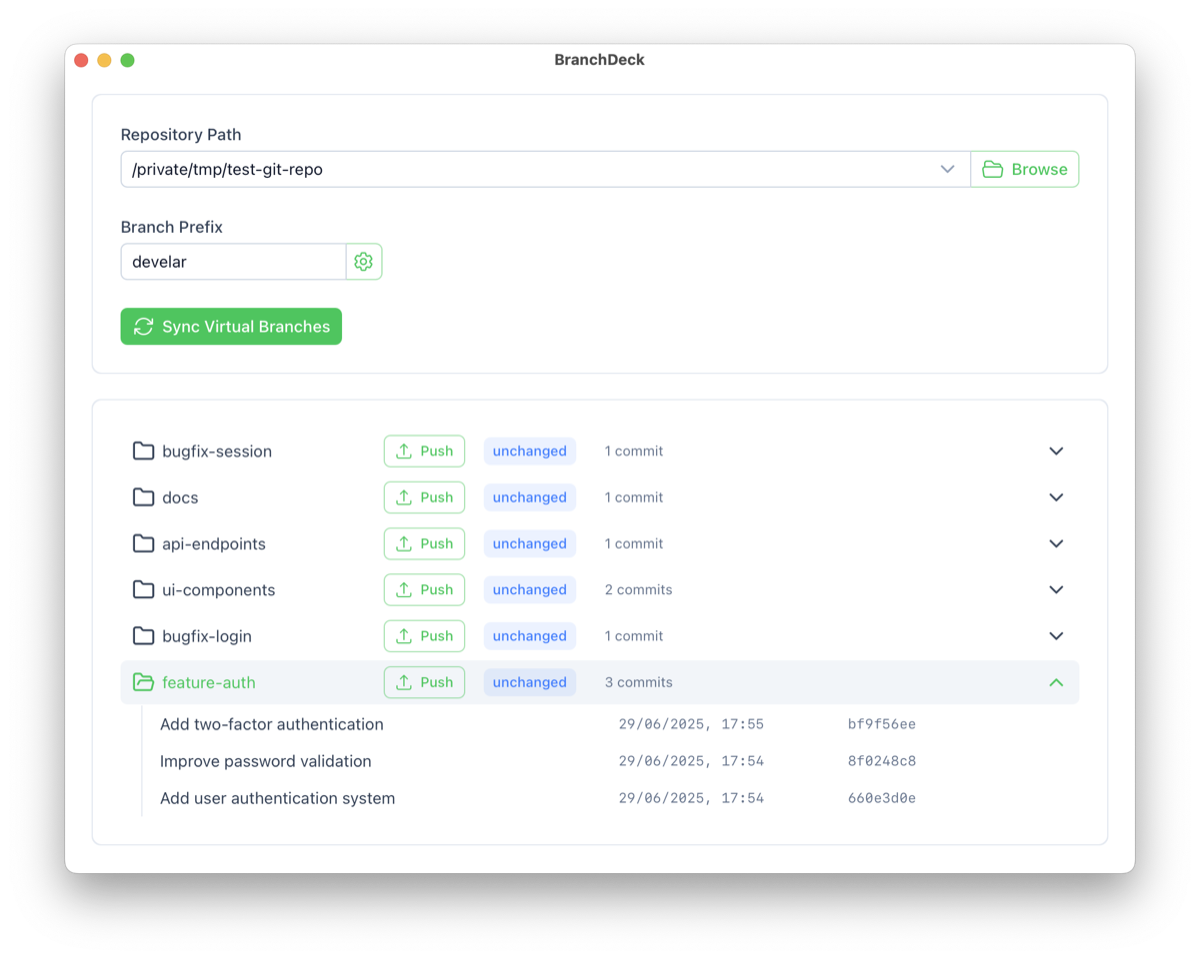
What It Does
Branch Deck creates Git branches from your commits based on message prefixes. Commits with the same prefix get cherry-picked into their own dedicated branch.
How It Works
Branch Deck analyzes your commit history and creates separate branches based on commit message patterns. There are two distinct kinds of “prefixes” to be aware of:
- Commit message grouping prefix: Text like
(feature-auth)at the start of a commit subject. This is used only to group commits on the main branch (HEAD). It is not persisted on virtual/archived branches and not present after integration into main. - Branch prefix (git config): The namespace (e.g.
username) configured viagit config branchdeck.branchPrefix. This becomes the first path segment underrefs/heads, e.g.refs/heads/username/....
Explicit Prefixes (commit messages)
Use the (name) format in your commit messages on main:
- Commits prefixed with
(feature-auth)are grouped into a virtual branch atusername/virtual/feature-auth - Commits prefixed with
(bugfix-login)are grouped intousername/virtual/bugfix-login
When Branch Deck creates or updates those virtual branches, the cherry-picked commit subjects are stored without the grouping prefix (e.g. Add login, not (feature-auth) Add login).
Issue Numbers
If no explicit prefix is found, Branch Deck automatically detects issue numbers (e.g., JIRA-123, ABC-456) in the first line of the commit message on main:
- Commits with
IJPL-163558: Fix observabilityare grouped intousername/virtual/IJPL-163558 - Commits with
[threading] IJPL-163558: Fix observabilityalso go tousername/virtual/IJPL-163558 - Square bracket prefixes like
[subsystem]are ignored when grouping by issue numbers - Multiple commits with the same issue number are grouped together
- Issue numbers must be in the first line of the commit message
Priority
- Explicit prefixes
(name)take precedence over issue numbers - Commits without either pattern remain on the main branch
Virtual and Archived Branch Layout
See docs/design/virtual-branches.md for details about branch structure and storage.
This allows you to maintain a clean, organized Git history while working on multiple features simultaneously.
Current Limitations
- Sub-branches not yet supported: Nested branch structures (e.g.,
(feature-auth/oauth)) are not currently implemented.
Why Branch Deck?
- Simple: Just add
(name)prefixes or use issue numbers in your commit messages - Automatic: Creates actual Git branches without manual branch management
- Organized: Each feature gets its own clean branch automatically
- Flexible: Work on multiple features simultaneously in one working directory
Installation
Documentation
For technical architecture and design decisions:
- Virtual Branches Architecture - How the branch management system works
- Integration Detection - How we detect merged branches
- All Design Docs - Complete technical documentation
Contributing
See DEVELOPMENT.md for development setup and contribution guidelines.
Contributors



Similar repos


Languages
Rust
47.8%
HTML
27.3%
TypeScript
15.9%
Vue
8.5%
README
Branch Deck
Branch Deck is a workaround for performance issues with GitButler on large repositories.
Automatically create Git branches from commits with prefixed messages. Organize your work into separate branches without manual branch management.
What It Does
Branch Deck creates Git branches from your commits based on message prefixes. Commits with the same prefix get cherry-picked into their own dedicated branch.
How It Works
Branch Deck analyzes your commit history and creates separate branches based on commit message patterns. There are two distinct kinds of “prefixes” to be aware of:
- Commit message grouping prefix: Text like
(feature-auth)at the start of a commit subject. This is used only to group commits on the main branch (HEAD). It is not persisted on virtual/archived branches and not present after integration into main. - Branch prefix (git config): The namespace (e.g.
username) configured viagit config branchdeck.branchPrefix. This becomes the first path segment underrefs/heads, e.g.refs/heads/username/....
Explicit Prefixes (commit messages)
Use the (name) format in your commit messages on main:
- Commits prefixed with
(feature-auth)are grouped into a virtual branch atusername/virtual/feature-auth - Commits prefixed with
(bugfix-login)are grouped intousername/virtual/bugfix-login
When Branch Deck creates or updates those virtual branches, the cherry-picked commit subjects are stored without the grouping prefix (e.g. Add login, not (feature-auth) Add login).
Issue Numbers
If no explicit prefix is found, Branch Deck automatically detects issue numbers (e.g., JIRA-123, ABC-456) in the first line of the commit message on main:
- Commits with
IJPL-163558: Fix observabilityare grouped intousername/virtual/IJPL-163558 - Commits with
[threading] IJPL-163558: Fix observabilityalso go tousername/virtual/IJPL-163558 - Square bracket prefixes like
[subsystem]are ignored when grouping by issue numbers - Multiple commits with the same issue number are grouped together
- Issue numbers must be in the first line of the commit message
Priority
- Explicit prefixes
(name)take precedence over issue numbers - Commits without either pattern remain on the main branch
Virtual and Archived Branch Layout
See docs/design/virtual-branches.md for details about branch structure and storage.
This allows you to maintain a clean, organized Git history while working on multiple features simultaneously.
Current Limitations
- Sub-branches not yet supported: Nested branch structures (e.g.,
(feature-auth/oauth)) are not currently implemented.
Why Branch Deck?
- Simple: Just add
(name)prefixes or use issue numbers in your commit messages - Automatic: Creates actual Git branches without manual branch management
- Organized: Each feature gets its own clean branch automatically
- Flexible: Work on multiple features simultaneously in one working directory
Installation
Documentation
For technical architecture and design decisions:
- Virtual Branches Architecture - How the branch management system works
- Integration Detection - How we detect merged branches
- All Design Docs - Complete technical documentation
Contributing
See DEVELOPMENT.md for development setup and contribution guidelines.
Similar repos
Contributors
Languages
Rust
47.8%
HTML
27.3%
TypeScript
15.9%
Vue
8.5%