
open-source IDE for thoughtful software design
See the codeSee what people are saying
README

Whiteboard is an open-source desktop app where humans and agents can architect software together in a common workspace.
Whiteboard plugs into the tools you already use - e.g. Claude Code, Codex, etc. – and gives your agent an SDK to draw on an in-app canvas to describe its work.
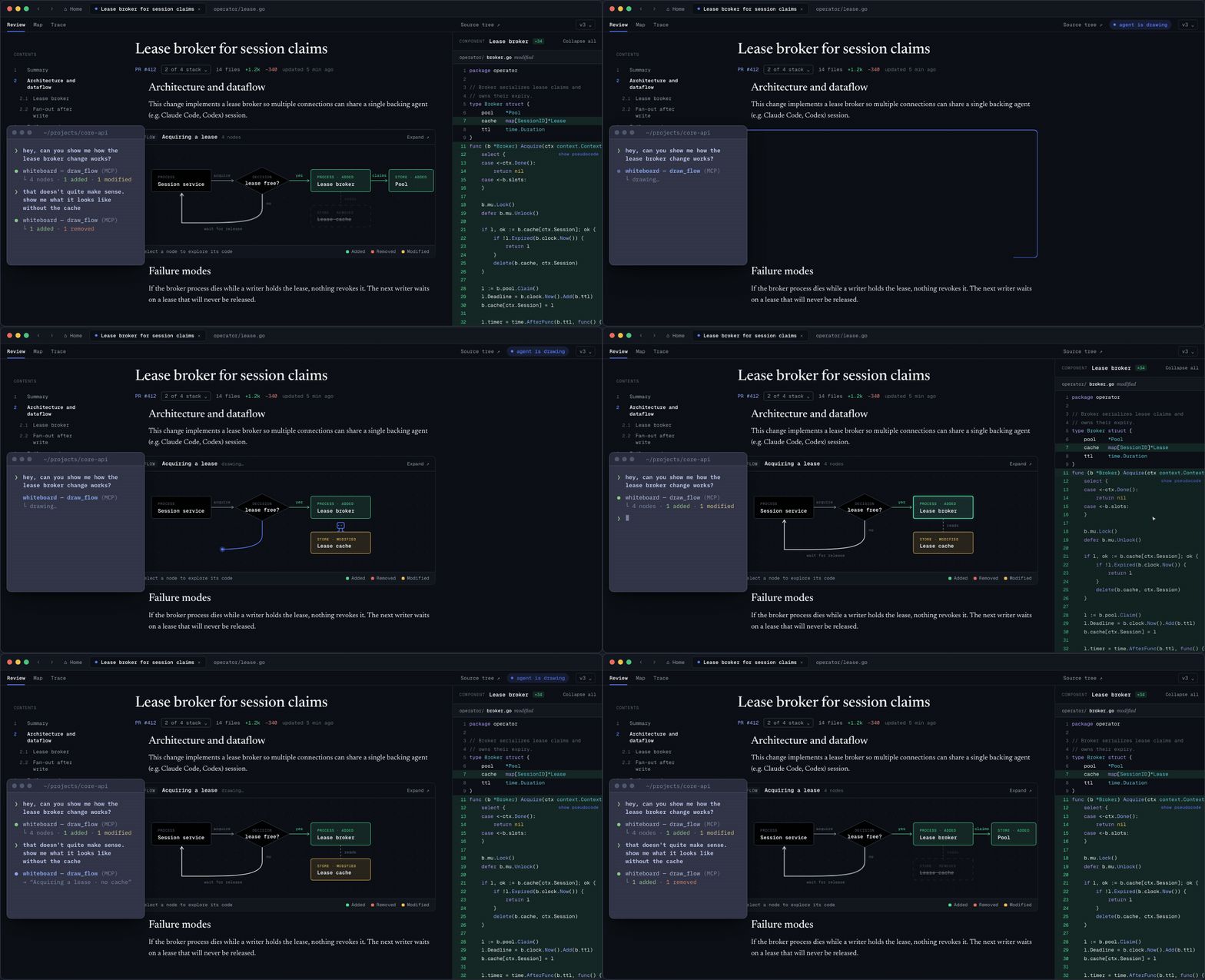
Here’s a 1 min demo video explaining more: https://www.youtube.com/watch?v=ChPn3ftULWE
Quickstart
- Download Whiteboard and open the app.
- Connect Claude Code, Codex, or another coding agent from the welcome screen.
- Ask your agent to review your current branch against up-to-date main and open the result in Whiteboard.
Guidance
In our experience, Whiteboard works best with models like GPT-6 Luna and Claude Opus 5.5 for their intelligence, cost, and speed tradeoff.
Here are a few example prompts of how to use Whiteboard effectively. We are working hard to make sure the right choices are baked in by default to the system prompt - part of why this system is open source! - but in the meantime:
For a new API change
hey, this stack of commits is set up so i can get an [api] to do [objective]
i'd like to see:
- proposed api
- examples
- motivations for this (if available to you in context/in the repo)
and then we can dive into implementation + explaining how things worked.
For a change to add telemetry:
cna you explain to me the telemetry changes form the newest posthog pr https://github.com/devdotfast/whiteboard/commit/4837e107946e27ebad50c282eb0f2585210d2a35 -- what are we tracking, how can we build good dashboards or product waterfalls from it? what do we do for hangs, errors, crashes etc... use whiteboard
If you see anything you don't like, highlight it in your clipboard and give it your agent, and it can re-draw on the Whiteboard to suit your needs!
Why does this exist?
Diagrams that lead to code
Pure HTML tools didn’t provide easy affordances to connect a spec or diagram to code; this is especially tricky since tradeoffs are often only discovered after a first pass at implementation. In Whiteboard, when you click on visualizations like a sequence diagram, an entity relationship diagram, or a quote from the agent’s trace, you can jump to the underlying code directly. When navigating code, you get keybindings and LSP support from VSCode out of the box.
Semantic diff viewer
Raw diff views can be very noisy, so we wrote a semantic, AST-aware diff viewer in Rust so you can only view the code changes which are relevant to you. We’ve set up some sane defaults: large added functions are summarized as pseudocode, and things like unit tests and documentation changes are collapsed / hidden. This is all customizable with a WASM-based plugin system.
Decision log
We found it difficult to reason about what set of decisions our agents made autonomously & how that impacts a change. So we built tools for agents to query and link their own traces on the Whiteboard, so you can visualize the requirements that you set, understand how they were implemented, and understand what decisions the agent made autonomously.
Open source, on your machine
Whiteboard is MIT-licensed and runs against your local checkouts. A hosted product for teams is planned, and everything will always remain self-hostable.
Known limitations
-
You cannot currently edit files in Whiteboard. If this is something that you find yourself wanting to do, please file an issue!
-
Working and browsing files across multiple repos in a single review isn't well supported.
-
While you can share reviews between machines with the share button, updates made after a review is shared don't appear for others. You would need to re-share the review.
Contributing
Contributions and feedback are welcome.
Read CONTRIBUTING.md for setup and the pull request workflow, and follow the Code of Conduct. Report vulnerabilities as described in SECURITY.md. Questions? Ask on Discord.
Privacy
Whiteboard runs against local checkouts. Anonymous telemetry does not include your code, diffs, Whiteboard text, prompts, or model output. Read the privacy overview, inspect the complete telemetry reference, or turn telemetry off at any time.
License
Whiteboard is available under the MIT License. The vendored Code -
OSS fork retains Microsoft's MIT license and third-party notices; see
apps/review-desktop/LICENSE and
apps/review-desktop/UPSTREAM.
On vendoring Code OSS
With everyone using dedicated agent TUIs and desktop apps, we only use our text editors for reviewing line-by-line diffs now, so we figured why not have a text editor meant for reviewing code. In that case, might as well start off with the most successful open source editor out there as a baseline.
We vendor Code OSS unlike other forks that maintain patches because coding agents have a hard time with patches and there's a lot of stuff from stock VS Code (i.e., ~45% of the codebase is Copilot these days 😬) that we don't need.
We regularly monitor upstream Code OSS and merge in security/feature patches as they come in.
Influences
- https://www.geoffreylitt.com/2026/07/02/understanding-is-the-new-bottleneck — a great overview of the constraints of modern software engineering.
- https://maggieappleton.com/2025-08-vibe-legacy-code/ and https://blog.val.town/vibe-code — do a great job describing how AI-generated code fits into the pre-2025 notion of software engineering.
- Karpathy on agents:
- On LLM agents: https://x.com/karpathy/status/1979644538185752935
- On agents as "junior engineer savants": https://x.com/karpathy/status/1915581920022585597


Similar repos


Languages
TypeScript
93.2%
CSS
2.3%
JavaScript
1.9%
Rust
1.2%
open-source IDE for thoughtful software design
See the codeSee what people are saying
README
Whiteboard is an open-source desktop app where humans and agents can architect software together in a common workspace.
Whiteboard plugs into the tools you already use - e.g. Claude Code, Codex, etc. – and gives your agent an SDK to draw on an in-app canvas to describe its work.
Here’s a 1 min demo video explaining more: https://www.youtube.com/watch?v=ChPn3ftULWE
Quickstart
- Download Whiteboard and open the app.
- Connect Claude Code, Codex, or another coding agent from the welcome screen.
- Ask your agent to review your current branch against up-to-date main and open the result in Whiteboard.
Guidance
In our experience, Whiteboard works best with models like GPT-6 Luna and Claude Opus 5.5 for their intelligence, cost, and speed tradeoff.
Here are a few example prompts of how to use Whiteboard effectively. We are working hard to make sure the right choices are baked in by default to the system prompt - part of why this system is open source! - but in the meantime:
For a new API change
hey, this stack of commits is set up so i can get an [api] to do [objective]
i'd like to see:
- proposed api
- examples
- motivations for this (if available to you in context/in the repo)
and then we can dive into implementation + explaining how things worked.
For a change to add telemetry:
cna you explain to me the telemetry changes form the newest posthog pr https://github.com/devdotfast/whiteboard/commit/4837e107946e27ebad50c282eb0f2585210d2a35 -- what are we tracking, how can we build good dashboards or product waterfalls from it? what do we do for hangs, errors, crashes etc... use whiteboard
If you see anything you don't like, highlight it in your clipboard and give it your agent, and it can re-draw on the Whiteboard to suit your needs!
Why does this exist?
Diagrams that lead to code
Pure HTML tools didn’t provide easy affordances to connect a spec or diagram to code; this is especially tricky since tradeoffs are often only discovered after a first pass at implementation. In Whiteboard, when you click on visualizations like a sequence diagram, an entity relationship diagram, or a quote from the agent’s trace, you can jump to the underlying code directly. When navigating code, you get keybindings and LSP support from VSCode out of the box.
Semantic diff viewer
Raw diff views can be very noisy, so we wrote a semantic, AST-aware diff viewer in Rust so you can only view the code changes which are relevant to you. We’ve set up some sane defaults: large added functions are summarized as pseudocode, and things like unit tests and documentation changes are collapsed / hidden. This is all customizable with a WASM-based plugin system.
Decision log
We found it difficult to reason about what set of decisions our agents made autonomously & how that impacts a change. So we built tools for agents to query and link their own traces on the Whiteboard, so you can visualize the requirements that you set, understand how they were implemented, and understand what decisions the agent made autonomously.
Open source, on your machine
Whiteboard is MIT-licensed and runs against your local checkouts. A hosted product for teams is planned, and everything will always remain self-hostable.
Known limitations
-
You cannot currently edit files in Whiteboard. If this is something that you find yourself wanting to do, please file an issue!
-
Working and browsing files across multiple repos in a single review isn't well supported.
-
While you can share reviews between machines with the share button, updates made after a review is shared don't appear for others. You would need to re-share the review.
Contributing
Contributions and feedback are welcome.
Read CONTRIBUTING.md for setup and the pull request workflow, and follow the Code of Conduct. Report vulnerabilities as described in SECURITY.md. Questions? Ask on Discord.
Privacy
Whiteboard runs against local checkouts. Anonymous telemetry does not include your code, diffs, Whiteboard text, prompts, or model output. Read the privacy overview, inspect the complete telemetry reference, or turn telemetry off at any time.
License
Whiteboard is available under the MIT License. The vendored Code -
OSS fork retains Microsoft's MIT license and third-party notices; see
apps/review-desktop/LICENSE and
apps/review-desktop/UPSTREAM.
On vendoring Code OSS
With everyone using dedicated agent TUIs and desktop apps, we only use our text editors for reviewing line-by-line diffs now, so we figured why not have a text editor meant for reviewing code. In that case, might as well start off with the most successful open source editor out there as a baseline.
We vendor Code OSS unlike other forks that maintain patches because coding agents have a hard time with patches and there's a lot of stuff from stock VS Code (i.e., ~45% of the codebase is Copilot these days 😬) that we don't need.
We regularly monitor upstream Code OSS and merge in security/feature patches as they come in.
Influences
- https://www.geoffreylitt.com/2026/07/02/understanding-is-the-new-bottleneck — a great overview of the constraints of modern software engineering.
- https://maggieappleton.com/2025-08-vibe-legacy-code/ and https://blog.val.town/vibe-code — do a great job describing how AI-generated code fits into the pre-2025 notion of software engineering.
- Karpathy on agents:
- On LLM agents: https://x.com/karpathy/status/1979644538185752935
- On agents as "junior engineer savants": https://x.com/karpathy/status/1915581920022585597
Similar repos
Languages
TypeScript
93.2%
CSS
2.3%
JavaScript
1.9%
Rust
1.2%