
See what people are saying
README

MacTube 2
YouTube as a real Mac app — without Shorts, without AI slop, without opening Chrome.

macOS 13 Ventura or later · Apple Silicon & Intel · always the latest build
Why MacTube 2
Watch what you chose, not what the algorithm pushes.
- Shorts off, for good. One switch removes Shorts from your home feed, search results, sidebar and recommendations. Shorts links take you back Home instead of down the scroll hole.
- Skip AI-generated videos. Videos YouTube labels Made with AI are stopped before they play. Channels caught posting them disappear from your feed too, so it gets cleaner the more you watch. One click to watch anyway if you want.
- Real Mac tabs. ⌘T opens a new tab, just like Safari. Keep a tutorial, a playlist and a talk open side by side.
- Links go where they should. Links in descriptions and comments open in your default browser — no "Are you sure you want to leave YouTube?" detours.
- Feels native. Its own Dock icon, its own window, light and dark mode, settings remembered between launches.
Controls
| Where | Shortcut | |
|---|---|---|
| Show / hide Shorts | Filters menu or Settings | ⇧⌘1 |
| Show / hide AI videos | Filters menu or Settings | ⇧⌘2 |
| New tab | File menu | ⌘T |
| New window | File menu | ⌘N |
| Settings | MacTube 2 menu | ⌘, |
Install
- Download MacTube2.dmg and drag MacTube 2 into Applications.
- Open MacTube 2. macOS blocks the first launch because the app isn't signed with a paid Apple developer account.
First launch
-
Open MacTube 2 once and click Done on the warning.
-
Open System Settings → Privacy & Security and scroll down to Security.
-
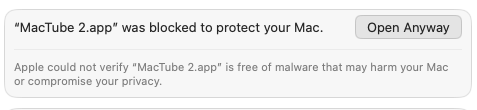
Next to "MacTube 2.app" was blocked to protect your Mac, click Open Anyway:
-
Confirm with Open Anyway and your password or Touch ID.
You only do this once. After that, MacTube 2 opens normally.
Good to know
- AI detection relies on YouTube's own Made with AI label. Videos their creators don't disclose — and YouTube doesn't catch — will still show up.
- Changed your mind about a channel? Filters → Forget Learned AI Channels resets the list.
Build it yourself
Every push to master builds a new release automatically. To build locally (needs Xcode): ./build-dmg.sh.
Based on MacTube by Kevin Dion. Not affiliated with YouTube or Google.
Contributors


Similar repos


Languages
Swift
96.9%
Shell
3.1%
See what people are saying
README
MacTube 2
YouTube as a real Mac app — without Shorts, without AI slop, without opening Chrome.
macOS 13 Ventura or later · Apple Silicon & Intel · always the latest build
Why MacTube 2
Watch what you chose, not what the algorithm pushes.
- Shorts off, for good. One switch removes Shorts from your home feed, search results, sidebar and recommendations. Shorts links take you back Home instead of down the scroll hole.
- Skip AI-generated videos. Videos YouTube labels Made with AI are stopped before they play. Channels caught posting them disappear from your feed too, so it gets cleaner the more you watch. One click to watch anyway if you want.
- Real Mac tabs. ⌘T opens a new tab, just like Safari. Keep a tutorial, a playlist and a talk open side by side.
- Links go where they should. Links in descriptions and comments open in your default browser — no "Are you sure you want to leave YouTube?" detours.
- Feels native. Its own Dock icon, its own window, light and dark mode, settings remembered between launches.
Controls
| Where | Shortcut | |
|---|---|---|
| Show / hide Shorts | Filters menu or Settings | ⇧⌘1 |
| Show / hide AI videos | Filters menu or Settings | ⇧⌘2 |
| New tab | File menu | ⌘T |
| New window | File menu | ⌘N |
| Settings | MacTube 2 menu | ⌘, |
Install
- Download MacTube2.dmg and drag MacTube 2 into Applications.
- Open MacTube 2. macOS blocks the first launch because the app isn't signed with a paid Apple developer account.
First launch
-
Open MacTube 2 once and click Done on the warning.
-
Open System Settings → Privacy & Security and scroll down to Security.
-
Next to "MacTube 2.app" was blocked to protect your Mac, click Open Anyway:
-
Confirm with Open Anyway and your password or Touch ID.
You only do this once. After that, MacTube 2 opens normally.
Good to know
- AI detection relies on YouTube's own Made with AI label. Videos their creators don't disclose — and YouTube doesn't catch — will still show up.
- Changed your mind about a channel? Filters → Forget Learned AI Channels resets the list.
Build it yourself
Every push to master builds a new release automatically. To build locally (needs Xcode): ./build-dmg.sh.
Based on MacTube by Kevin Dion. Not affiliated with YouTube or Google.
Similar repos
Contributors
Languages
Swift
96.9%
Shell
3.1%