
README
Everything you'd want from a photo frame: accurate colours, full privacy, a clean web app, and the ability to run as many frames as you like from one cheap server. Open source firmware and image server for six-colour e-ink photo frames — three models supported today, from a $99 7.3" panel to a 13.3" wall piece, all driven from one photo library.
Write the appliance image to a Raspberry Pi, join the WiFi network it creates, fill in a form — and you have a private photo frame server. No cloud, no terminal, no subscription.
Supported frames
| Frame | Size | Price | Status |
|---|---|---|---|
| Hokku / Huessen 13.3" | 13.3" | from ~$279 | ✅ Fully supported — the original, most thoroughly tested |
| Bigme F7 | 7.3" | ~$99 | ✅ Supported — proven end-to-end on real hardware |
| Seeed reTerminal E1004 | 13.3" | ~$288 | ⚠️ Experimental — confirmed working on real hardware once |
All three use E Ink Spectra 6, so one photo library feeds every frame — and you can mix sizes and orientations against it. See Hardware for where to buy and what to check.
Core features
Photos, your way
- Local-only — your photos never leave your network. No cloud, no third-party servers, no telemetry. The web app itself makes no external requests — fonts and assets are self-hosted, so nothing is phoned home just by opening a browser tab. Your hardware and open source software means you're in full control.
- Drag-and-drop upload — single files or dozens at a time, straight into the web app, with a live progress list. Works on phones too.
- Browse in a grid — preview exactly what the frame will show before it shows it, original and converted version side by side. Delete anything you don't want with one click.
- Click any photo — see how it was processed and compare the original against what's going to the frame at full size.
- All the formats you actually have — JPEG, PNG, HEIC/HEIF, AVIF, WebP, GIF, TIFF, BMP, JPEG XL. Anything from 90s scanned prints to modern iPhone, Android, and JPEG XL. Phone photos auto-rotate.
- Landscape or portrait — flip a switch and everything re-converts to match how the frame is mounted.
- Jump the queue — pick any photo in the library to be the next one shown on the frame.
Looks good on e-paper
- Correct out of the box — each supported panel ships with settings tuned for it, no tweaking needed.
- Adapts to each photo — it can tell a black-and-white photo from a colour one, and recognise faces (all done locally, nothing leaves your network), and picks the best conversion approach for each automatically.
- No ugly borders — photos close to the right shape get a subtle crop to fill the screen instead of showing a letterbox band.
- Faces survive the crop — when a photo does get cropped to fill, faces are detected locally and kept in frame rather than sliced off at the edge.
- Tunable to the nth degree — three independent conversion profiles (general, black-and-white, faces) with curated presets, plus an advanced panel that exposes nine palette colour-space variants (CIELAB / weighted CIELAB / OKLAB / CAM16-UCS, each with optional hue gating, plus a B&W-only LUT) and chroma-boost / dynamic-range knobs you can run in CIELAB or OKLAB independently. (Details on dithering)
- Colour-accurate — calibrated against the actual panels, not a theoretical colour profile.
Smart about frames
- Over-the-air firmware updates — update the firmware on any frame wirelessly from the web app. Open a frame's Details, toggle "Update firmware on next refresh", and the frame downloads and installs the new firmware on its own — no USB, no cable, no terminal. The old firmware stays in a second slot and is automatically restored if the new one can't reach the server. First-time setup still needs a USB flash to activate OTA; after that, all future updates are wireless.
- Flash frames from the web app — if you're running the server on the same machine you use for setup (the appliance scenario), connect a frame via USB and use "Flash a screen" in the web app directly, without running any setup wizard separately. On the Pi Zero 2 W appliance the single USB port is dual-role, so boot the appliance with nothing on the data port, then hot-plug the frame (through a micro-USB→USB-A OTG adapter, with the Pi powered from its PWR port) — a frame attached at boot stops the appliance from starting. See the appliance guide.
- Multiple frames, one server — each frame gets a name and shows up in a dashboard with battery level, WiFi signal, and when it'll next update. Mix models, sizes and orientations against one library: a 13.3" frame in the hall and a 7.3" on a shelf, each served images converted for its own panel.
- Per-frame settings — orientation, crop behaviour and firmware updates are set per screen, not globally.
- Knows which firmware each frame runs — the dashboard shows every frame's firmware version and flags the ones that are behind.
- Fair rotation — every photo gets its turn. Newly uploaded photos go to the front of the queue; after that, whichever image has been shown least goes next.
- Battery lasts months — the frame uses almost no power between refreshes. The web app shows a battery level for each frame and flags it red when it's getting low.
- Problems show up on the screen — if something goes wrong (wrong WiFi password, server unreachable) the frame displays a plain-English explanation on the e-paper itself instead of going blank. No plugging in a laptop to debug.
- Late-frame warning — if a frame misses its scheduled update by more than an hour, the web app flags it so you know to check WiFi or the battery.
- Scheduled updates — set the times you want the photo to change (e.g. morning, noon, evening) and the frame wakes up on its own. No constant connection needed.
- Settings are on the server — change the schedule or any other server setting in the web app and every frame picks it up automatically. No restarts, no reflashing.
- Instant refresh — there's a button on the frame that forces an immediate update whenever you want one.
- Diagnostics on demand — one click in the web app shows the frame's status without needing a cable.
- Recovers on its own — a frame that can't reach the server backs off and retries rather than hammering the network flat, and a firmware update that can't phone home afterwards rolls itself back to the previous version.
- What happened last refresh — after every update the frame sends a log of what it did to the server (WiFi connection, image download, display result). Open a frame's details in the web app to read it — no cable, no terminal needed.
- Comically over-engineered firmware — on the ESP32 frames it runs at 240 MHz (up from the 160 MHz default) on a dual-core processor with the compiler's maximum optimisations turned on, code and data copied into dedicated high-speed RAM at boot, and cache tuned for the exact chip revision on your board. Completely unnecessary for a frame that wakes up once a day, downloads a picture, and goes back to sleep. We did it anyway. 🚀
- A whole SoC reverse-engineered for the cheap one — the $99 Bigme F7 runs an XRADIOTECH XR872AT: no public SDK support, no vendor documentation. Supporting it meant recovering the panel init sequence from the stock firmware and writing a BROM flasher from scratch in Python, so adopting one needs no vendor tools at all.
Easy to run
- Everything through the web app — upload, browse, configure. No command line, no shared drives to set up.
- Fast even on small hardware — converting a big library of photos uses all available CPU cores and finishes much sooner than doing them one at a time. A Raspberry Pi Zero 2 W handles a multi-frame setup without breaking a sweat.
- Bad photos are handled gracefully — if a photo can't be converted, it's set aside with an explanation rather than silently vanishing. You can retry or remove it with one click.
- Progress while you wait — a status bar shows how many photos are being converted and roughly how long it'll take.
- Find it on your network by name — the server advertises itself as
hokku.localvia mDNS, so you can bookmarkhttp://hokku.local:8080/and never chase a changing IP address again. - Runs on basically anything, installs in minutes — a ready-made Raspberry Pi image, a Debian package that starts automatically, or run from source on macOS, Windows or Linux. Firmware comes pre-built. No build tools required.
- Sets itself up over WiFi — the appliance image raises its own access point on first boot and walks you through WiFi, hostname and options in a browser form. If the WiFi details turn out to be wrong it notices and puts the setup page back up by itself.
- One-click re-convert — want to try a different look? One button re-processes everything from scratch.
The web app
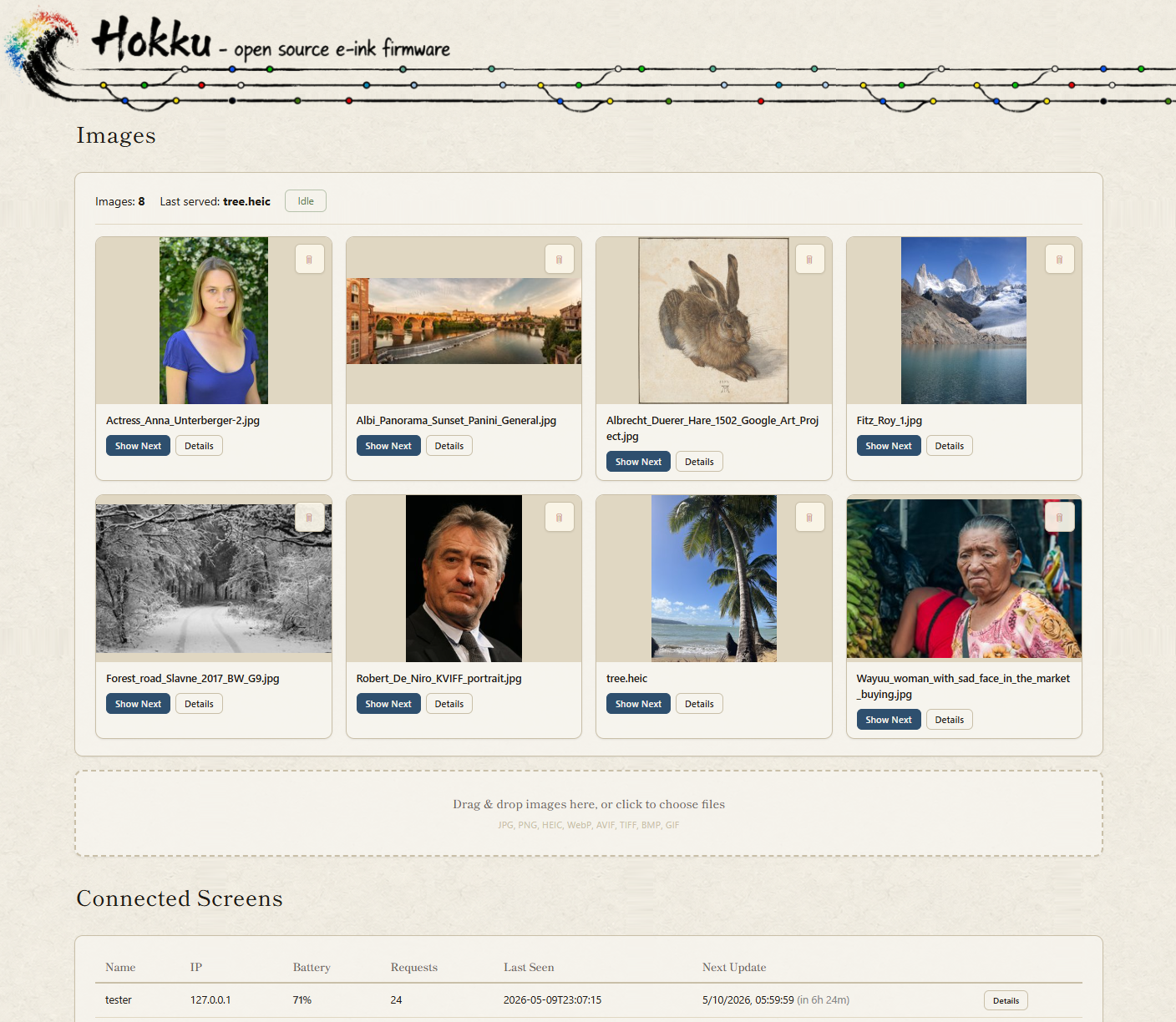
Three tabs: Images (your photo library — upload, preview, manage), Screens (live status of each frame — battery, WiFi, last seen, next update, per-frame orientation), and Config (refresh schedule and conversion settings). Everything updates live without a page reload. For a full walkthrough of every feature see the user manual.
System Requirements
Server side — any Linux, macOS, Windows, or Raspberry Pi on the same local network as the frame. A Raspberry Pi Zero 2 W is the recommended choice: cheap, silent, always-on, and more than fast enough. Around 512 MB of RAM; a few GB of disk for photos.
Frame side — any supported frame, a data-capable USB cable for the one-time first flash, and a 2.4 GHz WiFi network. After that first flash, firmware updates are wireless.
Installation
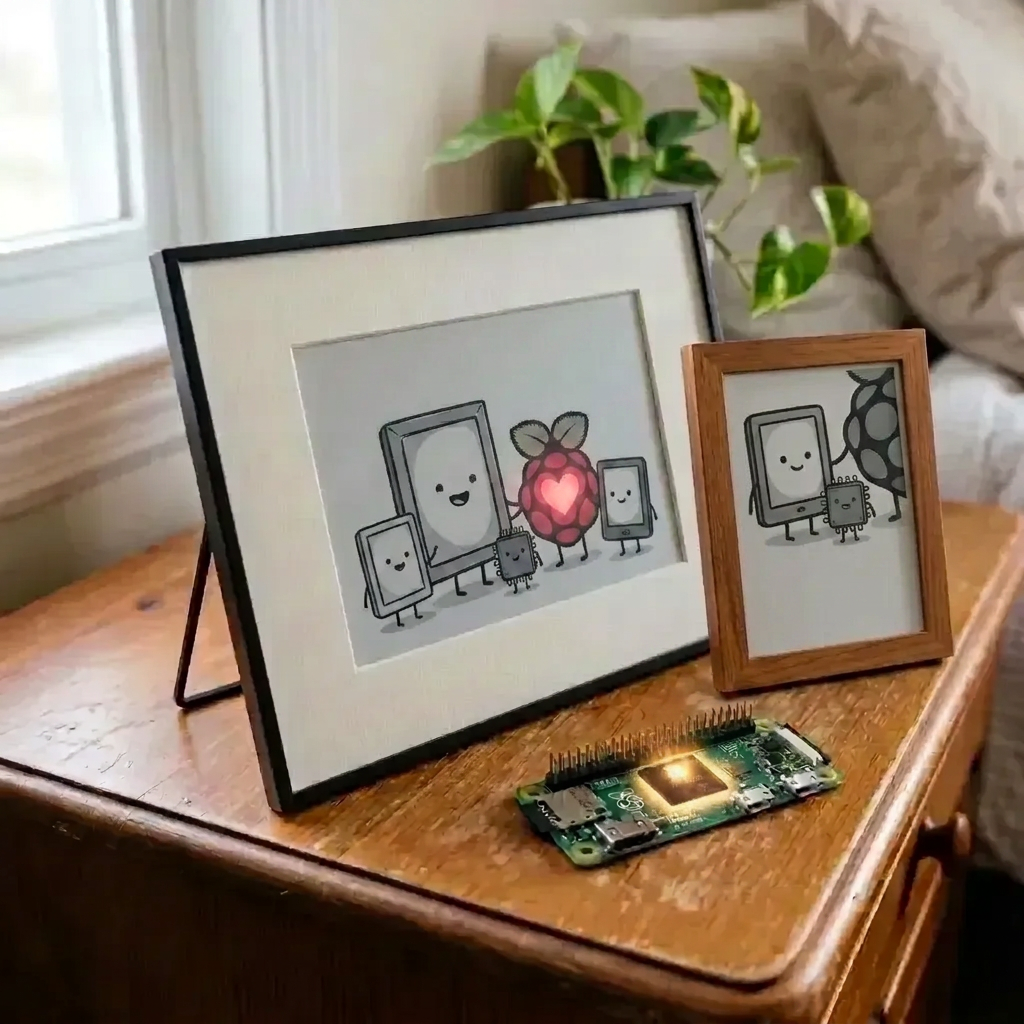
The easy way — the appliance image. Write it to an SD card, put it in a Raspberry Pi Zero 2 W, power it on. The Pi raises a WiFi network called Hokku Setup; join it from your phone, fill in the form that opens, and it reboots onto your own network with the server running. No keyboard, no monitor, no terminal.
Hokku loves Pi! If you need to pick one up, the hardware guide has a tested parts list that arrives next-day in the US.
Running it somewhere else — a laptop, a NAS, an existing Pi you'd rather not reimage — or prefer terminal tabs, mysterious pip errors, and the satisfaction of doing things the hard way? We've got you covered: Manual installation guide.
Buttons and LEDs
(Describes the Hokku / Huessen 13.3" frame — other models differ; see their screen documentation.)
The button on the back of the frame (right-hand side in landscape, lower side in portrait) forces an immediate refresh — pulls the next image from the server right now, ignoring the schedule. Works whether the frame is deep-asleep on battery, plugged into USB, or anywhere in between.
Two tiny LEDs on the bottom of the frame:
- Red — blinks when a computer is connected over USB. A plain wall charger won't trigger it, though the battery still charges fine either way.
- Green — on while the frame is fetching a new photo over WiFi. Off the rest of the time.
More Documentation
- Appliance image — the easy install: write an SD card, join its WiFi, fill in a form.
- User manual — full guide to the web app, frame behaviour, and day-to-day use.
- Installation — step-by-step server + firmware setup for those who prefer the scenic route.
- Dithering pipeline — why it looks the way it does; failure modes and countermeasures.
- Hardware — every supported frame, where to buy, and the recommended Pi server kit.
- Per-screen documentation — Hokku / Huessen 13.3" · Bigme F7 · Seeed reTerminal E1004 — hardware, firmware and quirks for each.
- Changelog — release history.
- Disclaimer — warranty (none), intended use, reverse-engineering notes, privacy.
Background
I bought the 13.3" frame in October 2025 from Wayfair for about $280 — the cheapest Spectra 6 e-ink display I could find at the time. The stock firmware didn't reliably update the image and was generally a pain to work with, so it was time to replace it. There's no public documentation on the hardware, so I had to do everything the hard way. Decided to make it an experiment in vibe coding something complex; the repo contains ~zero lines of human-written code.
Claude Sonnet and Opus were used throughout. Unfortunately, one cannot simply tell AI to build this firmware and hope it works — it takes a lot of pushing, prodding and domain knowledge for it to finally do what I needed it to do. AI proved excellent at analysing the original firmware, but needed a lot of hand-holding when writing the hardware interface. My conclusion is that AI, at the time of building this, is a savant fruitfly with ADHD: absolutely blow-me-away amazing at some things, has no idea what it did a minute ago, plain stupid at times, and way too eager to just do things if you don't hold it in check. Can't recommend a vibe-coding career in embedded software just quite yet :)
Thanks
@TaichungLester did the Seeed reTerminal E1004 panel bring-up in PR #16 — the driver work that port is built on.


Contributors

813 commits

2 commits
See what people are saying
Similar repos


Languages
Python
67.2%
C
18.4%
HTML
10.1%
Shell
2.9%
README
Everything you'd want from a photo frame: accurate colours, full privacy, a clean web app, and the ability to run as many frames as you like from one cheap server. Open source firmware and image server for six-colour e-ink photo frames — three models supported today, from a $99 7.3" panel to a 13.3" wall piece, all driven from one photo library.
Write the appliance image to a Raspberry Pi, join the WiFi network it creates, fill in a form — and you have a private photo frame server. No cloud, no terminal, no subscription.
Supported frames
| Frame | Size | Price | Status |
|---|---|---|---|
| Hokku / Huessen 13.3" | 13.3" | from ~$279 | ✅ Fully supported — the original, most thoroughly tested |
| Bigme F7 | 7.3" | ~$99 | ✅ Supported — proven end-to-end on real hardware |
| Seeed reTerminal E1004 | 13.3" | ~$288 | ⚠️ Experimental — confirmed working on real hardware once |
All three use E Ink Spectra 6, so one photo library feeds every frame — and you can mix sizes and orientations against it. See Hardware for where to buy and what to check.
Core features
Photos, your way
- Local-only — your photos never leave your network. No cloud, no third-party servers, no telemetry. The web app itself makes no external requests — fonts and assets are self-hosted, so nothing is phoned home just by opening a browser tab. Your hardware and open source software means you're in full control.
- Drag-and-drop upload — single files or dozens at a time, straight into the web app, with a live progress list. Works on phones too.
- Browse in a grid — preview exactly what the frame will show before it shows it, original and converted version side by side. Delete anything you don't want with one click.
- Click any photo — see how it was processed and compare the original against what's going to the frame at full size.
- All the formats you actually have — JPEG, PNG, HEIC/HEIF, AVIF, WebP, GIF, TIFF, BMP, JPEG XL. Anything from 90s scanned prints to modern iPhone, Android, and JPEG XL. Phone photos auto-rotate.
- Landscape or portrait — flip a switch and everything re-converts to match how the frame is mounted.
- Jump the queue — pick any photo in the library to be the next one shown on the frame.
Looks good on e-paper
- Correct out of the box — each supported panel ships with settings tuned for it, no tweaking needed.
- Adapts to each photo — it can tell a black-and-white photo from a colour one, and recognise faces (all done locally, nothing leaves your network), and picks the best conversion approach for each automatically.
- No ugly borders — photos close to the right shape get a subtle crop to fill the screen instead of showing a letterbox band.
- Faces survive the crop — when a photo does get cropped to fill, faces are detected locally and kept in frame rather than sliced off at the edge.
- Tunable to the nth degree — three independent conversion profiles (general, black-and-white, faces) with curated presets, plus an advanced panel that exposes nine palette colour-space variants (CIELAB / weighted CIELAB / OKLAB / CAM16-UCS, each with optional hue gating, plus a B&W-only LUT) and chroma-boost / dynamic-range knobs you can run in CIELAB or OKLAB independently. (Details on dithering)
- Colour-accurate — calibrated against the actual panels, not a theoretical colour profile.
Smart about frames
- Over-the-air firmware updates — update the firmware on any frame wirelessly from the web app. Open a frame's Details, toggle "Update firmware on next refresh", and the frame downloads and installs the new firmware on its own — no USB, no cable, no terminal. The old firmware stays in a second slot and is automatically restored if the new one can't reach the server. First-time setup still needs a USB flash to activate OTA; after that, all future updates are wireless.
- Flash frames from the web app — if you're running the server on the same machine you use for setup (the appliance scenario), connect a frame via USB and use "Flash a screen" in the web app directly, without running any setup wizard separately. On the Pi Zero 2 W appliance the single USB port is dual-role, so boot the appliance with nothing on the data port, then hot-plug the frame (through a micro-USB→USB-A OTG adapter, with the Pi powered from its PWR port) — a frame attached at boot stops the appliance from starting. See the appliance guide.
- Multiple frames, one server — each frame gets a name and shows up in a dashboard with battery level, WiFi signal, and when it'll next update. Mix models, sizes and orientations against one library: a 13.3" frame in the hall and a 7.3" on a shelf, each served images converted for its own panel.
- Per-frame settings — orientation, crop behaviour and firmware updates are set per screen, not globally.
- Knows which firmware each frame runs — the dashboard shows every frame's firmware version and flags the ones that are behind.
- Fair rotation — every photo gets its turn. Newly uploaded photos go to the front of the queue; after that, whichever image has been shown least goes next.
- Battery lasts months — the frame uses almost no power between refreshes. The web app shows a battery level for each frame and flags it red when it's getting low.
- Problems show up on the screen — if something goes wrong (wrong WiFi password, server unreachable) the frame displays a plain-English explanation on the e-paper itself instead of going blank. No plugging in a laptop to debug.
- Late-frame warning — if a frame misses its scheduled update by more than an hour, the web app flags it so you know to check WiFi or the battery.
- Scheduled updates — set the times you want the photo to change (e.g. morning, noon, evening) and the frame wakes up on its own. No constant connection needed.
- Settings are on the server — change the schedule or any other server setting in the web app and every frame picks it up automatically. No restarts, no reflashing.
- Instant refresh — there's a button on the frame that forces an immediate update whenever you want one.
- Diagnostics on demand — one click in the web app shows the frame's status without needing a cable.
- Recovers on its own — a frame that can't reach the server backs off and retries rather than hammering the network flat, and a firmware update that can't phone home afterwards rolls itself back to the previous version.
- What happened last refresh — after every update the frame sends a log of what it did to the server (WiFi connection, image download, display result). Open a frame's details in the web app to read it — no cable, no terminal needed.
- Comically over-engineered firmware — on the ESP32 frames it runs at 240 MHz (up from the 160 MHz default) on a dual-core processor with the compiler's maximum optimisations turned on, code and data copied into dedicated high-speed RAM at boot, and cache tuned for the exact chip revision on your board. Completely unnecessary for a frame that wakes up once a day, downloads a picture, and goes back to sleep. We did it anyway. 🚀
- A whole SoC reverse-engineered for the cheap one — the $99 Bigme F7 runs an XRADIOTECH XR872AT: no public SDK support, no vendor documentation. Supporting it meant recovering the panel init sequence from the stock firmware and writing a BROM flasher from scratch in Python, so adopting one needs no vendor tools at all.
Easy to run
- Everything through the web app — upload, browse, configure. No command line, no shared drives to set up.
- Fast even on small hardware — converting a big library of photos uses all available CPU cores and finishes much sooner than doing them one at a time. A Raspberry Pi Zero 2 W handles a multi-frame setup without breaking a sweat.
- Bad photos are handled gracefully — if a photo can't be converted, it's set aside with an explanation rather than silently vanishing. You can retry or remove it with one click.
- Progress while you wait — a status bar shows how many photos are being converted and roughly how long it'll take.
- Find it on your network by name — the server advertises itself as
hokku.localvia mDNS, so you can bookmarkhttp://hokku.local:8080/and never chase a changing IP address again. - Runs on basically anything, installs in minutes — a ready-made Raspberry Pi image, a Debian package that starts automatically, or run from source on macOS, Windows or Linux. Firmware comes pre-built. No build tools required.
- Sets itself up over WiFi — the appliance image raises its own access point on first boot and walks you through WiFi, hostname and options in a browser form. If the WiFi details turn out to be wrong it notices and puts the setup page back up by itself.
- One-click re-convert — want to try a different look? One button re-processes everything from scratch.
The web app
Three tabs: Images (your photo library — upload, preview, manage), Screens (live status of each frame — battery, WiFi, last seen, next update, per-frame orientation), and Config (refresh schedule and conversion settings). Everything updates live without a page reload. For a full walkthrough of every feature see the user manual.
System Requirements
Server side — any Linux, macOS, Windows, or Raspberry Pi on the same local network as the frame. A Raspberry Pi Zero 2 W is the recommended choice: cheap, silent, always-on, and more than fast enough. Around 512 MB of RAM; a few GB of disk for photos.
Frame side — any supported frame, a data-capable USB cable for the one-time first flash, and a 2.4 GHz WiFi network. After that first flash, firmware updates are wireless.
Installation
The easy way — the appliance image. Write it to an SD card, put it in a Raspberry Pi Zero 2 W, power it on. The Pi raises a WiFi network called Hokku Setup; join it from your phone, fill in the form that opens, and it reboots onto your own network with the server running. No keyboard, no monitor, no terminal.
Hokku loves Pi! If you need to pick one up, the hardware guide has a tested parts list that arrives next-day in the US.
Running it somewhere else — a laptop, a NAS, an existing Pi you'd rather not reimage — or prefer terminal tabs, mysterious pip errors, and the satisfaction of doing things the hard way? We've got you covered: Manual installation guide.
Buttons and LEDs
(Describes the Hokku / Huessen 13.3" frame — other models differ; see their screen documentation.)
The button on the back of the frame (right-hand side in landscape, lower side in portrait) forces an immediate refresh — pulls the next image from the server right now, ignoring the schedule. Works whether the frame is deep-asleep on battery, plugged into USB, or anywhere in between.
Two tiny LEDs on the bottom of the frame:
- Red — blinks when a computer is connected over USB. A plain wall charger won't trigger it, though the battery still charges fine either way.
- Green — on while the frame is fetching a new photo over WiFi. Off the rest of the time.
More Documentation
- Appliance image — the easy install: write an SD card, join its WiFi, fill in a form.
- User manual — full guide to the web app, frame behaviour, and day-to-day use.
- Installation — step-by-step server + firmware setup for those who prefer the scenic route.
- Dithering pipeline — why it looks the way it does; failure modes and countermeasures.
- Hardware — every supported frame, where to buy, and the recommended Pi server kit.
- Per-screen documentation — Hokku / Huessen 13.3" · Bigme F7 · Seeed reTerminal E1004 — hardware, firmware and quirks for each.
- Changelog — release history.
- Disclaimer — warranty (none), intended use, reverse-engineering notes, privacy.
Background
I bought the 13.3" frame in October 2025 from Wayfair for about $280 — the cheapest Spectra 6 e-ink display I could find at the time. The stock firmware didn't reliably update the image and was generally a pain to work with, so it was time to replace it. There's no public documentation on the hardware, so I had to do everything the hard way. Decided to make it an experiment in vibe coding something complex; the repo contains ~zero lines of human-written code.
Claude Sonnet and Opus were used throughout. Unfortunately, one cannot simply tell AI to build this firmware and hope it works — it takes a lot of pushing, prodding and domain knowledge for it to finally do what I needed it to do. AI proved excellent at analysing the original firmware, but needed a lot of hand-holding when writing the hardware interface. My conclusion is that AI, at the time of building this, is a savant fruitfly with ADHD: absolutely blow-me-away amazing at some things, has no idea what it did a minute ago, plain stupid at times, and way too eager to just do things if you don't hold it in check. Can't recommend a vibe-coding career in embedded software just quite yet :)
Thanks
@TaichungLester did the Seeed reTerminal E1004 panel bring-up in PR #16 — the driver work that port is built on.
See what people are saying
Similar repos
Contributors
813 commits
2 commits
Languages
Python
67.2%
C
18.4%
HTML
10.1%
Shell
2.9%