
[ICLR 2026] TangoFlux: Super Fast and Faithful Text to Audio Generation with Flow Matching
See the codeREADME
🔥🔥If you enjoyed TangoFlux, please check out our latest innovation, Jam, a lyrics-to-song generator: https://github.com/declare-lab/jamify






- Powered by Stability AI
News
📣 1/28/26: TangoFlux has been accepted to ICLR 2026!
📣 1/3/25: We have released CRPO dataset as well as the script to perform CRPO dataset generation!
Demos


Overall Pipeline
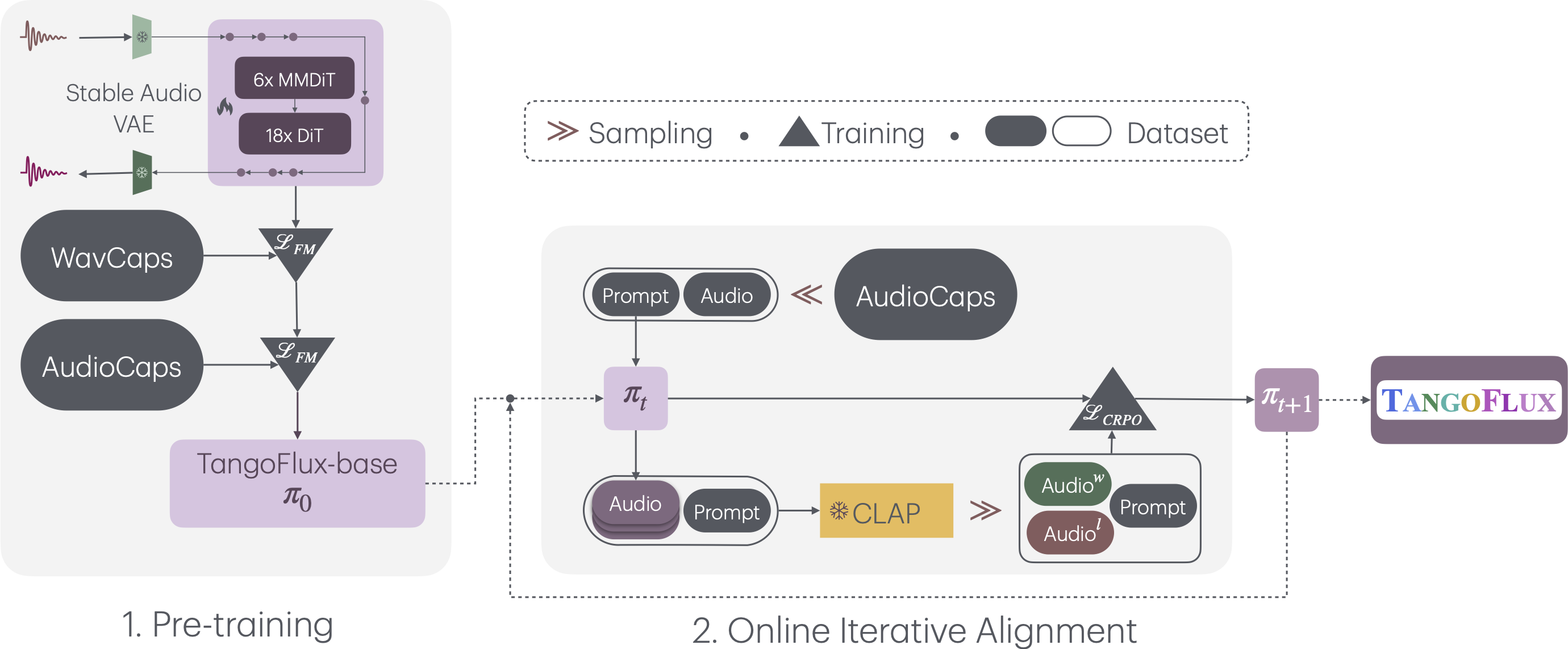
TangoFlux consists of FluxTransformer blocks, which are Diffusion Transformers (DiT) and Multimodal Diffusion Transformers (MMDiT) conditioned on a textual prompt and a duration embedding to generate a 44.1kHz audio up to 30 seconds long. TangoFlux learns a rectified flow trajectory to an audio latent representation encoded by a variational autoencoder (VAE). TangoFlux training pipeline consists of three stages: pre-training, fine-tuning, and preference optimization with CRPO. CRPO, particularly, iteratively generates new synthetic data and constructs preference pairs for preference optimization using DPO loss for flow matching.
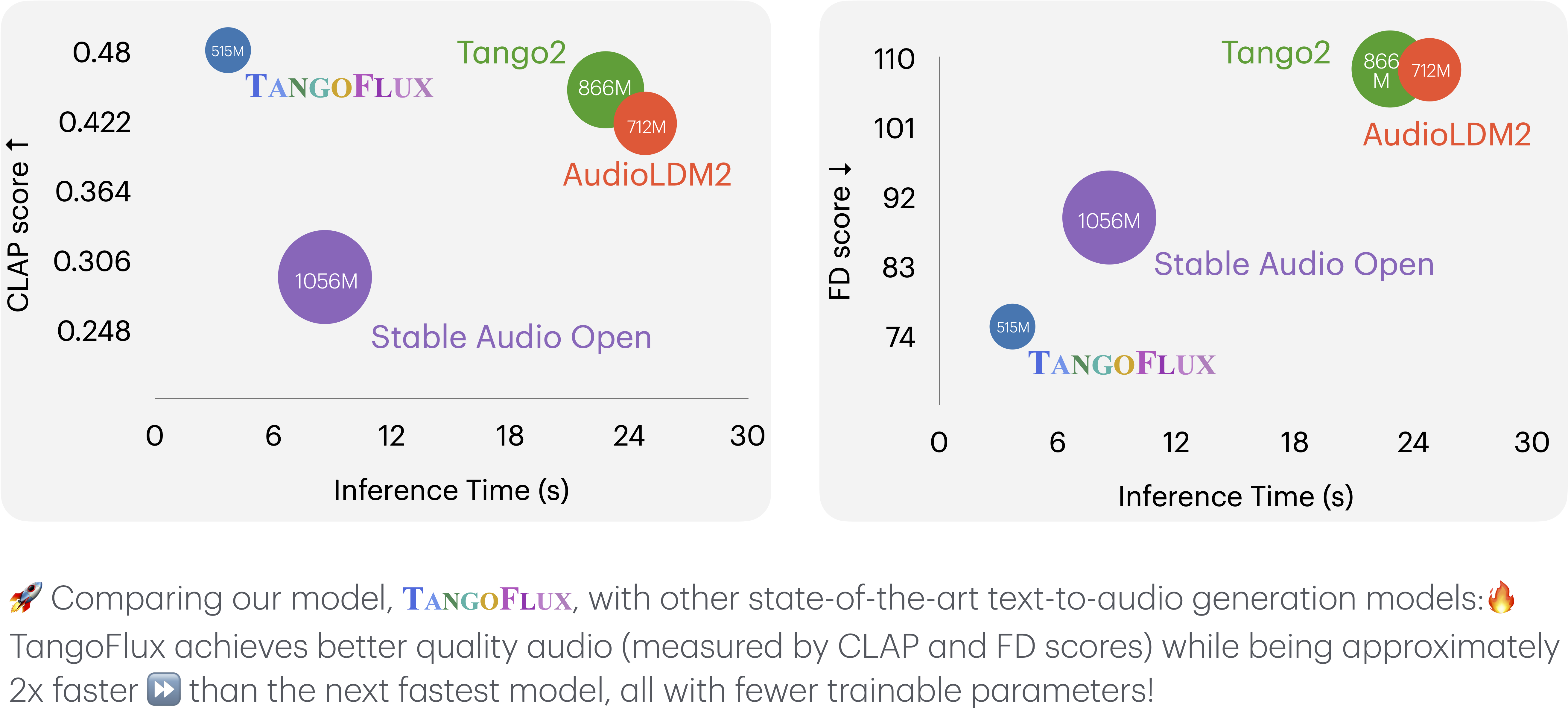
🚀 TangoFlux can generate 44.1kHz stereo audio up to 30 seconds in ~3 seconds on a single A40 GPU.
Installation
pip install git+https://github.com/declare-lab/TangoFlux
Inference
TangoFlux can generate audio up to 30 seconds long. You must pass a duration to the model.generate function when using the Python API. Please note that duration should be between 1 and 30.
Web Interface
Run the following command to start the web interface:
tangoflux-demo
CLI
Use the CLI to generate audio from text.
tangoflux "Hammer slowly hitting the wooden table" output.wav --duration 10 --steps 50
Python API
import torchaudio
from tangoflux import TangoFluxInference

model = TangoFluxInference(name='declare-lab/TangoFlux')
audio = model.generate('Hammer slowly hitting the wooden table', steps=50, duration=10)

torchaudio.save('output.wav', audio, 44100)
ComfyUI
This ui will let you design and execute advanced stable diffusion pipelines using a graph/nodes/flowchart based interface.
Check this repo for the TangoFlux custom node for ComfyUI. (Thanks to LucipherDev)
Our evaluation shows that inference with 50 steps yields the best results. A CFG scale of 3.5, 4, and 4.5 yield similar quality output. Inference with 25 steps yields similar audio quality at a faster speed.
Training
We use the accelerate package from Hugging Face for multi-GPU training. Run accelerate config to setup your run configuration. The default accelerate config is in the configs folder. Please specify the path to your training files in the configs/tangoflux_config.yaml. Samples of train.json and val.json have been provided. Replace them with your own audio.
tangoflux_config.yaml defines the training file paths and model hyperparameters:
CUDA_VISIBLE_DEVICES=0,1 accelerate launch --config_file='configs/accelerator_config.yaml' tangoflux/train.py --checkpointing_steps="best" --save_every=5 --config='configs/tangoflux_config.yaml'
To perform DPO training, modify the training files such that each data point contains "chosen", "reject", "caption" and "duration" fields. Please specify the path to your training files in configs/tangoflux_config.yaml. An example has been provided in train_dpo.json. Replace it with your own audio.
CUDA_VISIBLE_DEVICES=0,1 accelerate launch --config_file='configs/accelerator_config.yaml' tangoflux/train_dpo.py --checkpointing_steps="best" --save_every=5 --config='configs/tangoflux_config.yaml'
Evaluation
TangoFlux vs. Other Audio Generation Models
This key comparison metrics include:
- Output Length: Represents the duration of the generated audio.
- FDopenl3: Fréchet Distance.
- KLpasst: KL divergence.
- CLAPscore: Alignment score.
All the inference times are observed on the same A40 GPU. The counts of trainable parameters are reported in the #Params column.
| Model | Params | Duration | Steps | FDopenl3 ↓ | KLpasst ↓ | CLAPscore ↑ | IS ↑ | Inference Time (s) |
|---|---|---|---|---|---|---|---|---|
| AudioLDM 2 (Large) | 712M | 10 sec | 200 | 108.3 | 1.81 | 0.419 | 7.9 | 24.8 |
| Stable Audio Open | 1056M | 47 sec | 100 | 89.2 | 2.58 | 0.291 | 9.9 | 8.6 |
| Tango 2 | 866M | 10 sec | 200 | 108.4 | 1.11 | 0.447 | 9.0 | 22.8 |
| TangoFlux (Base) | 515M | 30 sec | 50 | 80.2 | 1.22 | 0.431 | 11.7 | 3.7 |
| TangoFlux | 515M | 30 sec | 50 | 75.1 | 1.15 | 0.480 | 12.2 | 3.7 |
CRPO dataset generation
There are 2 py files for CRPO dataset generation. tangoflux/generate_crpo.py generates the crpo dataset by providing path to prompt bank and model weights. You can specify the sample size as well as number of samples per prompt for crpo in the arguments. tangoflux/label_crpo.py labels the generated audio and construct preference pairs. This will also create a train.json in the output dir that can be passed into train_dpo.py
You can follow the example in crpo.sh which will generate crpo dataset, then perform reward labelling to generate the train.json
To run CRPO for multiple iteration, you can simply repeat the above the process multiple time through setting the correct model weight.
Citation
@misc{hung2024tangofluxsuperfastfaithful,
      title={TangoFlux: Super Fast and Faithful Text to Audio Generation with Flow Matching and Clap-Ranked Preference Optimization},
      author={Chia-Yu Hung and Navonil Majumder and Zhifeng Kong and Ambuj Mehrish and Amir Zadeh and Chuan Li and Rafael Valle and Bryan Catanzaro and Soujanya Poria},
      year={2024},
      eprint={2412.21037},
      archivePrefix={arXiv},
      primaryClass={cs.SD},
      url={https://arxiv.org/abs/2412.21037},
}
Questions
Please email me at chiayu001 at e.ntu.edu.sg
LICENSE
1. Model & License Summary
This repository contains TangoFlux (the “Model”) created for non-commercial, research-only purposes under the UK data copyright exemption. The Model is subject to:
- The Stability AI Community License Agreement, provided in the file
STABILITY_AI_COMMUNITY_LICENSE.md. - The WavCaps license requirement: only academic uses are permitted for data sourced from WavCaps.
- The original licenses of the datasets used in training.
By using or distributing this Model, you agree to adhere to all applicable licenses and restrictions, as summarized below.
2. Stability AI Community License Requirements
- You must comply with the Stability AI Community License Agreement (the “Agreement”) for any usage, distribution, or modification of this Model.
- Non-Commercial Use: This Model is for research and academic purposes only. Any commercial usage requires registering with Stability AI or obtaining a separate commercial license.
- Attribution & Notice:
- Retain the notice:
This Stability AI Model is licensed under the Stability AI Community License, Copyright © Stability AI Ltd. All Rights Reserved. - Clearly display “Powered by Stability AI” if you build upon or showcase this Model.
- Retain the notice:
- Disclaimer & Liability: This Model is provided “AS IS” with no warranties. Neither we nor Stability AI will be liable for any claim or damages related to Model use.
See STABILITY_AI_COMMUNITY_LICENSE.md for the full text.
3. WavCaps & Dataset Usage
- Academic-Only for WavCaps: By accessing any WavCaps-sourced data (including audio clips via provided links), you agree to use them strictly for non-commercial, academic research in accordance with WavCaps’ terms.
- WavCaps Audio: Each WavCaps audio subset has its own license terms. You are responsible for reviewing and complying with those licenses, including attribution requirements on your end.
4. UK Data Copyright Exemption
This Model was developed under the UK data copyright exemption for non-commercial research. Distribution or use outside these bounds must not violate that exemption or infringe on any underlying dataset’s license.
5. Further Information
- Stability AI License Terms: https://stability.ai/community-license
- WavCaps License: https://github.com/XinhaoMei/WavCaps?tab=readme-ov-file#license
End of License.
Contributors




Similar repos


Languages
Jupyter Notebook
95.3%
Python
4.6%
[ICLR 2026] TangoFlux: Super Fast and Faithful Text to Audio Generation with Flow Matching
See the codeREADME
🔥🔥If you enjoyed TangoFlux, please check out our latest innovation, Jam, a lyrics-to-song generator: https://github.com/declare-lab/jamify
- Powered by Stability AI
News
📣 1/28/26: TangoFlux has been accepted to ICLR 2026!
📣 1/3/25: We have released CRPO dataset as well as the script to perform CRPO dataset generation!
Demos
Overall Pipeline
TangoFlux consists of FluxTransformer blocks, which are Diffusion Transformers (DiT) and Multimodal Diffusion Transformers (MMDiT) conditioned on a textual prompt and a duration embedding to generate a 44.1kHz audio up to 30 seconds long. TangoFlux learns a rectified flow trajectory to an audio latent representation encoded by a variational autoencoder (VAE). TangoFlux training pipeline consists of three stages: pre-training, fine-tuning, and preference optimization with CRPO. CRPO, particularly, iteratively generates new synthetic data and constructs preference pairs for preference optimization using DPO loss for flow matching.
🚀 TangoFlux can generate 44.1kHz stereo audio up to 30 seconds in ~3 seconds on a single A40 GPU.
Installation
pip install git+https://github.com/declare-lab/TangoFlux
Inference
TangoFlux can generate audio up to 30 seconds long. You must pass a duration to the model.generate function when using the Python API. Please note that duration should be between 1 and 30.
Web Interface
Run the following command to start the web interface:
tangoflux-demo
CLI
Use the CLI to generate audio from text.
tangoflux "Hammer slowly hitting the wooden table" output.wav --duration 10 --steps 50
Python API
import torchaudio
from tangoflux import TangoFluxInference

model = TangoFluxInference(name='declare-lab/TangoFlux')
audio = model.generate('Hammer slowly hitting the wooden table', steps=50, duration=10)

torchaudio.save('output.wav', audio, 44100)
ComfyUI
This ui will let you design and execute advanced stable diffusion pipelines using a graph/nodes/flowchart based interface.
Check this repo for the TangoFlux custom node for ComfyUI. (Thanks to LucipherDev)
Our evaluation shows that inference with 50 steps yields the best results. A CFG scale of 3.5, 4, and 4.5 yield similar quality output. Inference with 25 steps yields similar audio quality at a faster speed.
Training
We use the accelerate package from Hugging Face for multi-GPU training. Run accelerate config to setup your run configuration. The default accelerate config is in the configs folder. Please specify the path to your training files in the configs/tangoflux_config.yaml. Samples of train.json and val.json have been provided. Replace them with your own audio.
tangoflux_config.yaml defines the training file paths and model hyperparameters:
CUDA_VISIBLE_DEVICES=0,1 accelerate launch --config_file='configs/accelerator_config.yaml' tangoflux/train.py --checkpointing_steps="best" --save_every=5 --config='configs/tangoflux_config.yaml'
To perform DPO training, modify the training files such that each data point contains "chosen", "reject", "caption" and "duration" fields. Please specify the path to your training files in configs/tangoflux_config.yaml. An example has been provided in train_dpo.json. Replace it with your own audio.
CUDA_VISIBLE_DEVICES=0,1 accelerate launch --config_file='configs/accelerator_config.yaml' tangoflux/train_dpo.py --checkpointing_steps="best" --save_every=5 --config='configs/tangoflux_config.yaml'
Evaluation
TangoFlux vs. Other Audio Generation Models
This key comparison metrics include:
- Output Length: Represents the duration of the generated audio.
- FDopenl3: Fréchet Distance.
- KLpasst: KL divergence.
- CLAPscore: Alignment score.
All the inference times are observed on the same A40 GPU. The counts of trainable parameters are reported in the #Params column.
| Model | Params | Duration | Steps | FDopenl3 ↓ | KLpasst ↓ | CLAPscore ↑ | IS ↑ | Inference Time (s) |
|---|---|---|---|---|---|---|---|---|
| AudioLDM 2 (Large) | 712M | 10 sec | 200 | 108.3 | 1.81 | 0.419 | 7.9 | 24.8 |
| Stable Audio Open | 1056M | 47 sec | 100 | 89.2 | 2.58 | 0.291 | 9.9 | 8.6 |
| Tango 2 | 866M | 10 sec | 200 | 108.4 | 1.11 | 0.447 | 9.0 | 22.8 |
| TangoFlux (Base) | 515M | 30 sec | 50 | 80.2 | 1.22 | 0.431 | 11.7 | 3.7 |
| TangoFlux | 515M | 30 sec | 50 | 75.1 | 1.15 | 0.480 | 12.2 | 3.7 |
CRPO dataset generation
There are 2 py files for CRPO dataset generation. tangoflux/generate_crpo.py generates the crpo dataset by providing path to prompt bank and model weights. You can specify the sample size as well as number of samples per prompt for crpo in the arguments. tangoflux/label_crpo.py labels the generated audio and construct preference pairs. This will also create a train.json in the output dir that can be passed into train_dpo.py
You can follow the example in crpo.sh which will generate crpo dataset, then perform reward labelling to generate the train.json
To run CRPO for multiple iteration, you can simply repeat the above the process multiple time through setting the correct model weight.
Citation
@misc{hung2024tangofluxsuperfastfaithful,
      title={TangoFlux: Super Fast and Faithful Text to Audio Generation with Flow Matching and Clap-Ranked Preference Optimization},
      author={Chia-Yu Hung and Navonil Majumder and Zhifeng Kong and Ambuj Mehrish and Amir Zadeh and Chuan Li and Rafael Valle and Bryan Catanzaro and Soujanya Poria},
      year={2024},
      eprint={2412.21037},
      archivePrefix={arXiv},
      primaryClass={cs.SD},
      url={https://arxiv.org/abs/2412.21037},
}
Questions
Please email me at chiayu001 at e.ntu.edu.sg
LICENSE
1. Model & License Summary
This repository contains TangoFlux (the “Model”) created for non-commercial, research-only purposes under the UK data copyright exemption. The Model is subject to:
- The Stability AI Community License Agreement, provided in the file
STABILITY_AI_COMMUNITY_LICENSE.md. - The WavCaps license requirement: only academic uses are permitted for data sourced from WavCaps.
- The original licenses of the datasets used in training.
By using or distributing this Model, you agree to adhere to all applicable licenses and restrictions, as summarized below.
2. Stability AI Community License Requirements
- You must comply with the Stability AI Community License Agreement (the “Agreement”) for any usage, distribution, or modification of this Model.
- Non-Commercial Use: This Model is for research and academic purposes only. Any commercial usage requires registering with Stability AI or obtaining a separate commercial license.
- Attribution & Notice:
- Retain the notice:
This Stability AI Model is licensed under the Stability AI Community License, Copyright © Stability AI Ltd. All Rights Reserved. - Clearly display “Powered by Stability AI” if you build upon or showcase this Model.
- Retain the notice:
- Disclaimer & Liability: This Model is provided “AS IS” with no warranties. Neither we nor Stability AI will be liable for any claim or damages related to Model use.
See STABILITY_AI_COMMUNITY_LICENSE.md for the full text.
3. WavCaps & Dataset Usage
- Academic-Only for WavCaps: By accessing any WavCaps-sourced data (including audio clips via provided links), you agree to use them strictly for non-commercial, academic research in accordance with WavCaps’ terms.
- WavCaps Audio: Each WavCaps audio subset has its own license terms. You are responsible for reviewing and complying with those licenses, including attribution requirements on your end.
4. UK Data Copyright Exemption
This Model was developed under the UK data copyright exemption for non-commercial research. Distribution or use outside these bounds must not violate that exemption or infringe on any underlying dataset’s license.
5. Further Information
- Stability AI License Terms: https://stability.ai/community-license
- WavCaps License: https://github.com/XinhaoMei/WavCaps?tab=readme-ov-file#license
End of License.
Similar repos
Contributors
Languages
Jupyter Notebook
95.3%
Python
4.6%