
Fast command-line HTML minifier — works on any HTML, with special support for Razor and Web Forms views. Parallel processing, safe preservation of <pre>/<code>/Knockout blocks, and easy MSBuild/CI integration.
See the codeREADME
HTML Minifier


A fast and efficient command-line tool to minify your HTML, Razor views, and Web Forms views. Reduce file sizes, improve load times, and deliver a better user experience by removing unnecessary whitespace and comments from your HTML files.
✨ Features
- 🚀 Fast Processing - Minifies files and entire directory trees quickly with parallel processing
- ⚡ Parallel Processing - Utilizes all CPU cores for maximum performance (4-8x faster on multi-core systems)
- 📊 Beautiful Reporting - Comprehensive statistics with progress tracking and professional visual presentation
- 📁 Flexible Input - Process individual files, specific folders, or entire directory structures
- ⚙️ Configurable - Control line length and selectively disable minification features
- 🔧 Framework Support - Special handling for Knockout.js, Angular, and other comment-dependent frameworks
- 🎯 Targeted Minification - Choose what to minify: HTML comments, JavaScript comments, or Knockout comments
- 🛡️ Safe Minification - Preserves content inside
<pre>,<textarea>, and<code>tags, and normalises attribute whitespace - 🔄 CI/CD Ready - Easy integration with MSBuild and build pipelines
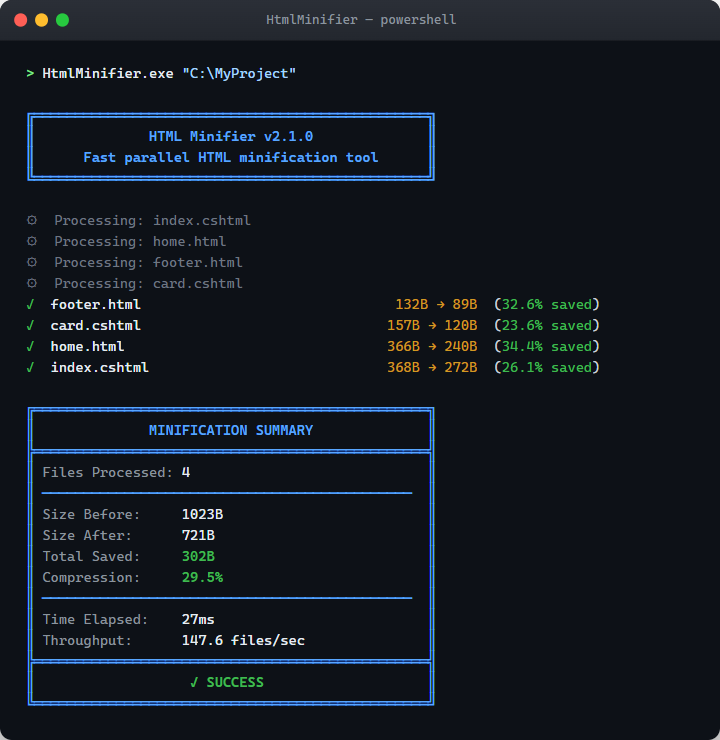
📊 Beautiful Reporting
Every run finishes with a clear, colour-coded summary - per-file savings plus overall compression, throughput, and elapsed time:
📦 Installation
See INSTALL.md for release downloads, prerequisites, installation, and instructions for obtaining and building the source.
🚀 Quick Start
Transform verbose HTML into compact, optimized code:
Before:
<h2>
    Admin Menu</h2>
<ul>
    <li>@Html.ActionLink("Edit blog entries", "List", "Admin")</li>
    <li>@Html.ActionLink("View Comments", "CommentList", "Admin")</li>
    <li>@Html.ActionLink("Clear Cache", "ClearCache", "Admin")</li>
</ul>
After:
<h2> Admin Menu</h2><ul><li>@Html.ActionLink("Edit blog entries", "List", "Admin")</li><li>@Html.ActionLink("View Comments", "CommentList", "Admin")</li><li>@Html.ActionLink("Clear Cache", "ClearCache", "Admin")</li></ul>
📖 Usage
Getting Help
View all available options:
HtmlMinifier.exe --help
Check the version:
HtmlMinifier.exe --version
Basic Usage
Minify all HTML files in a folder (including subfolders):
HtmlMinifier.exe "C:\Folder"
Advanced Options
Limit Line Length
Restrict the maximum number of characters per line:
HtmlMinifier.exe "C:\Folder" "60000"
Preserve Comments
For frameworks that rely on HTML comments (Angular, Knockout, etc.), preserve them:
HtmlMinifier.exe "C:\Folder" ignorehtmlcomments
Preserve JavaScript Comments
Keep JavaScript comments in your code:
HtmlMinifier.exe "C:\Folder" ignorejscomments
Preserve Knockout Comments
Specifically preserve Knockout.js comments:
HtmlMinifier.exe "C:\Folder" ignoreknockoutcomments
Multiple Targets
Minify Multiple Folders
HtmlMinifier.exe "C:\Folder\fld1" "C:\Folder\fld2"
Minify Specific Files
HtmlMinifier.exe "C:\Folder\file1.html" "C:\Folder\file2.html"
🔨 Build Integration
Integrate HTML Minifier into your build process for automatic minification during deployment. Check out this detailed guide on using HTML Minifier with MSBuild.
🛡️ What Gets Preserved
The following content is never altered by minification:
<pre>,<textarea>,<code>tags — internal whitespace is kept exactly as-is- IE conditional comments —
<!--[if IE]>,<!--[if !IE]><!-->, and<!--<![endif]-->patterns are all preserved #includevirtual comments — ASP.NET server-side includes are left intact- Knockout comments —
<!-- ko -->/<!-- /ko -->are preserved whenignoreknockoutcommentsis set - Razor declarations —
@model,@using,@inheritsare kept and correctly re-arranged - Attribute values — content inside quotes is preserved; leading/trailing whitespace is normalised
🤝 Contributing
Contributions are welcome. Read CONTRIBUTING.md for the development setup, coding standards, acceptance requirements, and pull request process.
To report a bug or propose an enhancement, follow SUPPORT.md.
📝 Requirements
- .NET Framework (Windows)
- Supports HTML, Razor (.cshtml), and Web Forms (.aspx) files
📄 License
Copyright (C) Dean Hume 2013 - 2026
Released under the MIT License
Made with ❤️ by Dean Hume
Similar repos


Fast command-line HTML minifier — works on any HTML, with special support for Razor and Web Forms views. Parallel processing, safe preservation of <pre>/<code>/Knockout blocks, and easy MSBuild/CI integration.
See the codeREADME
HTML Minifier
A fast and efficient command-line tool to minify your HTML, Razor views, and Web Forms views. Reduce file sizes, improve load times, and deliver a better user experience by removing unnecessary whitespace and comments from your HTML files.
✨ Features
- 🚀 Fast Processing - Minifies files and entire directory trees quickly with parallel processing
- ⚡ Parallel Processing - Utilizes all CPU cores for maximum performance (4-8x faster on multi-core systems)
- 📊 Beautiful Reporting - Comprehensive statistics with progress tracking and professional visual presentation
- 📁 Flexible Input - Process individual files, specific folders, or entire directory structures
- ⚙️ Configurable - Control line length and selectively disable minification features
- 🔧 Framework Support - Special handling for Knockout.js, Angular, and other comment-dependent frameworks
- 🎯 Targeted Minification - Choose what to minify: HTML comments, JavaScript comments, or Knockout comments
- 🛡️ Safe Minification - Preserves content inside
<pre>,<textarea>, and<code>tags, and normalises attribute whitespace - 🔄 CI/CD Ready - Easy integration with MSBuild and build pipelines
📊 Beautiful Reporting
Every run finishes with a clear, colour-coded summary - per-file savings plus overall compression, throughput, and elapsed time:
📦 Installation
See INSTALL.md for release downloads, prerequisites, installation, and instructions for obtaining and building the source.
🚀 Quick Start
Transform verbose HTML into compact, optimized code:
Before:
<h2>
    Admin Menu</h2>
<ul>
    <li>@Html.ActionLink("Edit blog entries", "List", "Admin")</li>
    <li>@Html.ActionLink("View Comments", "CommentList", "Admin")</li>
    <li>@Html.ActionLink("Clear Cache", "ClearCache", "Admin")</li>
</ul>
After:
<h2> Admin Menu</h2><ul><li>@Html.ActionLink("Edit blog entries", "List", "Admin")</li><li>@Html.ActionLink("View Comments", "CommentList", "Admin")</li><li>@Html.ActionLink("Clear Cache", "ClearCache", "Admin")</li></ul>
📖 Usage
Getting Help
View all available options:
HtmlMinifier.exe --help
Check the version:
HtmlMinifier.exe --version
Basic Usage
Minify all HTML files in a folder (including subfolders):
HtmlMinifier.exe "C:\Folder"
Advanced Options
Limit Line Length
Restrict the maximum number of characters per line:
HtmlMinifier.exe "C:\Folder" "60000"
Preserve Comments
For frameworks that rely on HTML comments (Angular, Knockout, etc.), preserve them:
HtmlMinifier.exe "C:\Folder" ignorehtmlcomments
Preserve JavaScript Comments
Keep JavaScript comments in your code:
HtmlMinifier.exe "C:\Folder" ignorejscomments
Preserve Knockout Comments
Specifically preserve Knockout.js comments:
HtmlMinifier.exe "C:\Folder" ignoreknockoutcomments
Multiple Targets
Minify Multiple Folders
HtmlMinifier.exe "C:\Folder\fld1" "C:\Folder\fld2"
Minify Specific Files
HtmlMinifier.exe "C:\Folder\file1.html" "C:\Folder\file2.html"
🔨 Build Integration
Integrate HTML Minifier into your build process for automatic minification during deployment. Check out this detailed guide on using HTML Minifier with MSBuild.
🛡️ What Gets Preserved
The following content is never altered by minification:
<pre>,<textarea>,<code>tags — internal whitespace is kept exactly as-is- IE conditional comments —
<!--[if IE]>,<!--[if !IE]><!-->, and<!--<![endif]-->patterns are all preserved #includevirtual comments — ASP.NET server-side includes are left intact- Knockout comments —
<!-- ko -->/<!-- /ko -->are preserved whenignoreknockoutcommentsis set - Razor declarations —
@model,@using,@inheritsare kept and correctly re-arranged - Attribute values — content inside quotes is preserved; leading/trailing whitespace is normalised
🤝 Contributing
Contributions are welcome. Read CONTRIBUTING.md for the development setup, coding standards, acceptance requirements, and pull request process.
To report a bug or propose an enhancement, follow SUPPORT.md.
📝 Requirements
- .NET Framework (Windows)
- Supports HTML, Razor (.cshtml), and Web Forms (.aspx) files
📄 License
Copyright (C) Dean Hume 2013 - 2026
Released under the MIT License
Made with ❤️ by Dean Hume