[MICCAI 2024] Official Repo of "HistGen: Histopathology Report Generation via Local-Global Feature Encoding and Cross-modal Context Interaction"
Python
85
2 commits
updated Dec 23, 2024
This repo contains the dataset, model weight, and source code for paper "HistGen: Histopathology Report Generation via Local-Global Feature Encoding and Cross-modal Context Interaction". We only support PyTorch for now. See our paper for a detailed description of HistGen.
HistGen: Histopathology Report Generation via Local-Global Feature Encoding and Cross-modal Context Interaction
Zhengrui Guo, Jiabo Ma, Yingxue Xu, Yihui Wang, Liansheng Wang, and Hao Chen
Paper: https://arxiv.org/abs/2403.05396
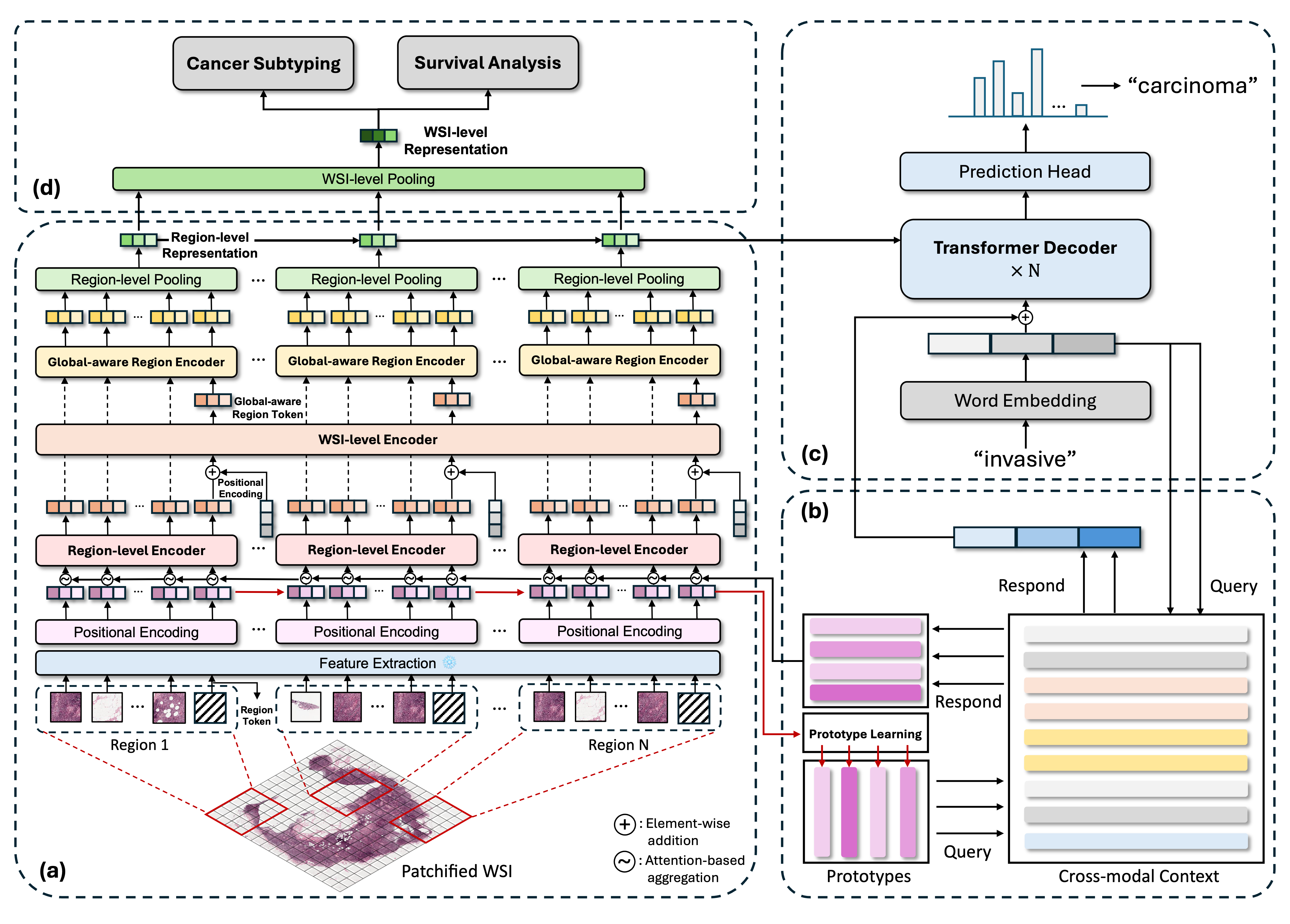 Overview of the proposed HistGen framework: (a) local-global hierarchical encoder module, (b) cross-modal context module, (c) decoder module, (d) transfer learning strategy for cancer diagnosis and prognosis.
Follow this instruction to create conda environment and install necessary packages:
git clone https://github.com/dddavid4real/HistGen.git
cd HistGen
conda env create -f requirements.yml
✨ Our curated dataset is now available on HuggingFace Datasets! Click here to access the dataset. In the Files and Versions section, you could find the extracted DINOv2 features of WSIs with name DINOv2_Features.z01~z14 and DINOv2_Features.zip. Please download all of them and then run the following commands to unzip the files:
zip -FF DINOv2_Features.zip --out WSI_Feature_DINOv2.zip
unzip WSI_Feature_DINOv2.zip
Also, the paired diagnostic reports can be found from the above link with name annotations.json.
🌟 Update: The ground truth reports are further cleaned and uploaded. You could find the cleaned reports with name annotations712_update.json, which provides smoother and more precise descripted reports. Meanwhile, the train:val:test sets are split into 7:1:2.
The structure of this fold is shown as follows:
HistGen WSI-report dataset/
|-- WSIs
|    |-- slide_1.svs
|    |-- slide_2.svs
|    ╵-- ...
|-- dinov2_vitl
|        |-- slide_1.pt
|        |-- slide_2.pt
|        ╵-- ...
╵-- annotation.json
in which WSIs denotes the original WSI data from TCGA, dinov2_vitl is the features of original WSIs extracted by our pre-trained DINOv2 ViT-L backbone, and annotation.json contains the diagnostic reports and case ids of their corresponding WSIs. Concretely, the structure of this file is like this:
{
    "train": [
        {
            "id": "TCGA-A7-A6VW-01Z-00-DX1.1BC4790C-DB45-4A3D-9C97-92C92C03FF60",
            "report": "Final Surgical Pathology Report Procedure: Diagnosis A. Sentinel lymph node, left axilla ...",
            "image_path": [
                "/storage/Pathology/wsi-report/wsi/TCGA-A7-A6VW-01Z-00-DX1.1BC4790C-DB45-4A3D-9C97-92C92C03FF60.pt"
            ],
            "split": "train"
        },
        ...
    ],

    "val": [
        {
            "id": "...",
            "report": "...",
            "image_path": ["..."],
            "split": "val"
        },
        ...
    ],

    "test": [
        {
            "id": "...",
            "report": "...",
            "image_path": ["..."],
            "split": "test"
        },
        ...
    ]
}
in which we have already split into train/val/test subsets with ratio 8:1:1.
"id" denotes the case id of this report's corresponding WSI, "report" is the full refined text obtained after our proposed report cleaning pipeline, and "image_path" could be just ignored.
To reproduce our proposed HistGen model, please download the dinov2_vitl directory together with annotation712_update.json.
In this work, we adpoted and further accelerated CLAM for preprocessing and feature extraction. We uploaded the minimal viable version of CLAM to this repo. For installation guide, we recommend to follow the original instructions here. To conduct preprocessing, please run the following commands:
cd HistGen
cd CLAM
conda activate clam
sh patching_scripts/tcga-wsi-report.sh
To extract features of WSIs, please run the following commands:
cd HistGen
cd CLAM
conda activate clam
sh extract_scripts/tcga-wsi-report.sh
in which we provide the ImageNet-pretrained ResNet, Ctranspath, PLIP, and our pre-trained DINOv2 ViT-L feature extractor. Note that Ctranspath requires specific timm environment, see here for more info.
🌟If Git LFS fails, please download the model checkpoint of our pre-trained DINOv2 feature extractor from this link. You could find the checkpoint for our pretrained DINOv2 feature extractor with name dinov2_cpath_v1.pth. After downloading, put it under HistGen/CLAM/models/ckpts/ .
🌟 Note that if loading DINOv2 checkpoint runs into problems, the most possible case is that your checkpoint is broken, please redownload from the above link.
To try our model for training, validation, and testing, simply run the following commands:
cd HistGen
conda activate histgen
sh train_wsi_report.sh
Before you run the script, please set the path and other hyperparameters in train_wsi_report.sh. Note that --image_dir should be the path to the dinov2_vitl directory, and --ann_path should be the path to the annotation712_update.json file.
🌟 Update: we have included baseline models in our paper for training, including R2Gen, R2GenCMN, Show&Tell, Transformer, M2Transformer, and UpDownAtt modeles. Note that they are not originally designed to process WSIs, thus enormous number of patches in a WSI may lead to unaffordable computational overhead. Thus, we implement a simple image token selection mechanism before processing these patch tokens by these models, "uniform sampling", "cross attention", and "kmeans clustering" are provided. And selected token number can be chosen in the script "train_wsi_report_baselines.sh". To train one of these baseline models, please run the following commands:
cd HistGen
conda activate histgen
sh train_wsi_report_baselines.sh
To generate reports for WSIs in test set, you can run the following commands:
cd HistGen
conda activate histgen
sh test_wsi_report.sh
Similarly, remember to set the path and other hyperparameters in test_wsi_report.sh.
In this paper, we consider WSI report generation task as an approach of vision-language pre-training, and we further fine-tune the pre-trained model on cancer subtyping and survival analysis tasks, with the strategy shown in Methodology subfigure (d). For the implementation of downstream tasks, we recommend to use the EasyMIL repository, which is a flexible and easy-to-use toolbox for multiple instance learning (MIL) tasks developed by our team.
We are currently organizing the pre-trained checkpoints and merging HistGen into EasyMIL. Please stay tuned for the update.
[email protected]If you find our work useful in your research, please consider citing our paper at:
@inproceedings{guo2024histgen,
  title={Histgen: Histopathology report generation via local-global feature encoding and cross-modal context interaction},
  author={Guo, Zhengrui and Ma, Jiabo and Xu, Yingxue and Wang, Yihui and Wang, Liansheng and Chen, Hao},
  booktitle={International Conference on Medical Image Computing and Computer-Assisted Intervention},
  pages={189--199},
  year={2024},
  organization={Springer}
}
This repo is made available under the Apache-2.0 License. For more details, please refer to the LICENSE file.
51 followers · starred May 2024
[MICCAI 2024] Official Repo of "HistGen: Histopathology Report Generation via Local-Global Feature Encoding and Cross-modal Context Interaction"
Python
85
2 commits
updated Dec 23, 2024
This repo contains the dataset, model weight, and source code for paper "HistGen: Histopathology Report Generation via Local-Global Feature Encoding and Cross-modal Context Interaction". We only support PyTorch for now. See our paper for a detailed description of HistGen.
HistGen: Histopathology Report Generation via Local-Global Feature Encoding and Cross-modal Context Interaction
Zhengrui Guo, Jiabo Ma, Yingxue Xu, Yihui Wang, Liansheng Wang, and Hao Chen
Paper: https://arxiv.org/abs/2403.05396
Overview of the proposed HistGen framework: (a) local-global hierarchical encoder module, (b) cross-modal context module, (c) decoder module, (d) transfer learning strategy for cancer diagnosis and prognosis.
Follow this instruction to create conda environment and install necessary packages:
git clone https://github.com/dddavid4real/HistGen.git
cd HistGen
conda env create -f requirements.yml
✨ Our curated dataset is now available on HuggingFace Datasets! Click here to access the dataset. In the Files and Versions section, you could find the extracted DINOv2 features of WSIs with name DINOv2_Features.z01~z14 and DINOv2_Features.zip. Please download all of them and then run the following commands to unzip the files:
zip -FF DINOv2_Features.zip --out WSI_Feature_DINOv2.zip
unzip WSI_Feature_DINOv2.zip
Also, the paired diagnostic reports can be found from the above link with name annotations.json.
🌟 Update: The ground truth reports are further cleaned and uploaded. You could find the cleaned reports with name annotations712_update.json, which provides smoother and more precise descripted reports. Meanwhile, the train:val:test sets are split into 7:1:2.
The structure of this fold is shown as follows:
HistGen WSI-report dataset/
|-- WSIs
|    |-- slide_1.svs
|    |-- slide_2.svs
|    ╵-- ...
|-- dinov2_vitl
|        |-- slide_1.pt
|        |-- slide_2.pt
|        ╵-- ...
╵-- annotation.json
in which WSIs denotes the original WSI data from TCGA, dinov2_vitl is the features of original WSIs extracted by our pre-trained DINOv2 ViT-L backbone, and annotation.json contains the diagnostic reports and case ids of their corresponding WSIs. Concretely, the structure of this file is like this:
{
    "train": [
        {
            "id": "TCGA-A7-A6VW-01Z-00-DX1.1BC4790C-DB45-4A3D-9C97-92C92C03FF60",
            "report": "Final Surgical Pathology Report Procedure: Diagnosis A. Sentinel lymph node, left axilla ...",
            "image_path": [
                "/storage/Pathology/wsi-report/wsi/TCGA-A7-A6VW-01Z-00-DX1.1BC4790C-DB45-4A3D-9C97-92C92C03FF60.pt"
            ],
            "split": "train"
        },
        ...
    ],

    "val": [
        {
            "id": "...",
            "report": "...",
            "image_path": ["..."],
            "split": "val"
        },
        ...
    ],

    "test": [
        {
            "id": "...",
            "report": "...",
            "image_path": ["..."],
            "split": "test"
        },
        ...
    ]
}
in which we have already split into train/val/test subsets with ratio 8:1:1.
"id" denotes the case id of this report's corresponding WSI, "report" is the full refined text obtained after our proposed report cleaning pipeline, and "image_path" could be just ignored.
To reproduce our proposed HistGen model, please download the dinov2_vitl directory together with annotation712_update.json.
In this work, we adpoted and further accelerated CLAM for preprocessing and feature extraction. We uploaded the minimal viable version of CLAM to this repo. For installation guide, we recommend to follow the original instructions here. To conduct preprocessing, please run the following commands:
cd HistGen
cd CLAM
conda activate clam
sh patching_scripts/tcga-wsi-report.sh
To extract features of WSIs, please run the following commands:
cd HistGen
cd CLAM
conda activate clam
sh extract_scripts/tcga-wsi-report.sh
in which we provide the ImageNet-pretrained ResNet, Ctranspath, PLIP, and our pre-trained DINOv2 ViT-L feature extractor. Note that Ctranspath requires specific timm environment, see here for more info.
🌟If Git LFS fails, please download the model checkpoint of our pre-trained DINOv2 feature extractor from this link. You could find the checkpoint for our pretrained DINOv2 feature extractor with name dinov2_cpath_v1.pth. After downloading, put it under HistGen/CLAM/models/ckpts/ .
🌟 Note that if loading DINOv2 checkpoint runs into problems, the most possible case is that your checkpoint is broken, please redownload from the above link.
To try our model for training, validation, and testing, simply run the following commands:
cd HistGen
conda activate histgen
sh train_wsi_report.sh
Before you run the script, please set the path and other hyperparameters in train_wsi_report.sh. Note that --image_dir should be the path to the dinov2_vitl directory, and --ann_path should be the path to the annotation712_update.json file.
🌟 Update: we have included baseline models in our paper for training, including R2Gen, R2GenCMN, Show&Tell, Transformer, M2Transformer, and UpDownAtt modeles. Note that they are not originally designed to process WSIs, thus enormous number of patches in a WSI may lead to unaffordable computational overhead. Thus, we implement a simple image token selection mechanism before processing these patch tokens by these models, "uniform sampling", "cross attention", and "kmeans clustering" are provided. And selected token number can be chosen in the script "train_wsi_report_baselines.sh". To train one of these baseline models, please run the following commands:
cd HistGen
conda activate histgen
sh train_wsi_report_baselines.sh
To generate reports for WSIs in test set, you can run the following commands:
cd HistGen
conda activate histgen
sh test_wsi_report.sh
Similarly, remember to set the path and other hyperparameters in test_wsi_report.sh.
In this paper, we consider WSI report generation task as an approach of vision-language pre-training, and we further fine-tune the pre-trained model on cancer subtyping and survival analysis tasks, with the strategy shown in Methodology subfigure (d). For the implementation of downstream tasks, we recommend to use the EasyMIL repository, which is a flexible and easy-to-use toolbox for multiple instance learning (MIL) tasks developed by our team.
We are currently organizing the pre-trained checkpoints and merging HistGen into EasyMIL. Please stay tuned for the update.
[email protected]If you find our work useful in your research, please consider citing our paper at:
@inproceedings{guo2024histgen,
  title={Histgen: Histopathology report generation via local-global feature encoding and cross-modal context interaction},
  author={Guo, Zhengrui and Ma, Jiabo and Xu, Yingxue and Wang, Yihui and Wang, Liansheng and Chen, Hao},
  booktitle={International Conference on Medical Image Computing and Computer-Assisted Intervention},
  pages={189--199},
  year={2024},
  organization={Springer}
}
This repo is made available under the Apache-2.0 License. For more details, please refer to the LICENSE file.
51 followers · starred May 2024



