A CLI oriented tool for managing VM images and instances
Rust
0
52 commits
updated Sep 16, 2026
Create and manage QEMU virtual machines from prebuilt OS images, with a command set modelled on Docker and various cloud clients.
The vm command:

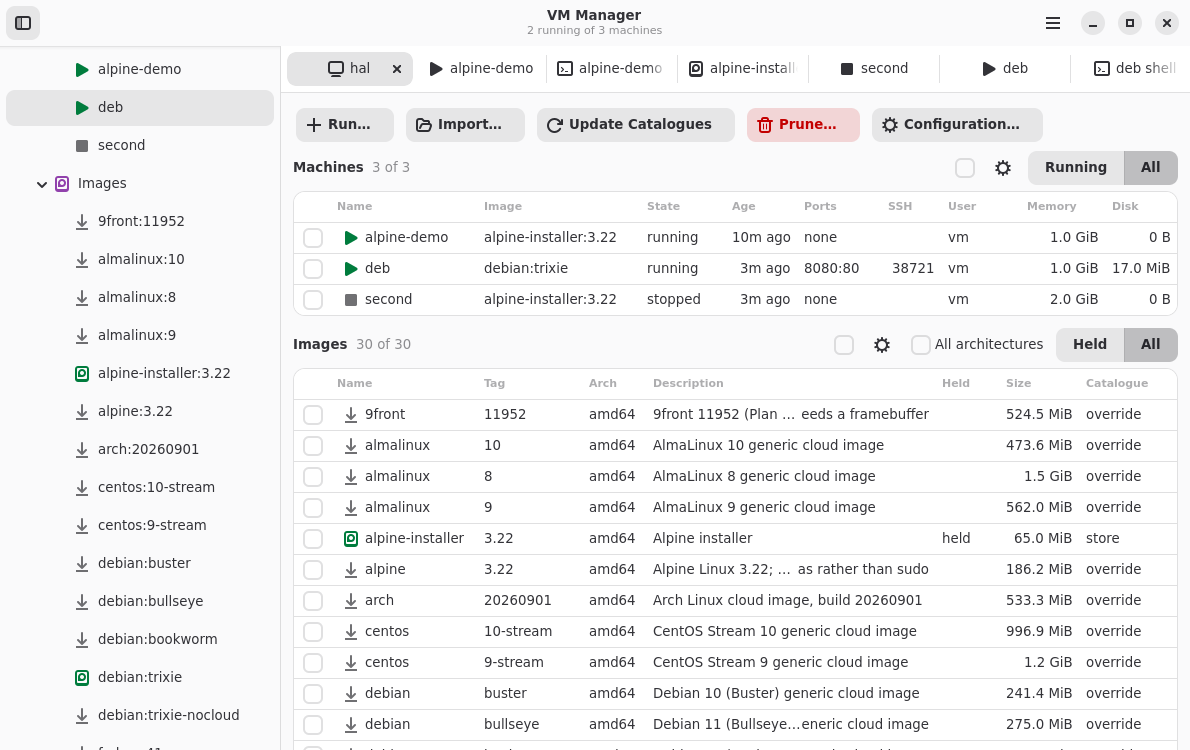
vmg or vm gui lets you do all the same things with a desktop GUI:
Build prerequisites (Debian 13):
sudo apt install build-essential
You also need Rust (2024 edition) from Rustup.sh or elsewhere.
Then:
cargo build
cargo run -p vm -- images
| Command | Purpose |
|---|---|
vm images | List the images the catalogues name; --local, --remote or --catalogue narrows it |
vm inspect <name or image> | Show a machine's settings, or an image's details, origin and users; --type chooses, --arch picks a build |
vm pull <image> | Fetch an image into the local store |
vm import <source> <image> | Bring an image file or URL into the local store |
vm export <image> <file> | Copy an image from the local store to a file |
vm update [catalogue] | Refresh the remote catalogues, or one |
vm config | Show the config file, or change a setting or catalogue |
vm run <image> | Create and start a machine |
vm start <name> | Start a stopped machine, optionally changing its settings; --eject removes its CD-ROM |
vm gui | Open the window, vmg |
vm ssh <name> | Open a shell on a machine, or run a command in it |
vm exec <name> -- <command> | Run a command in a machine with its arguments, streams and exit status intact |
vm cp <from> <to> | Copy files, naming one side as name:path |
vm ps | List machines; --all includes stopped ones, --follow refreshes, -q lists names only |
vm stop <name>... | Ask the guests to shut down, then force them |
vm pause <name>... | Stop machines' processors |
vm unpause <name>... | Let paused machines carry on |
vm kill <name>... | Stop machines without telling the guests |
vm logs <name> | Show a machine's console output; --follow streams it, --tail shortens it |
vm console <name> | Attach to a machine's serial console; Ctrl-] detaches |
vm screen <name> | Open a VNC viewer on a machine's screen |
vm screenshot <name> [file] | Save a machine's screen as a PNG |
vm clone <name> <image> | Save a machine's disk as a new image; -m describes it |
vm rm <name>... | Delete machines and their disks |
vm rmi <image>... | Delete images from the local store |
vm prune | Remove machines and images nothing needs; --all includes anything unused |
An image is named repository:tag, as in debian:trixie. The tag defaults to
latest. Appending @sha512:... pins the build: a reference whose digest does
not match the catalogue is refused.
man vm describes every command and option.
The catalogue ships with debian, ubuntu, fedora, centos, almalinux,
rocky, opensuse, alpine, arch, kali, omnios, freebsd, netbsd,
9front and puredarwin, several releases apiece. Each entry names a dated
build and its publisher's checksum, which vm pull verifies.
An entry may declare that its image is compressed (compression), the file in
a tar archive that is the image (archive_member), its format, a
source_format to convert to qcow2 when pulled, media = "cdrom" for a CD-ROM
image, and hardware it needs: firmware, cpu_model, machine and disk.
vm import names a local file or an http or https URL as an image in the
store catalogue. The source may be compressed with xz, gzip or zstd, and may
be a tar archive holding one file. A disk image, such as vmdk, vdi, vhdx or
raw, is converted to qcow2; an ISO CD-ROM image is kept as it is.
vm import ./appliance.vmdk appliance:1.0
vm import https://example.com/os-installer.iso installer:1.0
An imported URL stays fetchable: vm prune --all may remove the file, and
vm run or vm pull fetches and converts it again. --forget-url keeps only
the local copy. --login cloud-init marks an image that takes a cloud-init
seed, --firmware, --machine, --disk and --cpu-model give hardware it needs,
--digest checks the source, and --force replaces an image of the same name.
vm export copies a pulled or local image to a file, in the format it is
stored in: qcow2 for imports and clones, ISO for CD-ROM images. A name without
an image suffix gains one, a directory gains a file named after the image, and
a suffix for another format is refused. --compress compresses the file with
xz, or with gzip or zstd if named, adding .xz, .gz or .zst. --force
replaces an existing file.
vm export appliance:1.0 ./appliance
vm export appliance:1.0 ./appliance --compress zstd
vm run fetches the image if needed and starts a machine with its own
writable disk. -p host:guest forwards a port on 127.0.0.1, and
-p address:host:guest on another address; -v /host/path:/guest/path shares a
directory, read-only with a trailing :ro. -m sets memory, --cpus
processors, --cpu-model the QEMU CPU model, and --name the name. --rm
removes the machine once it stops.
Each machine gets its own key pair and an account named by --user, so vm ssh needs no password. vm ssh wraps ssh, so ~/.ssh/config and the agent
still apply. --password sets a password for console logins.
--add-ssh-config lets plain ssh, scp and rsync reach the machine by
name:
vm run debian:trixie --name mytestvm --add-ssh-config
ssh mytestvm
This adds one Include line to the top of ~/.ssh/config. A name already used
by a Host there is refused. vm rm or vm start --no-ssh-config removes the
entry.
vm exec runs a command for scripts, as docker exec does: each argument
reaches the guest unchanged, standard input is forwarded only with -i, -t
gives a terminal, and it exits with the command's status, or 125 when vm
itself fails. It waits up to a minute for a starting machine:
vm run debian:trixie --name ci --rm
tar -c . | vm exec -i ci -- tar -x -C /srv
vm exec -w /srv ci -- make test
vm stop ci
vm start accepts the same settings as vm run and applies them from then on.
--no-port, --no-volume, --no-pci, --no-usb and --no-password clear
them.
--pci gives the guest a host PCI device, such as a GPU for compute work, and
--usb gives it a USB device. Both repeat, and vm start replaces them as a
list. A PCI device is named by its address from lspci, such as 01:00.0; give
each function the guest needs, for example a GPU's 01:00.1 audio function as
well. A USB device is named by its IDs from lsusb, such as 046d:c52b, or by
where it is plugged in, such as 1-2.3, when several share IDs.
vm run debian:trixie --name compute --memory 16G --pci 01:00.0 --pci 01:00.1
vm start compute --usb 046d:c52b
The host has to allow this before vm can do it, and vm says what is
missing:
intel_iommu=on or amd_iommu=on on the kernel
command line.vfio-pci instead of its usual driver, for example with
sudo driverctl set-override 0000:01:00.0 vfio-pci./dev/vfio/ and /dev/bus/usb/
nodes, which a udev rule can grant.memlock limit
in /etc/security/limits.conf must be at least the machine's memory.The host loses the device while the machine runs.
Images without cloud-init still run, but take no key and no account.
A machine run from a CD-ROM image gets a blank disk, 20G unless --disk-size
says otherwise, and boots the CD-ROM until the disk holds a system. An
installer's reboot therefore starts the installed system. vm start --eject
removes the CD-ROM, after which the machine no longer needs the image, and
vm clone saves the installed disk as an image.
Machine state lives under $XDG_STATE_HOME/vm/instances.
vm prune removes what can never be used again: machines whose image is gone
for good, images no catalogue entry names, and files left by stopped machines
or unfinished downloads. --all also removes every stopped machine and every
pulled image no machine uses; machines go first, so their images go in the same
run. vm prune machines or vm prune images limits it to one kind, and
--dry-run lists without removing. Running and paused machines, images in use,
and images that cannot be fetched again are never removed.
ping from a guest gets no replies unless the host allows unprivileged pings
for one of the user's groups. Check with
cat /proc/sys/net/ipv4/ping_group_range; if it reads 1 0, run:
echo 'net.ipv4.ping_group_range = 0 2147483647' | sudo tee /etc/sysctl.d/60-ping.conf
sudo sysctl --system
Only echo requests pass, so traceroute and mtr see nothing past the host.
vmg, or vm gui, opens a window over the same machines and images. The
sidebar lists this host, its machines and the images it holds; the host tab
tables every image the catalogues name. Selecting one opens a tab of its
details and the actions its state allows.
Consoles, shells, logs and file copies open as terminal tabs. Every vm
command has a counterpart there; man vmg lists them.
Building it needs the GTK, libadwaita and VTE development packages:
sudo apt install pkg-config libgtk-4-dev libadwaita-1-dev libvte-2.91-gtk4-dev
The vm-manager-gui package installs it alongside vm-manager. It publishes a
panel indicator where the desktop shows one; GNOME needs
gnome-shell-extension-appindicator.
The package installs completion for bash, zsh and fish, covering commands, flags, machine names, image references and machine settings.
Without the package, with vm on the PATH, use one of:
source <(COMPLETE=bash vm)
source <(COMPLETE=zsh vm)
COMPLETE=fish vm | source
$XDG_CONFIG_HOME/vm/config.toml is optional. vm config shows where it is,
what it sets and what is defaulted, and changes it:
vm config set default_user '$USER'
vm config add remote internal https://mirror.example.com/vm/catalogue.toml --path images
vm config add local team /srv/vm/catalogue
vm config remove remote internal
Invalid values are refused, and no file is created until a change is made.
man vm-config describes the settings: the catalogues, whether vm run
fetches missing images, whether machines get an SSH config entry by default,
and default_user, the account created when --user is not given.
default_user = "$USER" uses the name of the user running vm.
Several catalogues can name images. Remote catalogues are fetched by
vm update; local ones are read in place. When two name the same image the
later one wins: remotes in the order listed, then locals in the order listed,
then store, the catalogue vm clone and vm import write to.
[[remote]]
name = "project"
url = "https://vm-manager.com/catalogue.toml"

[[remote]]
name = "internal"
url = "https://mirror.example.com/vm/catalogue.toml"
path = "images"

[[local]]
name = "team"
path = "/srv/vm/catalogue"
Without a [[remote]] the project's catalogue is the only remote.
A remote's url names a pointer file giving the catalogue's version and its
gzipped tar archive, as a URL or a file name beside the pointer. The archive
holds one top-level directory; path names the directory of entries within it,
default catalogue.
version = "0.0.1"
archive = "catalogue-0.0.1.tar.gz"
Commands write text by default, or --format json / --format yaml (or
VM_FORMAT). In those formats standard output holds only the document; errors
carry a stable kind.
MIT.
A CLI oriented tool for managing VM images and instances
Rust
0
52 commits
updated Sep 16, 2026
Create and manage QEMU virtual machines from prebuilt OS images, with a command set modelled on Docker and various cloud clients.
The vm command:
vmg or vm gui lets you do all the same things with a desktop GUI:
Build prerequisites (Debian 13):
sudo apt install build-essential
You also need Rust (2024 edition) from Rustup.sh or elsewhere.
Then:
cargo build
cargo run -p vm -- images
| Command | Purpose |
|---|---|
vm images | List the images the catalogues name; --local, --remote or --catalogue narrows it |
vm inspect <name or image> | Show a machine's settings, or an image's details, origin and users; --type chooses, --arch picks a build |
vm pull <image> | Fetch an image into the local store |
vm import <source> <image> | Bring an image file or URL into the local store |
vm export <image> <file> | Copy an image from the local store to a file |
vm update [catalogue] | Refresh the remote catalogues, or one |
vm config | Show the config file, or change a setting or catalogue |
vm run <image> | Create and start a machine |
vm start <name> | Start a stopped machine, optionally changing its settings; --eject removes its CD-ROM |
vm gui | Open the window, vmg |
vm ssh <name> | Open a shell on a machine, or run a command in it |
vm exec <name> -- <command> | Run a command in a machine with its arguments, streams and exit status intact |
vm cp <from> <to> | Copy files, naming one side as name:path |
vm ps | List machines; --all includes stopped ones, --follow refreshes, -q lists names only |
vm stop <name>... | Ask the guests to shut down, then force them |
vm pause <name>... | Stop machines' processors |
vm unpause <name>... | Let paused machines carry on |
vm kill <name>... | Stop machines without telling the guests |
vm logs <name> | Show a machine's console output; --follow streams it, --tail shortens it |
vm console <name> | Attach to a machine's serial console; Ctrl-] detaches |
vm screen <name> | Open a VNC viewer on a machine's screen |
vm screenshot <name> [file] | Save a machine's screen as a PNG |
vm clone <name> <image> | Save a machine's disk as a new image; -m describes it |
vm rm <name>... | Delete machines and their disks |
vm rmi <image>... | Delete images from the local store |
vm prune | Remove machines and images nothing needs; --all includes anything unused |
An image is named repository:tag, as in debian:trixie. The tag defaults to
latest. Appending @sha512:... pins the build: a reference whose digest does
not match the catalogue is refused.
man vm describes every command and option.
The catalogue ships with debian, ubuntu, fedora, centos, almalinux,
rocky, opensuse, alpine, arch, kali, omnios, freebsd, netbsd,
9front and puredarwin, several releases apiece. Each entry names a dated
build and its publisher's checksum, which vm pull verifies.
An entry may declare that its image is compressed (compression), the file in
a tar archive that is the image (archive_member), its format, a
source_format to convert to qcow2 when pulled, media = "cdrom" for a CD-ROM
image, and hardware it needs: firmware, cpu_model, machine and disk.
vm import names a local file or an http or https URL as an image in the
store catalogue. The source may be compressed with xz, gzip or zstd, and may
be a tar archive holding one file. A disk image, such as vmdk, vdi, vhdx or
raw, is converted to qcow2; an ISO CD-ROM image is kept as it is.
vm import ./appliance.vmdk appliance:1.0
vm import https://example.com/os-installer.iso installer:1.0
An imported URL stays fetchable: vm prune --all may remove the file, and
vm run or vm pull fetches and converts it again. --forget-url keeps only
the local copy. --login cloud-init marks an image that takes a cloud-init
seed, --firmware, --machine, --disk and --cpu-model give hardware it needs,
--digest checks the source, and --force replaces an image of the same name.
vm export copies a pulled or local image to a file, in the format it is
stored in: qcow2 for imports and clones, ISO for CD-ROM images. A name without
an image suffix gains one, a directory gains a file named after the image, and
a suffix for another format is refused. --compress compresses the file with
xz, or with gzip or zstd if named, adding .xz, .gz or .zst. --force
replaces an existing file.
vm export appliance:1.0 ./appliance
vm export appliance:1.0 ./appliance --compress zstd
vm run fetches the image if needed and starts a machine with its own
writable disk. -p host:guest forwards a port on 127.0.0.1, and
-p address:host:guest on another address; -v /host/path:/guest/path shares a
directory, read-only with a trailing :ro. -m sets memory, --cpus
processors, --cpu-model the QEMU CPU model, and --name the name. --rm
removes the machine once it stops.
Each machine gets its own key pair and an account named by --user, so vm ssh needs no password. vm ssh wraps ssh, so ~/.ssh/config and the agent
still apply. --password sets a password for console logins.
--add-ssh-config lets plain ssh, scp and rsync reach the machine by
name:
vm run debian:trixie --name mytestvm --add-ssh-config
ssh mytestvm
This adds one Include line to the top of ~/.ssh/config. A name already used
by a Host there is refused. vm rm or vm start --no-ssh-config removes the
entry.
vm exec runs a command for scripts, as docker exec does: each argument
reaches the guest unchanged, standard input is forwarded only with -i, -t
gives a terminal, and it exits with the command's status, or 125 when vm
itself fails. It waits up to a minute for a starting machine:
vm run debian:trixie --name ci --rm
tar -c . | vm exec -i ci -- tar -x -C /srv
vm exec -w /srv ci -- make test
vm stop ci
vm start accepts the same settings as vm run and applies them from then on.
--no-port, --no-volume, --no-pci, --no-usb and --no-password clear
them.
--pci gives the guest a host PCI device, such as a GPU for compute work, and
--usb gives it a USB device. Both repeat, and vm start replaces them as a
list. A PCI device is named by its address from lspci, such as 01:00.0; give
each function the guest needs, for example a GPU's 01:00.1 audio function as
well. A USB device is named by its IDs from lsusb, such as 046d:c52b, or by
where it is plugged in, such as 1-2.3, when several share IDs.
vm run debian:trixie --name compute --memory 16G --pci 01:00.0 --pci 01:00.1
vm start compute --usb 046d:c52b
The host has to allow this before vm can do it, and vm says what is
missing:
intel_iommu=on or amd_iommu=on on the kernel
command line.vfio-pci instead of its usual driver, for example with
sudo driverctl set-override 0000:01:00.0 vfio-pci./dev/vfio/ and /dev/bus/usb/
nodes, which a udev rule can grant.memlock limit
in /etc/security/limits.conf must be at least the machine's memory.The host loses the device while the machine runs.
Images without cloud-init still run, but take no key and no account.
A machine run from a CD-ROM image gets a blank disk, 20G unless --disk-size
says otherwise, and boots the CD-ROM until the disk holds a system. An
installer's reboot therefore starts the installed system. vm start --eject
removes the CD-ROM, after which the machine no longer needs the image, and
vm clone saves the installed disk as an image.
Machine state lives under $XDG_STATE_HOME/vm/instances.
vm prune removes what can never be used again: machines whose image is gone
for good, images no catalogue entry names, and files left by stopped machines
or unfinished downloads. --all also removes every stopped machine and every
pulled image no machine uses; machines go first, so their images go in the same
run. vm prune machines or vm prune images limits it to one kind, and
--dry-run lists without removing. Running and paused machines, images in use,
and images that cannot be fetched again are never removed.
ping from a guest gets no replies unless the host allows unprivileged pings
for one of the user's groups. Check with
cat /proc/sys/net/ipv4/ping_group_range; if it reads 1 0, run:
echo 'net.ipv4.ping_group_range = 0 2147483647' | sudo tee /etc/sysctl.d/60-ping.conf
sudo sysctl --system
Only echo requests pass, so traceroute and mtr see nothing past the host.
vmg, or vm gui, opens a window over the same machines and images. The
sidebar lists this host, its machines and the images it holds; the host tab
tables every image the catalogues name. Selecting one opens a tab of its
details and the actions its state allows.
Consoles, shells, logs and file copies open as terminal tabs. Every vm
command has a counterpart there; man vmg lists them.
Building it needs the GTK, libadwaita and VTE development packages:
sudo apt install pkg-config libgtk-4-dev libadwaita-1-dev libvte-2.91-gtk4-dev
The vm-manager-gui package installs it alongside vm-manager. It publishes a
panel indicator where the desktop shows one; GNOME needs
gnome-shell-extension-appindicator.
The package installs completion for bash, zsh and fish, covering commands, flags, machine names, image references and machine settings.
Without the package, with vm on the PATH, use one of:
source <(COMPLETE=bash vm)
source <(COMPLETE=zsh vm)
COMPLETE=fish vm | source
$XDG_CONFIG_HOME/vm/config.toml is optional. vm config shows where it is,
what it sets and what is defaulted, and changes it:
vm config set default_user '$USER'
vm config add remote internal https://mirror.example.com/vm/catalogue.toml --path images
vm config add local team /srv/vm/catalogue
vm config remove remote internal
Invalid values are refused, and no file is created until a change is made.
man vm-config describes the settings: the catalogues, whether vm run
fetches missing images, whether machines get an SSH config entry by default,
and default_user, the account created when --user is not given.
default_user = "$USER" uses the name of the user running vm.
Several catalogues can name images. Remote catalogues are fetched by
vm update; local ones are read in place. When two name the same image the
later one wins: remotes in the order listed, then locals in the order listed,
then store, the catalogue vm clone and vm import write to.
[[remote]]
name = "project"
url = "https://vm-manager.com/catalogue.toml"

[[remote]]
name = "internal"
url = "https://mirror.example.com/vm/catalogue.toml"
path = "images"

[[local]]
name = "team"
path = "/srv/vm/catalogue"
Without a [[remote]] the project's catalogue is the only remote.
A remote's url names a pointer file giving the catalogue's version and its
gzipped tar archive, as a URL or a file name beside the pointer. The archive
holds one top-level directory; path names the directory of entries within it,
default catalogue.
version = "0.0.1"
archive = "catalogue-0.0.1.tar.gz"
Commands write text by default, or --format json / --format yaml (or
VM_FORMAT). In those formats standard output holds only the document; errors
carry a stable kind.
MIT.



