
This repo is for the senior frontend engineer assessment
HTML
1
2,529 commits
updated Feb 6, 2023
README
Senior Frontend Engineer Take Home Assessment
Overview
Thanks for taking the time to interview with the Gradio team, the next step in the process includes completing a take-home assessment.
The format of the assessment will consist of:
- A quick call to help you get setup with your local development environment and answer any questions around the assessment.
- Spend no more than 4-5 hours on this take home assessment. You can always ask us clarifying questions during this process. Also you can always discuss your approach and how you would've implemented something you didn't have the time for.
- A final call to explain your submission and approach.
The purpose of this assessment is to create a custom dropdown menu. The dropdown component is an important input component within the Gradio library. It allows developers to enable users to select from a list of options within their demos. This repository currently implements a standard dropdown menu using the html select element:
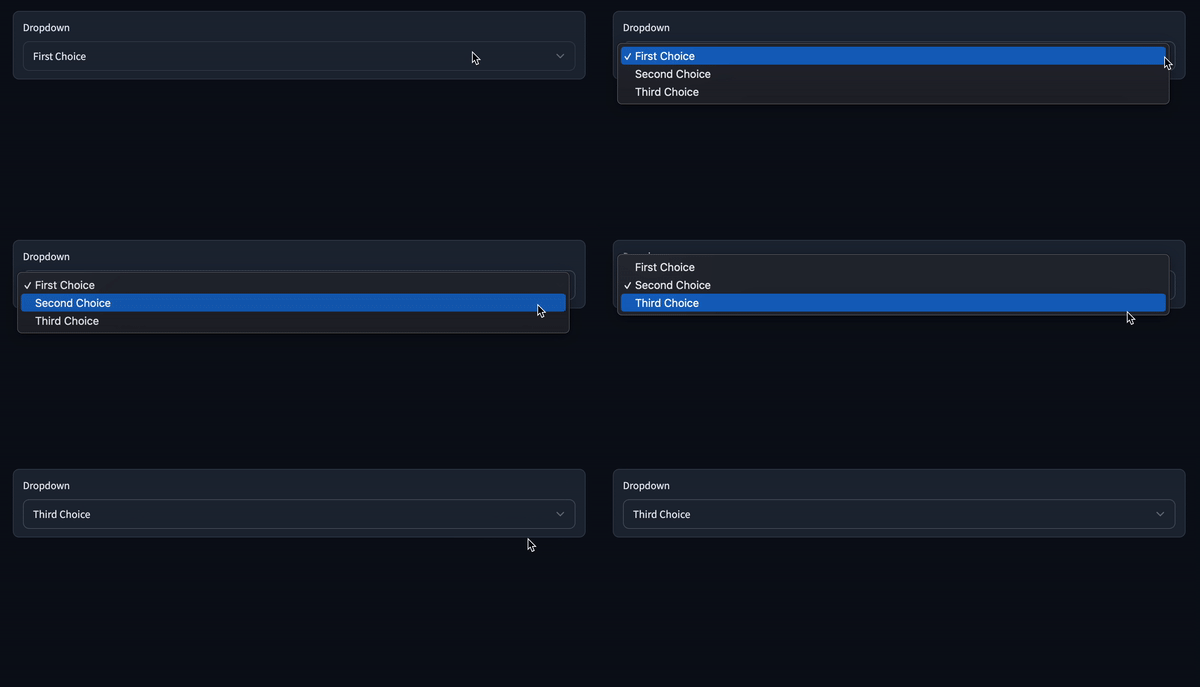
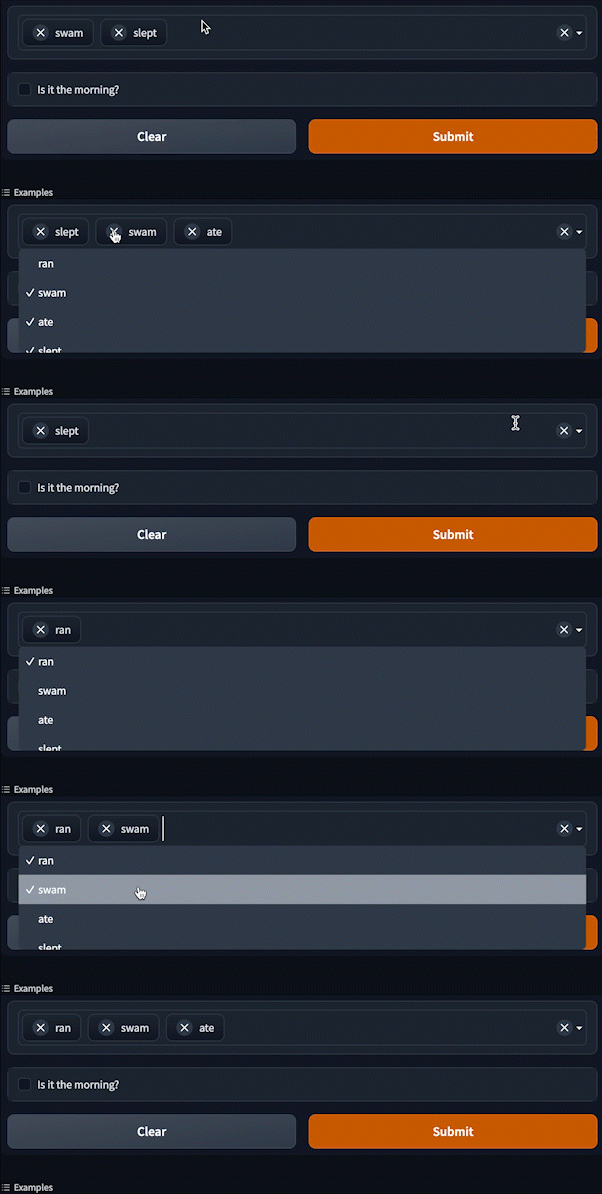
As shown above, the current dropdown is limited in its capabilities and very simplistic design. Your job will be to replace this dropdown with your own custom implementation and add more features, requested by our developers. Use the current dropdown component implementation as a starting point and build a completely custom dropdown within a private fork of this repository. Below is an example of a custom dropdown with extra functionality, don't feel the need to mimic this exact dropdown, we want to see your own unique approach:
Prerequisites
-
First, you will create a private fork of this repository and follow the CONTRIBUTING.md guide in order to setup your local development environment (both client and server side).
- We will setup an initial call to help with any issues when setting up your local environment. Try to see how far you can get on your own by following the guide. But we expect there to be some hurdles, so don't stress, we'll help get it sorted!
Structure of the Repository
It's helpful to know the overall structure of the repository, although you will only have to work with a couple of files.
-
/gradio: contains the Python source code for the library/gradio/interface.py: contains the Python source code for the coreInterfaceclass/gradio/blocks.py: contains the Python source code for the coreBlocksclass/gradio/components.py: contains the Python source code for thecomponents, you can add your custom components here.
-
/ui: contains the HTML/JS/CSS source code for the library (start here for frontend changes) -
/test: contains Python unit tests for the library -
/demo: contains demos that are used in the documentation, you can findGradioexamples over here. -
/website: contains the code for the Gradio website (www.gradio.app). See the README in the/websitefolder for more details -
Below are the files you will need to know about:
gradio/ui/packages/app/src/components/Dropdown/Dropdown.svelte- This is a simple file that creates a
Dropdowncomponent and wraps it in aBlock.
- This is a simple file that creates a
gradio/ui/packages/form/src/Dropdown.svelte- This is the file where the frontend implementation of your custom dropdown will go. Notice how the
choicesvariable is used to create an<option>with the current implementation. - https://github.com/dawoodkhan82/gradio-assessment/blob/cb475c1caa0b500461d96582a1085530d28ed2fb/ui/packages/form/src/Dropdown.svelte#L23-L25
- This is the file where the frontend implementation of your custom dropdown will go. Notice how the
gradio/gradio/components.py- For the extra dropdown features you may want to add, you're going to have to change the python api and add any additional developer facing parameters for the dropdown component. For example, you may want to add a
multiselectbool parameter to allow the developer to toggle on the ability to select multiple choices. - https://github.com/dawoodkhan82/gradio-assessment/blob/cb475c1caa0b500461d96582a1085530d28ed2fb/gradio/components.py#L1170
- For the extra dropdown features you may want to add, you're going to have to change the python api and add any additional developer facing parameters for the dropdown component. For example, you may want to add a
What we're looking for
Please don't feel the need to spend too much time on this assessment! To re-iterate: you can always discuss your approach and how you would've implemented something you didn't have the time for. We're mainly looking for how you work and communicate.
Overall:
- A basic working custom dropdown component
- Code quality and organization
- Documentation of how the component works and in-code documentation for any areas of code that may be hard to understand
- Good design eye
- Basic unit tests
- Ability to talk through your implementation
- Willingness to ask us questions if you reach any issues or have trouble understanding anything
Core Dropdown Features:
- Allow selection of a single dropdown option
- Clear the selected option
- Ability to type and search through the dropdown options
- Keyboard functionality: enter key to select an option, and arrow key support for navigating options
- A11Y (accessiblity) adherence
Extra Dropdown Features (Optional):
- Ability to select multiple dropdown options
- Section headers in the dropdown to organize options
- Filter dropdown options by typing in section header name
- Ability to clear all options and individual options
Contributors
(top 30 of 108)


Similar repos


Languages
HTML
83.4%
Python
11.4%
TypeScript
2.3%
Svelte
1.7%
This repo is for the senior frontend engineer assessment
HTML
1
2,529 commits
updated Feb 6, 2023
README
Senior Frontend Engineer Take Home Assessment
Overview
Thanks for taking the time to interview with the Gradio team, the next step in the process includes completing a take-home assessment.
The format of the assessment will consist of:
- A quick call to help you get setup with your local development environment and answer any questions around the assessment.
- Spend no more than 4-5 hours on this take home assessment. You can always ask us clarifying questions during this process. Also you can always discuss your approach and how you would've implemented something you didn't have the time for.
- A final call to explain your submission and approach.
The purpose of this assessment is to create a custom dropdown menu. The dropdown component is an important input component within the Gradio library. It allows developers to enable users to select from a list of options within their demos. This repository currently implements a standard dropdown menu using the html select element:
As shown above, the current dropdown is limited in its capabilities and very simplistic design. Your job will be to replace this dropdown with your own custom implementation and add more features, requested by our developers. Use the current dropdown component implementation as a starting point and build a completely custom dropdown within a private fork of this repository. Below is an example of a custom dropdown with extra functionality, don't feel the need to mimic this exact dropdown, we want to see your own unique approach:
Prerequisites
-
First, you will create a private fork of this repository and follow the CONTRIBUTING.md guide in order to setup your local development environment (both client and server side).
- We will setup an initial call to help with any issues when setting up your local environment. Try to see how far you can get on your own by following the guide. But we expect there to be some hurdles, so don't stress, we'll help get it sorted!
Structure of the Repository
It's helpful to know the overall structure of the repository, although you will only have to work with a couple of files.
-
/gradio: contains the Python source code for the library/gradio/interface.py: contains the Python source code for the coreInterfaceclass/gradio/blocks.py: contains the Python source code for the coreBlocksclass/gradio/components.py: contains the Python source code for thecomponents, you can add your custom components here.
-
/ui: contains the HTML/JS/CSS source code for the library (start here for frontend changes) -
/test: contains Python unit tests for the library -
/demo: contains demos that are used in the documentation, you can findGradioexamples over here. -
/website: contains the code for the Gradio website (www.gradio.app). See the README in the/websitefolder for more details -
Below are the files you will need to know about:
gradio/ui/packages/app/src/components/Dropdown/Dropdown.svelte- This is a simple file that creates a
Dropdowncomponent and wraps it in aBlock.
- This is a simple file that creates a
gradio/ui/packages/form/src/Dropdown.svelte- This is the file where the frontend implementation of your custom dropdown will go. Notice how the
choicesvariable is used to create an<option>with the current implementation. - https://github.com/dawoodkhan82/gradio-assessment/blob/cb475c1caa0b500461d96582a1085530d28ed2fb/ui/packages/form/src/Dropdown.svelte#L23-L25
- This is the file where the frontend implementation of your custom dropdown will go. Notice how the
gradio/gradio/components.py- For the extra dropdown features you may want to add, you're going to have to change the python api and add any additional developer facing parameters for the dropdown component. For example, you may want to add a
multiselectbool parameter to allow the developer to toggle on the ability to select multiple choices. - https://github.com/dawoodkhan82/gradio-assessment/blob/cb475c1caa0b500461d96582a1085530d28ed2fb/gradio/components.py#L1170
- For the extra dropdown features you may want to add, you're going to have to change the python api and add any additional developer facing parameters for the dropdown component. For example, you may want to add a
What we're looking for
Please don't feel the need to spend too much time on this assessment! To re-iterate: you can always discuss your approach and how you would've implemented something you didn't have the time for. We're mainly looking for how you work and communicate.
Overall:
- A basic working custom dropdown component
- Code quality and organization
- Documentation of how the component works and in-code documentation for any areas of code that may be hard to understand
- Good design eye
- Basic unit tests
- Ability to talk through your implementation
- Willingness to ask us questions if you reach any issues or have trouble understanding anything
Core Dropdown Features:
- Allow selection of a single dropdown option
- Clear the selected option
- Ability to type and search through the dropdown options
- Keyboard functionality: enter key to select an option, and arrow key support for navigating options
- A11Y (accessiblity) adherence
Extra Dropdown Features (Optional):
- Ability to select multiple dropdown options
- Section headers in the dropdown to organize options
- Filter dropdown options by typing in section header name
- Ability to clear all options and individual options
Similar repos
Contributors
(top 30 of 108)
Languages
HTML
83.4%
Python
11.4%
TypeScript
2.3%
Svelte
1.7%