
README
Two clickwheel iPods in QEMU, booting Apple's real firmware
This fork of QEMU-iOS adds two machines that emulate clickwheel iPods and boot real software dumped from the physical devices, with no boot ROM and without patching a single firmware instruction.
| Machine | SoC | What it boots |
|---|---|---|
iPod-Classic | Samsung S5L8702 | Apple's retailOS: RTXC kernel, disk, fonts, full clickwheel navigation, and the music player — Now Playing screen and audio out of the guest's own I2S |
iPod-Video | PortalPlayer PP5022C | Rockbox up to its menu, navigable, and Apple's retailOS: language screen → main menu → submenus → back |
Neither machine emulates Apple's boot ROM. The hardware the firmware touches is
modelled, and what that ROM left in memory is reproduced by hand. Full detail in
wiki/.
You need your own iPod. This repository ships no firmware. Every dumped artefact lives in
assets/, which is kept out of git on purpose: it is not ours to redistribute. Without your own dump there is nothing to boot. Both dump chains are documented below.
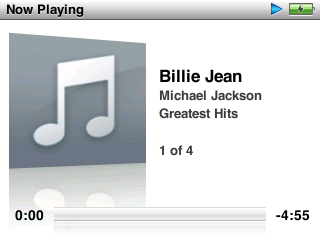
Apple's own Now Playing screen, in the emulator: album art, track, artist, album, track N of M and the progress bar. Audio is carried by the firmware's own render pump, DMA and I2S.
The music player
The player was the last and longest wall. It used to come up half-drawn and silent, and drop back to the song list after 18 seconds.
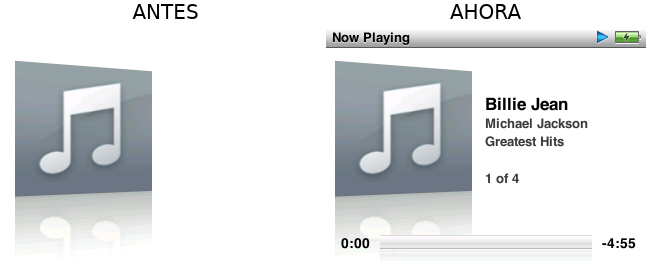
Four separate bugs stood between those two screenshots. The third one is the one worth seeing.
The compositor was covering the player
The player screen was being drawn the whole time. Dumping the display pipe's surfaces with the player open, layer 0 holds the entire player UI — title bar, artist, album, track N of M, progress bar — and layer 1 holds the album art, opaque and full screen. The compositor drew back-to-front starting at layer 0, so the art erased the player and left exactly the blank right-hand side that made the screen look half-drawn.
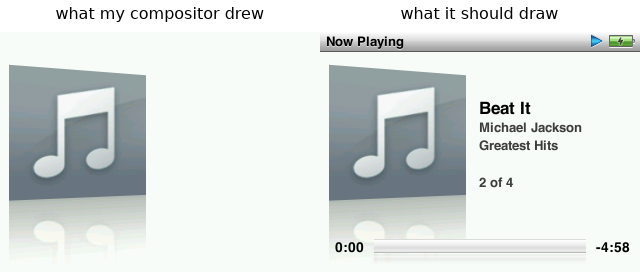
Same frame, same data on both sides. The only difference is the order the two layers are composited in.
The other half of the same bug: the model was discarding the layer's alpha channel. It really has one — the alpha byte takes 246 distinct values across the surface and the layer is 82% transparent.
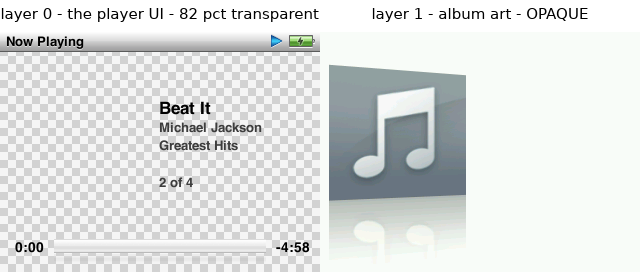
Compositing front-to-back with source-over fixes it, and it still explains the language-screen wipe that the original back-to-front Z order had been inferred from: that inference assumed opaque layers, which is where it went wrong.
The other three
-
The render pump gave up after exactly 8 calls, every run. The function that hands out audio buffers guards on a halfword in internal RAM, and watching that address across a whole three-minute run — boot included — showed that no CPU access ever writes it. The audio engine keeps state in IRAM that the firmware reads back, and the model was a register file that never wrote memory. What made it implementable rather than guesswork: the geometry is not a hidden hardware constant — the engine publishes it and the firmware reads it back to derive the buffer address and size. Render pump went from 8 activations to 1343, at ~20/s, which is exactly the slot cadence at 44.1 kHz.
-
The copy direction was backwards. The pump acquires a codec buffer and copies into it from the IRAM slot. Filling the codec buffers meant writing to the far end of that memcpy, where the firmware overwrote it immediately.
-
"Low Battery — Connect to Power". The battery ADC was being read correctly the whole time; what was missing was telling the firmware it was plugged in.
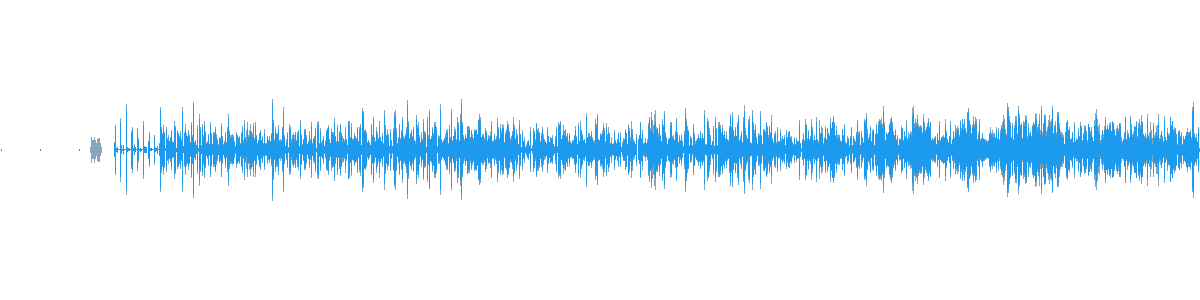
Audio captured off the emulator's I2S with the host shortcut disabled, so the only possible path is the guest's own render pump, DMA and I2S. 77-80% non-silent samples once playback is going.
Still broken: elapsed time stays at 0:00, pause stops the audio but will not resume, and switching tracks gives a burst and then silence. The MP3 decode itself is done host-side, the way an emulator handles an undocumented on-chip codec; everything else — track selection, transport, render pump, DMA, I2S — runs on the firmware.
Full write-up: wiki/20-classic6g-reproductor.md
(how it was fixed) and wiki/19-classic6g-dsp-hle.md
(the investigation, including the ~16 hypotheses that had to be retracted).
Navigation
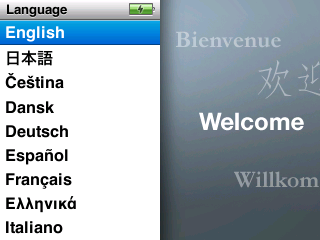 | 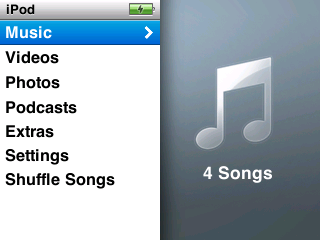 | 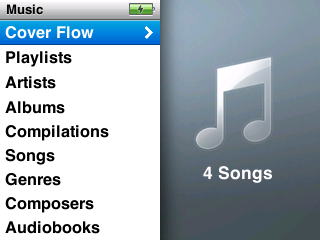 |
| Language screen | Main menu | Music menu |
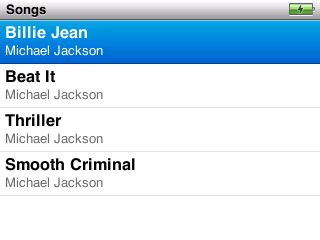
The library reads from a real iTunesDB on a FAT32 volume built by the tools in
tools/ipod_classic/.
Building
Built under WSL against a tree living on Windows. The binary is a Linux ELF: it only
runs under WSL. Full detail and three environment traps (CRLF, git symlinks,
--disable-werror) in wiki/05-build-notes.md.
# Configure (once)
mkdir -p build && cd build
../configure --enable-sdl --disable-cocoa --target-list=arm-softmmu \
             --disable-capstone --disable-slirp \
             --extra-cflags=-I/usr/include/openssl --extra-ldflags=-lcrypto \
             --disable-werror --enable-pie

# Build
ninja qemu-system-arm
Dependencies on Ubuntu 24.04:
sudo apt install -y libsdl2-dev libssl-dev libglib2.0-dev libpixman-1-dev \
                    ninja-build python3-venv dosfstools mtools
A cold build takes about 16 minutes. A no-op ninja takes ~20 s warm, but can take
6 minutes the first time after touching files from Windows — that is the 9p cache
on /mnt/c, not a broken build.
Running the iPod Classic 6G
You need the decrypted osos (see the chain)
and a disk image built from the .ipsw firmware partition.
# The disk. The FAT32 volume is deliberately EMPTY: the fonts live in the
# FIRMWARE partition, not here.
truncate -s 64M ~/6g/fat32.img && mkfs.vfat -F 32 -n IPOD ~/6g/fat32.img
python3 tools/ipod_classic/mkdisk6g4k.py ~/6g/E.img \
        assets/extracted/Firmware-24.9.1.2 ~/6g/fat32.img

# Boot
cd build && ./qemu-system-arm -M iPod-Classic \
    -kernel ../assets/classic6g/osos_decrypted.bin -serial null \
    -drive if=ide,format=raw,file=$HOME/6g/E.img -snapshot
- Without
-drivethere is no picture, and that is the guest's doing, not the model's: the UI dies looking for fonts, which live in the firmware'srsrcpartition. It enters a crash-and-reboot cycle. -serial nullkeeps the console clean. The firmware talks on stderr (semihosting) — never discard it.
Running the music player
The player needs several environment flags, each documented in
wiki/20-classic6g-reproductor.md. They are behind
flags because each has measured trade-offs and none is settled enough to impose:
IRAMSPILL=0x10000 SHA1_ZERO=1 SM1_IRQ=1 \
SM1_SLOTS=1 SM1_NSLOTS=2 SM1_DECODE=1 SM1_FEED_OFF=1 \
DISP_ALPHA=1 PMUCHARGER=adapter \
HLE_AUDIO_DATAPATH=1 HLE_AUDIO_SUSTAIN=1 HLE_AUDIO_DISK=<disk image> \
./qemu-system-arm -M iPod-Classic ... -display sdl
SM1_NSLOTS=2 is not cosmetic: the default 7-slot ring writes 28 KiB from 0x22038100
and that lands on memory which is not ours, freezing the UI mid-transition while audio
keeps playing.
AUDIOWAV=/path.wav captures everything the I2S clocks out. There is no live audio
backend — the I2S model only writes WAV. To hear it while it runs, pipe the file to a
player; note that ffplay hangs silently unless you set SDL_AUDIODRIVER=pulse.
Keys
| Key | Button |
|---|---|
q / e | wheel anticlockwise / clockwise |
Enter | SELECT (centre button) |
w | MENU |
a / d | previous / next |
s | PLAY / PAUSE |
Same as the 5G machine, so one habit covers both. Note the retailOS clickwheel drops roughly 5 of every 7 SELECT presses — if it does not register, press again.
Properties and trace variables
| Property | Default | What it does |
|---|---|---|
bootrom | (none) | Path to an S5L8702 boot ROM binary. If given, it keeps address 0 instead of the IRAM0 alias — we have none, see wiki/10 |
semihosting | on | Answers ARM semihosting. Leave it on: it is how the retailOS prints its panics |
There is no entry property: the decrypted osos is loaded raw at 0x08000000, which
is its addr in the firmware directory.
| Variable | What it traces |
|---|---|
DISPTRACE=1 | the compositor at 0x38900000, with guest PC and totals |
LCDTRACE=1 | the panel: commands, pixels and frame-engine starts |
ATATRACE=1 | the whole ATA conversation, register by register |
WHEELTRACE=1 | packets, commands and IRQ 23 edges |
SM1TRACE=1, PMUTRACE=1, I2SCOUNT=1, DMATRACE=1 | the audio path, the PMU, the I2S and the DMA controllers |
Running the iPod Video 5G
Both firmwares come from the same image (osos_full.bin): the iPod is dual-boot and
ipodpatcher left Rockbox's bootloader behind Apple's firmware. Only the entry point
changes, which is the entry property.
# Rockbox
./build/qemu-system-arm -M "iPod-Video,entry=0x735a00" ...
See wiki/09-historia-5g.md for the full invocation.
Dumping from a physical iPod Classic 6G
The project's founding blocker was that the Classic's osos is encrypted with the GID
key fused into the silicon. You do not need to extract the key: you just need the
device itself to decrypt it. Verified chain, full detail in
wiki/10-classic6g-emcore.md.
1. Pull Firmware-XX out of the .ipsw (it is a zip) and extract its four images
from the ]ih[ container:
python3 tools/ipod_classic/fwtool.py list    assets/extracted/Firmware-24.9.1.2
python3 tools/ipod_classic/fwtool.py extract assets/extracted/Firmware-24.9.1.2 assets/images
The osos that comes out is encrypted. The rsrc partition is not: it is a 78 MB
FAT16 volume with Resources/Fonts inside.
2. Install emCORE on the iPod (r859 or similar, freemyipod's bootloader).
3. Decrypt the osos using the SoC's own AES engine, over USB:
python3 tools/ipod_classic/emcore_s5l8702.py info
python3 tools/ipod_classic/emcore_s5l8702.py decrypt \
        assets/images/1_osos.payload assets/classic6g/osos_decrypted.bin
Takes 1.2 s. Neither official emCORE client works as-is (HEAD speaks a
post-r891 protocol; r859's calls pyusb with a parameter that disappeared in 1.0.0b1),
and there is one trap you must know to chunk it: hwkeyaes() zeroes the IV at the
start of every call, so the first block of each chunk comes out wrong — in CBC that
is repaired with an XOR against the previous chunk's last ciphertext block.
How you know it worked: 42,014 ASCII strings versus 0, coherent ARM vectors,
"Copyright 2001-2008 Apple Inc.", RTXC v3.2b, and the literal UI strings (Cover
Flow, Now Playing).
A negative result, verified: the boot ROM cannot be read from the running
device. See wiki/10 §4 — and §5, on how to avoid bricking one.
Dumping from a physical iPod Video 5G
Requires a 5G with Rockbox installed: dual boot is what puts both firmwares in one
image. Full chain in wiki/09-historia-5g.md; the short
version is tools/ipod_video/dump-firmware.ps1 (Windows, admin) followed by
fwtool.py and tools/ipod_video/mkdisk.sh.
What is modelled
iPod Classic 6G — hw/arm/ipod_classic/, 16 files plus headers: ARM926EJ-S with
SDRAM and IRAM0/1 (and the IRAM0 alias at address 0, where the ARM926 takes its
exceptions), VIC0/VIC1, the clock block, timers, GPIO, I2C, the PCF50635 PMU, the
CS42L55 codec, ATA, the display pipe and LCD, the clickwheel, two PL080 DMA
controllers, I2S, the SHA-1 accelerator and the SM1 audio engine.
iPod Video 5G — hw/arm/ipod_video/, 8 files plus headers: PP5022C, the interrupt
controller, DMA, IDE, I2C, the PCF50605 PMU and the BCM video chip's protocol.
Detail, including what is not modelled, in
wiki/02-s5l8702-hardware.md and
wiki/07-pp502x-hardware.md.
Known limits
Listed because the value of this documentation is that it can be trusted.
iPod Classic 6G
- The player's elapsed time stays at 0:00. Making the SM1 position register follow the I2S does not move it, so that counter comes from the player's own bookkeeping.
- Pause does not resume, and switching tracks gives a burst then silence. The PCM cursor never resets, so after a track change it reads out of position.
- The MP3 decode is host-side. Everything else runs on the firmware.
- Every audio and display fix is behind an environment flag, because each has measured trade-offs. The default build is byte-for-byte as it was.
- No USB, no NAND, no CE-ATA, no RTC.
iPod Video 5G
- The wheel does not move the highlight on the retailOS language screen. Measured (0 pixels), not diagnosed. It works in the main menu.
- No audio (neither I²S nor the WM8758 codec) and no USB.
- The VideoCore does not execute: its protocol is modelled, not its processor.
- DRAM size is an open question: 64 MB because that is what Rockbox reads from the silicon, though the firmware itself and iPodLinux's table say 32. Both work.
Both
- Several constants are our choices or inferences, not confirmed data. They are
marked
ASSUMED/INFERRED/UNDETERMINEDin the code and collected inwiki/09andwiki/12. tools/ipod_video/navtest.shandappletest.share not assertions, they are evidence generators: they close the QEMU invocation with|| trueand check nothing. You have to look at the numbers.tools/ipod_classic/navtest.shdoes decide, and fails if the noise floor stops being 0.
Where the detail lives
| Document | Contents |
|---|---|
wiki/README.md | Index of everything |
wiki/15-muros-classic6g.md | Every wall on the Classic 6G and how each one fell |
wiki/20-classic6g-reproductor.md | How the music player was fixed |
wiki/19-classic6g-dsp-hle.md | The audio investigation in full, retractions included |
wiki/12-historia-6g.md | How everything on the Classic 6G was worked out: each obstacle, its symptom and its cause, the catalogue of withdrawn hypotheses, and the chapter on the three times a dismissal was the right lead |
wiki/10-classic6g-emcore.md | The real device over USB and decrypting the osos with the SoC's own GID key |
wiki/11-classic6g-retailos.md | The retailOS running, section by section, and how to reproduce every measurement |
wiki/09-historia-5g.md | The same for the iPod Video 5G |
wiki/05-build-notes.md | Build, run, test, and how to find out where the firmware stopped |
The wiki is in Spanish.
This repository is a fork
Forked from devos50/qemu-ios (QEMU 8.2.0), branch
ipod_touch_2g, which emulates the iPod Touch 1G and 2G. That work is here intact
and its machines are listed in -M help:
QEMU's own documentation is in docs/; this README replaces the original
fork's.
This work depends on: Rockbox (open-source register-level drivers for both devices —
firmware/target/arm/s5l8702/ and firmware/export/s5l87xx.h for the Classic,
firmware/target/arm/ipod/ and pp5020.h for the 5G), iPodLinux
(ipodloader2/ipodhw.c, source of the SysInfo block), ipodpatcher (the dual-boot
model) and freemyipod.org (emCORE, and a
QEMU model of the S5L8702 in freemyipod/qemu@s5l8702-dev).


See what people are saying
Hacker News (1)
Similar repos


Languages
C
79.9%
C++
11.7%
Python
4.1%
Shell
1.9%
README
Two clickwheel iPods in QEMU, booting Apple's real firmware
This fork of QEMU-iOS adds two machines that emulate clickwheel iPods and boot real software dumped from the physical devices, with no boot ROM and without patching a single firmware instruction.
| Machine | SoC | What it boots |
|---|---|---|
iPod-Classic | Samsung S5L8702 | Apple's retailOS: RTXC kernel, disk, fonts, full clickwheel navigation, and the music player — Now Playing screen and audio out of the guest's own I2S |
iPod-Video | PortalPlayer PP5022C | Rockbox up to its menu, navigable, and Apple's retailOS: language screen → main menu → submenus → back |
Neither machine emulates Apple's boot ROM. The hardware the firmware touches is
modelled, and what that ROM left in memory is reproduced by hand. Full detail in
wiki/.
You need your own iPod. This repository ships no firmware. Every dumped artefact lives in
assets/, which is kept out of git on purpose: it is not ours to redistribute. Without your own dump there is nothing to boot. Both dump chains are documented below.
Apple's own Now Playing screen, in the emulator: album art, track, artist, album, track N of M and the progress bar. Audio is carried by the firmware's own render pump, DMA and I2S.
The music player
The player was the last and longest wall. It used to come up half-drawn and silent, and drop back to the song list after 18 seconds.
Four separate bugs stood between those two screenshots. The third one is the one worth seeing.
The compositor was covering the player
The player screen was being drawn the whole time. Dumping the display pipe's surfaces with the player open, layer 0 holds the entire player UI — title bar, artist, album, track N of M, progress bar — and layer 1 holds the album art, opaque and full screen. The compositor drew back-to-front starting at layer 0, so the art erased the player and left exactly the blank right-hand side that made the screen look half-drawn.
Same frame, same data on both sides. The only difference is the order the two layers are composited in.
The other half of the same bug: the model was discarding the layer's alpha channel. It really has one — the alpha byte takes 246 distinct values across the surface and the layer is 82% transparent.
Compositing front-to-back with source-over fixes it, and it still explains the language-screen wipe that the original back-to-front Z order had been inferred from: that inference assumed opaque layers, which is where it went wrong.
The other three
-
The render pump gave up after exactly 8 calls, every run. The function that hands out audio buffers guards on a halfword in internal RAM, and watching that address across a whole three-minute run — boot included — showed that no CPU access ever writes it. The audio engine keeps state in IRAM that the firmware reads back, and the model was a register file that never wrote memory. What made it implementable rather than guesswork: the geometry is not a hidden hardware constant — the engine publishes it and the firmware reads it back to derive the buffer address and size. Render pump went from 8 activations to 1343, at ~20/s, which is exactly the slot cadence at 44.1 kHz.
-
The copy direction was backwards. The pump acquires a codec buffer and copies into it from the IRAM slot. Filling the codec buffers meant writing to the far end of that memcpy, where the firmware overwrote it immediately.
-
"Low Battery — Connect to Power". The battery ADC was being read correctly the whole time; what was missing was telling the firmware it was plugged in.
Audio captured off the emulator's I2S with the host shortcut disabled, so the only possible path is the guest's own render pump, DMA and I2S. 77-80% non-silent samples once playback is going.
Still broken: elapsed time stays at 0:00, pause stops the audio but will not resume, and switching tracks gives a burst and then silence. The MP3 decode itself is done host-side, the way an emulator handles an undocumented on-chip codec; everything else — track selection, transport, render pump, DMA, I2S — runs on the firmware.
Full write-up: wiki/20-classic6g-reproductor.md
(how it was fixed) and wiki/19-classic6g-dsp-hle.md
(the investigation, including the ~16 hypotheses that had to be retracted).
Navigation
| | |
| Language screen | Main menu | Music menu |
The library reads from a real iTunesDB on a FAT32 volume built by the tools in
tools/ipod_classic/.
Building
Built under WSL against a tree living on Windows. The binary is a Linux ELF: it only
runs under WSL. Full detail and three environment traps (CRLF, git symlinks,
--disable-werror) in wiki/05-build-notes.md.
# Configure (once)
mkdir -p build && cd build
../configure --enable-sdl --disable-cocoa --target-list=arm-softmmu \
             --disable-capstone --disable-slirp \
             --extra-cflags=-I/usr/include/openssl --extra-ldflags=-lcrypto \
             --disable-werror --enable-pie

# Build
ninja qemu-system-arm
Dependencies on Ubuntu 24.04:
sudo apt install -y libsdl2-dev libssl-dev libglib2.0-dev libpixman-1-dev \
                    ninja-build python3-venv dosfstools mtools
A cold build takes about 16 minutes. A no-op ninja takes ~20 s warm, but can take
6 minutes the first time after touching files from Windows — that is the 9p cache
on /mnt/c, not a broken build.
Running the iPod Classic 6G
You need the decrypted osos (see the chain)
and a disk image built from the .ipsw firmware partition.
# The disk. The FAT32 volume is deliberately EMPTY: the fonts live in the
# FIRMWARE partition, not here.
truncate -s 64M ~/6g/fat32.img && mkfs.vfat -F 32 -n IPOD ~/6g/fat32.img
python3 tools/ipod_classic/mkdisk6g4k.py ~/6g/E.img \
        assets/extracted/Firmware-24.9.1.2 ~/6g/fat32.img

# Boot
cd build && ./qemu-system-arm -M iPod-Classic \
    -kernel ../assets/classic6g/osos_decrypted.bin -serial null \
    -drive if=ide,format=raw,file=$HOME/6g/E.img -snapshot
- Without
-drivethere is no picture, and that is the guest's doing, not the model's: the UI dies looking for fonts, which live in the firmware'srsrcpartition. It enters a crash-and-reboot cycle. -serial nullkeeps the console clean. The firmware talks on stderr (semihosting) — never discard it.
Running the music player
The player needs several environment flags, each documented in
wiki/20-classic6g-reproductor.md. They are behind
flags because each has measured trade-offs and none is settled enough to impose:
IRAMSPILL=0x10000 SHA1_ZERO=1 SM1_IRQ=1 \
SM1_SLOTS=1 SM1_NSLOTS=2 SM1_DECODE=1 SM1_FEED_OFF=1 \
DISP_ALPHA=1 PMUCHARGER=adapter \
HLE_AUDIO_DATAPATH=1 HLE_AUDIO_SUSTAIN=1 HLE_AUDIO_DISK=<disk image> \
./qemu-system-arm -M iPod-Classic ... -display sdl
SM1_NSLOTS=2 is not cosmetic: the default 7-slot ring writes 28 KiB from 0x22038100
and that lands on memory which is not ours, freezing the UI mid-transition while audio
keeps playing.
AUDIOWAV=/path.wav captures everything the I2S clocks out. There is no live audio
backend — the I2S model only writes WAV. To hear it while it runs, pipe the file to a
player; note that ffplay hangs silently unless you set SDL_AUDIODRIVER=pulse.
Keys
| Key | Button |
|---|---|
q / e | wheel anticlockwise / clockwise |
Enter | SELECT (centre button) |
w | MENU |
a / d | previous / next |
s | PLAY / PAUSE |
Same as the 5G machine, so one habit covers both. Note the retailOS clickwheel drops roughly 5 of every 7 SELECT presses — if it does not register, press again.
Properties and trace variables
| Property | Default | What it does |
|---|---|---|
bootrom | (none) | Path to an S5L8702 boot ROM binary. If given, it keeps address 0 instead of the IRAM0 alias — we have none, see wiki/10 |
semihosting | on | Answers ARM semihosting. Leave it on: it is how the retailOS prints its panics |
There is no entry property: the decrypted osos is loaded raw at 0x08000000, which
is its addr in the firmware directory.
| Variable | What it traces |
|---|---|
DISPTRACE=1 | the compositor at 0x38900000, with guest PC and totals |
LCDTRACE=1 | the panel: commands, pixels and frame-engine starts |
ATATRACE=1 | the whole ATA conversation, register by register |
WHEELTRACE=1 | packets, commands and IRQ 23 edges |
SM1TRACE=1, PMUTRACE=1, I2SCOUNT=1, DMATRACE=1 | the audio path, the PMU, the I2S and the DMA controllers |
Running the iPod Video 5G
Both firmwares come from the same image (osos_full.bin): the iPod is dual-boot and
ipodpatcher left Rockbox's bootloader behind Apple's firmware. Only the entry point
changes, which is the entry property.
# Rockbox
./build/qemu-system-arm -M "iPod-Video,entry=0x735a00" ...
See wiki/09-historia-5g.md for the full invocation.
Dumping from a physical iPod Classic 6G
The project's founding blocker was that the Classic's osos is encrypted with the GID
key fused into the silicon. You do not need to extract the key: you just need the
device itself to decrypt it. Verified chain, full detail in
wiki/10-classic6g-emcore.md.
1. Pull Firmware-XX out of the .ipsw (it is a zip) and extract its four images
from the ]ih[ container:
python3 tools/ipod_classic/fwtool.py list    assets/extracted/Firmware-24.9.1.2
python3 tools/ipod_classic/fwtool.py extract assets/extracted/Firmware-24.9.1.2 assets/images
The osos that comes out is encrypted. The rsrc partition is not: it is a 78 MB
FAT16 volume with Resources/Fonts inside.
2. Install emCORE on the iPod (r859 or similar, freemyipod's bootloader).
3. Decrypt the osos using the SoC's own AES engine, over USB:
python3 tools/ipod_classic/emcore_s5l8702.py info
python3 tools/ipod_classic/emcore_s5l8702.py decrypt \
        assets/images/1_osos.payload assets/classic6g/osos_decrypted.bin
Takes 1.2 s. Neither official emCORE client works as-is (HEAD speaks a
post-r891 protocol; r859's calls pyusb with a parameter that disappeared in 1.0.0b1),
and there is one trap you must know to chunk it: hwkeyaes() zeroes the IV at the
start of every call, so the first block of each chunk comes out wrong — in CBC that
is repaired with an XOR against the previous chunk's last ciphertext block.
How you know it worked: 42,014 ASCII strings versus 0, coherent ARM vectors,
"Copyright 2001-2008 Apple Inc.", RTXC v3.2b, and the literal UI strings (Cover
Flow, Now Playing).
A negative result, verified: the boot ROM cannot be read from the running
device. See wiki/10 §4 — and §5, on how to avoid bricking one.
Dumping from a physical iPod Video 5G
Requires a 5G with Rockbox installed: dual boot is what puts both firmwares in one
image. Full chain in wiki/09-historia-5g.md; the short
version is tools/ipod_video/dump-firmware.ps1 (Windows, admin) followed by
fwtool.py and tools/ipod_video/mkdisk.sh.
What is modelled
iPod Classic 6G — hw/arm/ipod_classic/, 16 files plus headers: ARM926EJ-S with
SDRAM and IRAM0/1 (and the IRAM0 alias at address 0, where the ARM926 takes its
exceptions), VIC0/VIC1, the clock block, timers, GPIO, I2C, the PCF50635 PMU, the
CS42L55 codec, ATA, the display pipe and LCD, the clickwheel, two PL080 DMA
controllers, I2S, the SHA-1 accelerator and the SM1 audio engine.
iPod Video 5G — hw/arm/ipod_video/, 8 files plus headers: PP5022C, the interrupt
controller, DMA, IDE, I2C, the PCF50605 PMU and the BCM video chip's protocol.
Detail, including what is not modelled, in
wiki/02-s5l8702-hardware.md and
wiki/07-pp502x-hardware.md.
Known limits
Listed because the value of this documentation is that it can be trusted.
iPod Classic 6G
- The player's elapsed time stays at 0:00. Making the SM1 position register follow the I2S does not move it, so that counter comes from the player's own bookkeeping.
- Pause does not resume, and switching tracks gives a burst then silence. The PCM cursor never resets, so after a track change it reads out of position.
- The MP3 decode is host-side. Everything else runs on the firmware.
- Every audio and display fix is behind an environment flag, because each has measured trade-offs. The default build is byte-for-byte as it was.
- No USB, no NAND, no CE-ATA, no RTC.
iPod Video 5G
- The wheel does not move the highlight on the retailOS language screen. Measured (0 pixels), not diagnosed. It works in the main menu.
- No audio (neither I²S nor the WM8758 codec) and no USB.
- The VideoCore does not execute: its protocol is modelled, not its processor.
- DRAM size is an open question: 64 MB because that is what Rockbox reads from the silicon, though the firmware itself and iPodLinux's table say 32. Both work.
Both
- Several constants are our choices or inferences, not confirmed data. They are
marked
ASSUMED/INFERRED/UNDETERMINEDin the code and collected inwiki/09andwiki/12. tools/ipod_video/navtest.shandappletest.share not assertions, they are evidence generators: they close the QEMU invocation with|| trueand check nothing. You have to look at the numbers.tools/ipod_classic/navtest.shdoes decide, and fails if the noise floor stops being 0.
Where the detail lives
| Document | Contents |
|---|---|
wiki/README.md | Index of everything |
wiki/15-muros-classic6g.md | Every wall on the Classic 6G and how each one fell |
wiki/20-classic6g-reproductor.md | How the music player was fixed |
wiki/19-classic6g-dsp-hle.md | The audio investigation in full, retractions included |
wiki/12-historia-6g.md | How everything on the Classic 6G was worked out: each obstacle, its symptom and its cause, the catalogue of withdrawn hypotheses, and the chapter on the three times a dismissal was the right lead |
wiki/10-classic6g-emcore.md | The real device over USB and decrypting the osos with the SoC's own GID key |
wiki/11-classic6g-retailos.md | The retailOS running, section by section, and how to reproduce every measurement |
wiki/09-historia-5g.md | The same for the iPod Video 5G |
wiki/05-build-notes.md | Build, run, test, and how to find out where the firmware stopped |
The wiki is in Spanish.
This repository is a fork
Forked from devos50/qemu-ios (QEMU 8.2.0), branch
ipod_touch_2g, which emulates the iPod Touch 1G and 2G. That work is here intact
and its machines are listed in -M help:
QEMU's own documentation is in docs/; this README replaces the original
fork's.
This work depends on: Rockbox (open-source register-level drivers for both devices —
firmware/target/arm/s5l8702/ and firmware/export/s5l87xx.h for the Classic,
firmware/target/arm/ipod/ and pp5020.h for the 5G), iPodLinux
(ipodloader2/ipodhw.c, source of the SysInfo block), ipodpatcher (the dual-boot
model) and freemyipod.org (emCORE, and a
QEMU model of the S5L8702 in freemyipod/qemu@s5l8702-dev).
See what people are saying
Hacker News (1)
Similar repos
Contributors
(top 30 of 298)
Languages
C
79.9%
C++
11.7%
Python
4.1%
Shell
1.9%