[EMNLP '26] Dependency-Aware Structural Retrieval for Massive Agent Skills
Python
223
22 commits
updated Aug 30, 2026
Dependency-Aware Structural Retrieval for Massive Agent Skills
Dawei Liu* · Zongxia Li* · Hongyang Du · Xiyang Wu · Shihang Gui · Yongbei Kuang · Lichao Sun






Graph of Skills builds a skill graph offline from a library of SKILL.md documents, then retrieves a small, ranked set of relevant skills at task time. Instead of flooding the agent context with an entire skill library, GoS surfaces only the skills most likely to help -- along with their prerequisites and related capabilities.
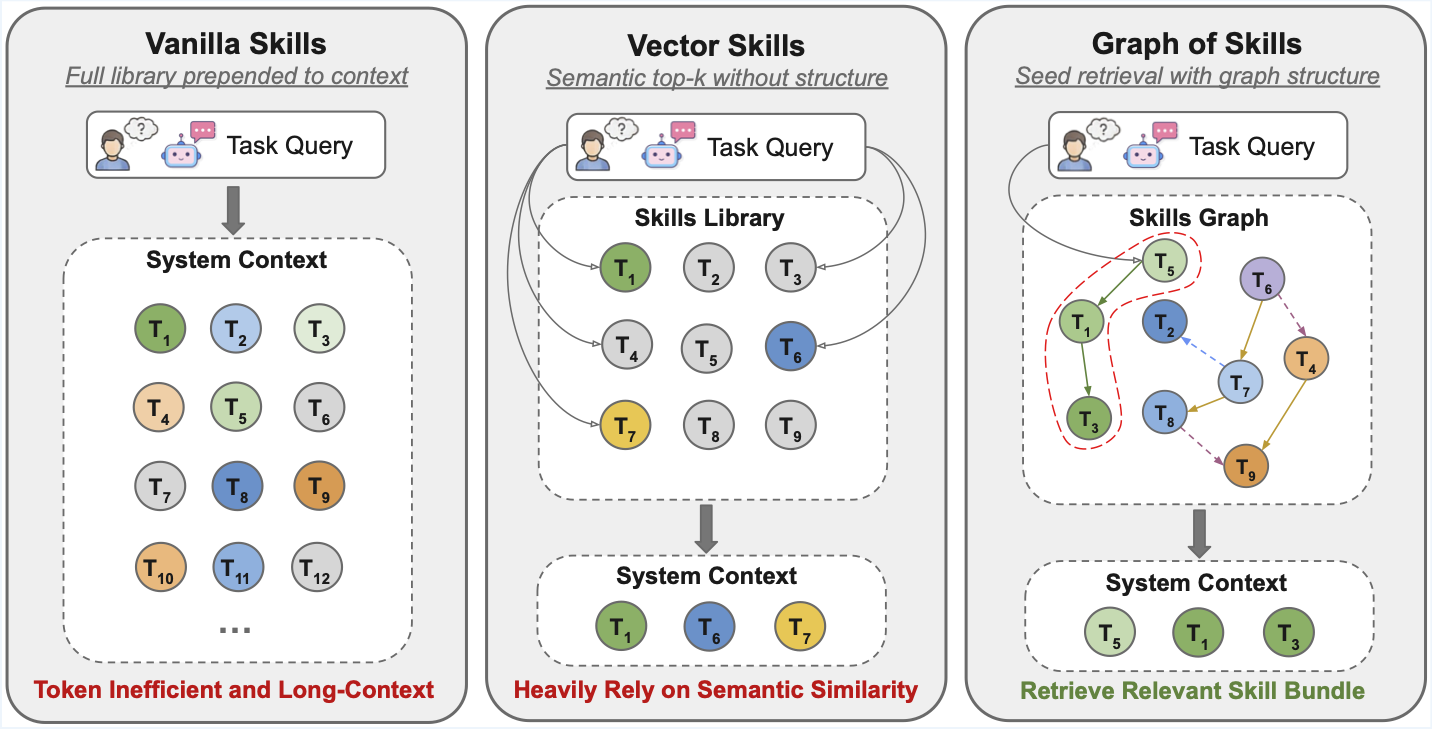
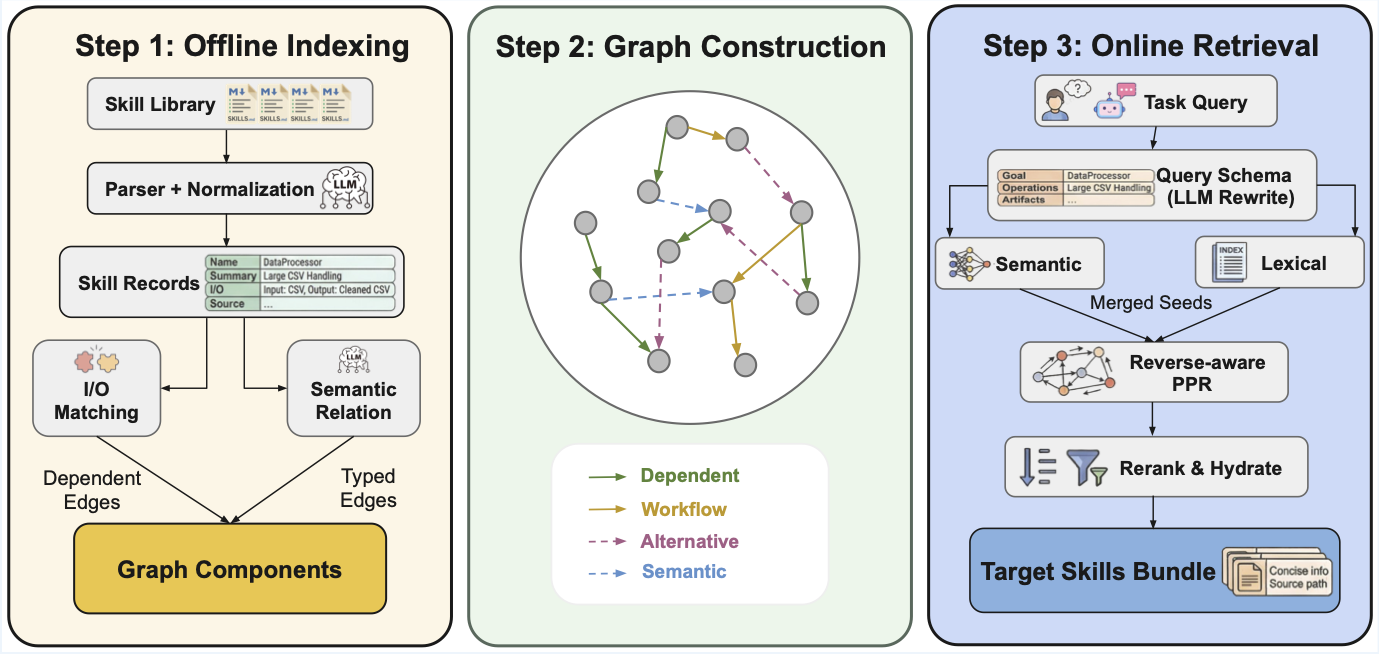
Retrieval pipeline:
GoS is evaluated on SkillsBench (87 dockerized coding tasks) and ALFWorld (140 episodes) across three model families. R = average reward (%), T = average total tokens (uncached input + cached input + output), S = agent-only runtime (s). ↑ higher is better, ↓ lower is better. All numbers are means over two runs per setting.
| Model | Method | SB R↑ | SB T↓ | SB S↓ | AW R↑ | AW T↓ | AW S↓ |
|---|---|---|---|---|---|---|---|
| Claude Sonnet 4.5 | Vanilla Skills | 25.0 | 967,791 | 465.8 | 89.3 | 1,524,401 | 53.2 |
| Vector Skills | 19.3 | 894,640 | 357.3 | 93.6 | 28,407 | 37.8 | |
| GoS (ours) | 31.0 | 860,315 | 364.9 | 97.9 | 27,215 | 49.2 | |
| MiniMax M2.7 | Vanilla Skills | 17.2 | 942,113 | 580.7 | 47.1 | 2,184,823 | 88.6 |
| Vector Skills | 10.4 | 852,881 | 552.9 | 50.7 | 66,109 | 73.4 | |
| GoS (ours) | 18.7 | 867,452 | 502.5 | 54.3 | 65,227 | 68.8 | |
| GPT-5.2 Codex | Vanilla Skills | 27.4 | 3,187,749 | 686.8 | 89.3 | 1,435,614 | 83.3 |
| Vector Skills | 21.5 | 1,243,648 | 773.0 | 92.9 | 34,436 | 57.0 | |
| GoS (ours) | 34.4 | 1,379,773 | 715.6 | 93.6 | 46,462 | 64.7 |
GoS achieves the highest reward on every model on both benchmarks while cutting total tokens by up to 56× (ALFWorld, Claude Sonnet 4.5) vs. Vanilla Skills.
Reward and cost as the repository grows (SkillsBench, GPT-5.2 Codex). T in millions of tokens.
| Skills | Method | R↑ | T (M)↓ | S↓ |
|---|---|---|---|---|
| 200 | Vanilla Skills | 32.5 | 1.85 | 701.6 |
| Vector Skills | 21.2 | 1.06 | 833.8 | |
| GoS (ours) | 32.1 | 1.36 | 731.2 | |
| 500 | Vanilla Skills | 26.0 | 1.93 | 756.8 |
| Vector Skills | 20.7 | 1.10 | 849.5 | |
| GoS (ours) | 31.4 | 1.16 | 890.3 | |
| 1,000 | Vanilla Skills | 27.4 | 3.19 | 686.8 |
| Vector Skills | 21.5 | 1.24 | 773.0 | |
| GoS (ours) | 34.4 | 1.38 | 715.6 | |
| 2,000 | Vanilla Skills | 26.7 | 5.84 | 733.5 |
| Vector Skills | 23.8 | 1.11 | 799.8 | |
| GoS (ours) | 31.3 | 1.14 | 788.0 |
From 500 skills onward GoS leads both baselines by 5.4, 7.0, and 4.6 reward points. Flat exposure rises from 1.93M to 5.84M tokens (~3x) across the same range while both retrievers stay near-constant — the scaling burden is in the prompt, not in retrieval.
Full SkillsBench, GPT-5.2 Codex, 1,000-skill library.
| Variant | R↑ | T (M)↓ | S↓ |
|---|---|---|---|
| Full GoS (reverse-aware PPR) | 34.4 | 1.38 | 715.6 |
| Forward-only PPR (γ_r = 0) | 25.3 | 1.20 | 742.7 |
| w/o graph propagation | 29.3 | 0.89 | 766.2 |
| w/o lexical + rerank | 26.7 | 1.01 | 747.7 |
Traversal direction matters more than the graph itself. Replacing reverse traversal with forward propagation costs 9.1 reward points — a larger loss than removing graph propagation entirely (5.1). The gain comes from traversing dependencies backwards, not from graph diffusion as such.
The table above compares full agent runs, which entangle the graph with hydration, reranking, and the agent interface. This budget-matched offline study holds seeding, reranker, top-N selection, character budgets, and hydration fixed across all arms, so only the graph operation changes (200-skill library, 87 queries).
| Retrieval operation | R_avail↑ | R_full↑ | C↑ | D↑ |
|---|---|---|---|---|
| Reverse-aware PPR (GoS) | 0.575 | 0.502 | 0.421 | 0.654 |
| Forward-only PPR (γ_r = 0) | 0.490 | 0.428 | 0.311 | 0.362 |
| No-Graph (matched flat) | 0.542 | 0.473 | 0.368 | 0.481 |
| One-Hop dependency | 0.542 | 0.473 | 0.368 | 0.481 |
R_avail / R_full = available- and full-oracle recall, C = exact bundle completeness, D = dependency-pair co-recovery. The same ordering reproduces at retrieval level: forward propagation is worse than not using the graph at all, and dependency-pair co-recovery falls from 0.654 to 0.362.
If you find this work useful, please cite the EMNLP 2026 version:
@inproceedings{liu2026graphofskills,
  title     = {Graph-of-Skills: Dependency-Aware Structural Retrieval for Massive Agent Skills},
  author    = {Liu, Dawei and Li, Zongxia and Du, Hongyang and Wu, Xiyang and
               Gui, Shihang and Kuang, Yongbei and Sun, Lichao},
  booktitle = {Proceedings of the 2026 Conference on Empirical Methods in Natural Language Processing (EMNLP)},
  year      = {2026}
}
@misc{liu2026graphofskillsarxiv,
  title         = {Graph-of-Skills: Dependency-Aware Structural Retrieval for Massive Agent Skills},
  author        = {Dawei Liu and Zongxia Li and Hongyang Du and Xiyang Wu and
                   Shihang Gui and Yongbei Kuang and Lichao Sun},
  year          = {2026},
  eprint        = {2604.05333},
  archivePrefix = {arXiv},
  primaryClass  = {cs.AI},
  url           = {https://arxiv.org/abs/2604.05333}
}
uv (recommended) or pipgit clone https://github.com/davidliuk/graph-of-skills.git
cd graph-of-skills
uv sync
cp .env.example .env # then fill in your API keys
OPENAI_API_KEY=sk-...
# Use the ``openai/...`` prefix so LiteLLM targets the OpenAI API (omit OPENAI_BASE_URL).
GOS_EMBEDDING_MODEL=openai/text-embedding-3-large
GOS_EMBEDDING_DIM=3072
OpenRouter exact-response caching is enabled by default for reproducible retries during
indexing (GOS_OPENROUTER_RESPONSE_CACHE=true). Cached responses must be disabled or
isolated when repeated graph builds are intended to measure LLM construction variance.
OPENROUTER_API_KEY=<openrouter-key>
OPENAI_BASE_URL=https://openrouter.ai/api/v1
GOS_EMBEDDING_MODEL=openrouter/openai/text-embedding-3-large
GOS_EMBEDDING_DIM=3072
OPENAI_API_KEY=<azure-api-key>
OPENAI_BASE_URL=https://YOUR-RESOURCE.services.ai.azure.com/openai/v1
# Must match your **deployment name** in Azure (not necessarily ``text-embedding-3-large``).
GOS_EMBEDDING_MODEL=openai/<your-deployment-name>
GOS_EMBEDDING_DIM=<vector-dimension-for-that-model>
GEMINI_API_KEY=<your-key>
GOS_EMBEDDING_MODEL=gemini/gemini-embedding-001
GOS_EMBEDDING_DIM=3072
Goal: install the package, pull the published skill libraries, build (or download) a graph workspace, then run retrieval from the shell.
Read next: DATA.md for every download flag and asset size; .env.example for embedding providers. After GoS works locally, use evaluation/README.md for benchmark runners and evaluation/skillsbench/README.md for Harbor-based SkillsBench.
Complete Installation above: clone, uv sync, cp .env.example .env, and set embedding (and optional LLM) keys. Indexing and retrieval load .env from the repo root when you use uv run gos ….
The collections skills_200, skills_500, skills_1000, skills_2000 are directories of SKILL.md files on HuggingFace, not in git. They unpack to:
data/skillsets/skills_200/ … data/skillsets/skills_2000/./scripts/download_data.sh --skillsets
This tries each archive, skips directories that already have files, and logs [skip] if an archive is not yet on the Hub. Gated datasets: HF_TOKEN=hf_... ./scripts/download_data.sh --skillsets. Full reference (tasks, workspaces, selective flags): DATA.md.
Tiny smoke test without HuggingFace: index the built-in folder skills/ (only a few skills) with any --workspace path you like.
--workspace is where GoS stores the indexed graph (vectors + graph storage). Use the same path for gos retrieve, gos status, and gos add.
For ALFWorld and SkillsBench defaults, keep this mapping (see evaluation/README.md and evaluation/skillsbench/graphskills_benchmark.py):
| Skill tree you index | Recommended --workspace |
|---|---|
data/skillsets/skills_200 | data/gos_workspace/skills_200_v1 |
data/skillsets/skills_500 | data/gos_workspace/skills_500_v1 |
data/skillsets/skills_1000 | data/gos_workspace/skills_1000_v1 |
data/skillsets/skills_2000 | data/gos_workspace/skills_2000_v1 |
A. Build locally (needs embedding API; duration grows with library size):
mkdir -p data/gos_workspace
uv run gos index data/skillsets/skills_200 \
  --workspace data/gos_workspace/skills_200_v1 --clear
Use the matching pair for other sets (e.g. skills_1000 → data/gos_workspace/skills_1000_v1). Embedding model and dimension in .env must stay the same for later retrieval (see Configuration).
B. Download a prebuilt workspace (no gos index; must match the embedding used to build that archive):
./scripts/download_data.sh --workspace
Compatibility note: the legacy
*_v1archives were serialized by an undirected cleanup pipeline and are retained only for reproducing earlier results. The repaired typed-directed constructor rejects them because edge direction cannot be recovered safely. Build a fresh workspace from the downloaded skill library for current GoS retrieval and new experiments.
See DATA.md for which gos_workspace_skills_*_v1.tar.gz files exist on the Hub and how they map to data/gos_workspace/.
uv run gos retrieve "parse binary STL file, calculate volume and mass" \
  --workspace data/gos_workspace/skills_200_v1 --max-skills 5
uv run gos status --workspace data/gos_workspace/skills_200_v1
uv run gos add path/to/NEW_SKILL.md --workspace data/gos_workspace/skills_200_v1
uv run gos relink --workspace data/gos_workspace/skills_200_v1 \
  --concurrency 8 --checkpoint-every 10 --resume
gos relink writes three secret-free telemetry artifacts beside the graph:
relink_progress.json: atomic resume ledger and cumulative counters;relink_events.jsonl: append-only attempt/checkpoint events with token,
cost, timing, throughput, per-batch focus results, and failures;construction_report.json: final graph, provenance, configuration, aggregate
usage, stage timing, and throughput summary.The console checkpoint line also reports cumulative calls, input/output tokens, provider cost, failures, edges, and elapsed wall time. Logs never include API keys, request headers, prompts, raw skill documents, or model responses.
GoS ships with a built-in MCP server that gives Claude Code direct access to the skill graph. When you open this project, Claude Code auto-discovers the server via .mcp.json — no manual setup.
Quick start:
uv sync                              # install deps (once)
cp .env.example .env                 # fill in API keys
./scripts/download_data.sh --workspace   # download prebuilt workspaces
Then open the project in Claude Code. The graph-of-skills MCP server is ready. Ask naturally:
"Find skills for processing 3D mesh files with GoS, then follow the skill instructions to complete the task."
Claude Code will call the GoS tools, retrieve relevant skills, and follow their instructions autonomously.
claude mcp add graph-of-skills -- uv run --directory /path/to/graph-of-skills gos-claude

# Or with an explicit workspace
claude mcp add graph-of-skills -- uv run --directory /path/to/graph-of-skills gos-claude \
  --workspace data/gos_workspace/skills_200_v1
Available tools:
| Tool | Purpose |
|---|---|
search_skills | Quick ranked summary of relevant skills for a task |
retrieve_skill_bundle | Full agent-ready skill content (SKILL.md bodies, scripts, graph evidence) |
hydrate_skills | Load specific skills by exact name |
list_skills | Browse all indexed skills with descriptions |
get_skill_detail | Full metadata, I/O schema, and graph neighbors for one skill |
get_skill_neighbors | Dependency / workflow / semantic edges for a skill |
get_status | Workspace stats (skill count, edge count, retrieval config) |
index_skills | Build the skill graph from a directory of SKILL.md files |
add_skill | Incrementally add new skills to an existing graph |
See CLAUDE.md for the full integration guide, example workflows, and configuration.
Inside a Docker container, an agent calls graphskills-query with a natural-language task description and receives a bounded skill bundle:
graphskills-query "parse binary STL file and calculate mass"
Each returned skill includes a Source: path the agent can open directly:
Source: /opt/graphskills/skills/mesh-analysis/SKILL.md
Set GOS_SKILLS_DIR to control path rewriting, so the same workspace can be indexed on a host and queried inside a container.
| Command | Description |
|---|---|
gos index <dir> | Build a graph workspace from a skill directory |
gos add <file> | Add a single skill to an existing workspace |
gos relink | Build/resume edges with bounded concurrency and durable telemetry |
gos retrieve <query> | Retrieve a ranked skill bundle for a query |
gos query <query> | Compact retrieval output (for debugging) |
gos status | Show workspace statistics |
gos experiment | Run built-in experiment presets |
gos experiment-presets | List available experiment presets |
graphskills-query | Agent-facing retrieval (rewrites Source: paths for containers) |
gos-server | Start the MCP server for tool-based retrieval |
gos-claude | Start the MCP server for Claude Code (auto-discovered via .mcp.json) |
All runtime settings are driven by environment variables. See .env.example for the full template. Download paths and workspace layout on disk are documented in DATA.md.
| Variable | Default | Description |
|---|---|---|
GOS_EMBEDDING_MODEL | openai/text-embedding-3-large | Embedding model for indexing and retrieval (use openai/<deployment> on Azure) |
GOS_EMBEDDING_DIM | 3072 | Embedding dimension (must match the model output) |
GOS_PREBUILT_WORKING_DIR | -- | Path to a prebuilt workspace for retrieval |
GOS_RETRIEVAL_TOP_N | 8 | Maximum number of skills returned |
GOS_SEED_TOP_K | 5 | Initial seed count before graph expansion |
GOS_MAX_CONTEXT_CHARS | 12000 | Hard cap on total returned bundle size (chars) |
GOS_SKILLS_DIR | -- | Container-side skill root (for Source: path rewriting) |
Note: The embedding model at retrieval time must match the model used when the workspace was indexed.
Docs: Start with evaluation/README.md (all tracks, modes, env vars). For SkillsBench + Harbor only, use evaluation/skillsbench/README.md. Dataset files and scripts are described in DATA.md.
We evaluate GoS on two benchmarks:
| Benchmark | Type | Tasks |
|---|---|---|
| ALFWorld | Interactive household tasks | 140 episodes |
| SkillsBench | Dockerized coding tasks | 87 tasks |
For running these evaluations, we recommend routing the agent's chat / completion API through OpenRouter: use an OpenAI-compatible BASE_URL (for example https://openrouter.ai/api/v1) and the API key your runner documents. The GoS project's own evaluation testing is done mainly this way. Embeddings for indexing and retrieval are separate; configure them in .env as in .env.example (OpenRouter, direct OpenAI, Gemini, or Azure).
Benchmark data is hosted externally and not included in this repository:
./scripts/download_data.sh # download all assets (~780 MB); options in DATA.md
Selective downloads and workspace rebuild steps: DATA.md.
Scope: GoS retrieval against a real workspace, then one SkillsBench task in Docker via Harbor. This is a smoke test, not a full benchmark sweep. For all tracks, see evaluation/README.md.
Prerequisites:
uv sync and a filled .env (embedding provider for the workspace you use, plus GEMINI_API_KEY for the Harbor agent when using gemini-cli).PATH, e.g. uv tool install harbor (see evaluation/skillsbench/README.md).data/skillsets/skills_200/ (from ./scripts/download_data.sh --skillsets or the full download script).data/gos_workspace/skills_200_v1: either build with gos index or download with ./scripts/download_data.sh --workspace (Quick Start, Step 3; full detail in DATA.md).The embedding model in .env must match how that workspace was built (same GOS_EMBEDDING_MODEL / GOS_EMBEDDING_DIM as at index time).
1. Retrieval smoke test
uv run gos retrieve "unit tests with pytest" \
  --workspace data/gos_workspace/skills_200_v1 --max-skills 3
You should see SKILL_HIT and at least one skill block. If you get errors about embedding dimension or missing keys, fix .env before continuing.
2. Generate a single graph-skills task pack
From the repository root, materialize one task (dialogue-parser is a small, standard example; it must exist under evaluation/skillsbench/tasks/):
uv run python evaluation/skillsbench/graphskills_benchmark.py \
  --skillset-name skills_200 \
  --task dialogue-parser \
  --skip-allskills --skip-vectorskills \
  --output-root evaluation/skillsbench/generated_verify
This writes evaluation/skillsbench/generated_verify/tasks_graph_skills/dialogue-parser/ with the graph-retrieval sidecar and mounts your workspace into the task image.
3. Run that task with Harbor
Still from the repo, load keys then run Harbor from evaluation/skillsbench/ so paths resolve like the rest of the eval docs:
cd evaluation/skillsbench
set -a && source ../../.env && set +a
harbor run --agent gemini-cli \
  --model gemini/gemini-3-flash-preview \
  --force-build \
  -p generated_verify/tasks_graph_skills/dialogue-parser \
  -o jobs/verify-sample
Use a --model string your Harbor agent accepts (often the same family as in .env). First run may spend time on image build.
4. What "success" looks like
Errors: 0 in the summary table.result.json appears under evaluation/skillsbench/jobs/verify-sample/<timestamp>/.0.0, partial (e.g. 0.5), or 1.0 depending on the task and agent; that is normal. The goal of this minimal path is to confirm retrieval, task packaging, Docker, and the agent all run, not to maximize score.For more agents, configs, and batch YAML, see evaluation/skillsbench/README.md.
graph-of-skills/
├── gos/                          # Core GoS package
│   ├── core/                     #   Engine, retrieval, parsing, schema
│   ├── interfaces/               #   CLI, MCP server, Claude Code plugin
│   └── utils/                    #   Configuration (pydantic-settings)
├── data/                         # Downloaded data (gitignored; see DATA.md)
│   ├── skillsets/                #   Skill libraries (skills_200, 500, 1000, 2000)
│   └── gos_workspace/            #   Indexed or prebuilt graph workspaces
├── evaluation/                   # See evaluation/README.md
│   ├── alfworld_run.py           #   ALFWorld benchmark runner
│   ├── skill.py                  #   SkillModule adapter for GoS
│   ├── analysis/                 #   Offline analyses — evaluation/analysis/README.md
│   └── skillsbench/              #   SkillsBench — evaluation/skillsbench/README.md
│       └── experiments/          #     Ablation conditions, batch configs, dashboard
├── skills/                       # Agent bootstrap skills for retrieval
├── scripts/                      # Utility scripts (data download, etc.)
├── tests/                        # Test suite
├── pyproject.toml                # Package definition & CLI entry points
├── .env.example                  # Environment variable template
├── DATA.md                       # Data & downloads
└── CLAUDE.md                     # Claude Code / MCP integration guide
| Document | What it covers |
|---|---|
| CLAUDE.md | Claude Code integration: MCP plugin setup, available tools, example workflows, configuration |
| DATA.md | Downloading skill sets, SkillsBench tasks, and prebuilt workspaces (scripts/download_data.sh); rebuilding a workspace from source; packaging uploads for HuggingFace |
| evaluation/README.md | Evaluation overview: ALFWorld, SkillsBench runners, retrieval modes (gos / vector / all_full / none), environment setup for benchmark tracks |
| evaluation/analysis/README.md | Offline analysis tools: graph diagnostics, build comparison, matched retrieval ablations, metadata stress, edge audit |
| evaluation/skillsbench/README.md | SkillsBench detail: Harbor, Docker, generating task variants (graphskills_benchmark.py), batch configs, agents |
.env.example | All GOS_* and provider variables for indexing, retrieval, and CLI |
| CONTRIBUTING.md | Dev setup, tests, project layout for contributors |
This project is licensed under the MIT License.
157 followers · starred Apr 2026
89 followers · starred May 2026
[EMNLP '26] Dependency-Aware Structural Retrieval for Massive Agent Skills
Python
223
22 commits
updated Aug 30, 2026
Dependency-Aware Structural Retrieval for Massive Agent Skills
Dawei Liu* · Zongxia Li* · Hongyang Du · Xiyang Wu · Shihang Gui · Yongbei Kuang · Lichao Sun
Graph of Skills builds a skill graph offline from a library of SKILL.md documents, then retrieves a small, ranked set of relevant skills at task time. Instead of flooding the agent context with an entire skill library, GoS surfaces only the skills most likely to help -- along with their prerequisites and related capabilities.
Retrieval pipeline:
GoS is evaluated on SkillsBench (87 dockerized coding tasks) and ALFWorld (140 episodes) across three model families. R = average reward (%), T = average total tokens (uncached input + cached input + output), S = agent-only runtime (s). ↑ higher is better, ↓ lower is better. All numbers are means over two runs per setting.
| Model | Method | SB R↑ | SB T↓ | SB S↓ | AW R↑ | AW T↓ | AW S↓ |
|---|---|---|---|---|---|---|---|
| Claude Sonnet 4.5 | Vanilla Skills | 25.0 | 967,791 | 465.8 | 89.3 | 1,524,401 | 53.2 |
| Vector Skills | 19.3 | 894,640 | 357.3 | 93.6 | 28,407 | 37.8 | |
| GoS (ours) | 31.0 | 860,315 | 364.9 | 97.9 | 27,215 | 49.2 | |
| MiniMax M2.7 | Vanilla Skills | 17.2 | 942,113 | 580.7 | 47.1 | 2,184,823 | 88.6 |
| Vector Skills | 10.4 | 852,881 | 552.9 | 50.7 | 66,109 | 73.4 | |
| GoS (ours) | 18.7 | 867,452 | 502.5 | 54.3 | 65,227 | 68.8 | |
| GPT-5.2 Codex | Vanilla Skills | 27.4 | 3,187,749 | 686.8 | 89.3 | 1,435,614 | 83.3 |
| Vector Skills | 21.5 | 1,243,648 | 773.0 | 92.9 | 34,436 | 57.0 | |
| GoS (ours) | 34.4 | 1,379,773 | 715.6 | 93.6 | 46,462 | 64.7 |
GoS achieves the highest reward on every model on both benchmarks while cutting total tokens by up to 56× (ALFWorld, Claude Sonnet 4.5) vs. Vanilla Skills.
Reward and cost as the repository grows (SkillsBench, GPT-5.2 Codex). T in millions of tokens.
| Skills | Method | R↑ | T (M)↓ | S↓ |
|---|---|---|---|---|
| 200 | Vanilla Skills | 32.5 | 1.85 | 701.6 |
| Vector Skills | 21.2 | 1.06 | 833.8 | |
| GoS (ours) | 32.1 | 1.36 | 731.2 | |
| 500 | Vanilla Skills | 26.0 | 1.93 | 756.8 |
| Vector Skills | 20.7 | 1.10 | 849.5 | |
| GoS (ours) | 31.4 | 1.16 | 890.3 | |
| 1,000 | Vanilla Skills | 27.4 | 3.19 | 686.8 |
| Vector Skills | 21.5 | 1.24 | 773.0 | |
| GoS (ours) | 34.4 | 1.38 | 715.6 | |
| 2,000 | Vanilla Skills | 26.7 | 5.84 | 733.5 |
| Vector Skills | 23.8 | 1.11 | 799.8 | |
| GoS (ours) | 31.3 | 1.14 | 788.0 |
From 500 skills onward GoS leads both baselines by 5.4, 7.0, and 4.6 reward points. Flat exposure rises from 1.93M to 5.84M tokens (~3x) across the same range while both retrievers stay near-constant — the scaling burden is in the prompt, not in retrieval.
Full SkillsBench, GPT-5.2 Codex, 1,000-skill library.
| Variant | R↑ | T (M)↓ | S↓ |
|---|---|---|---|
| Full GoS (reverse-aware PPR) | 34.4 | 1.38 | 715.6 |
| Forward-only PPR (γ_r = 0) | 25.3 | 1.20 | 742.7 |
| w/o graph propagation | 29.3 | 0.89 | 766.2 |
| w/o lexical + rerank | 26.7 | 1.01 | 747.7 |
Traversal direction matters more than the graph itself. Replacing reverse traversal with forward propagation costs 9.1 reward points — a larger loss than removing graph propagation entirely (5.1). The gain comes from traversing dependencies backwards, not from graph diffusion as such.
The table above compares full agent runs, which entangle the graph with hydration, reranking, and the agent interface. This budget-matched offline study holds seeding, reranker, top-N selection, character budgets, and hydration fixed across all arms, so only the graph operation changes (200-skill library, 87 queries).
| Retrieval operation | R_avail↑ | R_full↑ | C↑ | D↑ |
|---|---|---|---|---|
| Reverse-aware PPR (GoS) | 0.575 | 0.502 | 0.421 | 0.654 |
| Forward-only PPR (γ_r = 0) | 0.490 | 0.428 | 0.311 | 0.362 |
| No-Graph (matched flat) | 0.542 | 0.473 | 0.368 | 0.481 |
| One-Hop dependency | 0.542 | 0.473 | 0.368 | 0.481 |
R_avail / R_full = available- and full-oracle recall, C = exact bundle completeness, D = dependency-pair co-recovery. The same ordering reproduces at retrieval level: forward propagation is worse than not using the graph at all, and dependency-pair co-recovery falls from 0.654 to 0.362.
If you find this work useful, please cite the EMNLP 2026 version:
@inproceedings{liu2026graphofskills,
  title     = {Graph-of-Skills: Dependency-Aware Structural Retrieval for Massive Agent Skills},
  author    = {Liu, Dawei and Li, Zongxia and Du, Hongyang and Wu, Xiyang and
               Gui, Shihang and Kuang, Yongbei and Sun, Lichao},
  booktitle = {Proceedings of the 2026 Conference on Empirical Methods in Natural Language Processing (EMNLP)},
  year      = {2026}
}
@misc{liu2026graphofskillsarxiv,
  title         = {Graph-of-Skills: Dependency-Aware Structural Retrieval for Massive Agent Skills},
  author        = {Dawei Liu and Zongxia Li and Hongyang Du and Xiyang Wu and
                   Shihang Gui and Yongbei Kuang and Lichao Sun},
  year          = {2026},
  eprint        = {2604.05333},
  archivePrefix = {arXiv},
  primaryClass  = {cs.AI},
  url           = {https://arxiv.org/abs/2604.05333}
}
uv (recommended) or pipgit clone https://github.com/davidliuk/graph-of-skills.git
cd graph-of-skills
uv sync
cp .env.example .env # then fill in your API keys
OPENAI_API_KEY=sk-...
# Use the ``openai/...`` prefix so LiteLLM targets the OpenAI API (omit OPENAI_BASE_URL).
GOS_EMBEDDING_MODEL=openai/text-embedding-3-large
GOS_EMBEDDING_DIM=3072
OpenRouter exact-response caching is enabled by default for reproducible retries during
indexing (GOS_OPENROUTER_RESPONSE_CACHE=true). Cached responses must be disabled or
isolated when repeated graph builds are intended to measure LLM construction variance.
OPENROUTER_API_KEY=<openrouter-key>
OPENAI_BASE_URL=https://openrouter.ai/api/v1
GOS_EMBEDDING_MODEL=openrouter/openai/text-embedding-3-large
GOS_EMBEDDING_DIM=3072
OPENAI_API_KEY=<azure-api-key>
OPENAI_BASE_URL=https://YOUR-RESOURCE.services.ai.azure.com/openai/v1
# Must match your **deployment name** in Azure (not necessarily ``text-embedding-3-large``).
GOS_EMBEDDING_MODEL=openai/<your-deployment-name>
GOS_EMBEDDING_DIM=<vector-dimension-for-that-model>
GEMINI_API_KEY=<your-key>
GOS_EMBEDDING_MODEL=gemini/gemini-embedding-001
GOS_EMBEDDING_DIM=3072
Goal: install the package, pull the published skill libraries, build (or download) a graph workspace, then run retrieval from the shell.
Read next: DATA.md for every download flag and asset size; .env.example for embedding providers. After GoS works locally, use evaluation/README.md for benchmark runners and evaluation/skillsbench/README.md for Harbor-based SkillsBench.
Complete Installation above: clone, uv sync, cp .env.example .env, and set embedding (and optional LLM) keys. Indexing and retrieval load .env from the repo root when you use uv run gos ….
The collections skills_200, skills_500, skills_1000, skills_2000 are directories of SKILL.md files on HuggingFace, not in git. They unpack to:
data/skillsets/skills_200/ … data/skillsets/skills_2000/./scripts/download_data.sh --skillsets
This tries each archive, skips directories that already have files, and logs [skip] if an archive is not yet on the Hub. Gated datasets: HF_TOKEN=hf_... ./scripts/download_data.sh --skillsets. Full reference (tasks, workspaces, selective flags): DATA.md.
Tiny smoke test without HuggingFace: index the built-in folder skills/ (only a few skills) with any --workspace path you like.
--workspace is where GoS stores the indexed graph (vectors + graph storage). Use the same path for gos retrieve, gos status, and gos add.
For ALFWorld and SkillsBench defaults, keep this mapping (see evaluation/README.md and evaluation/skillsbench/graphskills_benchmark.py):
| Skill tree you index | Recommended --workspace |
|---|---|
data/skillsets/skills_200 | data/gos_workspace/skills_200_v1 |
data/skillsets/skills_500 | data/gos_workspace/skills_500_v1 |
data/skillsets/skills_1000 | data/gos_workspace/skills_1000_v1 |
data/skillsets/skills_2000 | data/gos_workspace/skills_2000_v1 |
A. Build locally (needs embedding API; duration grows with library size):
mkdir -p data/gos_workspace
uv run gos index data/skillsets/skills_200 \
  --workspace data/gos_workspace/skills_200_v1 --clear
Use the matching pair for other sets (e.g. skills_1000 → data/gos_workspace/skills_1000_v1). Embedding model and dimension in .env must stay the same for later retrieval (see Configuration).
B. Download a prebuilt workspace (no gos index; must match the embedding used to build that archive):
./scripts/download_data.sh --workspace
Compatibility note: the legacy
*_v1archives were serialized by an undirected cleanup pipeline and are retained only for reproducing earlier results. The repaired typed-directed constructor rejects them because edge direction cannot be recovered safely. Build a fresh workspace from the downloaded skill library for current GoS retrieval and new experiments.
See DATA.md for which gos_workspace_skills_*_v1.tar.gz files exist on the Hub and how they map to data/gos_workspace/.
uv run gos retrieve "parse binary STL file, calculate volume and mass" \
  --workspace data/gos_workspace/skills_200_v1 --max-skills 5
uv run gos status --workspace data/gos_workspace/skills_200_v1
uv run gos add path/to/NEW_SKILL.md --workspace data/gos_workspace/skills_200_v1
uv run gos relink --workspace data/gos_workspace/skills_200_v1 \
  --concurrency 8 --checkpoint-every 10 --resume
gos relink writes three secret-free telemetry artifacts beside the graph:
relink_progress.json: atomic resume ledger and cumulative counters;relink_events.jsonl: append-only attempt/checkpoint events with token,
cost, timing, throughput, per-batch focus results, and failures;construction_report.json: final graph, provenance, configuration, aggregate
usage, stage timing, and throughput summary.The console checkpoint line also reports cumulative calls, input/output tokens, provider cost, failures, edges, and elapsed wall time. Logs never include API keys, request headers, prompts, raw skill documents, or model responses.
GoS ships with a built-in MCP server that gives Claude Code direct access to the skill graph. When you open this project, Claude Code auto-discovers the server via .mcp.json — no manual setup.
Quick start:
uv sync                              # install deps (once)
cp .env.example .env                 # fill in API keys
./scripts/download_data.sh --workspace   # download prebuilt workspaces
Then open the project in Claude Code. The graph-of-skills MCP server is ready. Ask naturally:
"Find skills for processing 3D mesh files with GoS, then follow the skill instructions to complete the task."
Claude Code will call the GoS tools, retrieve relevant skills, and follow their instructions autonomously.
claude mcp add graph-of-skills -- uv run --directory /path/to/graph-of-skills gos-claude

# Or with an explicit workspace
claude mcp add graph-of-skills -- uv run --directory /path/to/graph-of-skills gos-claude \
  --workspace data/gos_workspace/skills_200_v1
Available tools:
| Tool | Purpose |
|---|---|
search_skills | Quick ranked summary of relevant skills for a task |
retrieve_skill_bundle | Full agent-ready skill content (SKILL.md bodies, scripts, graph evidence) |
hydrate_skills | Load specific skills by exact name |
list_skills | Browse all indexed skills with descriptions |
get_skill_detail | Full metadata, I/O schema, and graph neighbors for one skill |
get_skill_neighbors | Dependency / workflow / semantic edges for a skill |
get_status | Workspace stats (skill count, edge count, retrieval config) |
index_skills | Build the skill graph from a directory of SKILL.md files |
add_skill | Incrementally add new skills to an existing graph |
See CLAUDE.md for the full integration guide, example workflows, and configuration.
Inside a Docker container, an agent calls graphskills-query with a natural-language task description and receives a bounded skill bundle:
graphskills-query "parse binary STL file and calculate mass"
Each returned skill includes a Source: path the agent can open directly:
Source: /opt/graphskills/skills/mesh-analysis/SKILL.md
Set GOS_SKILLS_DIR to control path rewriting, so the same workspace can be indexed on a host and queried inside a container.
| Command | Description |
|---|---|
gos index <dir> | Build a graph workspace from a skill directory |
gos add <file> | Add a single skill to an existing workspace |
gos relink | Build/resume edges with bounded concurrency and durable telemetry |
gos retrieve <query> | Retrieve a ranked skill bundle for a query |
gos query <query> | Compact retrieval output (for debugging) |
gos status | Show workspace statistics |
gos experiment | Run built-in experiment presets |
gos experiment-presets | List available experiment presets |
graphskills-query | Agent-facing retrieval (rewrites Source: paths for containers) |
gos-server | Start the MCP server for tool-based retrieval |
gos-claude | Start the MCP server for Claude Code (auto-discovered via .mcp.json) |
All runtime settings are driven by environment variables. See .env.example for the full template. Download paths and workspace layout on disk are documented in DATA.md.
| Variable | Default | Description |
|---|---|---|
GOS_EMBEDDING_MODEL | openai/text-embedding-3-large | Embedding model for indexing and retrieval (use openai/<deployment> on Azure) |
GOS_EMBEDDING_DIM | 3072 | Embedding dimension (must match the model output) |
GOS_PREBUILT_WORKING_DIR | -- | Path to a prebuilt workspace for retrieval |
GOS_RETRIEVAL_TOP_N | 8 | Maximum number of skills returned |
GOS_SEED_TOP_K | 5 | Initial seed count before graph expansion |
GOS_MAX_CONTEXT_CHARS | 12000 | Hard cap on total returned bundle size (chars) |
GOS_SKILLS_DIR | -- | Container-side skill root (for Source: path rewriting) |
Note: The embedding model at retrieval time must match the model used when the workspace was indexed.
Docs: Start with evaluation/README.md (all tracks, modes, env vars). For SkillsBench + Harbor only, use evaluation/skillsbench/README.md. Dataset files and scripts are described in DATA.md.
We evaluate GoS on two benchmarks:
| Benchmark | Type | Tasks |
|---|---|---|
| ALFWorld | Interactive household tasks | 140 episodes |
| SkillsBench | Dockerized coding tasks | 87 tasks |
For running these evaluations, we recommend routing the agent's chat / completion API through OpenRouter: use an OpenAI-compatible BASE_URL (for example https://openrouter.ai/api/v1) and the API key your runner documents. The GoS project's own evaluation testing is done mainly this way. Embeddings for indexing and retrieval are separate; configure them in .env as in .env.example (OpenRouter, direct OpenAI, Gemini, or Azure).
Benchmark data is hosted externally and not included in this repository:
./scripts/download_data.sh # download all assets (~780 MB); options in DATA.md
Selective downloads and workspace rebuild steps: DATA.md.
Scope: GoS retrieval against a real workspace, then one SkillsBench task in Docker via Harbor. This is a smoke test, not a full benchmark sweep. For all tracks, see evaluation/README.md.
Prerequisites:
uv sync and a filled .env (embedding provider for the workspace you use, plus GEMINI_API_KEY for the Harbor agent when using gemini-cli).PATH, e.g. uv tool install harbor (see evaluation/skillsbench/README.md).data/skillsets/skills_200/ (from ./scripts/download_data.sh --skillsets or the full download script).data/gos_workspace/skills_200_v1: either build with gos index or download with ./scripts/download_data.sh --workspace (Quick Start, Step 3; full detail in DATA.md).The embedding model in .env must match how that workspace was built (same GOS_EMBEDDING_MODEL / GOS_EMBEDDING_DIM as at index time).
1. Retrieval smoke test
uv run gos retrieve "unit tests with pytest" \
  --workspace data/gos_workspace/skills_200_v1 --max-skills 3
You should see SKILL_HIT and at least one skill block. If you get errors about embedding dimension or missing keys, fix .env before continuing.
2. Generate a single graph-skills task pack
From the repository root, materialize one task (dialogue-parser is a small, standard example; it must exist under evaluation/skillsbench/tasks/):
uv run python evaluation/skillsbench/graphskills_benchmark.py \
  --skillset-name skills_200 \
  --task dialogue-parser \
  --skip-allskills --skip-vectorskills \
  --output-root evaluation/skillsbench/generated_verify
This writes evaluation/skillsbench/generated_verify/tasks_graph_skills/dialogue-parser/ with the graph-retrieval sidecar and mounts your workspace into the task image.
3. Run that task with Harbor
Still from the repo, load keys then run Harbor from evaluation/skillsbench/ so paths resolve like the rest of the eval docs:
cd evaluation/skillsbench
set -a && source ../../.env && set +a
harbor run --agent gemini-cli \
  --model gemini/gemini-3-flash-preview \
  --force-build \
  -p generated_verify/tasks_graph_skills/dialogue-parser \
  -o jobs/verify-sample
Use a --model string your Harbor agent accepts (often the same family as in .env). First run may spend time on image build.
4. What "success" looks like
Errors: 0 in the summary table.result.json appears under evaluation/skillsbench/jobs/verify-sample/<timestamp>/.0.0, partial (e.g. 0.5), or 1.0 depending on the task and agent; that is normal. The goal of this minimal path is to confirm retrieval, task packaging, Docker, and the agent all run, not to maximize score.For more agents, configs, and batch YAML, see evaluation/skillsbench/README.md.
graph-of-skills/
├── gos/                          # Core GoS package
│   ├── core/                     #   Engine, retrieval, parsing, schema
│   ├── interfaces/               #   CLI, MCP server, Claude Code plugin
│   └── utils/                    #   Configuration (pydantic-settings)
├── data/                         # Downloaded data (gitignored; see DATA.md)
│   ├── skillsets/                #   Skill libraries (skills_200, 500, 1000, 2000)
│   └── gos_workspace/            #   Indexed or prebuilt graph workspaces
├── evaluation/                   # See evaluation/README.md
│   ├── alfworld_run.py           #   ALFWorld benchmark runner
│   ├── skill.py                  #   SkillModule adapter for GoS
│   ├── analysis/                 #   Offline analyses — evaluation/analysis/README.md
│   └── skillsbench/              #   SkillsBench — evaluation/skillsbench/README.md
│       └── experiments/          #     Ablation conditions, batch configs, dashboard
├── skills/                       # Agent bootstrap skills for retrieval
├── scripts/                      # Utility scripts (data download, etc.)
├── tests/                        # Test suite
├── pyproject.toml                # Package definition & CLI entry points
├── .env.example                  # Environment variable template
├── DATA.md                       # Data & downloads
└── CLAUDE.md                     # Claude Code / MCP integration guide
| Document | What it covers |
|---|---|
| CLAUDE.md | Claude Code integration: MCP plugin setup, available tools, example workflows, configuration |
| DATA.md | Downloading skill sets, SkillsBench tasks, and prebuilt workspaces (scripts/download_data.sh); rebuilding a workspace from source; packaging uploads for HuggingFace |
| evaluation/README.md | Evaluation overview: ALFWorld, SkillsBench runners, retrieval modes (gos / vector / all_full / none), environment setup for benchmark tracks |
| evaluation/analysis/README.md | Offline analysis tools: graph diagnostics, build comparison, matched retrieval ablations, metadata stress, edge audit |
| evaluation/skillsbench/README.md | SkillsBench detail: Harbor, Docker, generating task variants (graphskills_benchmark.py), batch configs, agents |
.env.example | All GOS_* and provider variables for indexing, retrieval, and CLI |
| CONTRIBUTING.md | Dev setup, tests, project layout for contributors |
This project is licensed under the MIT License.
157 followers · starred Apr 2026
89 followers · starred May 2026



