Graphical Debugger for Sublime Text for debuggers that support the debug adapter protocol
Python
419
948 commits
updated Oct 12, 2026
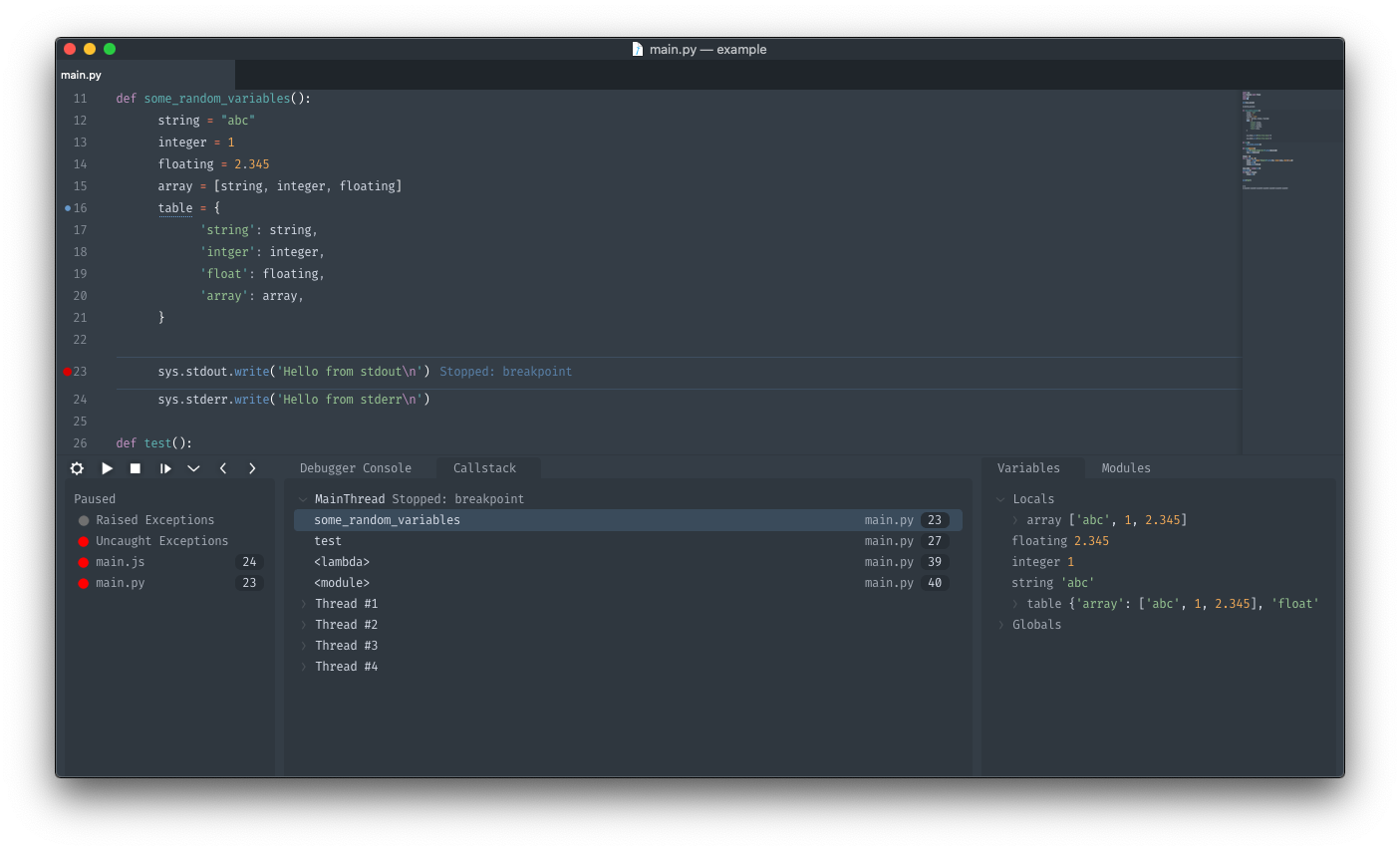
Graphical Debugger for sublime text for debuggers that support the debug adapter protocol.
Using package control run Package Control: Install Package and select Debugger.
or clone into your sublime Packages directory (If you are on Sublime Text 3 use the st3 branch)
This project attempts to match Visual Studio Code's Debugger fairly closely so their documentation can be pretty helpful. See https://code.visualstudio.com/docs/editor/debugging
This project comes with some pre-configured debuggers (They can be installed using Debugger: Install adapters)
Open the debug panel
Debugger: OpenInstall a debug adapter by running: Debugger: Install adapter from the command palette.
Add a configuration Debugger: Add Configuration from the command palette (or add one manually, see below).
debugger_configurations to your sublime-project and use the same configuration format as Visual Studio Code${file} are supported but the list of supported variables differs from VSCode. The supported values are those listed at http://www.sublimetext.com/docs/build_systems.html#variables plus the VSCode-specific ${workspaceFolder} that resolves to the path of the first workspace folder.Your configuration will look something like the following but with some debugger specific fields.
"debugger_configurations" : [
    {
        "name" : "Name of your configuration",
        "request" : "launch"|"attach",
        "type" : "debugger name",
         ...
    }
]
Debugger: Start (if no configuration is selected it will ask you to select or create one)Tasks are based on sublime build_systems with more integration so they can be used more seamlessly while debugging. When errors occur while running a task they are reported in the debugger ui (problem detection is the same as sublime, you must add file_regex to your task)
see https://www.sublimetext.com/docs/build_systems.html
Tasks are basically the same as sublime builds but there are a few additional parameters.
name which will show up in the debugger UI and be the name of the panel
"debugger_tasks" : [
    {
        "name" : "Name of your task",
        "cmd" : ["task", "command"],
         ...
    }
]
Debugger: Run Taskspre_debug_task or post_debug_task to your configuration specifying the name of the task to run.Settings can be adjusted with Preferences: Debugger Settings
for a full list of settings see debugger.sublime-settings
internal_font_scale and internal_width_modifier in the settings4,959 followers · starred May 2024
71 followers · starred Nov 2022
568 followers · starred Dec 2021
234 followers · starred Apr 2019
Graphical Debugger for Sublime Text for debuggers that support the debug adapter protocol
Python
419
948 commits
updated Oct 12, 2026
Graphical Debugger for sublime text for debuggers that support the debug adapter protocol.
Using package control run Package Control: Install Package and select Debugger.
or clone into your sublime Packages directory (If you are on Sublime Text 3 use the st3 branch)
This project attempts to match Visual Studio Code's Debugger fairly closely so their documentation can be pretty helpful. See https://code.visualstudio.com/docs/editor/debugging
This project comes with some pre-configured debuggers (They can be installed using Debugger: Install adapters)
Open the debug panel
Debugger: OpenInstall a debug adapter by running: Debugger: Install adapter from the command palette.
Add a configuration Debugger: Add Configuration from the command palette (or add one manually, see below).
debugger_configurations to your sublime-project and use the same configuration format as Visual Studio Code${file} are supported but the list of supported variables differs from VSCode. The supported values are those listed at http://www.sublimetext.com/docs/build_systems.html#variables plus the VSCode-specific ${workspaceFolder} that resolves to the path of the first workspace folder.Your configuration will look something like the following but with some debugger specific fields.
"debugger_configurations" : [
    {
        "name" : "Name of your configuration",
        "request" : "launch"|"attach",
        "type" : "debugger name",
         ...
    }
]
Debugger: Start (if no configuration is selected it will ask you to select or create one)Tasks are based on sublime build_systems with more integration so they can be used more seamlessly while debugging. When errors occur while running a task they are reported in the debugger ui (problem detection is the same as sublime, you must add file_regex to your task)
see https://www.sublimetext.com/docs/build_systems.html
Tasks are basically the same as sublime builds but there are a few additional parameters.
name which will show up in the debugger UI and be the name of the panel
"debugger_tasks" : [
    {
        "name" : "Name of your task",
        "cmd" : ["task", "command"],
         ...
    }
]
Debugger: Run Taskspre_debug_task or post_debug_task to your configuration specifying the name of the task to run.Settings can be adjusted with Preferences: Debugger Settings
for a full list of settings see debugger.sublime-settings
internal_font_scale and internal_width_modifier in the settings4,959 followers · starred May 2024
71 followers · starred Nov 2022
568 followers · starred Dec 2021
234 followers · starred Apr 2019